audio TOYOTA SEQUOIA HYBRID 2023 User Guide
[x] Cancel search | Manufacturer: TOYOTA, Model Year: 2023, Model line: SEQUOIA HYBRID, Model: TOYOTA SEQUOIA HYBRID 2023Pages: 628, PDF Size: 14.27 MB
Page 296 of 628
2964-5. Using the driving support systems
Owners Manual_USA_M0C043_en
■The system can be operated
when
●The power switch is in ON.
●Intuitive parking assist function is
on.
●The vehicle speed is less than
about 6 mph (10 km/h).
●A shift position other than P is
selected.
■If “Parking Assist Unavailable
Clean Parking Assist Sensor” is
displayed on the multi-informa-
tion display
A sensor may be covered with water
drops, ice, snow, d irt, etc. Remove
the water drops, ice, snow, dirt, etc.,
from the sensor to return the system
to normal.
Also, due to ice forming on a sensor
at low temperatures, a warning
message may be displayed or the
sensor may not be able to detect an
object. Once the ice melts, the sys-
tem will return to normal.
If a warning message is displayed
even if the sensor is clean, there
may be a sensor malfunction. Have
the vehicle inspected by your Toyota
dealer.
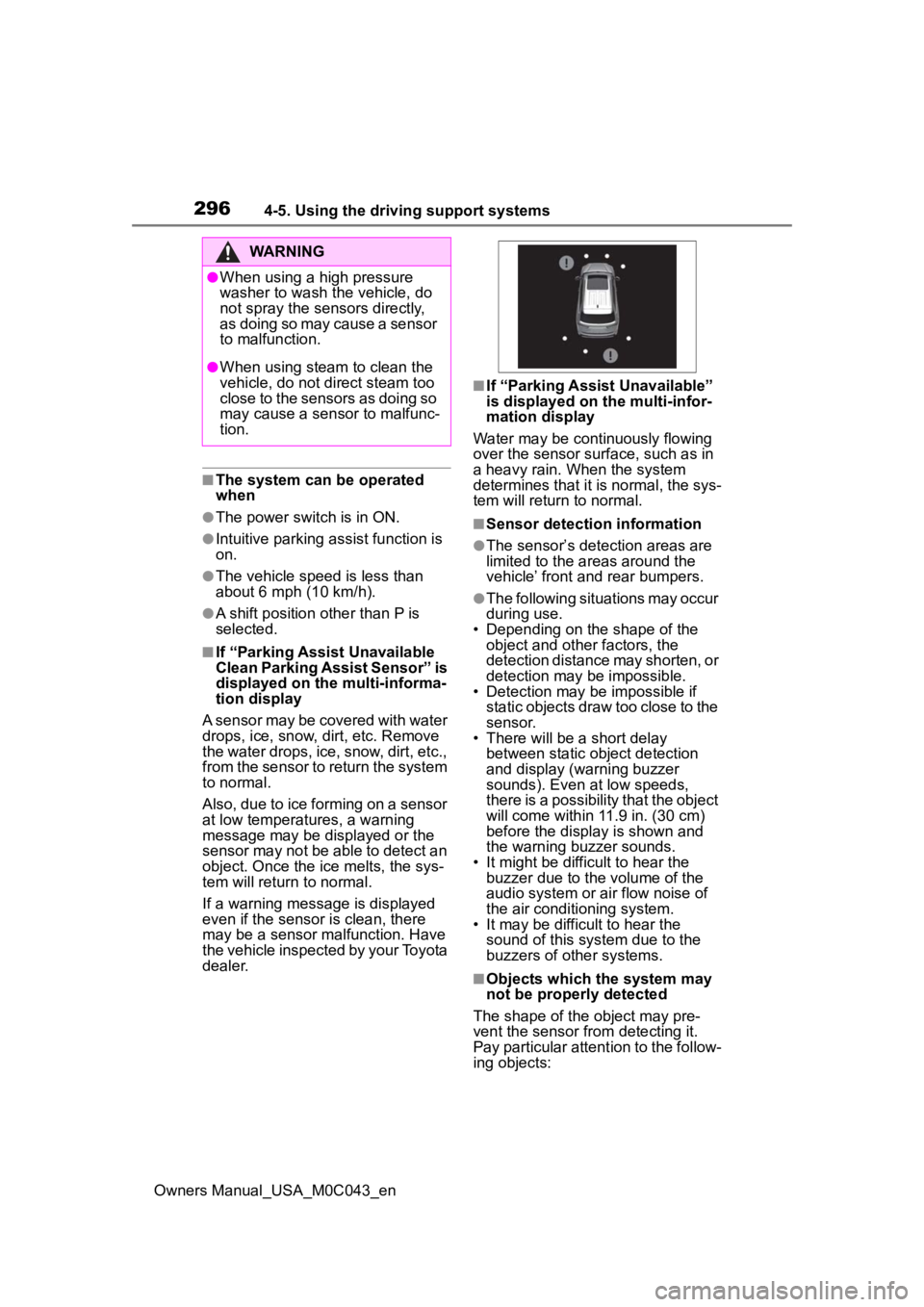
■If “Parking Assist Unavailable”
is displayed on the multi-infor-
mation display
Water may be continuously flowing
over the sensor surface, such as in
a heavy rain. When the system
determines that it is normal, the sys-
tem will return to normal.
■Sensor detection information
●The sensor’s detection areas are
limited to the areas around the
vehicle’ front and rear bumpers.
●The following situations may occur
during use.
• Depending on the shape of the object and other factors, the
detection distance may shorten, or
detection may be impossible.
• Detection may be impossible if
static objects draw too close to the
sensor.
• There will be a short delay
between static object detection
and display (warning buzzer
sounds). Even at low speeds,
there is a possibility that the object
will come within 11.9 in. (30 cm)
before the display is shown and
the warning buzzer sounds.
• It might be diffic ult to hear the
buzzer due to the volume of the
audio system or air flow noise of
the air conditioning system.
• It may be diffi cult to hear the
sound of this sys tem due to the
buzzers of other systems.
■Objects which the system may
not be properly detected
The shape of the object may pre-
vent the sensor from detecting it.
Pay particular attent ion to the follow-
ing objects:
WARNING
●When using a high pressure
washer to wash the vehicle, do
not spray the sensors directly,
as doing so may cause a sensor
to malfunction.
●When using steam to clean the
vehicle, do not direct steam too
close to the sensors as doing so
may cause a sens or to malfunc-
tion.
Page 302 of 628
3024-5. Using the driving support systems
Owners Manual_USA_M0C043_enThe buzzer also sounds for approx-
imately 1 second immediately after
the RCTA function is turned on.
Use the meter control switches
to enable/disable the RCTA
function. (
P. 9 8 )
1 Press or to select .
2 Press or to select
“RCTA” and then press .
When the RCTA function is dis-
abled, the “RCTA OFF” indicator
( P.91) illuminates. (Each time the
power switch is turned off then
changed to ON, the RCTA function
will be enabled a utomatically.)
■When towing a trailer
When Auto Trailer Detection (ATD)
( P.289) is activated, the function
automatically turns off.
■Outside rear view mirror indica-
tor visibility
In strong sunlight, the outside rear
view mirror indicato r may be difficult
to see.
■Hearing the RCTA buzzer
The RCTA buzzer may be difficult to
hear over loud noises, such as high
audio volume.
■When “Rear Cross Traffic Alert
Unavailable” is shown on the
multi-information display
The sensor voltage has become
abnormal, or water, snow, mud, etc.,
may be built up in the vicinity of the
sensor area of t he rear bumper.
( P.288)
Removing the water, snow, mud,
etc., from the vicinity of the sensor area should return it to normal. Also,
the sensor may not function nor-
mally when used in extremely hot or
cold weather.
■When “Rear Cross Traffic Alert
Malfunction Visit Your Dealer”
is shown on the
multi-informa-
tion display
There may be a sensor malfunction
or misaligned. Have the vehicle
inspected at your Toyota dealer.
■Radar sensors
P.288
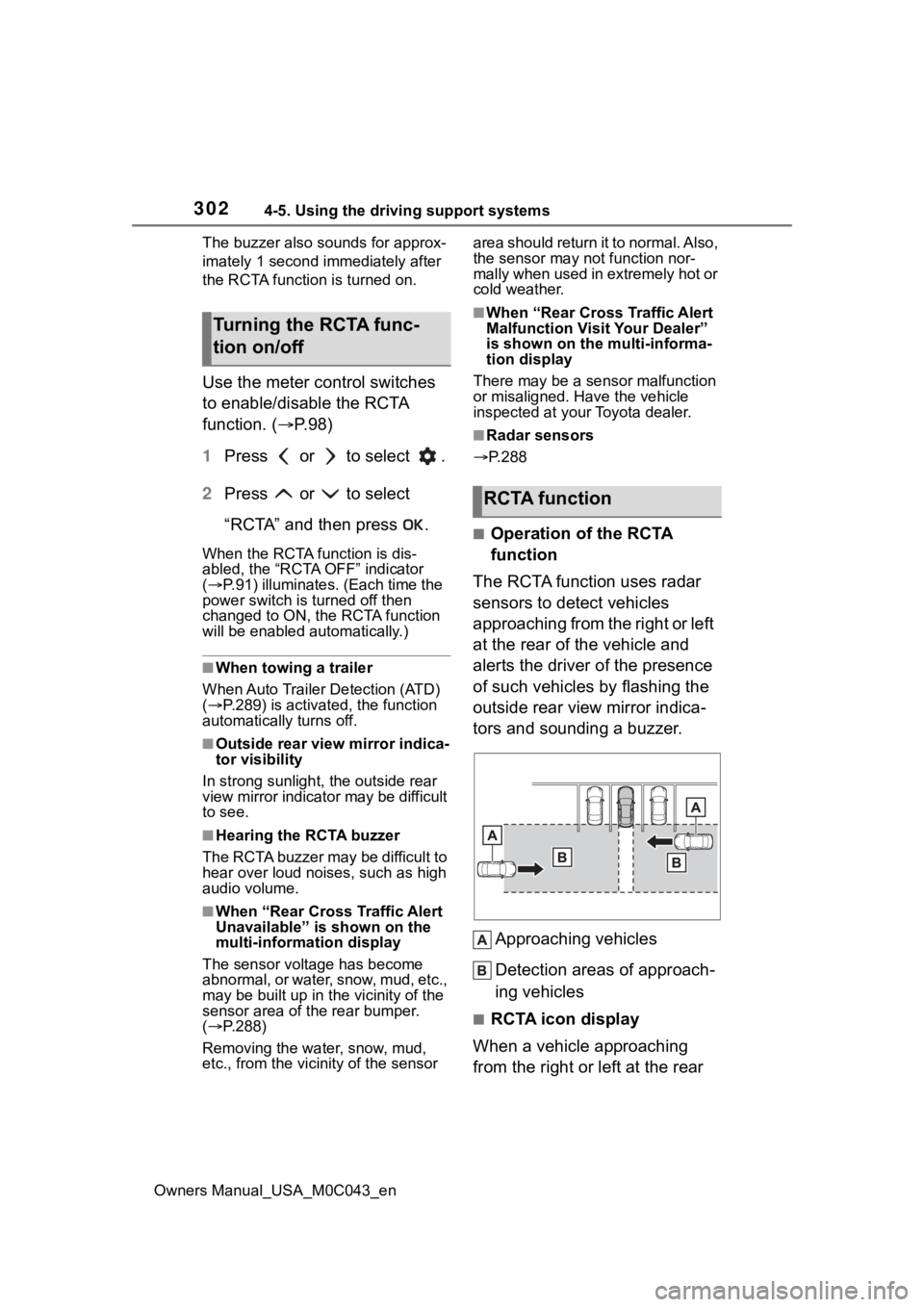
■Operation of the RCTA
function
The RCTA function uses radar
sensors to detect vehicles
approaching from the right or left
at the rear of the vehicle and
alerts the driver of the presence
of such vehicles by flashing the
outside rear view mirror indica-
tors and sounding a buzzer.
Approaching vehicles
Detection areas of approach-
ing vehicles
■RCTA icon display
When a vehicle approaching
from the right or left at the rear
Turning the RCTA func-
tion on/off
RCTA function
Page 454 of 628
4546-1. Maintenance and care
Owners Manual_USA_M0C043_en
WARNING
■Water in the vehicle
Do not get any of the SRS compo-
nents or wiring in the vehicle inte-
rior wet. ( P. 3 7 )
An electrical malfunction may
cause the airbags to deploy or not
function properly, resulting in
death or serious injury.
■Cleaning the interior (espe-
cially instrument panel)
Do not use a polis h wax or polish
cleaner. The instrument panel
may reflect off the windshield,
obstructing the dr iver’s view and
leading to an accident, resulting in
death or serious injury.
NOTICE
■Cleaning detergents
●Do not use the following types
of detergent, as they may dis-
color the vehicle interior or
cause streaks or damage to
painted surfaces:
• Areas other than the seats and steering wheel: Organic sub-
stances such as benzene or
gasoline, alkaline or acidic solu-
tions, dye, and bleach
• Seats: Alkaline or acidic solu- tions, such as thinner, benzene,
and alcohol
• Steering wheel: Organic sub- stances, such as thinner, and
cleaner that contains alcohol
●Do not use a polish wax or pol-
ish cleaner. The instrument
panel’s or other interior part’s
painted surface may be dam-
aged.
■Preventing damage to leather
surfaces
Observe the following precautions
to avoid damage to and deteriora-
tion of leather surfaces:
●Remove any dust or dirt from
leather surfaces immediately.
●Do not expose the vehicle to
direct sunlight for extended peri-
ods of time. Park the vehicle in
the shade, especially during
summer.
●Do not place items made of
vinyl, plastic, or containing wax
on the upholstery, as they may
stick to the leather surface if the
vehicle interior heats up signifi-
cantly.
■Water on the floor
Do not wash the v ehicle floor with
water.
Vehicle systems such as the
audio system may be damaged if
water comes into contact with
electrical components such as the
audio system above or under the
floor of the vehicle. Water may
also cause the body to rust.
■When cleaning the inside of
the windshield
Do not allow glass cleaner to con-
tact the lens. Also, do not touch
the lens. ( P.244)
■Cleaning the inside of the
back window
●Do not use a gla ss cleaner to
clean the back window, as this
may cause damage to the back
window defogger heater wires
or antenna. Use a cloth damp-
ened with lukewarm water to
gently wipe the window clean.
Wipe the window in strokes run-
ning parallel to the heater wires
or antenna.
Page 516 of 628
5167-2. Steps to take in an emergency
Owners Manual_USA_M0C043_en
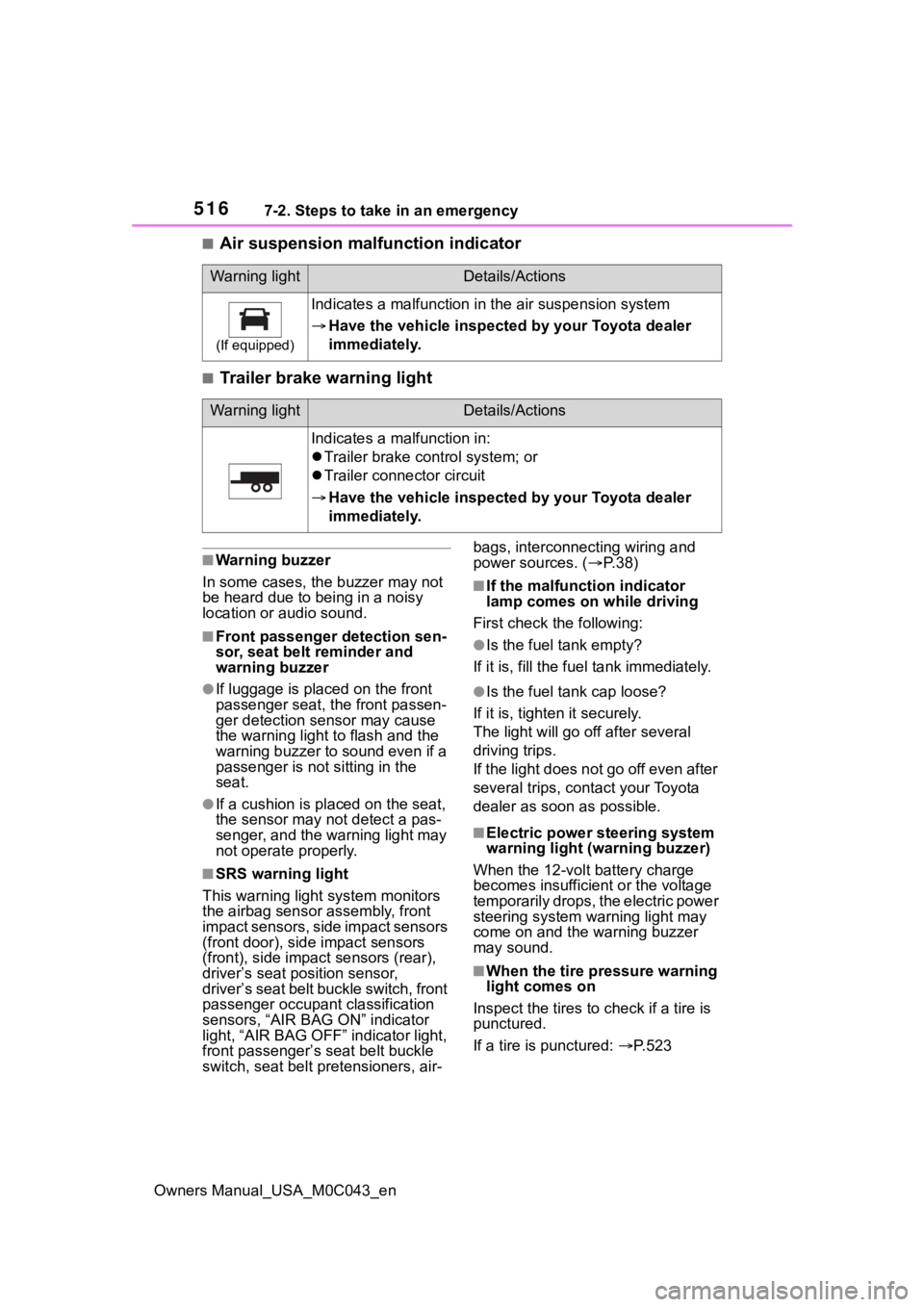
■Air suspension malfunction indicator
■Trailer brake warning light
■Warning buzzer
In some cases, the buzzer may not
be heard due to being in a noisy
location or audio sound.
■Front passenger detection sen-
sor, seat belt reminder and
warning buzzer
●If luggage is placed on the front
passenger seat, the front passen-
ger detection sensor may cause
the warning light to flash and the
warning buzzer to sound even if a
passenger is not sitting in the
seat.
●If a cushion is placed on the seat,
the sensor may n ot detect a pas-
senger, and the warning light may
not operate properly.
■SRS warning light
This warning light system monitors
the airbag sensor assembly, front
impact sensors, side impact sensors
(front door), side impact sensors
(front), side impact sensors (rear),
driver’s seat position sensor,
driver’s seat belt buckle switch, front
passenger occupant classification
sensors, “AIR BAG ON” indicator
light, “AIR BAG OFF” indicator light,
front passenger’s seat belt buckle
switch, seat belt pretensioners, air- bags, interconnecting wiring and
power sources. (
P. 3 8 )
■If the malfunction indicator
lamp comes on while driving
First check the following:
●Is the fuel tank empty?
If it is, fill the fuel tank immediately.
●Is the fuel ta nk cap loose?
If it is, tighten it securely.
The light will go off after several
driving trips.
If the light does not go off even after
several trips, con tact your Toyota
dealer as soon as possible.
■Electric power steering system
warning light (warning buzzer)
When the 12-volt battery charge
becomes insufficient or the voltage
temporarily drops, the electric power
steering system warning light may
come on and the warning buzzer
may sound.
■When the tire pressure warning
light comes on
Inspect the tires to check if a tire is
punctured.
If a tire is punctured: P. 5 2 3
Warning lightDetails/Actions
(If equipped)
Indicates a malfunction in the air suspension system
Have the vehicle inspecte d by your Toyota dealer
immediately.
Warning lightDetails/Actions
Indicates a malfunction in:
Trailer brake control system; or
Trailer connector circuit
Have the vehicle inspecte d by your Toyota dealer
immediately.
Page 540 of 628

5407-2. Steps to take in an emergency
Owners Manual_USA_M0C043_en
■Starting the hybrid system
when the battery is discharged
The hybrid system cannot be started
by push-starting.
■To prevent 12-volt battery dis-
charge
●Turn off the headlights and the
audio system while the hybrid sys-
tem is off.
●Turn off any unnecessary electri-
cal components when the vehicle
is running at a low speed for an
extended period, such as in heavy
traffic.
■When the 12-volt battery is
removed or discharged
●Information stor ed in the ECU is
cleared. When the 12-volt battery
is depleted, have the vehicle
inspected at you r Toyota dealer.
●Some systems may require initial-
ization. ( P.581)
■When removing the 12-volt bat-
tery terminals
When the 12-volt battery terminals
are removed, the information stored
in the ECU is cleared. Before
removing the 12-volt battery termi-
nals, contact your Toyota dealer.
■Charging the 1 2-volt battery
The electricity stor ed in the 12-volt
battery will discharge gradually even
when the vehicle is not in use, due
to natural discharge and the drain-
ing effects of certain electrical appli-
ances. If the vehicle is left for a long
time, the 12-volt battery may dis-
charge, and the hybrid system may
be unable to start. (The 12-volt bat-
tery recharges aut omatically while
the hybrid system is operating.)
■When recharging or replacing
the 12-volt battery
●In some cases, i t may not be pos-
sible to unlock the doors using the
smart key system when the 12-
volt battery is discharged. Use the wireless remote c
ontrol or the
mechanical key to lock or unlock
the doors.
●The hybrid syste m may not start
on the first attemp t after reinstall-
ing the 12-volt battery. In that
case, start the hybrid system in
the same manner as when the
electronic key does not operate
properly ( P.536). This is not a
malfunction, as the hybrid system
will start normally on the second
attempt.
●The power switch mode is memo-
rized by the vehicle. When the 12-
volt battery is reconnected, the
system will return to the mode it
was in before the 12-volt battery
was discharged. Before discon-
necting the 12-volt battery, turn
the power switch off.
If you are unsure what mode the
power switch was in before the
12-volt battery discharged, be
especially careful when recon-
necting the 12-volt battery.
●Some systems may require initial-
ization. ( P.581)
■When replacing t he 12-volt bat-
tery
●Use a 12-volt battery that con-
forms to European regulations.
●Use a battery that the case size is
same as the previous one (LN2),
20 hours rate ca pacity (20HR) is
equivalent (55Ah) or greater, and
performance rating (CCA) is
equivalent (345A) or greater.
• If the sizes differ, the 12-volt bat- tery cannot be properly secured.
• If the 20 hour rate capacity is low,
even if the time p eriod where the
vehicle is not used is a short time,
the 12-volt battery may discharge
and hybrid system may not be
able to start.
●Use a ventilation type calcium bat-
tery
●Use a 12-volt battery with a han-
dle. If a 12-volt battery without a
handle is used, removal is more
Page 571 of 628
5718-2. Customization
Owners Manual_USA_M0C043_en
8
Vehicle specifications
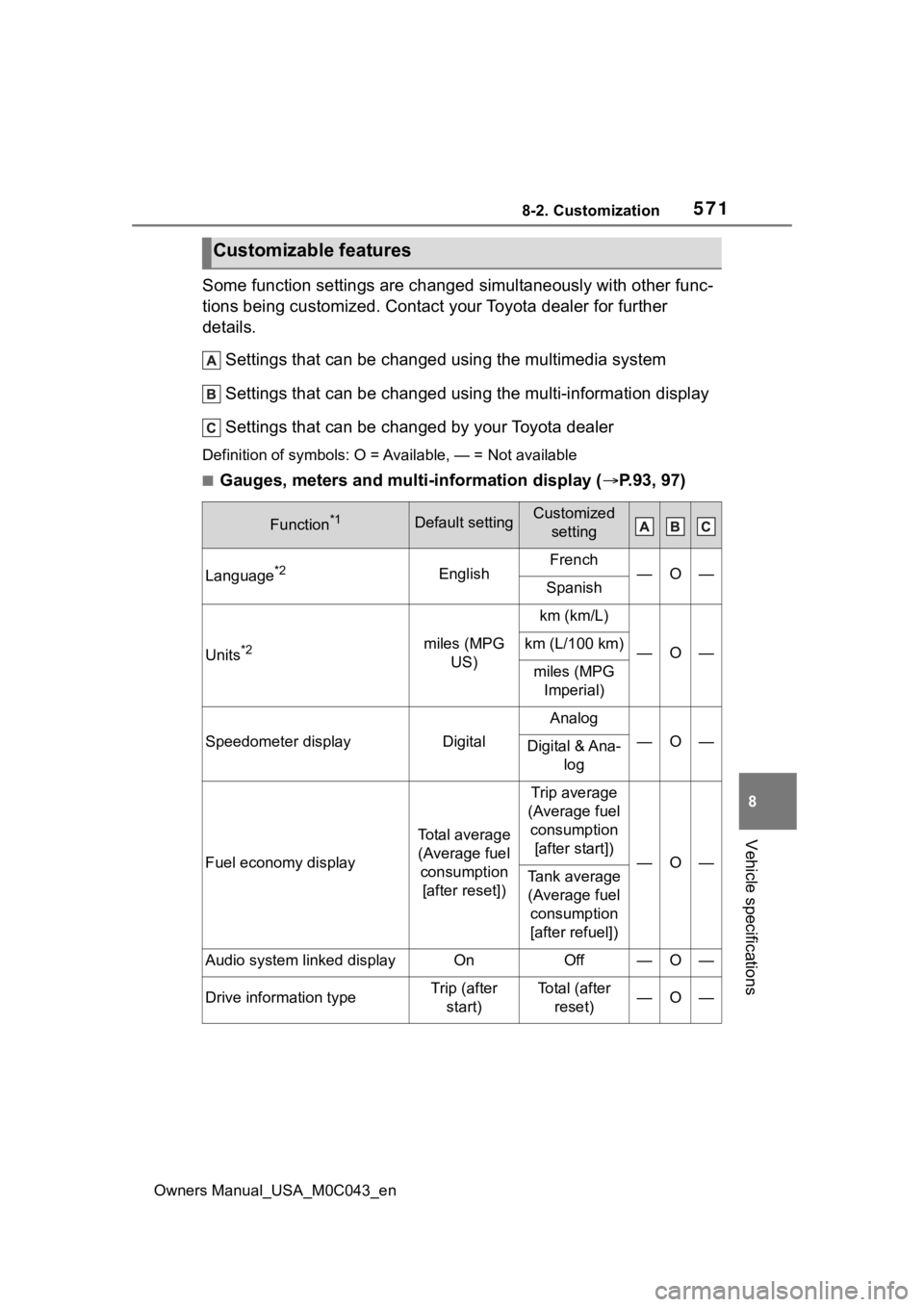
Some function settings are changed simultaneously with other func-
tions being customized. Contact y our Toyota dealer for further
details.
Settings that can be changed using the multimedia system
Settings that can be changed using the multi-information displ ay
Settings that can be changed by your Toyota dealer
Definition of symbols: O = Av ailable, — = Not available
■Gauges, meters and multi-information display ( P.93, 97)
Customizable features
Function*1Default settingCustomized
setting
Language*2EnglishFrench—O—Spanish
Units*2miles (MPG US)
km (km/L)
—O—km (L/100 km)
miles (MPG Imperial)
Speedometer displayDigital
Analog
—O—Digital & Ana- log
Fuel economy display
Total average (Average fuel consumption [after reset])
Trip average
(Average fuel consumption [after start])
—O—Tank average (Average fuel consumption
[after refuel])
Audio system linked displayOnOff—O—
Drive information typeTrip (after start)To t a l ( a f t e r reset)—O—
Page 572 of 628
5728-2. Customization
Owners Manual_USA_M0C043_en
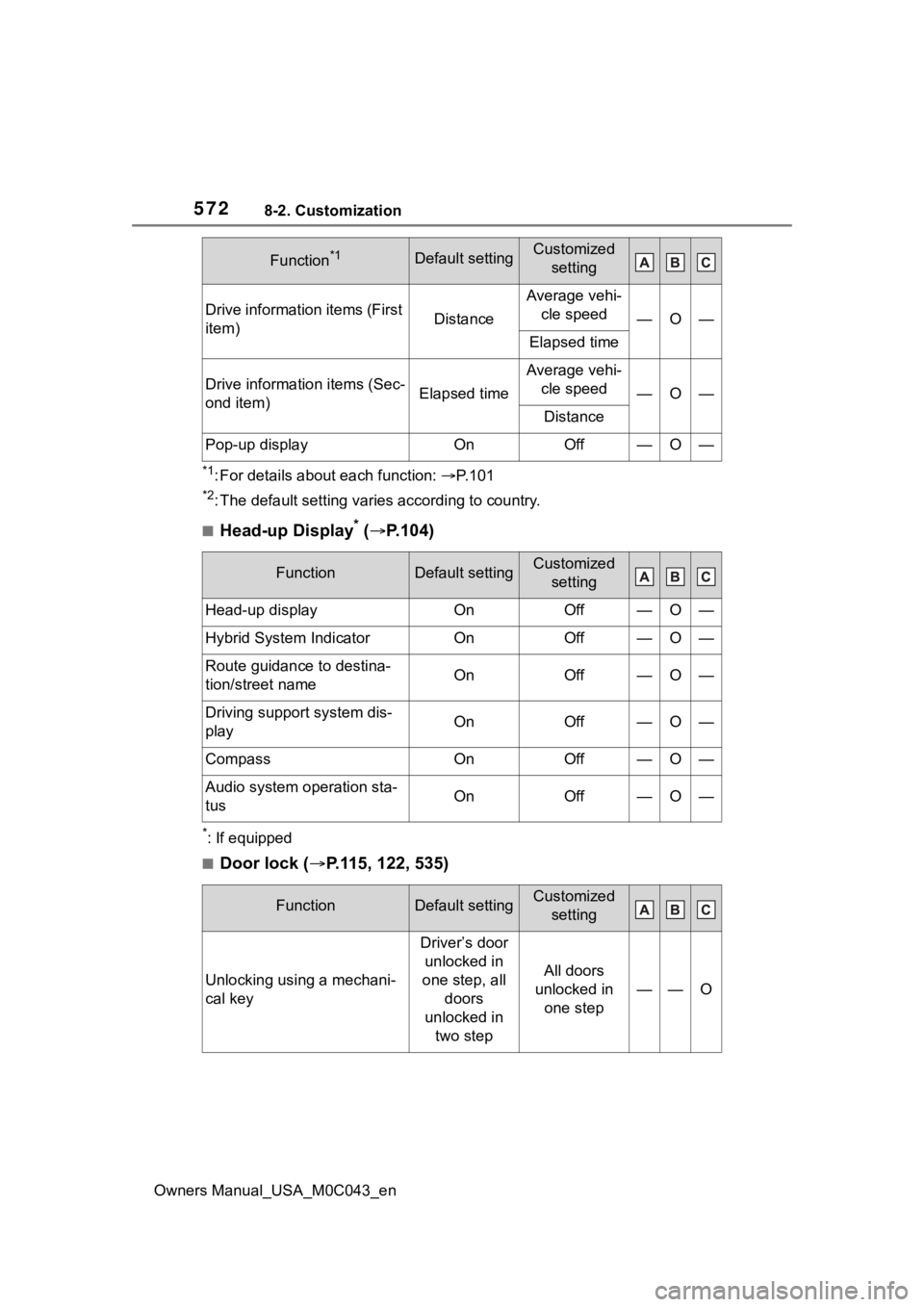
*1: For details about each function: P. 1 0 1
*2: The default setting varies according to country.
■Head-up Display* ( P.104)
*: If equipped
■Door lock ( P.115, 122, 535)
Drive information items (First
item)Distance
Average vehi-
cle speed
—O—
Elapsed time
Drive information items (Sec-
ond item)Elapsed time
Average vehi-cle speed
—O—
Distance
Pop-up displayOnOff—O—
FunctionDefault settingCustomized setting
Head-up displayOnOff—O—
Hybrid System IndicatorOnOff—O—
Route guidance to destina-
tion/street nameOnOff—O—
Driving support system dis-
playOnOff—O—
CompassOnOff—O—
Audio system operation sta-
tusOnOff—O—
FunctionDefault settingCustomized setting
Unlocking using a mechani-
cal key
Driver’s door unlocked in
one step, all doors
unlocked in two step
All doors
unlocked in one step
——O
Function*1Default settingCustomized setting
Page 599 of 628
Owners Manual_USA_M0C043_en
599Alphabetical Index
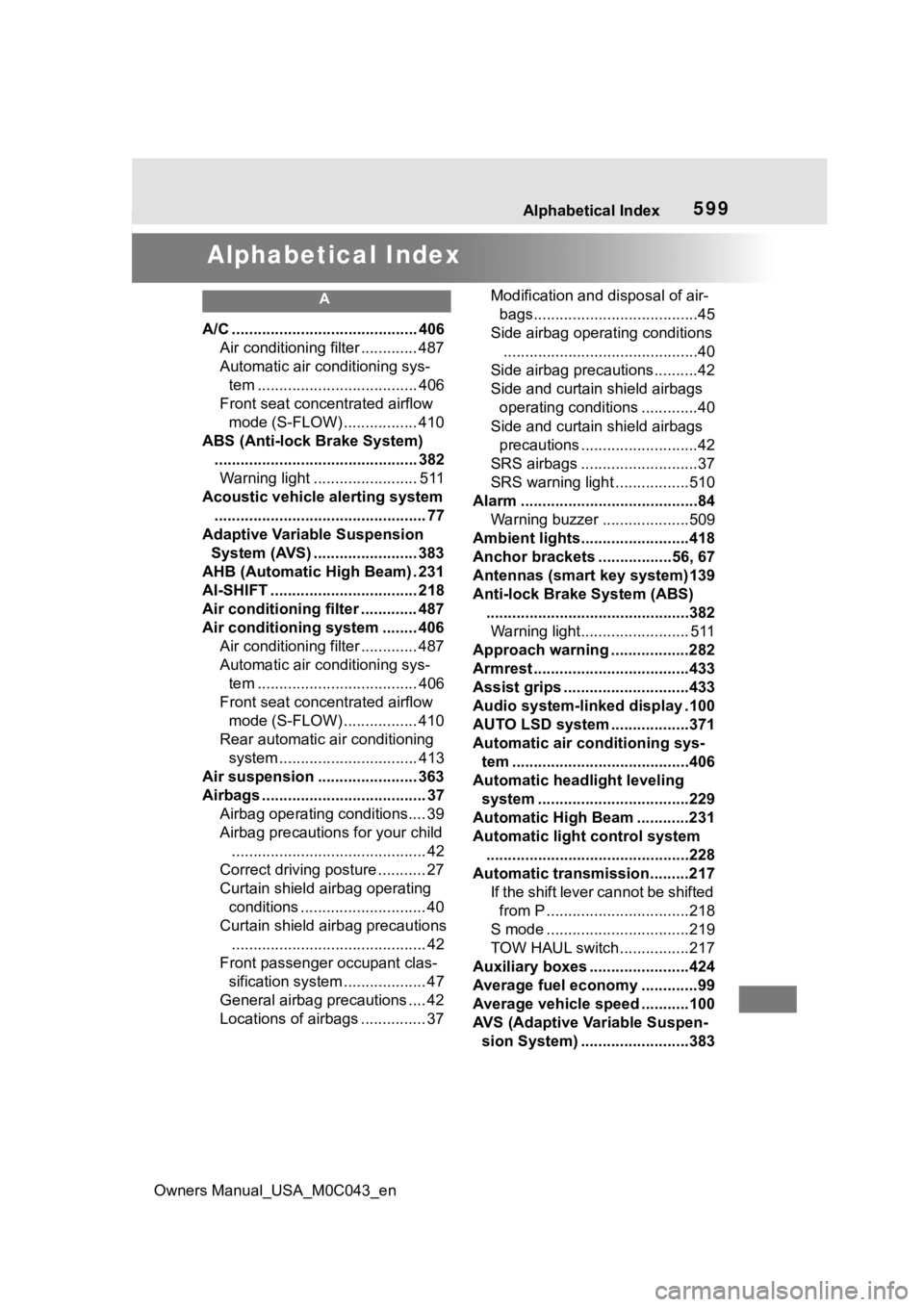
Alphabetical Index
A
A/C ........................................... 406Air conditioning filter ............. 487
Automatic air conditioning sys-tem ..................................... 406
Front seat concentrated airflow mode (S-FLOW) ................. 410
ABS (Anti-lock Brake System) ............................................... 382Warning light ........................ 511
Acoustic vehicle alerting system ................................................. 77
Adaptive Variable Suspension System (AVS) ........................ 383
AHB (Automatic High Beam) . 231
AI-SHIFT .................................. 218
Air conditioning filter ............. 487
Air conditioning system ........ 406 Air conditioning filter ............. 487
Automatic air conditioning sys-tem ..................................... 406
Front seat concentrated airflow mode (S-FLOW) ................. 410
Rear automatic air conditioning system ................................ 413
Air suspension ....................... 363
Airbags ...................................... 37 Airbag operating conditions.... 39
Airbag precautions for your child............................................. 42
Correct driving posture ........... 27
Curtain shield airbag operating conditions ............................. 40
Curtain shield airbag precautions ............................................. 42
Front passenger occupant clas- sification system ................... 47
General airbag precautions .... 42
Locations of airbags ............... 37 Modification and disposal of air-
bags......................................45
Side airbag operating conditions .............................................40
Side airbag precautions..........42
Side and curtain shield airbags operating conditions .............40
Side and curtain shield airbags precautions ...........................42
SRS airbags ...........................37
SRS warning light .................510
Alarm .........................................84 Warning buzzer ....................509
Ambient lights.........................418
Anchor brackets ... ..............56, 67
Antennas (smart key system)139
Anti-lock Brake System (ABS) ...............................................382Warning light......................... 511
Approach warning ..................282
Armrest ......... ......................... ..433
Assist grips .............................433
Audio system-linked display .100
AUTO LSD system ..................371
Automatic air conditioning sys- tem .........................................406
Automatic headlight leveling system ...................................229
Automatic High Beam ............231
Automatic light control system ...............................................228
Automatic transmission.........217 If th e s hif t le ver ca n no t b e s hif te d from P .................................218
S mode .................................219
TOW HAUL switch................217
Auxiliary boxes .......................424
Average fuel economy .............99
Average vehicle speed ...........100
AVS (Adaptive Variable Suspen- sion System) .........................383
Page 607 of 628
Owners Manual_USA_M0C043_en
Alphabetical Index607
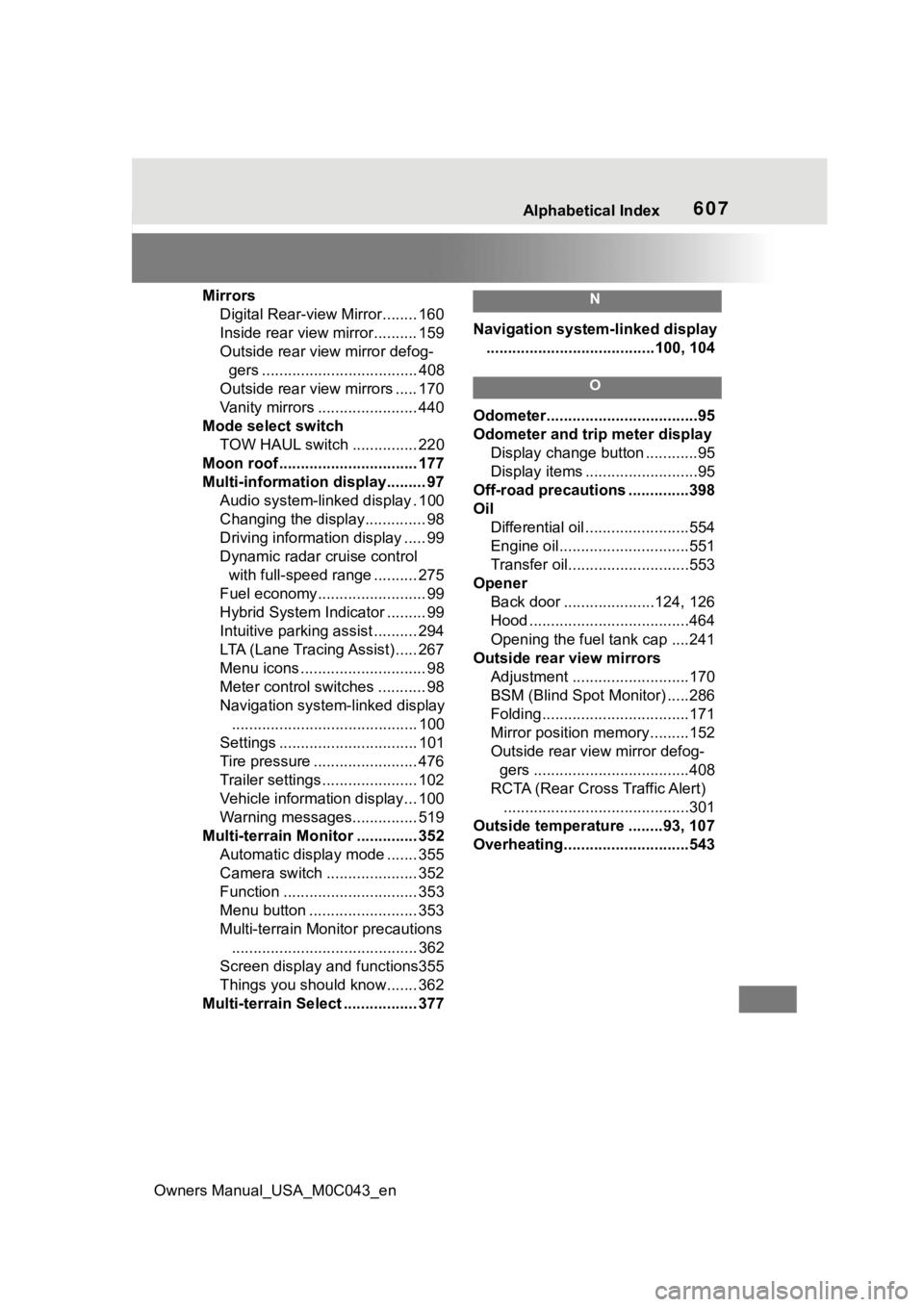
MirrorsDigital Rear-view Mirror........ 160
Inside rear view mirror.......... 159
Outside rear view mirror defog-gers .................................... 408
Outside rear view mirrors ..... 170
Vanity mirrors ....................... 440
Mode select switch TOW HAUL switch ............... 220
Moon roof .......................... ...... 177
Multi-information display......... 97 Audio system-linked display . 100
Changing the display.............. 98
Driving informatio n display ..... 99
Dynamic radar cruise control with full-speed range .......... 275
Fuel economy......................... 99
Hybrid System Indicator ......... 99
Intuitive parking assist .......... 294
LTA (Lane Tracing Assist) ..... 267
Menu icons ............................. 98
Meter control switches ........... 98
Navigation system-linked display ........................................... 100
Settings ................................ 101
Tire pressure ........................ 476
Trailer settings ...................... 102
Vehicle information display... 100
Warning messages............... 519
Multi-terrain Moni tor .............. 352
Automatic display mode ....... 355
Camera switch ..................... 352
Function ............................... 353
Menu button ......................... 353
Multi-terrain Monitor precautions ........................................... 362
Screen display and functions355
Things you should know....... 362
Multi-terrain Select ................. 377N
Navigation system-linked display .......................................100, 104
O
Odometer...................................95
Odometer and trip meter display Display change button ............95
Display items ..........................95
Off-road precautions ..............398
Oil Differential oil ........................554
Engine oil..............................551
Transfer oil............................553
Opener Back door .....................124, 126
Hood .....................................464
Opening the fuel tank cap ....241
Outside rear view mirrors Adjustment ...........................170
BSM (Blind Spot M onitor) .....286
Folding..................................171
Mirror position me mory.........152
Outside rear view mirror defog- gers ....................................408
RCTA (Rear Cross Traffic Alert) ...........................................301
Outside temperature ........93, 107
Overheating.............................543
Page 615 of 628
Owners Manual_USA_M0C043_en
Alphabetical Index615
WeightCargo capacity ..................... 197
Load limits ............................ 197
Wheel lock nut ........................ 524
Wheels ..................................... 486 Replacing ............................. 486
Size ...................................... 555
Wheel lock nut...................... 524
Window lock switch ............... 176
Windows Power windows .................... 174
Rear window defogger ......... 408
Washer ......................... 235, 239
Windshield defogger .............. 407
Windshield wipers .................. 235 Rain-sensing windshield wipers........................................... 235
Winter driving tips .................. 401
Wireless charger .................... 429
Wireless remote co ntrol ........ 113
Battery-Saving Function ....... 140
Locking/Unlocking ................ 113
Replacing the battery ........... 493
?
For information regarding the equipment listed
below, refer to the “MUL-
TIMEDIA OWNER’S MAN-
UAL”.
· Navigation system
· Audio/visual system