battery TOYOTA SEQUOIA HYBRID 2023 User Guide
[x] Cancel search | Manufacturer: TOYOTA, Model Year: 2023, Model line: SEQUOIA HYBRID, Model: TOYOTA SEQUOIA HYBRID 2023Pages: 628, PDF Size: 14.27 MB
Page 85 of 628
851-5. Theft deterrent system
Owners Manual_USA_M0C043_en
1
For safety and security
■Triggering of the alarm
The alarm may be triggered in the
following situations:
(Stopping the alarm deactivates the
alarm system.)
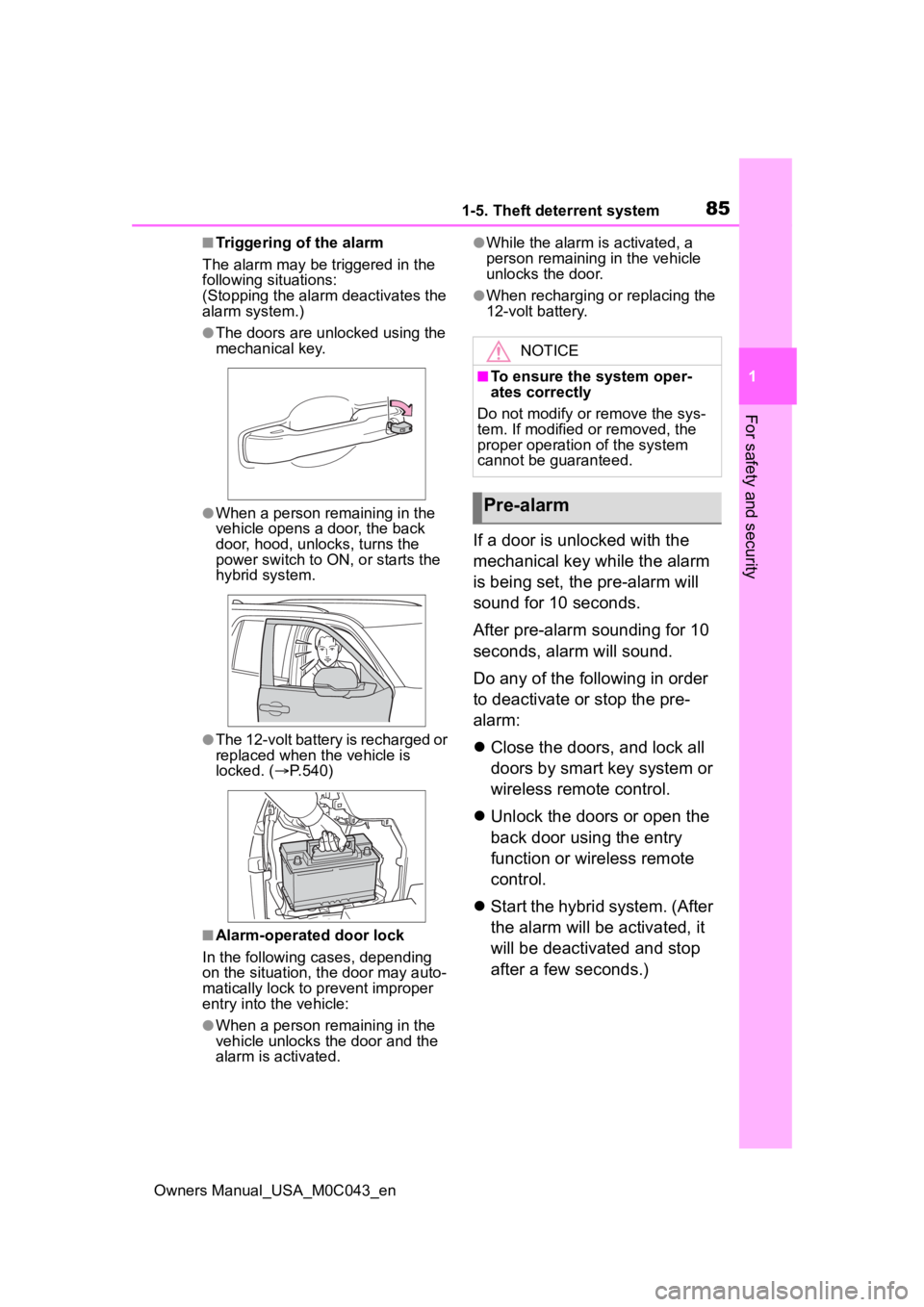
●The doors are unlocked using the
mechanical key.
●When a person remaining in the
vehicle opens a door, the back
door, hood, unlocks, turns the
power switch to ON, or starts the
hybrid system.
●The 12-volt battery is recharged or
replaced when the vehicle is
locked. ( P.540)
■Alarm-operated door lock
In the following cases, depending
on the situation, th e door may auto-
matically lock to p revent improper
entry into the vehicle:
●When a person remaining in the
vehicle unlocks the door and the
alarm is activated.
●While the alarm i s activated, a
person remaining in the vehicle
unlocks the door.
●When recharging or replacing the
12-volt battery.
If a door is unlocked with the
mechanical key while the alarm
is being set, the pre-alarm will
sound for 10 seconds.
After pre-alarm sounding for 10
seconds, alarm will sound.
Do any of the following in order
to deactivate or stop the pre-
alarm:
Close the doors, and lock all
doors by smart key system or
wireless remote control.
Unlock the doors or open the
back door using the entry
function or wireless remote
control.
Start the hybrid system. (After
the alarm will be activated, it
will be deactivated and stop
after a few seconds.)
NOTICE
■To ensure the system oper-
ates correctly
Do not modify or remove the sys-
tem. If modified or removed, the
proper operation of the system
cannot be guaranteed.
Pre-alarm
Page 95 of 628
952-1. Instrument cluster
Owners Manual_USA_M0C043_en
2
Vehicle status information and indicators
■Display items
Odometer
Displays the total distance the vehi-
cle has been driven.
Trip meter A/Trip meter B
Displays the distance the vehicle
has been driven since the meter
was last reset. Trip meters A and B
can be used to record and display
different distances independently.
Distance until next engine oil
change
Displays the distance the vehicle
can be driven until an oil change is
necessary.
■Changing the display
Each time the “ODO TRIP”
switch is pressed, the displayed
item will be changed. When the
trip meter is displayed, pressing
and holding the switch will reset
the trip meter.
WARNING
For example, there is a lag
between the driver’s shifting and
the new gear number appearing
on the display. This lag could
cause the driver to downshift
again, causing rapid and exces-
sive engine braking and possibly
an accident resulting in death or
injury.
NOTICE
■To prevent damage to the
engine and its components
●Do not let the i ndicator needle
of the tachomete r enter the red
zone, which indicates the maxi-
mum engine speed.
●The engine may be overheating
if the engine coolant tempera-
ture gauge is in the red zone
(H). In this case, immediately
stop the vehicle in a safe place,
and check the engine after it
has cooled completely.
( P.543)
■Voltmeter
When the voltmeter indicates 19
V or higher or 9 V or lower while
the hybrid system is operating,
there may be a 12- volt battery or
charging system malfunction.
Have the vehicle inspected at
your Toyota dealer.
■Engine oil pressure gauge
When the value of the engine oil
pressure gauge drops while the
engine is running, stop the vehicle
in a safe place immediately and
check the amoun t of engine oil.
( P.466)
When the oil pressure drops even
though the engine oil amount has
not decreased, or i f the oil pres-
sure does not increase when
engine oil is added, contact your
Toyota dealer, as there may be a
problem with the lubrication sys-
tem.
Odometer and trip meter
display
Page 103 of 628
1032-1. Instrument cluster
Owners Manual_USA_M0C043_en
2
Vehicle status information and indicators
error continues, contact your Toy-
ota dealer.
■Vehicle functions and set-
tings that can be changed
P.570
■Suspension of the settings dis-
play
●Some settings cannot be changed
while driving. When changing set-
tings, park the vehicle in a safe
place.
●If a warning message is displayed,
operation of the settings display
will be suspended.
Select to display warning mes-
sages and measures to be
taken if a malfunction is
detected. ( P.519)
WARNING
■Cautions during setting up
the display
If the hybrid system is operating
when changing the display set-
tings, ensure that the vehicle is
parked in a place with adequate
ventilation. In a closed area such
as a garage, exhaust gases
including harmful carbon monox-
ide (CO) may collect and enter
the vehicle. This may lead to
death or a seri ous health hazard.
NOTICE
■During setting up the display
To prevent 12-volt battery dis-
charge, ensure that the hybrid
system is operating while setting
up the display features.
Warning message display
Page 106 of 628
1062-1. Instrument cluster
Owners Manual_USA_M0C043_en
■Enabling/disabling of the head-
up display
If the head-up display is disabled, it
will remain disabled when the power
switch is turned off then back to ON.
■Display brightness
The brightness of the head-up dis-
play can be adjusted on of the
multi-information display. Also, it is
automatically adjusted according to
the ambient brightness.
■Driving support system sta-
tus display
Displays the operational status
of the following systems:
LTA (Lane Tracing Assist)
( P.261)
Dynamic radar cruise control
with full-speed range
( P.275)
Details of content d isplayed on the
head-up display may differ from
that displayed on the multi-informa-
tion display. For details, refer to the
explanation of each system.
■Navigation system-linked
display area
Displays the following items
which are linked to the naviga-
tion system:
Street name
Route guidance to destination
Compass (heading-up dis-
play)
Pop-up displays for the following
systems will be displayed when
necessary:
■Driving support systems
Displays a warning/sugges-
tion/advice message or the
operating state of a relevant
system.
PCS (Pre-Colli sion System)
( P.249)
LTA (Lane Tracing Assist)
( P.261)
PKSB (Parking Support
Brake) (If equipped) ( P.307)
WARNING
■Caution for changing settings
of the head-up display
If the hybrid system is operating
when changing the display
settings, ensure t hat the vehicle
is parked in a place with adequate
ventilation. In a closed area such
as a garage, exhaust gases
including harmful carbon monox-
ide (CO) may collect and enter
the vehicle. This may lead to
death or a seri ous health hazard.
NOTICE
■When changing the settings
of the head-up display
To prevent 12-volt battery dis-
charge, ensure that the hybrid
system is operating while chang-
ing the settings of the head-up
display.
Driving support system
status/navigation system-
linked display area
Pop-up display
Page 112 of 628
1123-1. Key information
Owners Manual_USA_M0C043_en
3-1.Key information
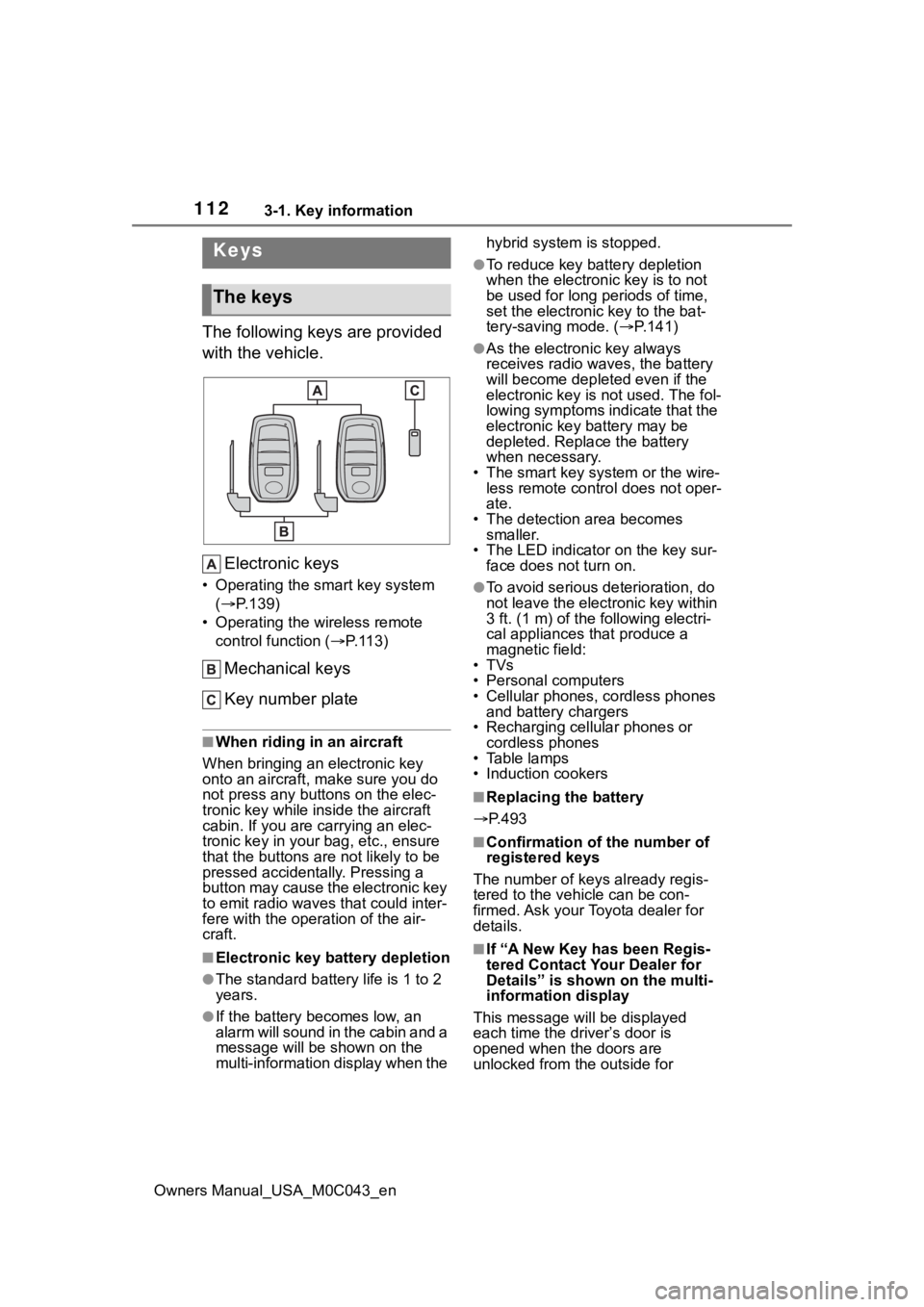
The following keys are provided
with the vehicle.Electronic keys
• Operating the smart key system ( P.139)
• Operating the wireless remote control function ( P. 1 1 3 )
Mechanical keys
Key number plate
■When riding in an aircraft
When bringing an electronic key
onto an aircraft, make sure you do
not press any buttons on the elec-
tronic key while inside the aircraft
cabin. If you are carrying an elec-
tronic key in your bag, etc., ensure
that the buttons are not likely to be
pressed accidentally. Pressing a
button may cause the electronic key
to emit radio waves that could inter-
fere with the oper ation of the air-
craft.
■Electronic key battery depletion
●The standard battery life is 1 to 2
years.
●If the battery becomes low, an
alarm will sound in the cabin and a
message will be s hown on the
multi-information display when the hybrid system is stopped.
●To reduce key battery depletion
when the electronic key is to not
be used for long periods of time,
set the electronic key to the bat-
tery-saving mode. (
P.141)
●As the electronic key always
receives radio waves, the battery
will become depleted even if the
electronic key is not used. The fol-
lowing symptoms indicate that the
electronic key battery may be
depleted. Replace the battery
when necessary.
• The smart key system or the wire- less remote contro l does not oper-
ate.
• The detection area becomes smaller.
• The LED indicator on the key sur- face does not turn on.
●To avoid serious deterioration, do
not leave the electronic key within
3 ft. (1 m) of the following electri-
cal appliances that produce a
magnetic field:
•TVs
• Personal computers
• Cellular phones, cordless phones and battery chargers
• Recharging cellular phones or cordless phones
• Table lamps
• Induction cookers
■Replacing the battery
P.493
■Confirmation of the number of
registered keys
The number of keys already regis-
tered to the vehi cle can be con-
firmed. Ask your Toyota dealer for
details.
■If “A New Key has been Regis-
tered Contact Your Dealer for
Details” is shown on the multi-
information display
This message will be displayed
each time the driver’s door is
opened when the doors are
unlocked from the outside for
Keys
The keys
Page 114 of 628
1143-1. Key information
Owners Manual_USA_M0C043_en
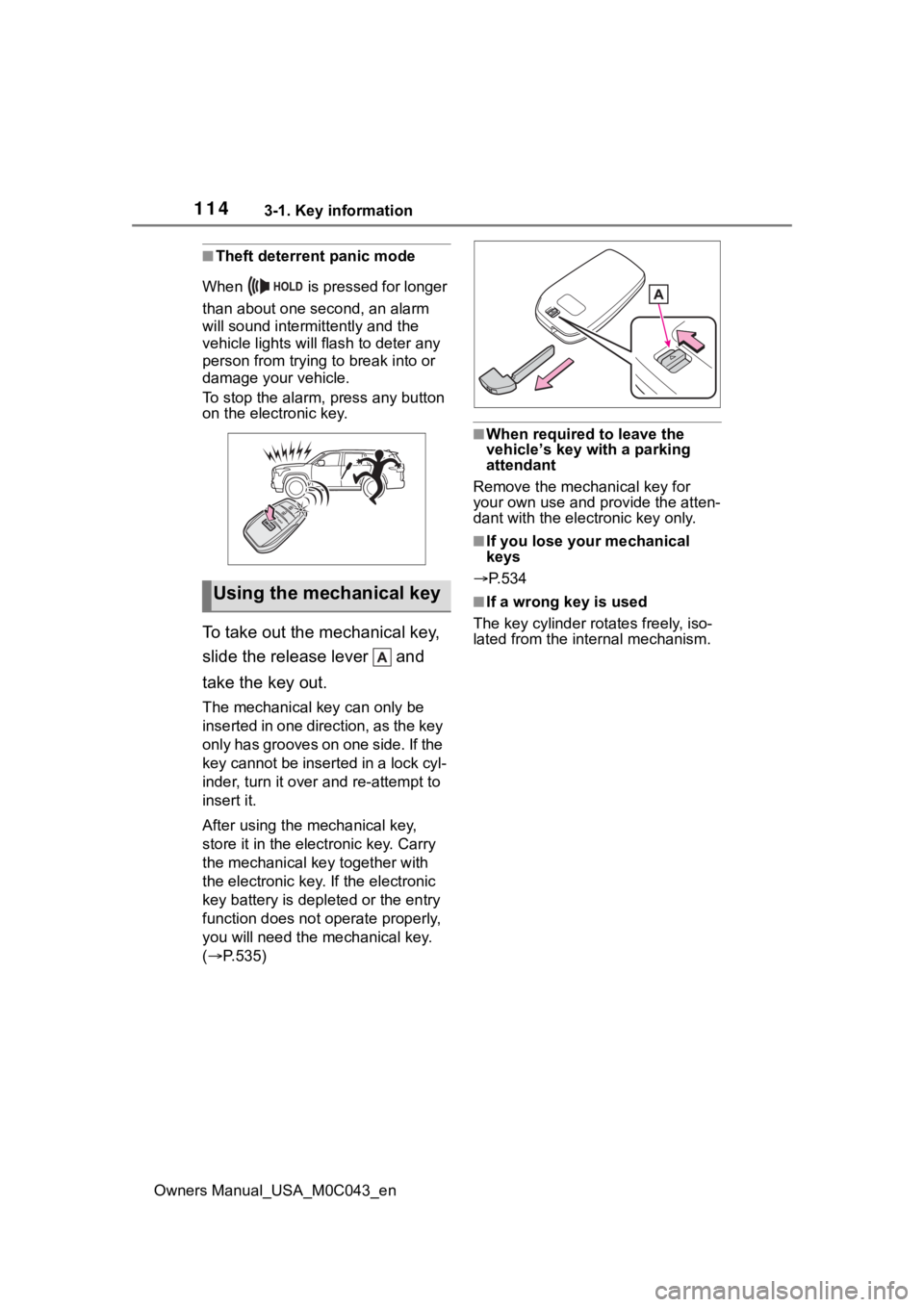
■Theft deterrent panic mode
When is pressed for longer
than about one second, an alarm
will sound intermittently and the
vehicle lights will f lash to deter any
person from trying to break into or
damage your vehicle.
To stop the alarm, press any button
on the electronic key.
To take out the mechanical key,
slide the release lever and
take the key out.
The mechanical key can only be
inserted in one direction, as the key
only has grooves on one side. If the
key cannot be inserted in a lock cyl-
inder, turn it over and re-attempt to
insert it.
After using the mechanical key,
store it in the electronic key. Carry
the mechanical k ey together with
the electronic key. If the electronic
key battery is dep leted or the entry
function does not operate properly,
you will need the m echanical key.
( P.535)
■When required to leave the
vehicle’s key wi th a parking
attendant
Remove the mechanical key for
your own use and p rovide the atten-
dant with the elec tronic key only.
■If you lose your mechanical
keys
P.534
■If a wrong key is used
The key cylinder rotates freely, iso-
lated from the internal mechanism.Using the mechanical key
Page 117 of 628
1173-2. Opening, closing and locking the doors
Owners Manual_USA_M0C043_en
3
Before driving
■If the smart key system or the
wireless remote control does
not operate properly
Use the mechanical key to lock and
unlock the doors. ( P.536)
Replace the key battery with a new
one if it is depleted. ( P.493)
■If the 12-volt battery is dis-
charged
The doors cannot be locked and
unlocked using the smart key sys-
tem or wireless remote control. Lock
or unlock the doors using the
mechanical key. ( P.536)
■Rear seat reminder function
●In order to remind you not to for-
get luggage, etc., in the rear seat,
when the power switch is turned to
OFF after any of the following con-
ditions are met, a buzzer will
sound and a message will be dis-
played on the multi-information
display for approximately 6 sec-
onds.
• The hybrid system is started within 10 minutes after opening
and closing a rear door.
• A rear door has been opened and closed after the hybrid system
was started.
However, if a rear door is opened
and then closed within approxi-
mately 2 seconds , the rear seat
reminder function may not operate.
●The rear seat reminder function
determines that luggage, etc., has
been placed in a rear seat based
on opening and closing of a rear
door. Therefore, depending on the
situation, the rear seat reminder
function may not operate and you
may still forget luggage, etc., in
the rear seat, or it may operate
unnecessarily.
●The rear seat reminder function
can be enabled/disabled.
( P.570)
■Customization
Some functions can be customized.
( P.570)
WARNING
■To prevent an accident
Observe the following precautions
while driving the vehicle.
Failure to do so may result in a
door opening and an occupant
falling out of the vehi cle, resulting
in death or serious injury.
●Ensure that all doors are prop-
erly closed and locked.
●Do not pull the inside handle of
the doors while driving.
Be especially careful for the front
doors, as the doors may be
opened even if the inside lock but-
tons are in locked position.
●Set the rear door child-protector
locks when children are seated
in the rear seats.
■When opening or closing a
door
Check the surroundings of the
vehicle such as wh ether the vehi-
cle is on an incline, whether there
is enough space for a door to
open and whether a strong wind
is blowing. When opening or clos-
ing the door, hold the door handle
tightly to prepare for any unpre-
dictable movement.
Page 121 of 628
1213-2. Opening, closing and locking the doors
Owners Manual_USA_M0C043_en
3
Before driving
●A board is not completely stowed
●Vehicle speed is approximately 3
mph (5 km/h) or higher
The boards will not automatically
deploy again when vehicle speed
returns to less th an 3 mph (5 km/h).
■If “Running Board Unable to
Deploy” is displayed on the
multi-Information display
The board may not be completely
deployed.
Close and open the door once more
or use the switch inside the vehicle
( P.121) and completely deploy the
board.
■If “Power Steps Unable to
Retract” is displayed on the
multi-Information display
The boards may not be completely
stowed.
Check that nothing is caught
between the boards and the vehicle.
■If “Power Steps System Mal-
function See Owner’s Manual”
is displayed on the multi-infor-
mation display
The system may be malfunctioning.
Have the vehicle inspected by Toy-
ota dealer.
■When snow or mud is attached
to the boards or the boards are
frozen
The power running boards may not
operate correctly. Before stepping
on a board, check that it is com-
pletely deployed. If the power run-
ning boards are not operating
correctly, turn the power steps
switch off and refrain from use.
■After recharging/reconnecting
the 12-volt battery
If the power running boards have
not completely deployed or stowed,
the boards may not move in the
intended direction the first time they
are operated. However, from the
second time onwards, the boards
will resume nor mal operation.
■When getting in and out of the
vehicle
Take care because clothes and
shoes may become dirty due to con-
tact with the lower part of the vehicle
body.
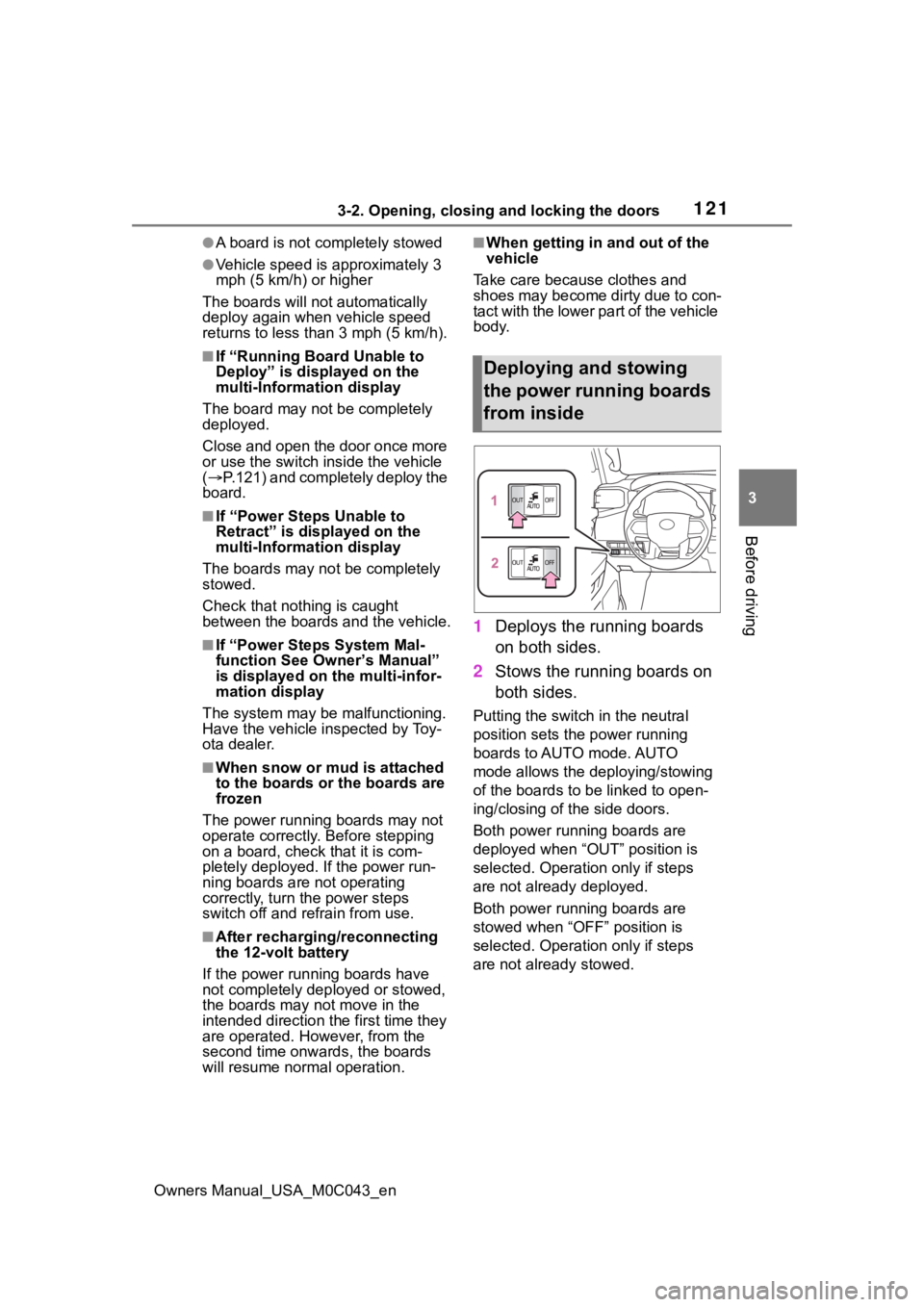
1 Deploys the running boards
on both sides.
2 Stows the running boards on
both sides.
Putting the switch in the neutral
position sets the power running
boards to AUTO mode. AUTO
mode allows the deploying/stowing
of the boards to b e linked to open-
ing/closing of the side doors.
Both power running boards are
deployed when “OUT” position is
selected. Operation only if steps
are not already deployed.
Both power running boards are
stowed when “OFF” position is
selected. Operation only if steps
are not already stowed.
Deploying and stowing
the power running boards
from inside
Page 131 of 628
1313-2. Opening, closing and locking the doors
Owners Manual_USA_M0C043_en
3
Before driving
●When operated while a person is
too close to the rear bumper
●When an external radio wave
source interferes with the commu-
nication between the electronic
key and the vehicle ( P.141)
●When charging from an external
power source or connecting the
AC charging cable
●When the vehicle is parked near
an electrical noise source which
affects the sensitivity of the Hands
Free Power Back Door, such as a
pay parking spot , gas station,
electrically heated road, or fluo-
rescent light
●When the vehicle is near a TV
tower, electric po wer plant, radio
station, large display, airport or
other facility that generates strong
radio waves or electrical noise
●When a large amount of water is
applied to the rear bumper, such
as when the vehicle is being
washed or in heavy rain
●When mud, snow, ice, etc. is
attached to the rear bumper
●When the vehicle has been
parked for a while near objects
that may move and contact the
rear bumper, such as plants
●When an accessory is installed to
the rear bumper
If an accessory has been installed,
turn the Hands Free Power Back
Door operation setting off.
■Preventing unintentional opera-
tion of the Hands Free Power
Back Door
When an electronic key is in the
operation range, the Hands Free
Power Back Door may operate unin-
tentionally, so be ca reful in the fol-
lowing situations.
●When a large amount of water is
applied to the rear bumper, such
as when the vehicle is being
washed or in heavy rain
●When dirt is wip ed off the rear
bumper
●When a small animal or small
object, such as a ball, moves
under the rear bumper
●When an object is moved from
under the rear bumper
●If someone is swinging their legs
while sitting on the rear bumper
●If the legs or another part of some-
one’s body contacts the rear
bumper while passing by the vehi-
cle
●When the vehicle is parked near
an electrical noise source which
affects the sensitivity of the Hands
Free Power Back Door, such as a
pay parking spot, gas station,
electrically heated road, or fluo-
rescent light
●When the vehicle is near a TV
tower, electric pow er plant, radio
station, large display, airport or
other facility that generates strong
radio waves or electrical noise
●When the vehicle is parked in a
place where objects such as
plants are near the rear bumper
●If luggage, etc. is set near the rear
bumper
●If accessories or a vehicle cover is
installed/removed near the rear
bumper
●When the vehicle is being towed
To prevent unintentional operation,
turn the Hands F ree Power Back
Door operation setting off. ( P.135)
■When reconnecting the 12-volt
battery
To enable the power back door to
operate properly, close the back
door manually.
■If the back door opener is inop-
erative
The back door can be unlocked
from the inside.
1 Remove the cover.
Page 133 of 628
1333-2. Opening, closing and locking the doors
Owners Manual_USA_M0C043_en
3
Before driving
●In the following situations, the
power back door may detect an
abnormality and automatic
operation may be stopped. In
this case, the back door has to
be operated manually. Take
extra care when on an incline,
as the back door may open or
close abruptly.
• When the back door contacts an obstacle
• When the 12-volt battery volt- age suddenly drops, such as
when the power switch is turned
to ON or the hybrid system is
started during automatic opera-
tion
●If a bicycle carrier or similar
heavy object is attached to the
back door, the power back door
may not operate, causing itself
to malfunction, or the back door
may suddenly shut again after
being opened, causing some-
one’s hands, arms, head or
neck to be caught and injured.
When installing an accessory
part to the back door, using a
genuine Toyota part is recom-
mended.
■Jam protection function
Observe the following precau-
tions.
Failure to do so may cause death
or serious injury.
●Never use any part of your body
to intentionally a ctivate the jam
protection function.
●The jam protection function may
not work if something gets
caught just before the back door
fully closes. Be careful not to
catch fingers or anything else.
●The jam protection function may
not work depending on the
shape of the object that is
caught. Be careful not to catch
fingers or anything else.
■Hands Free Power Back Door
Observe the following precautions
when operating the Hands Free
Power Back Door.
Failure to do so may cause death
or serious injury.
●Check the safety of the sur-
rounding area to make sure
there are no obs tacles or any-
thing that could cause any of
your belongings to get caught.
WARNING
●When putting your foot near the
lower center part of the rear
bumper and moving it from the
rear bumper, be careful not to
touch the exhaust pipes until
they have cooled down suffi-
ciently, as touching hot exhaust
pipes can cause burns.
●Do not leave the electronic key
within the effective range
(detection area) of the luggage
compartment.