key battery TOYOTA SEQUOIA HYBRID 2023 User Guide
[x] Cancel search | Manufacturer: TOYOTA, Model Year: 2023, Model line: SEQUOIA HYBRID, Model: TOYOTA SEQUOIA HYBRID 2023Pages: 628, PDF Size: 14.27 MB
Page 141 of 628
1413-2. Opening, closing and locking the doors
Owners Manual_USA_M0C043_en
3
Before driving
while the vehicle is not in operation
for a long time.
●In the following situations, the
smart key system may take some
time to unlock the doors.
• The electronic key has been left in an area of approximately 6 ft. (2
m) of the outside of the vehicle for
10 minutes or longer.
• The smart key system has not been used for 5 days or longer.
●If the smart key system has not
been used for 14 days or longer,
the doors canno t be unlocked at
any doors except the driver’s door.
In this case, take hold of the
driver’s door handle, or use the
wireless remote control or the
mechanical key, to unlock the
doors.
■Turning an electronic key to
battery-saving mode
●When battery-saving mode is set,
battery depletion is minimized by
stopping the electronic key from
receiving radio waves.
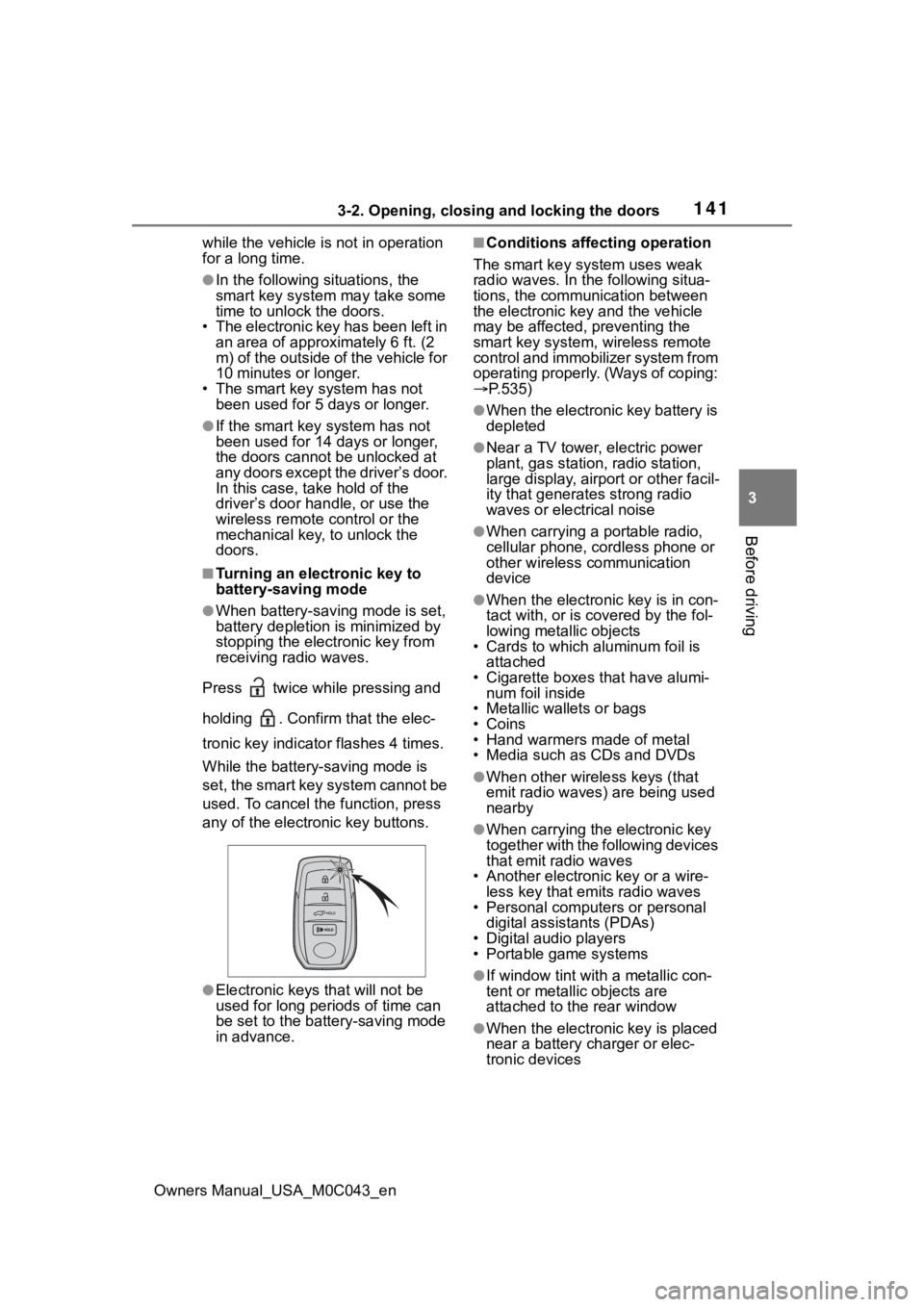
Press twice while pressing and
holding . Confirm that the elec-
tronic key indicator flashes 4 times.
While the battery-saving mode is
set, the smart key system cannot be
used. To cancel the function, press
any of the electronic key buttons.
●Electronic keys that will not be
used for long periods of time can
be set to the battery-saving mode
in advance.
■Conditions affecting operation
The smart key system uses weak
radio waves. In the following situa-
tions, the communication between
the electronic key and the vehicle
may be affected, preventing the
smart key system, wireless remote
control and immobilizer system from
operating properly. (Ways of coping:
P.535)
●When the electronic key battery is
depleted
●Near a TV tower, electric power
plant, gas station, radio station,
large display, airpo rt or other facil-
ity that generates strong radio
waves or electrical noise
●When carrying a portable radio,
cellular phone, cordless phone or
other wireless communication
device
●When the electronic key is in con-
tact with, or is c overed by the fol-
lowing metallic objects
• Cards to which aluminum foil is
attached
• Cigarette boxes that have alumi- num foil inside
• Metallic wallets or bags
•Coins
• Hand warmers made of metal
• Media such as CDs and DVDs
●When other wirel ess keys (that
emit radio waves) are being used
nearby
●When carrying the electronic key
together with the following devices
that emit radio waves
• Another electronic key or a wire- less key that emits radio waves
• Personal computers or personal
digital assistants (PDAs)
• Digital audio players
• Portable game systems
●If window tint wit h a metallic con-
tent or metallic objects are
attached to the rear window
●When the electronic key is placed
near a battery charger or elec-
tronic devices
Page 142 of 628

1423-2. Opening, closing and locking the doors
Owners Manual_USA_M0C043_en
●When the vehicle is parked in a
pay parking spot where radio
waves are emitted.
■Note for the entry function
●Even when the electronic key is
within the effective range (detec-
tion areas), the system may not
operate properly in the following
cases:
• The electronic key is too close to the window or outside door han-
dle, near the ground, or in a high
place when the doors are locked
or unlocked.
• The electronic key is near the
ground or in a high place, or too
close to the center of the rear
bumper.
• The electronic key is on the instru- ment panel, or floor, or in the door
pockets or glove box when the
hybrid system is s tarted or power
switch modes are changed.
●Do not leave the electronic key on
top of the instrument panel or near
the door pockets when exiting the
vehicle. Depending on the radio
wave reception conditions, it may
be detected by the antenna out-
side the cabin and the doors will
become lockable from the outside,
possibly trapping the electronic
key inside the vehicle.
●As long as the electronic key is
within the effective range, the
doors may be locked or unlocked
by anyone. However, only the
doors detecting the electronic key
can be used to unl ock the vehicle.
●Even if the electronic key is not
inside the vehicle, it may be possi-
ble to start the hybrid system if the
electronic key is near the window.
●The doors may unlock or lock if a
large amount of water splashes on
the door handle, such as in the
rain or in a car wash, when the
electronic key is within the effec-
tive range. (The doors will auto-
matically be locked after
approximately 60 seconds if the doors or the glass hatch are not
opened and closed.)
●If the wireless remote control is
used to lock the doors when the
electronic key is near the vehicle,
there is a possib
ility that the door
may not be unlocked by the entry
function. (Use the wireless remote
control to unlock the doors.)
●Touching the door lock sensor
while wearing gloves may delay or
prevent lock operation.
●When the lock operation is per-
formed using the lock sensor, rec-
ognition signals will be shown up
to two consecutive times. After
this, no recognition signals will be
given.
●If the door handle becomes wet
while the electronic key is within
the effective range, the door may
lock and unlock repeatedly. In this
case, follow the following correc-
tion procedures to wash the vehi-
cle:
• Place the electronic key in a loca-
tion 6 ft. (2 m) or more away from
the vehicle. (Take care to ensure
that the key is not stolen.)
• Set the electronic key to battery- saving mode to disable the smart
key system. ( P.141)
●If the electronic key is inside the
vehicle and a door handle
becomes wet during a car wash, a
message may be shown on the
multi-information display and a
buzzer will sound outside the vehi-
cle. To turn off the alarm, lock all
the doors.
●The lock sensor may not work
properly if it comes into contact
with ice, snow, m ud, etc. Clean
the lock sensor and attempt to
operate it again.
●A sudden approach to the effec-
tive range or door handle may pre-
vent the doors from being
unlocked. In this case, return the
door handle to the original position
and check that t he doors unlock
Page 143 of 628
1433-2. Opening, closing and locking the doors
Owners Manual_USA_M0C043_en
3
Before driving
before pulling the door handle
again.
●If there is another electronic key in
the detection area, it may take
slightly longer to unlock the doors
after the door handle is gripped.
■When the vehicle is not driven
for extended periods
●To prevent theft of the vehicle, do
not leave the electronic key within
6 ft. (2 m) of the vehicle.
●The smart key system can be
deactivated in advance.
●Setting the electronic key to bat-
tery-saving mode helps to reduce
key battery depletion. ( P.141)
■To operate the system properly
●Make sure to carry the electronic
key when operating the system.
Do not get the electronic key too
close to the vehicle when operat-
ing the system from the outside of
the vehicle.
Depending on the position and hold-
ing condition of the electronic key,
the key may not be detected cor-
rectly and the system may not oper-
ate properly. (The alarm may go off
accidentally, or the door lock pre-
vention function may not operate.)
■If the smart key system does
not operate properly
●Locking and unlocking the doors:
P. 5 3 6
●Starting the hybrid system:
P. 5 3 6
■Customization
Some functions can be customized.
( P.570)
■If the smart key system has
been deactivated in a custom-
ized setting
●Locking and unlocking the doors:
Use the wireless remote control or
mechanical key. ( P.115, 536)
●Starting the hybrid system and
changing power switch modes:
P. 5 3 6
●Stopping the hybrid system:
P. 2 1 4
■Certification
P.618
WARNING
■Caution regarding interfer-
ence with electronic devices
●People with implantable car-
diac pacemakers, cardiac
resynchronization therapy-
pacemakers or implantable car-
dioverter defibrillators should
keep away from the smart key
system antennas. ( P.139)
The radio waves may affect the
operation of such devices. If
necessary, the entry function
can be disabled. Ask your Toy-
ota dealer for details, such as
the frequency of radio waves
and timing of the emitted radio
waves. Then, consult your doc-
tor to see if you should disable
the entry function.
●Users of any electrical medical
device other than implantable
cardiac pacemakers, cardiac
resynchronization therapy-
pacemakers or implantable car-
dioverter defibrillators should
consult the manufacturer of the
device for information about its
operation under the influence of
radio waves.
Radio waves could have unex-
pected effects on the operation
of such medical devices.
Ask your Toyota dealer for details
on disabling the entry function.
Page 212 of 628
2124-2. Driving procedures
Owners Manual_USA_M0C043_en
4-2.Driving procedures
1Pull the parking brake switch
to check that the parking
brake is set. ( P.222)
The parking brake indicator will
come on.
2Check that the shift lever is in
P.
3 Firmly depress the brake
pedal.
and a message will be dis-
played on the multi-information dis-
play.
If it is not displayed, the hybrid sys-
tem cannot be started.
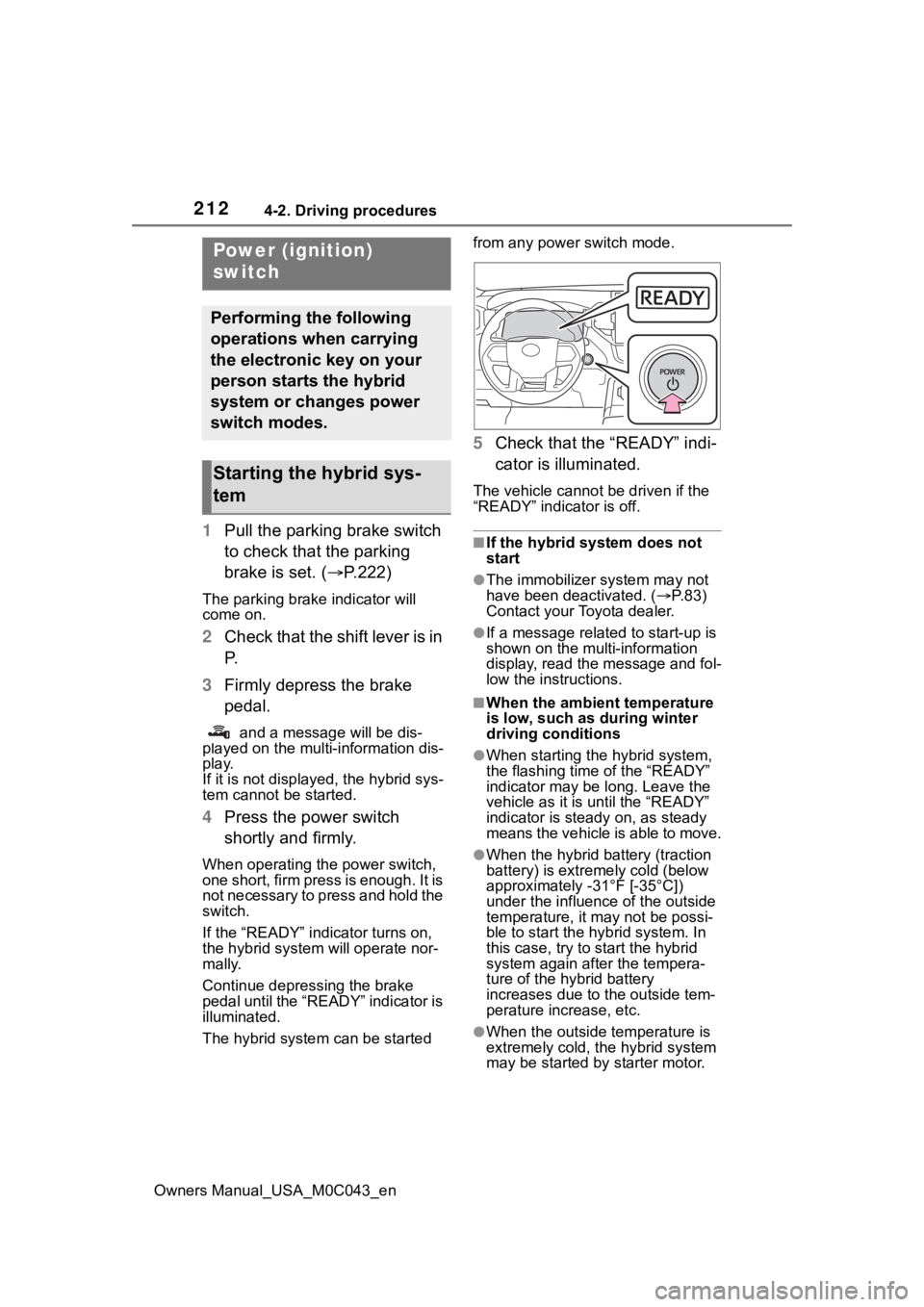
4 Press the power switch
shortly and firmly.
When operating the power switch,
one short, firm press is enough. It is
not necessary to press and hold the
switch.
If the “READY” indicator turns on,
the hybrid system will operate nor-
mally.
Continue depressing the brake
pedal until the “READY” indicator is
illuminated.
The hybrid system can be started from any power switch mode.
5
Check that the “READY” indi-
cator is illuminated.
The vehicle cannot be driven if the
“READY” indicator is off.
■If the hybrid system does not
start
●The immobilizer system may not
have been deactivated. ( P. 8 3 )
Contact your Toyota dealer.
●If a message related to start-up is
shown on the multi-information
display, read the message and fol-
low the instructions.
■When the ambient temperature
is low, such as during winter
driving conditions
●When starting th e hybrid system,
the flashing time of the “READY”
indicator may be long. Leave the
vehicle as it is until the “READY”
indicator is steady on, as steady
means the vehicle is able to move.
●When the hybrid battery (traction
battery) is extremely cold (below
approximately -31°F [-35°C])
under the influenc e of the outside
temperature, it ma y not be possi-
ble to start the hybrid system. In
this case, try to start the hybrid
system again after the tempera-
ture of the hybrid battery
increases due to the outside tem-
perature increase, etc.
●When the outside temperature is
extremely cold, the hybrid system
may be started by starter motor.
Power (ignition)
switch
Performing the following
operations when carrying
the electronic key on your
person starts the hybrid
system or changes power
switch modes.
Starting the hybrid sys-
tem
Page 213 of 628
2134-2. Driving procedures
Owners Manual_USA_M0C043_en
4
Driving
■Starting the hybrid system by
starter motor
●When the fuel lid is opened and
closed (such as re-fueling)
●When the outside temperature is
extremely cold (th e hybrid system
may be started by starter motor)
■Sounds and vibrations specific
to a Hybrid Electric Vehicle
P. 7 7
■If the 12-volt battery is dis-
charged
The hybrid system cannot be started
using the smart key system. Refer
to P.538 to restart the hybrid sys-
tem.
■Electronic key battery depletion
P. 1 1 2
■Conditions affecting operation
P. 1 4 1
■Notes for the entry function
P. 1 4 2
■If “Smart Key System Malfunc-
tion See Owner’s Manual” is
displayed on the multi-informa-
tion display
The system may be malfunctioning.
Have the vehicle inspected by your
Toyota dealer immediately.
■When “Check Fuel Cap” is dis-
played on the multi-information
display
P. 2 4 2
■If the “READY” indicator does
not come on
In the event that the “READY” indi-
cator does not come on even after
performing the proper procedures
for starting the vehicle, contact your
Toyota dealer immediately.
■If the hybrid system is malfunc-
tioning
P. 5 1 9
■Electronic key battery
P.493
■Operation of the power switch
●If the switch is not pressed shortly
and firmly, the power switch mode
may not change o r the hybrid sys-
tem may not start.
●If attempting to restart the hybrid
system immediately after turning
the power switch to OFF, the
hybrid system may not start in
some cases. After turning the
power switch to OF F, please wait
a few seconds before restarting
the hybrid system.
■Customization
If the smart key system has been
deactivated in a customized setting,
refer to P.535.
WARNING
■When starting the hybrid sys-
tem
Always start the hybrid system
while sitting in the driver’s seat.
Do not depress t he accelerator
pedal while starting the hybrid
system under any circumstances.
Doing so may cause an accident
resulting in death o r serious injury.
NOTICE
■When starting the hybrid sys-
tem
If the hybrid system becomes diffi-
cult to start, have your vehicle
checked by your Toyota dealer
immediately.
Page 229 of 628
2294-3. Operating the lights and wipers
Owners Manual_USA_M0C043_en
4
Driving
and may cause the automatic head-
light system to malfunction.
■Automatic light off system
●When the headlights are on: The
headlights and tail lights turn off
30 seconds after the driver’s door
is opened and clos ed if the power
switch is turned to ACC or off.
(The lights turn off immediately if
on the key is pressed after all
the doors are closed.)
●When only the tail lights are on:
The tail lights tu rn off automati-
cally if the power switch is turned
to ACC or OFF and the driver’s
door is opened.
To turn the lights on again, turn the
power switch to ON, or turn the light
switch off once and then back to or .
■Light reminder buzzer
A buzzer sounds when the power
switch is turned to ACC or OFF and
the driver’s door is opened while the
lights are turned on.
■When unlock the doors (wel-
come lamp) (If equipped)
When the doors are unlocked using
the entry function or wireless remote
control, the front parking lights and
tail lights turn o n automatically.
When the light switch is in the AUTO
position and the surrounding area is
dark, this function will operate.
■Automatic headlight leveling
system (if equipped)
The level of the headlights is auto-
matically adjusted according to the
number of passengers and the load-
ing condition of the vehicle to
ensure that the headlights do not
interfere with other road users.
■Windshield wiper linked head-
light illumination
When driving during daytime with
the headlight swit ch turned to , if the windshield wipers are
used, the headlights will turn on
automatically after several seconds
to help enhance the visibility of your
vehicle.
■12-volt battery-saving function
In order to prevent the 12-volt bat-
tery of the vehicle from discharging,
if the headlights and/or tail lights are
on when the power switch is turned
to OFF the 12-volt battery-saving
function will operate and automati-
cally turn off all the lights after
approximately 20 minutes. When
the power switch is turned to ON,
the 12-volt battery-saving function
will be disabled.
When any of the following are per-
formed, the 12-volt battery-saving
function is canceled once and then
reactivated. All the lights will turn off
automatically 20 minutes after the
12-volt battery-saving function has
been reactivated:
●When the headlight switch is oper-
ated
●When a door is opened or closed
■Customization
Some functions can be customized.
( P.570)
NOTICE
■To prevent 12-volt battery dis-
charge
Do not leave the lights on longer
than necessary when the hybrid
system is not operating.
Page 420 of 628

4205-2. Using the interior lights
Owners Manual_USA_M0C043_enor R. Turn off when shift lever in D.
“ON”
Turns on while the shift lever is in P
or R. Turn off when shift lever in D.
■Illuminated entry system
The lights automatically turn on/off
according to the power switch
mode, the presence of the elec-
tronic key, whether the doors are
locked/unlocked, and whether the
doors are open/closed.
■To prevent the 12-volt battery
from being discharged
If the follo wing lights remain on
when the door is not fully closed and
the main switch i s in the “DOOR”
position, the lights will go off auto-
matically after 20 minutes:
●Personal/interior lights
●Trailer hitch light
■The personal/interior lights may
turn on automatically when
If any of the SRS airbags deploy
(inflate) or in the event of a strong
rear impact, the personal/interior
lights will turn on automatically.
The personal/interior lights will turn
off automatically after approximately
20 minutes.
The personal/interior lights can be
turned off manually. However, in
order to help prev ent further colli-
sions, it is recommended that they
be left on until safety can be
ensured.
(The personal/interior lights may not
turn on automatically depending on
the force of the impact and condi-
tions of the collision.)
■Customization
Some functions can be customized.
( P.570)
NOTICE
■To prevent 12-volt battery dis-
charge
Do not leave the lights on longer
than necessary when the hybrid
system is off.
■Removing light lenses
Never remove the lens for the
personal/interior lights. Otherwise,
the lights will be damaged. If a
lens needs to be removed, con-
tact your Toyota dealer.
Page 433 of 628
4335-4. Using the other interior features
Owners Manual_USA_M0C043_en
5
Interior features
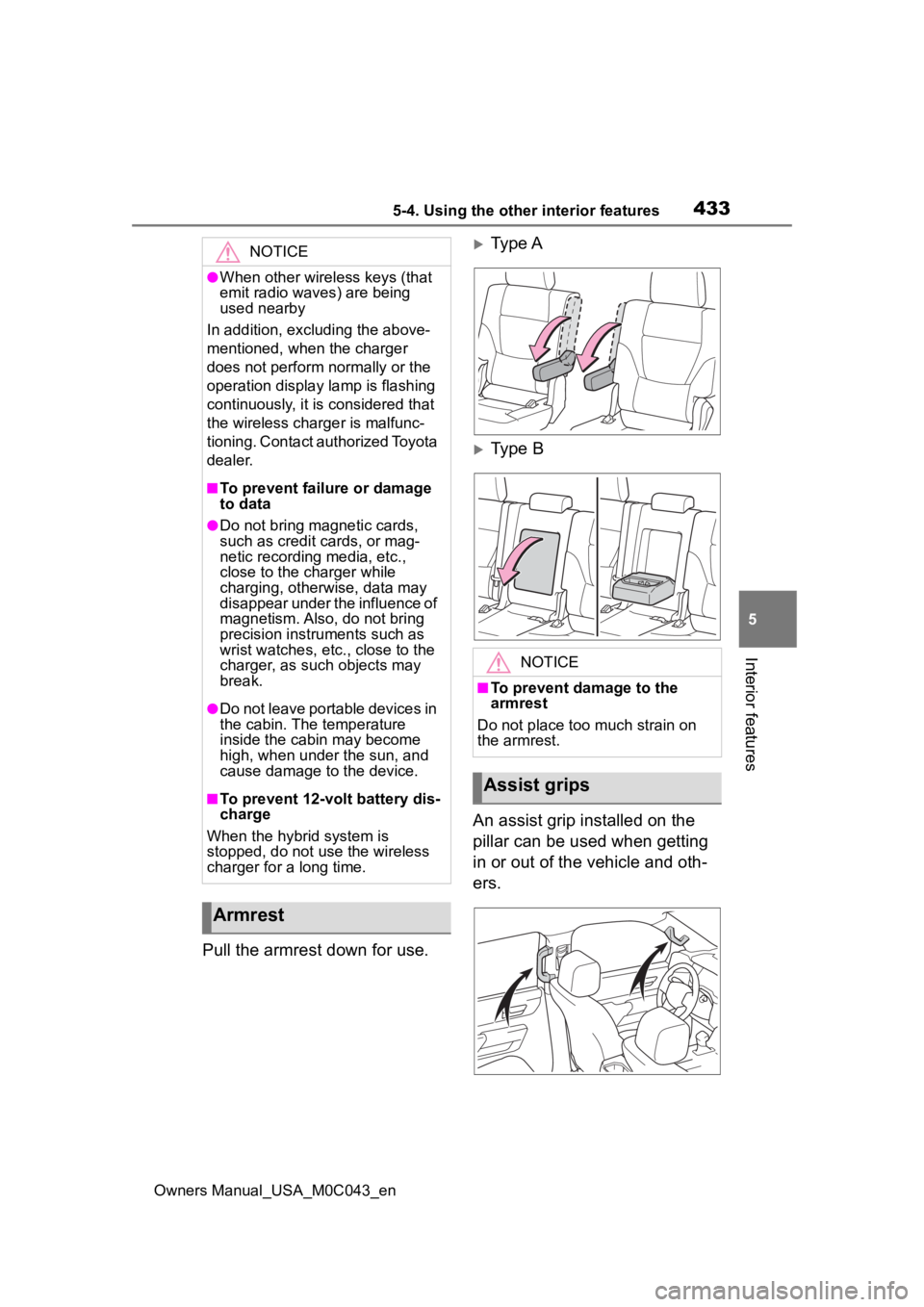
Pull the armrest down for use.
Type A
Type B
An assist grip installed on the
pillar can be used when getting
in or out of the vehicle and oth-
ers.
NOTICE
●When other wireless keys (that
emit radio waves) are being
used nearby
In addition, excl uding the above-
mentioned, when the charger
does not perform normally or the
operation display lamp is flashing
continuously, it is considered that
the wireless charger is malfunc-
tioning. Contact authorized Toyota
dealer.
■To prevent failu re or damage
to data
●Do not bring magnetic cards,
such as credit cards, or mag-
netic recording media, etc.,
close to the charger while
charging, otherwise, data may
disappear under the influence of
magnetism. Also, do not bring
precision instruments such as
wrist watches, etc ., close to the
charger, as such objects may
break.
●Do not leave portable devices in
the cabin. The temperature
inside the cabin may become
high, when under the sun, and
cause damage to the device.
■To prevent 12-volt battery dis-
charge
When the hybrid system is
stopped, do not use the wireless
charger for a long time.
Armrest
NOTICE
■To prevent damage to the
armrest
Do not place too much strain on
the armrest.
Assist grips
Page 449 of 628
449
Owners Manual_USA_M0C043_en
6
6
Maintenance and care
Maintenance and care
6-1. Maintenance and careCleaning and protecting the vehicle exterior .......... 450
Cleaning and protecting the vehicle interior ........... 453
6-2. Maintenance Maintenance requirements.................................. 456
General maintenance.. 457
Emission inspection and maintenance (I/M) pro-
grams ........................ 460
6-3. Do-it-yourself mainte- nance
Do-it-yourself service pre- cautions ..................... 462
Hood ........................... 464
Engine compartment ... 465
12-volt battery ............. 471
Tires ............................ 474
Tire inflation pressure.. 484
Wheels ......... ...............486
Air conditioning filter .... 487
Cleaning the hybrid battery (traction battery) air intake
vent and filter............. 489
Electronic key battery.. 493
Checking and replacing fuses.......................... 495
Light bulbs................... 498
Page 450 of 628
4506-1. Maintenance and care
Owners Manual_USA_M0C043_en
6-1.Maintenance and care
Working from top to bottom,
liberally apply water to the
vehicle body, wheel wells and
underside of the vehicle to
remove any dirt and dust.
Wash the vehicle body using
a sponge or soft cloth, such
as a chamois.
For hard-to-remove marks,
use car wash soap and rinse
thoroughly with water.
Wipe away any water.
Wax the vehicle when the
waterproof coating deterio-
rates.
If water does not bead on a clean
surface, apply wax when the vehi-
cle body is cool.
■Automatic car washes
●Fold the mirrors before washing
the vehicle.
Start washing from the front of the
vehicle. Extend the mirrors before
driving.
●Turn off the power back door (if
equipped).
●Brushes used in automatic car
washes may scratch the vehicle surface, parts (wheel, etc.) and
harm your vehicle’s paint.
●Rear spoiler may not be washable
in some automatic car washes.
There may also be an increased
risk of damage to vehicle.
■High pressure car washes
As water may enter the cabin, do
not bring the nozzle tip near the
gaps around the doors or perimeter
of the windows, or spray these
areas continuously.
■When using a car wash
If the door handle becomes wet
while the electronic key is within the
effective range, the door may lock
and unlock repeatedly. In that case,
follow the following correction pro-
cedures to wash the vehicle:
●Place the key in a position 6 ft. (2
m) or more separate from the
vehicle while the vehicle is being
washed. (Take care to ensure that
the key is not stolen.)
●Set the electronic key to battery-
saving mode to disable the Smart
key system. ( P.140)
■Wheels and wheel ornaments
●Remove any dirt immediately by
using a neutral detergent.
●Wash detergent off with water
immediately after use.
●To protect the paint from damage,
make sure to obs erve the follow-
ing precautions.
• Do not use acidic, alkaline or abrasive detergent
• Do not use hard brushes
• Do not use detergent on the wheels when they are hot, such
as after driving or parking in hot
weather
■Brake pads and calipers
Rust may form if the vehicle is
parked with wet brake pads or disc
rotors, causing them to stick. Before
parking the vehicle after it is
washed, drive slo wly and apply the
Cleaning and protect-
ing the vehicle exte-
rior
Perform cleaning in a man-
ner appropriate to each
component and its material.
Cleaning instructions