suspension TOYOTA SEQUOIA HYBRID 2023 User Guide
[x] Cancel search | Manufacturer: TOYOTA, Model Year: 2023, Model line: SEQUOIA HYBRID, Model: TOYOTA SEQUOIA HYBRID 2023Pages: 628, PDF Size: 14.27 MB
Page 250 of 628
2504-5. Using the driving support systems
Owners Manual_USA_M0C043_en
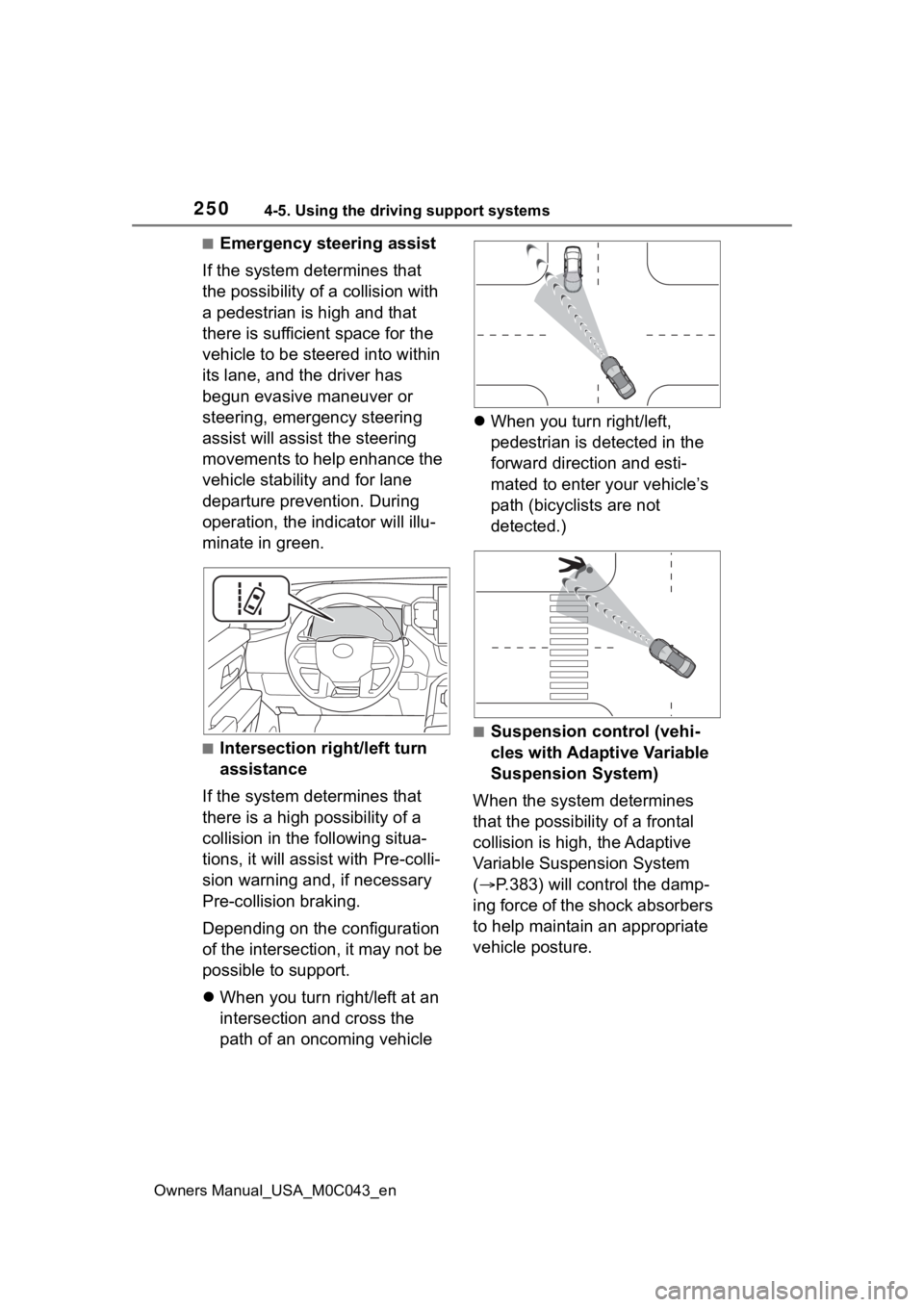
■Emergency steering assist
If the system determines that
the possibility of a collision with
a pedestrian is high and that
there is sufficient space for the
vehicle to be steered into within
its lane, and the driver has
begun evasive maneuver or
steering, emergency steering
assist will assist the steering
movements to help enhance the
vehicle stability and for lane
departure prevention. During
operation, the indicator will illu-
minate in green.
■Intersection right/left turn
assistance
If the system determines that
there is a high possibility of a
collision in the following situa-
tions, it will assist with Pre-colli-
sion warning and, if necessary
Pre-collision braking.
Depending on the configuration
of the intersection, it may not be
possible to support.
When you turn right/left at an
intersection and cross the
path of an oncoming vehicle
When you turn right/left,
pedestrian is detected in the
forward direction and esti-
mated to enter your vehicle’s
path (bicyclists are not
detected.)
■Suspension control (vehi-
cles with Adaptive Variable
Suspension System)
When the system determines
that the possibility of a frontal
collision is high, the Adaptive
Variable Suspension System
( P.383) will control the damp-
ing force of the shock absorbers
to help maintain an appropriate
vehicle posture.
Page 262 of 628
2624-5. Using the driving support systems
Owners Manual_USA_M0C043_en
WARNING
●This vehicle has Automatic
Trailer Detection feature that
can detect certain trailers under
certain conditions. After trailer is
detected, lane centering func-
tion will be disabled. In certain
conditions, there is a possibility
of falsely detecting trailer when
there is no actual trailer. In that
case, lane centering function
will be disabled. To activate lane
centering function, turn power
switch to off and then turn it on
again.
●Following scenes has possibility
of false detection of trailer:
Crowded environments such as
parking lots or camping
grounds, closely following vehi-
cles such traffic jam, drive
through, parallel parking, etc.
●Do not use the lane centering
system and steering assist func-
tion when the vehicle is lifted
unless using a Toyota official lift
up kit up to 4 in. (101 mm),
including tire height. Aftermar-
ket lift kits may degrade system
performance.
■Situations unsuitable for LTA
system
In the following situations, use the
LTA switch to turn the system off.
Failure to do so may lead to an
accident, resulting in death or
serious injury.
●Vehicle is driven on a road sur-
face which is slippery due to
rainy weather, fallen snow,
freezing, etc.
●Vehicle is driven on a snow-cov-
ered road.
●White (yellow) lines are difficult
to see due to rain, snow, fog,
dust, etc.
●Vehicle is driven in a temporary
lane or restricted lane due to
construction work.
●Vehicle is driven in a construc-
tion zone.
●A spare tire, tire chains, etc.,
are equipped.
●When the tires have been
excessively worn, or when the
tire inflation p ressure is low.
●When your vehicles is towing a
trailer or another vehicle, except
when the followin g condition is
met.
• When the other vehicle is a trailer properly attached and
connected to Toyota’s official
TBC ECU. ( P.198)
●When the vehicle is lifted up,
except in the following cases.
• When using a Toyota official lift kit up to 4 in. (101 mm), includ-
ing tire height. Aftermarket lift
kits may degrade system perfor-
mance.
■Preventing LTA system mal-
functions and operations per-
formed by mistake
●Do not modify the headlights or
place stickers, etc., on the sur-
face of the lights.
●Do not modify the suspension,
etc. If the suspension, etc.,
needs to be replaced, contact
your Toyota dealer.
●Do not install or place anything
on the hood or grille. Also, do
not install a gr ille guard (bull
bars, kangaroo bar, etc.).
●If your windshield needs
repairs, contact your Toyota
dealer.
Page 295 of 628
2954-5. Using the driving support systems
Owners Manual_USA_M0C043_en
4
Driving
2 Press or to select
and then press .
When the intuitive parking assist
function is disabled, the intuitive
parking assist OFF indicator
( P.91) illuminates.
To re-enable the system when it
was disabled, select on the
multi-information display, select and then On. If disabled using
this method, the system will not be
re-enabled by turning the power
switch off and then to ON.
■When towing a trailer
When the 7-pin connector is con-
nected and Auto Trailer Detection
(ATD) ( P.289) is activated, the
rear sensor automatically turns off.
WARNING
■Cautions regarding the use of
the system
There is a limit to the degree of
recognition accuracy and control
performance that this system can
provide, do not ov erly rely on this
system. The driver is always
responsible for paying attention to
the vehicle’ surroundings and
driving safely.
■To ensure the system can
operate properly
Observe the following precau-
tions.
Failing to do so may result in the
vehicle being unable to be driven
safely and possibly cause an acci-
dent.
●Do not damage the sensors,
and always keep them clean.
●Do not attach a sticker or install
an electronic component, such
as a backlit licen se plate (espe-
cially fluorescent type), fog
lights, fender po le or wireless
antenna near a radar sensor.
●Do not subject the surrounding
area of the sensor to a strong
impact. If subjected to an
impact, have the vehicle
inspected by your Toyota
dealer. If the front or rear
bumper needs to be
removed/installed or replaced,
contact your Toyota dealer.
●Do not modify, disassemble or
paint the sensors.
●Do not attach a license plate
cover.
●Keep your tires properly
inflated.
■When to disable the function
In the following situations, disable
the function as it may operate
even though there is no possibility
of a collision.
●Failing to observe the warnings
above.
●A non-genuine Toyota suspen-
sion (lowered suspension, etc.)
is installed.
■Notes when washing the vehi-
cle
Do not apply intensive bursts of
water or steam to the sensor
area.
Doing so may result in the sensor
malfunctioning.
Page 305 of 628
3054-5. Using the driving support systems
Owners Manual_USA_M0C043_en
4
Driving
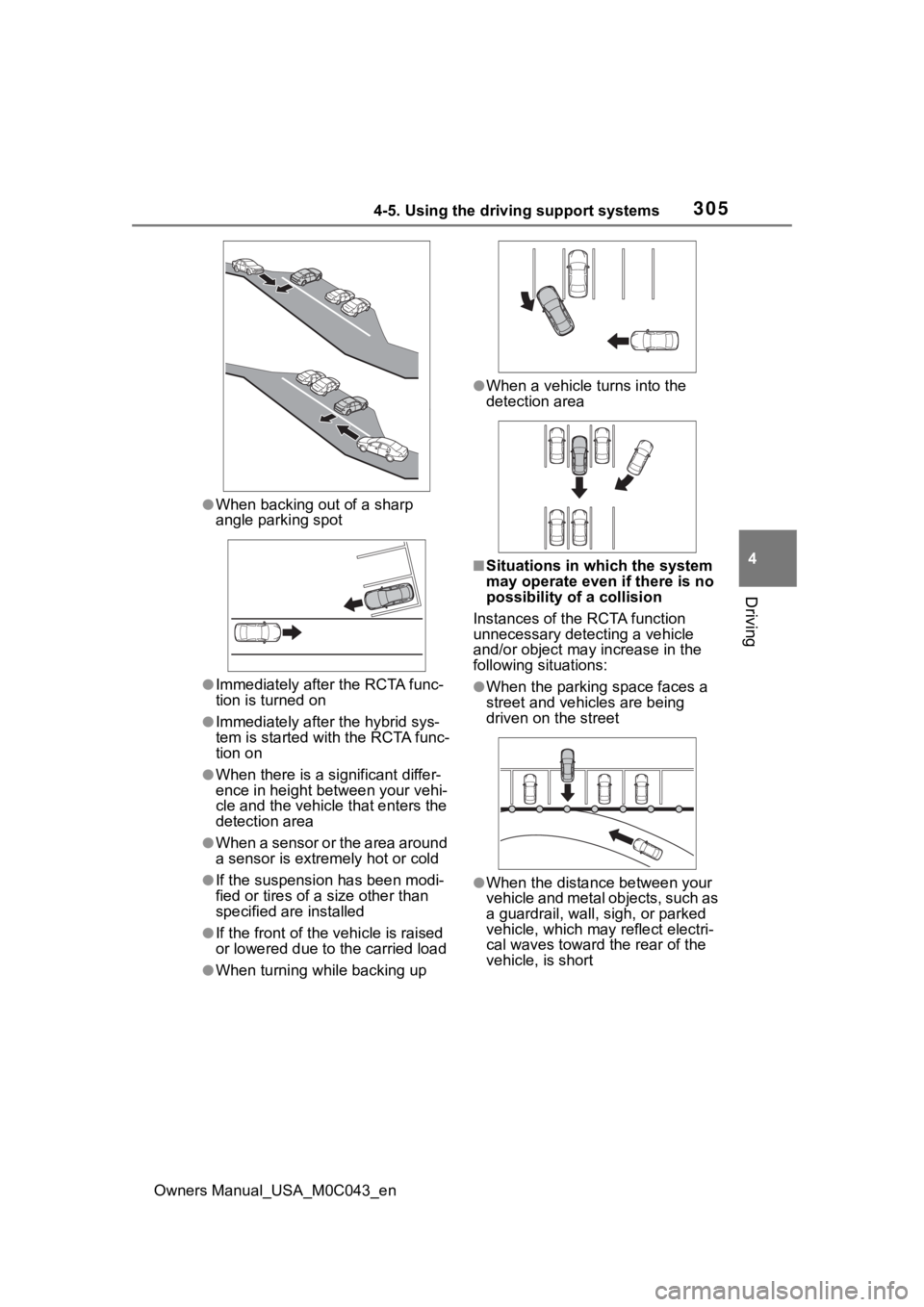
●When backing out of a sharp
angle parking spot
●Immediately afte r the RCTA func-
tion is turned on
●Immediately after the hybrid sys-
tem is started with the RCTA func-
tion on
●When there is a significant differ-
ence in height between your vehi-
cle and the vehicle that enters the
detection area
●When a sensor or the area around
a sensor is extremely hot or cold
●If the suspension has been modi-
fied or tires of a size other than
specified are installed
●If the front of the vehicle is raised
or lowered due to the carried load
●When turning while backing up
●When a vehicle tu rns into the
detection area
■Situations in which the system
may operate even if there is no
possibility of a collision
Instances of the RCTA function
unnecessary detec ting a vehicle
and/or object may increase in the
following situations:
●When the parking space faces a
street and vehicles are being
driven on the street
●When the distance between your
vehicle and metal objects, such as
a guardrail, wall, sigh, or parked
vehicle, which may reflect electri-
cal waves toward the rear of the
vehicle, is short
Page 306 of 628
3064-5. Using the driving support systems
Owners Manual_USA_M0C043_en
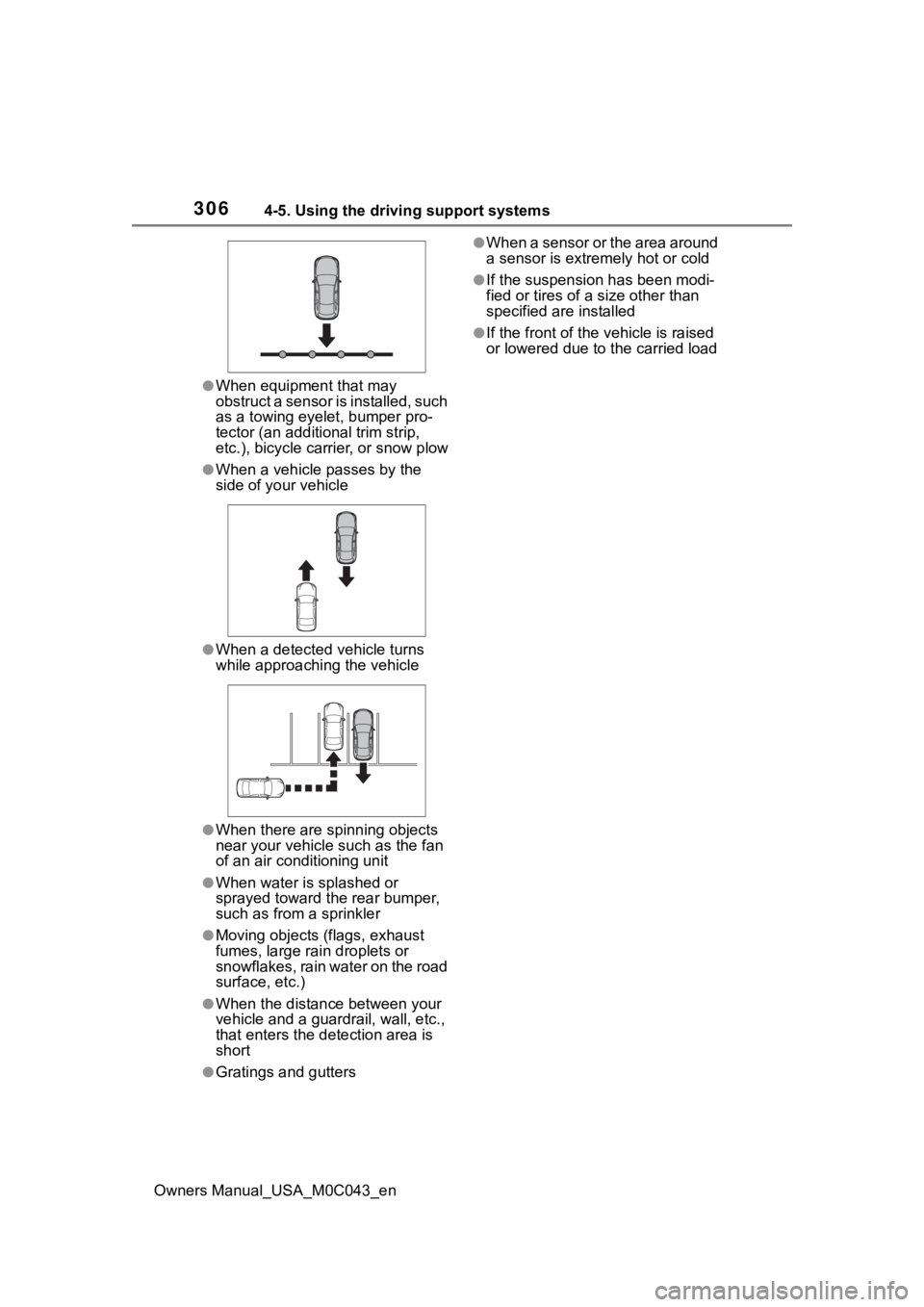
●When equipment that may
obstruct a sensor is installed, such
as a towing eyelet, bumper pro-
tector (an additional trim strip,
etc.), bicycle carrier, or snow plow
●When a vehicle passes by the
side of your vehicle
●When a detected vehicle turns
while approaching the vehicle
●When there are spinning objects
near your vehicle such as the fan
of an air conditioning unit
●When water is splashed or
sprayed toward t he rear bumper,
such as from a sprinkler
●Moving objects (flags, exhaust
fumes, large rain droplets or
snowflakes, rain water on the road
surface, etc.)
●When the distanc e between your
vehicle and a guardr ail, wall, etc.,
that enters the detection area is
short
●Gratings and gutters
●When a sensor or the area around
a sensor is extremely hot or cold
●If the suspension has been modi-
fied or tires of a size other than
specified are installed
●If the front of the v ehicle is raised
or lowered due to the carried load
Page 308 of 628
3084-5. Using the driving support systems
Owners Manual_USA_M0C043_en
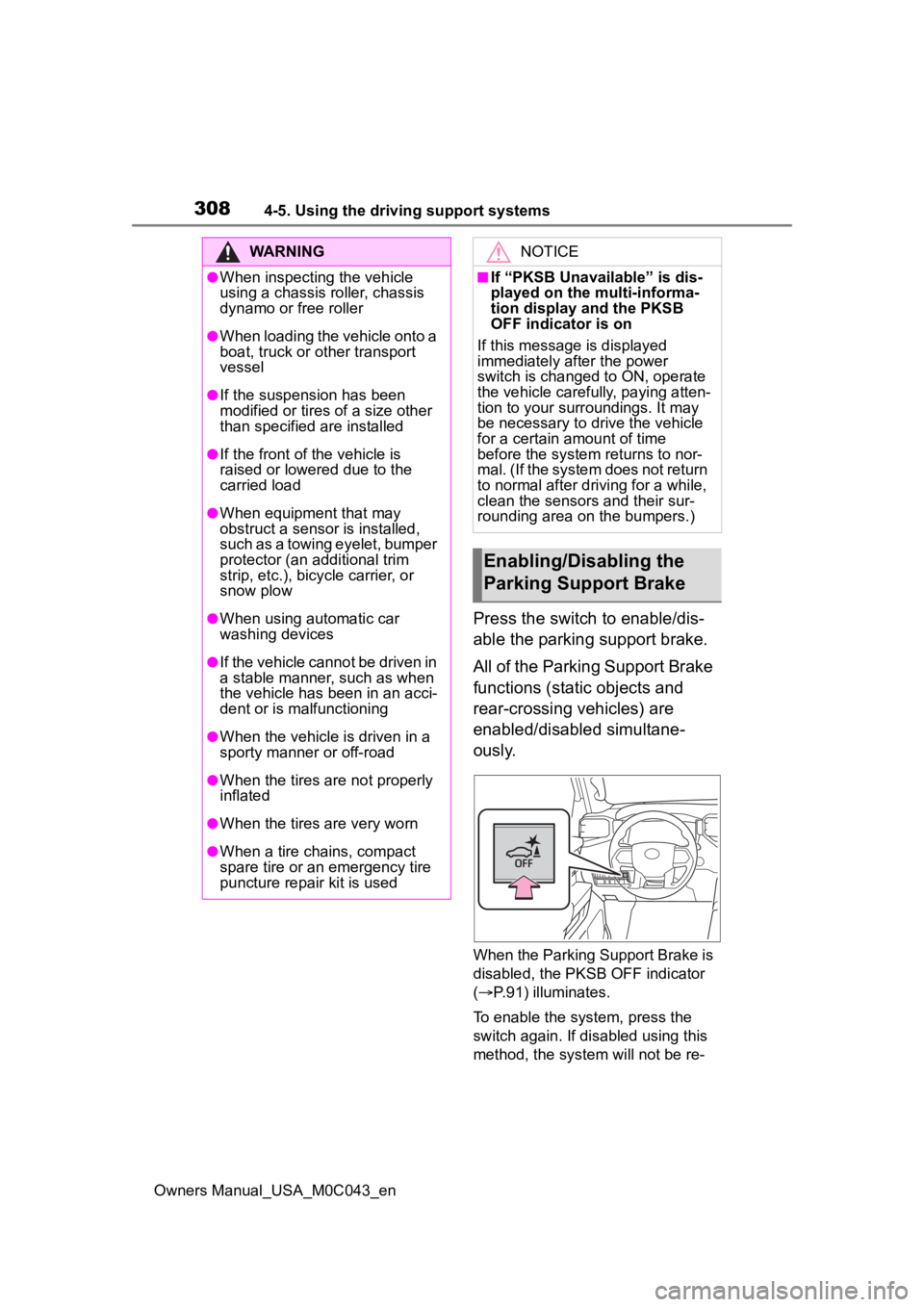
Press the switch to enable/dis-
able the parking support brake.
All of the Parking Support Brake
functions (static objects and
rear-crossing vehicles) are
enabled/disabled simultane-
ously.
When the Parking Support Brake is
disabled, the PKSB OFF indicator
( P.91) illuminates.
To enable the system, press the
switch again. If disabled using this
method, the system will not be re-
WARNING
●When inspecting the vehicle
using a chassis roller, chassis
dynamo or free roller
●When loading the vehicle onto a
boat, truck or other transport
vessel
●If the suspension has been
modified or tires of a size other
than specified are installed
●If the front of the vehicle is
raised or lowered due to the
carried load
●When equipment that may
obstruct a sensor is installed,
such as a towing eyelet, bumper
protector (an additional trim
strip, etc.), bicycle carrier, or
snow plow
●When using automatic car
washing devices
●If the vehicle cannot be driven in
a stable manner, such as when
the vehicle has been in an acci-
dent or is malfunctioning
●When the vehicle is driven in a
sporty manner or off-road
●When the tires are not properly
inflated
●When the tires are very worn
●When a tire chains, compact
spare tire or an emergency tire
puncture repair kit is used
NOTICE
■If “PKSB Unavailable” is dis-
played on the multi-informa-
tion display and the PKSB
OFF indicator is on
If this message is displayed
immediately after the power
switch is changed to ON, operate
the vehicle carefully, paying atten-
tion to your surroundings. It may
be necessary to drive the vehicle
for a certain amount of time
before the system returns to nor-
mal. (If the system does not return
to normal after dr iving for a while,
clean the sensors and their sur-
rounding area on the bumpers.)
Enabling/Disabling the
Parking Support Brake
Page 313 of 628

3134-5. Using the driving support systems
Owners Manual_USA_M0C043_en
4
Driving
■When the vehicle moves in
the unintended direction
due to the wrong shift posi-
tion being selected
P.294
Types of sensors
WARNING
■To ensure the system can
operate properly
Observe the following precau-
tions.
Failing to do so may result in the
vehicle being unable to be driven
safely and possibly cause an acci-
dent.
●Do not damage the sensors,
and always keep them clean.
●Do not attach a sticker or install
an electronic component, such
as a backlit licen se plate (espe-
cially fluorescent type), fog
lights, fender po le or wireless
antenna near a radar sensor.
●Do not subject the surrounding
area of the sensor to a strong
impact. If subjected to an
impact, have the vehicle
inspected by your Toyota
dealer. If the front or rear
bumper needs to be
removed/installed or replaced,
contact your Toyota dealer.
●Do not modify, disassemble or
paint the sensors.
●Do not attach a license plate
cover.
●Keep your tires properly
inflated.
■Handling the suspension
Do not modify the suspension, as
changes to the height or inclina-
tion of the vehic le may prevent
the sensors from detecting
objects correctly or cause the sys-
tem to not operate or operate
unnecessarily.
■If the Parking Support Brake
function (static objects) oper-
ates unnecessarily, such as
at a railroad crossing
In the event that the Parking Sup-
port Brake function (static objects)
operates unnecessarily, such as
at a railroad crossing, brake con-
trol will be canceled after approxi-
mately 2 seconds, allowing you to
proceed forward and leave the
area, brake control can also be
canceled by depressing the brake
pedal. Depressing the accelera-
tor pedal after brake control is
canceled will allow you to proceed
forward and leave the area.
Page 318 of 628
3184-5. Using the driving support systems
Owners Manual_USA_M0C043_en
WARNING
●Do not use the panoramic view
monitor system in the following
cases:
• On icy or slick road surfaces, or in snow
• When using tire chains or emer- gency tires
• When the front door or the back door is not clo sed completely
• On roads that are not flat or straight, such as curves or
slopes
• If the suspension has been modified or tires of a size other
than specified are installed
●In low temperatures, the screen
may darken or the image may
become faint. The image could
distort when the vehicle is mov-
ing, or you may become unable
to see the image on the screen.
Be sure to visually check all
around the vehicle both directly
and using the mirrors before
proceeding.
●If the tire sizes are changed, the
position of the guide lines dis-
played on the screen may
change.
●The camera uses a special lens.
The distances between objects
and pedestrians that appear in
the image displayed on the
screen will differ from the actual
distances. ( P.344)
●When an aftermarket part is
installed in the display area of
the screen.
NOTICE
●In panoramic view/moving
view/see-through view, the sys-
tem combines images taken
from the front, back, left and
right side cameras into a single
image. There are limits to the
range and content that can be
displayed. Familiarize yourself
with the characteristics of the
panoramic view monitor system
before using it.
●Image clarity may decline at the
four corners of t he panoramic
view/moving view/see-through
view. However, this is not a mal-
function, as these are the
regions along the border of
each camera image where the
images are combined.
●Depending on lighting condi-
tions near each of the cameras,
bright and dark patches may
appear on the panoramic
view/moving view/see-through
view.
●The panoramic view/moving
view/see-through view display
does not extend higher than the
installation pos ition and image
capture range o f each camera.
●There are blind spots around
the vehicle. Accordingly, there
are regions not displayed in
panoramic view.
●Three-dimensional objects dis-
played in wide fr ont view, rear
view or side view may not be
displayed in panoramic
view/moving view/see-through
view.
Page 363 of 628
3634-5. Using the driving support systems
Owners Manual_USA_M0C043_en
4
Driving
*: If equipped
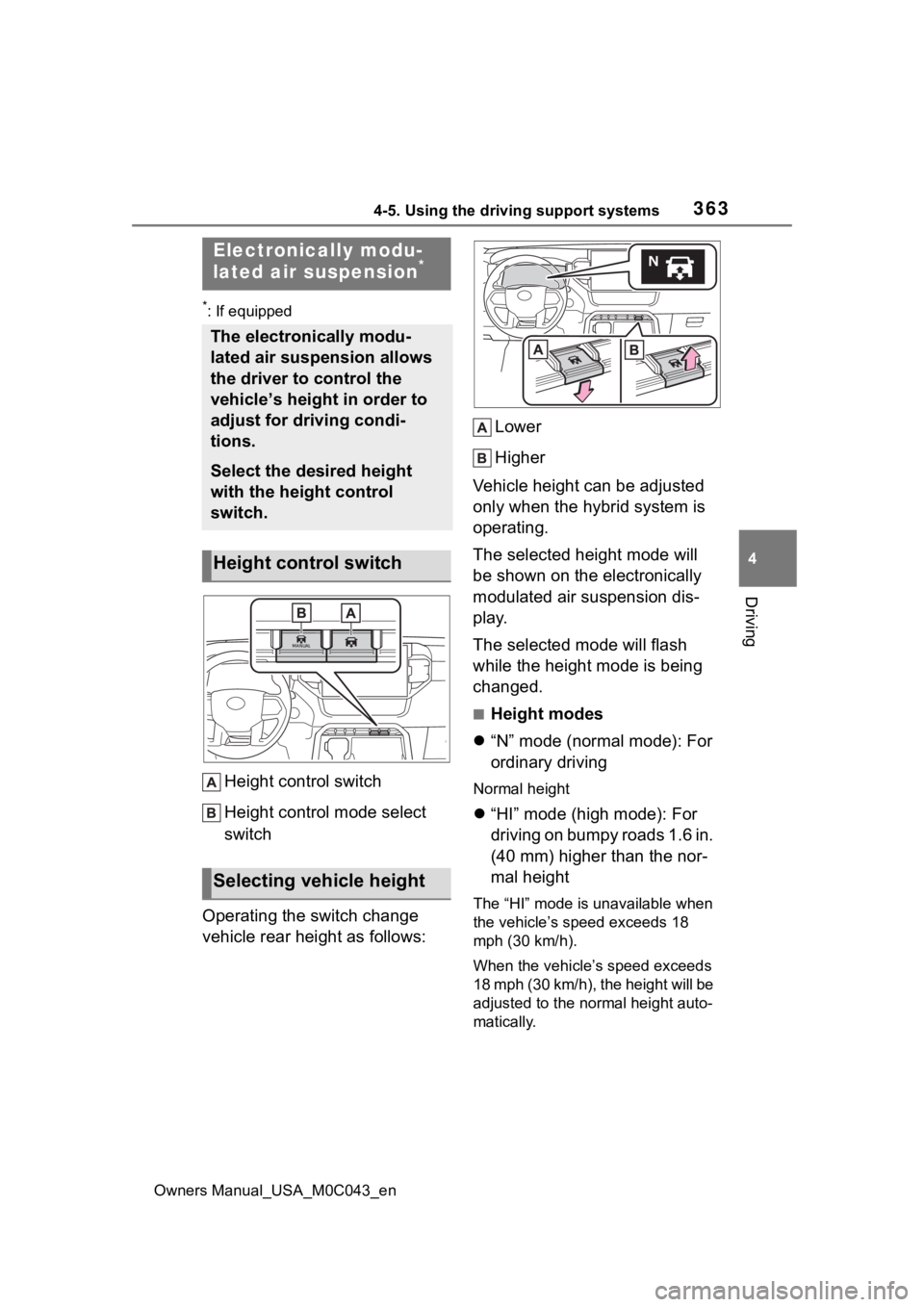
Height control switch
Height control mode select
switch
Operating the switch change
vehicle rear height as follows: Lower
Higher
Vehicle height can be adjusted
only when the hybrid system is
operating.
The selected height mode will
be shown on the electronically
modulated air suspension dis-
play.
The selected mode will flash
while the height mode is being
changed.
■Height modes
“N” mode (normal mode): For
ordinary driving
Normal height
“HI” mode (high mode): For
driving on bumpy roads 1.6 in.
(40 mm) higher than the nor-
mal height
The “HI” mode is unavailable when
the vehicle’s speed exceeds 18
mph (30 km/h).
When the vehicle’s speed exceeds
18 mph (30 km/h), the height will be
adjusted to the normal height auto-
matically.
Electronically modu-
lated air suspension*
The electronically modu-
lated air suspension allows
the driver to control the
vehicle’s height in order to
adjust for driving condi-
tions.
Select the desired height
with the height control
switch.
Height control switch
Selecting vehicle height
Page 364 of 628
3644-5. Using the driving support systems
Owners Manual_USA_M0C043_en
“LO” mode (low mode): For
the ease of egress/ingress
and loading luggage
1.2 in. (30 mm) lo wer than the nor-
mal height
The “LO” mode is unavailable when
the vehicle’s speed exceeds 8 mph
(12 km/h).
When the vehicles speed exceeds
8 mph (12 km/h), t he height will be
adjusted to the normal height auto-
matically.
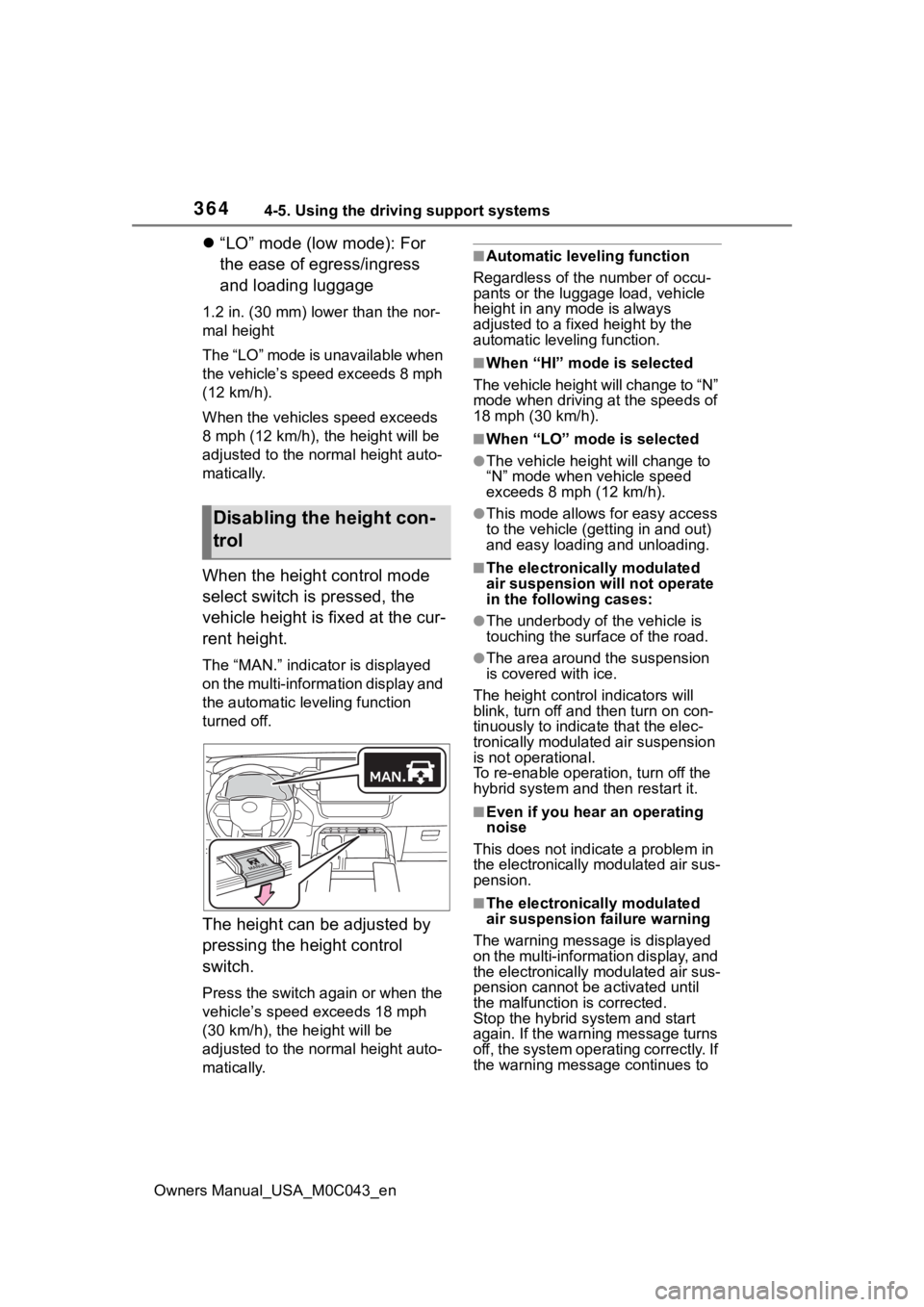
When the height control mode
select switch is pressed, the
vehicle height is fixed at the cur-
rent height.
The “MAN.” indicator is displayed
on the multi-information display and
the automatic leveling function
turned off.
The height can be adjusted by
pressing the height control
switch.
Press the switch again or when the
vehicle’s speed exceeds 18 mph
(30 km/h), the height will be
adjusted to the normal height auto-
matically.
■Automatic leveling function
Regardless of the number of occu-
pants or the luggage load, vehicle
height in any mode is always
adjusted to a fixed height by the
automatic leveling function.
■When “HI” mode is selected
The vehicle height will change to “N”
mode when driving at the speeds of
18 mph (30 km/h).
■When “LO” mode is selected
●The vehicle height will change to
“N” mode when vehicle speed
exceeds 8 mph (12 km/h).
●This mode allows for easy access
to the vehicle (getting in and out)
and easy loading and unloading.
■The electronically modulated
air suspension will not operate
in the following cases:
●The underbody of the vehicle is
touching the surface of the road.
●The area around the suspension
is covered with ice.
The height control indicators will
blink, turn off and then turn on con-
tinuously to indica te that the elec-
tronically modulated air suspension
is not operational.
To re-enable operation, turn off the
hybrid system and then restart it.
■Even if you hear an operating
noise
This does not indicate a problem in
the electronically modulated air sus-
pension.
■The electronically modulated
air suspension failure warning
The warning messag e is displayed
on the multi-information display, and
the electronically modulated air sus-
pension cannot be activated until
the malfunction is corrected.
Stop the hybrid system and start
again. If the warning message turns
off, the system operating correctly. If
the warning message continues to
Disabling the height con-
trol