Vin TOYOTA SEQUOIA HYBRID 2023 Owner's Guide
[x] Cancel search | Manufacturer: TOYOTA, Model Year: 2023, Model line: SEQUOIA HYBRID, Model: TOYOTA SEQUOIA HYBRID 2023Pages: 628, PDF Size: 14.27 MB
Page 79 of 628
791-4. Hybrid system
Owners Manual_USA_M0C043_en
1
For safety and security
■Running out of fuel
When the vehicle has run out of fuel
and the hybrid system cannot be
started, refuel th e vehicle with at
least enough gasoline to make the
low fuel level warning light ( P.515)
go off. If there is only a small
amount of fuel, th e hybrid system
may not be able to start. (The stan-
dard amount of fuel is about 15.2 L
[4.0 gal., 3.3 Imp. gal.] when the
vehicle is on a level surface. This
value may vary whe n the vehicle is
on a slope. Add extra fuel when the
vehicle is inclined.)
■Electromagnetic waves
●High voltage parts and cables on
Hybrid Electric Vehicles incorpo-
rate electromagnetic shielding,
and therefore emi t approximately
the same amount of electromag-
netic waves as conventional gaso-
line powered vehicles or home
electronic appliances.
●Your vehicle may cause sound
interference in so me third party-
produced radio parts.
■Hybrid battery (tr action battery)
The hybrid battery (traction battery)
has a limited service life. The lifes-
pan of the hybrid battery (traction
battery) can change in accordance
with driving style and driving condi-
tions.
■Starting the hybrid system in an
extremely cold environment
When the hybrid battery (traction
battery) is extremely cold (below
approximately -31°F [-35°C]) under
the influence of t he outside tem-
perature, it may no t be possible to
start the hybrid system. In this case,
try to start the hybrid system again
after the temperature of the hybrid
battery increases due to the outside
temperature increase etc.
WARNING
■High voltage precautions
This vehicle has high voltage DC
and AC systems as well as a 12-
volt system. DC and AC high volt-
age is very dangerous and can
cause severe burns and electric
shock that may result in death or
serious injury.
●Never touch, disassemble,
remove or replace the high volt-
age parts, cables or their con-
nectors.
●The hybrid system will become
hot after starting as the system
uses high voltage. Be careful of
both the high voltage and the
high temperature, and always
obey the warning labels
attached to the vehicle.
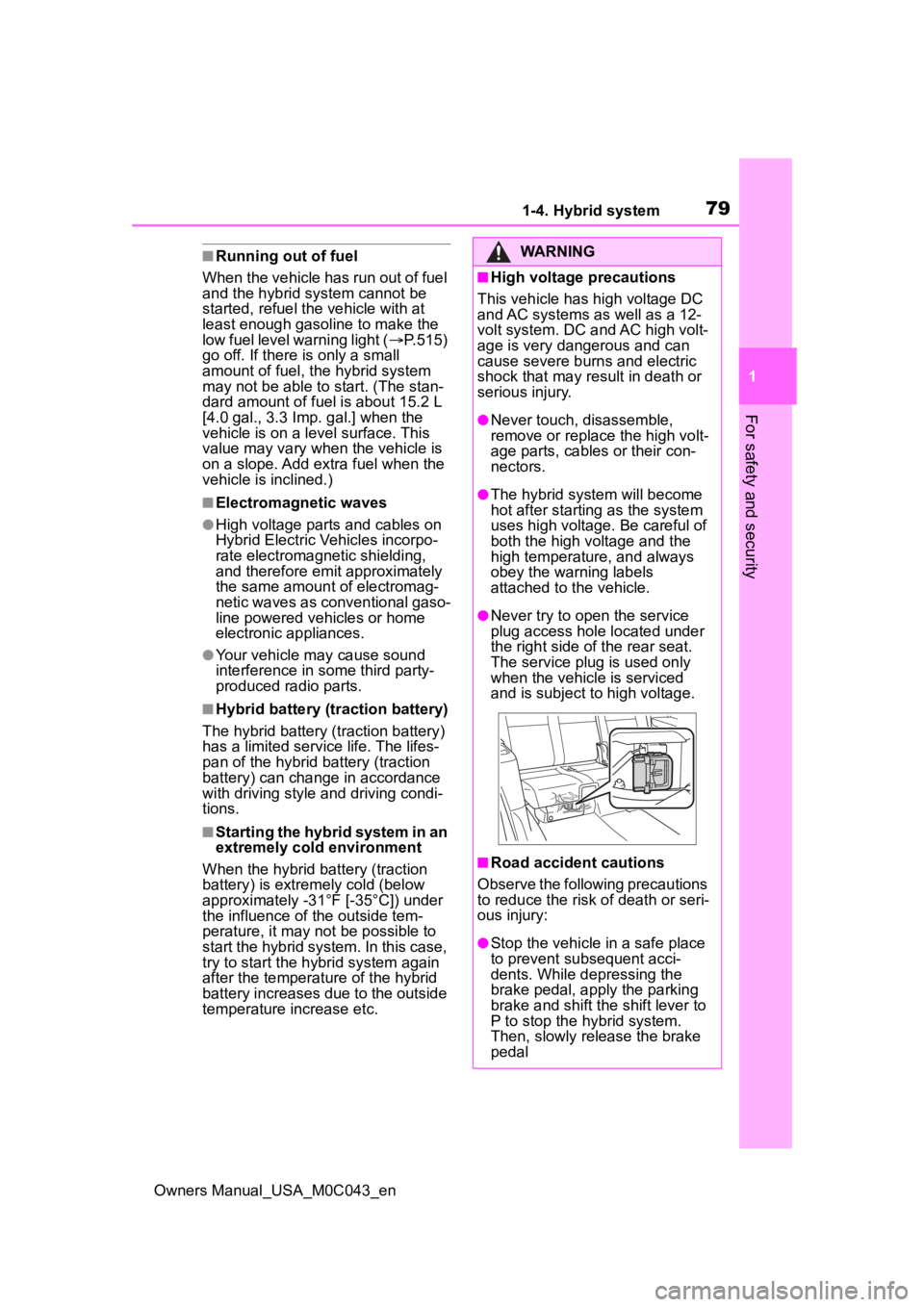
●Never try to open the service
plug access hole located under
the right side o f the rear seat.
The service plug is used only
when the vehicle is serviced
and is subject to high voltage.
■Road accident cautions
Observe the following precautions
to reduce the risk of death or seri-
ous injury:
●Stop the vehicle in a safe place
to prevent subsequent acci-
dents. While depressing the
brake pedal, apply the parking
brake and shift the shift lever to
P to stop the hybrid system.
Then, slowly release the brake
pedal
Page 80 of 628
801-4. Hybrid system
Owners Manual_USA_M0C043_en
WARNING
●Do not touch the high voltage
parts, cables and connectors.
●If electric wires are exposed
inside or outside your vehicle,
an electric shock may occur.
Never touch exposed electric
wires.
●If a fire occurs in the Hybrid
Electric Vehicle, leave the vehi-
cle as soon as possible. Never
use a fire extinguisher that is
not meant for electric fires.
Using even a small amount of
water may be dangerous.
●If your vehicle needs to be
towed, do so with the rear
wheels (2WD models) or four
wheels (4WD models) raised. If
the wheels connected to the
electric motor (traction motor)
are on the ground when towing,
the motor may continue to gen-
erate electricity. This may cause
a fire. (P.505)
●Carefully inspect the ground
under the vehicle. If you find
that liquid has leaked onto the
ground, the fuel system may
have been damaged. Leave the
vehicle as soon as possible.
●If a fluid leak occurs, do not
touch the fluid as it may be
strong alkaline electrolyte from
the hybrid battery (traction bat-
tery). If it comes into contact
with your skin or eyes, wash it
off immediately with a large
amount of water or, if possible,
boric acid solution. Seek imme-
diate medical attention.
■Hybrid battery (traction bat-
tery)
●Never resell, hand over or mod-
ify the hybrid battery. To prevent
accidents, hybrid batteries that
have been removed from a dis-
posed vehicle are collected
through your Toyota dealer. Do
not dispose of the battery your-
self.
Unless the battery is properly col-
lected, the following may occur,
resulting in dea th or serious
injury:
• The hybrid batte ry may be ille-
gally disposed of or dumped,
and it is hazardous to the envi-
ronment or someone may touch
a high voltage part, resulting in
an electric shock.
• The hybrid battery is intended to be used exclusively with your
Hybrid Electric Vehicle. If the
hybrid battery is used outside of
your vehicle or modified in any
way, accidents such as electric
shock, heat generation, smoke
generation, an explosion and
electrolyte leakage may occur.
When reselling or handing over
your vehicle, the possibility of an
accident is extremely high
because the person receiving the
vehicle may not be aware of these
dangers.
●If your vehicle is disposed of
without the hybrid battery hav-
ing been removed, there is a
danger of serious electric shock
if high voltage parts, cables and
their connectors are touched. In
the event that your vehicle must
be disposed of, the hybrid bat-
tery must be disposed of by
your Toyota dealer. If the hybrid
battery is not disposed of prop-
erly, it may cause electric shock
that can result in death or seri-
ous injury.
Page 93 of 628
932-1. Instrument cluster
Owners Manual_USA_M0C043_en
2
Vehicle status information and indicators
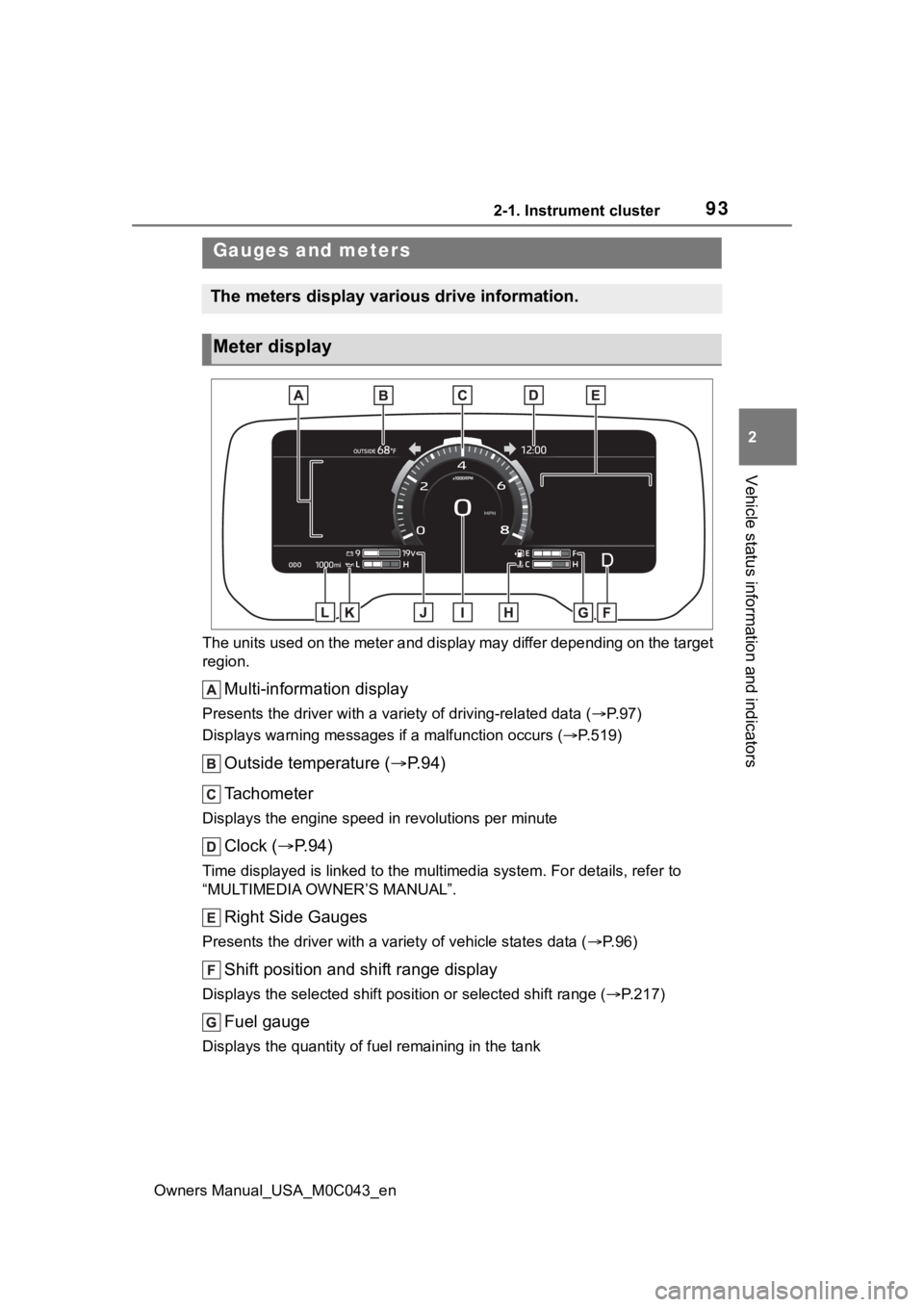
The units used on the meter and display may differ depending on the target
region.
Multi-information display
Presents the driver with a variety of driving-related data ( P. 9 7 )
Displays warning messages if a malfunction occurs (P.519)
Outside temperature ( P. 9 4 )
Tachometer
Displays the engine speed in revolutions per minute
Clock ( P. 9 4 )
Time displayed is linked to the multimedia system. For details, refer to
“MULTIMEDIA OWNER’S MANUAL”.
Right Side Gauges
Presents the driver with a variety of vehicle states data ( P. 9 6 )
Shift position and shift range display
Displays the selected shift posit ion or selected shift range (P.217)
Fuel gauge
Displays the quantity of fu el remaining in the tank
Gauges and meters
The meters display various drive information.
Meter display
Page 94 of 628
942-1. Instrument cluster
Owners Manual_USA_M0C043_en
Engine coolant temperature gauge
Displays the engine coolant temperature
Speedometer
Displays the vehicle speed
Voltmeter
Displays the charge state
Engine oil pressure gauge
Displays the engine oil pressure
Odometer and trip meter ( P.95)
■The meters and display illumi-
nate when
The power swit ch is in ON.
■Tachometer needle feature
The tachometer needle will fade in
or out during the engine starting or
stopping, respectively.
The needle is completely visible
after the engine is turned on or
turned off.
■Clock settings screen
If clock setting item is displayed
when is selected on the multi-
information display, the system may
be malfunctioning. Have the vehicle
inspected by your Toyota dealer.
■Outside temperature display
●In the following si tuations, the cor-
rect outside tempe rature may not
be displayed, or the display may
take longer than normal to
change.
• When stopped, or driving at low
speeds (less than 12 mph [20
km/h])
• When the outside temperature
has changed suddenly (at the
entrance/exit of a garage, tunnel,
etc.)
●When “--” or “E” is displayed, the
system may be malfunctioning.
Take your vehicle to your Toyota
dealer.
●Displays the outsi de temperature
within the range of -40°F (-40°C)
to 122°F (50°C).
●When the outside temperature is
approximately 37°F (3°C) or
lower, the indicator will flash
for approximately 10 seconds,
then stay on.
■Liquid crystal display
P. 9 8
■Customization
Settings (e. g. mete r display) can be
changed on screen of the multi-
information display. ( P.101)
WARNING
■The information display at
low temperatures
Allow the interior of the vehicle to
warm up before using the liquid
crystal information display. At
extremely low temperatures, the
information disp lay monitor may
respond slowly, and display
changes may be delayed.
Page 97 of 628
972-1. Instrument cluster
Owners Manual_USA_M0C043_en
2
Vehicle status information and indicators
■Changing the display items
1 Press or to select .
2 Press or to select
“Customize Right Side”, and
then press and hold .
3 Select the item and then
press .
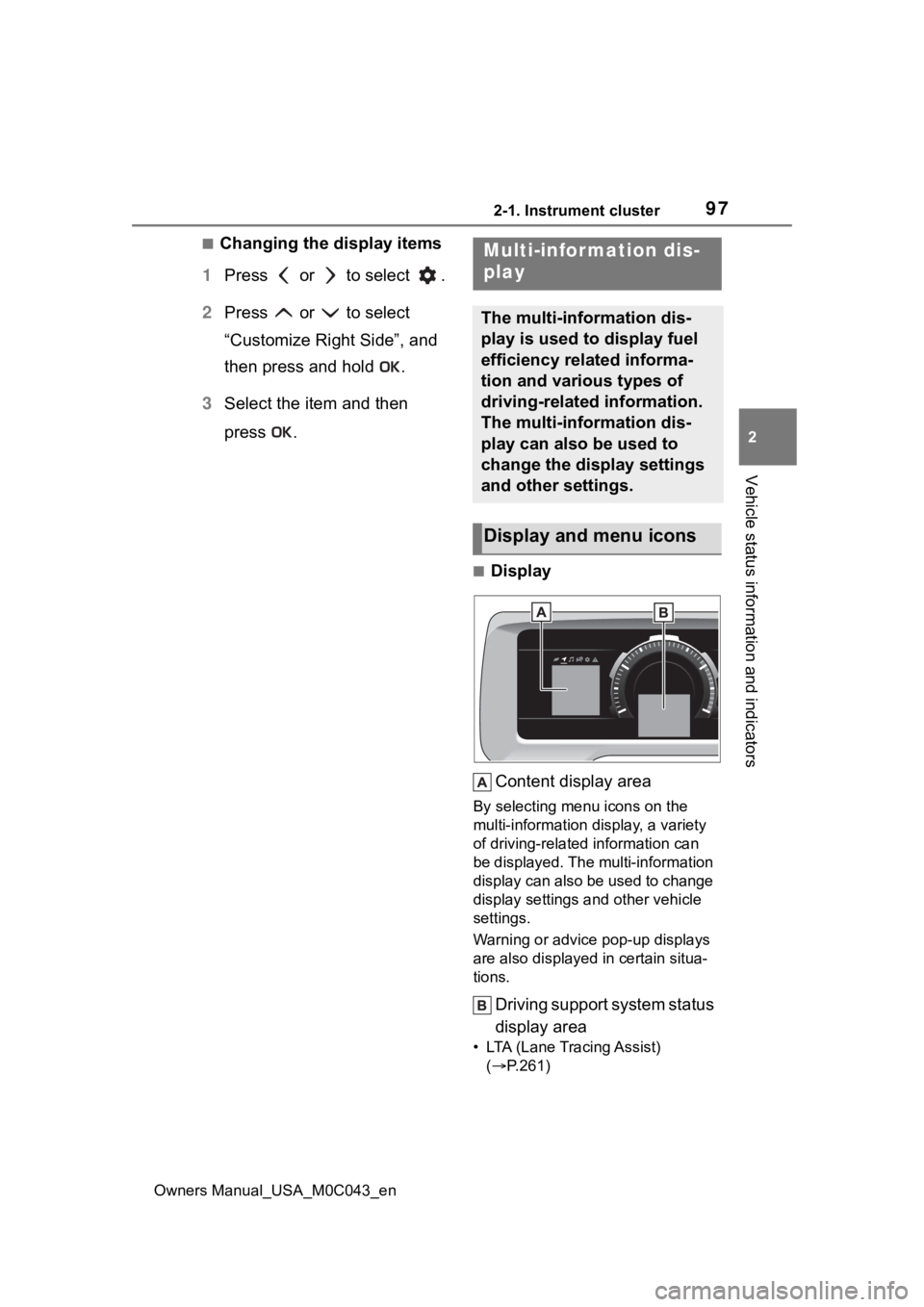
■Display
Content display area
By selecting menu icons on the
multi-information di splay, a variety
of driving-related information can
be displayed. The multi-information
display can also be used to change
display settings and other vehicle
settings.
Warning or advice pop-up displays
are also displayed in certain situa-
tions.
Driving support system status
display area
• LTA (Lane Tracing Assist) ( P.261)
Multi-infor mation dis-
play
The multi-information dis-
play is used to display fuel
efficiency related informa-
tion and various types of
driving-related information.
The multi-information dis-
play can also be used to
change the display settings
and other settings.
Display and menu icons
Page 98 of 628
982-1. Instrument cluster
Owners Manual_USA_M0C043_en• Dynamic radar cruise control with
full-speed range ( P.275)
• RSA (Road Sign Assist) (if equipped) ( P.272)
■Menu icons
The menu icons will be dis-
played by pressing the or
meter control switch.
■Liquid crystal display
Small spots or light spots may
appear on the display. This phenom-
enon is characteristi c of liquid crys-
tal displays, and there is no problem
continuing to use the display.
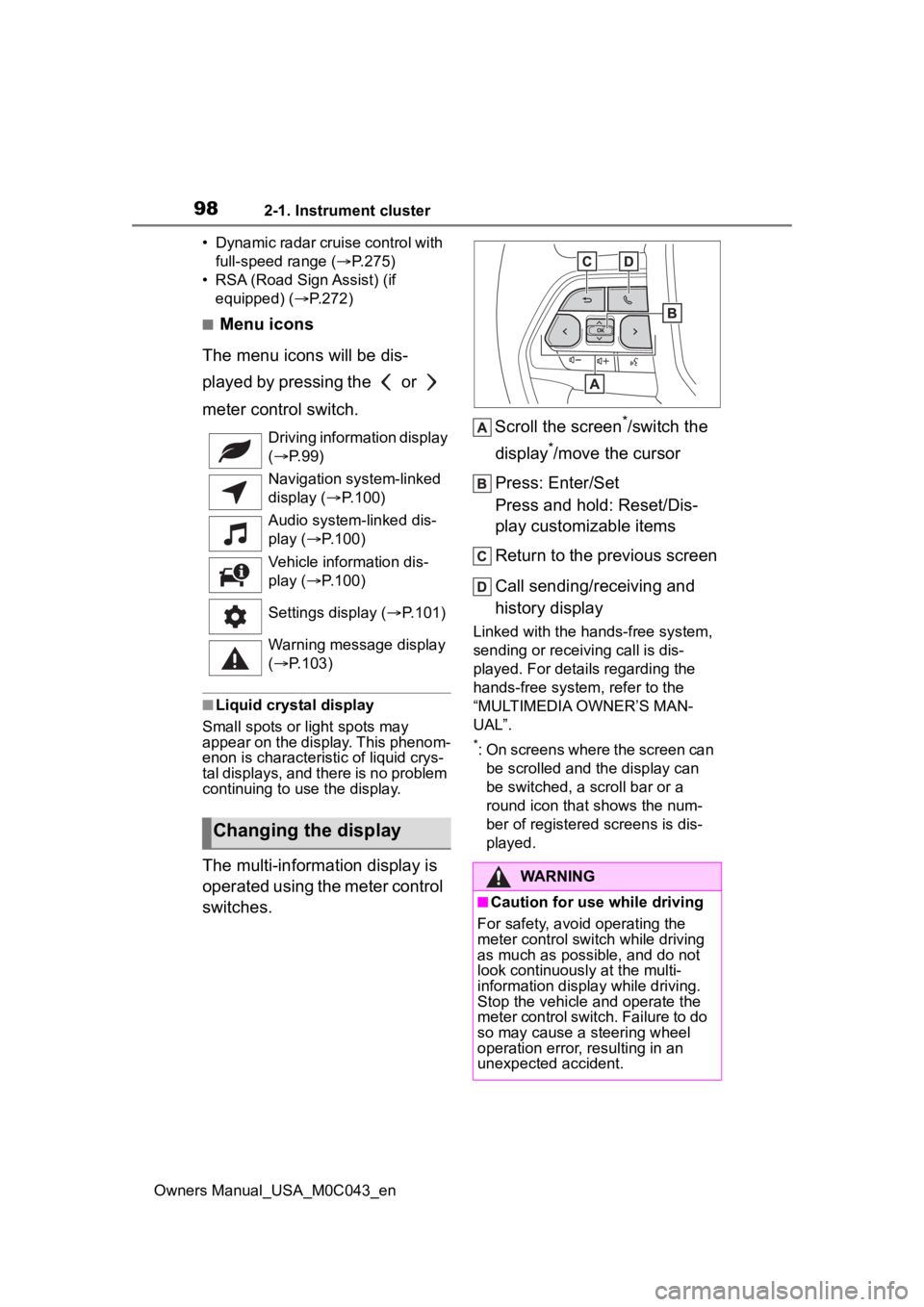
The multi-information display is
operated using the meter control
switches. Scroll the screen
*/switch the
display
*/move the cursor
Press: Enter/Set
Press and hold: Reset/Dis-
play customizable items
Return to the previous screen
Call sending/receiving and
history display
Linked with the hands-free system,
sending or receiving call is dis-
played. For details regarding the
hands-free system, refer to the
“MULTIMEDIA OWNER’S MAN-
UAL”.
*: On screens where the screen can be scrolled and the display can
be switched, a scroll bar or a
round icon that shows the num-
ber of registered screens is dis-
played.
Driving information display
(
P. 9 9 )
Navigation system-linked
display ( P.100)
Audio system-linked dis-
play ( P.100)
Vehicle information dis-
play ( P.100)
Settings display ( P.101)
Warning message display
( P.103)
Changing the display
WARNING
■Caution for use while driving
For safety, avoid operating the
meter control switch while driving
as much as possible, and do not
look continuously at the multi-
information display while driving.
Stop the vehicle and operate the
meter control switch. Failure to do
so may cause a steering wheel
operation error, resulting in an
unexpected accident.
Page 99 of 628
992-1. Instrument cluster
Owners Manual_USA_M0C043_en
2
Vehicle status information and indicators
Select to display fuel consump-
tion data in various forms.
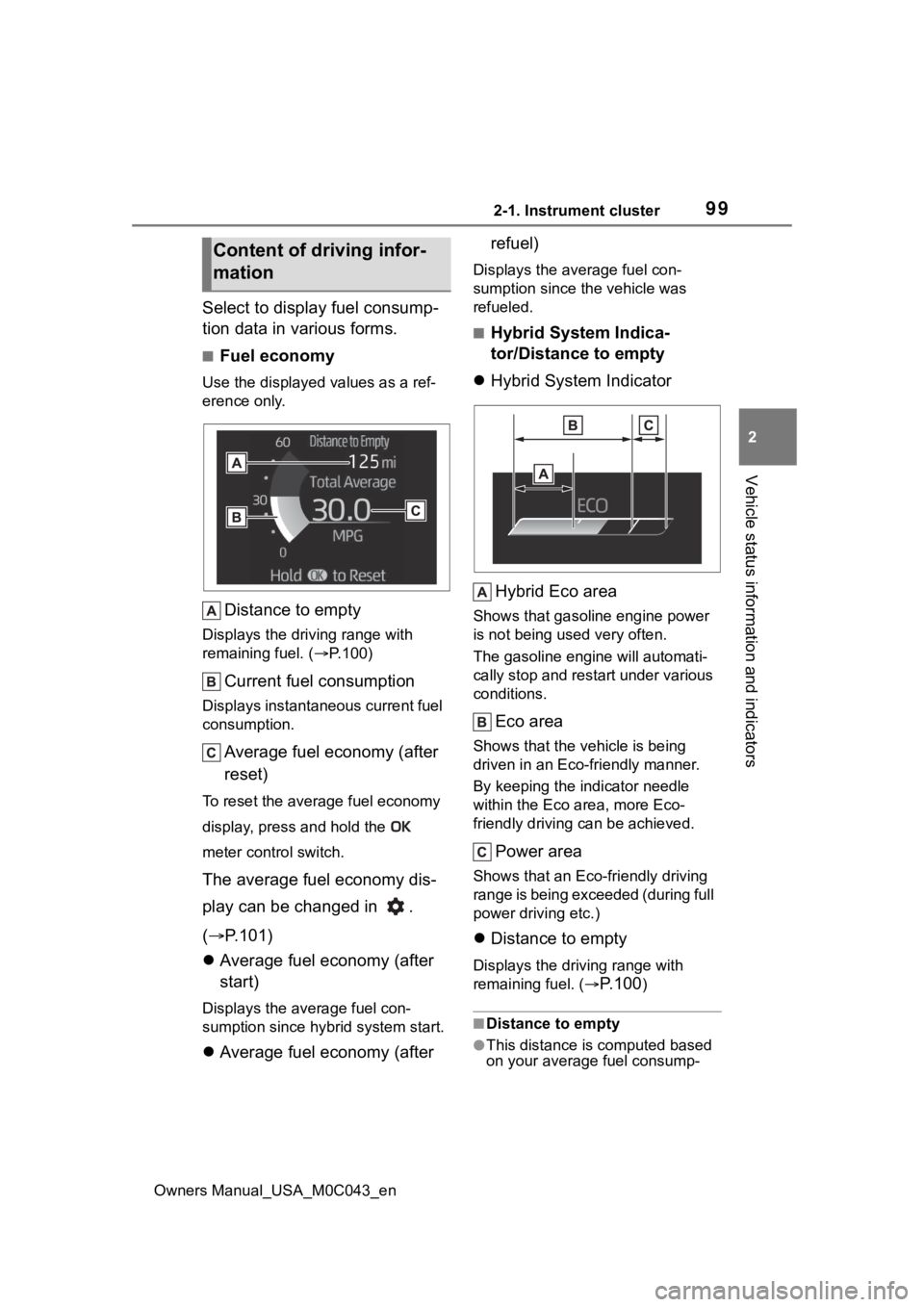
■Fuel economy
Use the displayed values as a ref-
erence only.
Distance to empty
Displays the driving range with
remaining fuel. ( P.100)
Current fuel consumption
Displays instantaneous current fuel
consumption.
Average fuel economy (after
reset)
To reset the average fuel economy
display, press and hold the
meter control switch.
The average fuel economy dis-
play can be changed in .
( P.101)
Average fuel economy (after
start)
Displays the average fuel con-
sumption since hybrid system start.
Average fuel economy (after refuel)
Displays the average fuel con-
sumption since the vehicle was
refueled.
■Hybrid System Indica-
tor/Distance to empty
Hybrid System Indicator
Hybrid Eco area
Shows that gasoline engine power
is not being used very often.
The gasoline engi ne will automati-
cally stop and restart under various
conditions.
Eco area
Shows that the vehicle is being
driven in an Eco-friendly manner.
By keeping the indicator needle
within the Eco area, more Eco-
friendly driving can be achieved.
Power area
Shows that an Eco-friendly driving
range is being exceeded (during full
power driving etc.)
Distance to empty
Displays the driving range with
remaining fuel. (
P.100)
■Distance to empty
●This distance is computed based
on your average fuel consump-
Content of driving infor-
mation
Page 101 of 628
1012-1. Instrument cluster
Owners Manual_USA_M0C043_en
2
Vehicle status information and indicators
• “Distance”: Displ ays the distance
driven since hybrid system start
*
• “Total Time”: Displays the elapsed time since hybrid system start
*
*
: These items are reset each time the hybrid system stops.
“Total”
• “Average Speed”: Displays the
average vehicle speed since the
display was reset
*
• “Distance”: Displ ays the distance
driven since the display was
reset
*
• “Total Time”: Displays the elapsed
time since the display was reset
*
*
: To reset, display the desired item
and press and hold the meter
control switch.
■Tire inflation pressure
Displays inflation pressure of
each tire.
■Meter display settings that
can be changed
Language
Select to change the language dis-
played.
Units
Select to change t he units of mea-
sure displayed.
Meter Type
Select to change the main dial type
to speedometer or tachometer.
(Driving information dis-
play settings)
• Fuel economy display
Select to change the average fuel
consumption display between after
start/after reset/after refuel.
( P. 9 9 )
(Audio settings)
Select to displa y/not display the
audio system linked display.
(Vehicle information dis-
play settings)
Select to change the displayed con-
tent of the following:
• Drive information type
Select to change the drive informa-
tion type display between after
start/after reset.
• Drive information items
Select to set the first and second
items of the drive information dis-
play to any of the following: aver-
age vehicle
speed/distance/elapsed time.
Pop-up display
Select to enable/disable pop-up
displays for each relevant system.
Multi-information display off
Select to turn the multi-information
display off.
To turn the multi-information display
on again, press any of the meter
control switches.
Default setting
Select to reset the meter display
settings to the default setting.
Settings display
Page 103 of 628
1032-1. Instrument cluster
Owners Manual_USA_M0C043_en
2
Vehicle status information and indicators
error continues, contact your Toy-
ota dealer.
■Vehicle functions and set-
tings that can be changed
P.570
■Suspension of the settings dis-
play
●Some settings cannot be changed
while driving. When changing set-
tings, park the vehicle in a safe
place.
●If a warning message is displayed,
operation of the settings display
will be suspended.
Select to display warning mes-
sages and measures to be
taken if a malfunction is
detected. ( P.519)
WARNING
■Cautions during setting up
the display
If the hybrid system is operating
when changing the display set-
tings, ensure that the vehicle is
parked in a place with adequate
ventilation. In a closed area such
as a garage, exhaust gases
including harmful carbon monox-
ide (CO) may collect and enter
the vehicle. This may lead to
death or a seri ous health hazard.
NOTICE
■During setting up the display
To prevent 12-volt battery dis-
charge, ensure that the hybrid
system is operating while setting
up the display features.
Warning message display
Page 104 of 628
1042-1. Instrument cluster
Owners Manual_USA_M0C043_en
*: If equipped
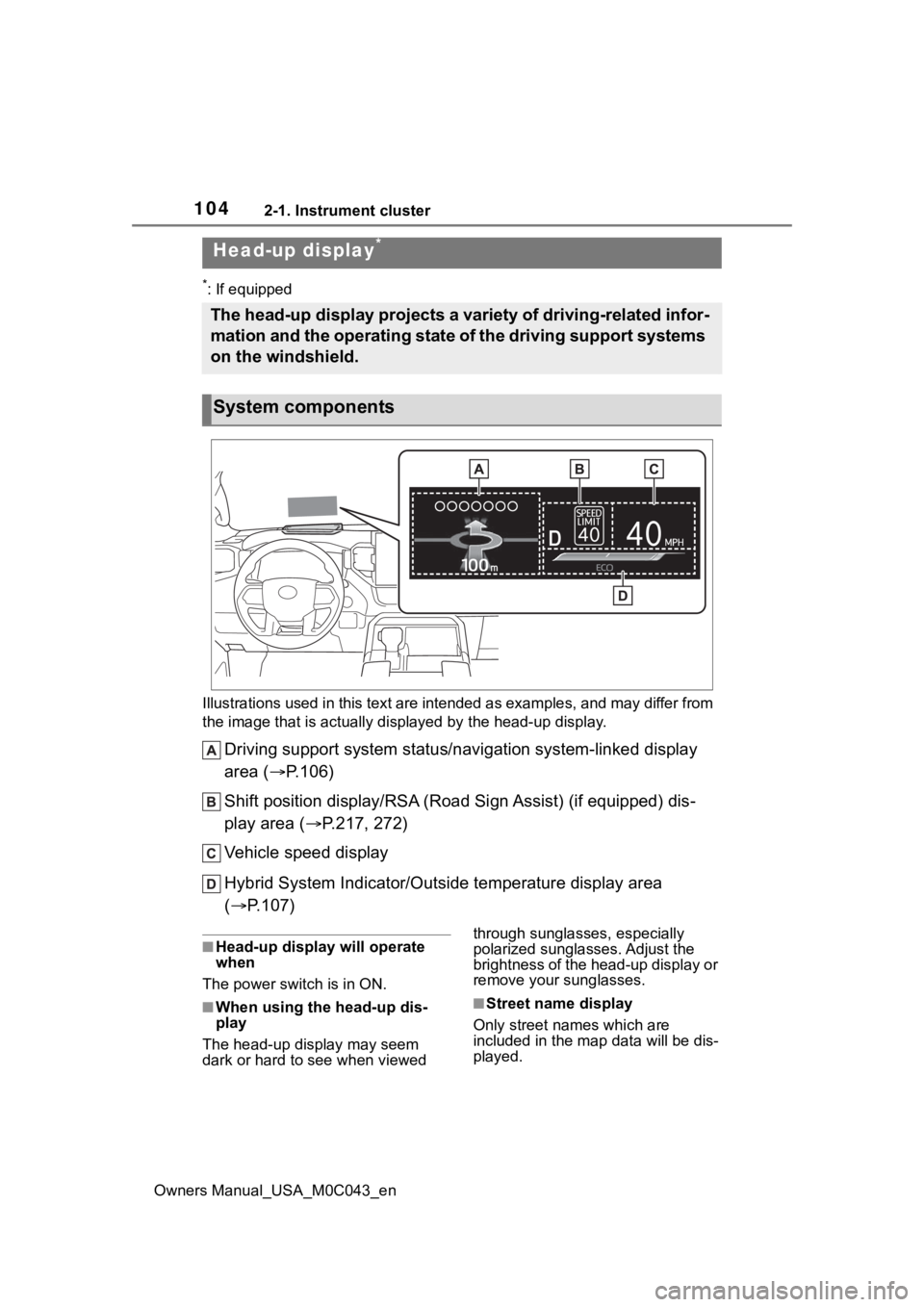
Illustrations used in this text are intended as examples, and m ay differ from
the image that is actually displayed by the he ad-up display.
Driving support system status/navigation system-linked display
area ( P.106)
Shift position display/RSA (R oad Sign Assist) (if equipped) dis -
play area ( P.217, 272)
Vehicle speed display
Hybrid System Indicator/Outside temperature display area
( P.107)
■Head-up display will operate
when
The power swit ch is in ON.
■When using the head-up dis-
play
The head-up display may seem
dark or hard to see when viewed through sunglasses, especially
polarized sunglasses. Adjust the
brightness of the head-up display or
remove your sunglasses.■Street name display
Only street names which are
included in the m ap data will be dis-
played.
Head-up display*
The head-up display projects a variety of driving-related infor -
mation and the operating state of the driving support systems
on the windshield.
System components