mirror TOYOTA SEQUOIA HYBRID 2023 Service Manual
[x] Cancel search | Manufacturer: TOYOTA, Model Year: 2023, Model line: SEQUOIA HYBRID, Model: TOYOTA SEQUOIA HYBRID 2023Pages: 628, PDF Size: 14.27 MB
Page 318 of 628
3184-5. Using the driving support systems
Owners Manual_USA_M0C043_en
WARNING
●Do not use the panoramic view
monitor system in the following
cases:
• On icy or slick road surfaces, or in snow
• When using tire chains or emer- gency tires
• When the front door or the back door is not clo sed completely
• On roads that are not flat or straight, such as curves or
slopes
• If the suspension has been modified or tires of a size other
than specified are installed
●In low temperatures, the screen
may darken or the image may
become faint. The image could
distort when the vehicle is mov-
ing, or you may become unable
to see the image on the screen.
Be sure to visually check all
around the vehicle both directly
and using the mirrors before
proceeding.
●If the tire sizes are changed, the
position of the guide lines dis-
played on the screen may
change.
●The camera uses a special lens.
The distances between objects
and pedestrians that appear in
the image displayed on the
screen will differ from the actual
distances. ( P.344)
●When an aftermarket part is
installed in the display area of
the screen.
NOTICE
●In panoramic view/moving
view/see-through view, the sys-
tem combines images taken
from the front, back, left and
right side cameras into a single
image. There are limits to the
range and content that can be
displayed. Familiarize yourself
with the characteristics of the
panoramic view monitor system
before using it.
●Image clarity may decline at the
four corners of t he panoramic
view/moving view/see-through
view. However, this is not a mal-
function, as these are the
regions along the border of
each camera image where the
images are combined.
●Depending on lighting condi-
tions near each of the cameras,
bright and dark patches may
appear on the panoramic
view/moving view/see-through
view.
●The panoramic view/moving
view/see-through view display
does not extend higher than the
installation pos ition and image
capture range o f each camera.
●There are blind spots around
the vehicle. Accordingly, there
are regions not displayed in
panoramic view.
●Three-dimensional objects dis-
played in wide fr ont view, rear
view or side view may not be
displayed in panoramic
view/moving view/see-through
view.
Page 319 of 628
3194-5. Using the driving support systems
Owners Manual_USA_M0C043_en
4
Driving
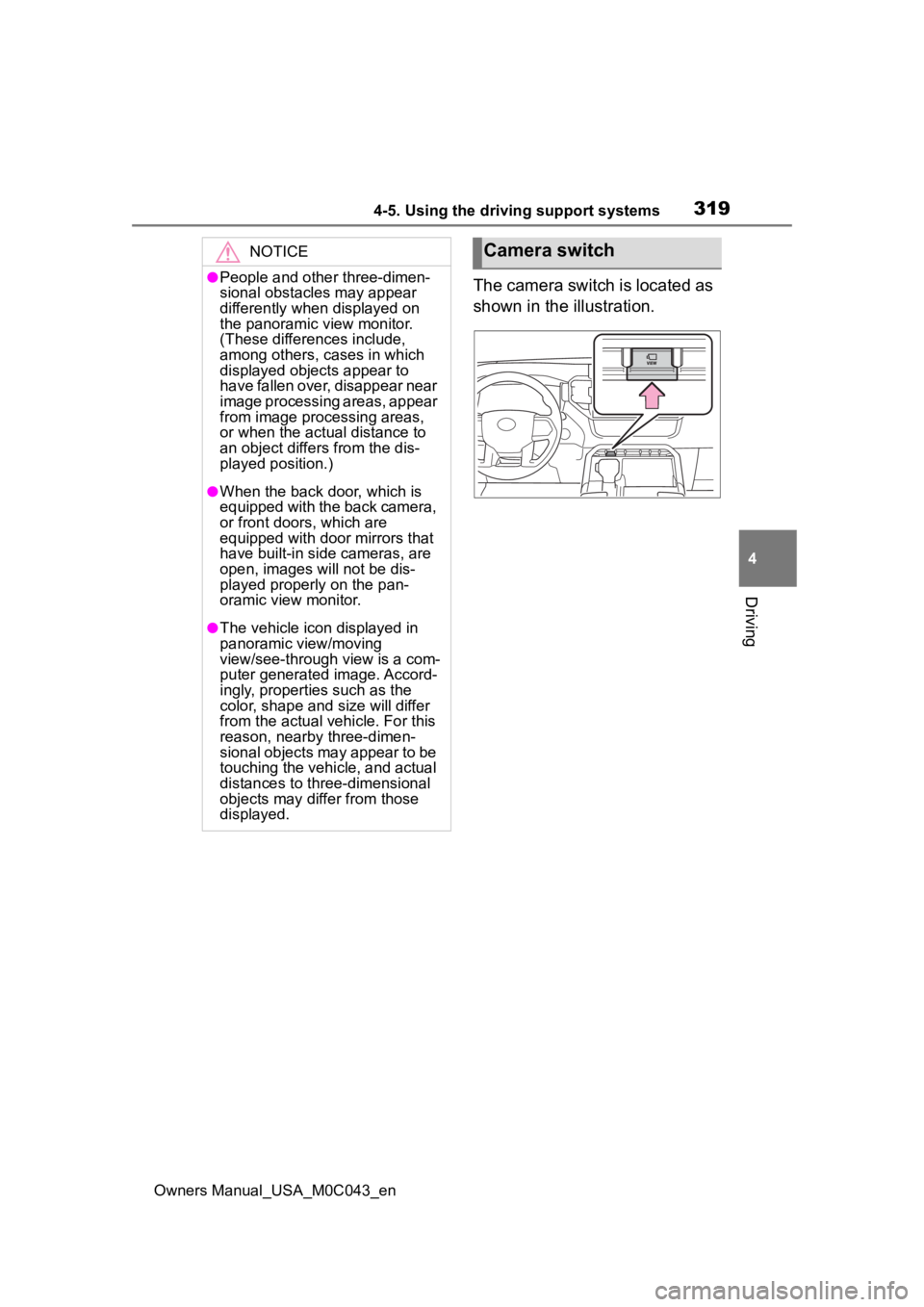
The camera switch is located as
shown in the illustration.
NOTICE
●People and other three-dimen-
sional obstacles may appear
differently when displayed on
the panoramic view monitor.
(These differences include,
among others, cases in which
displayed objects appear to
have fallen over, disappear near
image processing areas, appear
from image processing areas,
or when the actual distance to
an object differs from the dis-
played position.)
●When the back door, which is
equipped with the back camera,
or front doors, which are
equipped with door mirrors that
have built-in side cameras, are
open, images will not be dis-
played properly on the pan-
oramic view monitor.
●The vehicle icon displayed in
panoramic view/moving
view/see-through view is a com-
puter generated image. Accord-
ingly, properties such as the
color, shape and size will differ
from the actual veh icle. For this
reason, nearby three-dimen-
sional objects may appear to be
touching the vehicle, and actual
distances to three-dimensional
objects may diffe r from those
displayed.
Camera switch
Page 327 of 628
3274-5. Using the driving support systems
Owners Manual_USA_M0C043_en
4
Driving
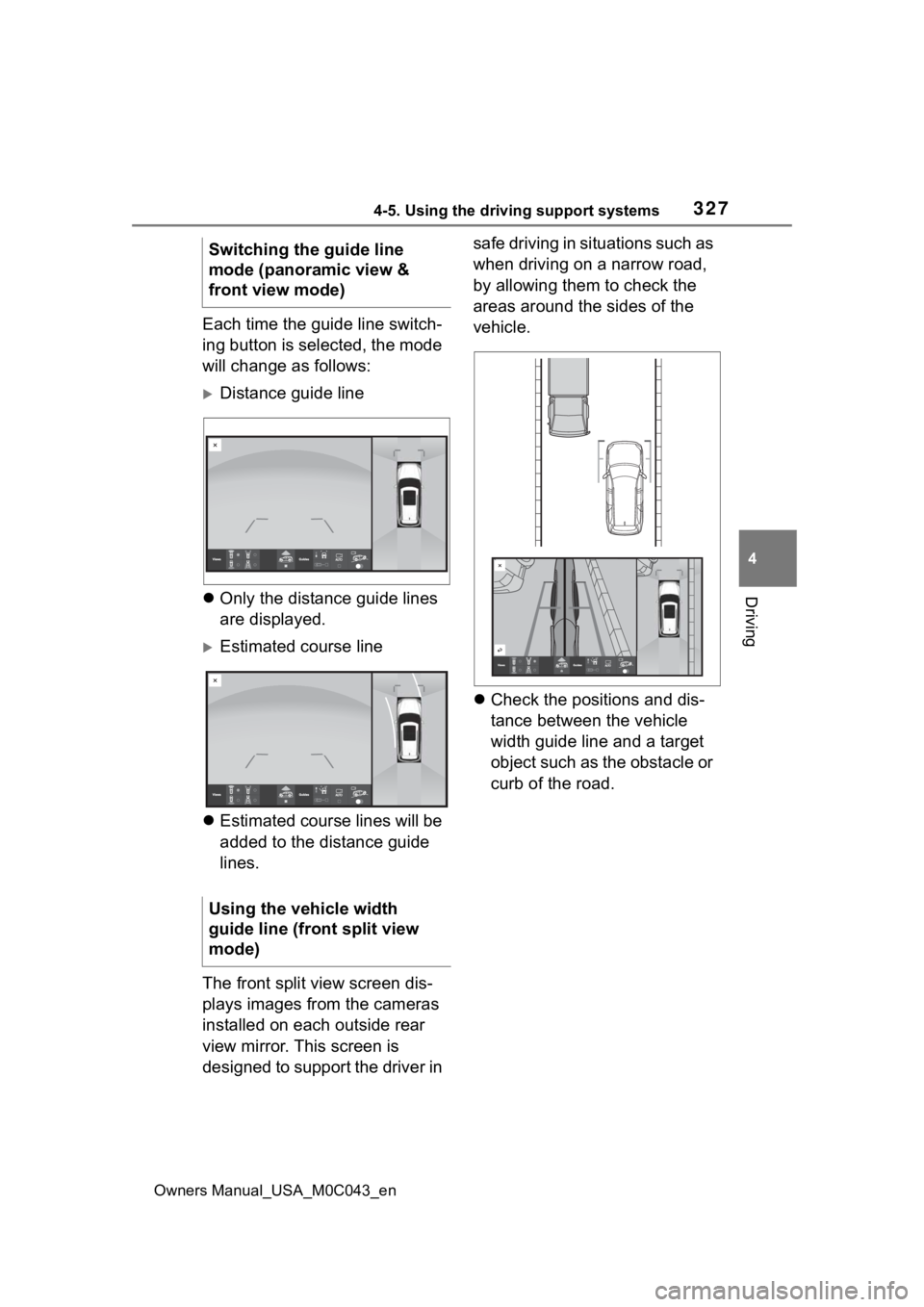
Each time the guide line switch-
ing button is selected, the mode
will change as follows:
Distance guide line
Only the distance guide lines
are displayed.
Estimated course line
Estimated course lines will be
added to the distance guide
lines.
The front split view screen dis-
plays images from the cameras
installed on each outside rear
view mirror. This screen is
designed to support the driver in safe driving in situations such as
when driving on a narrow road,
by allowing them to check the
areas around the sides of the
vehicle.
Check the positions and dis-
tance between the vehicle
width guide line and a target
object such as the obstacle or
curb of the road.
Switching the guide line
mode (panoramic view &
front view mode)
Using the vehicle width
guide line (front split view
mode)
Page 352 of 628
3524-5. Using the driving support systems
Owners Manual_USA_M0C043_en
*: If equipped
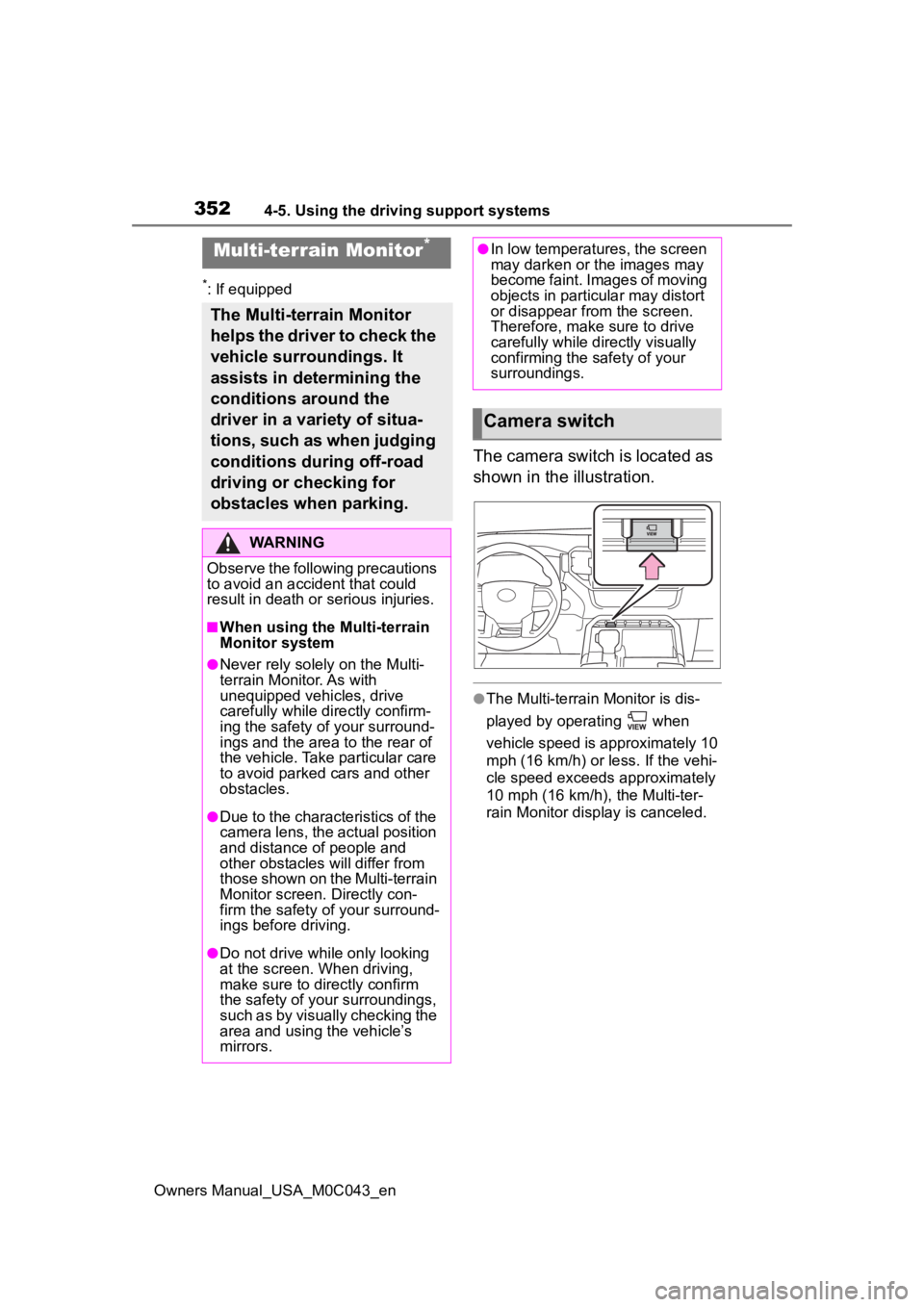
The camera switch is located as
shown in the illustration.
●The Multi-terrain Monitor is dis-
played by operating when
vehicle speed is approximately 10
mph (16 km/h) or less. If the vehi-
cle speed exceeds approximately
10 mph (16 km/h), the Multi-ter-
rain Monitor display is canceled.
Multi-terrain Monitor*
The Multi-terrain Monitor
helps the driver to check the
vehicle surroundings. It
assists in determining the
conditions around the
driver in a variety of situa-
tions, such as when judging
conditions during off-road
driving or checking for
obstacles when parking.
WARNING
Observe the following precautions
to avoid an accident that could
result in death or serious injuries.
■When using the Multi-terrain
Monitor system
●Never rely solely on the Multi-
terrain Monitor. As with
unequipped vehicles, drive
carefully while directly confirm-
ing the safety o f your surround-
ings and the area to the rear of
the vehicle. Take particular care
to avoid parked cars and other
obstacles.
●Due to the characteristics of the
camera lens, the actual position
and distance of people and
other obstacles will differ from
those shown on the Multi-terrain
Monitor screen. Directly con-
firm the safety of your surround-
ings before driving.
●Do not drive while only looking
at the screen. When driving,
make sure to directly confirm
the safety of your surroundings,
such as by visually checking the
area and using the vehicle’s
mirrors.
●In low temperatures, the screen
may darken or the images may
become faint. Images of moving
objects in particular may distort
or disappear from the screen.
Therefore, make sure to drive
carefully while directly visually
confirming the safety of your
surroundings.
Camera switch
Page 406 of 628
4065-1. Using the air conditioning system and defogger
Owners Manual_USA_M0C043_en
5-1.Using the air conditioning system and defogger
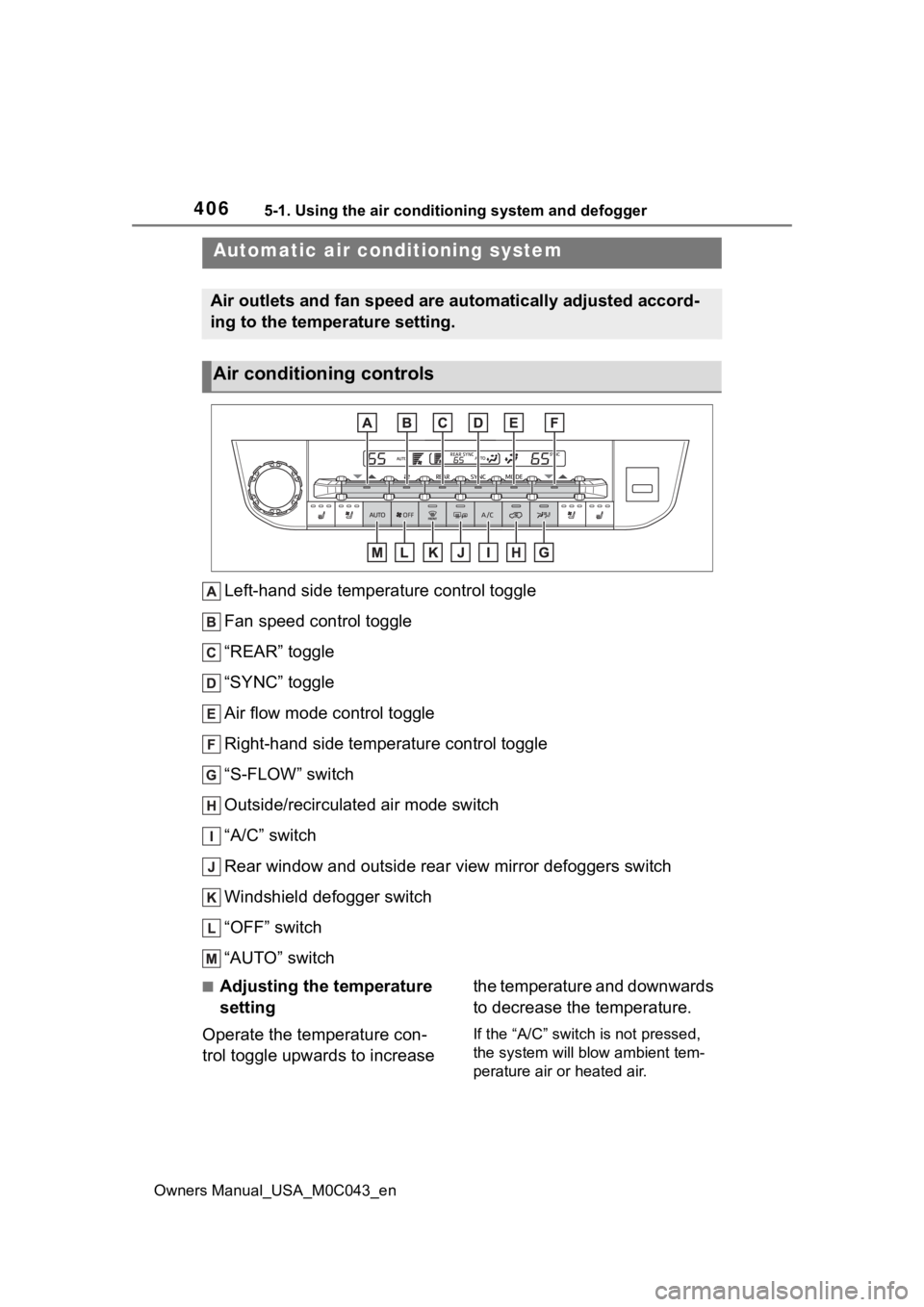
Left-hand side temperature control toggle
Fan speed control toggle
“REAR” toggle
“SYNC” toggle
Air flow mode control toggle
Right-hand side temperature control toggle
“S-FLOW” switch
Outside/recirculated air mode switch
“A/C” switch
Rear window and outside rear view mirror defoggers switch
Windshield defogger switch
“OFF” switch
“AUTO” switch
■Adjusting the temperature
setting
Operate the temperature con-
trol toggle upwards to increase the temperature and downwards
to decrease the temperature.
If the “A/C” switch is not pressed,
the system will blow ambient tem-
perature air or heated air.
Automatic air conditioning system
Air outlets and fan speed are automatically adjusted accord-
ing to the temperature setting.
Air conditioning controls
Page 408 of 628
4085-1. Using the air conditioning system and defogger
Owners Manual_USA_M0C043_en
■Defogging the rear window
and outside rear view mir-
rors
Defoggers are used to defog the
rear window and to remove rain-
drops, dew and frost from the
outside rear view mirrors.
Press the rear window and out-
side rear view mirror defoggers
switch.
The defoggers will automatically
turn off after 15 minutes.
When the rear window and outside
rear view mirror defoggers switch is
on, the indicator illuminates on the
rear window and ou tside rear view
mirror defoggers switch.
■When the outside temperature
exceeds 75°F (24°C) and the air
conditioning system is on
●In order to reduce the air condi-
tioning power consumption, the air
conditioning system may switch to
recirculated air mode automati-
cally.
This may also reduce fuel con-
sumption.
●Recirculated air mode is selected
as a default mode when the power
switch is turned to ON.
It is possible to switch to outside air
mode at any time by pressing the
outside air mode switch.
■Fogging up of the windows
●The windows will easily fog up
when the humidity in the vehicle is
high. Turning the cooling and
dehumidification function on will
dehumidify the air from the outlets
and defog the windshield effec-
tively.
●If you turn the cooling and dehu-
midification function off, the win-
dows may fog up more easily.
●The windows may fog up if the
recirculated air mode is used.
■When driving on dusty roads
Close all windows. If dust thrown up
by the vehicle is still drawn into the
vehicle after closing the windows, it
is recommended that the air intake
mode be set to outside air mode and
the fan speed to a ny setting except
off.
■Outside/recirculated air mode
●Setting to the recirculated air
mode temporarily is recom-
mended in preventing dirty air
from entering the vehicle interior
and helping to c ool the vehicle
when the outside air temperature
is high.
●Outside/recirculated air mode may
automatically switch depending on
the temperature setting or the
inside temperature.
■When the outside temperature
falls to nearly 32°F (0°C)
The dehumidification function may
not operate even when “A/C” switch
is pressed.
■Ventilation and air conditioning
odors
●To let fresh air in, set the air condi-
tioning system to the outside air
mode.
●During use, various odors from
inside and outside the vehicle may
enter into and accumulate in the
air conditioning system. This may
then cause odor to be emitted
from the vents.
●In order to suppr ess odors that
occur when the air conditioning
system starts, the air flow mode
may change to blow air to the feet
or air may stop blowing for a short
period of time immediately after
the air conditioning system is
started in automatic mode.
●When parking, the system auto-
matically switches to outside air
mode to encourage better air cir-
Page 409 of 628
4095-1. Using the air conditioning system and defogger
Owners Manual_USA_M0C043_en
5
Interior features
culation throughout the vehicle,
helping to reduce odors that occur
when starting the vehicle.
■Air conditioning filter
P. 4 8 7
■Air conditioning system refrig-
erant
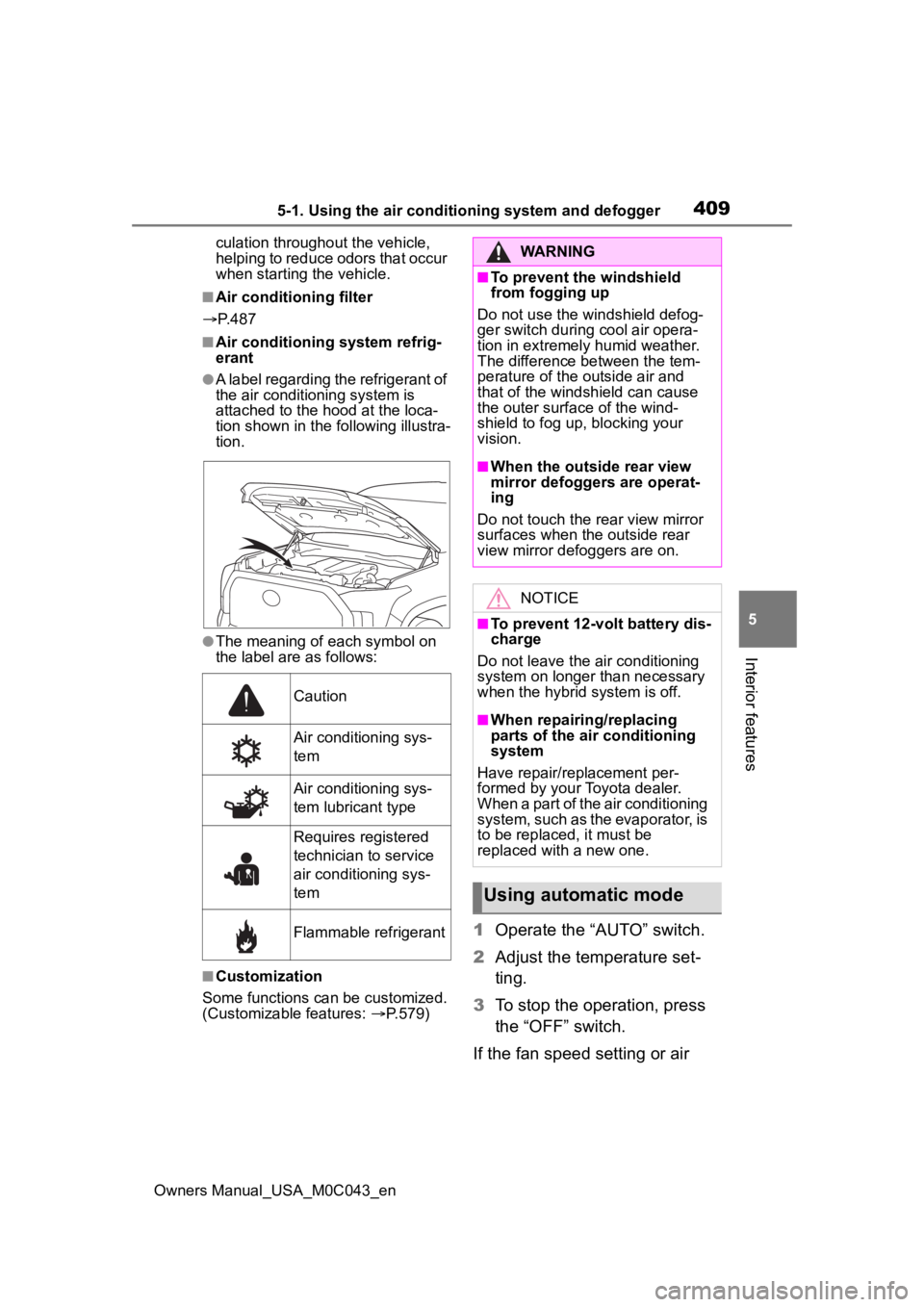
●A label regarding the refrigerant of
the air conditioning system is
attached to the ho od at the loca-
tion shown in the f ollowing illustra-
tion.
●The meaning of each symbol on
the label are as follows:
■Customization
Some functions can be customized.
(Customizable features: P.579)
1 Operate the “AUTO” switch.
2 Adjust the temperature set-
ting.
3 To stop the operation, press
the “OFF” switch.
If the fan speed setting or air
Caution
Air conditioning sys-
tem
Air conditioning sys-
tem lubricant type
Requires registered
technician to service
air conditioning sys-
tem
Flammable refrigerant
WARNING
■To prevent the windshield
from fogging up
Do not use the windshield defog-
ger switch during cool air opera-
tion in extremely humid weather.
The difference between the tem-
perature of the outside air and
that of the windshield can cause
the outer surface of the wind-
shield to fog up, blocking your
vision.
■When the outside rear view
mirror defoggers are operat-
ing
Do not touch the rear view mirror
surfaces when the outside rear
view mirror def oggers are on.
NOTICE
■To prevent 12-volt battery dis-
charge
Do not leave the air conditioning
system on longer than necessary
when the hybrid system is off.
■When repairing/replacing
parts of the air conditioning
system
Have repair/replacement per-
formed by your Toyota dealer.
When a part of the air conditioning
system, such as the evaporator, is
to be replaced, it must be
replaced with a new one.
Using automatic mode
Page 411 of 628
4115-1. Using the air conditioning system and defogger
Owners Manual_USA_M0C043_en
5
Interior features
To turn on the “SYNC” mode,
operate the “SYNC” toggle
upwards or downwards.
The driver’s side temperature con-
trol toggle can be used to adjust the
temperature for the driver’s and
front passenger’s side. To enter
individual mode, operate the front
passenger’s side temperature con-
trol toggle or press the “SYNC” tog-
gle again.
When the “SYNC” mode is on, the
“SYNC” indicator is illuminate.
This feature is used to prevent
ice from building up on the wind-
shield and wiper blades.
Press the rear window and out-
side rear view mirror defoggers
switch.
The windshield wiper de-icer will
automatically turn off after 15 min-
utes.
Turning the rear window and out-
side rear view mirror defoggers on
will turn the windshield wiper de-
icer on.
When the rear window and outside
rear view mirror defoggers switch is
on, the indicator illuminates on the
rear window and ou tside rear view
mirror defoggers switch.
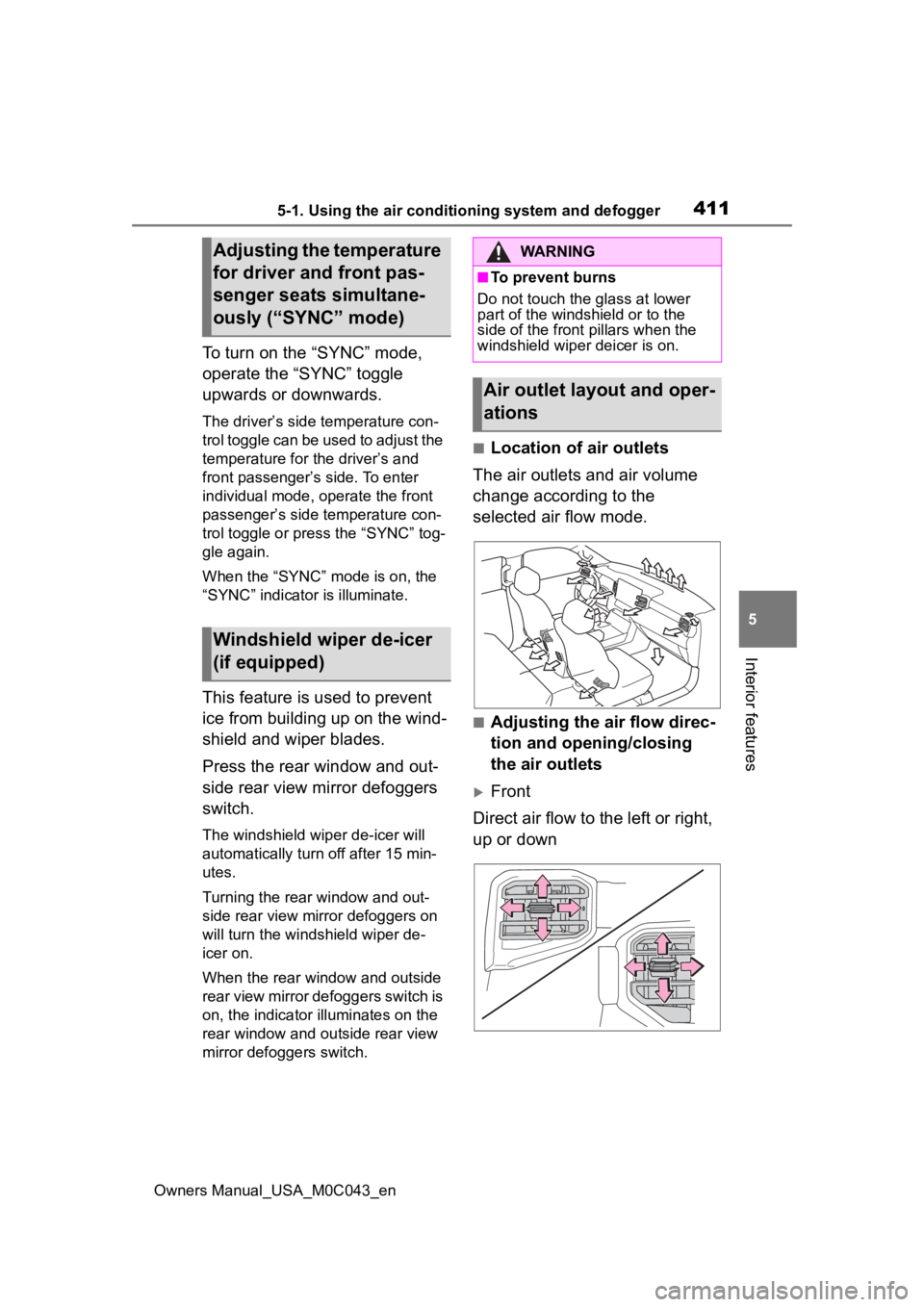
■Location of air outlets
The air outlets and air volume
change according to the
selected air flow mode.
■Adjusting the air flow direc-
tion and opening/closing
the air outlets
Front
Direct air flow to the left or right,
up or down
Adjusting the temperature
for driver and front pas-
senger seats simultane-
ously (“SYNC” mode)
Windshield wiper de-icer
(if equipped)
WARNING
■To prevent burns
Do not touch the glass at lower
part of the windshield or to the
side of the front p illars when the
windshield wiper deicer is on.
Air outlet layout and oper-
ations
Page 440 of 628
4405-4. Using the other interior features
Owners Manual_USA_M0C043_en
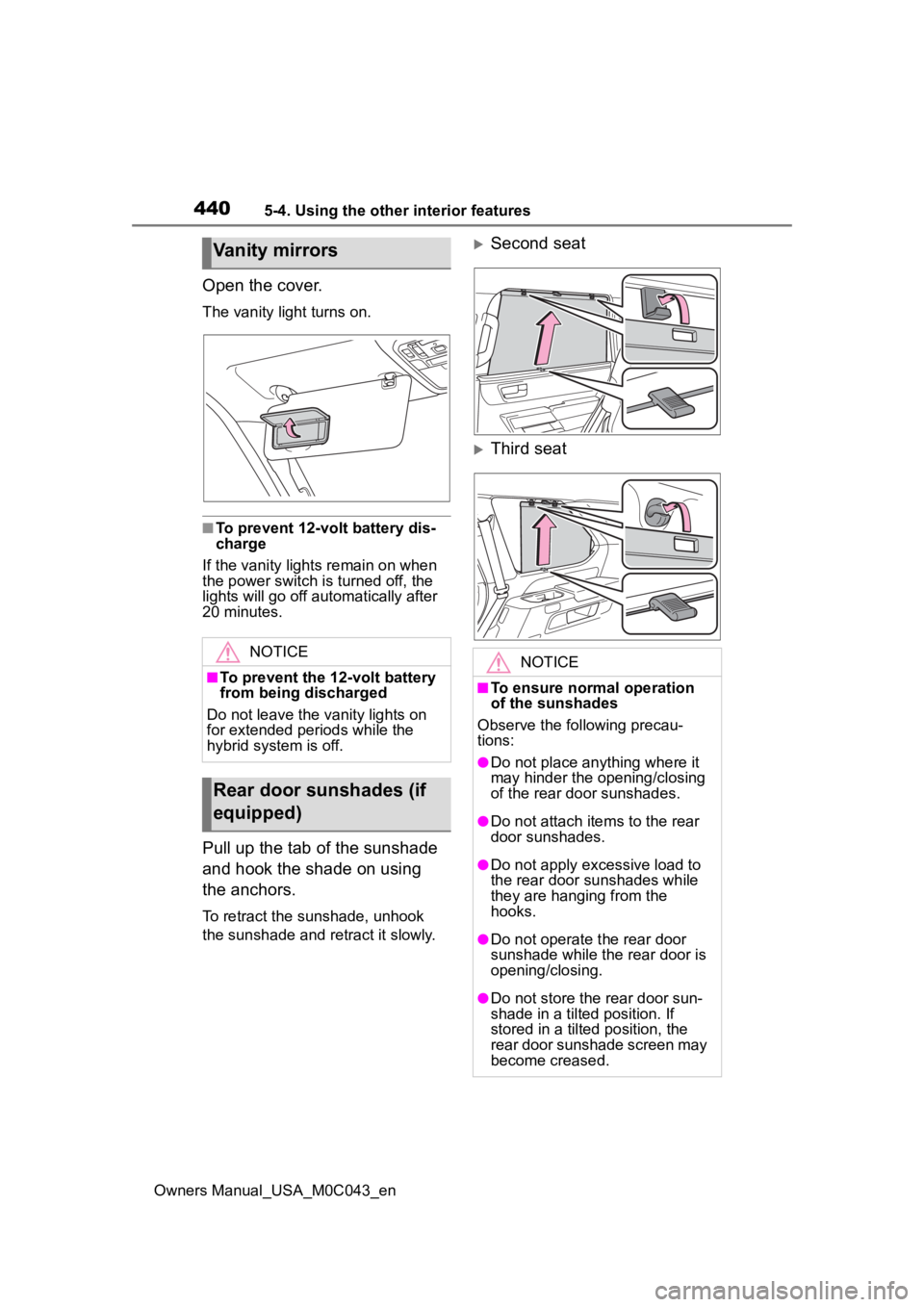
Open the cover.
The vanity light turns on.
■To prevent 12-volt battery dis-
charge
If the vanity light s remain on when
the power switch is turned off, the
lights will go off automatically after
20 minutes.
Pull up the tab of the sunshade
and hook the shade on using
the anchors.
To retract the sunshade, unhook
the sunshade and re tract it slowly.
Second seat
Third seat
Vanity mirrors
NOTICE
■To prevent the 12-volt battery
from being discharged
Do not leave the vanity lights on
for extended periods while the
hybrid system is off.
Rear door sunshades (if
equipped)
NOTICE
■To ensure normal operation
of the sunshades
Observe the following precau-
tions:
●Do not place anything where it
may hinder the opening/closing
of the rear door sunshades.
●Do not attach ite ms to the rear
door sunshades.
●Do not apply excessive load to
the rear door sunshades while
they are hanging from the
hooks.
●Do not operate t he rear door
sunshade while the rear door is
opening/closing.
●Do not store the rear door sun-
shade in a tilted position. If
stored in a tilted position, the
rear door sunshade screen may
become creased.
Page 442 of 628
4425-4. Using the other interior features
Owners Manual_USA_M0C043_en
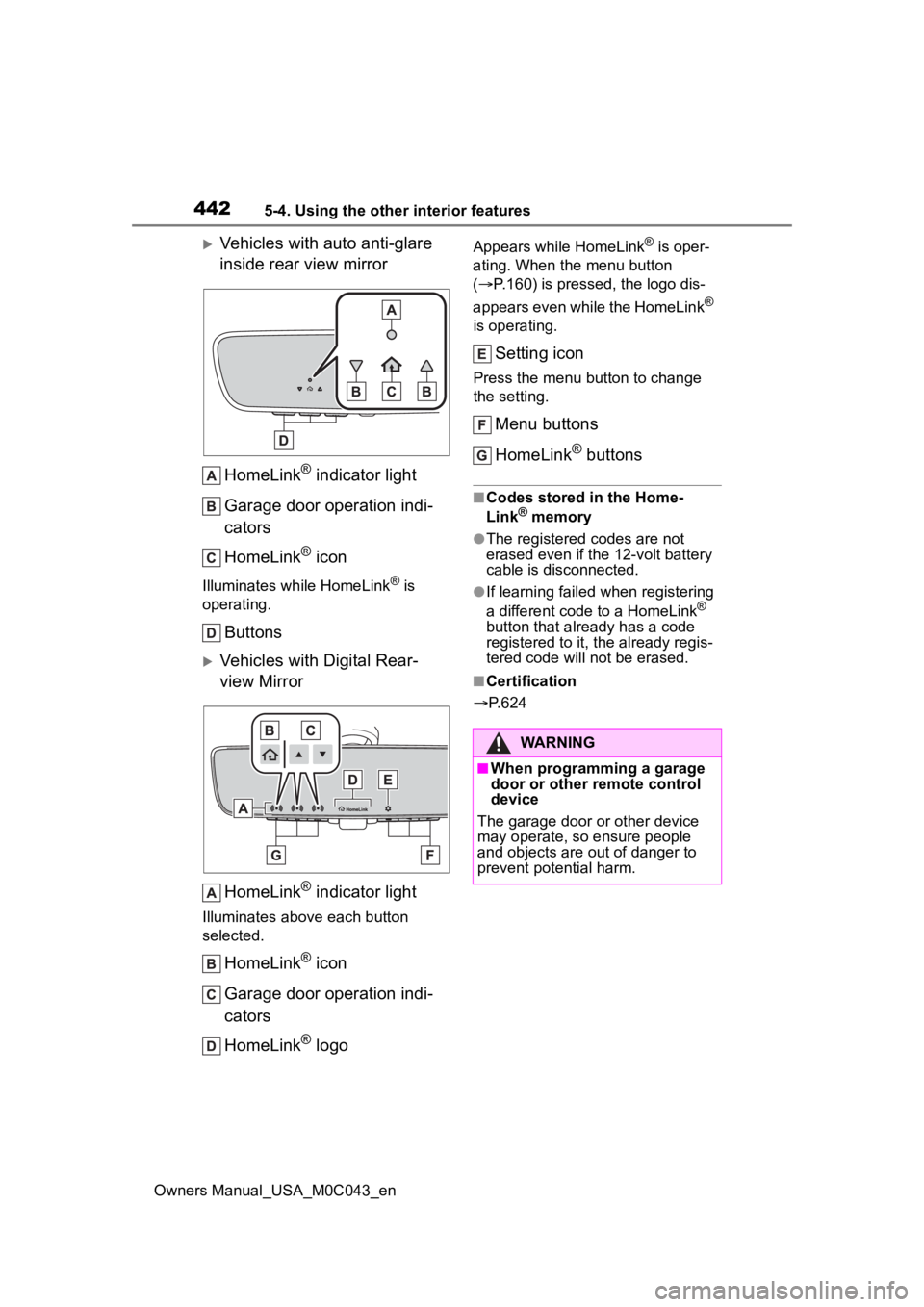
Vehicles with auto anti-glare
inside rear view mirrorHomeLink
® indicator light
Garage door operation indi-
cators
HomeLink
® icon
Illuminates while HomeLink® is
operating.
Buttons
Vehicles with Digital Rear-
view Mirror
HomeLink
® indicator light
Illuminates above each button
selected.
HomeLink® icon
Garage door operation indi-
cators
HomeLink
® logo
Appears while HomeLink® is oper-
ating. When the menu button
( P.160) is pressed, the logo dis-
appears even while the HomeLink
®
is operating.
Setting icon
Press the menu button to change
the setting.
Menu buttons
HomeLink
® buttons
■Codes stored in the Home-
Link® memory
●The registered codes are not
erased even if the 12-volt battery
cable is disconnected.
●If learning failed when registering
a different code to a HomeLink®
button that already has a code
registered to it, the already regis-
tered code will not be erased.
■Certification
P.624
WARNING
■When programming a garage
door or other remote control
device
The garage door or other device
may operate, so ensure people
and objects are out of danger to
prevent potential harm.