wheel TOYOTA SEQUOIA HYBRID 2023 Workshop Manual
[x] Cancel search | Manufacturer: TOYOTA, Model Year: 2023, Model line: SEQUOIA HYBRID, Model: TOYOTA SEQUOIA HYBRID 2023Pages: 628, PDF Size: 14.27 MB
Page 259 of 628
2594-5. Using the driving support systems
Owners Manual_USA_M0C043_en
4
Driving
• If a vehicle ahead is irregularly shaped, such as a tractor or side
car
• If a vehicle ahead is a child sized bicycle, a bicycle that is carrying a
large load, a bicycle ridden by
more than one person, or a
uniquely shaped bicycle (bicycle
with a child seat, tandem bicycle,
etc.)
• If a pedestrian/or t he riding height
of a bicyclist ahead is shorter than
approximately 3.2 ft. (1 m) or taller
than approximately 6.5 ft. (2 m)
• If a pedestrian/bicyclist is wearing
oversized clothing (a rain coat,
long skirt, etc.), making their sil-
houette obscure
• If a pedestrian is bending forward or squatting or bicyclist is bending
forward
• If a pedestrian/bicyclist is moving fast
• If a pedestrian is pushing a
stroller, wheelchair, bicycle or
other vehicle
• When driving in inclement weather
such as heavy rain, fog, snow or a
sandstorm
• When driving through steam or
smoke
• When the surrounding area is dim, such as at dawn or dusk, or while
at night or in a t unnel, making a
detectable object appear to be
nearly the same color as its sur-
roundings
• When driving in a place where the surrounding brightness changes
suddenly, such as at the entrance
or exit of a tunnel
• After the hybrid system has
started the vehicle has not been
driven for a certain amount of time
• While making a left/right turn and
for a few seconds after making a
left/right turn
• While driving on a curve and for a
few seconds after driving on a
curve
• If your vehicle is skidding
• If the front of the vehicle is raised or lowered • If the wheels are misaligned
• If a wiper blade is blocking the
front camera
• The vehicle is being driven at extremely high speeds
• When driving on a hill
• If the radar sensor or front camera
is misaligned
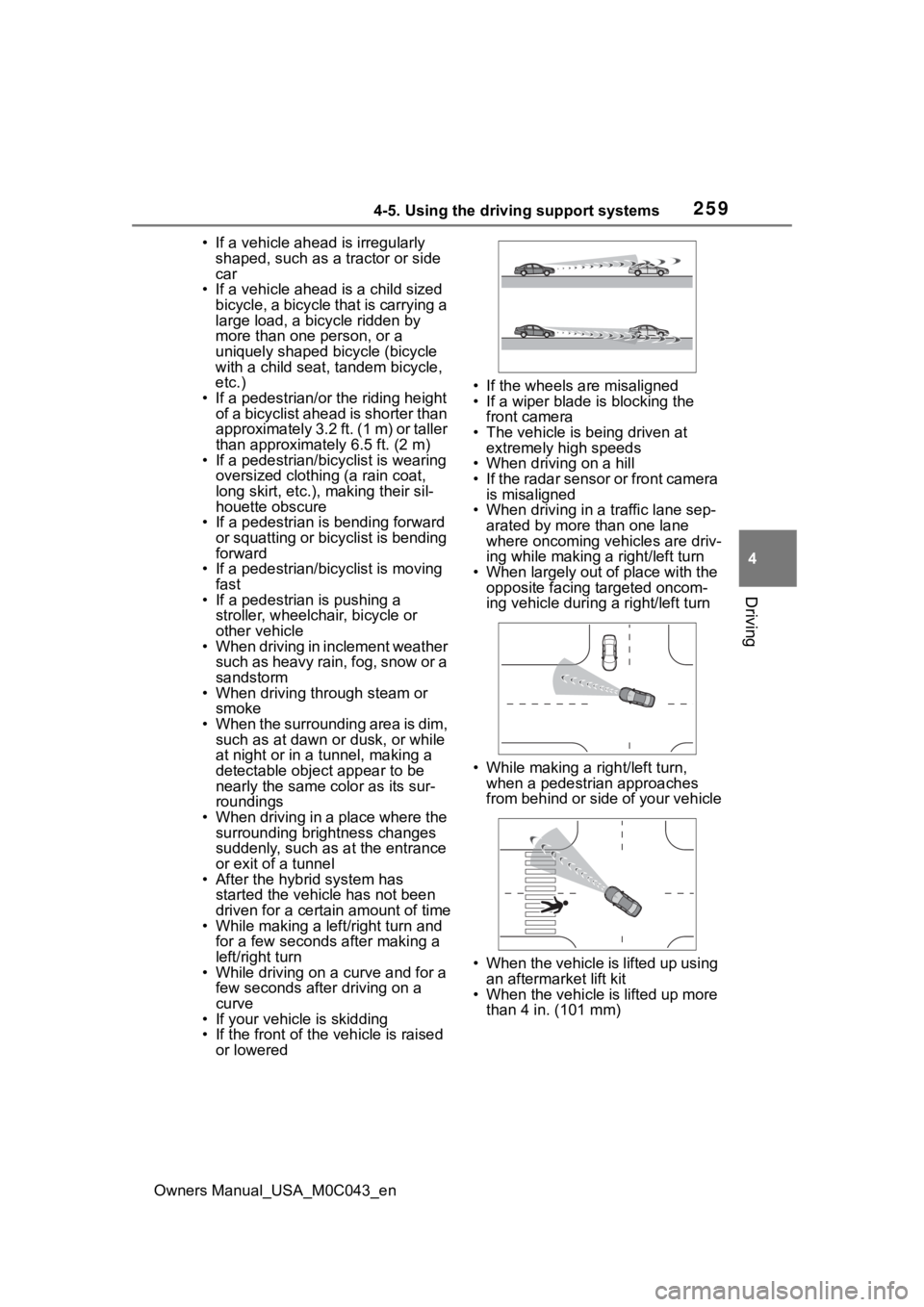
• When driving in a traffic lane sep-
arated by more than one lane
where oncoming vehicles are driv-
ing while making a right/left turn
• When largely out of place with the opposite facing targeted oncom-
ing vehicle during a right/left turn
• While making a right/left turn,
when a pedestrian approaches
from behind or side of your vehicle
• When the vehicle is lifted up using an aftermarket lift kit
• When the vehicle is lifted up more than 4 in. (101 mm)
Page 260 of 628

2604-5. Using the driving support systems
Owners Manual_USA_M0C043_en
●In addition to the above, in some
situations, such as the following,
the emergency steering assist
may not operate.
• When the white (yellow) lane lines are difficult to see, such as when
they are faint, di verging/merging,
or a shadow is cast upon them
• When the lane is wider or nar-
rower than normal
• When there is a light and dark pat- tern on the road surface, such as
due to road repairs
• When a pedestrian is detected near the centerline of the vehicle
• When the target is too close
• When there is insufficient safe or unobstructed space for the vehicle
to be steered into
• If oncoming vehicle is present
• If VSC function is operating
●In some situations such as the fol-
lowing, sufficient braking force or
steering force may not be
obtained, preventing the system
from performing properly:
• If the braking functions cannot operate to their full extent, such as
when the brake parts are
extremely cold, extremely hot, or
wet
• If the vehicle is not properly main-
tained (brakes or tires are exces-
sively worn, improper tire inflation
pressure, etc.)
• When the vehicle is being driven on a gravel road or other slippery
surface
• When the road surface has deep wheel tracks
• When driving o n a hill road
• When driving on a road that has inclines to the left or right
• When your vehicles is towing a
trailer or another vehicle
• When your vehicle is lifted up
■If VSC is disabled
●If VSC is disabled ( P.384), the
pre-collision brake assist and pre-
collision braking functions are also
disabled.
●The PCS warning light will turn on
and “VSC Turned OFF Pre-Colli-
sion Brake System Unavailable”
will be displayed on the multi-
information display.
Page 261 of 628
2614-5. Using the driving support systems
Owners Manual_USA_M0C043_en
4
Driving
While driving on a road with
clear white (yellow) lane lines,
the LTA system warns the driver
if the vehicle may deviate from
the current lane
*, and also can
slightly operate the steering
wheel to help avoid deviation
from the lane. Also, while the
dynamic radar cruise control
with full-speed range is operat-
ing, this system will operate the
steering wheel to maintain the
vehicle’s lane position.
The LTA system recognizes
white (yellow) lane lines
* using
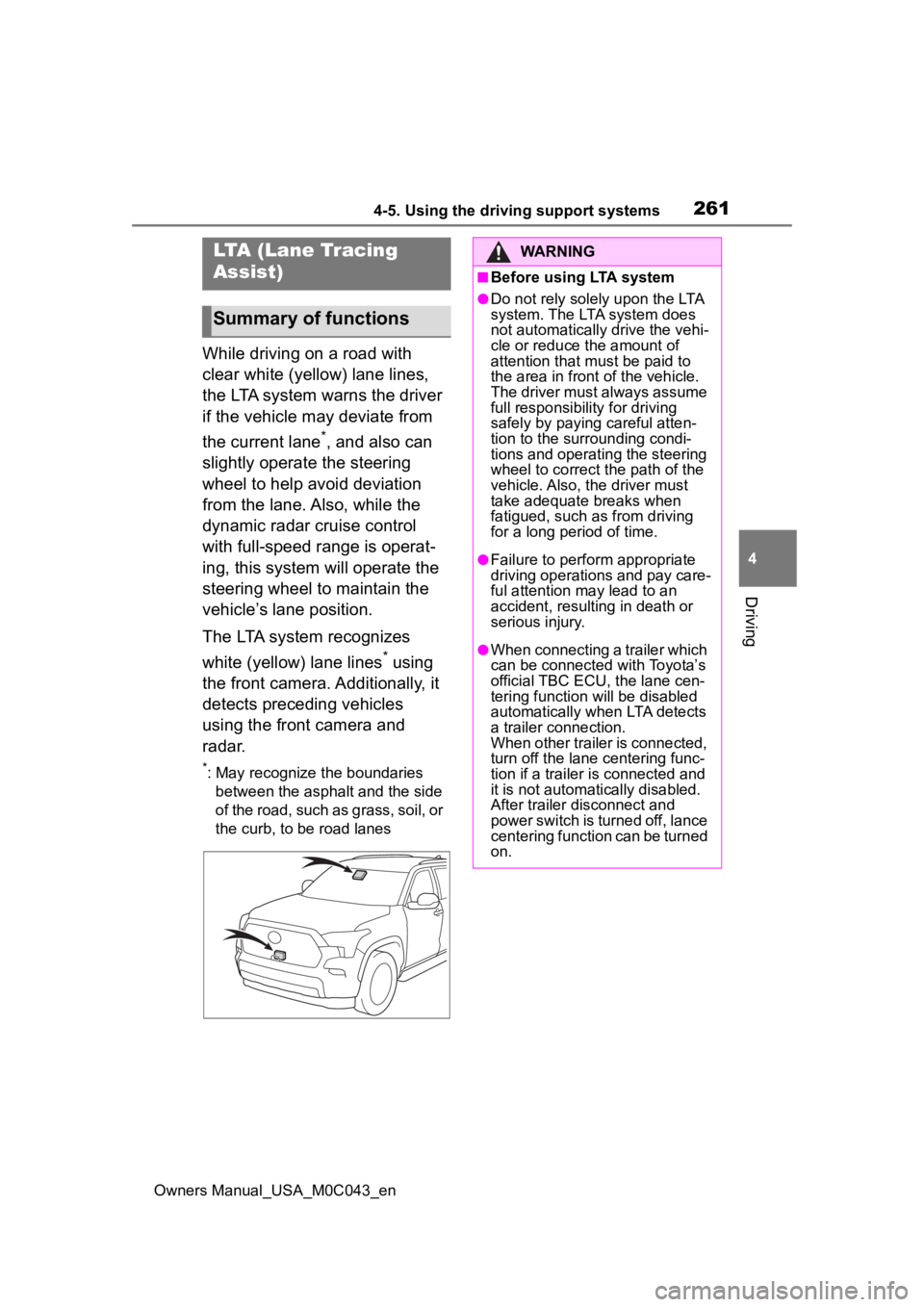
the front camera. Additionally, it
detects preceding vehicles
using the front camera and
radar.
*: May recognize the boundaries between the asphalt and the side
of the road, such as grass, soil, or
the curb, to be road lanes
LTA (Lane Tracing
Assist)
Summary of functions
WARNING
■Before using LTA system
●Do not rely solely upon the LTA
system. The LTA system does
not automatically drive the vehi-
cle or reduce the amount of
attention that m ust be paid to
the area in front of the vehicle.
The driver must always assume
full responsibilit y for driving
safely by paying careful atten-
tion to the surrounding condi-
tions and operating the steering
wheel to correct the path of the
vehicle. Also, the driver must
take adequate breaks when
fatigued, such as from driving
for a long period of time.
●Failure to perform appropriate
driving operations and pay care-
ful attention may lead to an
accident, resulting in death or
serious injury.
●When connecting a trailer which
can be connected with Toyota’s
official TBC ECU, the lane cen-
tering function will be disabled
automatically when LTA detects
a trailer connection.
When other trailer is connected,
turn off the lane centering func-
tion if a trailer is connected and
it is not automatically disabled.
After trailer disconnect and
power switch is turned off, lance
centering function can be turned
on.
Page 263 of 628
2634-5. Using the driving support systems
Owners Manual_USA_M0C043_en
4
Driving
WARNING
■Conditions in which functions
may not operate properly
In the following situations, the
functions may not operate prop-
erly and the vehicle may depart
from its lane. Drive safely by
always paying careful attention to
your surroundings and operate
the steering wheel to correct the
path of the vehicle without relying
solely on the functions.
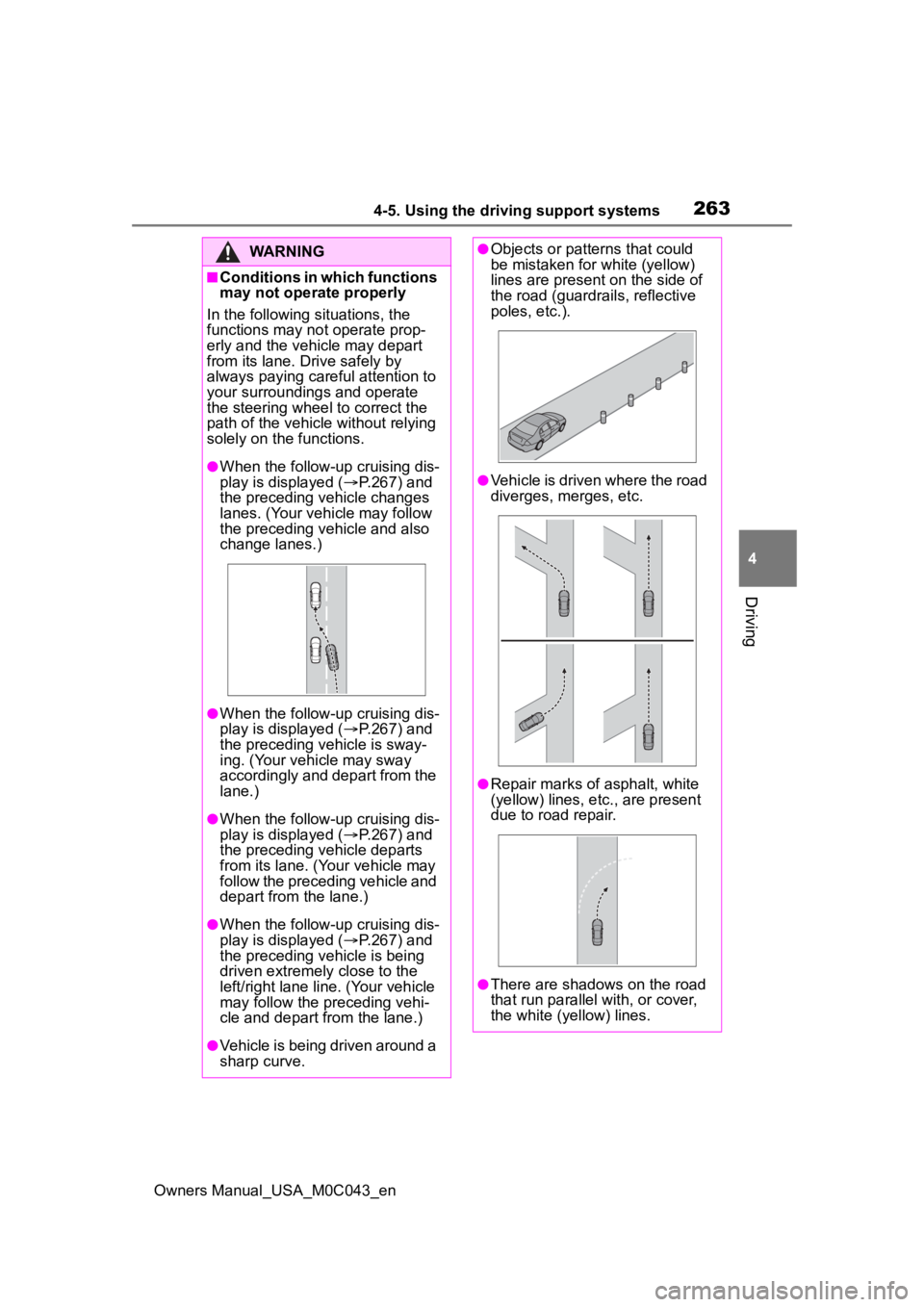
●When the follow-up cruising dis-
play is displayed ( P.267) and
the preceding vehicle changes
lanes. (Your vehicle may follow
the preceding vehicle and also
change lanes.)
●When the follow-up cruising dis-
play is displayed ( P.267) and
the preceding vehicle is sway-
ing. (Your vehicle may sway
accordingly and depart from the
lane.)
●When the follow-up cruising dis-
play is displayed ( P.267) and
the preceding vehicle departs
from its lane. (Your vehicle may
follow the preceding vehicle and
depart from the lane.)
●When the follow-up cruising dis-
play is displayed ( P.267) and
the preceding vehicle is being
driven extremely close to the
left/right lane line. (Your vehicle
may follow the preceding vehi-
cle and depart from the lane.)
●Vehicle is being driven around a
sharp curve.
●Objects or patterns that could
be mistaken for white (yellow)
lines are present on the side of
the road (guardrails, reflective
poles, etc.).
●Vehicle is driven where the road
diverges, merges, etc.
●Repair marks of asphalt, white
(yellow) lines, etc., are present
due to road repair.
●There are shadows on the road
that run parallel with, or cover,
the white (yellow) lines.
Page 265 of 628
2654-5. Using the driving support systems
Owners Manual_USA_M0C043_en
4
Driving
■Lane departure alert func-
tion
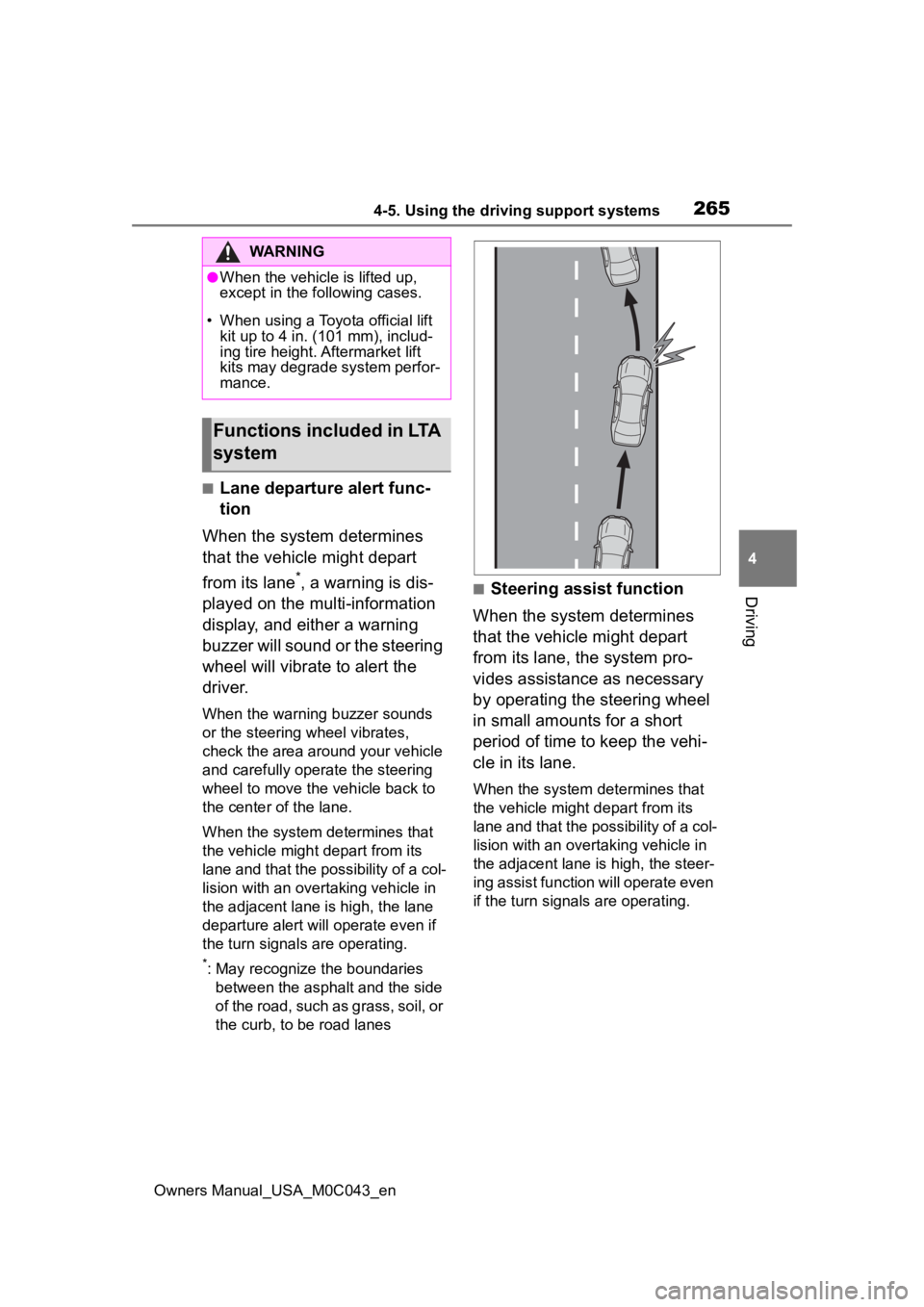
When the system determines
that the vehicle might depart
from its lane
*, a warning is dis-
played on the multi-information
display, and either a warning
buzzer will sound or the steering
wheel will vibrate to alert the
driver.
When the warning buzzer sounds
or the steering wheel vibrates,
check the area around your vehicle
and carefully operate the steering
wheel to move the vehicle back to
the center of the lane.
When the system determines that
the vehicle might depart from its
lane and that the possibility of a col-
lision with an overtaking vehicle in
the adjacent lane is high, the lane
departure alert will operate even if
the turn signals are operating.
*: May recognize the boundaries between the asphalt and the side
of the road, such as grass, soil, or
the curb, to be road lanes
■Steering assist function
When the system determines
that the vehicle might depart
from its lane, the system pro-
vides assistance as necessary
by operating the steering wheel
in small amounts for a short
period of time to keep the vehi-
cle in its lane.
When the system determines that
the vehicle might depart from its
lane and that the possibility of a col-
lision with an overta king vehicle in
the adjacent lane is high, the steer-
ing assist function will operate even
if the turn signals are operating.
WARNING
●When the vehicle is lifted up,
except in the following cases.
• When using a Toyota official lift kit up to 4 in. (101 mm), includ-
ing tire height. Aftermarket lift
kits may degrade system perfor-
mance.
Functions included in LTA
system
Page 266 of 628
2664-5. Using the driving support systems
Owners Manual_USA_M0C043_en
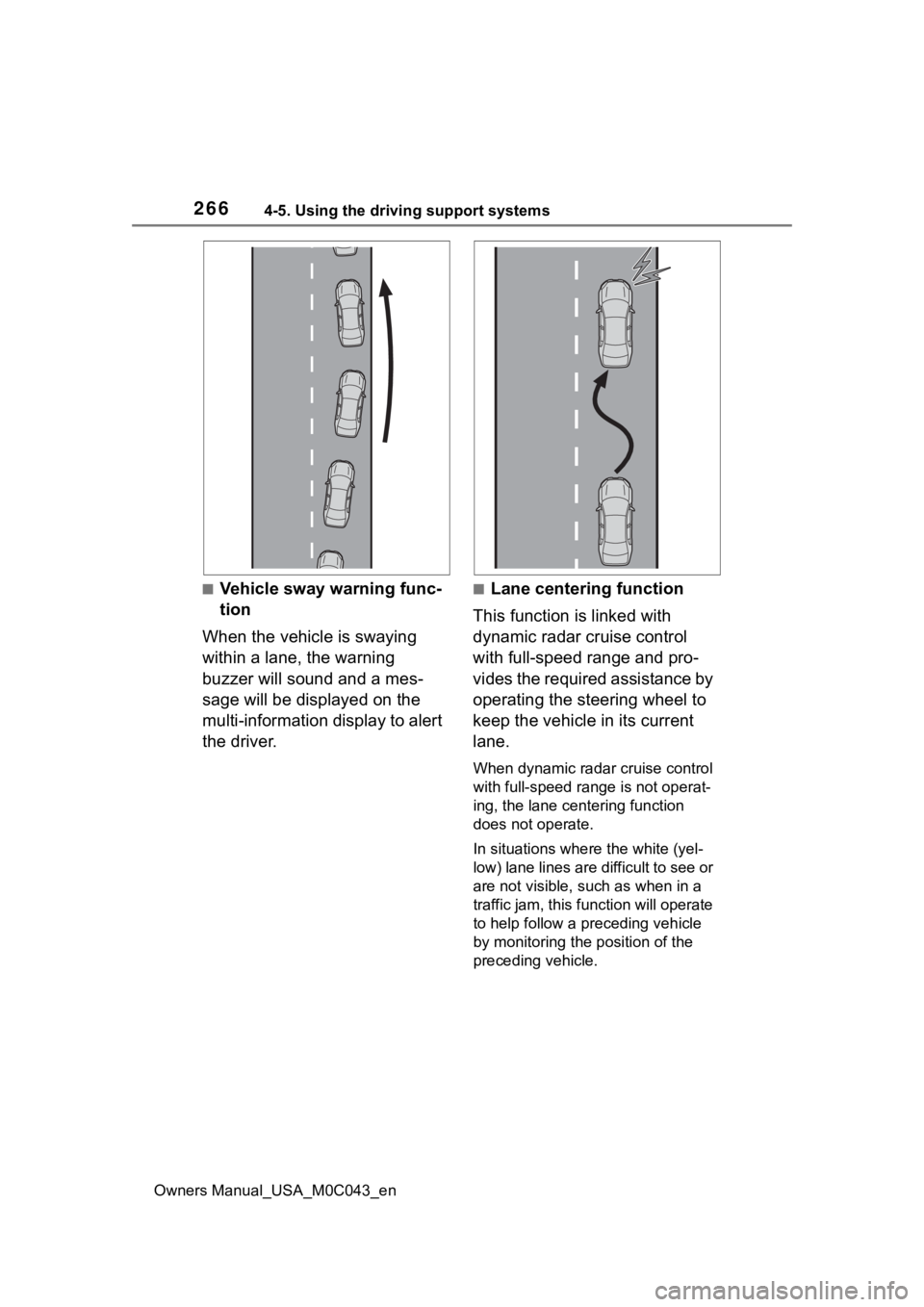
■Vehicle sway warning func-
tion
When the vehicle is swaying
within a lane, the warning
buzzer will sound and a mes-
sage will be displayed on the
multi-information display to alert
the driver.■Lane centering function
This function is linked with
dynamic radar cruise control
with full-speed range and pro-
vides the required assistance by
operating the steering wheel to
keep the vehicle in its current
lane.
When dynamic radar cruise control
with full-speed range is not operat-
ing, the lane centering function
does not operate.
In situations where the white (yel-
low) lane lines are d ifficult to see or
are not visible, such as when in a
traffic jam, this function will operate
to help follow a preceding vehicle
by monitoring the position of the
preceding vehicle.
Page 267 of 628
2674-5. Using the driving support systems
Owners Manual_USA_M0C043_en
4
Driving
Press the LTA switch to turn the
LTA system on
The LTA indicator illuminates and a
message is displaye d on the multi-
information display.
Press the LTA switch again to turn
the LTA system off.
When the LTA system is turned on
or off, operation of the LTA system
continues in the same condition the
next time the hybrid system started.
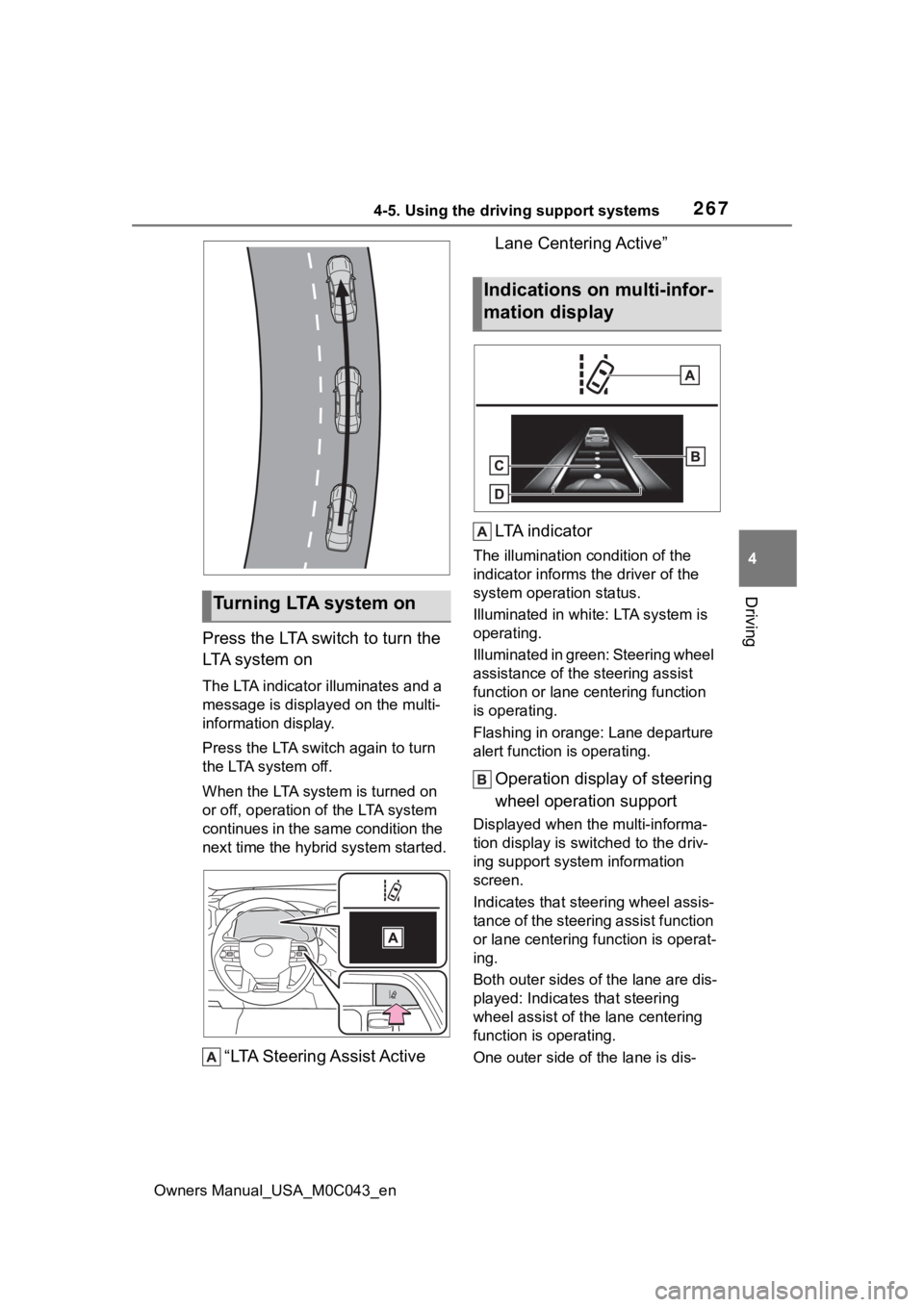
“LTA Steering Assist Active Lane Centering Active”
LTA i n d i c a t o r
The illumination condition of the
indicator informs the driver of the
system operation status.
Illuminated in white: LTA system is
operating.
Illuminated in green: Steering wheel
assistance of the steering assist
function or lane centering function
is operating.
Flashing in orange: Lane departure
alert function is operating.
Operation display of steering
wheel operation support
Displayed when the multi-informa-
tion display is swit
ched to the driv-
ing support system information
screen.
Indicates that steering wheel assis-
tance of the steering assist function
or lane centering f unction is operat-
ing.
Both outer sides of the lane are dis-
played: Indicates that steering
wheel assist of the lane centering
function is operating.
One outer side of the lane is dis-
Tu r n i n g LTA s y s t e m o n
Indications on multi-infor-
mation display
Page 268 of 628
2684-5. Using the driving support systems
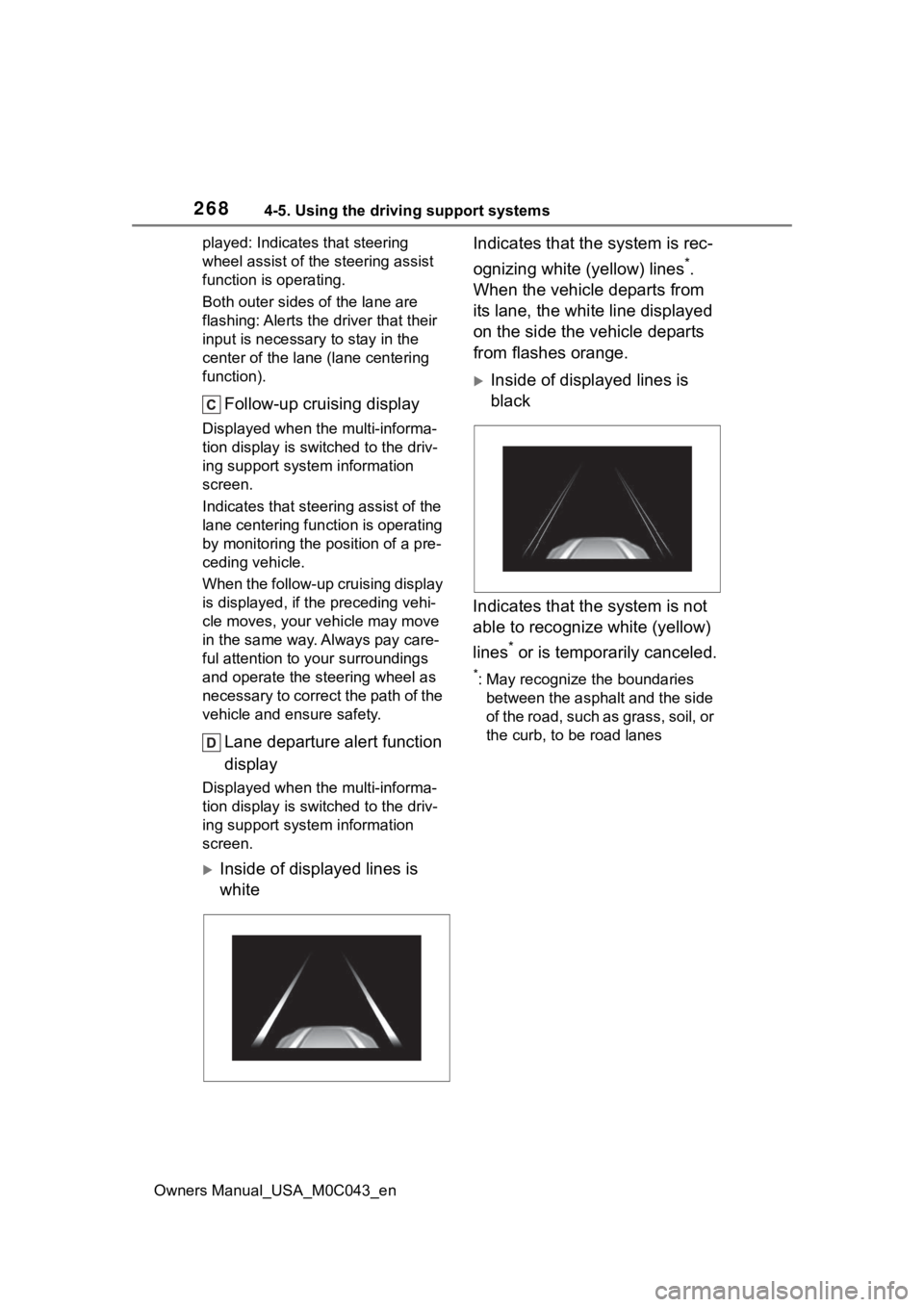
Owners Manual_USA_M0C043_enplayed: Indicates that steering
wheel assist of the steering assist
function is operating.
Both outer sides of the lane are
flashing: Alerts the driver that their
input is necessary to stay in the
center of the lane (lane centering
function).
Follow-up cruising display
Displayed when the multi-informa-
tion display is switched to the driv-
ing support system information
screen.
Indicates that steering assist of the
lane centering function is operating
by monitoring the position of a pre-
ceding vehicle.
When the follow-up cruising display
is displayed, if the preceding vehi-
cle moves, your vehicle may move
in the same way. A
lways pay care-
ful attention to your surroundings
and operate the steering wheel as
necessary to correct the path of the
vehicle and ensure safety.
Lane departure alert function
display
Displayed when the multi-informa-
tion display is switched to the driv-
ing support system information
screen.
Inside of displayed lines is
white Indicates that the system is rec-
ognizing white (yellow) lines
*.
When the vehicle departs from
its lane, the white line displayed
on the side the vehicle departs
from flashes orange.
Inside of displayed lines is
black
Indicates that the system is not
able to recognize white (yellow)
lines
* or is temporarily canceled.
*: May recognize the boundaries between the asphalt and the side
of the road, such as grass, soil, or
the curb, to be road lanes
Page 269 of 628
2694-5. Using the driving support systems
Owners Manual_USA_M0C043_en
4
Driving
■Operation conditions of each
function
●Lane departure alert function
This function oper ates when all of
the following cond itions are met.
• LTA is turned on.
• Vehicle speed is approximately 32
mph (50 km/h) or more.
*1
• System recognizes white (yellow)
lane lines*2. (When a white [yel-
low] line*2 is recognized on only
one side, the system will operate
only for the reco gnized side.)
• Width of traffic lane is approxi- mately 9.8 ft. ( 3 m) or more.
• Turn signal lever is not operated.
(Except when another vehicle is in
the lane on the side where the
turn signal was operated)
• Vehicle is not being driven around a sharp curve.
• No system malfunctions are detected. ( P.271)
*1: The function opera tes even if the
vehicle speed is less than
approximately 32 mph (50 km/h)
when the lane centering function
is operating.
*2: May recognize the boundaries between the asphalt and the side
o f t he r oa d, su ch as gr as s, s oil, or
the curb, to be road lanes
●Steering assist function
This function oper ates when all of
the following conditions are met in
addition to the operation conditions
for the lane departure alert function.
• Vehicle is not accelerated or decelerated by a fixed amount or
more.
• Steering wheel is not operated with a steering force level suitable
for changing lanes.
• ABS, VSC, TRAC and PCS are not operating.
• TRAC or VSC is not turned off.
• Hands off steering wheel warning is not displayed. (
P.270)
●Vehicle sway warning function
This function operates when all of
the following conditions are met.
• Setting for “Sway Warning” in
of the multi-information display is
set to “ON”. ( P.578)
• Vehicle speed is approximately 32
mph (50 km/h) or more.
• Width of traffic lane is approxi- mately 9.8 ft. (3 m) or more.
• No system malfunctions are detected. ( P.271)
●Lane centering function
This function operates when all of
the following conditions are met.
• LTA is turned on.
• Setting for “Lane Center” in of
the multi-informatio n display is set
to “ON”. ( P.578)
• This function recognizes white
(yellow) lane lines or the position
of a preceding v ehicle (except
when the preceding vehicle is
small, such as a motorcycle).
• The dynamic radar cruise control with full-speed ran ge is operating
in vehicle-to-vehicle distance con-
trol mode.
• Width of traffic lane is approxi- mately 10 to 13 ft. (3 to 4 m).
• Turn signal lever is not operated.
• Vehicle is not being driven around a sharp curve.
• No system malfunctions are detected. ( P.271)
• Vehicle does not accelerate or
decelerate by a fixed amount or
more.
• Steering wheel is not operated
with a steering force level suitable
for changing lanes.
• ABS, VSC, TRAC and PCS are
not operating.
• TRAC or VSC is not turned off.
• Hands off steering wheel warning is not displayed. ( P.270)
• The vehicle is being driven in the center of a lane.
Page 270 of 628
2704-5. Using the driving support systems
Owners Manual_USA_M0C043_en• Steering assist function is not
operating.
• When your vehicle is not towing a
trailer or during emergency tow-
ing.
■Temporary cancelation of func-
tions
●When operation conditions are no
longer met, a function may be
temporarily canceled. However,
when the operation conditions are
met again, operation of the func-
tion is automatically restored.
( P.269)
●If the operation conditions
( P.269) are no longer met while
the lane centering function is
operating, the steering wheel may
vibrate and the buzzer may sound
to indicate that the function has
been temporarily canceled. How-
ever, if the “Alert” customization
setting is set to , the system
will notify the driver by vibrating
the steering wheel instead of
sounding the buzzer.
■Steering assist function/lane
centering function
●Depending on the vehicle speed,
lane departure situation, road con-
ditions, etc., the driver may not
feel the function is operating or
the function may not operate at
all.
●The steering control of the func-
tion is overridden by the driver’s
steering wheel operation.
●Do not attempt to test the opera-
tion of the steering assist function.
■Lane departure alert function
●The warning buzzer may be diffi-
cult to hear due to external noise,
audio playback, etc. Also, it may
be difficult to feel steering wheel
vibrations due to the road condi-
tions, etc.
●It may not be possible for the sys-
tem to determine if there is a dan-
ger of a collision with a vehicle in
an adjacent lane.
●Do not attempt to test the opera-
tion of the lane departure alert
function.
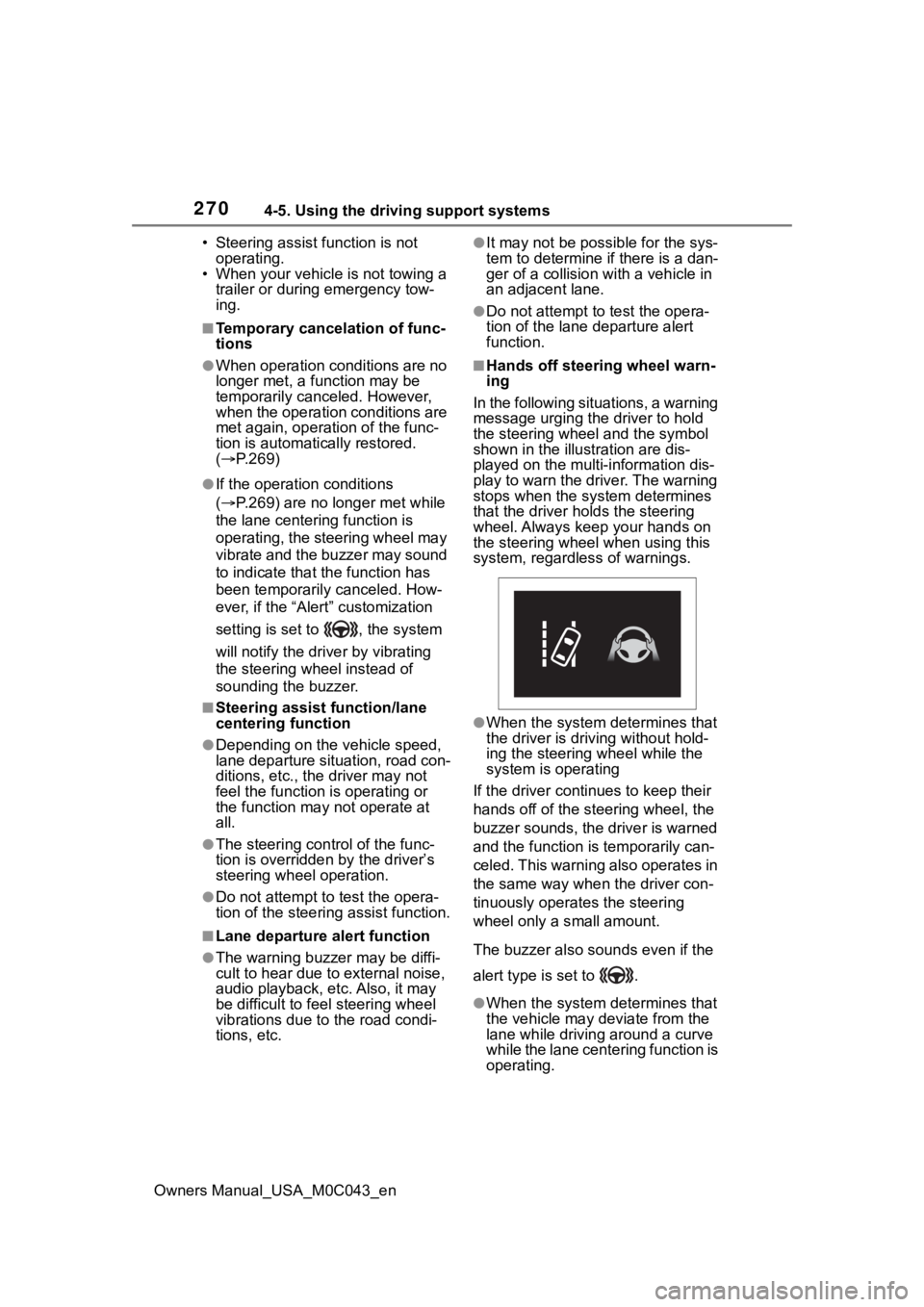
■Hands off steering wheel warn-
ing
In the following situations, a warning
message urging the driver to hold
the steering wheel and the symbol
shown in the illust ration are dis-
played on the multi-information dis-
play to warn the driver. The warning
stops when the sys tem determines
that the driver holds the steering
wheel. Always keep your hands on
the steering wheel when using this
system, regardless of warnings.
●When the system determines that
the driver is driving without hold-
ing the steering wheel while the
system is operating
If the driver continues to keep their
hands off of the steering wheel, the
buzzer sounds, the driver is warned
and the function is temporarily can-
celed. This warning also operates in
the same way when the driver con-
tinuously operates the steering
wheel only a s mall amount.
The buzzer also sounds even if the
alert type is set to .
●When the system determines that
the vehicle may deviate from the
lane while driving around a curve
while the lane centering function is
operating.