lane assist TOYOTA SEQUOIA HYBRID 2023 Owners Manual
[x] Cancel search | Manufacturer: TOYOTA, Model Year: 2023, Model line: SEQUOIA HYBRID, Model: TOYOTA SEQUOIA HYBRID 2023Pages: 628, PDF Size: 14.27 MB
Page 3 of 628
3TABLE OF CONTENTS
Owners Manual_USA_M0C043_en
1
2
3
4
5
6
7
8
9
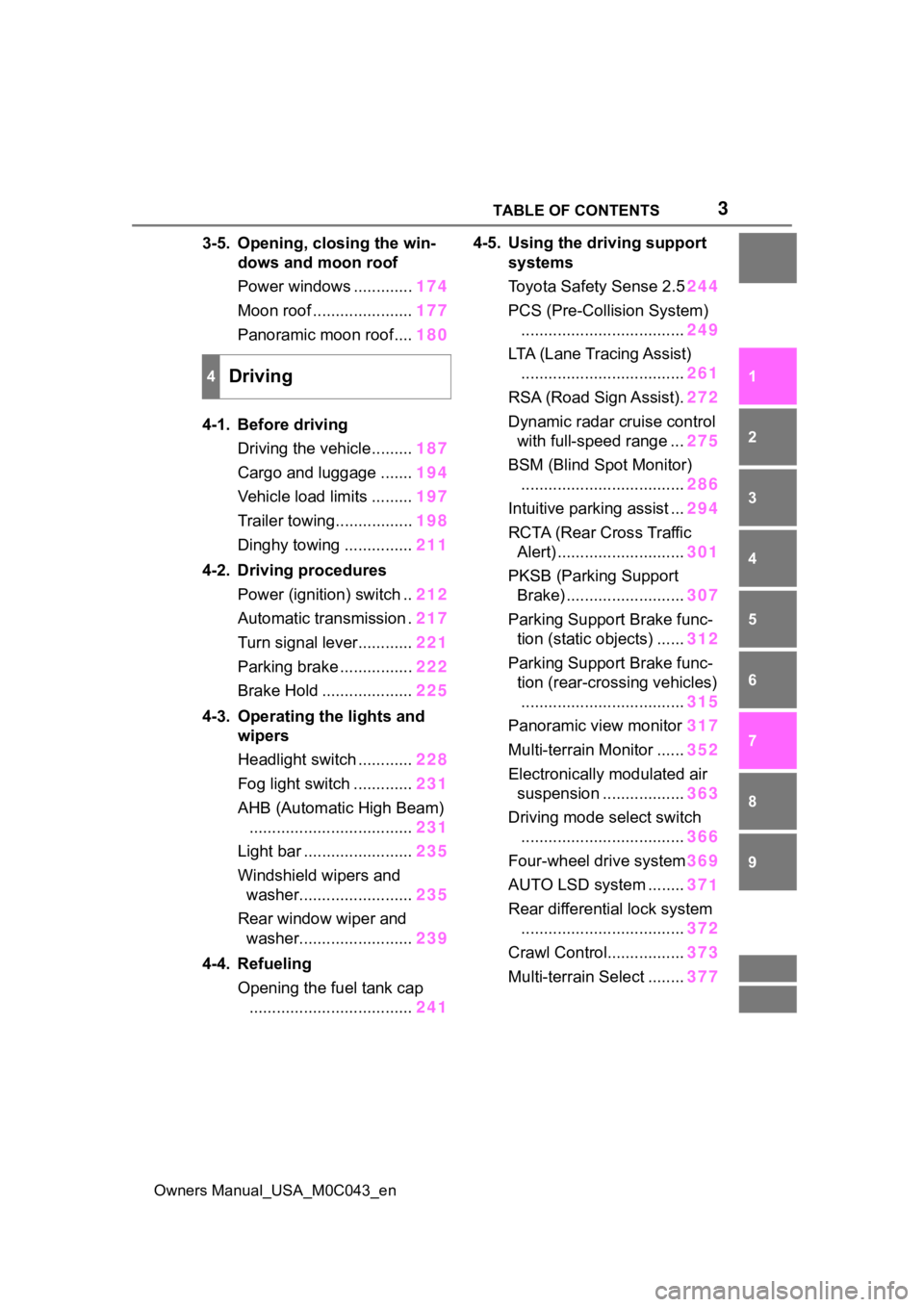
3-5. Opening, closing the win- dows and moon roof
Power windows ............. 174
Moon roof ...................... 177
Panoramic moon roof.... 180
4-1. Before driving Driving the vehicle......... 187
Cargo and luggage ....... 194
Vehicle load limits ......... 197
Trailer towing................. 198
Dinghy towing ............... 211
4-2. Driving procedures Power (ignition) switch .. 212
Automatic transmission . 217
Turn signal lever............ 221
Parking brake ................ 222
Brake Hold .................... 225
4-3. Operating the lights and wipers
Headlight switch ............ 228
Fog light switch ............. 231
AHB (Automatic High Beam) .................................... 231
Light bar ........................ 235
Windshield wipers and washer......................... 235
Rear window wiper and washer......................... 239
4-4. Refueling Opening the fuel tank cap.................................... 2414-5. Using the driving support
systems
Toyota Safet y Sense 2.5244
PCS (Pre-Collision System) .................................... 249
LTA (Lane Tracing Assist) .................................... 261
RSA (Road Sign Assist). 272
Dynamic radar cruise control with full-speed range ... 275
BSM (Blind Spot Monitor) .................................... 286
Intuitive parking assist ... 294
RCTA (Rear Cross Traffic Alert) ............................ 301
PKSB (Parking Support Brake) .......................... 307
Parking Support Brake func- tion (static objects) ...... 312
Parking Support Brake func- tion (rear-crossing vehicles)
.................................... 315
Panoramic view monitor 317
Multi-terrain Monitor ...... 352
Electronically modulated air suspension .................. 363
Driving mode s elect switch
.................................... 366
Four-wheel drive system 369
AUTO LSD system ........ 37
1
Re ar dif
ferential lock system
.................................... 372
Crawl Control................. 373
Multi-terrain Select ........ 377
4Driving
Page 22 of 628
22Pictorial index
Owners Manual_USA_M0C043_en
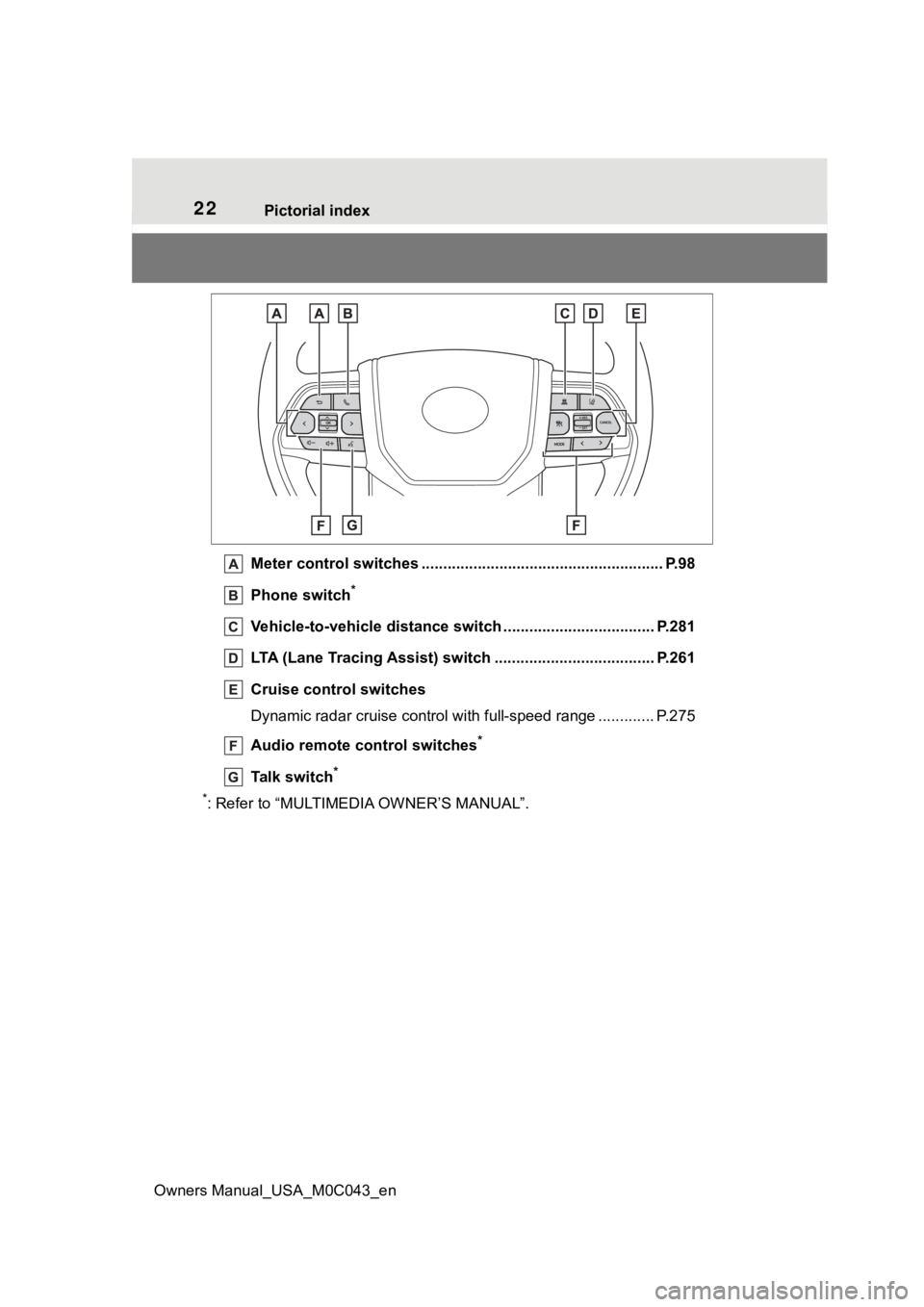
Meter control switches .. ...................................................... P.98
Phone switch
*
Vehicle-to-vehicle distance switch ................................... P.281
LTA (Lane Tracing Assist) switch ............................... ...... P.261
Cruise control switches
Dynamic radar cruise control with full-speed range ............. P. 2 7 5
Audio remote control switches
*
Talk switch*
*
: Refer to “MULTIMEDIA OWNER’S MANUAL”.
Page 97 of 628
972-1. Instrument cluster
Owners Manual_USA_M0C043_en
2
Vehicle status information and indicators
■Changing the display items
1 Press or to select .
2 Press or to select
“Customize Right Side”, and
then press and hold .
3 Select the item and then
press .
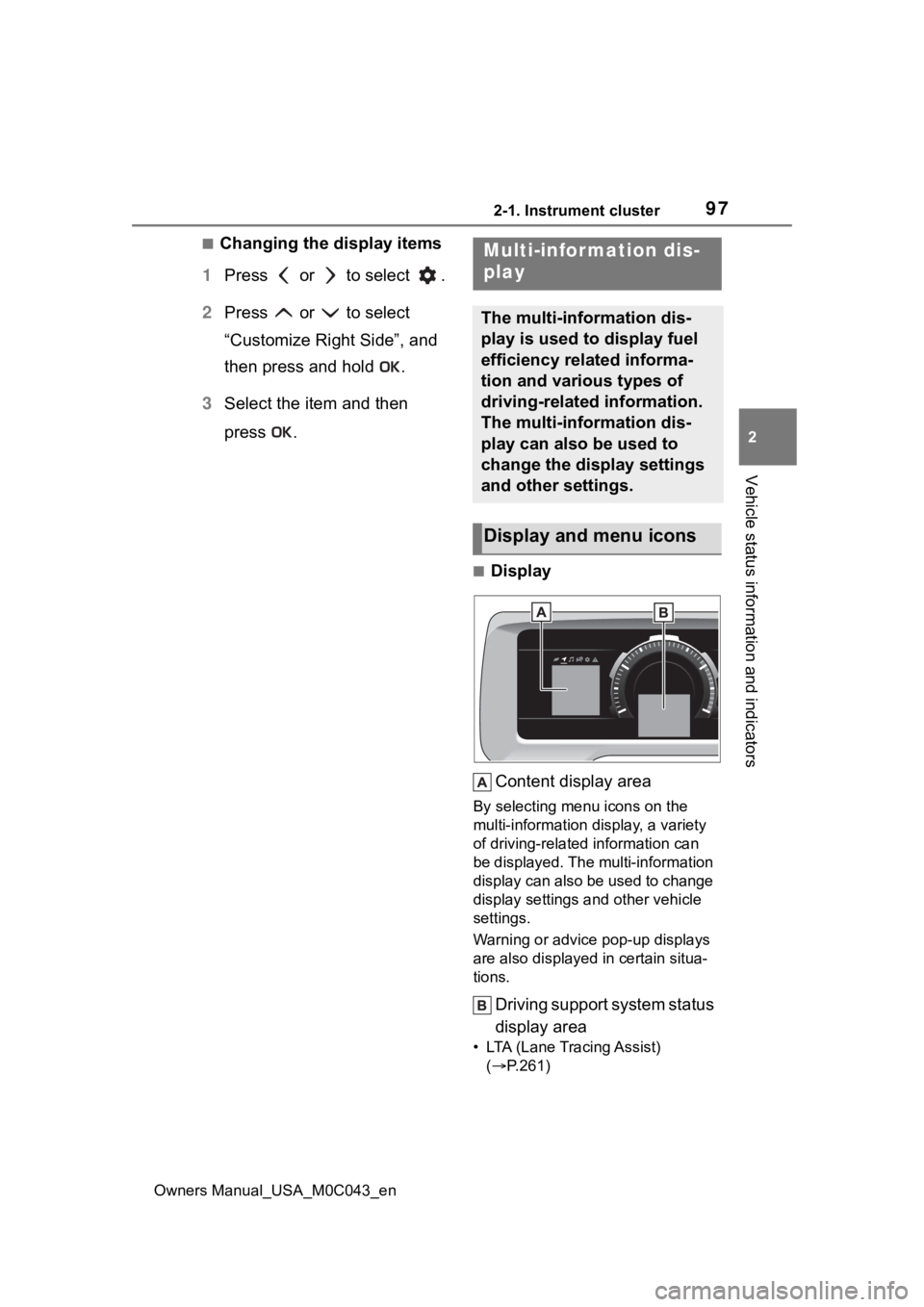
■Display
Content display area
By selecting menu icons on the
multi-information di splay, a variety
of driving-related information can
be displayed. The multi-information
display can also be used to change
display settings and other vehicle
settings.
Warning or advice pop-up displays
are also displayed in certain situa-
tions.
Driving support system status
display area
• LTA (Lane Tracing Assist) ( P.261)
Multi-infor mation dis-
play
The multi-information dis-
play is used to display fuel
efficiency related informa-
tion and various types of
driving-related information.
The multi-information dis-
play can also be used to
change the display settings
and other settings.
Display and menu icons
Page 106 of 628
1062-1. Instrument cluster
Owners Manual_USA_M0C043_en
■Enabling/disabling of the head-
up display
If the head-up display is disabled, it
will remain disabled when the power
switch is turned off then back to ON.
■Display brightness
The brightness of the head-up dis-
play can be adjusted on of the
multi-information display. Also, it is
automatically adjusted according to
the ambient brightness.
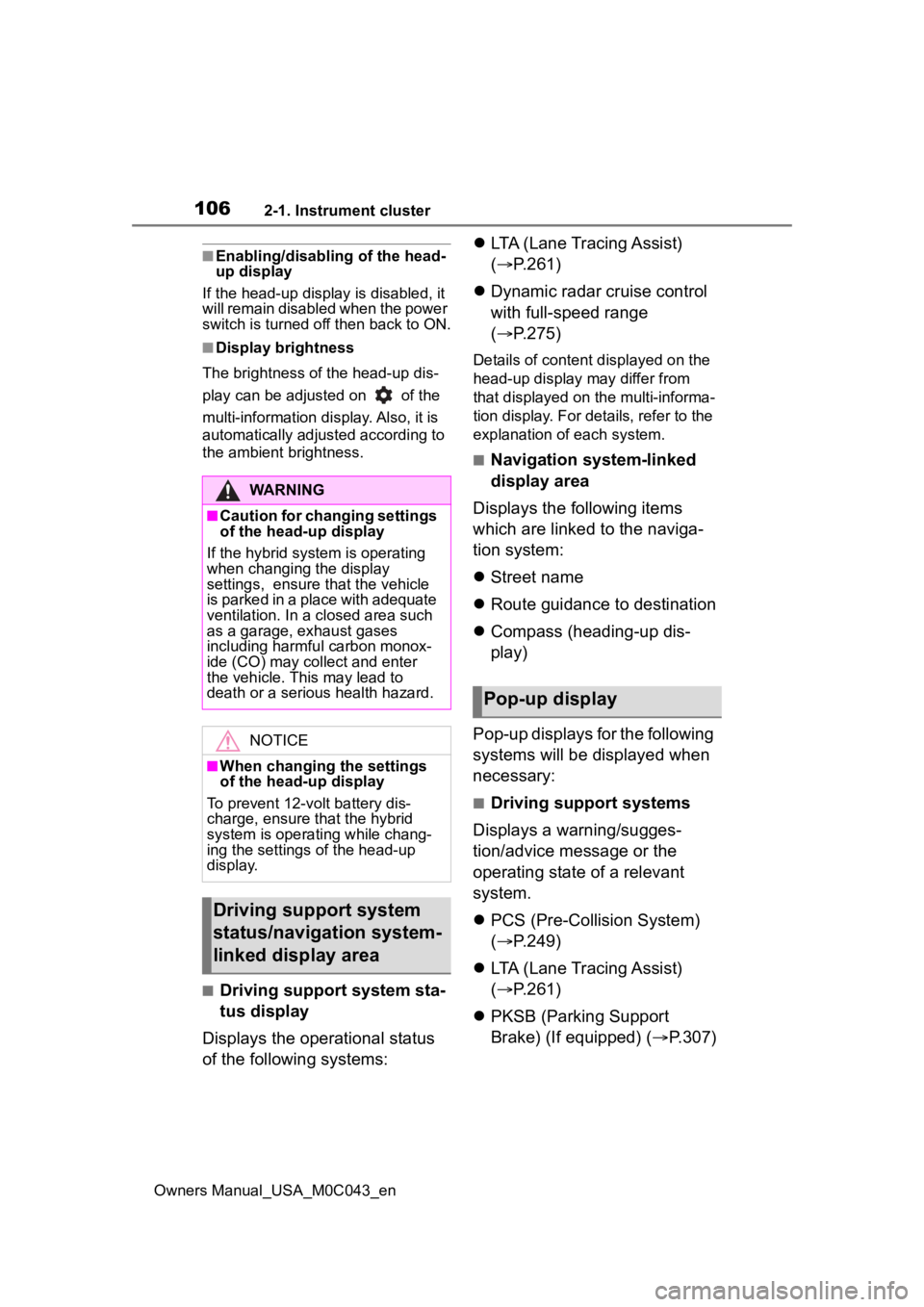
■Driving support system sta-
tus display
Displays the operational status
of the following systems:
LTA (Lane Tracing Assist)
( P.261)
Dynamic radar cruise control
with full-speed range
( P.275)
Details of content d isplayed on the
head-up display may differ from
that displayed on the multi-informa-
tion display. For details, refer to the
explanation of each system.
■Navigation system-linked
display area
Displays the following items
which are linked to the naviga-
tion system:
Street name
Route guidance to destination
Compass (heading-up dis-
play)
Pop-up displays for the following
systems will be displayed when
necessary:
■Driving support systems
Displays a warning/sugges-
tion/advice message or the
operating state of a relevant
system.
PCS (Pre-Colli sion System)
( P.249)
LTA (Lane Tracing Assist)
( P.261)
PKSB (Parking Support
Brake) (If equipped) ( P.307)
WARNING
■Caution for changing settings
of the head-up display
If the hybrid system is operating
when changing the display
settings, ensure t hat the vehicle
is parked in a place with adequate
ventilation. In a closed area such
as a garage, exhaust gases
including harmful carbon monox-
ide (CO) may collect and enter
the vehicle. This may lead to
death or a seri ous health hazard.
NOTICE
■When changing the settings
of the head-up display
To prevent 12-volt battery dis-
charge, ensure that the hybrid
system is operating while chang-
ing the settings of the head-up
display.
Driving support system
status/navigation system-
linked display area
Pop-up display
Page 185 of 628
185
Owners Manual_USA_M0C043_en
4
4
Driving
Driving
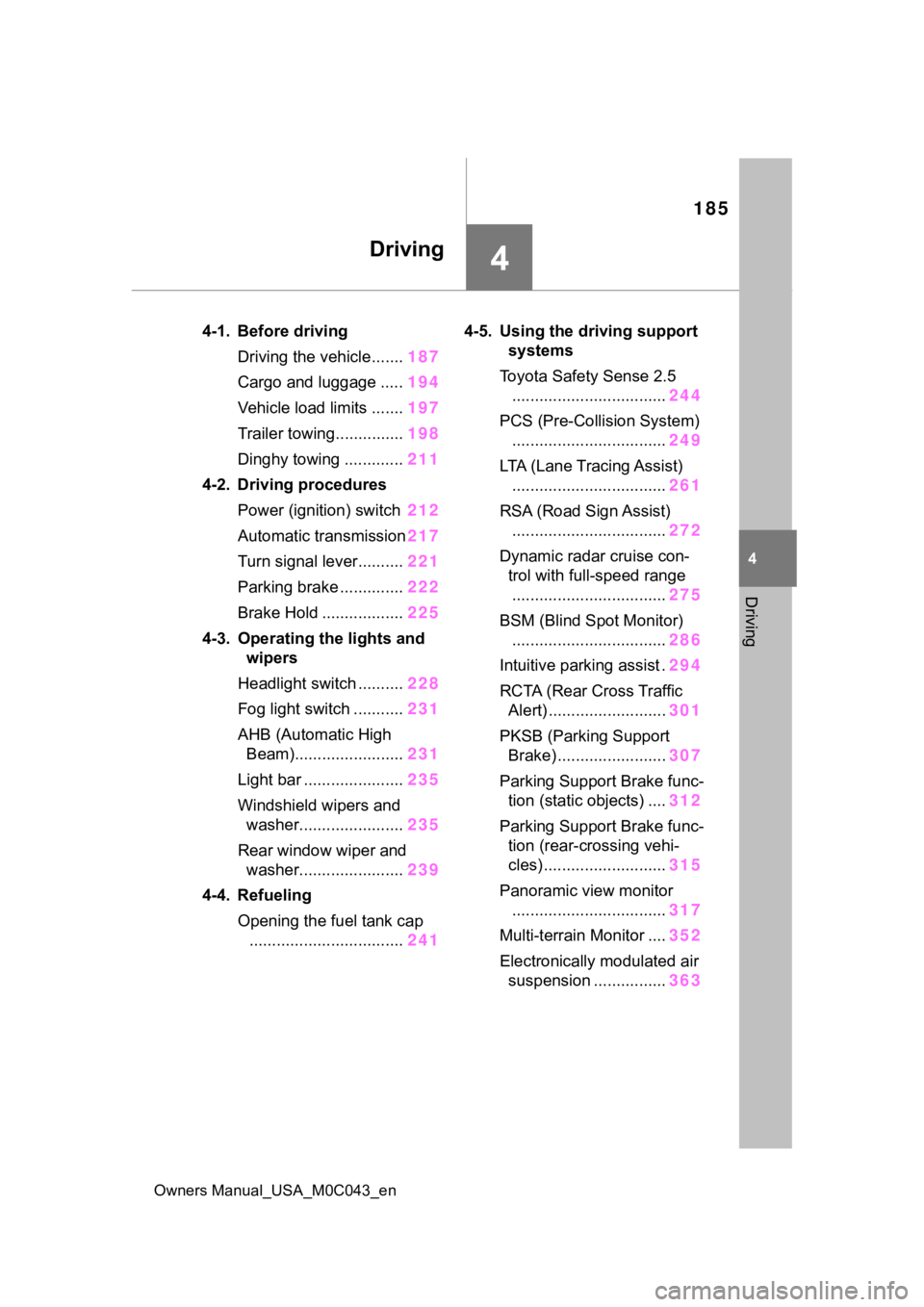
4-1. Before drivingDriving the vehicle....... 187
Cargo and luggage ..... 194
Vehicle load limits ....... 197
Trailer towing............... 198
Dinghy towing ............. 211
4-2. Driving procedures Power (ignition) switch 212
Automatic transmission 217
Turn signal lever.......... 221
Parking brake .............. 222
Brake Hold .................. 225
4-3. Operating the lights and wipers
Headlight switch .......... 228
Fog light switch ........... 231
AHB (Automatic High Beam)........................ 231
Light bar ...................... 235
Windshield wipers and washer....................... 235
Rear window wiper and washer....................... 239
4-4. Refueling Opening the fuel tank cap.................................. 2414-5. Using the dr
iving support
systems
Toyota Safety Sense 2.5 .................................. 244
PCS (Pre-Collision System) .................................. 249
LTA (Lane Tracing Assist) .................................. 261
RSA (Road Sign Assist) .................................. 272
Dynamic radar cruise con- trol with full-speed range
.................................. 275
BSM (Blind Spot Monitor) .................................. 286
Intuitive parking assist . 294
RCTA (Rear Cross Traffic Alert) .......................... 301
PKSB (Parking Support Brake) ........................ 307
Parking Support Brake func- tion (static objects) .... 312
Parking Support Brake func- tion (rear-crossing vehi-
cles) ........................... 315
Panoramic view monitor .................................. 317
Multi-terrain Monitor .... 352
Electronically modulated air suspension ................ 363
Page 200 of 628
2004-1. Before driving
Owners Manual_USA_M0C043_en
WARNING
●Do not exceed 65 mph (104
km/h), the posted towing speed
limit or the speed limit for your
trailer as set forth in your trailer
owner’s manual, whichever is
lowest. Slow down sufficiently
before making a turn, in cross
winds, on wet or slippery sur-
face, etc., to help avoid an acci-
dent. If you experience a
vehicle-trailer instability from
reducing a certain speed, slow
down and make sure you keep
your vehicle speed under the
speed of which you experience
the instability.
●Do not make jerk y, abrupt or
sharp turns.
●Do not apply the brakes sud-
denly as you may skid, resulting
in jackknifing and loss of vehicle
control. This is especially true
on wet or slippery surfaces.
●Do not exceed th e trailer hitch
assembly weight, gross vehicle
weight, gross axle weight and
trailer tongue weight capacities.
●Do not use the following sys-
tems when your vehicles is tow-
ing a trailer or a nother vehicle.
• PCS (Pre-Collision System)
• Dynamic radar cruise control with full-speed range
Except when the following condi-
tions are all met,
• When the other vehicle is a trailer properly attached and
connected to Toyota’s official
TBC ECU.
• When the vehicle is not being driven on a slippery surface
such as an icy road or a very
wet road.
●Do not use the following sys-
tems when your vehicles is tow-
ing a trailer or another vehicle.
• Cruise control (if equipped)
• LTA (Lane Tracing Assist)
If the vehicle detects that a trailer
is being towed, the lane centering
function of LTA is automatically
turned off.
●Slow down and downshift
before descending steep or long
downhill grades. Do not make
sudden downshifts while
descending steep or long down-
hill grades.
●Vehicle-trailer instability is more
likely on steep long downhills.
Before descending steep or
long downhill grades, slow
down and downshift. Do not
make sudden downshifts when
descending steep or long down-
hill grades. Avoid holding the
brake pedal down too long or
applying the brakes too fre-
quently. This could cause the
brakes to overheat and result in
reduced braking efficiency.
●Do not tow a trailer when the
temporary spare tire is installed
on your vehicle.
■When towing a trailer
Toyota recommends trailers with
brakes that conform to any appli-
cable federal and s tate/provincial
regulations.
●If the gross tr ailer weight
exceeds unbraked TWR, trailer
brakes are required. Toyota rec-
ommends trailers with brakes
that conform to all applicable
federal and state/provincial reg-
ulations.
Page 244 of 628
2444-5. Using the driving support systems
Owners Manual_USA_M0C043_en
4-5.Using the driving support systems
■PCS (Pre-Collision System)
P.249
■LTA (Lane Tracing Assist)
P.261
■AHB (Automatic High
Beam)
P.231
■RSA (Road Sign Assist)*
P.272
*: If equipped
■Dynamic radar cruise con-
trol with full-speed range
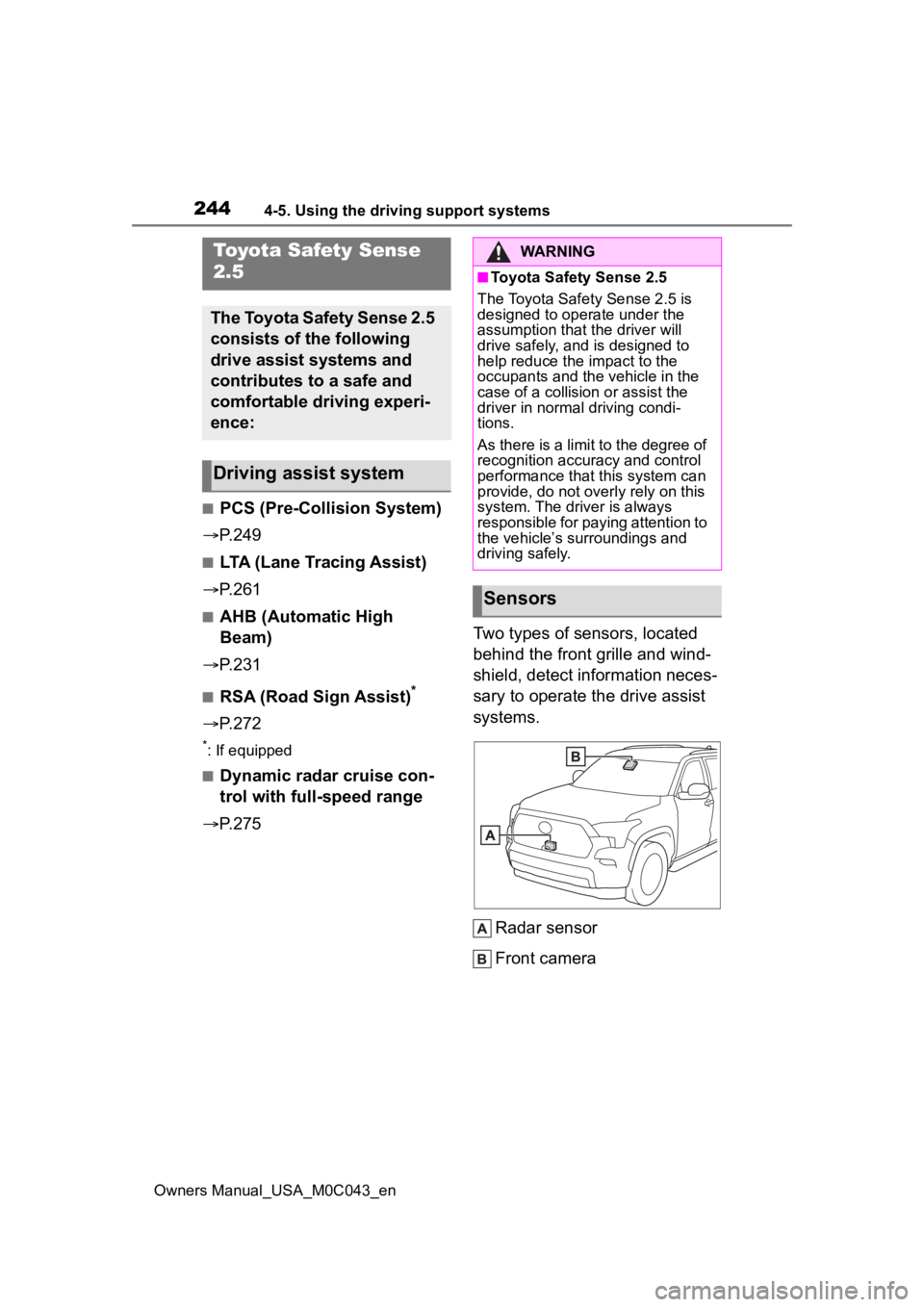
P.275 Two types of sensors, located
behind the front grille and wind-
shield, detect information neces-
sary to operate the drive assist
systems.
Radar sensor
Front camera
Toyota Safety Sense
2.5
The Toyota Safety Sense 2.5
consists of the following
drive assist systems and
contributes to a safe and
comfortable driving experi-
ence:
Driving assist system
WARNING
■Toyota Safety Sense 2.5
The Toyota Safety Sense 2.5 is
designed to operate under the
assumption that the driver will
drive safely, and is designed to
help reduce the impact to the
occupants and the vehicle in the
case of a collision or assist the
driver in normal driving condi-
tions.
As there is a limit to the degree of
recognition accuracy and control
performance that this system can
provide, do not overly rely on this
system. The driver is always
responsible for paying attention to
the vehicle’s su rroundings and
driving safely.
Sensors
Page 250 of 628
2504-5. Using the driving support systems
Owners Manual_USA_M0C043_en
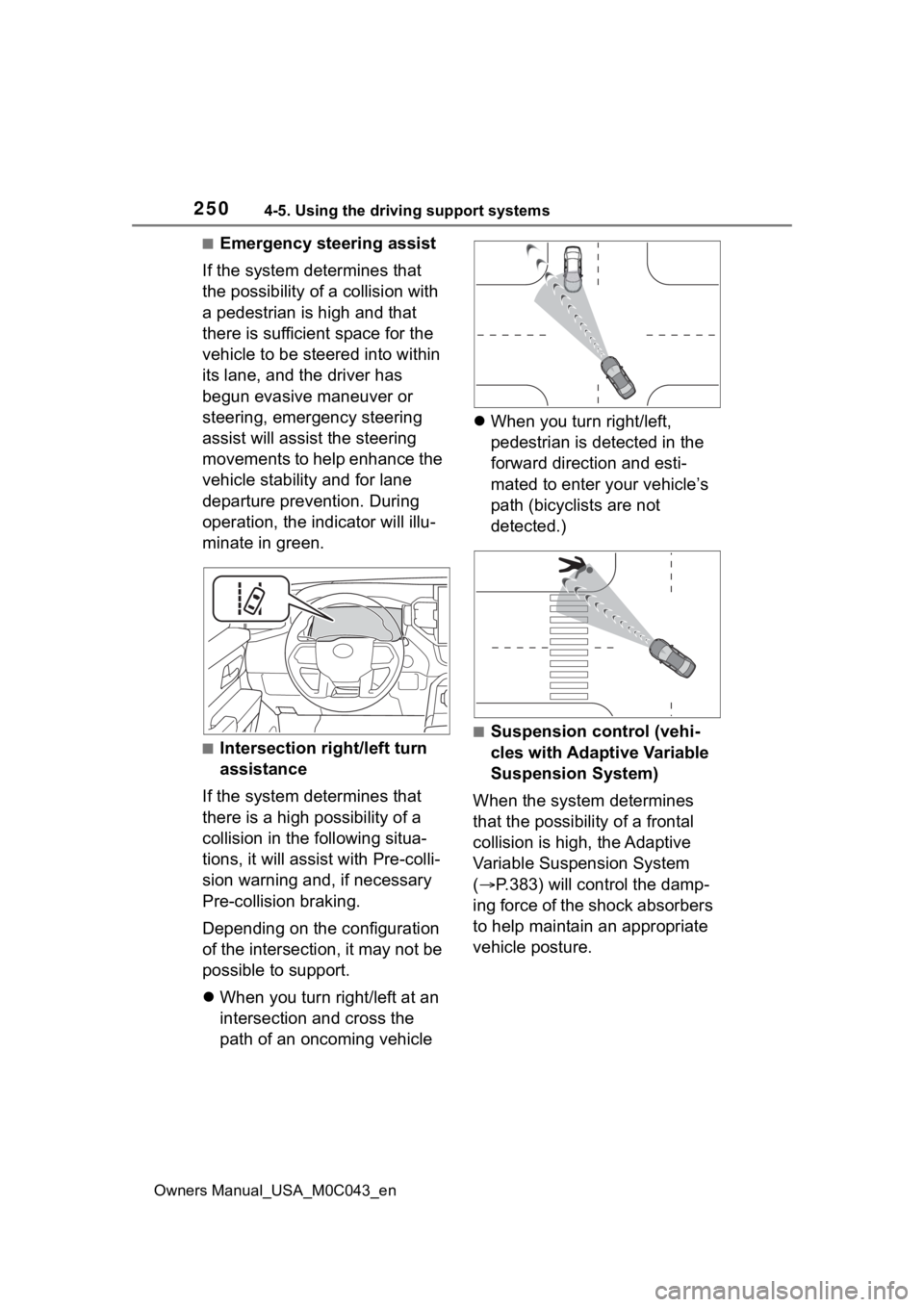
■Emergency steering assist
If the system determines that
the possibility of a collision with
a pedestrian is high and that
there is sufficient space for the
vehicle to be steered into within
its lane, and the driver has
begun evasive maneuver or
steering, emergency steering
assist will assist the steering
movements to help enhance the
vehicle stability and for lane
departure prevention. During
operation, the indicator will illu-
minate in green.
■Intersection right/left turn
assistance
If the system determines that
there is a high possibility of a
collision in the following situa-
tions, it will assist with Pre-colli-
sion warning and, if necessary
Pre-collision braking.
Depending on the configuration
of the intersection, it may not be
possible to support.
When you turn right/left at an
intersection and cross the
path of an oncoming vehicle
When you turn right/left,
pedestrian is detected in the
forward direction and esti-
mated to enter your vehicle’s
path (bicyclists are not
detected.)
■Suspension control (vehi-
cles with Adaptive Variable
Suspension System)
When the system determines
that the possibility of a frontal
collision is high, the Adaptive
Variable Suspension System
( P.383) will control the damp-
ing force of the shock absorbers
to help maintain an appropriate
vehicle posture.
Page 251 of 628
2514-5. Using the driving support systems
Owners Manual_USA_M0C043_en
4
Driving
WARNING
■Limitations of the pre-colli-
sion system
●The driver is solely responsible
for safe driving. Always drive
safely, taking care to observe
your surroundings.
Do not use the pre-collision sys-
tem instead of normal braking
operations under any circum-
stances. This system will not
prevent collisions or lessen col-
lision damage or injury in every
situation. Do not overly rely on
this system. Failure to do so
may lead to an accident, result-
ing in death or serious injury.
●Although this system is
designed to help avoid a colli-
sion or help reduce the impact
of the collision, its effectiveness
may change according to vari-
ous conditions, therefore the
system may not always be able
to achieve the same level of
performance.
Read the following conditions
carefully. Do not overly rely on
this system and always drive
carefully.
• Conditions under which the sys- tem may operate even if there is
no possibility of a collision:
P. 2 5 6
• Conditions under which the sys- tem may not operate properly:
P. 2 5 8
●Do not attempt to test the oper-
ation of the pre-collision system
yourself.
Depending on the objects used
for testing (dummies, card-
board objects imitating detect-
able objects, etc.), the system
may not operate properly, possi-
bly leading to an accident.
■Pre-collision braking
●When the pre-collision braking
function is operating, a large
amount of braking force will be
applied.
●If the vehicle is stopped by the
operation of the pre-collision
braking function, the pre-colli-
sion braking function operation
will be canceled after approxi-
mately 2 seconds. Depress the
brake pedal as necessary.
●The pre-collision braking func-
tion may not operate if certain
operations are performed by the
driver. If the accelerator pedal is
being depressed strongly or the
steering wheel is being turned,
the system may determine that
the driver is taking evasive
action and possibly prevent the
pre-collision braking function
from operating.
●In some situations, while the
pre-collision brak ing function is
operating, operation of the func-
tion may be canceled if the
accelerator pedal is depressed
strongly or the steering wheel is
turned and the system deter-
mines that the driver is taking
evasive action.
●If the brake pedal is being
depressed, the system may
determine that t he driver is tak-
ing evasive action and possibly
delay the operation timing of the
pre-collision braking function.
■Emergency steering assist
●As emergency steering assist
operation will be canceled when
the system determines that lane
departure prevention function
has been completed.
Page 260 of 628

2604-5. Using the driving support systems
Owners Manual_USA_M0C043_en
●In addition to the above, in some
situations, such as the following,
the emergency steering assist
may not operate.
• When the white (yellow) lane lines are difficult to see, such as when
they are faint, di verging/merging,
or a shadow is cast upon them
• When the lane is wider or nar-
rower than normal
• When there is a light and dark pat- tern on the road surface, such as
due to road repairs
• When a pedestrian is detected near the centerline of the vehicle
• When the target is too close
• When there is insufficient safe or unobstructed space for the vehicle
to be steered into
• If oncoming vehicle is present
• If VSC function is operating
●In some situations such as the fol-
lowing, sufficient braking force or
steering force may not be
obtained, preventing the system
from performing properly:
• If the braking functions cannot operate to their full extent, such as
when the brake parts are
extremely cold, extremely hot, or
wet
• If the vehicle is not properly main-
tained (brakes or tires are exces-
sively worn, improper tire inflation
pressure, etc.)
• When the vehicle is being driven on a gravel road or other slippery
surface
• When the road surface has deep wheel tracks
• When driving o n a hill road
• When driving on a road that has inclines to the left or right
• When your vehicles is towing a
trailer or another vehicle
• When your vehicle is lifted up
■If VSC is disabled
●If VSC is disabled ( P.384), the
pre-collision brake assist and pre-
collision braking functions are also
disabled.
●The PCS warning light will turn on
and “VSC Turned OFF Pre-Colli-
sion Brake System Unavailable”
will be displayed on the multi-
information display.