contents TOYOTA SIENNA 2007 Service Repair Manual
[x] Cancel search | Manufacturer: TOYOTA, Model Year: 2007, Model line: SIENNA, Model: TOYOTA SIENNA 2007Pages: 3000, PDF Size: 52.26 MB
Page 258 of 3000

AV – 6AUDIO / VISUAL – AUDIO AND VISUAL SYSTEM
AV
(c) ID3 tag and WMA tag
(1) Additional textual information called ID3 tag can
be input to MP3 files. Information such as song
titles and artist names can be stored.
HINT:
This player is compatible with the ID3 tags of ID3
Ver. 1.0 and 1.1, and ID3 Ver. 2.2 and 2.3.
(Number of characters complies with ID3 Ver.
1.0 and 1.1.)
(2) Additional textual information called WMA tag
can be input to WMA files. Information such as
song titles and artist names can be stored.
(d) Usable media
(1) Only CD-ROMs, CD-Rs (CD-Recordable), and
CD-RWs (CD-ReWritable) only can be used to
play MP3/WMA files.
NOTICE:
• CD-Rs and CD-RWs are more easily
affected by a hot and humid environment
than discs used for normal audio CDs. For
this reason, some CD-Rs and CD-RWs
may not be played.
• If there are fingerprints or scratches on
the disc, the disc may not be played or the
CD may skip.
• Some CD-Rs and CD-RWs deteriorate if
they are left in the cabin for a long time.
• Keep CD-Rs and CD-RWs in a storage
case that is impenetrable to light.
(e) Usable media format
(1) Usable media format
HINT:
• As for MP3/WMA files written in any format
other than those above, the contents of the
files may not be played normally or the file
names or folder names may not be displayed
correctly.
• This player is compatible with multi-session
discs and can play CD-Rs and CD-RWs on
which MP3/WMA files are added. However,
only the first session can be played.
• Discs whose first session includes both music
data and MP3 or WMA format data cannot be
played.
(2) Standard and restrictions
Disc format CD-ROM Mode 1, CD-ROM XA Mode 2 Form1
File format ISO9660 Level 1 and Level 2 (joliet)
Maximum directory levels 8 levels
Maximum number of characters for a folder name/file name 32 characters
Maximum number of folders192 (Including empty folders, route folders, and folders that do not
contain MP3/WMA files)
Maximum number of files in a disc 255 (Including non-MP3/WMA files)
Page 273 of 3000

NS–12NAVIGATION – NAVIGATION SYSTEM
NS
(b) Playable WMA file standards
(c) ID3 tag and WMA tag
(1) Additional textual information called ID3 tag can
be input to MP3 files. Information such as song
titles and artist names can be stored.
HINT:
This player is compatible with the ID3 tags of ID3
Ver. 1.0 and 1.1, and ID3 Ver. 2.2 and 2.3.
(Number of characters complies with ID3 Ver.
1.0 and 1.1.)
(2) Additional textual information called WMA tag
can be input to WMA files. Information such as
song titles and artist names can be stored.
(d) Usable media
(1) Only CD-ROMs, CD-Rs (CD-Recordable), and
CD-RWs (CD-ReWritable) only can be used to
play MP3/WMA files.
NOTICE:
• CD-Rs and CD-RWs are more easily
affected by a hot and humid environment
than discs used for normal audio CDs. For
this reason, some CD-Rs and CD-RWs
may not be played.
• If there are fingerprints or scratches on
the disc, the disc may not be played or the
CD may skip.
• Some CD-Rs and CD-RWs deteriorate if
they are left in the cabin for a long time.
• Keep CD-Rs and CD-RWs in a storage
case that is impenetrable to light.
(e) Usable media format
(1) Usable media format
HINT:
• As for MP3/WMA files written in any format
other than those above, the contents of the
files may not be played normally or the file
names or folder names may not be displayed
correctly.
• This player is compatible with multi-session
discs and can play CD-Rs and CD-RWs on
which MP3/WMA files are added. However,
only the first session can be played.
• Discs whose first session includes both music
data and MP3 or WMA format data cannot be
played.
Compatible standard WMA Ver. 7, 8, and 9
Compatible sampling frequency 32, 44.1, 48 (kHz)
Compatible bit rate• Ver. 7, 8: CBR48, 64, 80, 96, 128, 160, 192 (kbps)
• Ver. 9: CBR48, 64, 80, 96, 128, 160, 192, 256, 320 (kbps)
• Compatible with playback of channel 2 only
Disc format CD-ROM Mode 1, CD-ROM XA Mode 2 Form 1
File format ISO9660 Level 1 and Level 2 (joliet)
Page 281 of 3000

WS–6WINDSHIELD / WINDOWGLASS – POWER WINDOW CONTROL SYSTEM (w/ Jam Protec-
tion Function)
WS
CUSTOMIZE PARAMETERS
HINT:
The following item can be customized.
NOTICE:
• After confirming whether the items requested by the
customer are applicable or not for customization,
perform the customize operation.
• Be sure to record the current settings before
customizing.
• When troubleshooting, make sure that the item in
question is not set to "OFF" as a result of
customization (Example: For the system, "the wireless
function does not operate", first check that the
wireless function is not set to "OFF", then perform
troubleshooting).
POWER WINDOW
DISPLAY (ITEM) DEFAULT CONTENTS SETTING
IG OFF P/W ONAfter ignition switch OFF, power window control permission signal is
outputON / OFF
Page 353 of 3000
2GR-FE ENGINE CONTROL SYSTEM – SFI SYSTEMES–27
ES
Contents:
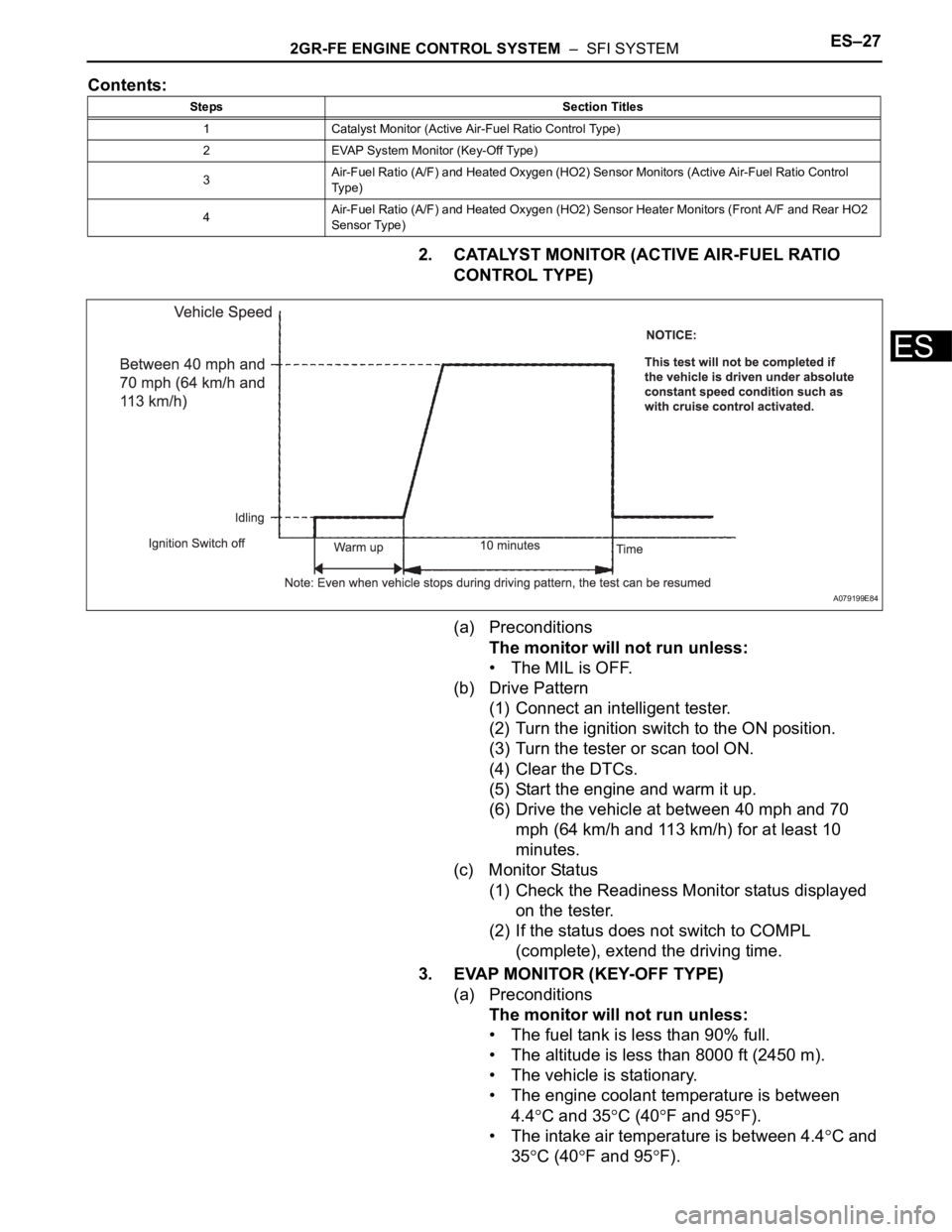
2. CATALYST MONITOR (ACTIVE AIR-FUEL RATIO
CONTROL TYPE)
(a) Preconditions
The monitor will not run unless:
• The MIL is OFF.
(b) Drive Pattern
(1) Connect an intelligent tester.
(2) Turn the ignition switch to the ON position.
(3) Turn the tester or scan tool ON.
(4) Clear the DTCs.
(5) Start the engine and warm it up.
(6) Drive the vehicle at between 40 mph and 70
mph (64 km/h and 113 km/h) for at least 10
minutes.
(c) Monitor Status
(1) Check the Readiness Monitor status displayed
on the tester.
(2) If the status does not switch to COMPL
(complete), extend the driving time.
3. EVAP MONITOR (KEY-OFF TYPE)
(a) Preconditions
The monitor will not run unless:
• The fuel tank is less than 90% full.
• The altitude is less than 8000 ft (2450 m).
• The vehicle is stationary.
• The engine coolant temperature is between
4.4
C and 35C (40F and 95F).
• The intake air temperature is between 4.4
C and
35
C (40F and 95F).
Steps Section Titles
1 Catalyst Monitor (Active Air-Fuel Ratio Control Type)
2 EVAP System Monitor (Key-Off Type)
3Air-Fuel Ratio (A/F) and Heated Oxygen (HO2) Sensor Monitors (Active Air-Fuel Ratio Control
Ty p e )
4Air-Fuel Ratio (A/F) and Heated Oxygen (HO2) Sensor Heater Monitors (Front A/F and Rear HO2
Sensor Type)
A079199E84
Page 803 of 3000
2GR-FE ENGINE CONTROL SYSTEM – SFI SYSTEMES–27
ES
Contents:
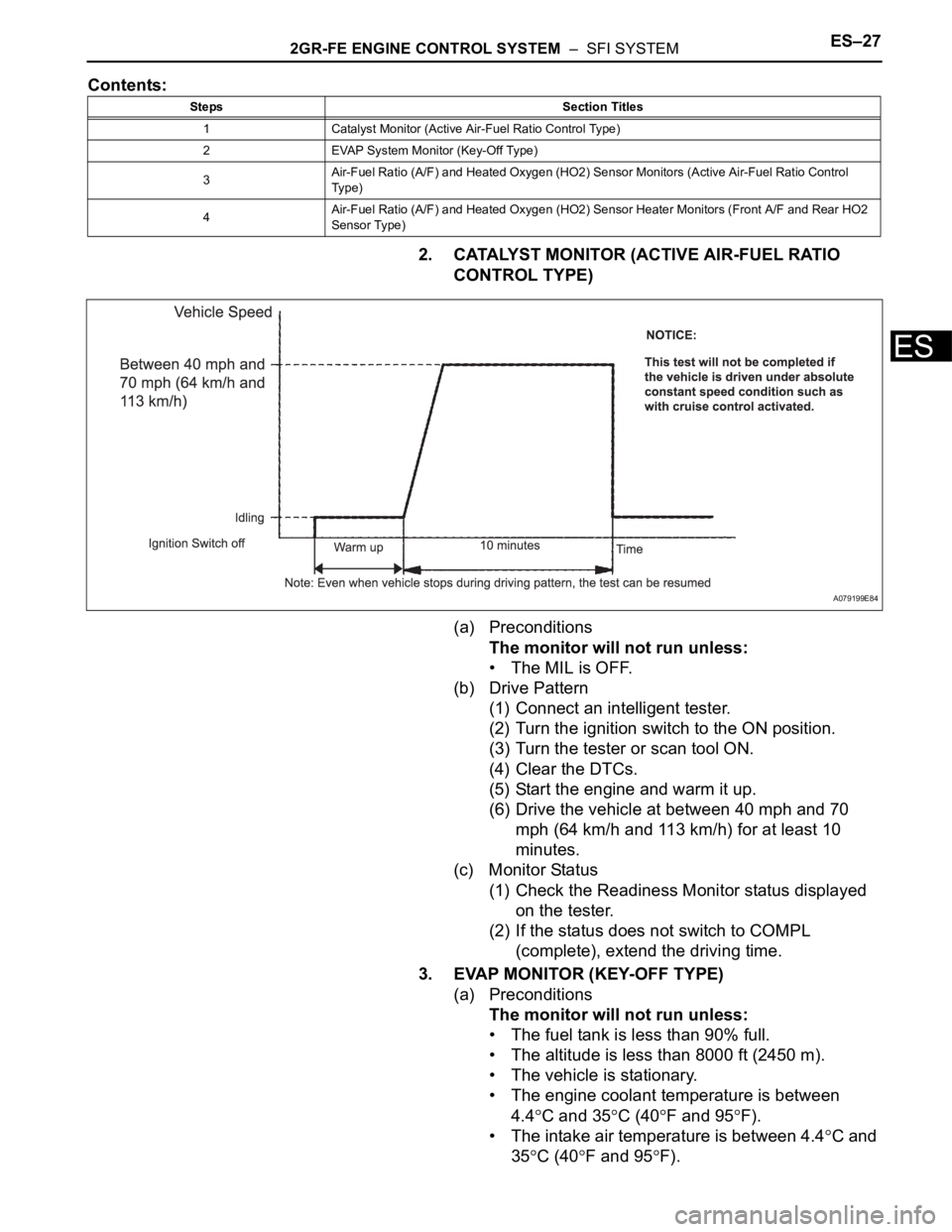
2. CATALYST MONITOR (ACTIVE AIR-FUEL RATIO
CONTROL TYPE)
(a) Preconditions
The monitor will not run unless:
• The MIL is OFF.
(b) Drive Pattern
(1) Connect an intelligent tester.
(2) Turn the ignition switch to the ON position.
(3) Turn the tester or scan tool ON.
(4) Clear the DTCs.
(5) Start the engine and warm it up.
(6) Drive the vehicle at between 40 mph and 70
mph (64 km/h and 113 km/h) for at least 10
minutes.
(c) Monitor Status
(1) Check the Readiness Monitor status displayed
on the tester.
(2) If the status does not switch to COMPL
(complete), extend the driving time.
3. EVAP MONITOR (KEY-OFF TYPE)
(a) Preconditions
The monitor will not run unless:
• The fuel tank is less than 90% full.
• The altitude is less than 8000 ft (2450 m).
• The vehicle is stationary.
• The engine coolant temperature is between
4.4
C and 35C (40F and 95F).
• The intake air temperature is between 4.4
C and
35
C (40F and 95F).
Steps Section Titles
1 Catalyst Monitor (Active Air-Fuel Ratio Control Type)
2 EVAP System Monitor (Key-Off Type)
3Air-Fuel Ratio (A/F) and Heated Oxygen (HO2) Sensor Monitors (Active Air-Fuel Ratio Control
Ty p e )
4Air-Fuel Ratio (A/F) and Heated Oxygen (HO2) Sensor Heater Monitors (Front A/F and Rear HO2
Sensor Type)
A079199E84
Page 2280 of 3000
TIRE AND WHEEL – TIRE PRESSURE WARNING SYSTEMTW–33
TW
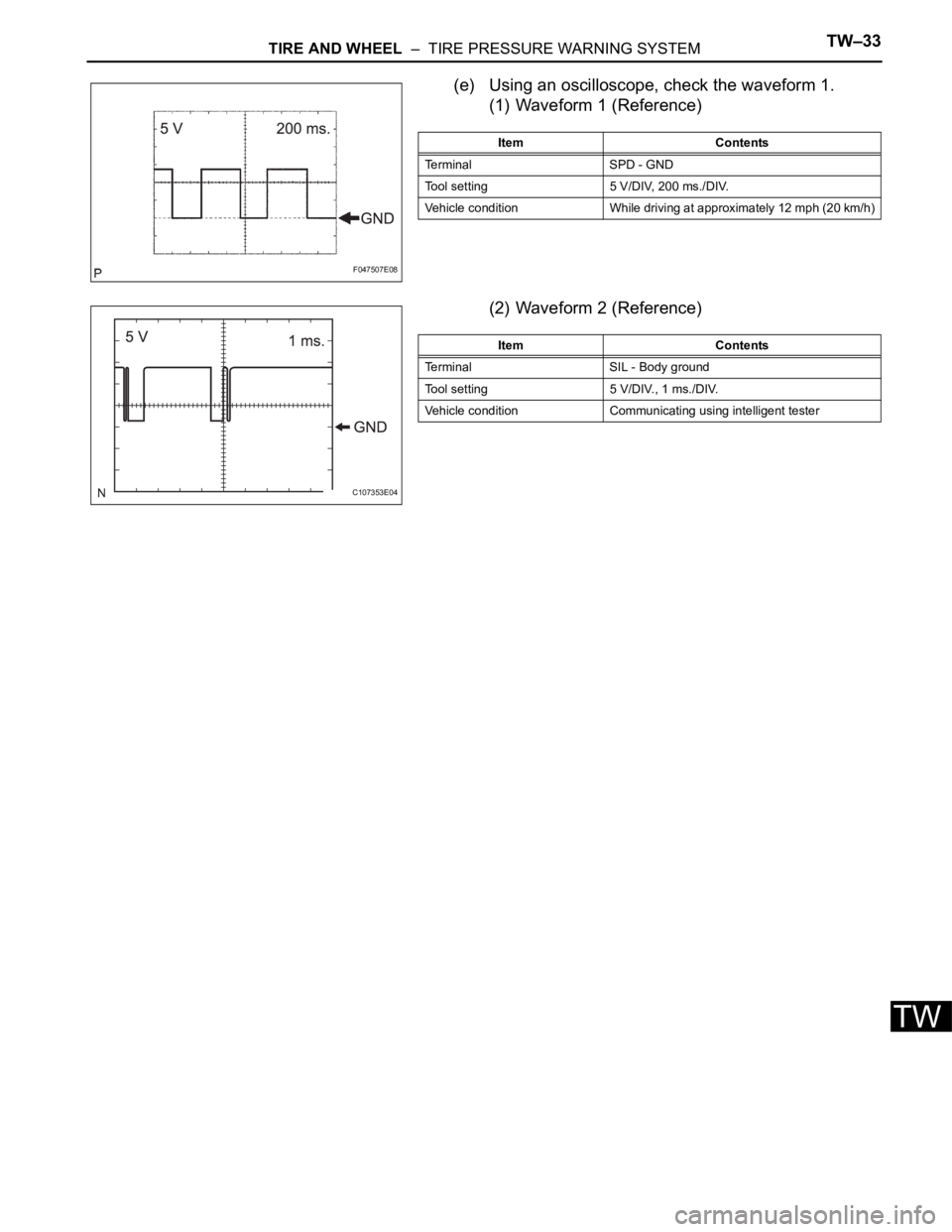
(e) Using an oscilloscope, check the waveform 1.
(1) Waveform 1 (Reference)
(2) Waveform 2 (Reference)
F047507E08
Item Contents
Terminal SPD - GND
Tool setting 5 V/DIV, 200 ms./DIV.
Vehicle condition While driving at approximately 12 mph (20 km/h)
C107353E04
Item Contents
Terminal SIL - Body ground
Tool setting 5 V/DIV., 1 ms./DIV.
Vehicle condition Communicating using intelligent tester
Page 2348 of 3000
TIRE AND WHEEL – TIRE PRESSURE WARNING SYSTEMTW–33
TW
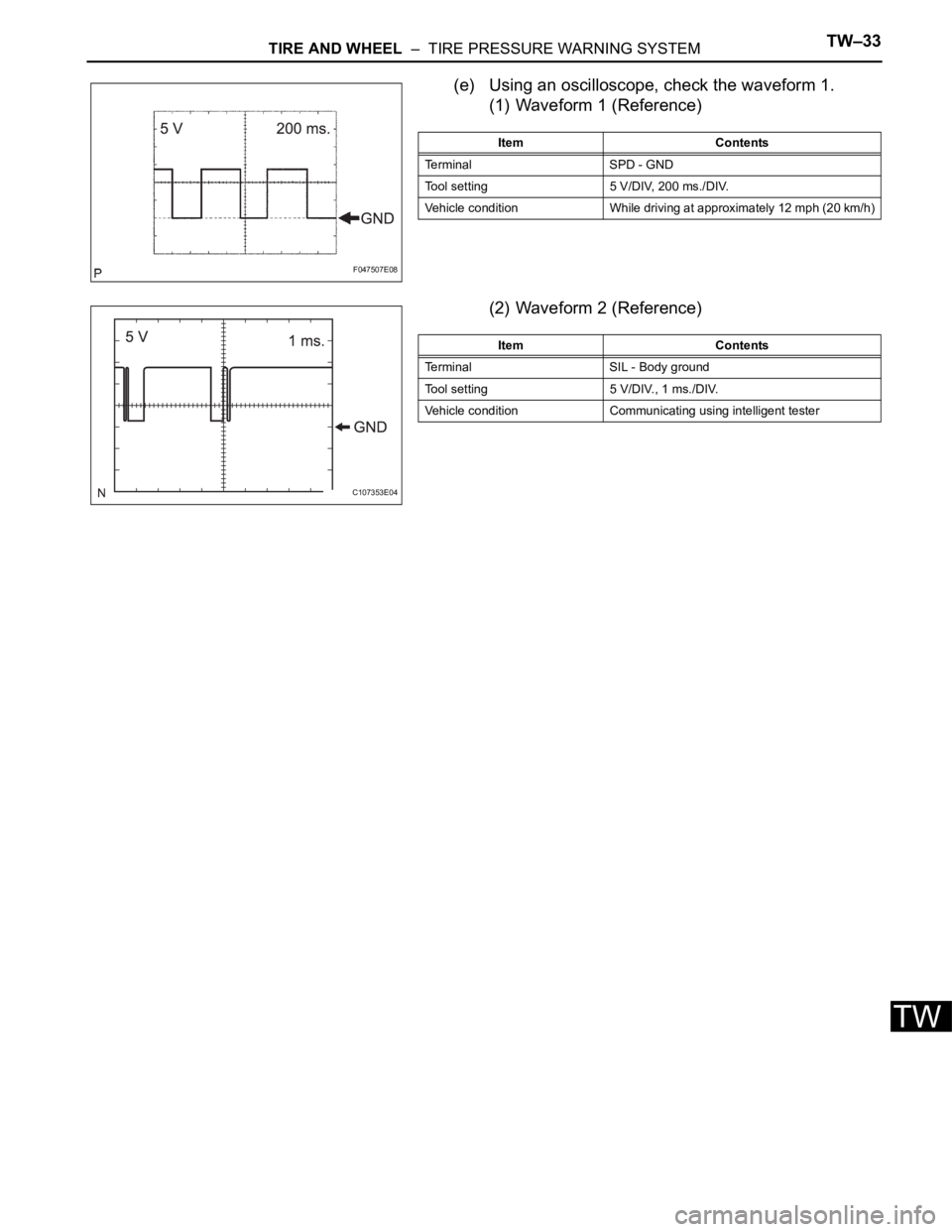
(e) Using an oscilloscope, check the waveform 1.
(1) Waveform 1 (Reference)
(2) Waveform 2 (Reference)
F047507E08
Item Contents
Terminal SPD - GND
Tool setting 5 V/DIV, 200 ms./DIV.
Vehicle condition While driving at approximately 12 mph (20 km/h)
C107353E04
Item Contents
Terminal SIL - Body ground
Tool setting 5 V/DIV., 1 ms./DIV.
Vehicle condition Communicating using intelligent tester
Page 2792 of 3000
AIR CONDITIONING – AIR CONDITIONING SYSTEM (for Automatic Air Conditioning Sys-
tem)AC–49
AC
Result
B
A
(a) Use the intelligent tester to check if the multiplex
communication system (BEAN) is functioning normally.
Result
B
A
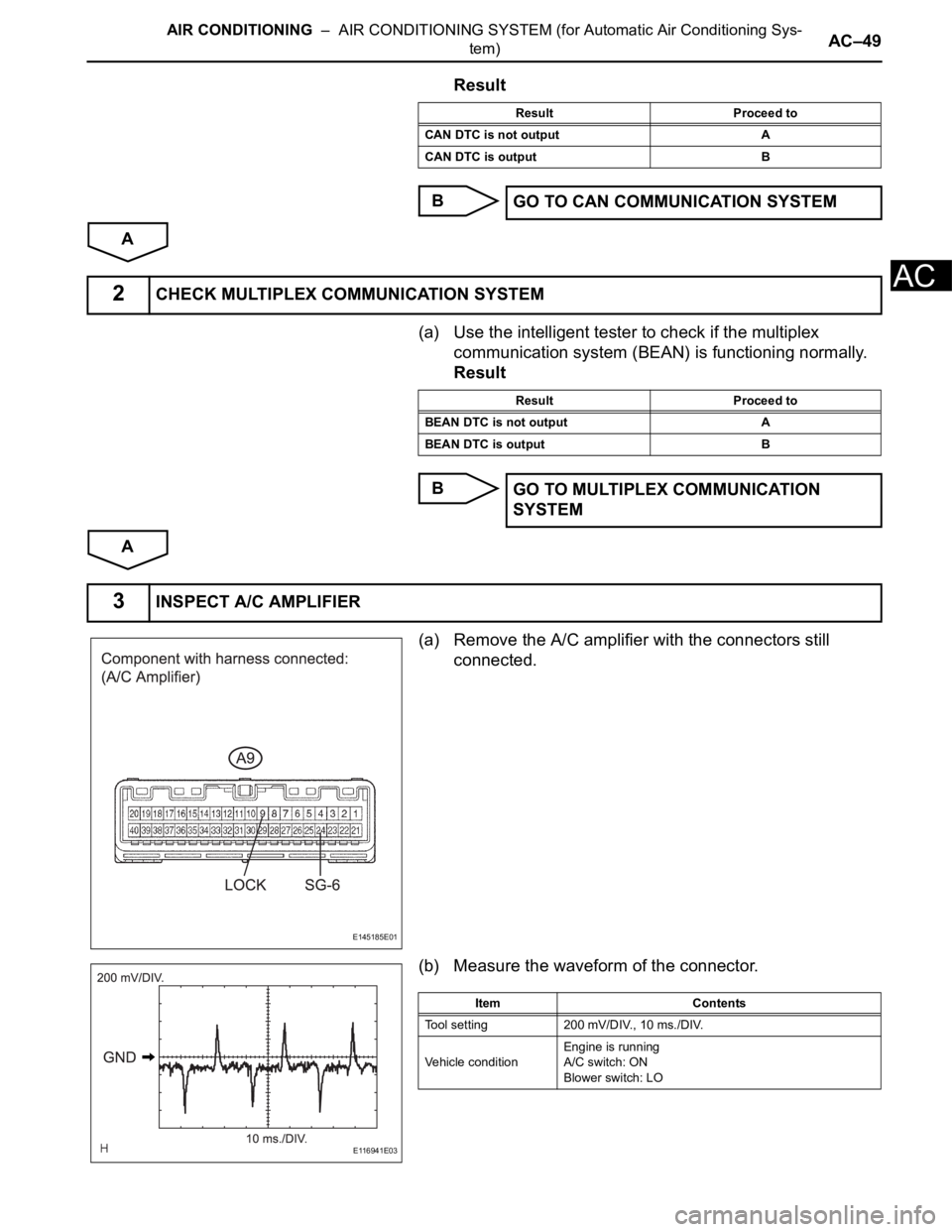
(a) Remove the A/C amplifier with the connectors still
connected.
(b) Measure the waveform of the connector.
Result Proceed to
CAN DTC is not output A
CAN DTC is output B
GO TO CAN COMMUNICATION SYSTEM
2CHECK MULTIPLEX COMMUNICATION SYSTEM
Result Proceed to
BEAN DTC is not output A
BEAN DTC is output B
GO TO MULTIPLEX COMMUNICATION
SYSTEM
3INSPECT A/C AMPLIFIER
E145185E01
E116941E03
Item Contents
Tool setting 200 mV/DIV., 10 ms./DIV.
Vehicle conditionEngine is running
A/C switch: ON
Blower switch: LO
Page 2877 of 3000
AC–134AIR CONDITIONING – AIR CONDITIONING SYSTEM (for Automatic Air Conditioning Sys-
tem)
AC
OK
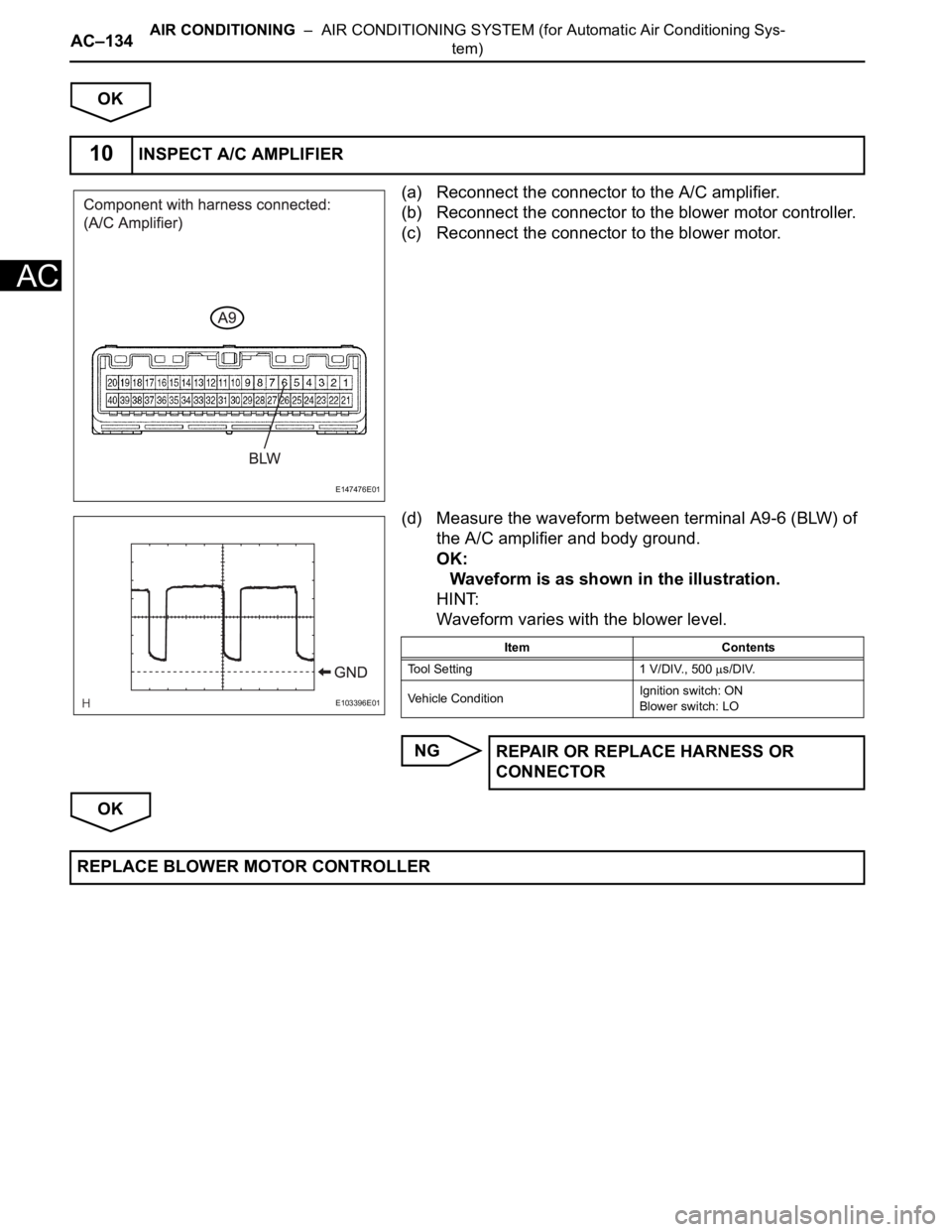
(a) Reconnect the connector to the A/C amplifier.
(b) Reconnect the connector to the blower motor controller.
(c) Reconnect the connector to the blower motor.
(d) Measure the waveform between terminal A9-6 (BLW) of
the A/C amplifier and body ground.
OK:
Waveform is as shown in the illustration.
HINT:
Waveform varies with the blower level.
NG
OK
10INSPECT A/C AMPLIFIER
E147476E01
E103396E01
Item Contents
Tool Setting 1 V/DIV., 500
s/DIV.
Vehicle ConditionIgnition switch: ON
Blower switch: LO
REPAIR OR REPLACE HARNESS OR
CONNECTOR
REPLACE BLOWER MOTOR CONTROLLER
Page 2902 of 3000
AIR CONDITIONING – AIR CONDITIONING SYSTEM (for Automatic Air Conditioning Sys-
tem)AC–13
AC
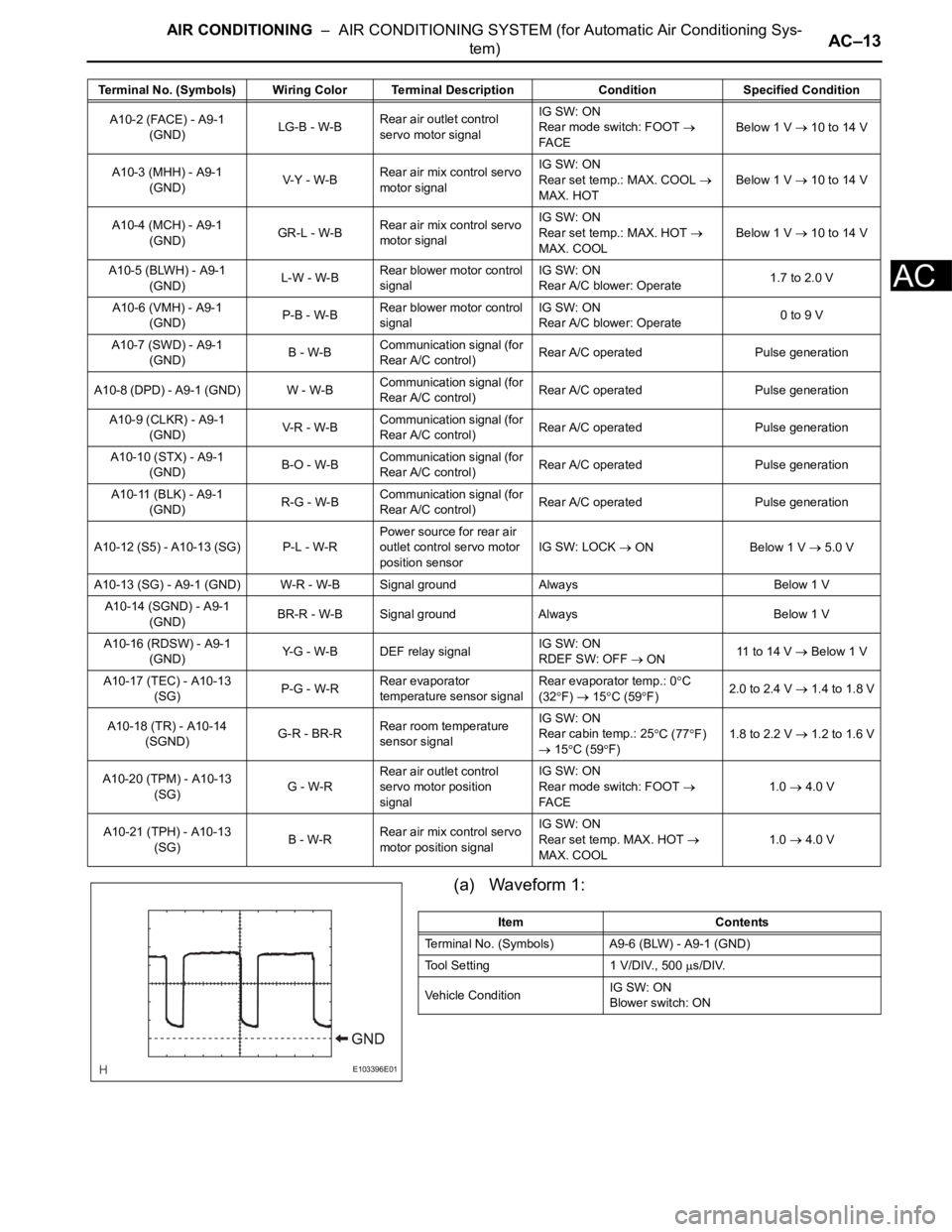
(a) Waveform 1:
A10-2 (FACE) - A9-1
(GND)LG-B - W-BRear air outlet control
servo motor signalIG SW: ON
Rear mode switch: FOOT
FA C EBelow 1 V 10 to 14 V
A10-3 (MHH) - A9-1
(GND)V-Y - W-BRear air mix control servo
motor signalIG SW: ON
Rear set temp.: MAX. COOL
MAX. HOTBelow 1 V 10 to 14 V
A10-4 (MCH) - A9-1
(GND)GR-L - W-BRear air mix control servo
motor signalIG SW: ON
Rear set temp.: MAX. HOT
MAX. COOLBelow 1 V 10 to 14 V
A10-5 (BLWH) - A9-1
(GND)L-W - W-BRear blower motor control
signalIG SW: ON
Rear A/C blower: Operate1.7 to 2.0 V
A10-6 (VMH) - A9-1
(GND)P-B - W-BRear blower motor control
signalIG SW: ON
Rear A/C blower: Operate0 to 9 V
A10-7 (SWD) - A9-1
(GND)B - W-BCommunication signal (for
Rear A/C control)Rear A/C operated Pulse generation
A10-8 (DPD) - A9-1 (GND) W - W-BCommunication signal (for
Rear A/C control)Rear A/C operated Pulse generation
A10-9 (CLKR) - A9-1
(GND)V-R - W- BCommunication signal (for
Rear A/C control)Rear A/C operated Pulse generation
A10-10 (STX) - A9-1
(GND)B-O - W-BCommunication signal (for
Rear A/C control)Rear A/C operated Pulse generation
A10-11 (BLK) - A9-1
(GND)R-G - W-BCommunication signal (for
Rear A/C control)Rear A/C operated Pulse generation
A10-12 (S5) - A10-13 (SG) P-L - W-RPower source for rear air
outlet control servo motor
position sensorIG SW: LOCK
ON Below 1 V 5.0 V
A10-13 (SG) - A9-1 (GND) W-R - W-B Signal ground Always Below 1 V
A10-14 (SGND) - A9-1
(GND)BR-R - W-B Signal ground Always Below 1 V
A10-16 (RDSW) - A9-1
(GND)Y-G - W-B DEF relay signalIG SW: ON
RDEF SW: OFF
ON11 to 14 V Below 1 V
A10-17 (TEC) - A10-13
(SG)P-G - W-RRear evaporator
temperature sensor signalRear evaporator temp.: 0
C
(32
F) 15C (59F)2.0 to 2.4 V 1.4 to 1.8 V
A10-18 (TR) - A10-14
(SGND)G-R - BR-RRear room temperature
sensor signalIG SW: ON
Rear cabin temp.: 25
C (77F)
15C (59F)1.8 to 2.2 V
1.2 to 1.6 V
A10-20 (TPM) - A10-13
(SG)G - W-RRear air outlet control
servo motor position
signalIG SW: ON
Rear mode switch: FOOT
FA C E1.0 4.0 V
A10-21 (TPH) - A10-13
(SG)B - W-RRear air mix control servo
motor position signalIG SW: ON
Rear set temp. MAX. HOT
MAX. COOL1.0 4.0 V Terminal No. (Symbols) Wiring Color Terminal Description ConditionSpecified Condition
E103396E01
Item Contents
Terminal No. (Symbols) A9-6 (BLW) - A9-1 (GND)
Tool Setting 1 V/DIV., 500
s/DIV.
Vehicle ConditionIG SW: ON
Blower switch: ON