air condition TOYOTA SIENNA 2014 XL30 / 3.G User Guide
[x] Cancel search | Manufacturer: TOYOTA, Model Year: 2014, Model line: SIENNA, Model: TOYOTA SIENNA 2014 XL30 / 3.GPages: 872, PDF Size: 15.99 MB
Page 185 of 872
185
1
1-7. Safety information
Before driving
SIENNA_OM_OM45483U_(U)
Front passenger occupant classification system
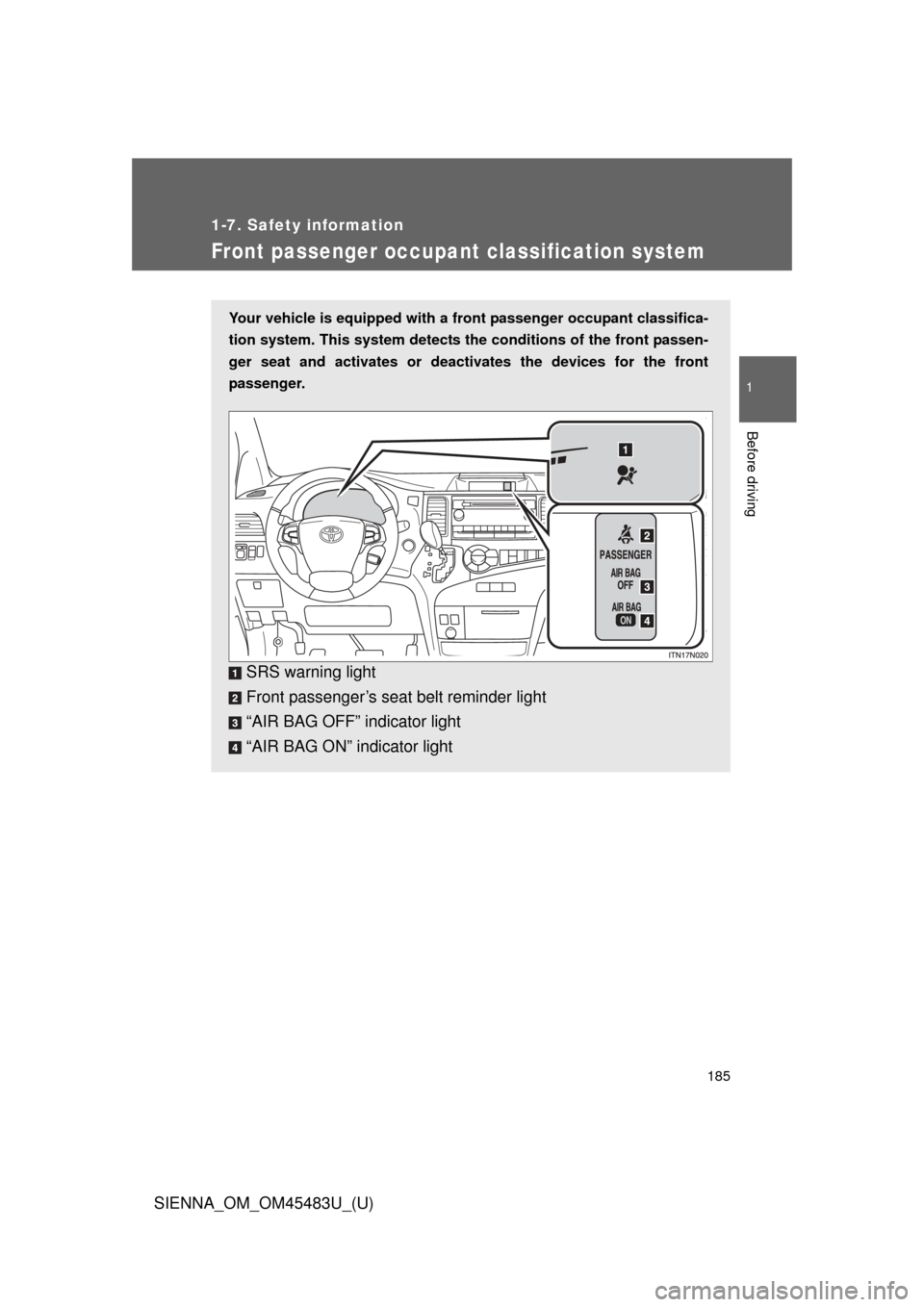
Your vehicle is equipped with a front passenger occupant classifica-
tion system. This system detects the conditions of the front passen-
ger seat and activates or deactiv ates the devices for the front
passenger.
SRS warning light
Front passenger’s seat belt reminder light
“AIR BAG OFF” indicator light
“AIR BAG ON” indicator light
Page 186 of 872

186 1-7. Safety information
SIENNA_OM_OM45483U_(U)
Conditions and operation of the front passenger occupant
classification system
■ Adult
*1
■Child*3 or child restraint system*4
Indicator/
warning light “AIR BAG ON” and “AIR BAG OFF”
indicator lights “AIR BAG
ON”
SRS warning light Off
Front passenger’s seat belt reminder light
Flashing*2
Devices Front passenger airbag
Activated
Side airbag on the front passenger seat
Curtain shield airbag in the front passenger side
Front passenger’s seat belt pretensioner
Indicator/
warning light “AIR BAG ON” and “AIR BAG OFF”
indicator lights “AIR BAG
OFF”
*5
SRS warning light Off
Front passenger’s seat belt reminder light Flashing
*2
DevicesFront passenger airbag Deactivated
Side airbag on the front passenger seat
Activated
Curtain shield airbag in the front
passenger side
Front passenger’s seat belt pretensioner
Page 256 of 872
256
2-2. Instrument cluster and information display
SIENNA_OM_OM45483U_(U)
Multi-information display
: If equipped
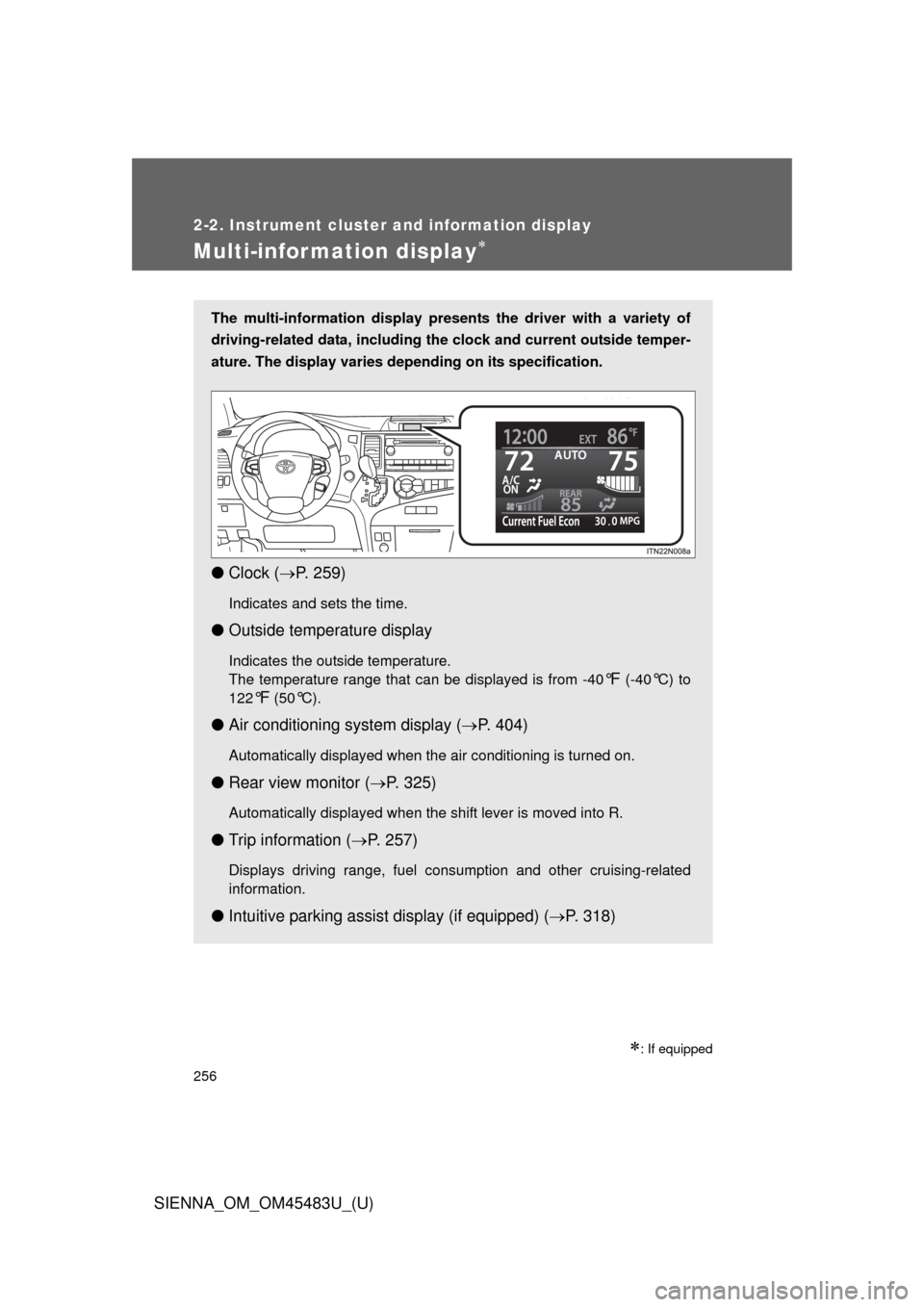
The multi-information display presents the driver with a variety of
driving-related data, including the clock and current outside temper-
ature. The display varies depending on its specification.
● Clock ( P. 259)
Indicates and sets the time.
● Outside temperature display
Indicates the outside temperature.
The temperature range that can be displayed is from -40
°F (-40°C) to
122
°F (50°C).
● Air conditioning system display ( P. 404)
Automatically displayed when the air conditioning is turned on.
● Rear view monitor ( P. 325)
Automatically displayed when the shift lever is moved into R.
● Trip information ( P. 257)
Displays driving range, fuel consumption and other cruising-related
information.
● Intuitive parking assist display (if equipped) ( P. 318)
Page 323 of 872

323
2-4. Using other
driving systems
2
When driving
SIENNA_OM_OM45483U_(U)
■Sensor detection information
●Certain vehicle conditions and the surrounding environment may affect
the ability of the sensor to correctly detect obstacles. Particular instances
where this may occur are listed below.
• There is dirt, snow or ice on the sensor.
• The sensor is frozen.
• The sensor is covered in any way.
• The vehicle is leaning considerably to one side.
• On an extremely bumpy road, on an incline, on gravel, or on grass
• The vicinity of the vehicle is noisy due to vehicle horns, motorcycle
engines, air brakes of large vehicles, or other loud noises producing
ultrasonic waves.
• There is another vehicle equipped with parking assist sensors in the vicinity.
• A sensor is coated with a sheet of spray or heavy rain.
• The vehicle is equipped with a fender pole or radio antenna.
• A bumper or sensor receives a strong impact.
• The vehicle is approaching a tall or right-angled curb.
• In harsh sunlight or intense cold weather
In addition to the examples above, there are instances in which, because of
their shapes, signs and other objects may be judged by the sensor to be
closer than they are.
● The shape of the obstacle may prevent the sensor from detecting it. Pay
particular attention to the following obstacles:
• Wires, fences, ropes etc.
• Cotton, snow and other materials that absorb sound waves
• Sharply-angled objects
• Low obstacles
• Tall obstacles with upper sections projecting outwards in the direction
of your vehicle
Page 369 of 872
369
2-5. Driving information
2
When driving
SIENNA_OM_OM45483U_(U)
Winter driving tips
Carry out the necessary preparations and inspections before driving
the vehicle in winter. Always drive the vehicle in a manner appropri-
ate to the prevailing weather conditions.
■ Pre-winter preparations
●Use fluids that are appropriate to the prevailing outside tem-
peratures.
• Engine oil
• Engine coolant
• Washer fluid
● Have a service technician inspect the level and specific grav-
ity of battery electrolyte.
● Have the vehicle fitted with four snow tires or purchase a set
of tire chains for the front tires.
Ensure that all tires are the same size and brand, and that chains
match the size of the tires.
■Before driving the vehicle
Perform the following according to the driving conditions:
●Do not try to forcibly open a window or move a wiper that is
frozen. Pour warm water over the frozen area to melt the ice.
Wipe away the water immediately to prevent it from freezing.
● To ensure proper operation of th e climate control system fan,
remove any snow that has accumulated on the air inlet vents
in front of the windshield.
● Remove any ice that has accumu lated on the vehicle chassis.
● Periodically check for and remove any excess ice or snow
that may have accumulated in the wheel well or on the
brakes.
Page 385 of 872

385
2-5. Driving information
2
When driving
SIENNA_OM_OM45483U_(U)
●
Take care when passing other vehicles. Passing requires consider-
able distance. After passing a vehicle, do not forget the length of
your trailer, and be sure you hav e plenty of room before changing
lanes.
● To maintain engine braking efficiency and charging system perfor-
mance when using engine braking, do not put the transmission in
D. If in the S mode, transmission shift range position must be in 4
or lower.
● Instability happens more frequently when descending steep or long
downhill grades. Before descending, slow down and downshift. Do
not make sudden downshifts while descending steep or long down-
hill grades.
● Avoid holding the brake pedal down too long or applying the
brakes too frequently. This could cause the brakes to overheat and
result in reduced braking efficiency.
● Due to the added load of the trailer, your vehicle’s engine may
overheat on hot days (at temper atures over 85°F [30°C]) when
driving up a long or steep grade. If the Engine coolant temperature
gauge overheating, immediately turn off the air conditioning (if in
use), pull your vehicle off the road and stop in a safe spot.
( P. 790)
Page 394 of 872
394
SIENNA_OM_OM45483U_(U)
3-1. Using the air conditioning system and defogger
Front manual air conditioning system ....... 396
Front automatic air conditioning system ....... 404
Rear manual air conditioning system ....... 414
Rear automatic air conditioning system ....... 417
Rear window and outside rear view mirror defoggers,
and windshield wiper
de-icer ............................ 421
3-2. Using the audio system Audio system type............ 423
Using the radio ................. 428
Using the CD player ......... 438
Playing MP3 and WMA discs ..................... 447
Operating an iPod ............ 458
Operating a USB memory .......................... 465
Optimal use of the audio system ........................... 473
Using the AUX port .......... 478
Using the steering switches ......................... 479
Detachable pole antenna .......................... 483 3-3. Using the Bluetooth® audio
system
Bluetooth
®
audio system.................. 486
Using the Bluetooth
®
audio system.................. 490
Operating a Bluetooth
®
enabled portable
player ............................. 496
Setting up a Bluetooth
®
enabled portable
player ............................. 498
Bluetooth
® audio system
setup .............................. 503
3-4. Using the rear audio system Rear seat entertainment system features ............. 504
Using the DVD player (DVD video) ................... 515
Using the DVD player (video CD)...................... 525
Using the DVD player (audio CD/CD text) ........ 529
Using the DVD player (WMA/MP3 discs) .......... 530
Using the video mode ...... 532
Changing the DVD initial setting ............................ 534
Page 396 of 872
396
SIENNA_OM_OM45483U_(U)
3-1. Using the air conditioning system and defogger
Front manual air conditioning system
Adjusting the settings■ Basic setting
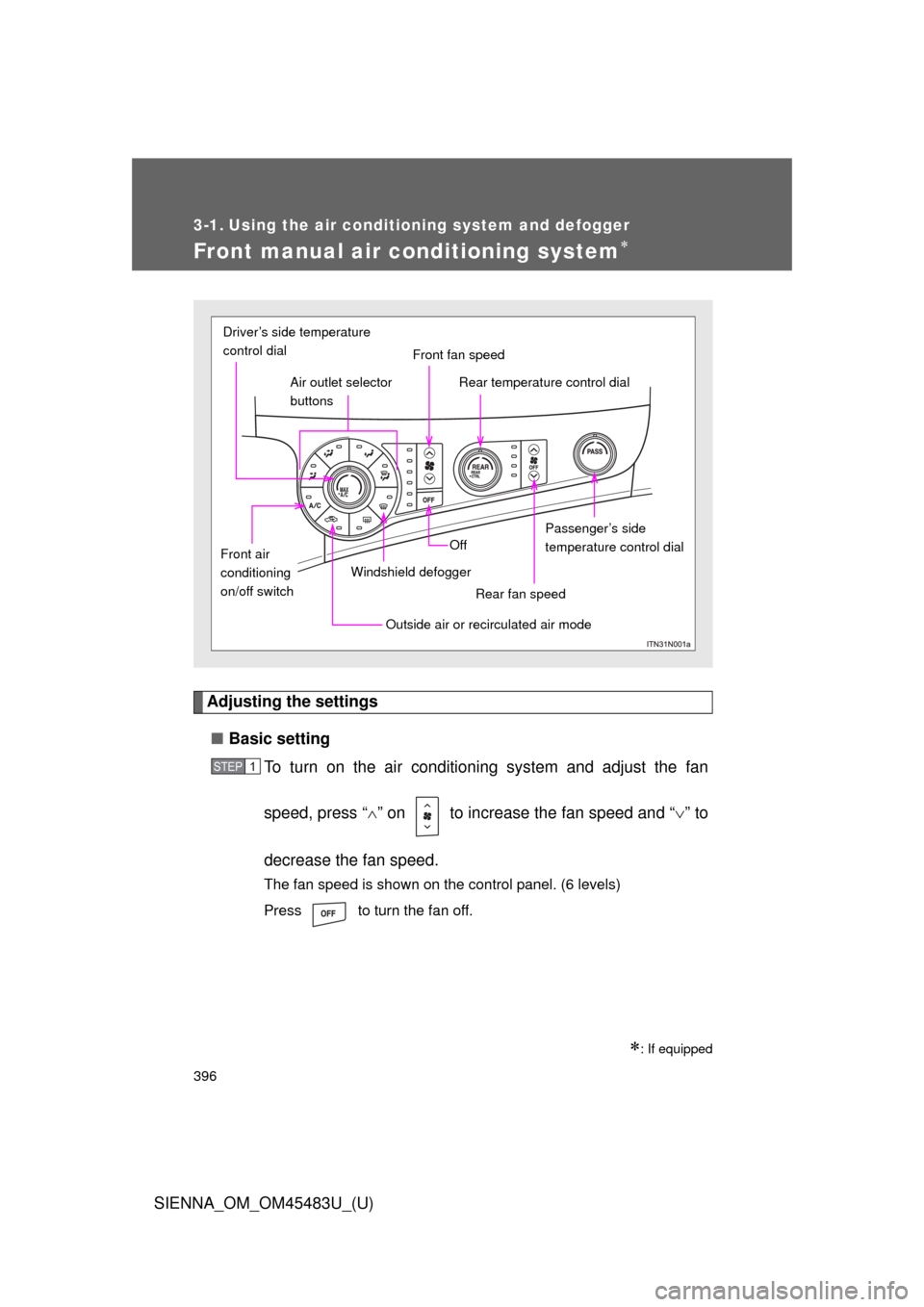
To turn on the air conditioning system and adjust the fan
speed, press “ ” on to increase the fan speed and “ ” to
decrease the fan speed.
The fan speed is shown on the control panel. (6 levels)
Press to turn the fan off.
: If equipped
Front fan speed
Air outlet selector
buttons
Driver’s side temperature
control dial
Rear temperature control dial
Passenger’s side
temperature control dial
Rear fan speed
Off
Windshield defogger
Outside air or recirculated air mode
Front air
conditioning
on/off switch
STEP1
Page 397 of 872
397
3-1. Using the air conditioning system
and defogger
3
Interior features
SIENNA_OM_OM45483U_(U)Driver’s side temperature control dial
Turn the temperature control dial clockwise (warm) or coun-
terclockwise (cool).
If is not pressed, the system will blow ambient temperature air
or heated air.
For quick cooling, turn the temperature control dial to the “MAX A/C”
position. The air conditioning will automatically turn on and the air
circulation mode will be set to recirculated air mode.
When the dial is in the “MAX A/C” position, the air conditioning sys-
tem cannot be turned off even if is pressed.
Front passenger’s side temperature control dial
Turn the temperature control dial clockwise (warm) or counter
clockwise (cool).
STEP2
Page 398 of 872
398 3-1. Using the air conditioning system and defogger
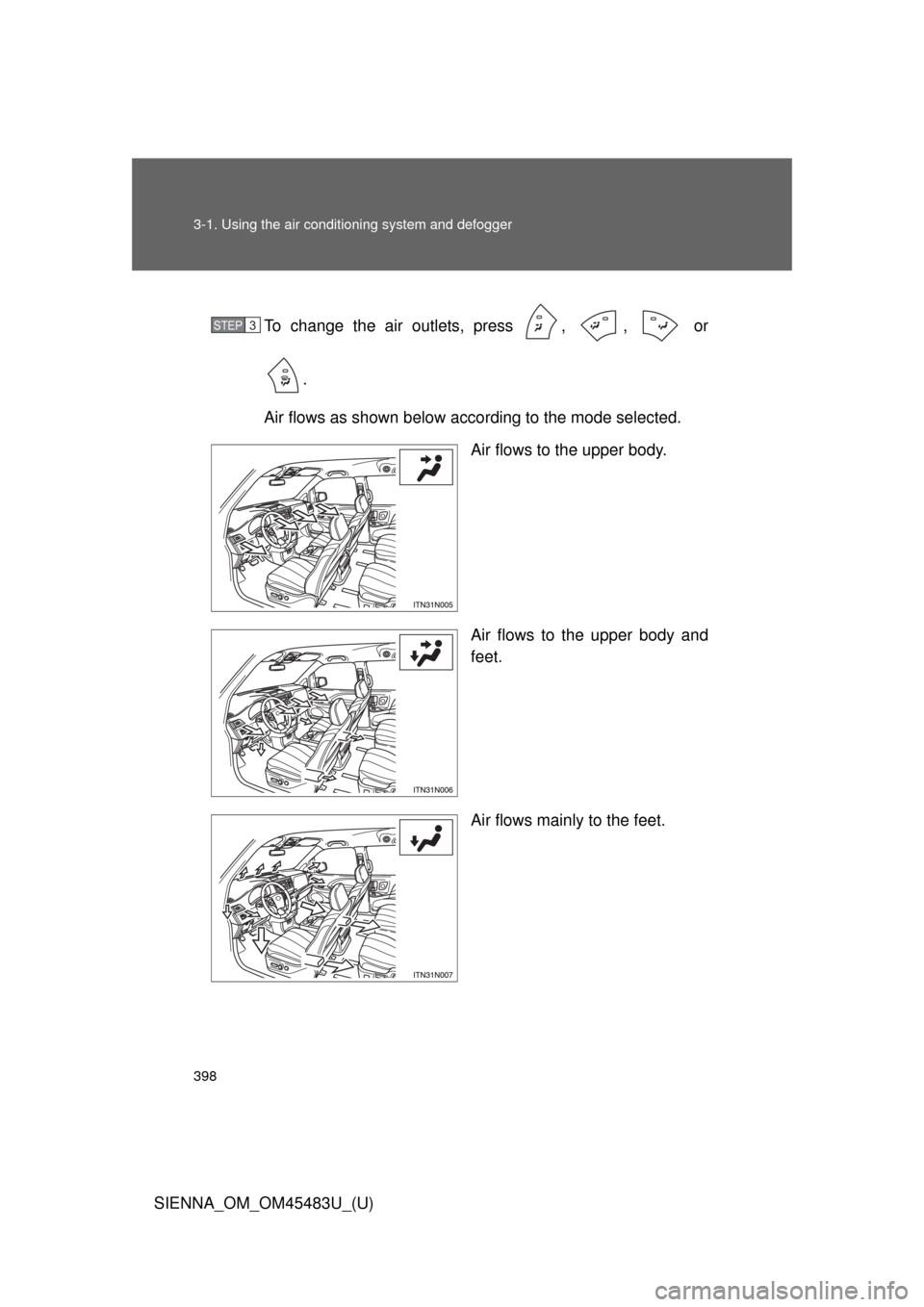
SIENNA_OM_OM45483U_(U)To change the air outlets, press , , or
.
Air flows as shown below according to the mode selected. Air flows to the upper body.
Air flows to the upper body and
feet.
Air flows mainly to the feet.
STEP3