ignition TOYOTA SIENNA 2014 XL30 / 3.G Owner's Manual
[x] Cancel search | Manufacturer: TOYOTA, Model Year: 2014, Model line: SIENNA, Model: TOYOTA SIENNA 2014 XL30 / 3.GPages: 872, PDF Size: 15.99 MB
Page 158 of 872

158 1-5. Refueling
SIENNA_OM_OM45483U_(U)
CAUTION
■When refueling the vehicle
Observe the following precautions while refueling the vehicle.
Failure to do so may result in death or serious injury.
●After exiting the vehicle and before opening the fuel door, touch an
unpainted metal surface to discharge any static electricity. It is important to
discharge static electricity before refueling because sparks resulting from
static electricity can cause fuel vapors to ignite while refueling.
● Always hold the grips on the fuel tank cap and turn it slowly to remove it.
A whooshing sound may be heard when the fuel tank cap is loosened.
Wait until the sound cannot be heard before fully removing the cap.
In hot weather, pressurized fuel may spray out of the filler neck and cause
injury.
● Do not allow anyone that has not discharged static electricity from their
body to come close to an open fuel tank.
● Do not inhale vaporized fuel.
Fuel contains substances that are harmful if inhaled.
● Do not smoke while refueling the vehicle.
Doing so may cause the fuel to ignite and cause a fire.
● Do not return to the vehicle or touch any person or object that is statically
charged.
This may cause static electricity to build up, resulting in a possible ignition
hazard.
Page 160 of 872
160
SIENNA_OM_OM45483U_(U)
1-6. Theft deterrent system
Engine immobilizer system
: If equipped
The vehicle’s keys have built-in transponder chips that prevent the
engine from starting if a key has not been previously registered in
the vehicle’s on-board computer.
Never leave the keys inside the vehicle when you leave the vehicle.
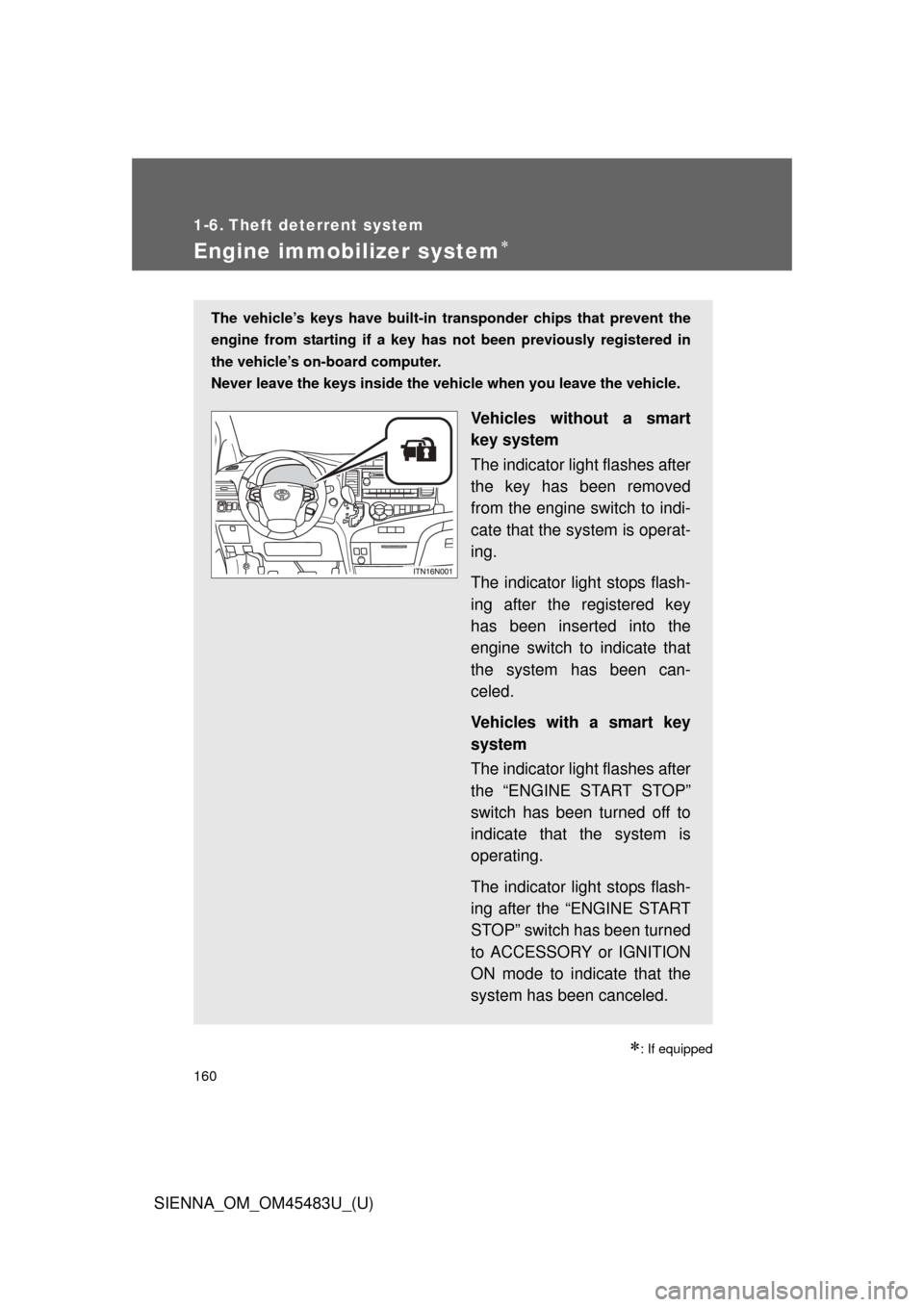
Vehicles without a smart
key system
The indicator light flashes after
the key has been removed
from the engine switch to indi-
cate that the system is operat-
ing.
The indicator light stops flash-
ing after the registered key
has been inserted into the
engine switch to indicate that
the system has been can-
celed.
Vehicles with a smart key
system
The indicator light flashes after
the “ENGINE START STOP”
switch has been turned off to
indicate that the system is
operating.
The indicator light stops flash-
ing after the “ENGINE START
STOP” switch has been turned
to ACCESSORY or IGNITION
ON mode to indicate that the
system has been canceled.
Page 164 of 872
164 1-6. Theft deterrent system
SIENNA_OM_OM45483U_(U)
■System maintenance
The vehicle has a maintenance-free type alarm system.
■ Items to check before locking the vehicle
To prevent unexpected triggering of the alarm and vehicle theft, make sure
of the following:
●Nobody is in the vehicle.
● The windows and moon roof (if equipped) are closed before the alarm is
set.
● No valuables or other personal items are left in the vehicle.
■ Deactivating or stopping the alarm
Do one of the following to deactivate or stop the alarm:
●Unlock the doors using the entry function or wireless remote
control.
● Vehicles without a smart key system: Turn the engine switch
to the “ACC” or “ON” position, or start the engine.
Vehicles with a smart key system: Turn the “ENGINE START
STOP” switch to ACCESSORY or IGNITION ON mode, or
start the engine.
(The alarm will be deactivated or stopped after a few sec-
onds.)
Page 213 of 872
When driving2
213
SIENNA_OM_OM45483U_(U)
2-1. Driving proceduresDriving the vehicle............ 214
Engine (ignition) switch (vehicles without a smart
key system).................... 228
Engine (ignition) switch (vehicles with a smart
key system).................... 231
Automatic transaxle ......... 238
Turn signal lever .............. 243
Parking brake ................... 244
Horn ................................. 245
2-2. Instrument cluster and information display
Gauges and meters............. 246
Indicators and warning lights .............................. 249
Multi-information display............................ 256
2-3. Operating the lights and wipers
Headlight switch ............... 270
Automatic High Beam ...... 277
Fog light switch ................ 284
Windshield wipers and washer .................... 286
Rear window wiper and washer .................... 294 2-4. Using other driving systems
Cruise control ................... 297
Dynamic radar cruise control ............................ 302
Intuitive parking assist...... 318
Rear view monitor system ........................... 325
Driving assist systems ..... 331
Hill-start assist control ...... 337
PCS (Pre-Collision System).......................... 340
BSM (Blind Spot Monitor).......................... 348
2-5. Driving information Cargo and luggage .......... 360
Vehicle load limits ............ 368
Winter driving tips ............ 369
Trailer towing (with towing package)............. 373
Dinghy towing .................. 393
Page 228 of 872
228
2-1. Driving procedures
SIENNA_OM_OM45483U_(U)
Engine (ignition) switch (vehicles without a smar t key system)
■Starting the engine
Check that the parking brake is set.
Check that the shift lever is set in P.
Firmly depress the brake pedal.
Turn the engine switch to the “START” position to start the
engine.
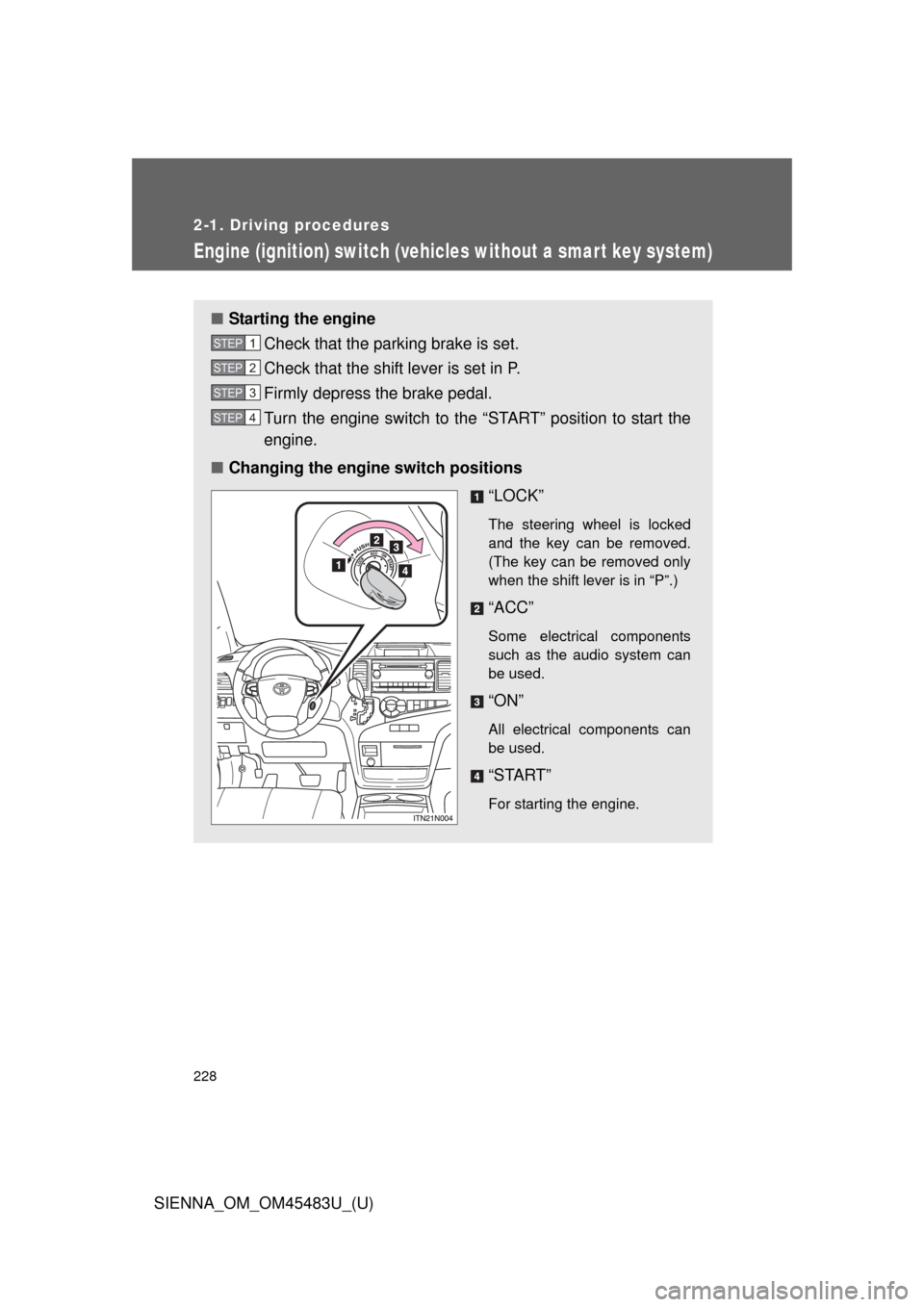
■ Changing the engine switch positions
“LOCK”
The steering wheel is locked
and the key can be removed.
(The key can be removed only
when the shift lever is in “P”.)
“ACC”
Some electrical components
such as the audio system can
be used.
“ON”
All electrical components can
be used.
“START”
For starting the engine.
STEP1
STEP2
STEP3
STEP4
Page 231 of 872
231
2-1. Driving procedures
2
When driving
SIENNA_OM_OM45483U_(U)
Engine (ignition) switch (vehicles with a smart key system)
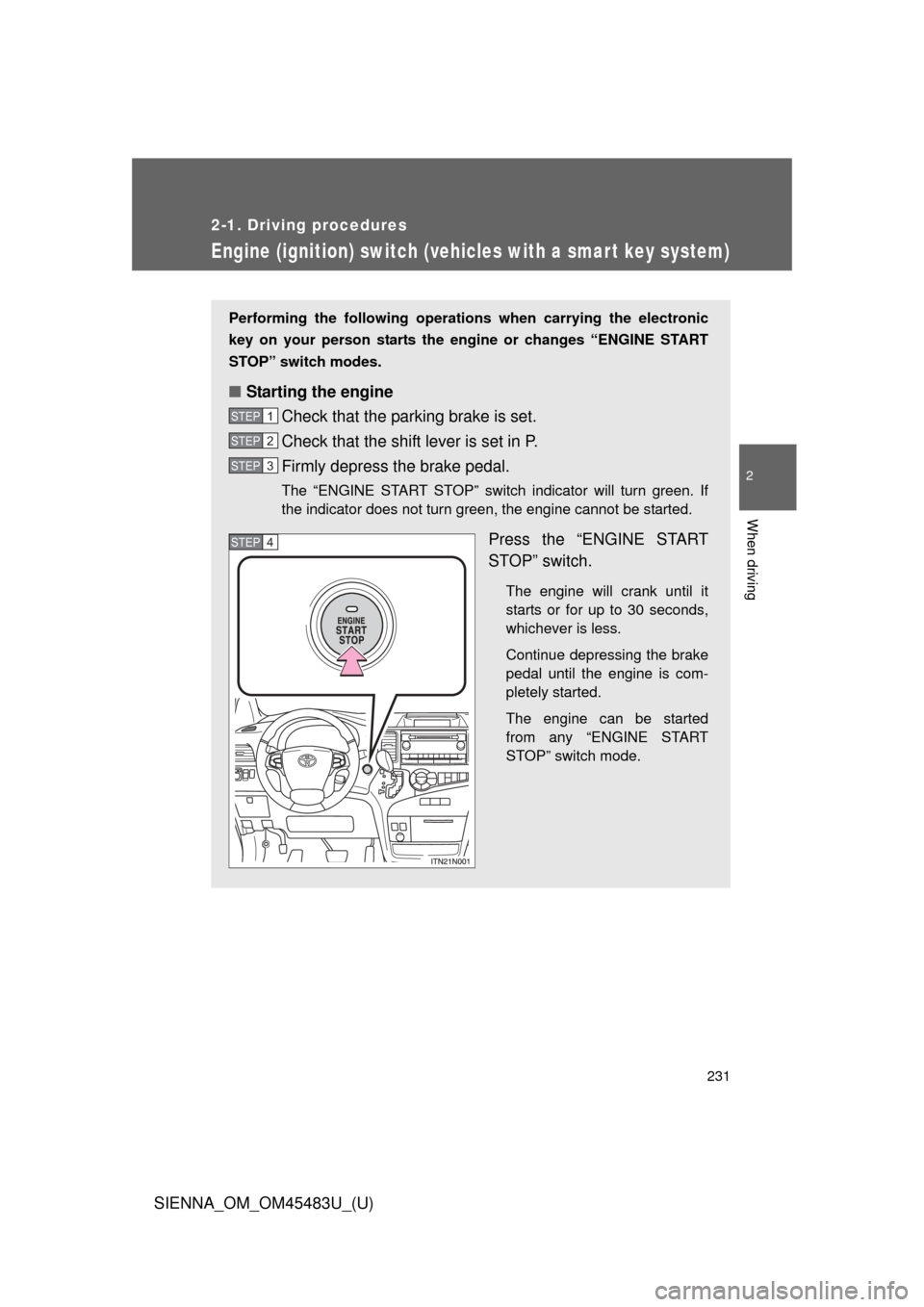
Performing the following operations when carrying the electronic
key on your person starts the engine or changes “ENGINE START
STOP” switch modes.
■ Starting the engine
Check that the parking brake is set.
Check that the shift lever is set in P.
Firmly depress the brake pedal.
The “ENGINE START STOP” switch indicator will turn green. If
the indicator does not turn green, the engine cannot be started.
Press the “ENGINE START
STOP” switch.
The engine will crank until it
starts or for up to 30 seconds,
whichever is less.
Continue depressing the brake
pedal until the engine is com-
pletely started.
The engine can be started
from any “ENGINE START
STOP” switch mode.
STEP1
STEP2
STEP3
STEP4
Page 233 of 872
233
2-1. Driving procedures
2
When driving
SIENNA_OM_OM45483U_(U)
■
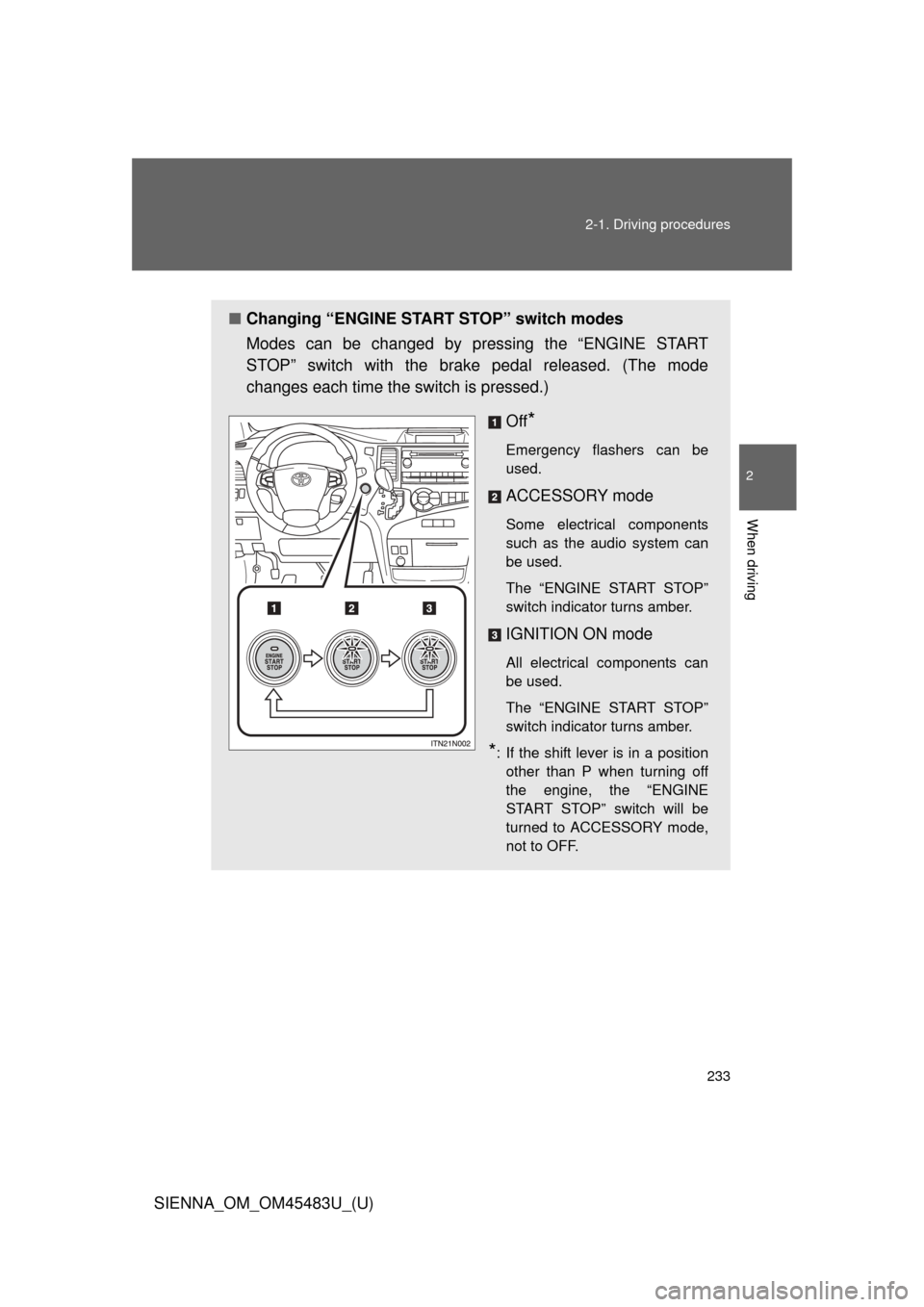
Changing “ENGINE START STOP” switch modes
Modes can be changed by pressing the “ENGINE START
STOP” switch with the brake pedal released. (The mode
changes each time the switch is pressed.)
Off
*
Emergency flashers can be
used.
ACCESSORY mode
Some electrical components
such as the audio system can
be used.
The “ENGINE START STOP”
switch indicator turns amber.
IGNITION ON mode
All electrical components can
be used.
The “ENGINE START STOP”
switch indicator turns amber.
*: If the shift lever is in a positionother than P when turning off
the engine, the “ENGINE
START STOP” switch will be
turned to ACCESSORY mode,
not to OFF.
Page 234 of 872
234 2-1. Driving procedures
SIENNA_OM_OM45483U_(U)
When stopping the engine with the shift lever in a position other
than PIf the engine is stopped with the sh ift lever in a position other than P,
the “ENGINE START STOP” switch will not be turned off but instead
be turned to ACCESSORY mode. Perform the following procedure to
turn the switch off:
Check that the parking brake is set.
Shift the shift lever to P.
Check that the indicator on the “ENGINE START STOP”
switch is illuminated in amber and then press the “ENGINE
START STOP” switch once.
Check that the indicator on the “ENGINE START STOP”
switch is off.
■Auto power off function
If the vehicle is left in ACCESSORY mode for more than 20 minutes or
IGNITION ON mode (the engine is not running) for more than an hour with
the shift lever in P, the “ENGINE START STOP” switch will automatically turn
off. However, this function cannot entirely prevent battery discharge. Do not
leave the vehicle with the “ENGINE START STOP” switch in ACCESSORY
or IGNITION ON mode for long periods of time when the engine is not
running.
■ Operation of the “ENGINE START STOP” switch
When operating the “ENGINE START STOP” switch, one short, firm press is
enough. If the switch is pressed improperly, the engine may not start or the
“ENGINE START STOP” switch mode may not change. It is not necessary to
press and hold the switch.
STEP1
STEP2
STEP3
STEP4
Page 238 of 872
238
2-1. Driving procedures
SIENNA_OM_OM45483U_(U)
Automatic transaxle
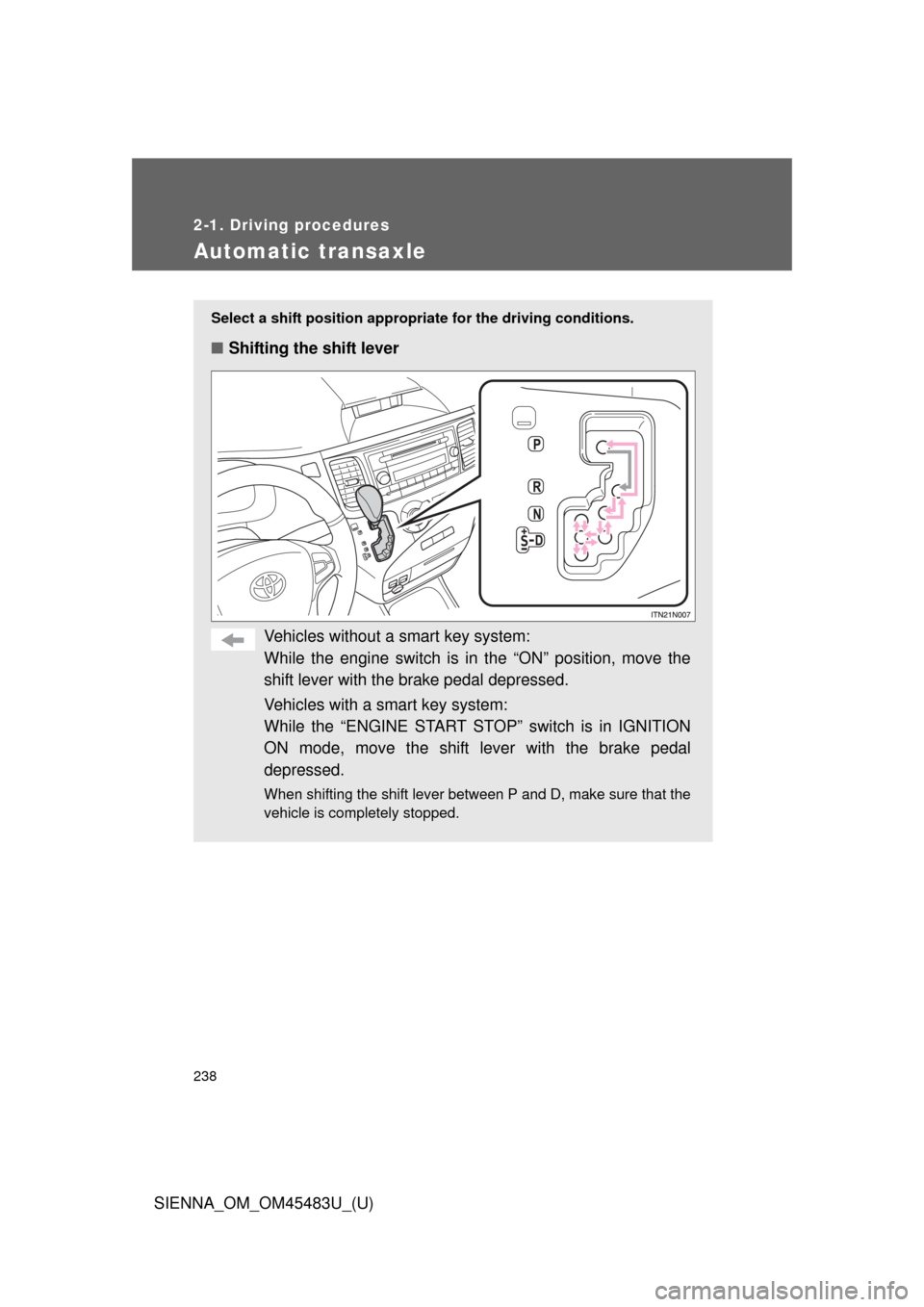
Select a shift position appropriate for the driving conditions.
■Shifting the shift lever
Vehicles without a smart key system:
While the engine switch is in the “ON” position, move the
shift lever with the brake pedal depressed.
Vehicles with a smart key system:
While the “ENGINE START STOP” switch is in IGNITION
ON mode, move the shift lever with the brake pedal
depressed.
When shifting the shift lever between P and D, make sure that the
vehicle is completely stopped.
Page 243 of 872
243
2-1. Driving procedures
2
When driving
SIENNA_OM_OM45483U_(U)
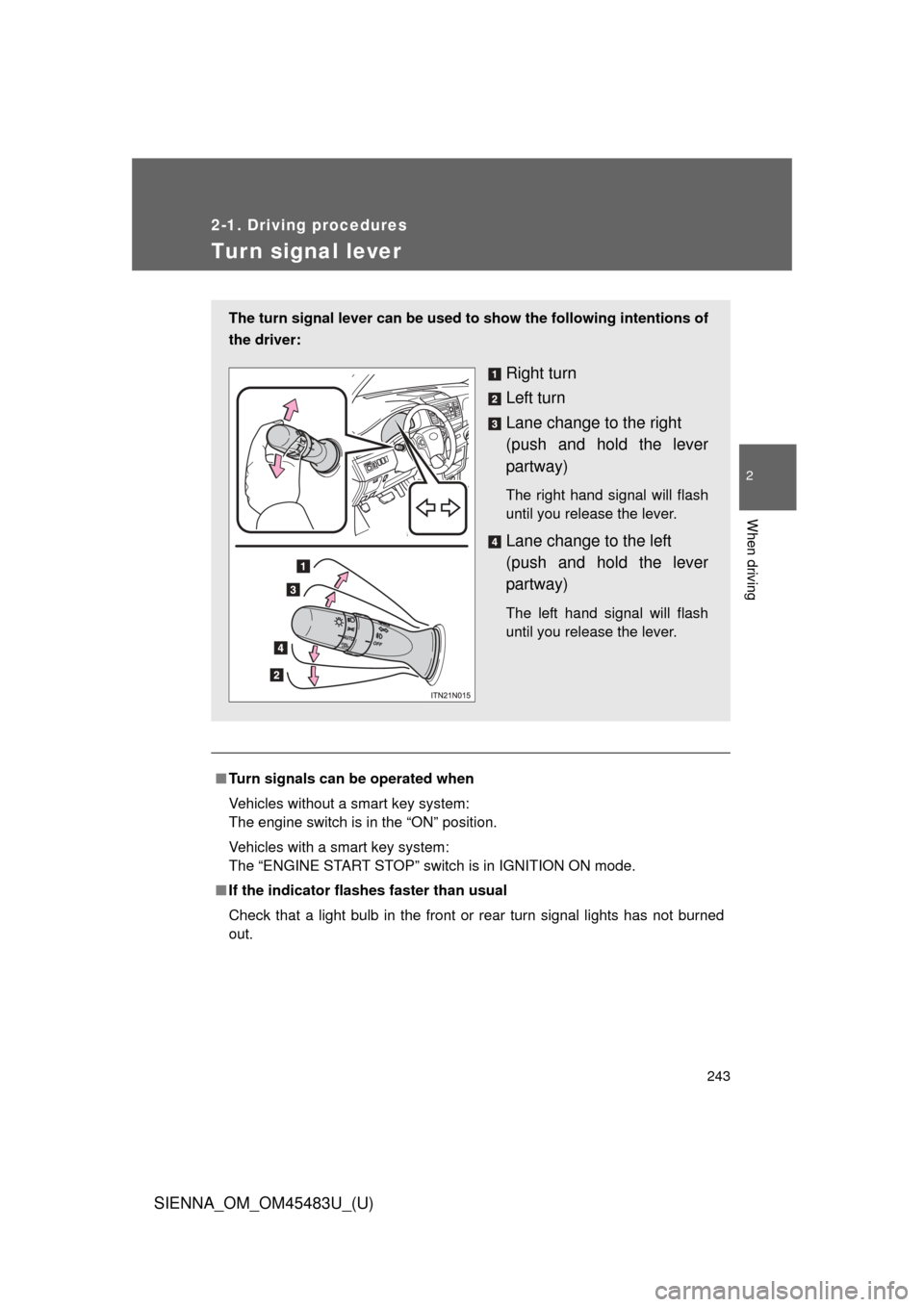
Tur n signal lever
■Turn signals can be operated when
Vehicles without a smart key system:
The engine switch is in the “ON” position.
Vehicles with a smart key system:
The “ENGINE START STOP” switch is in IGNITION ON mode.
■ If the indicator flashes faster than usual
Check that a light bulb in the front or rear turn signal lights has not burned
out.
The turn signal lever can be used to show the following intentions of
the driver:
Right turn
Left turn
Lane change to the right
(push and hold the lever
partway)
The right hand signal will flash
until you release the lever.
Lane change to the left
(push and hold the lever
partway)
The left hand signal will flash
until you release the lever.