lock TOYOTA SIENNA 2014 XL30 / 3.G Owners Manual
[x] Cancel search | Manufacturer: TOYOTA, Model Year: 2014, Model line: SIENNA, Model: TOYOTA SIENNA 2014 XL30 / 3.GPages: 872, PDF Size: 15.99 MB
Page 1 of 872
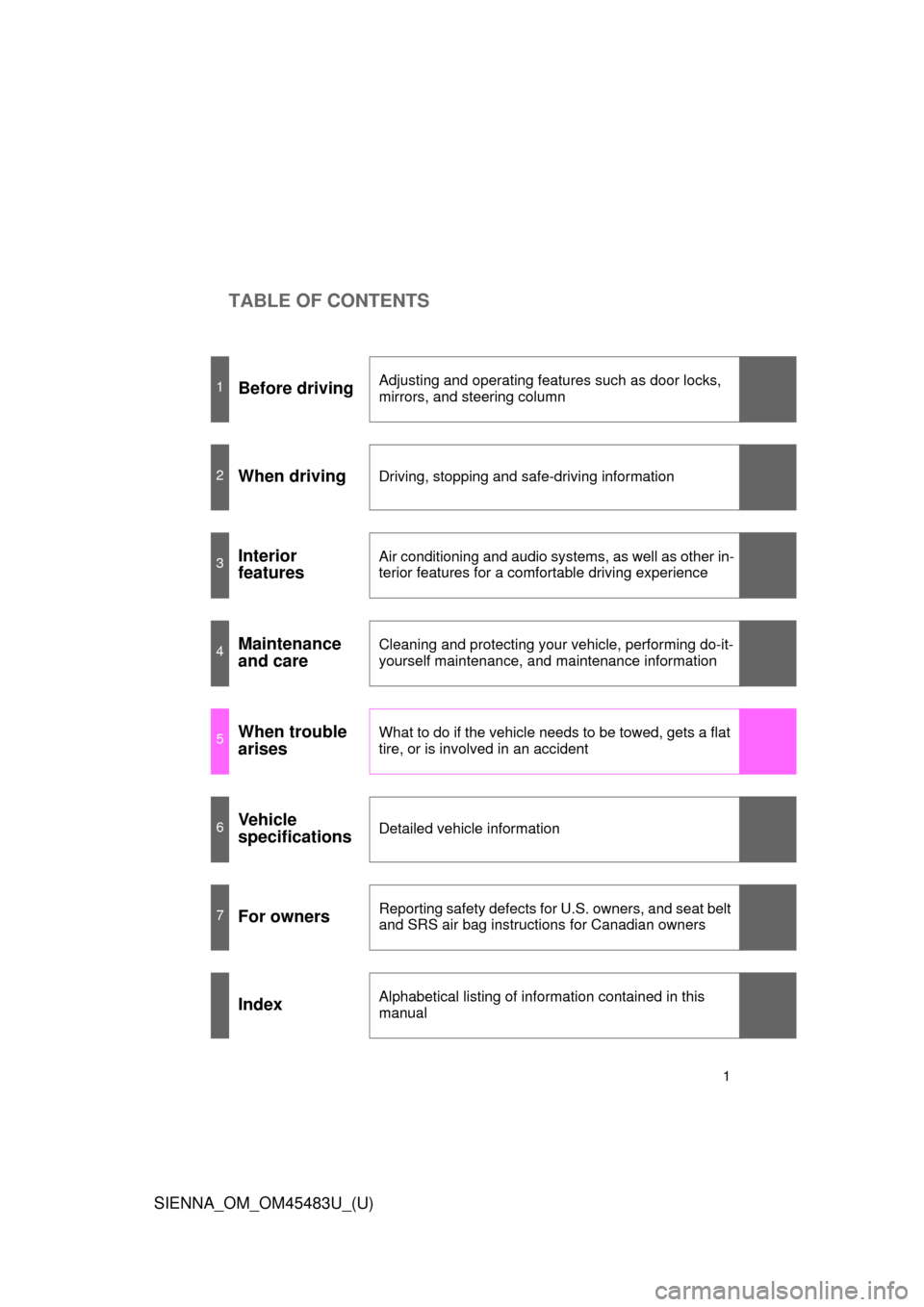
TABLE OF CONTENTS
SIENNA_OM_OM45483U_(U)
1
1Before drivingAdjusting and operating features such as door locks,
mirrors, and steering column
2When drivingDriving, stopping and safe-driving information
3Interior
featuresAir conditioning and audio systems, as well as other in-
terior features for a comfortable driving experience
4Maintenance
and careCleaning and protecting your vehicle, performing do-it-
yourself maintenance, and maintenance information
5When trouble
arisesWhat to do if the vehicle needs to be towed, gets a flat
tire, or is involved in an accident
6Vehicle
specificationsDetailed vehicle information
7For ownersReporting safety defects for U.S. owners, and seat belt
and SRS air bag instructions for Canadian owners
IndexAlphabetical listing of information contained in this
manual
Page 2 of 872

TABLE OF CONTENTSIndex
2
SIENNA_OM_OM45483U_(U)
1-1. Key informationKeys ..................................... 32
1-2. Opening, closing and locking the doors
Smart key system................. 36
Wireless remote control ....... 53
Front doors ........................... 60
Sliding doors ........................ 67
Back door ............................. 82
1-3. Adjustable components (seats, mirrors, steering
wheel)
Front seats ........................... 95
Rear seats .......................... 100
Driving position memory..... 121
Head restraints ................... 126
Seat belts ........................... 129
Steering wheel ................... 138
Inside rear view mirror........ 139
Outside rear view mirrors .............................. 141 1-4. Opening and closing the
windows and moon roof
Power windows................... 145
Quarter windows................. 149
Moon roof ........................... 151
1-5. Refueling Opening the fuel tank cap .................................... 156
1-6. Theft deterrent system Engine immobilizer system .............................. 160
Alarm .................................. 163
Theft prevention labels (for U.S.A.) ....................... 167
1-7. Safety information Correct driving posture ....... 168
SRS airbags ....................... 170
Front passenger occupant classification system ......... 185
Child restraint systems ....... 191
Installing child restraints ..... 196
1Before driving
Page 5 of 872
1
2
3
4
5
6
7
5
SIENNA_OM_OM45483U_(U)
3-5. Using the hands-free phone system (for cellular phone)
Hands-free phone system (for cellular phone)
features ............................. 545
Using the hands-free phone system (for cellular
phone)............................... 550
Making a phone call ............ 559
Setting a cellular phone ...... 564
Security and system setup ................................. 569
Using the phone book ......... 574
3-6. Using the interior lights Interior lights list .................. 582
• Personal/interior light main switch ....................... 583
• Personal/interior lights ...... 584
• Personal lights .................. 586
• Rear ceiling lights ............. 586 3-7. Using the storage features
List of storage features ....... 588
• Glove boxes ..................... 589
• Console box ..................... 591
• Overhead console ............ 594
• Cup holders ...................... 595
• Bottle holders ................... 598
• Door pockets .................... 600
• Auxiliary boxes ................. 601
3-8. Other interior features Sun visors........................... 606
Vanity mirrors ..................... 607
Clock .................................. 608
Conversation mirror ............ 609
Power outlets...................... 610
Seat heaters ....................... 614
Armrests ............................. 616
Assist grips ......................... 618
Rear side sunshades.......... 619
Grocery bag hooks ............. 620
Floor mat ............................ 622
Luggage compartment features ............................ 624
Garage door opener ........... 626
Compass ............................ 634
Safety Connect ................... 639
Page 13 of 872
SIENNA_OM_OM45483U_(U)
13
B
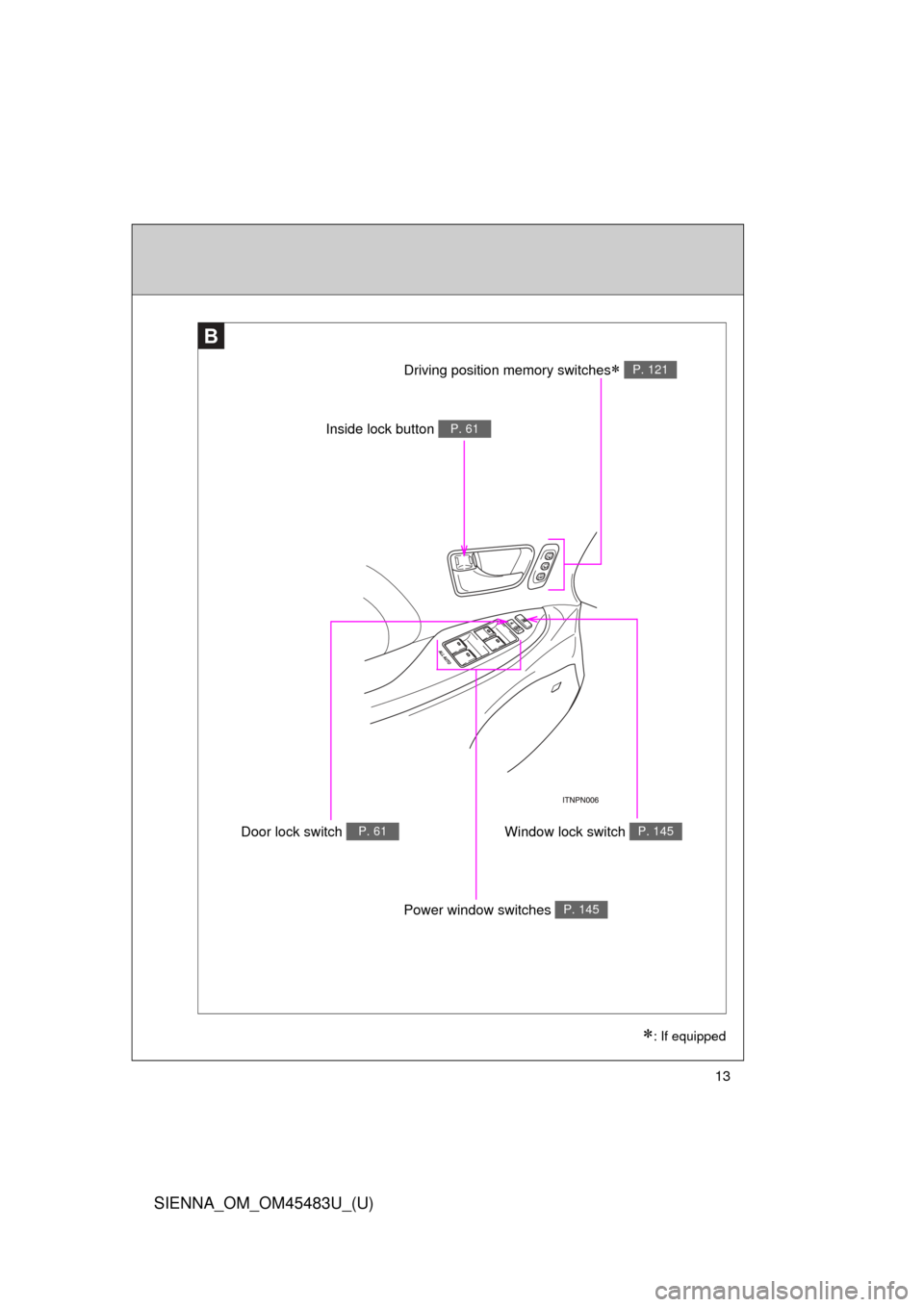
Door lock switch P. 61Window lock switch P. 145
Driving position memory switches P. 121
: If equipped
Inside lock button P. 61
Power window switches P. 145
Page 16 of 872
SIENNA_OM_OM45483U_(U)
16
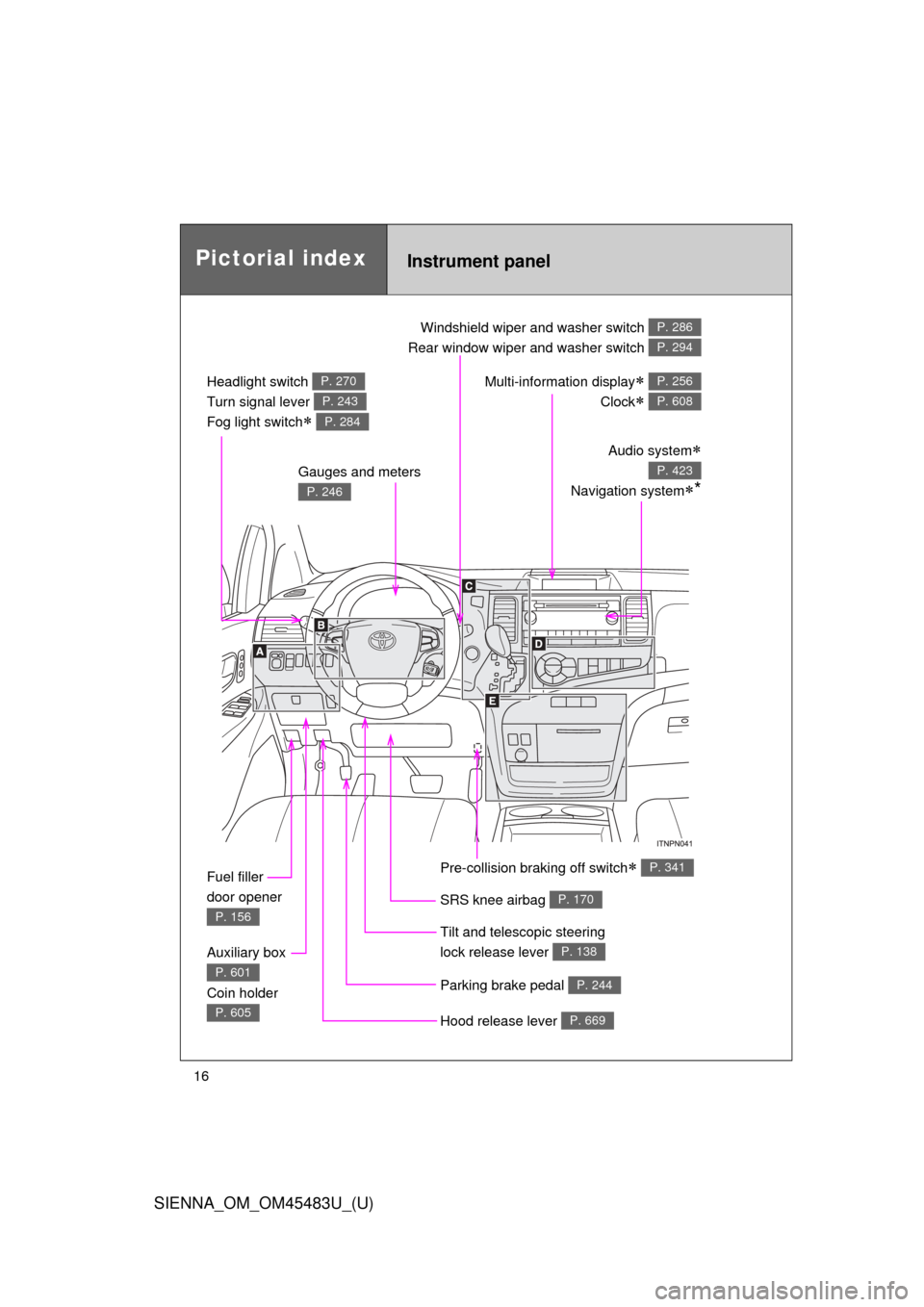
Pictorial indexInstrument panel
Headlight switch
Turn signal lever
Fog light switch
P. 270
P. 243
P. 284
Windshield wiper and washer switch
Rear window wiper and washer switch P. 286
P. 294
Gauges and meters
P. 246
Audio system
Navigation system*
P. 423
Multi-information display
Clock
P. 256
P. 608
Fuel filler
door opener
P. 156
Auxiliary box
Coin holder
P. 601
P. 605Hood release lever P. 669
Parking brake pedal P. 244
Tilt and telescopic steering
lock release lever
P. 138
SRS knee airbag P. 170
Pre-collision braking off switch P. 341
Page 19 of 872
SIENNA_OM_OM45483U_(U)
19
C
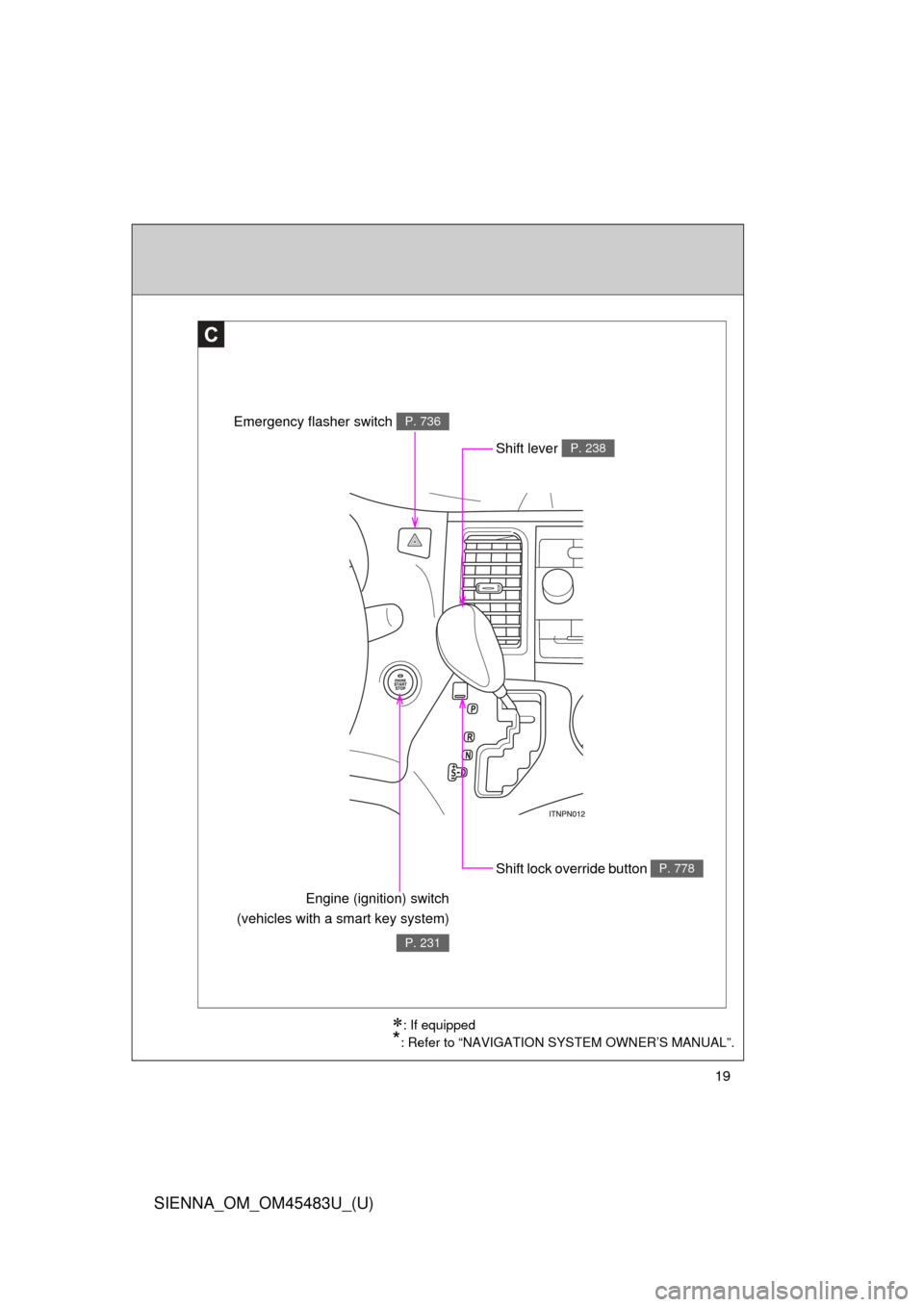
Shift lock override button P. 778
Engine (ignition) switch
(vehicles with a smart key system)
P. 231
Shift lever P. 238
Emergency flasher switch P. 736
: If equipped
*: Refer to “NAVIGATION SYSTEM OWNER’S MANUAL”.
Page 25 of 872

SIENNA_OM_OM45483U_(U)
25
Installation of a mobile two-way radio system
The installation of a mobile two-way radio system in your vehicle could affect
electronic systems such as:
●Multiport fuel injection system/sequential multiport fuel injection system
● Cruise control system
● Anti-lock brake system
● SRS airbag system
● Seat belt pretensioner system
Be sure to check with your Toyota dealer for precautionary measures or spe-
cial instructions regarding installation of a mobile two-way radio system.
Page 31 of 872
Before driving1
31
SIENNA_OM_OM45483U_(U)
1-1. Key informationKeys ................................... 32
1-2. Opening, closing and locking the doors
Smart key system .............. 36
Wireless remote control ..... 53
Front doors......................... 60
Sliding doors ...................... 67
Back door ........................... 82
1-3. Adjustable components (seats, mirrors, steering
wheel)
Front seats ......................... 95
Rear seats........................ 100
Driving position memory .......................... 121
Head restraints................. 126
Seat belts ......................... 129
Steering wheel ................. 138
Inside rear view mirror ..... 139
Outside rear view mirrors............................ 141 1-4. Opening and closing the
windows and moon roof
Power windows ................ 145
Quarter windows .............. 149
Moon roof ......................... 151
1-5. Refueling Opening the fuel tank cap ................................. 156
1-6. Theft deterrent system Engine immobilizer system ........................... 160
Alarm................................ 163
Theft prevention labels (for U.S.A.) ..................... 167
1-7. Safety information Correct driving posture..... 168
SRS airbags ..................... 170
Front passenger occupant classification system ...... 185
Child restraint systems..... 191
Installing child restraints... 196
Page 33 of 872
33
1-1. Key information
1
Before driving
SIENNA_OM_OM45483U_(U)
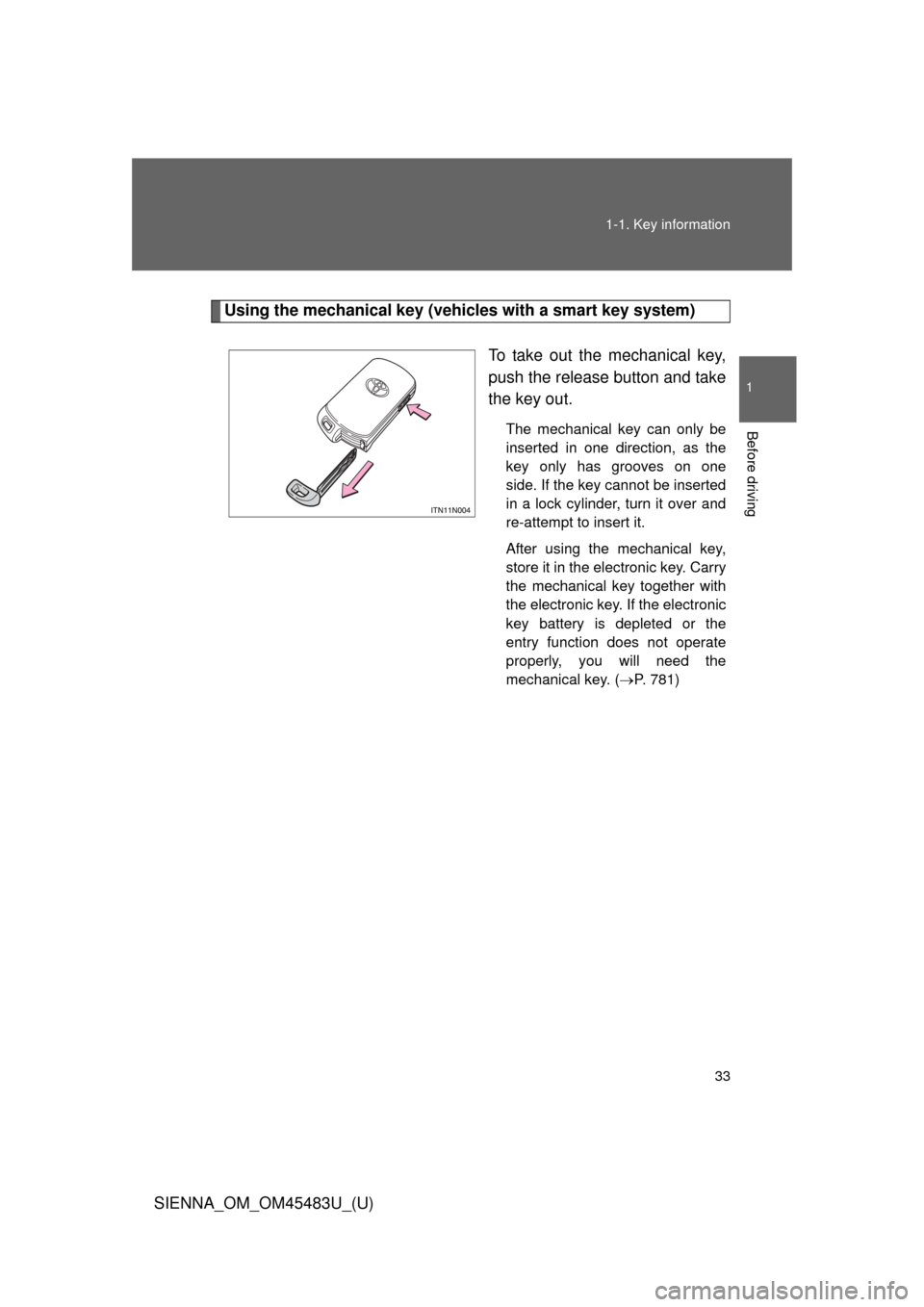
Using the mechanical key (vehicles with a smart key system)
To take out the mechanical key,
push the release button and take
the key out.
The mechanical key can only be
inserted in one direction, as the
key only has grooves on one
side. If the key cannot be inserted
in a lock cylinder, turn it over and
re-attempt to insert it.
After using the mechanical key,
store it in the electronic key. Carry
the mechanical key together with
the electronic key. If the electronic
key battery is depleted or the
entry function does not operate
properly, you will need the
mechanical key. (P. 781)
Page 34 of 872
34 1-1. Key information
SIENNA_OM_OM45483U_(U)
■When required to leave the vehicle ’s key with a parking attendant
Lock the glove box as circumstances demand. ( P. 589)
On vehicles without the smart key system, provide the attendant with the
valet key.
On vehicles with the smart key system, remove the mechanical key for your
own use and provide the attendant with the electronic key only.
■ Key number plate
Keep the plate in a safe place such as your wallet, not in the vehicle. In the
event that a key (without a smart key system) or mechanical key (with a
smart key system) is lost, a new key can be made by your Toyota dealer
using the key number plate. ( P. 780)
■ When riding in an aircraft
When bringing a key with wireless remote control function onto an aircra\
ft,
make sure you do not press any buttons on the key while inside the aircraft
cabin. If you are carrying the key in your bag etc., ensure that the buttons
are not likely to be pressed accidentally. Pressing a button may cause the
key to emit radio waves that could interfere with the operation of the a\
ircraft.