reset TOYOTA SIENNA 2017 XL30 / 3.G Navigation Manual
[x] Cancel search | Manufacturer: TOYOTA, Model Year: 2017, Model line: SIENNA, Model: TOYOTA SIENNA 2017 XL30 / 3.GPages: 366, PDF Size: 10.33 MB
Page 121 of 366
121
4. AUDIO/VISUAL REMOTE CONTROLS
SIENNA_Navi+MM_OM08009U_(U)
16.01.25 16:40
AUDIO/VISUAL SYSTEM
3
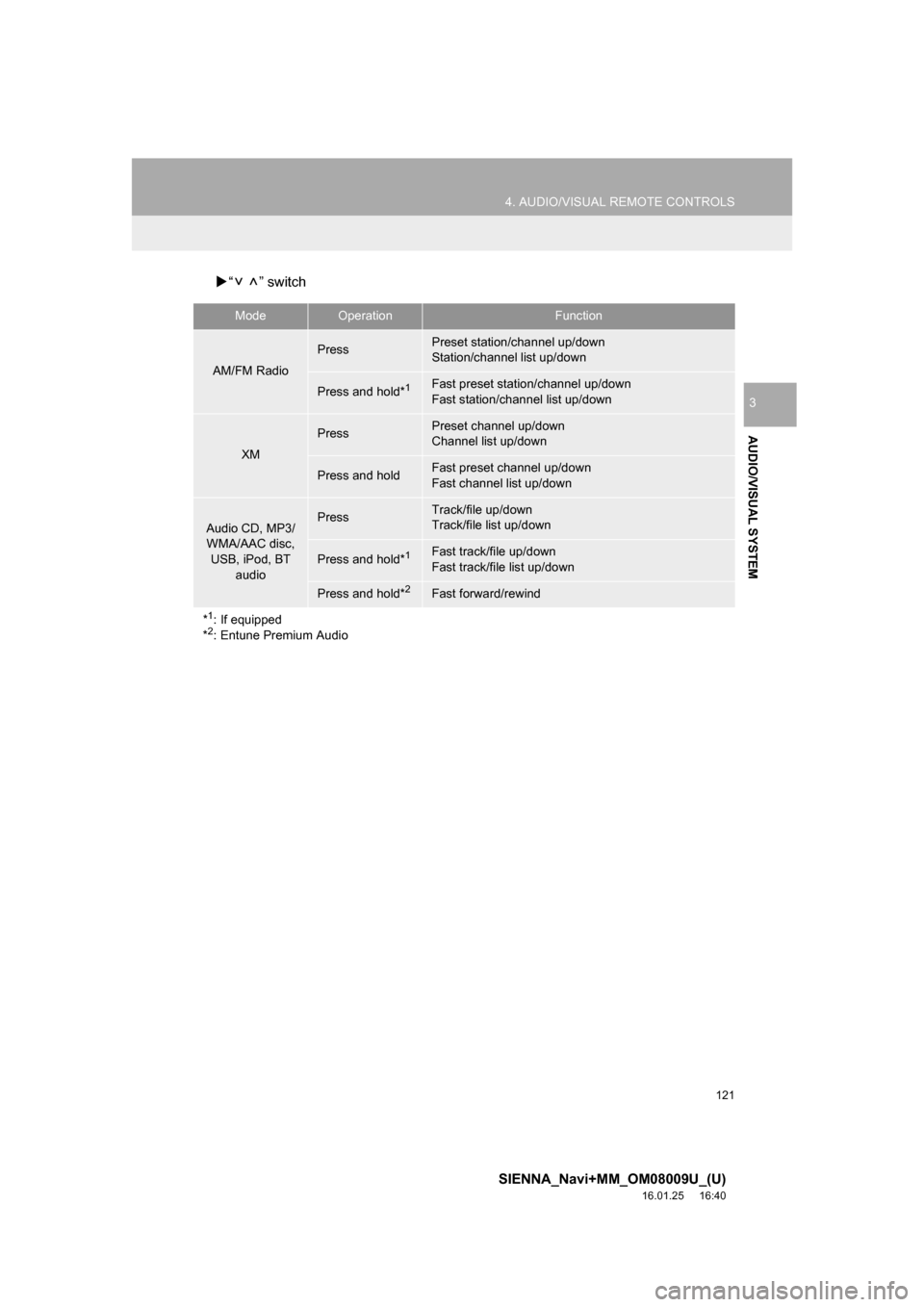
“ ” switch
ModeOperationFunction
AM/FM Radio
PressPreset station/channel up/down
Station/channel list up/down
Press and hold*1Fast preset station/channel up/down
Fast station/channel list up/down
XM
PressPreset channel up/down
Channel list up/down
Press and holdFast preset channel up/down
Fast channel list up/down
Audio CD, MP3/
WMA/AAC disc, USB, iPod, BT
audioPressTrack/file up/down
Track/file list up/down
Press and hold*1Fast track/file up/down
Fast track/file list up/down
Press and hold*2Fast forward/rewind
*
1: If equipped
*2: Entune Premium Audio
Page 124 of 366
124
5. SETUP
SIENNA_Navi+MM_OM08009U_(U)
16.01.25 16:40
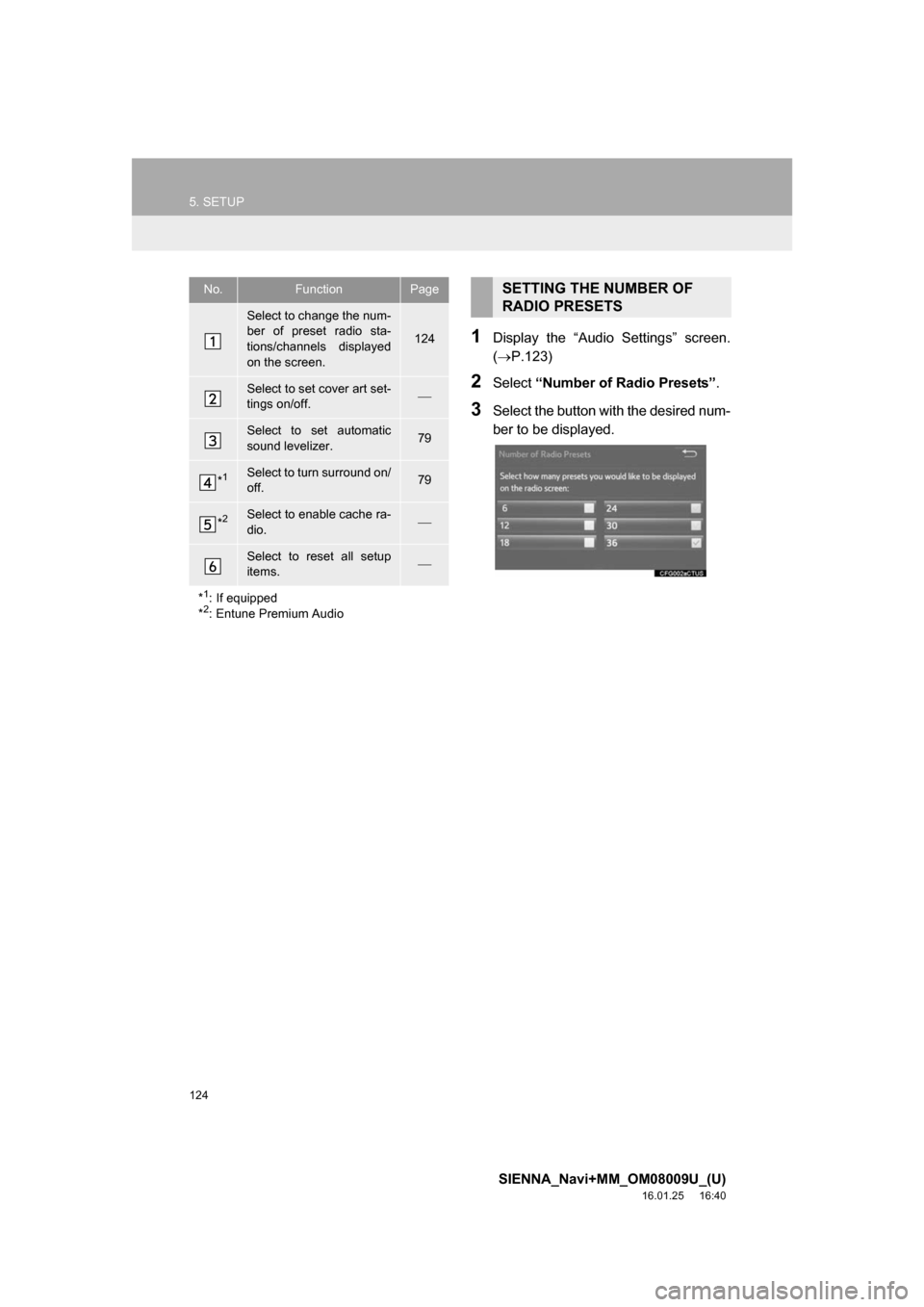
1Display the “Audio Settings” screen.
(P.123)
2Select “Number of Radio Presets” .
3Select the button with the desired num-
ber to be displayed.
No.FunctionPage
Select to change the num-
ber of preset radio sta-
tions/channels displayed
on the screen.
124
Select to set cover art set-
tings on/off.
Select to set automatic
sound levelizer.79
*1Select to turn surround on/
off.79
*2Select to enable cache ra-
dio.
Select to reset all setup
items.
*
1: If equipped
*2: Entune Premium Audio
SETTING THE NUMBER OF
RADIO PRESETS
Page 159 of 366
159
7. REAR SEAT ENTERTAINMENT SYSTEM OPERATION
SIENNA_Navi+MM_OM08009U_(U)
16.01.25 16:40
AUDIO/VISUAL SYSTEM
3
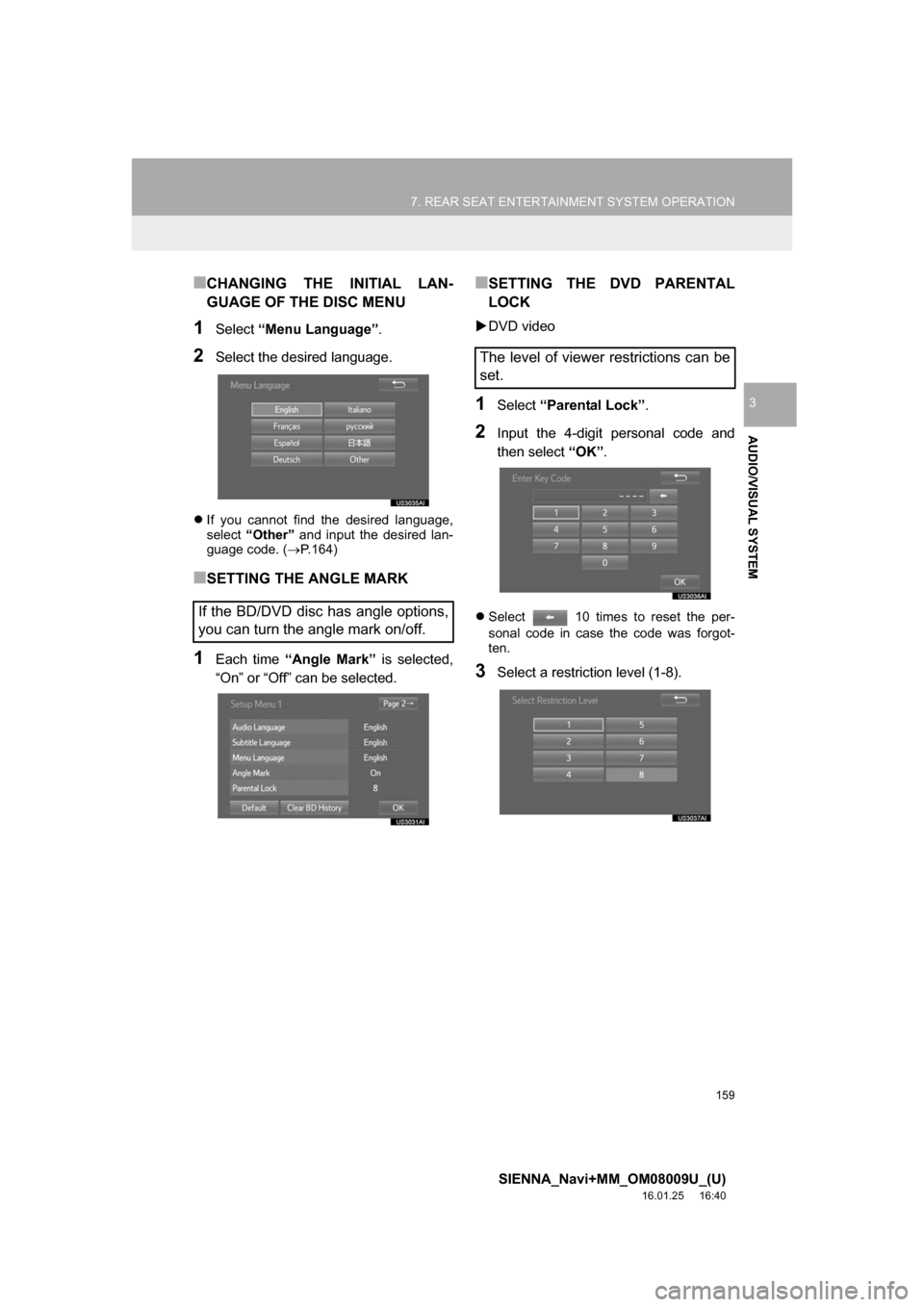
■CHANGING THE INITIAL LAN-
GUAGE OF THE DISC MENU
1Select “Menu Language” .
2Select the desired language.
If you cannot find the desired language,
select “Other” and input the desired lan-
guage code. ( P.164)
■SETTING THE ANGLE MARK
1Each time “Angle Mark” is selected,
“On” or “Off” can be selected.
■SETTING THE DVD PARENTAL
LOCK
DVD video
1Select “Parental Lock” .
2Input the 4-digit personal code and
then select “OK”.
Select 10 times to reset the per-
sonal code in case the code was forgot-
ten.
3Select a restriction level (1-8).
If the BD/DVD disc has angle options,
you can turn the angle mark on/off.
The level of viewer restrictions can be
set.
Page 160 of 366
160
7. REAR SEAT ENTERTAINMENT SYSTEM OPERATION
SIENNA_Navi+MM_OM08009U_(U)
16.01.25 16:40
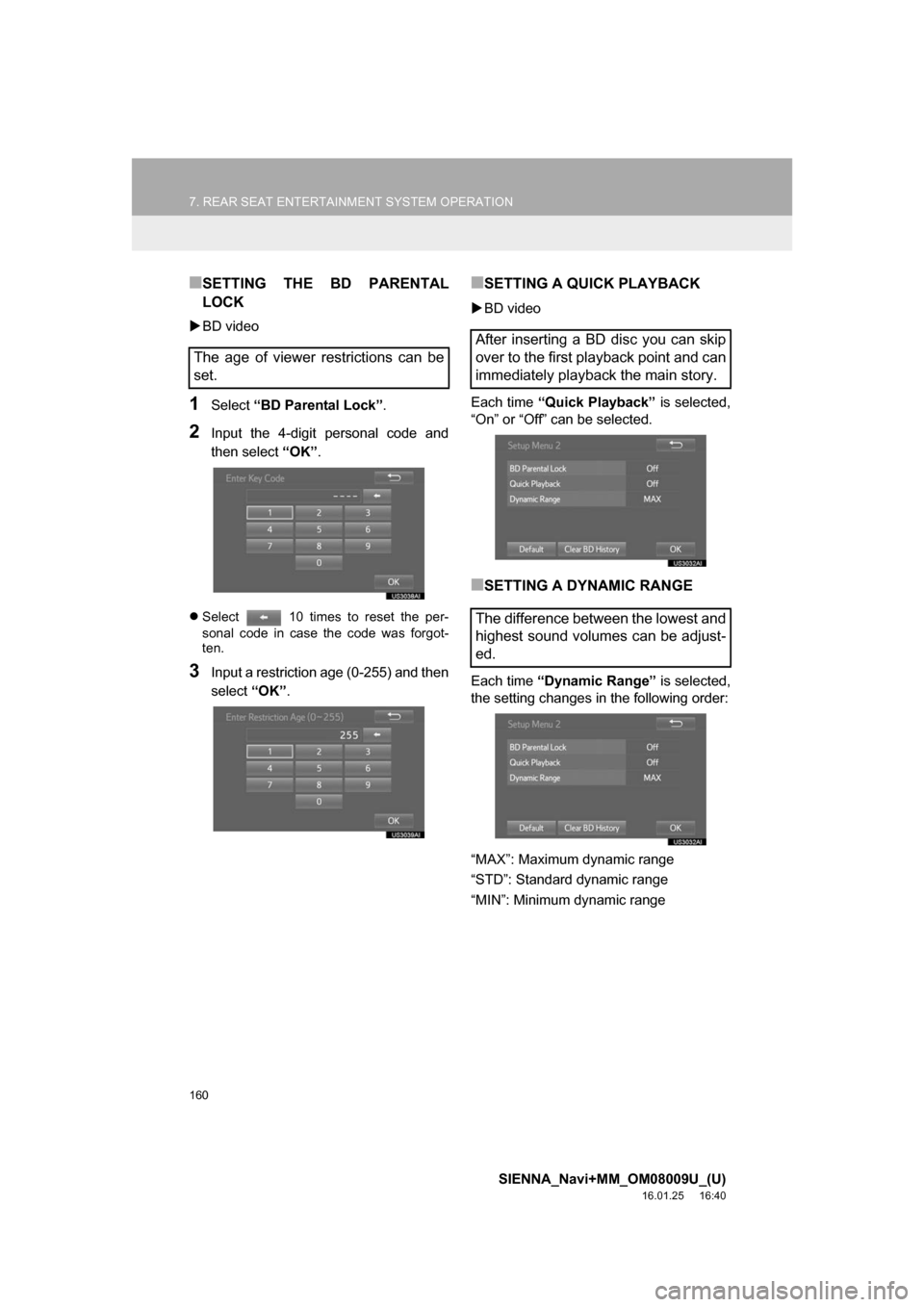
■SETTING THE BD PARENTAL
LOCK
BD video
1Select “BD Parental Lock” .
2Input the 4-digit personal code and
then select “OK”.
Select 10 times to reset the per-
sonal code in case the code was forgot-
ten.
3Input a restriction age (0-255) and then
select “OK”.
■SETTING A QUICK PLAYBACK
BD video
Each time “Quick Playback” is selected,
“On” or “Off” can be selected.
■SETTING A DYNAMIC RANGE
Each time “Dynamic Range” is selected,
the setting changes in the following order:
“MAX”: Maximum dynamic range
“STD”: Standard dynamic range
“MIN”: Minimum dynamic range
The age of viewer restrictions can be
set.
After inserting a BD disc you can skip
over to the first playback point and can
immediately playback the main story.
The difference between the lowest and
highest sound volumes can be adjust-
ed.
Page 237 of 366
237
1. PHONE OPERATION (HANDS-FREE SYSTEM FOR CELLULAR PHONES)
SIENNA_Navi+MM_OM08009U_(U)
16.01.25 16:40
PHONE
7
■BY SELECTING “Release Tones”
1Select “Release Tones” .
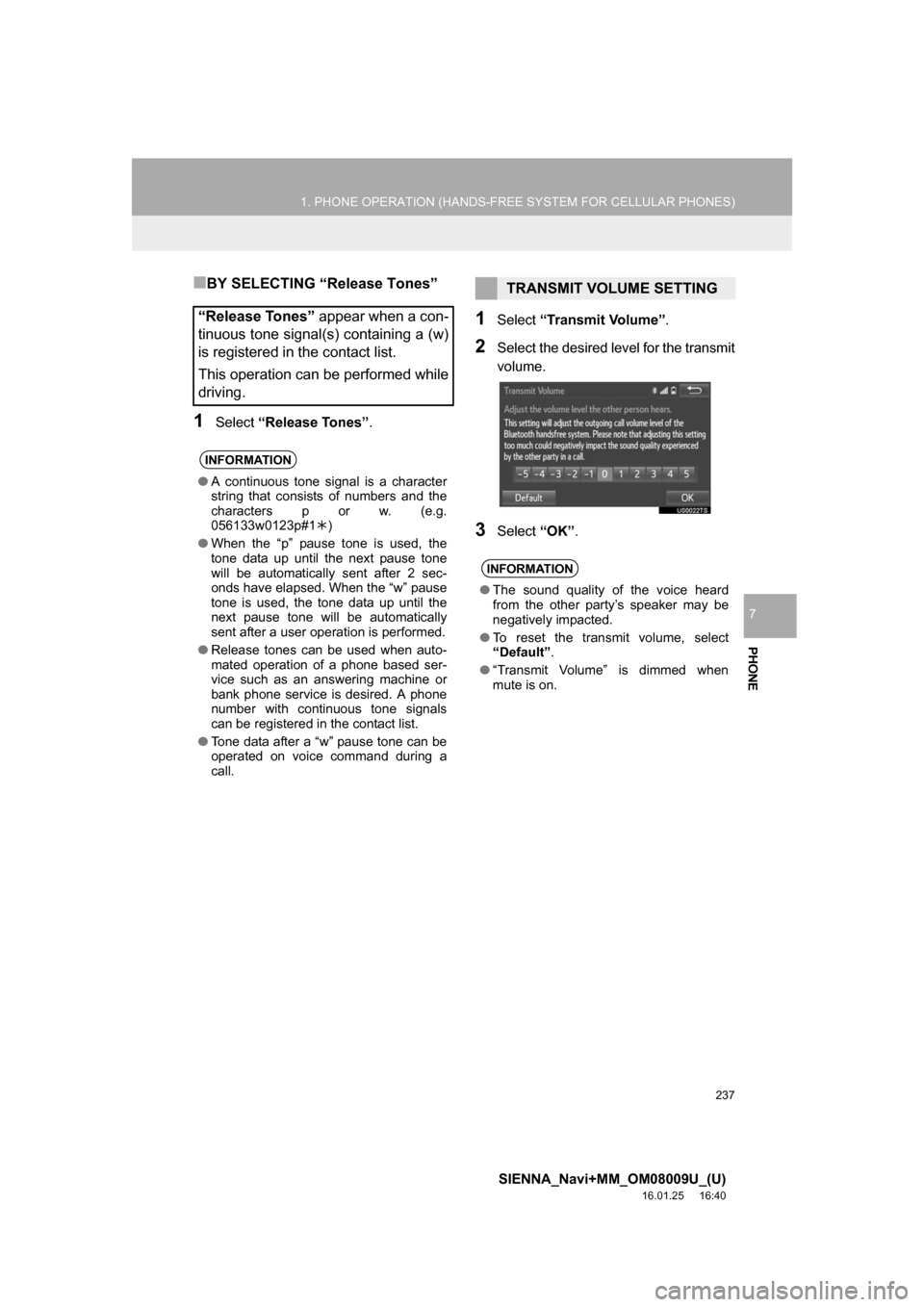
1Select “Transmit Volume”.
2Select the desired level for the transmit
volume.
3Select “OK”.
“Release Tones” appear when a con-
tinuous tone signal(s) containing a (w)
is registered in the contact list.
This operation can be performed while
driving.
INFORMATION
● A continuous tone signal is a character
string that consists of numbers and the
characters p or w. (e.g.
056133w0123p#1 )
● When the “p” pause tone is used, the
tone data up until the next pause tone
will be automatically sent after 2 sec-
onds have elapsed. When the “w” pause
tone is used, the tone data up until the
next pause tone will be automatically
sent after a user operation is performed.
● Release tones can be used when auto-
mated operation of a phone based ser-
vice such as an answering machine or
bank phone service is desired. A phone
number with continuous tone signals
can be registered in the contact list.
● Tone data after a “w” pause tone can be
operated on voice command during a
call.
TRANSMIT VOLUME SETTING
INFORMATION
● The sound quality of the voice heard
from the other party’s speaker may be
negatively impacted.
● To reset the transmit volume, select
“Default” .
● “Transmit Volume” is dimmed when
mute is on.
Page 242 of 366
242
1. PHONE OPERATION (HANDS-FREE SYSTEM FOR CELLULAR PHONES)
SIENNA_Navi+MM_OM08009U_(U)
16.01.25 16:40
1Display the message inbox screen.
(P.239)
2Select the desired message from the
list.
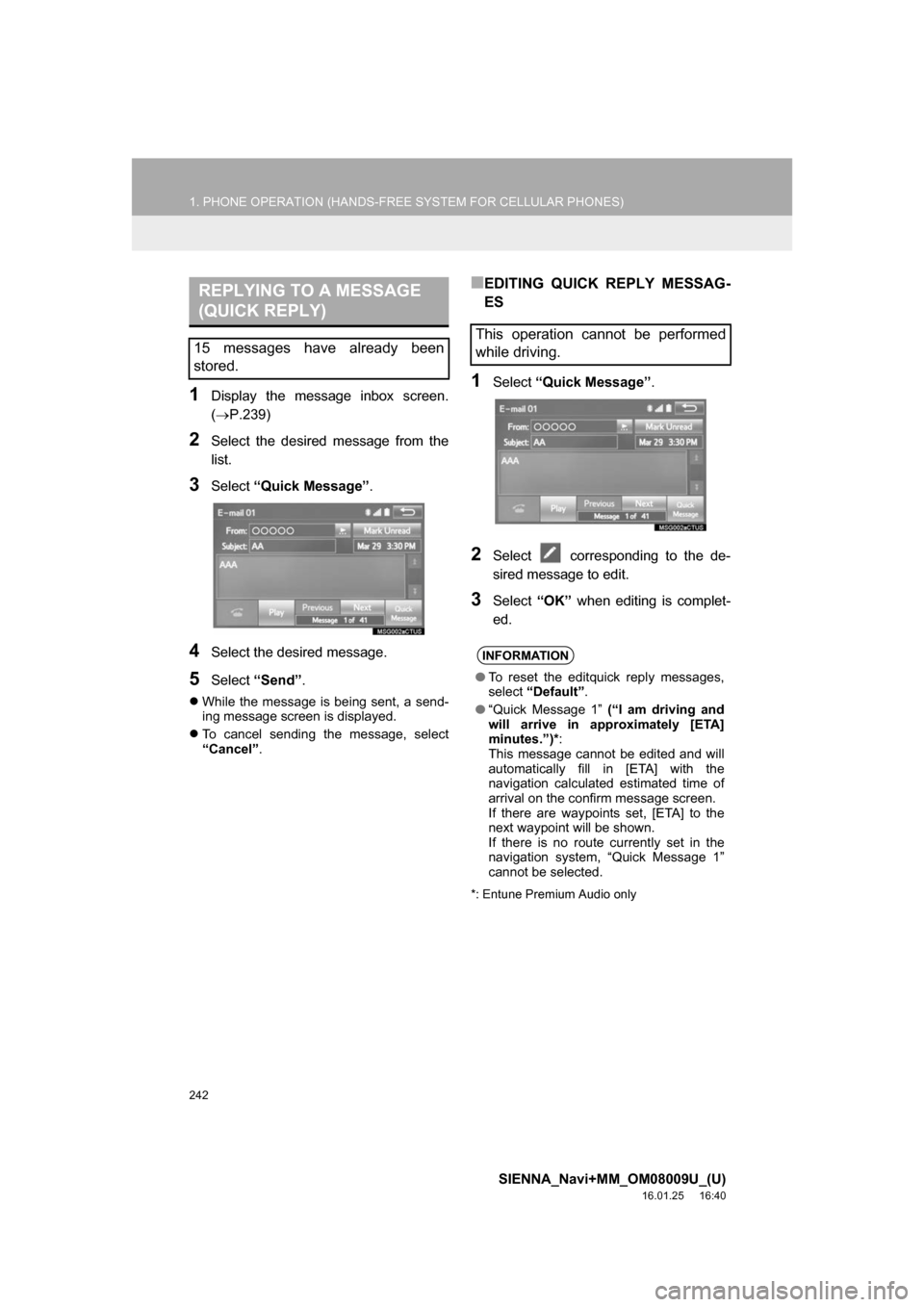
3Select “Quick Message” .
4Select the desired message.
5Select “Send” .
While the message is being sent, a send-
ing message screen is displayed.
To cancel sending the message, select
“Cancel” .
■EDITING QUICK REPLY MESSAG-
ES
1Select “Quick Message” .
2Select corresponding to the de-
sired message to edit.
3Select “OK” when editing is complet-
ed.
*: Entune Premium Audio only
REPLYING TO A MESSAGE
(QUICK REPLY)
15 messages have already been
stored.This operation cannot be performed
while driving.
INFORMATION
● To reset the editquick reply messages,
select “Default” .
● “Quick Message 1” (“I am driving and
will arrive in approximately [ETA]
minutes.”)* :
This message cannot be edited and will
automatically fill in [ETA] with the
navigation calculated estimated time of
arrival on the confirm message screen.
If there are waypoints set, [ETA] to the
next waypoint will be shown.
If there is no route currently set in the
navigation system, “Quick Message 1”
cannot be selected.
Page 245 of 366
245
2. SETUP
SIENNA_Navi+MM_OM08009U_(U)
16.01.25 16:40
PHONE
7
1Display the “Phone/Message Settings”
screen. (P.244)
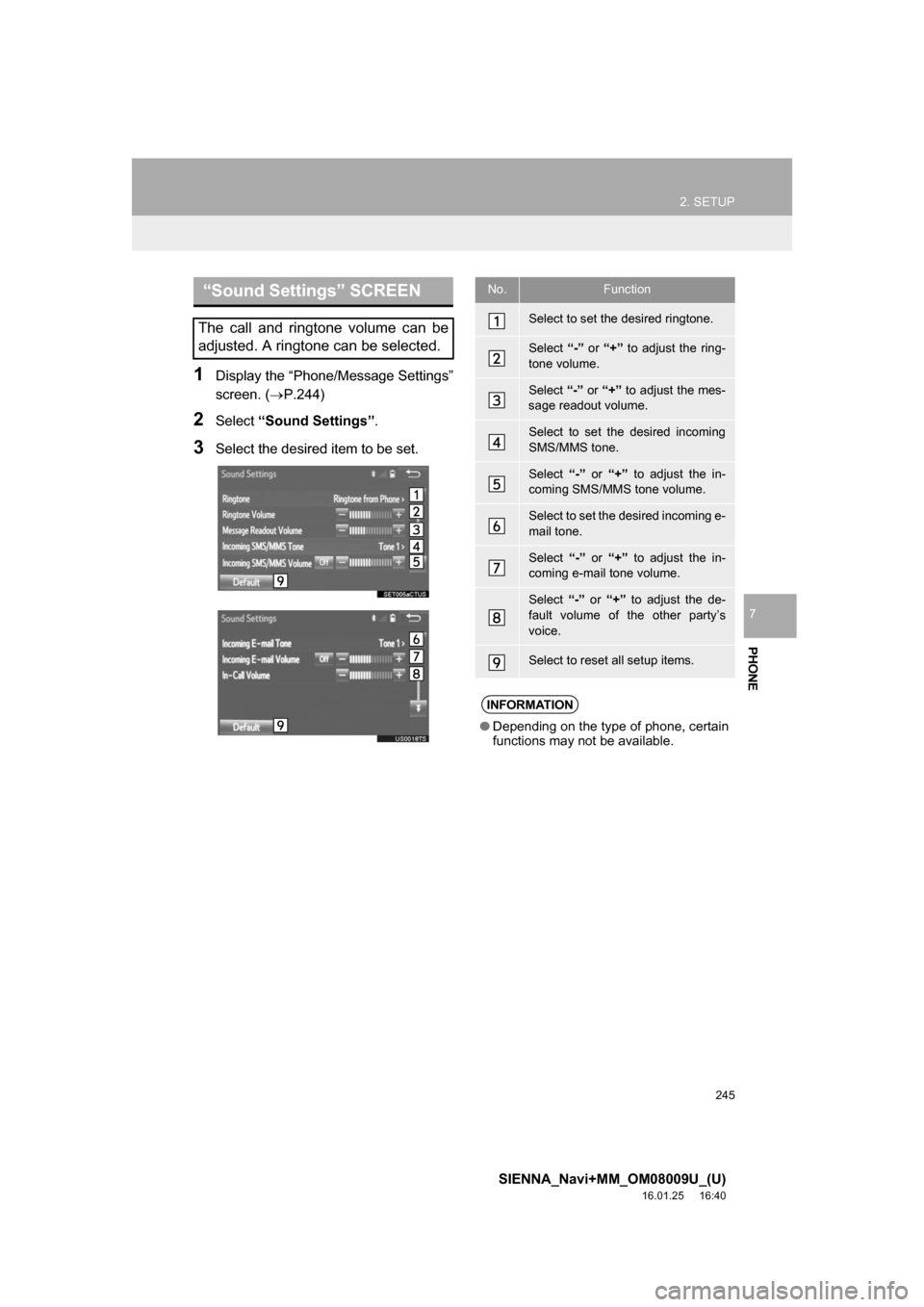
2Select “Sound Settings” .
3Select the desired item to be set.
“Sound Settings” SCREEN
The call and ringtone volume can be
adjusted. A ringtone can be selected.
No.Function
Select to set the desired ringtone.
Select “-” or “+” to adjust the ring-
tone volume.
Select “-” or “+” to adjust the mes-
sage readout volume.
Select to set the desired incoming
SMS/MMS tone.
Select “-” or “+” to adjust the in-
coming SMS/MMS tone volume.
Select to set the desired incoming e-
mail tone.
Select “-” or “+” to adjust the in-
coming e-mail tone volume.
Select “-” or “+” to adjust the de-
fault volume of the other party’s
voice.
Select to reset all setup items.
INFORMATION
● Depending on the type of phone, certain
functions may not be available.
Page 247 of 366
247
2. SETUP
SIENNA_Navi+MM_OM08009U_(U)
16.01.25 16:40
PHONE
7
*: For PBAP compatible Bluetooth®
phones, this function is available when
“Automatic Transfer” is set to off.
(P.246)
■FOR PBAP COMPATIBLE
Bluetooth
® PHONES
1Select “Update Contacts from
Phone” .
Contacts are transferred automatically.
2Check that a confirmation screen is
displayed when the operation is com-
plete.
This operation may be unnecessary
depending on the type of cellular phone.
Depending on the type of cellular phone,
OBEX authentication may be required
when transferring contact data. Enter
“1234” into the Bluetooth
® phone.
If another Bluetooth
® device is connected
when transferring contact data, depending
on the phone, the connected Bluetooth
®
device may need to be disconnected.
Depending on the type of Bluetooth
®
phone being connected, it may be neces-
sary to perform additional steps on the
phone.
*Select to delete contacts
from the contact list.250
Select to reset all setup
items.
INFORMATION
●Depending on the type of phone, certain
functions may not be available.
● Contact data is managed independently
for every registered phone. When one
phone is connected, another phone’s
registered data cannot be read.
No.FunctionPageUPDATE CONTACTS FROM
PHONE
Operation methods differ between
PBAP compatible and PBAP incom-
patible but OPP compatible Bluetooth
®
phones.
If your cellular phone is neither PBAP
nor OPP compatible, the contacts can-
not be transferred.
Page 254 of 366
254
2. SETUP
SIENNA_Navi+MM_OM08009U_(U)
16.01.25 16:40
1Display the “Phone/Message Settings”
screen. (P.244)
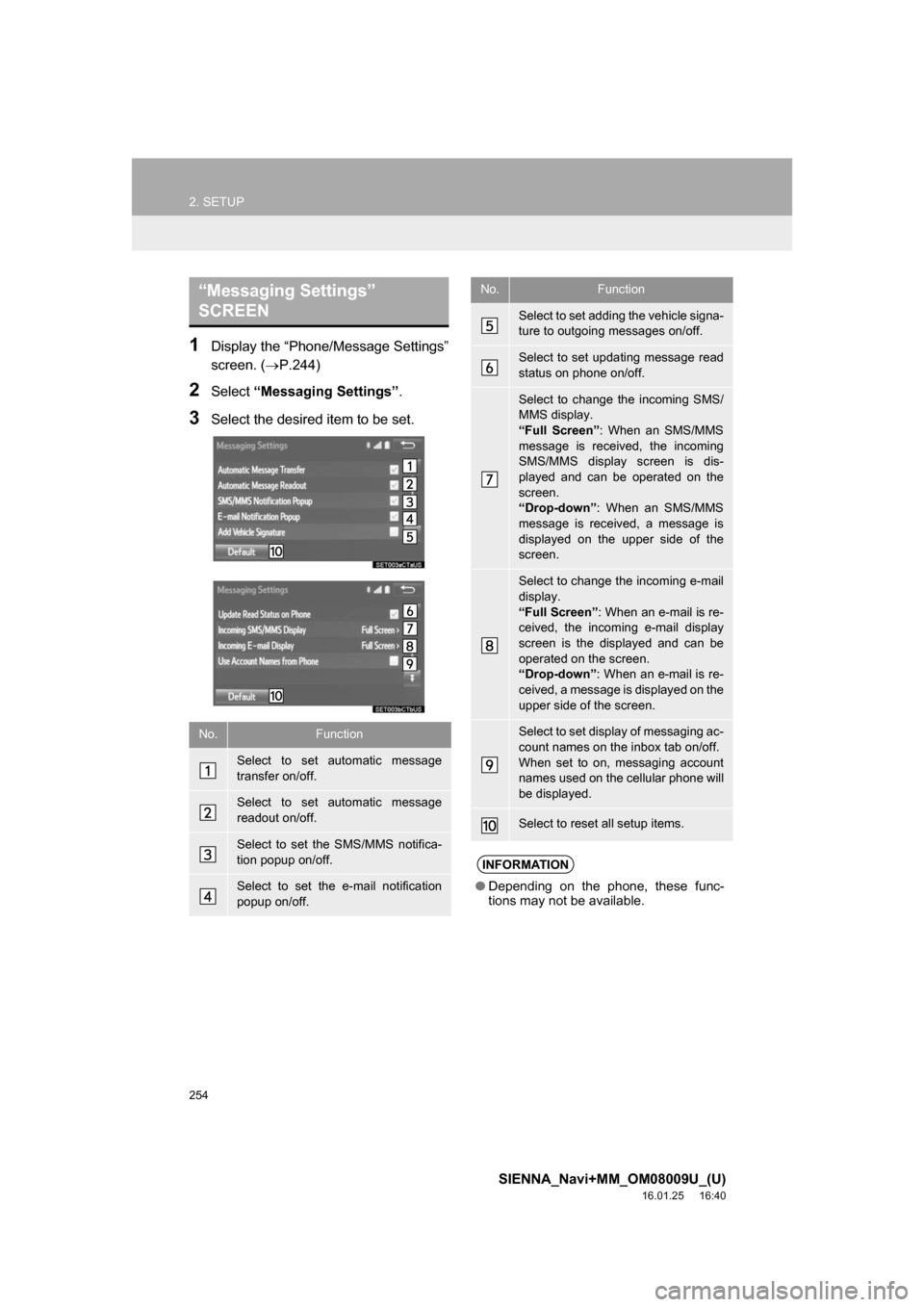
2Select “Messaging Settings” .
3Select the desired item to be set.
“Messaging Settings”
SCREEN
No.Function
Select to set automatic message
transfer on/off.
Select to set automatic message
readout on/off.
Select to set the SMS/MMS notifica-
tion popup on/off.
Select to set the e-mail notification
popup on/off.
Select to set adding the vehicle signa-
ture to outgoing messages on/off.
Select to set updating message read
status on phone on/off.
Select to change the incoming SMS/
MMS display.
“Full Screen”: When an SMS/MMS
message is received, the incoming
SMS/MMS display screen is dis-
played and can be operated on the
screen.
“Drop-down” : When an SMS/MMS
message is received, a message is
displayed on the upper side of the
screen.
Select to change the incoming e-mail
display.
“Full Screen” : When an e-mail is re-
ceived, the incoming e-mail display
screen is the displayed and can be
operated on the screen.
“Drop-down” : When an e-mail is re-
ceived, a message is displayed on the
upper side of the screen.
Select to set display of messaging ac-
count names on the inbox tab on/off.
When set to on, messaging account
names used on the cellular phone will
be displayed.
Select to reset all setup items.
INFORMATION
● Depending on the phone, these func-
tions may not be available.
No.Function
Page 255 of 366
255
2. SETUP
SIENNA_Navi+MM_OM08009U_(U)
16.01.25 16:40
PHONE
7
1Display the phone top screen.
(P.229)
2Select .
3Select “Settings” .
1Display the “Phone/Message Settings”
screen. (P.244)
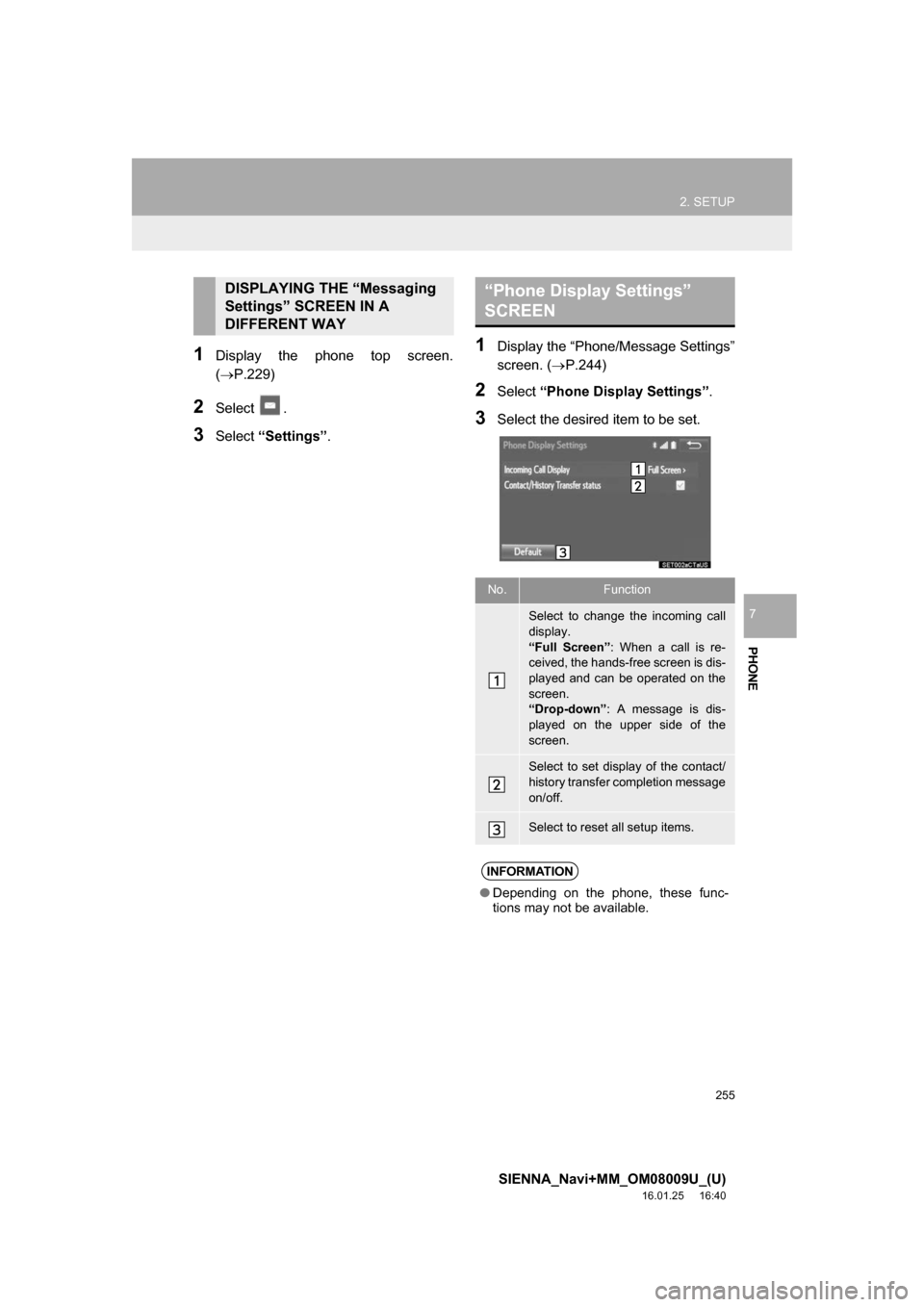
2Select “Phone Display Settings” .
3Select the desired item to be set.
DISPLAYING THE “Messaging
Settings” SCREEN IN A
DIFFERENT WAY“Phone Display Settings”
SCREEN
No.Function
Select to change the incoming call
display.
“Full Screen”: When a call is re-
ceived, the hands-free screen is dis-
played and can be operated on the
screen.
“Drop-down” : A message is dis-
played on the upper side of the
screen.
Select to set display of the contact/
history transfer completion message
on/off.
Select to reset all setup items.
INFORMATION
● Depending on the phone, these func-
tions may not be available.