reset TOYOTA SIENNA 2017 XL30 / 3.G Navigation Manual
[x] Cancel search | Manufacturer: TOYOTA, Model Year: 2017, Model line: SIENNA, Model: TOYOTA SIENNA 2017 XL30 / 3.GPages: 366, PDF Size: 10.33 MB
Page 266 of 366
266
SIENNA_Navi+MM_OM08009U_(U)
16.01.25 16:40
1. DESTINATION SEARCH SCREEN .................................... 284
2. SEARCH OPERATION . ............... 286
SELECTING SEARCH AREA .............. 287
SETTING HOME AS
DESTINATION .................................. 287
SETTING PRESET DESTINATIONS AS DESTINATION ............................ 287
SEARCHING BY ADDRESS ............... 288
SEARCHING BY POINT OF INTEREST......................................... 289
SEARCHING FROM PREVIOUS DESTINATIONS ................................ 292
SEARCHING BY ADDRESS BOOK .... 292
SEARCHING BY EMERGENCY.......... 293
SEARCHING BY INTERSECTION AND FREEWAY ................................ 293
SEARCHING BY MAP ......................... 295
SEARCHING BY COORDINATES ...... 295
3. STARTING ROUTE GUIDANCE ............... ................. 296
STARTING ROUTE GUIDANCE ......... 296
PAUSING GUIDANCE ......................... 299
1. ROUTE GUIDANCE SCREEN .... 300
SCREEN FOR ROUTE GUIDANCE .... 300
ROUTE OVERVIEW ............................ 301
DURING FREEWAY DRIVING ............ 302
WHEN APPROACHING
INTERSECTION ................................ 303
TURN LIST SCREEN ........................... 304
TURN-BY-TURN ARROW SCREEN ............................................ 304
2. TYPICAL VOICE GUIDANCE PROMPTS ................................. 305
3. EDITING ROUTE ......................... 306
ADDING DESTINATIONS .................... 307
REORDERING DESTINATIONS ......... 307
DELETING DESTINATIONS ................ 307
SETTING ROUTE PREFERENCES ................................ 308
SELECTING ROUTE TYPE ................. 308
DETOUR SETTING.............................. 309
2DESTINATION SEARCH3ROUTE GUIDANCE
Page 267 of 366
267
SIENNA_Navi+MM_OM08009U_(U)
16.01.25 16:40
1
2
3
4
5
6
7
8
9
1. MEMORY POINTS SETTINGS .... 311
SETTING UP HOME ........................... 312
SETTING UP PRESET DESTINATIONS................................ 313
SETTING UP ADDRESS BOOK ......... 315
SETTING UP AREAS TO AVOID ........ 317
DELETING PREVIOUS DESTINATIONS................................ 319
1. DETAILED NAVIGATION SETTINGS ................................. 320
SCREENS FOR NAVIGATION
SETTINGS ........................................ 320
2. TRAFFIC SETTINGS ................... 324
SCREEN FOR TRAFFIC
SETTINGS ........................................ 324
AUTO AVOID TRAFFIC ...................... 325
MY TRAFFIC ROUTES ....................... 326
1. GPS (GLOBAL POSITIONING SYSTEM ) .......... 330
LIMITATIONS OF THE
NAVIGATION SYSTEM..................... 330
2. MAP DATABASE VERSION AND COVERED AREA ............. 333
MAP INFORMATION ........................... 333
ABOUT THE MAP DATA ..................... 334
4MEMORY POINTS
5SETUP
6TIPS FOR THE NAVIGATION
SYSTEM
Page 285 of 366
285
2. DESTINATION SEARCH
SIENNA_Navi+MM_OM08009U_(U)
16.01.25 16:40
NAVIGATION SYSTEM
8
Select to search for a destination by coordinates.295
Select to set a destination as home.287
Select to set a destination from preset destinations.287
Select to delete set destinations.307
No.FunctionPage
Page 287 of 366
287
2. DESTINATION SEARCH
SIENNA_Navi+MM_OM08009U_(U)
16.01.25 16:40
NAVIGATION SYSTEM
8
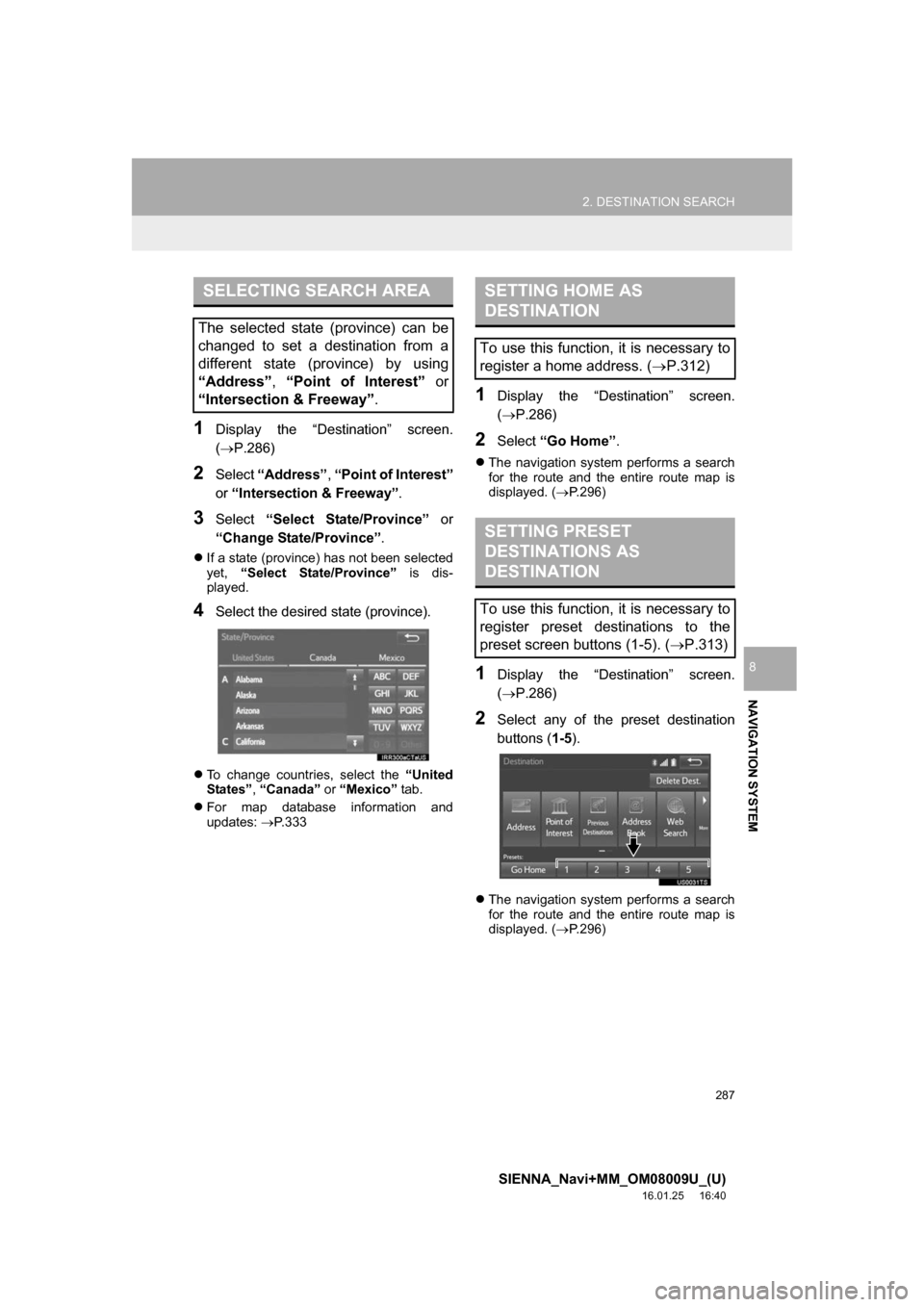
1Display the “Destination” screen.
(P.286)
2Select “Address” , “Point of Interest”
or “Intersection & Freeway”.
3Select “Select State/Province” or
“Change State/Province” .
If a state (province) has not been selected
yet, “Select State/Province” is dis-
played.
4Select the desired state (province).
To change countries, select the “United
States” , “Canada” or “Mexico” tab.
For map database information and
updates: P. 3 3 3
1Display the “Destination” screen.
(P.286)
2Select “Go Home” .
The navigation system performs a search
for the route and the entire route map is
displayed. ( P.296)
1Display the “Destination” screen.
(P.286)
2Select any of the preset destination
buttons ( 1-5).
The navigation system performs a search
for the route and the entire route map is
displayed. ( P.296)
SELECTING SEARCH AREA
The selected state (province) can be
changed to set a destination from a
different state (province) by using
“Address”, “Point of Interest” or
“Intersection & Freeway” .
SETTING HOME AS
DESTINATION
To use this function, it is necessary to
register a home address. (P.312)
SETTING PRESET
DESTINATIONS AS
DESTINATION
To use this function, it is necessary to
register preset destinations to the
preset screen buttons (1-5). ( P.313)
Page 311 of 366
311
SIENNA_Navi+MM_OM08009U_(U)
16.01.25 16:40
NAVIGATION SYSTEM
8
4. MEMORY POINTS
1. MEMORY POINTS SETTINGS
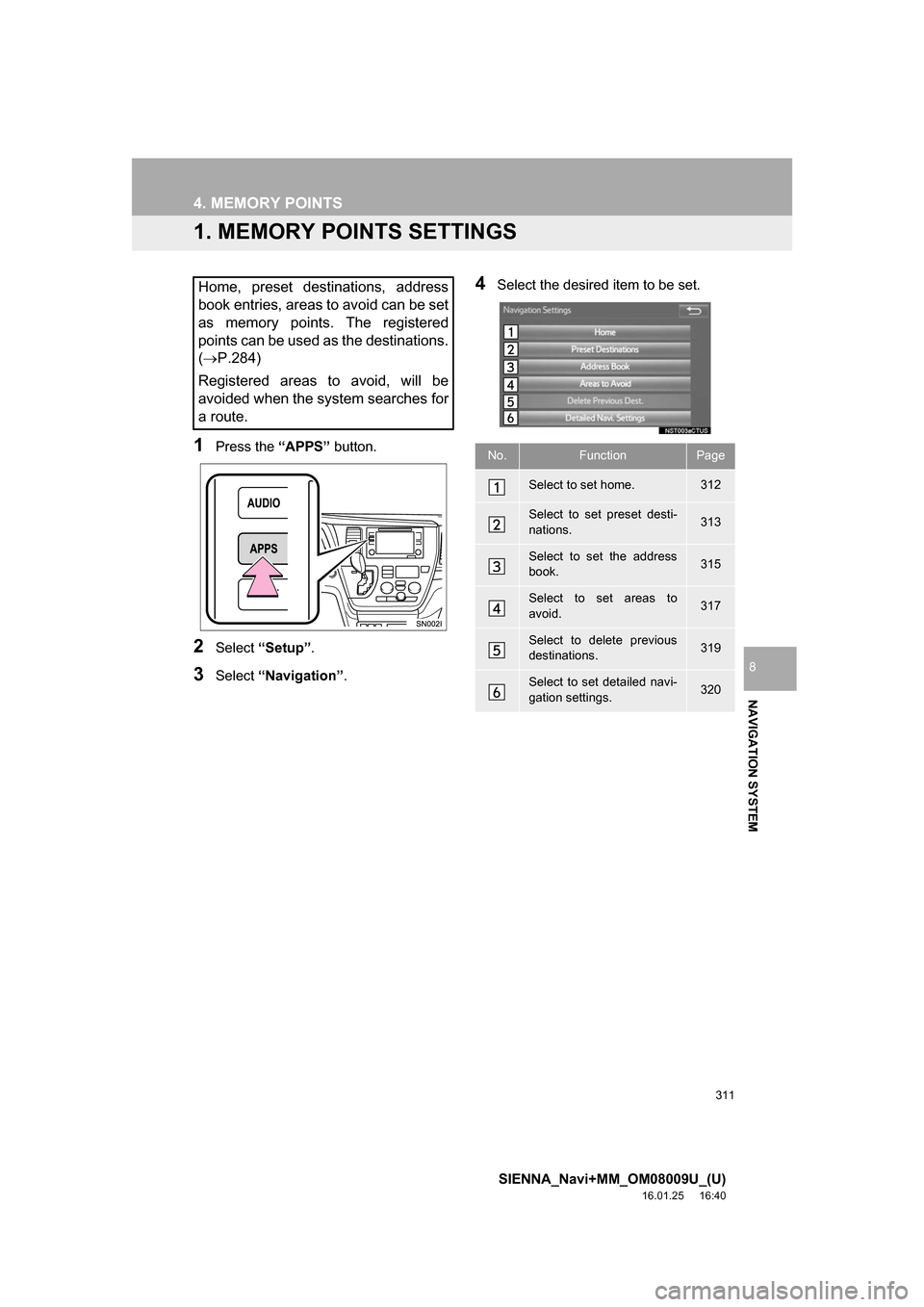
1Press the “APPS” button.
2Select “Setup” .
3Select “Navigation” .
4Select the desired item to be set.Home, preset destinations, address
book entries, areas to avoid can be set
as memory points. The registered
points can be used as the destinations.
(P.284)
Registered areas to avoid, will be
avoided when the system searches for
a route.
No.FunctionPage
Select to set home.312
Select to set preset desti-
nations.313
Select to set the address
book.315
Select to set areas to
avoid.317
Select to delete previous
destinations.319
Select to set detailed navi-
gation settings.320
Page 313 of 366
313
4. MEMORY POINTS
SIENNA_Navi+MM_OM08009U_(U)
16.01.25 16:40
NAVIGATION SYSTEM
8
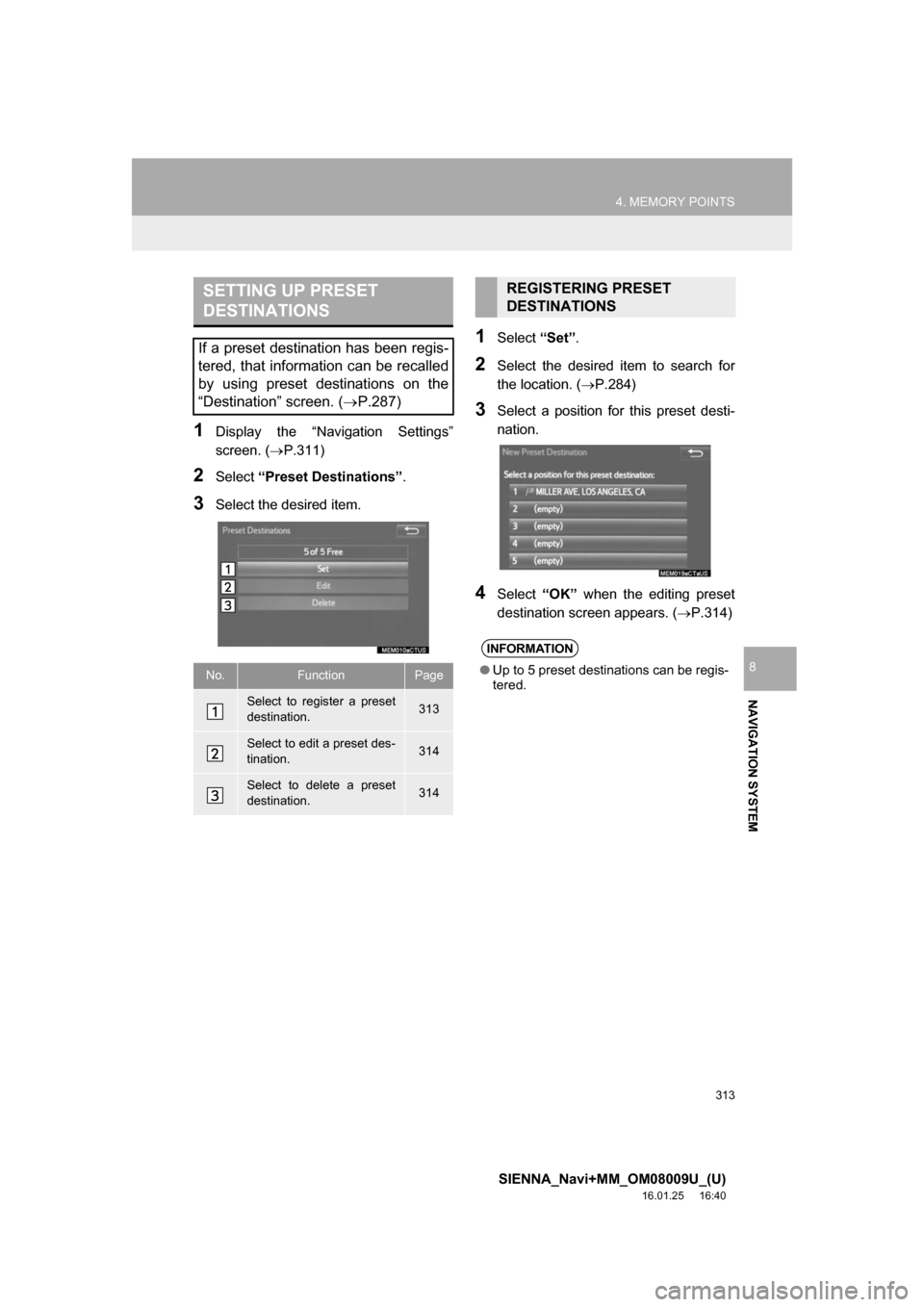
1Display the “Navigation Settings”
screen. (P.311)
2Select “Preset Destinations” .
3Select the desired item.
1Select “Set”.
2Select the desired item to search for
the location. ( P.284)
3Select a position for this preset desti-
nation.
4Select “OK” when the editing preset
destination screen appears. ( P.314)
SETTING UP PRESET
DESTINATIONS
If a preset destination has been regis-
tered, that information can be recalled
by using preset destinations on the
“Destination” screen. (P.287)
No.FunctionPage
Select to register a preset
destination.313
Select to edit a preset des-
tination.314
Select to delete a preset
destination.314
REGISTERING PRESET
DESTINATIONS
INFORMATION
● Up to 5 preset destinations can be regis-
tered.
Page 314 of 366
314
4. MEMORY POINTS
SIENNA_Navi+MM_OM08009U_(U)
16.01.25 16:40
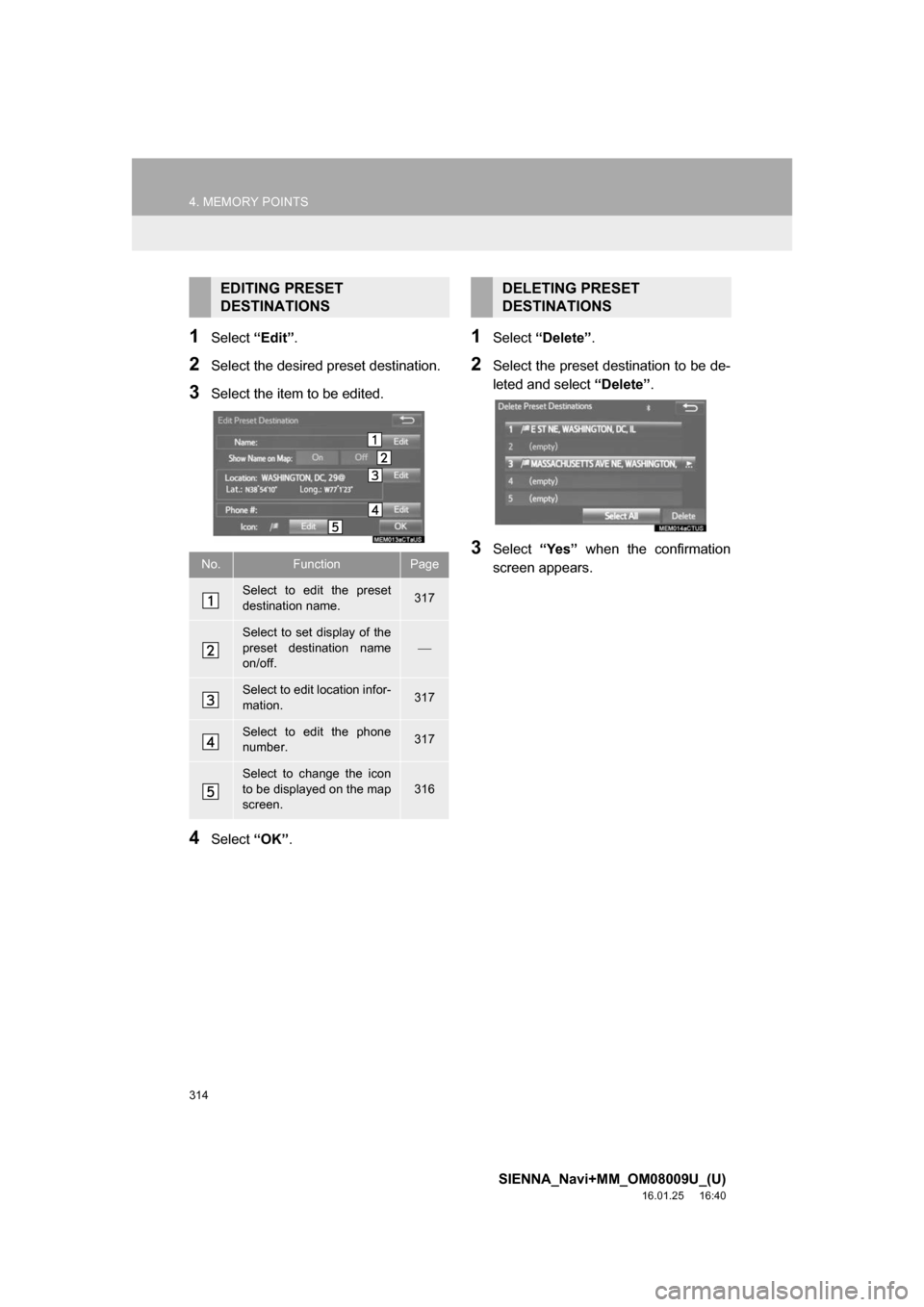
1Select “Edit”.
2Select the desired preset destination.
3Select the item to be edited.
4Select “OK”.
1Select “Delete” .
2Select the preset destination to be de-
leted and select “Delete”.
3Select “Yes” when the confirmation
screen appears.
EDITING PRESET
DESTINATIONS
No.FunctionPage
Select to edit the preset
destination name.317
Select to set display of the
preset destination name
on/off.
Select to edit location infor-
mation.317
Select to edit the phone
number.317
Select to change the icon
to be displayed on the map
screen.
316
DELETING PRESET
DESTINATIONS
Page 321 of 366
321
5. SETUP
SIENNA_Navi+MM_OM08009U_(U)
16.01.25 16:40
NAVIGATION SYSTEM
8
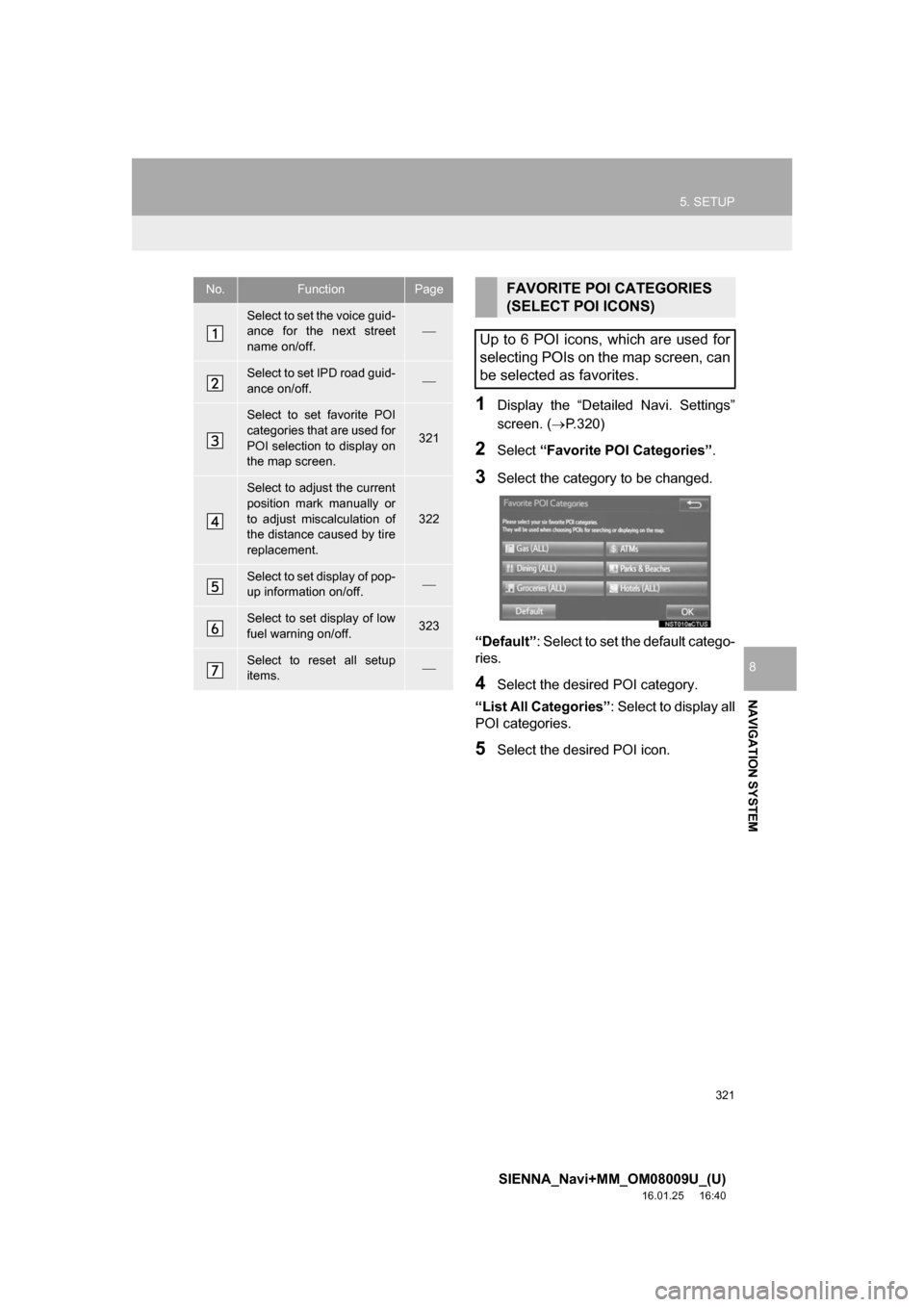
1Display the “Detailed Navi. Settings”
screen. (P.320)
2Select “Favorite POI Categories” .
3Select the category to be changed.
“Default” : Select to set the default catego-
ries.
4Select the desired POI category.
“List All Categories” : Select to display all
POI categories.
5Select the desired POI icon.
No.FunctionPage
Select to set the voice guid-
ance for the next street
name on/off.
Select to set IPD road guid-
ance on/off.
Select to set favorite POI
categories that are used for
POI selection to display on
the map screen.
321
Select to adjust the current
position mark manually or
to adjust miscalculation of
the distance caused by tire
replacement.
322
Select to set display of pop-
up information on/off.
Select to set display of low
fuel warning on/off.323
Select to reset all setup
items.
FAVORITE POI CATEGORIES
(SELECT POI ICONS)
Up to 6 POI icons, which are used for
selecting POIs on the map screen, can
be selected as favorites.
Page 324 of 366
324
5. SETUP
SIENNA_Navi+MM_OM08009U_(U)
16.01.25 16:40
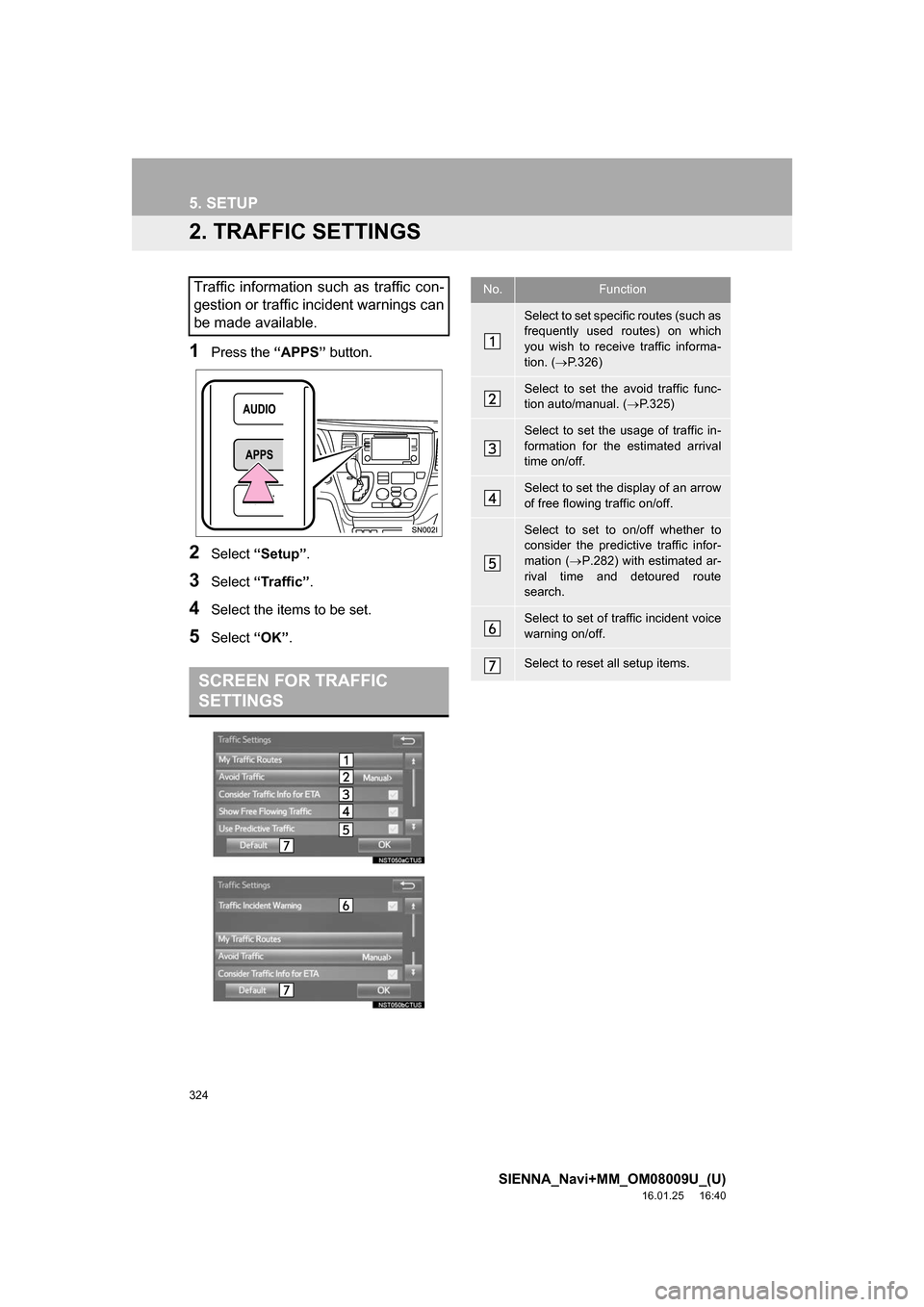
2. TRAFFIC SETTINGS
1Press the “APPS” button.
2Select “Setup” .
3Select “Traffic” .
4Select the items to be set.
5Select “OK”.
Traffic information such as traffic con-
gestion or traffic incident warnings can
be made available.
SCREEN FOR TRAFFIC
SETTINGS
No.Function
Select to set specific routes (such as
frequently used routes) on which
you wish to receive traffic informa-
tion. ( P.326)
Select to set the avoid traffic func-
tion auto/manual. ( P.325)
Select to set the usage of traffic in-
formation for the estimated arrival
time on/off.
Select to set the display of an arrow
of free flowing traffic on/off.
Select to set to on/off whether to
consider the predictive traffic infor-
mation ( P.282) with estimated ar-
rival time and detoured route
search.
Select to set of traffic incident voice
warning on/off.
Select to reset all setup items.
Page 348 of 366
348
SIENNA_Navi+MM_OM08009U_(U)
16.01.25 16:40
3. SETUP
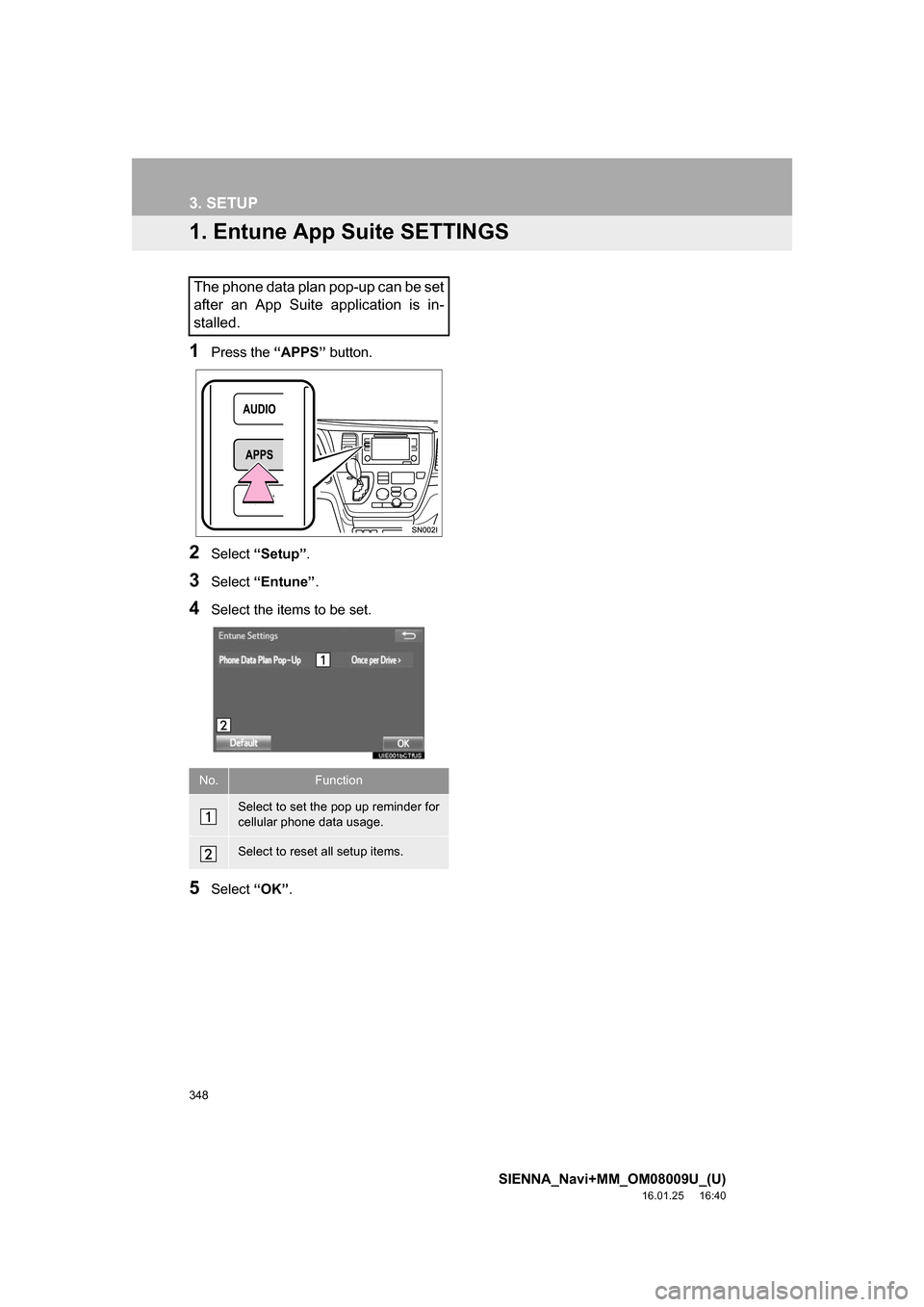
1. Entune App Suite SETTINGS
1Press the “APPS” button.
2Select “Setup” .
3Select “Entune” .
4Select the items to be set.
5Select “OK”.
The phone data plan pop-up can be set
after an App Suite application is in-
stalled.
No.Function
Select to set the pop up reminder for
cellular phone data usage.
Select to reset all setup items.