change wheel TOYOTA SIENNA 2018 Owners Manual (in English)
[x] Cancel search | Manufacturer: TOYOTA, Model Year: 2018, Model line: SIENNA, Model: TOYOTA SIENNA 2018Pages: 52, PDF Size: 4.46 MB
Page 26 of 52
24
FEATURES & OPERATIONS
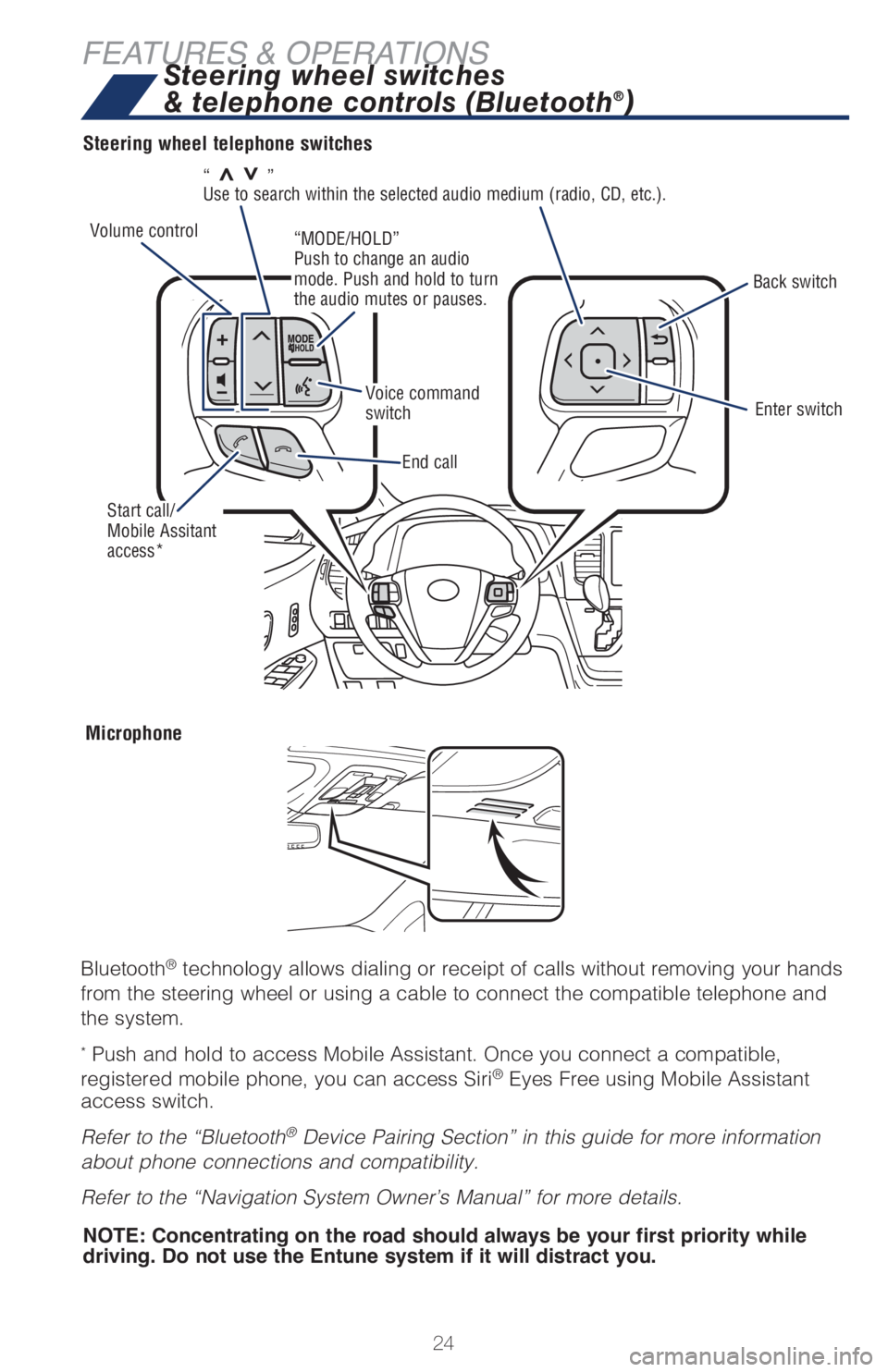
“>>”
Use to search within the selected audio medium (radio, CD, etc.).
Steering wheel telephone switches
Microphone
Bluetooth® technology allows dialing or receipt of calls without removing your hands
from the steering wheel or using a cable to connect the compatible telephone and
the system.
* Push and hold to access Mobile Assistant. Once you connect a compatible,
registered mobile phone, you can access Siri® Eyes Free using Mobile Assistant
access switch.
Refer to the “Bluetooth
® Device Pairing Section” in this guide for more information
about phone connections and compatibility.
Refer to the “Navigation System Owner’s Manual” for more details.
Steering wheel switches
& telephone controls (Bluetooth®)
Back switch
Enter switch
End call
NOTE: Concentrating on the road should always be your first priority while
driving. Do not use the Entune system if it will distract you.
Volume control
Voice command
switch
Start call/
Mobile Assitant
access*
“MODE/HOLD”
Push to change an audio
mode. Push and hold to turn
the audio mutes or pauses.
Page 36 of 52
34
TOYOTA SAFETY SENSE™
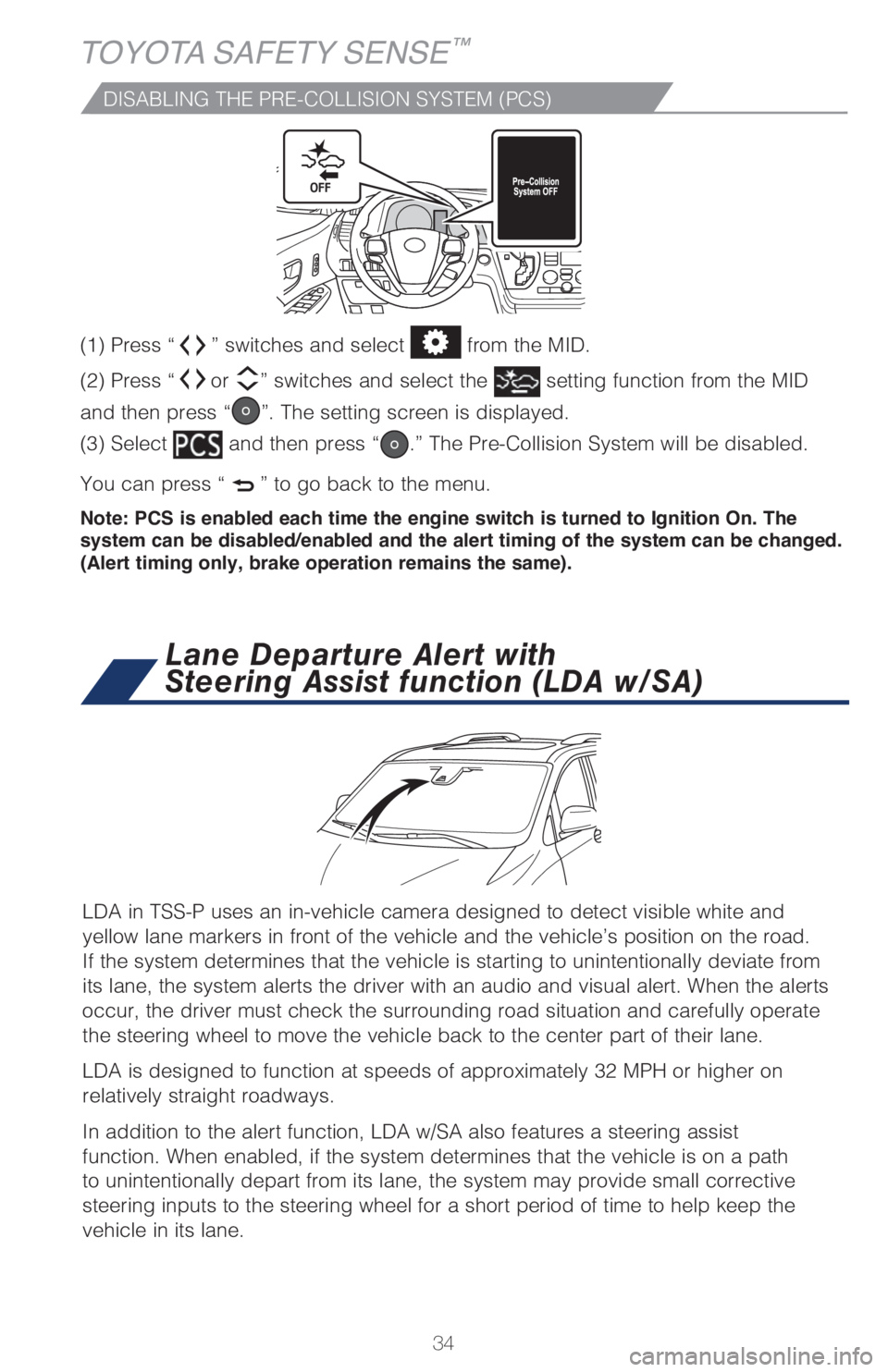
(1) Press “” switches and select from the MID.
(2) Press “
or ” switches and select the setting function from the MID
and then press “
”. The setting screen is displayed.
(3) Select
and then press “.” The Pre-Collision System will be disabled.
You can press “
” to go back to the menu.
Note: PCS is enabled each time the engine switch is turned to Ignition On. The
system can be disabled/enabled and the alert timing of the system can be changed.
(Alert timing only, brake operation remains the same).
DISABLING THE PRE-COLLISION SYSTEM (PCS)
LDA in TSS-P uses an in-vehicle camera designed to detect visible white and
yellow lane markers in front of the vehicle and the vehicle’s position on the road.
If the system determines that the vehicle is starting to unintentionally deviate from
its lane, the system alerts the driver with an audio and visual alert. When the alerts
occur, the driver must check the surrounding road situation and carefully operate
the steering wheel to move the vehicle back to the center part of their lane.
LDA is designed to function at speeds of approximately 32 MPH or higher on
relatively straight roadways.
In addition to the alert function, LDA w/SA also features a steering assist
function. When enabled, if the system determines that the vehicle is on a path
to unintentionally depart from its lane, the system may provide small corrective
steering inputs to the steering wheel for a short period of time to help keep the
vehicle in its lane.
Lane Departure Alert with
Steering Assist function (LDA w/SA)
Page 38 of 52
36
TOYOTA SAFETY SENSE™
DISABLING THE STEERING ASSIST FUNCTION
(1) Press “” switches to find and select .
(2) Press “
or ” switches to find the setting function and then press
“
”. The LDA Steering Assist system will be disabled.
(3) You can press “
” to go back to the menu.
Note: Operation of the LDA system and setting adjustments continues in the same
condition regardless of Ignition cycle until changed by the driver or the system is reset.
ADJUSTING LDA ALERT SENSITIVITY
The driver can adjust the sensitivity of the LDA (warning) function from the
Multi-Information Display (MID) customization screen.
High - Is designed to warn approximately before the front tire crosses the
lane marker.
Normal - Is designed to warn approximately when the front tire crosses
the lane marker.
(1) Press “
” switches to find and select .
(2) Press “
or ” switches to find the setting function and then press
“
”. The setting screen is displayed.
(3) Select “Sensitivity” and then press “
.” Each time “” is pressed, the
response to the LDA alert sensitivity changes. You can press “
” to go back to
the menu.
Note: Operation of the LDA system and setting adjustments continues in the
same condition regardless of Ignition cycle until changed by the driver or the
system is reset.
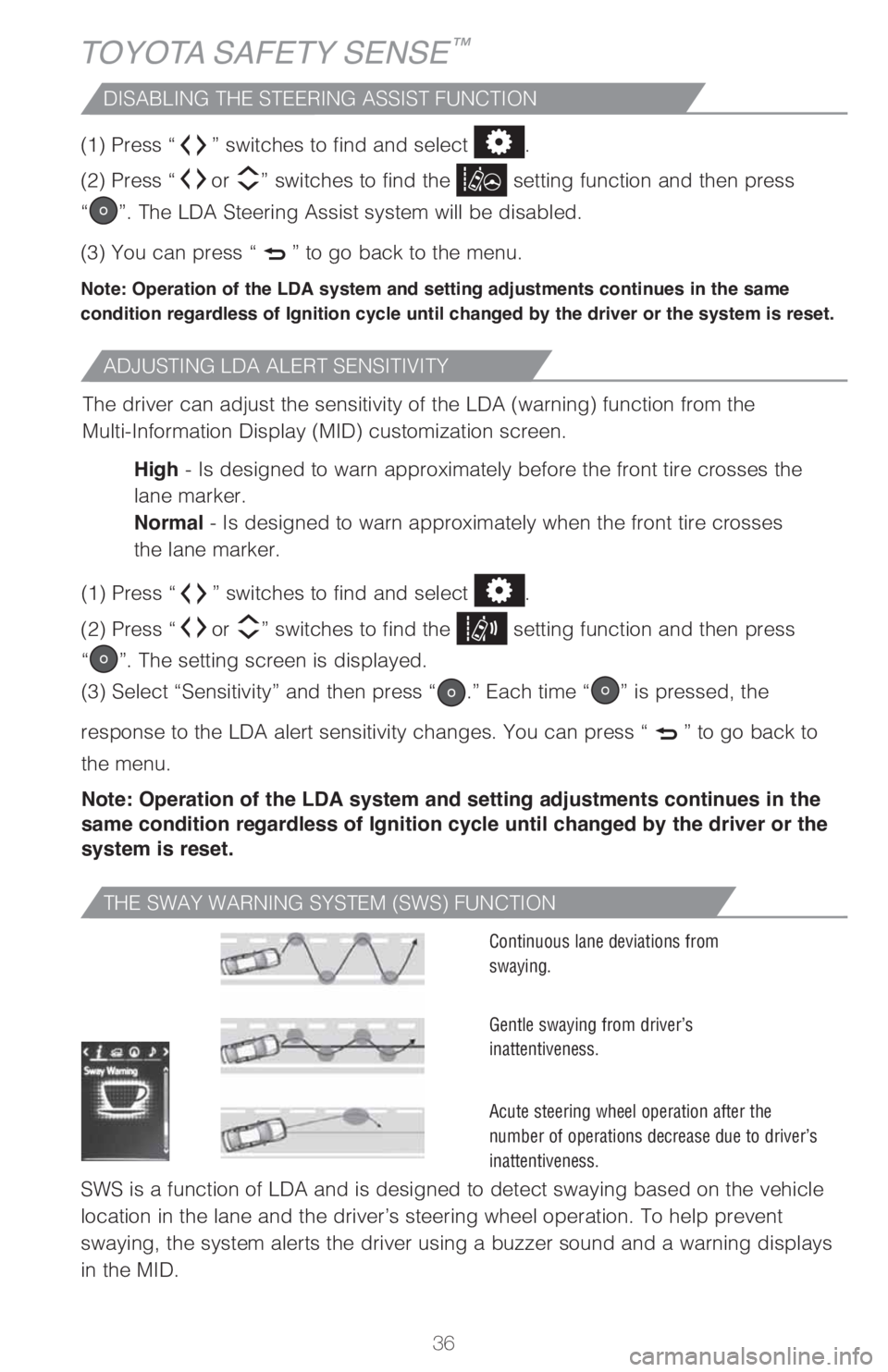
THE SWAY WARNING SYSTEM (SWS) FUNCTION
SWS is a function of LDA and is designed to detect swaying based on the vehicle
location in the lane and the driver’s steering wheel operation. To help prevent
swaying, the system alerts the driver using a buzzer sound and a warning displays
in the MID.
Continuous lane deviations from
swaying.
Gentle swaying from driver’s
inattentiveness.
Acute steering wheel operation after the
number of operations decrease due to driver’s
inattentiveness.