lock TOYOTA SIENNA 2018 Owners Manual (in English)
[x] Cancel search | Manufacturer: TOYOTA, Model Year: 2018, Model line: SIENNA, Model: TOYOTA SIENNA 2018Pages: 52, PDF Size: 4.46 MB
Page 3 of 52
1
OVERVIEW FEATURES & OPERATIONS TOYOTA SAFETY SENSE SAFETY & EMERGENCY FEATURES
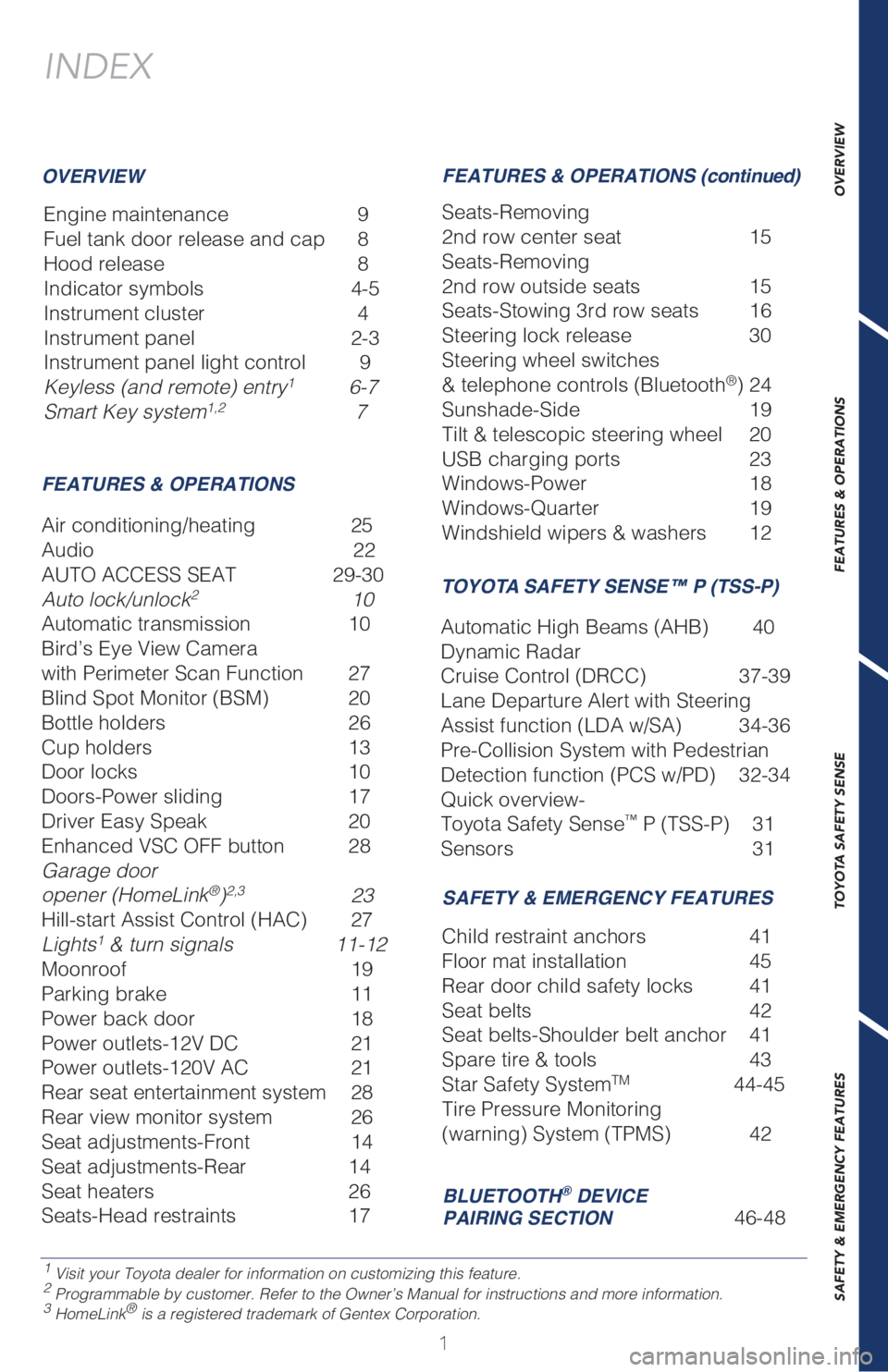
INDEX
Engine maintenance 9
Fuel tank door release and cap 8
Hood release 8
Indicator symbols 4-5
Instrument cluster 4
Instrument panel 2-3
Instrument panel light control 9
Keyless (and remote) entry
1 6-7
Smart Key system1,2 7
1 Visit your Toyota dealer for information on customizing this feature.2 Programmable by customer. Refer to the Owner’s Manual for instructions and more information.3 HomeLink® is a registered trademark of Gentex Corporation.
OVERVIEW
FEATURES & OPERATIONSFEATURES & OPERATIONS (continued)
SAFETY & EMERGENCY FEATURES
Air conditioning/heating 25
Audio 22
AUTO ACCESS SEAT 29-30
Auto lock/unlock
2 10
Automatic transmission 10
Bird’s Eye View Camera
with Perimeter Scan Function 27
Blind Spot Monitor (BSM) 20
Bottle holders 26
Cup holders 13
Door locks 10
Doors-Power sliding 17
Driver Easy Speak 20
Enhanced VSC OFF button 28
Garage door
opener (HomeLink
®)2,3 23
Hill-start Assist Control (HAC) 27
Lights
1 & turn signals 11-12
Moonroof 19
Parking brake 11
Power back door 18
Power outlets-12V DC 21
Power outlets-120V AC 21
Rear seat entertainment system 28
Rear view monitor system 26
Seat adjustments-Front 14
Seat adjustments-Rear 14
Seat heaters 26
Seats-Head restraints 17Seats-Removing
2nd row center seat 15
Seats-Removing
2nd row outside seats 15
Seats-Stowing 3rd row seats 16
Steering lock release 30
Steering wheel switches
& telephone controls (Bluetooth
®) 24
Sunshade-Side 19
Tilt & telescopic steering wheel 20
USB charging ports 23
Windows-Power 18
Windows-Quarter 19
Windshield wipers & washers 12
Child restraint anchors 41
Floor mat installation 45
Rear door child safety locks 41
Seat belts 42
Seat belts-Shoulder belt anchor 41
Spare tire & tools 43
Star Safety System
TM 44-45
Tire Pressure Monitoring
(warning) System (TPMS) 42
BLUETOOTH® DEVICE
PAIRING SECTION 46-48
TOYOTA SAFETY SENSE™ P (TSS-P)
Automatic High Beams (AHB) 40
Dynamic Radar
Cruise Control (DRCC) 37-39
Lane Departure Alert with Steering
Assist function (LDA w/SA) 34-36
Pre-Collision System with Pedestrian
Detection function (PCS w/PD) 32-34
Quick overview-
Toyota Safety Sense
™ P (TSS-P) 31
Sensors 31
Page 4 of 52
2
OVERVIEW
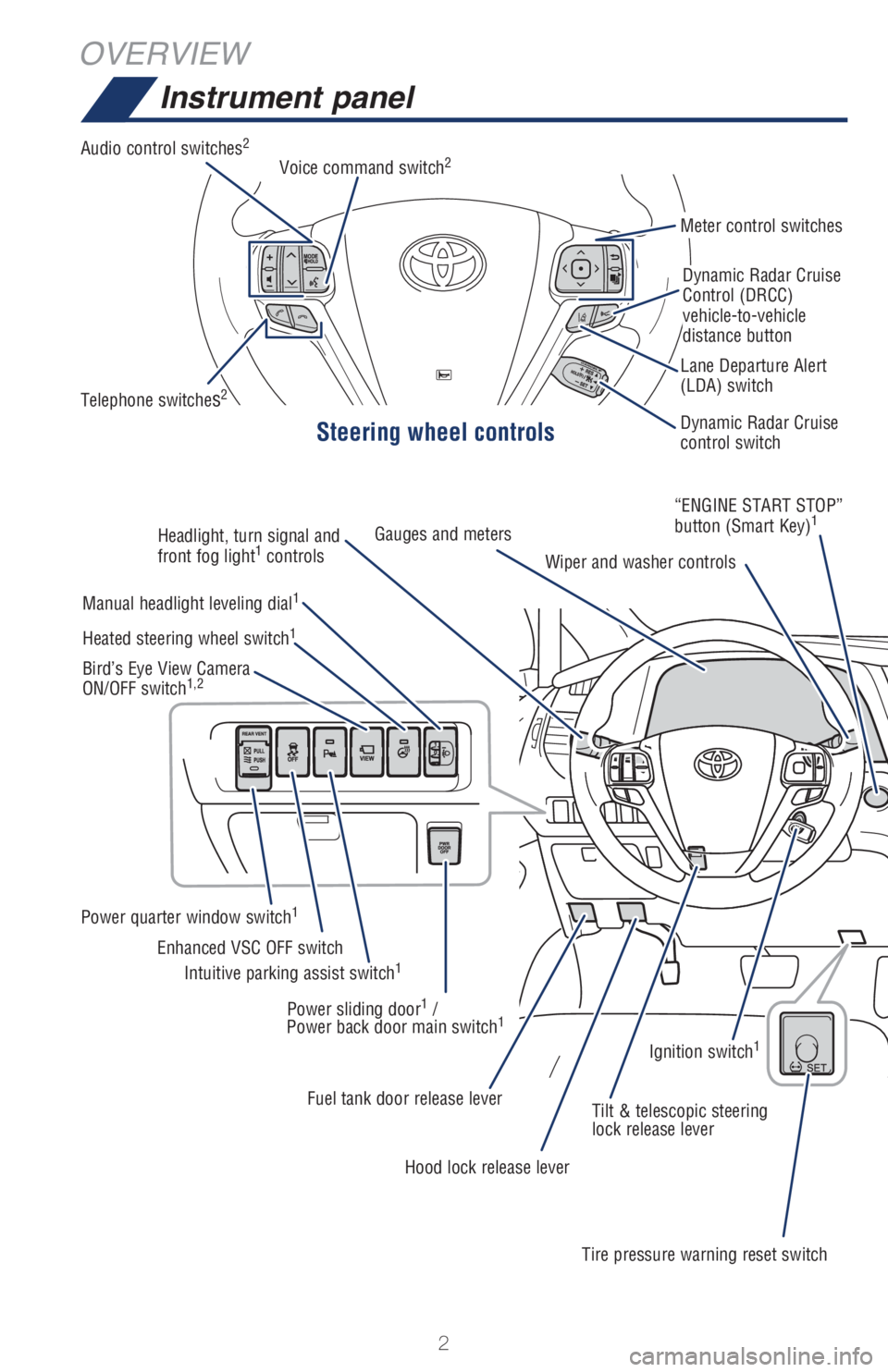
Instrument panel
Steering wheel controls
Audio control switches2
Telephone switches2
Meter control switches
Dynamic Radar Cruise
Control (DRCC)
vehicle-to-vehicle
distance button
Dynamic Radar Cruise
control switch Lane Departure Alert
(LDA) switch Voice command switch
2
Headlight, turn signal and
front fog light1
controlsGauges and meters
Wiper and washer controls“ENGINE START STOP”
button (Smart Key)
1
Manual headlight leveling dial1
Power quarter window switch1
Intuitive parking assist switch1Enhanced VSC OFF switch Heated steering wheel switch
1
Bird’s Eye View Camera
ON/OFF switch1,2
Power sliding door1 /
Power back door main switch1
Fuel tank door release lever
Tilt & telescopic steering
lock release lever
Hood lock release lever
Tire pressure warning reset switchIgnition switch
1
Page 6 of 52
4
ODO1000 miles
68°FExterior
OVERVIEW
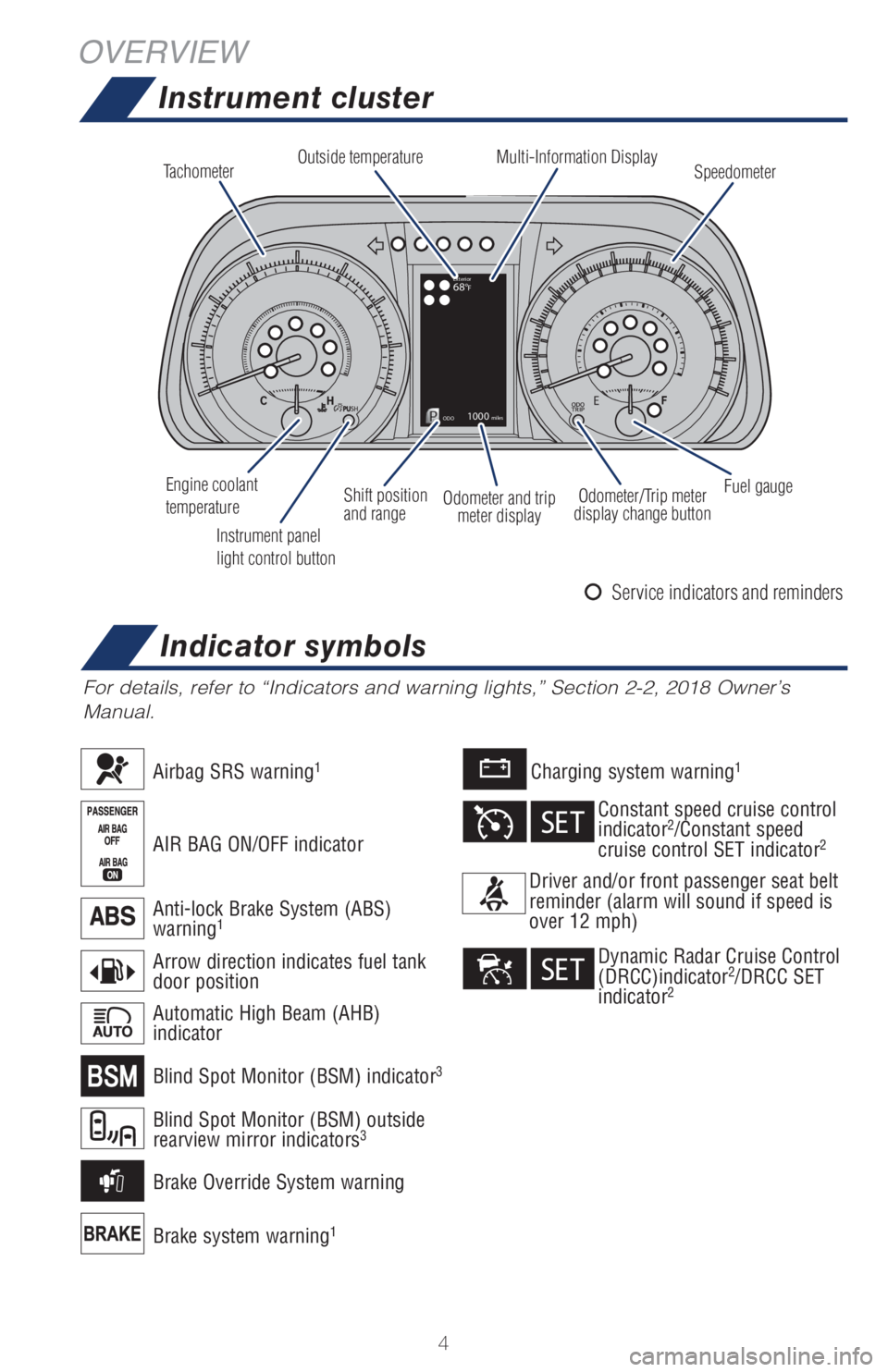
Instrument cluster
For details, refer to “Indicators and warning lights,” Section 2-2, 2018 Owner’s
Manual.
Tachometer
Speedometer Multi-Information Display Outside temperature
Engine coolant
temperature
Instrument panel
light control buttonOdometer and trip
meter display Shift position
and rangeOdometer/Trip meter
display change buttonFuel gauge
Charging system warning1
Brake system warning1
AIR BAG ON/OFF indicator
Airbag SRS warning1
Arrow direction indicates fuel tank
door position
Automatic High Beam (AHB)
indicator
Anti-lock Brake System (ABS)
warning1
Blind Spot Monitor (BSM) outside
rearview mirror indicators3
Blind Spot Monitor (BSM) indicator3
Brake Override System warning
Driver and/or front passenger seat belt
reminder (alarm will sound if speed is
over 12 mph)
Constant speed cruise control
indicator2/Constant speed
cruise control SET indicator2
Dynamic Radar Cruise Control
(DRCC)indicator2/DRCC SET
indicator2
Indicator symbols
Service indicators and reminders
Page 8 of 52
6
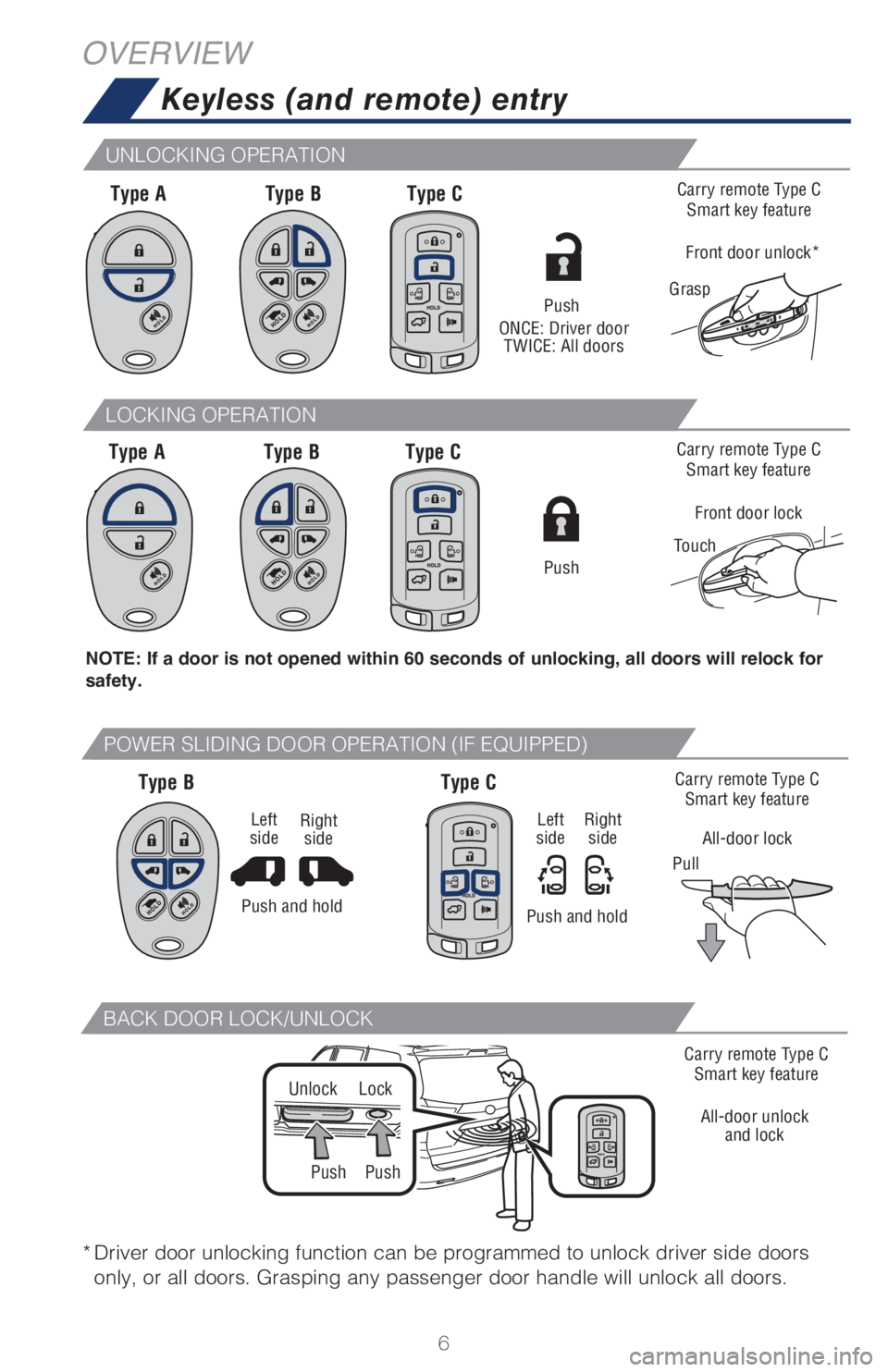
Keyless (and remote) entry
OVERVIEW
NOTE: If a door is not opened within 60 seconds of unlocking, all doors will relock for
safety.
Type A
Type AType B
Type BType C
Type C
* Driver door unlocking function can be programmed to unlock driver side doors
only, or all doors. Grasping any passenger door handle will unlock all doors.
Push
ONCE: Driver door
TWICE: All doors
Carry remote Type C
Smart key feature
Front door lock
Touch
Carry remote Type C
Smart key feature
All-door lock
PullCarry remote Type C
Smart key feature
Grasp
Front door unlock*
Push
Type B Type C
LOCKING OPERATION
UNLOCKING OPERATION
POWER SLIDING DOOR OPERATION (IF EQUIPPED)
Push
Unlock
PushLock
Carry remote Type C
Smart key feature
All-door unlock
and lock
BACK DOOR LOCK/UNLOCK
Push and hold
Right
side Left
side
Push and holdRight
side Left
side
Page 12 of 52
10
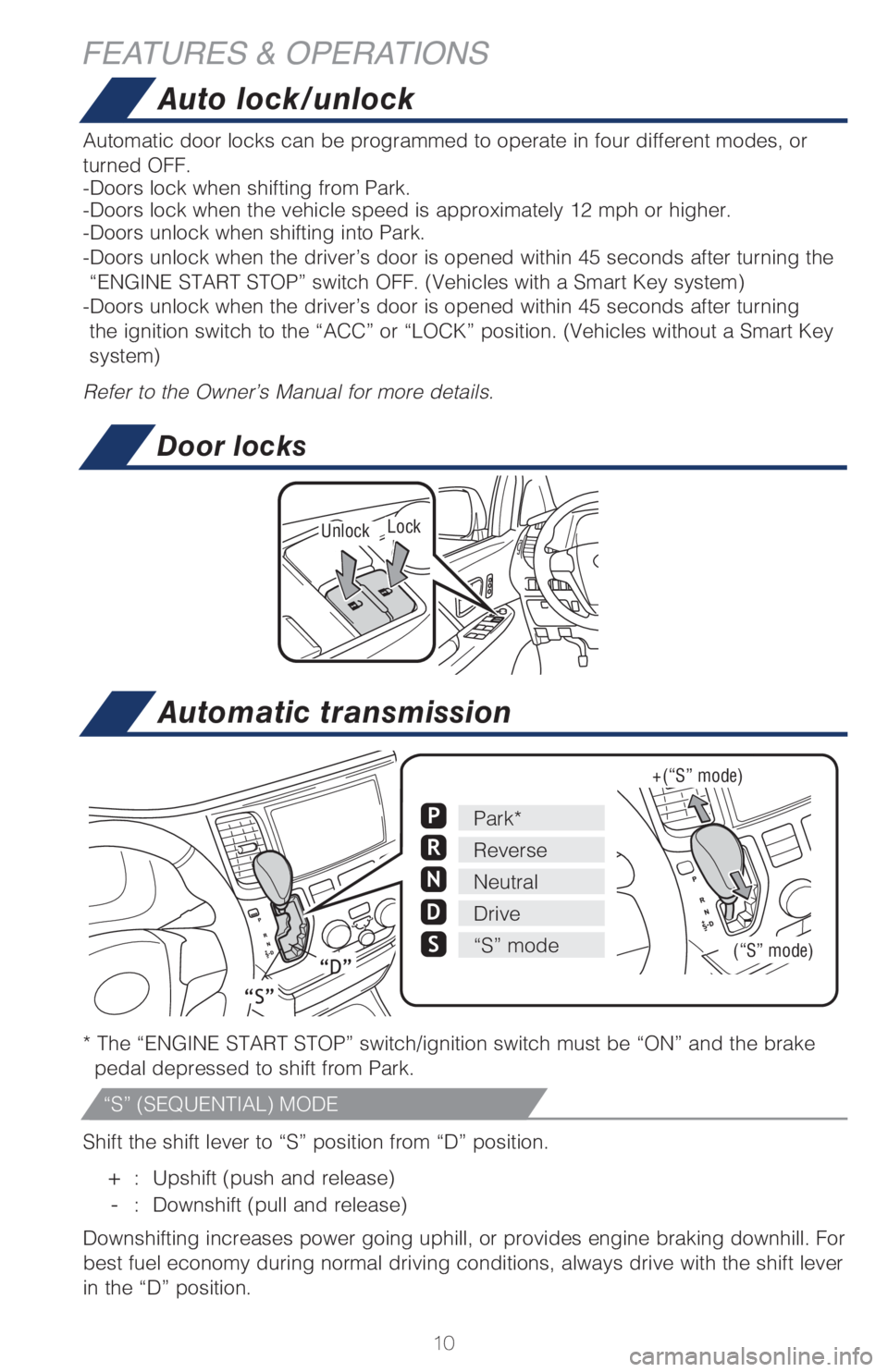
Auto lock/unlock
Automatic transmission
Automatic door locks can be programmed to operate in four different modes, or
turned OFF.
-Doors lock when shifting from Park.
-Doors lock when the vehicle speed is approximately 12 mph or higher.
-Doors unlock when shifting into Park.
-Doors unlock when the driver’s door is opened within 45 seconds after turning the
“ENGINE START STOP” switch OFF. (Vehicles with a Smart Key system)
-Doors unlock when the driver’s door is opened within 45 seconds after turning
the ignition switch to the “ACC” or “LOCK” position. (Vehicles without a Smart Key
system)
Refer to the Owner’s Manual for more details.
* The “ENGINE START STOP” switch/ignition switch must be “ON” and the brake
pedal depressed to shift from Park.
Shift the shift lever to “S” position from “D” position.
+ : Upshift (push and release)
- : Downshift (pull and release)
Downshifting increases power going uphill, or provides engine braking downhill. For
best fuel economy during normal driving conditions, always drive with the shift lever
in the “D” position.
Park*P
ReverseR
NeutralN
DriveD
S“S” mode
“S”
“D”
+ (“S” mode)
(“S” mode)
Door locks
UnlockLock
FEATURES & OPERATIONS
“S” (SEQUENTIAL) MODE
Page 13 of 52
11
OVERVIEW FEATURES & OPERATIONS TOYOTA SAFETY SENSE SAFETY & EMERGENCY FEATURES
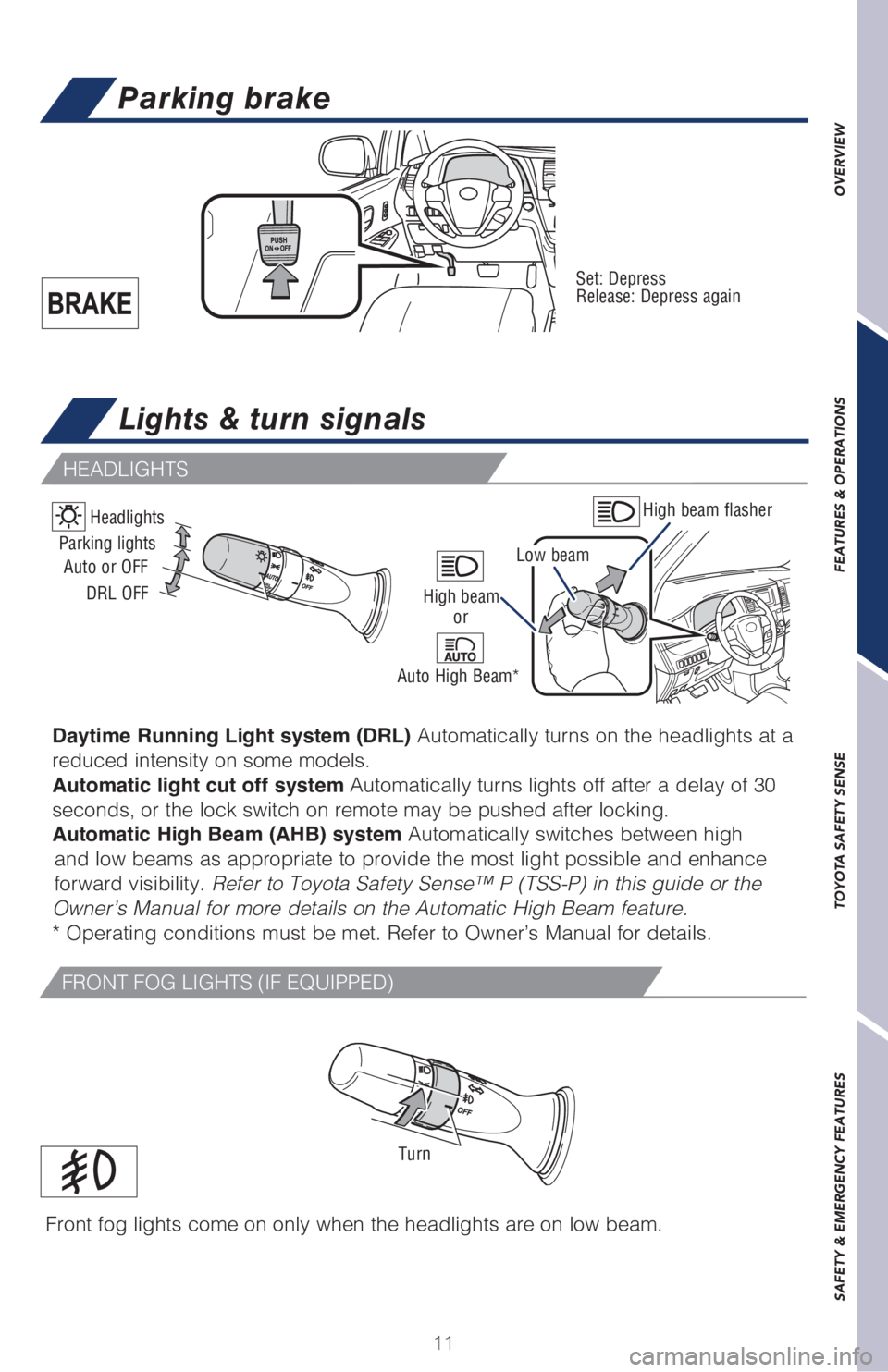
Lights & turn signals
Parking brake
Set: Depress
Release: Depress again
High beam flasher
Low beam Headlights
Daytime Running Light system (DRL) Automatically turns on the headlights at a
reduced intensity on some models.
Automatic light cut off system Automatically turns lights off after a delay of 30
seconds, or the lock switch on remote may be pushed after locking.
Automatic High Beam (AHB) system Automatically switches between high
and low beams as appropriate to provide the most light possible and enhance
forward visibility. Refer to Toyota Safety Sense™ P (TSS-P) in this guide or the
Owner’s Manual for more details on the Automatic High Beam feature.
* Operating conditions must be met. Refer to Owner’s Manual for details.
Parking lights
High beam
Auto or OFF
DRL OFF
Auto High Beam* or
Front fog lights come on only when the headlights are on low beam.
Turn
FRONT FOG LIGHTS (IF EQUIPPED)
HEADLIGHTS
Page 19 of 52
17
OVERVIEW FEATURES & OPERATIONS TOYOTA SAFETY SENSE SAFETY & EMERGENCY FEATURES
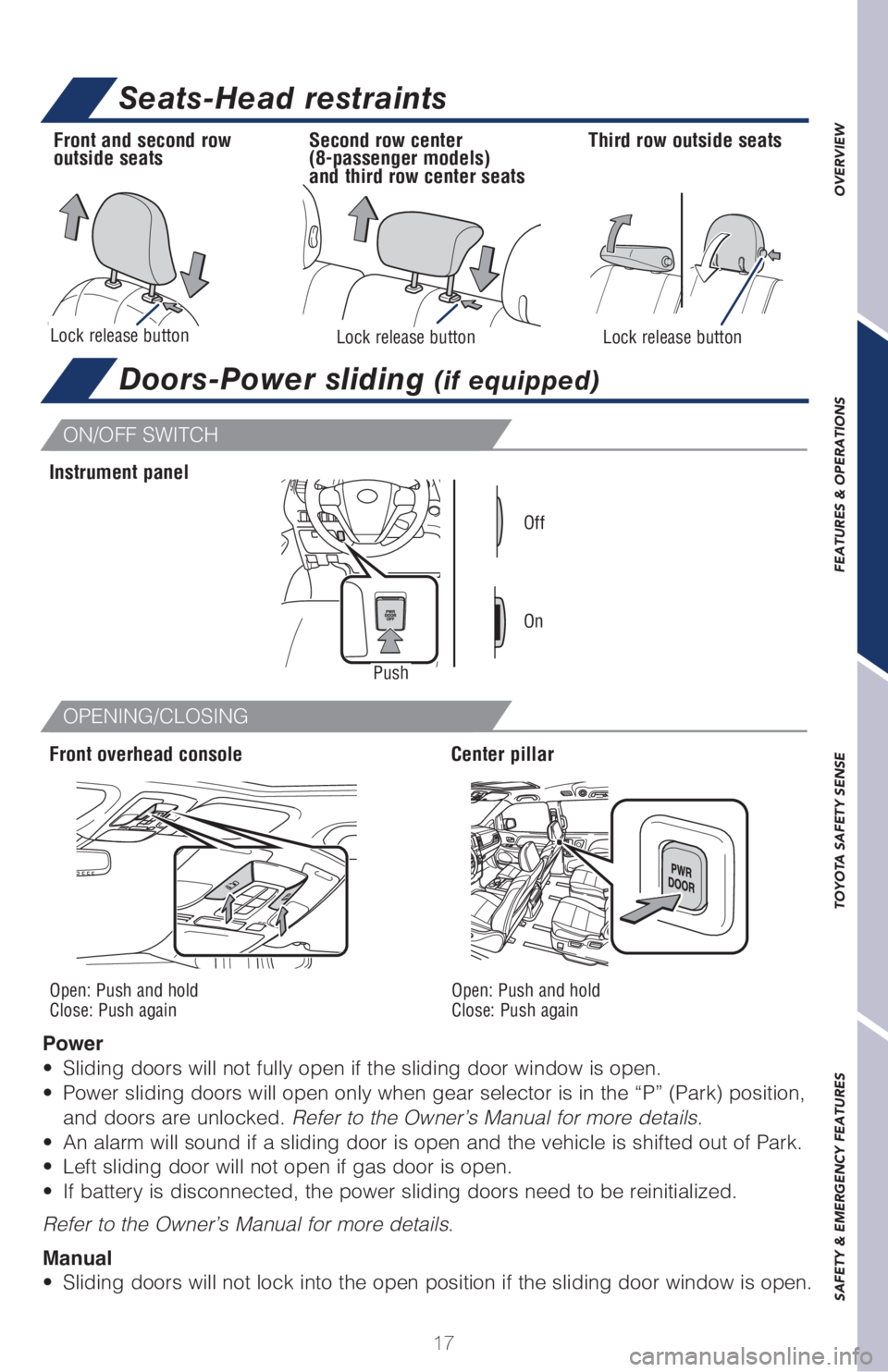
Doors-Power sliding (if equipped)
ON/OFF SWITCH
OPENING/CLOSING
Power
• Sliding doors will not fully open if the sliding door window is open.
• Power sliding doors will open only when gear selector is in the “P” (Park) position,
and doors are unlocked. Refer to the Owner’s Manual for more details.
• An alarm will sound if a sliding door is open and the vehicle is shifted out of Park.
• Left sliding door will not open if gas door is open.
• If battery is disconnected, the power sliding doors need to be reinitialized.
Refer to the Owner’s Manual for more details.
Manual
• Sliding doors will not lock into the open position if the sliding door window is open.
Front overhead console Instrument panel
Push
Center pillar
On Off
Open: Push and hold
Close: Push againOpen: Push and hold
Close: Push again
Seats-Head restraints
Lock release button
Front and second row
outside seatsThird row outside seats
Lock release buttonLock release button
Second row center
(8-passenger models)
and third row center seats
Page 20 of 52
18
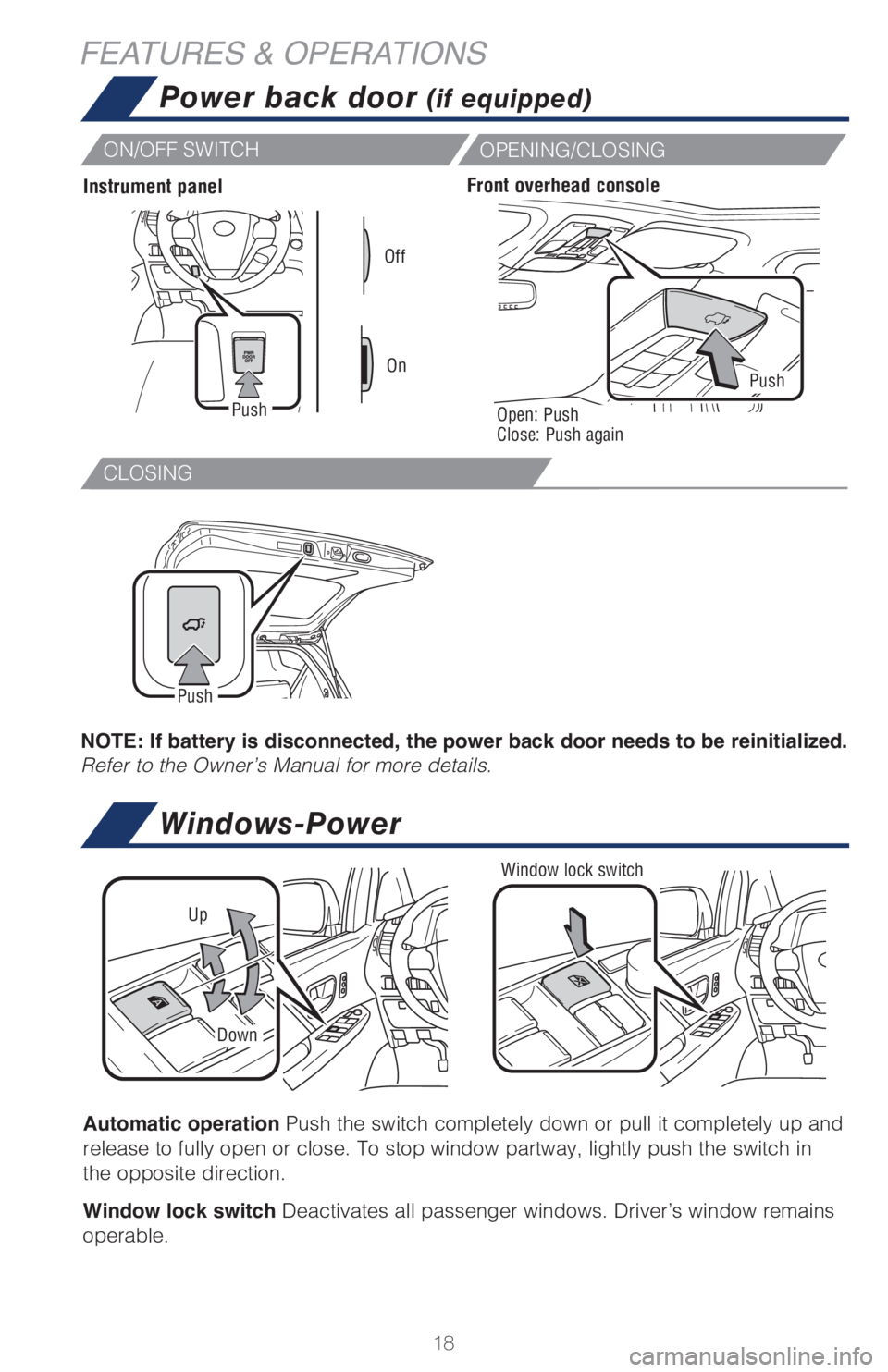
CLOSING
FEATURES & OPERATIONS
Automatic operation Push the switch completely down or pull it completely up and
release to fully open or close. To stop window partway, lightly push the switch in
the opposite direction.
Window lock switch Deactivates all passenger windows. Driver’s window remains
operable.
NOTE: If battery is disconnected, the power back door needs to be reinitialized.
Refer to the Owner’s Manual for more details.
Window lock switch
Up
Down
On OffPush
Instrument panelFront overhead console
Open: Push
Close: Push againPush
Push
Power back door (if equipped)
Windows-Power
ON/OFF SWITCH
OPENING/CLOSING
Page 22 of 52
20
Driver Easy Speak (if equipped)
Blind Spot Monitor (BSM) (if equipped)
FEATURES & OPERATIONS
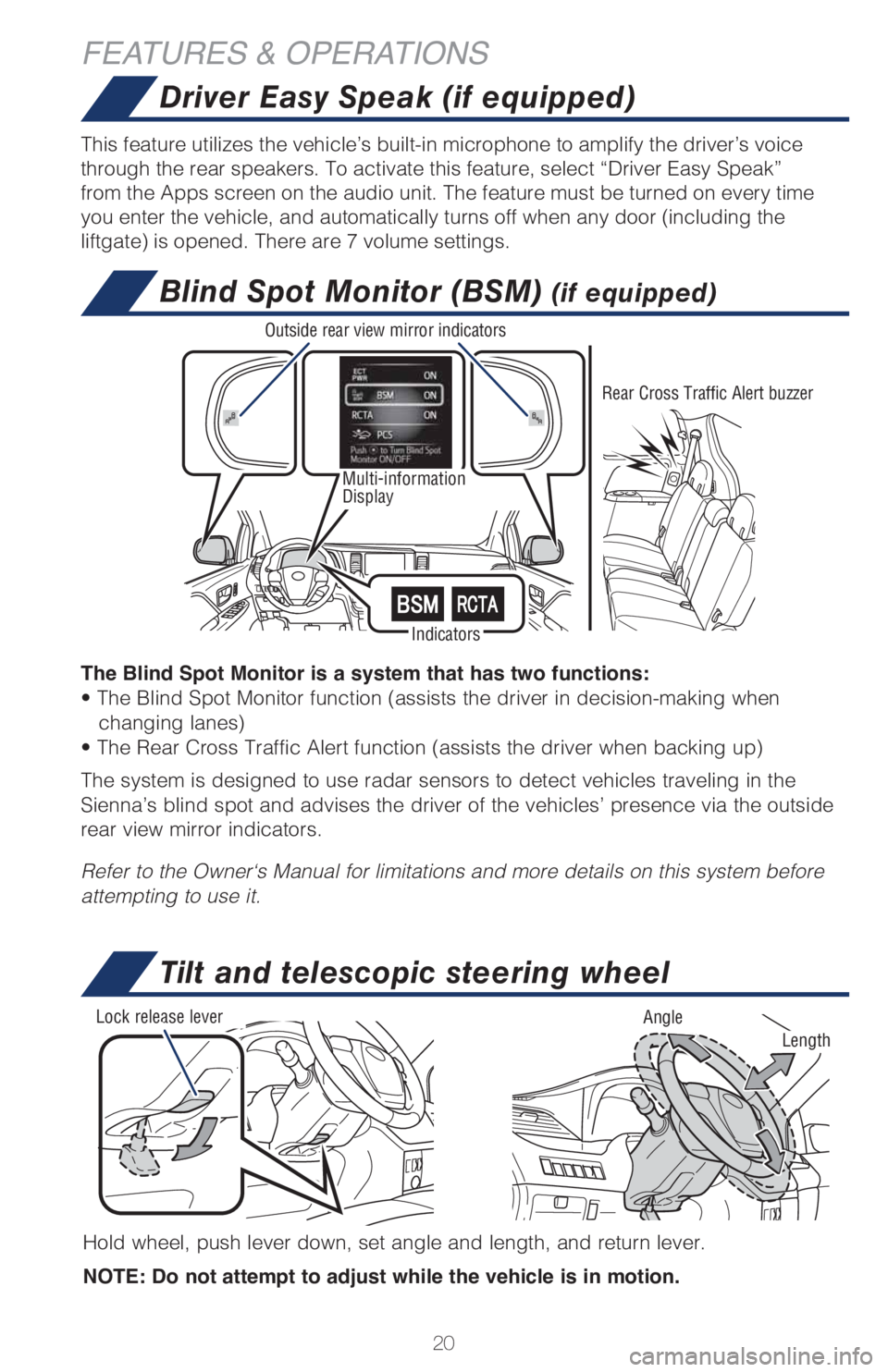
Multi-information
Display
This feature utilizes the vehicle’s built-in microphone to amplify the driver’s voice
through the rear speakers. To activate this feature, select “Driver Easy Speak”
from the Apps screen on the audio unit. The feature must be turned on every time
you enter the vehicle, and automatically turns off when any door (including the
liftgate) is opened. There are 7 volume settings.
Tilt and telescopic steering wheel
Hold wheel, push lever down, set angle and length, and return lever.
NOTE: Do not attempt to adjust while the vehicle is in motion.
Length
Lock release lever
Angle
IndicatorsRear Cross Traffic Alert buzzer Outside rear view mirror indicators
The Blind Spot Monitor is a system that has two functions:
• The Blind Spot Monitor function (assists the driver in decision-making when
changing lanes)
• The Rear Cross Traffic Alert function (assists the driver when backing up)
The system is designed to use radar sensors to detect vehicles traveling in the
Sienna’s blind spot and advises the driver of the vehicles’ presence via the outside
rear view mirror indicators.
Refer to the Owner‘s Manual for limitations and more details on this system before
attempting to use it.
Page 32 of 52
30
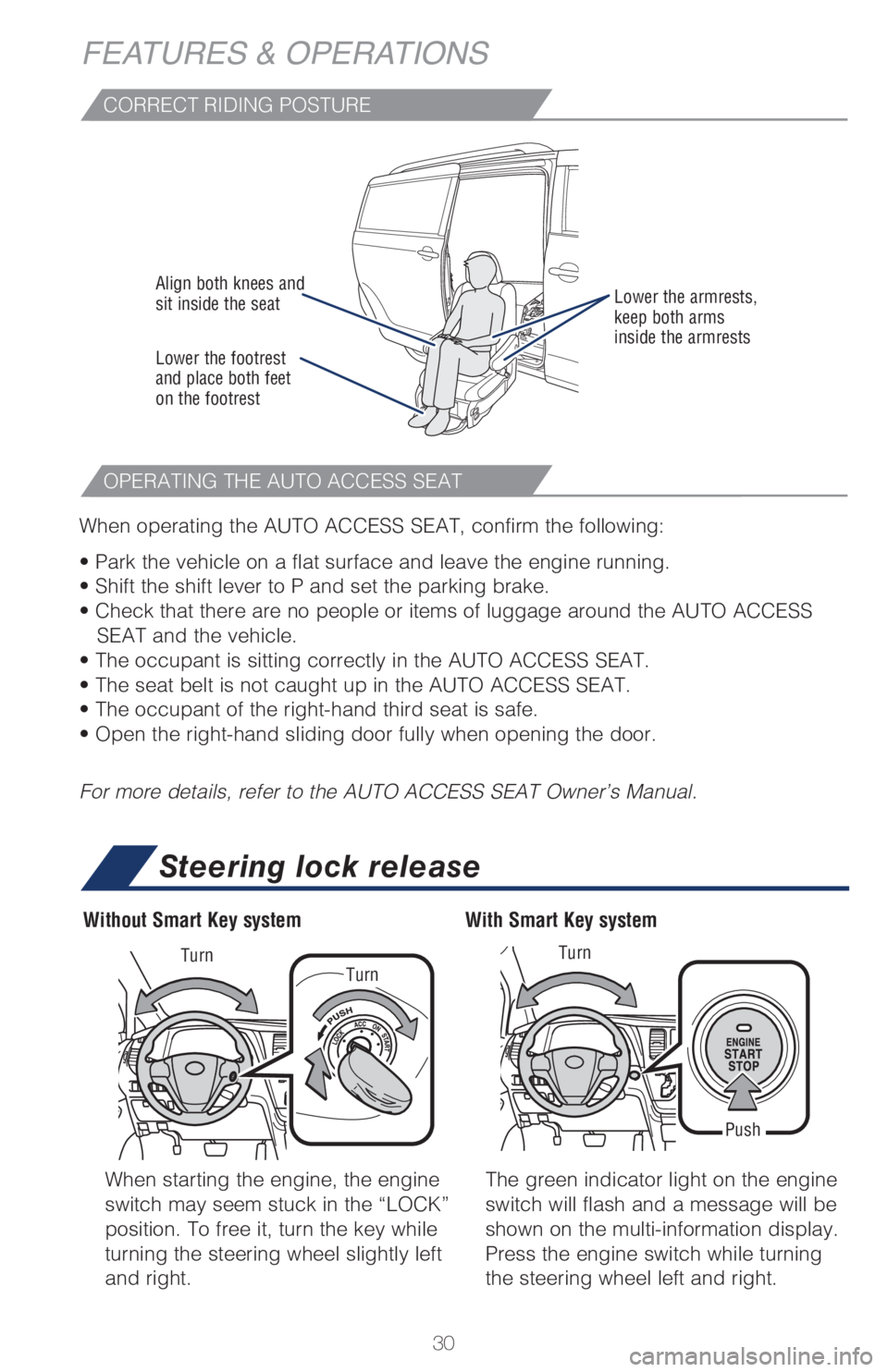
CORRECT RIDING POSTURE
OPERATING THE AUTO ACCESS SEAT
FEATURES & OPERATIONS
Align both knees and
sit inside the seatLower the armrests,
keep both arms
inside the armrests
Lower the footrest
and place both feet
on the footrest
When operating the AUTO ACCESS SEAT, confirm the following:
• Park the vehicle on a flat surface and leave the engine running.
• Shift the shift lever to P and set the parking brake.
• Check that there are no people or items of luggage around the AUTO ACCESS
SEAT and the vehicle.
• The occupant is sitting correctly in the AUTO ACCESS SEAT.
• The seat belt is not caught up in the AUTO ACCESS SEAT.
• The occupant of the right-hand third seat is safe.
• Open the right-hand sliding door fully when opening the door.
For more details, refer to the AUTO ACCESS SEAT Owner’s Manual.
When starting the engine, the engine
switch may seem stuck in the “LOCK”
position. To free it, turn the key while
turning the steering wheel slightly left
and right.The green indicator light on the engine
switch will flash and a message will be
shown on the multi-information display.
Press the engine switch while turning
the steering wheel left and right.
With Smart Key system Without Smart Key system
Push Turn
Turn
Turn
Steering lock release