engine TOYOTA SIENNA 2018 (in English) User Guide
[x] Cancel search | Manufacturer: TOYOTA, Model Year: 2018, Model line: SIENNA, Model: TOYOTA SIENNA 2018Pages: 584, PDF Size: 14.47 MB
Page 77 of 584
771-2. Theft deterrent system
SIENNA_OM_OM08019U_(U)
1
For safety and security
Engine immobilizer system
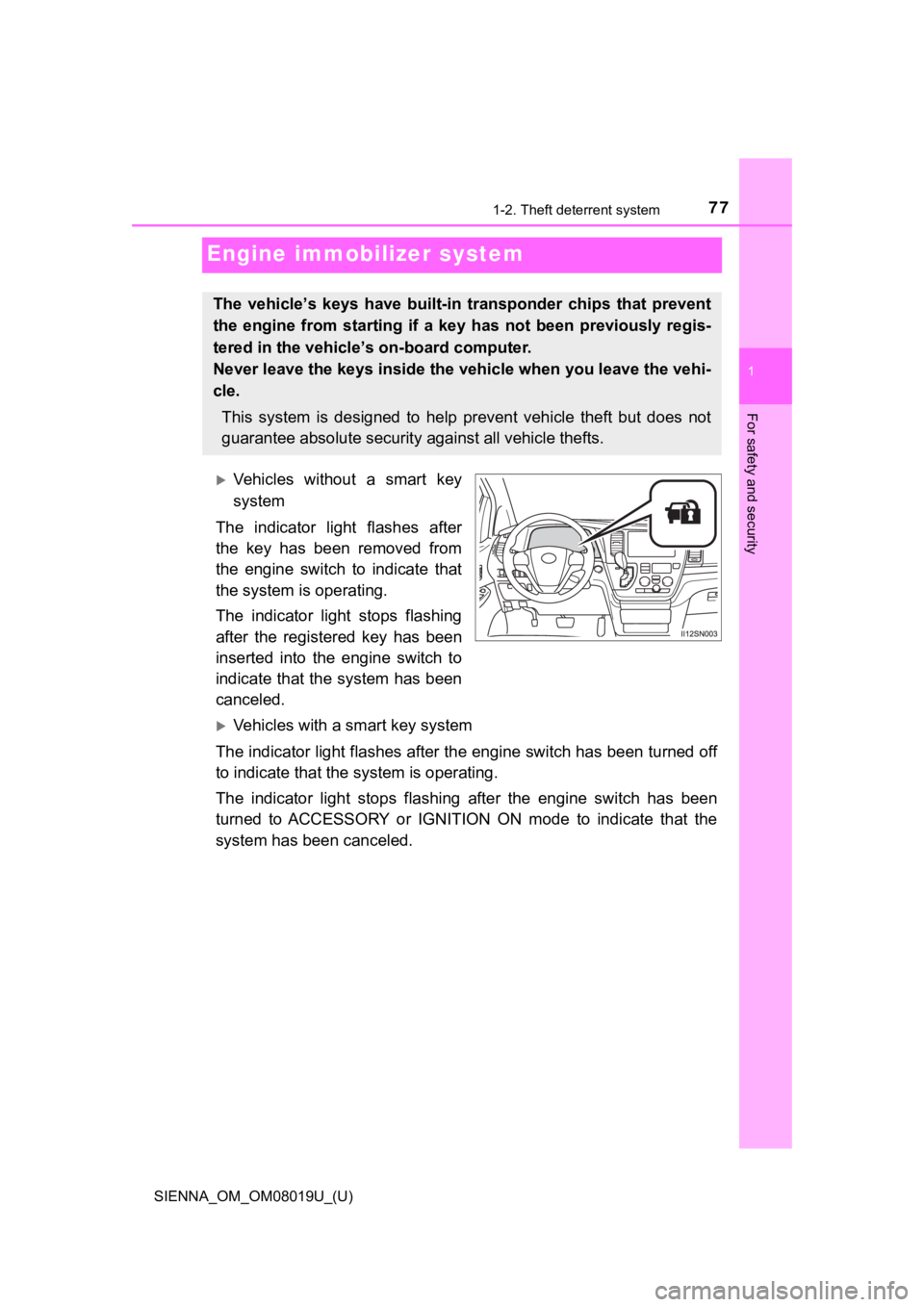
Vehicles without a smart key
system
The indicator light flashes after
the key has been removed from
the engine switch to indicate that
the system is operating.
The indicator light stops flashing
after the registered key has been
inserted into the engine switch to
indicate that the system has been
canceled.
Vehicles with a smart key system
The indicator light flashes aft er the engine switch has been tu rned off
to indicate that the system is operating.
The indicator light stops flashi ng after the engine switch has been
turned to ACCESSORY or IGNITION ON mode to indicate that the
system has been canceled.
The vehicle’s keys ha ve built-in transponder chips that prevent
the engine from starting if a key has not been previously regis -
tered in the vehicle’s on-board computer.
Never leave the keys inside the vehicle when you leave the vehi-
cle.
This system is designed to help prevent vehicle theft but does not
guarantee absolute security against all vehicle thefts.
Page 78 of 584
781-2. Theft deterrent system
SIENNA_OM_OM08019U_(U)
■System maintenance
The vehicle has a maintenance-free type engine immobilizer syst em.
■ Conditions that may cause the system to malfunction
●If the grip portion of the key is in contact with a metallic ob ject
● If the key is in close proximity to or touching a key to the security system
(key with a built-in transponder chip) of another vehicle
■ Certifications for the engine immobilizer system
For vehicles sold in the U.S.A.
Vehicles without a smart key system
FCC ID: WRKRI-44BTY
Vehicles with a smart key system
FCC ID: NI4TMIMB-1
This device complies with part 15 of the FCC Rules. Operation is subject to
the following two conditions: (1) This device may not cause har mful interfer-
ence, and (2) this device must accept any interference received, including
interference that may cause undesired operation.
Changes or modifications not expressly approved by the party re sponsible for
compliance could void the user’s authority to operate the equip ment.
For vehicles sold in Canada
WARNING
■Certifications for the engine immobilizer system
Changes or modifications not expressly approved by the party re sponsible
for compliance could void the user’s authority to operate the e quipment.
NOTICE
■To ensure the system operates correctly
Do not modify or remove the system. If modified or removed, the proper
operation of the system cannot be guaranteed.
Page 79 of 584
791-2. Theft deterrent system
SIENNA_OM_OM08019U_(U)
1
For safety and security
Alar m
The alarm uses light and sound to give an alert when an intrusion is
detected.
The alarm is triggered in the following situations when the ala rm is
set:
● A locked door is unlocked or opened in any way other than using
the entry function (vehicles with a smart key system) or wireless
remote control. (The doors wi ll lock again automatically.)
● The hood is opened.
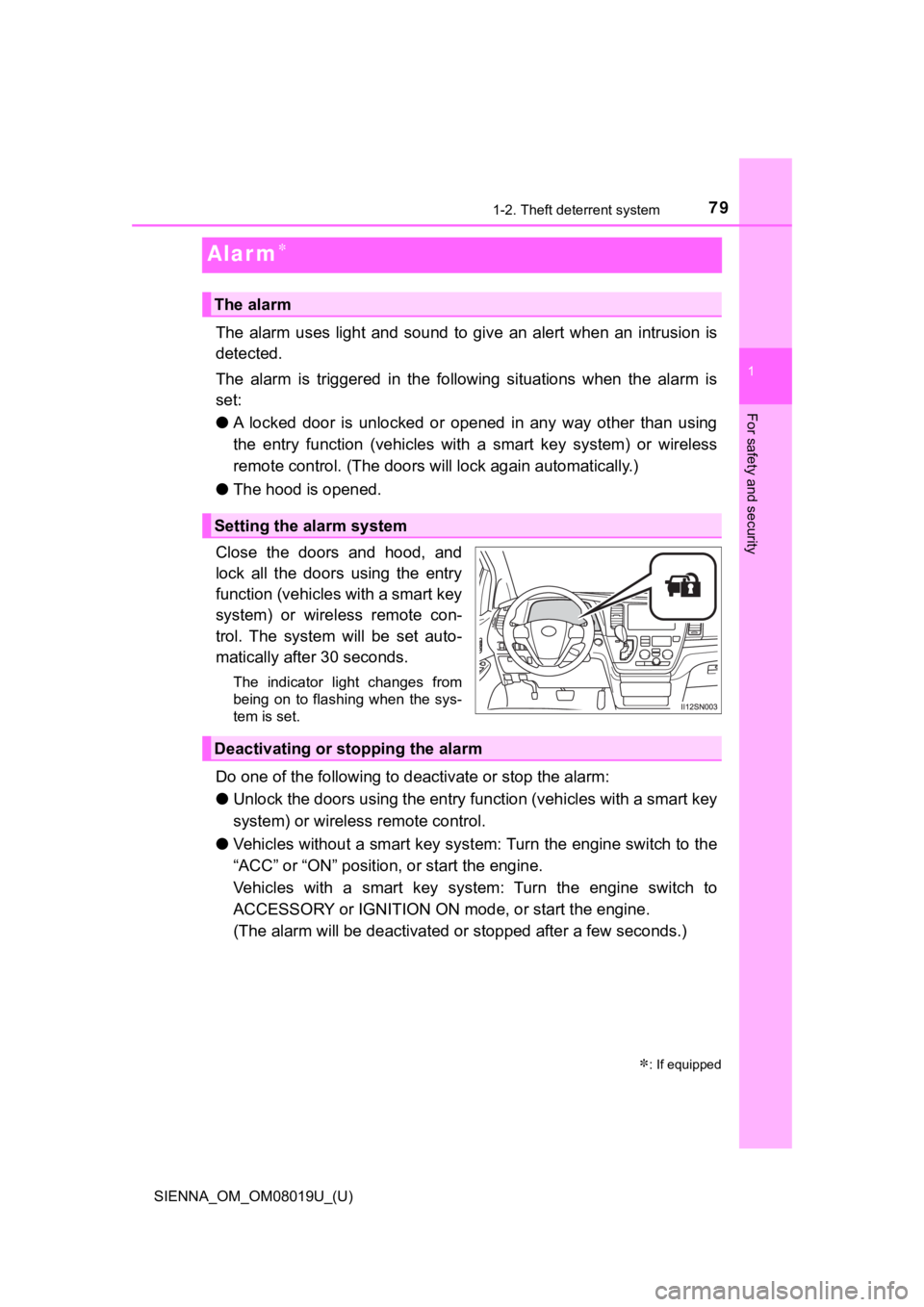
Close the doors and hood, and
lock all the doors using the entry
function (vehicles with a smart key
system) or wireless remote con-
trol. The system will be set auto-
matically after 30 seconds.
The indicator light changes from
being on to flashing when the sys-
tem is set.
Do one of the following to d eactivate or stop the alarm:
● Unlock the doors using the entry function (vehicles with a smart key
system) or wireless remote control.
● Vehicles without a smart key sys tem: Turn the engine switch to the
“ACC” or “ON” position, or start the engine.
Vehicles with a smart key system: Turn the engine switch to
ACCESSORY or IGNITION ON m ode, or start the engine.
(The alarm will be deactivated or stopped after a few seconds.)
: If equipped
The alarm
Setting the alarm system
Deactivating or stopping the alarm
Page 85 of 584
SIENNA_OM_OM08019U_(U)
852. Instrument cluster
2
Instrument cluster
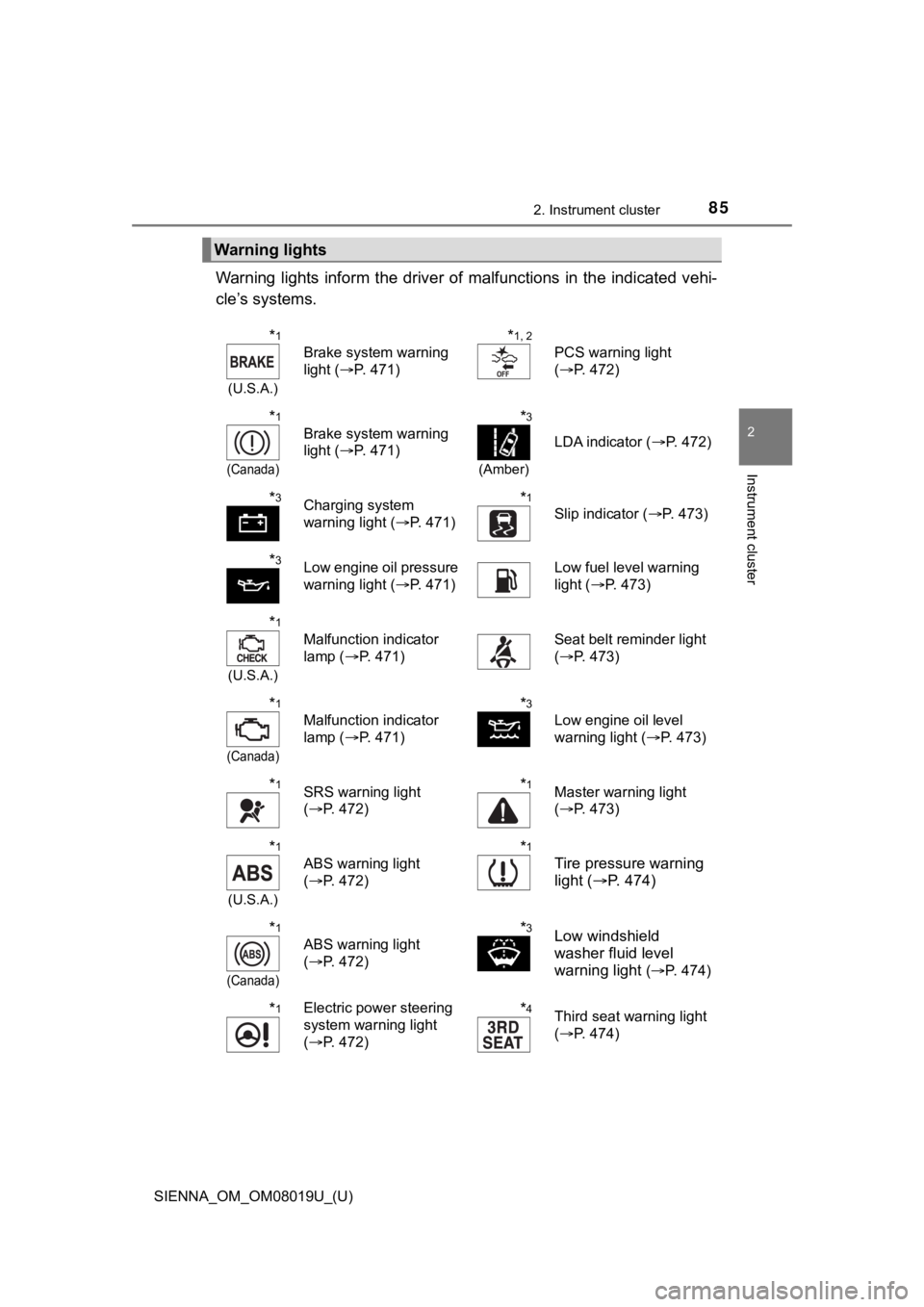
Warning lights inform the driver of malfunctions in the indicated vehi-
cle’s systems.
Warning lights
*1
(U.S.A.)
Brake system warning
light ( P. 471)
*1, 2
PCS warning light
(P. 472)
*1
(Canada)
Brake system warning
light ( P. 471)
*3
(Amber)
LDA indicator ( P. 472)
*3Charging system
warning light (P. 471)*1
Slip indicator ( P. 473)
*3Low engine oil pressure
warning light (P. 471) Low fuel level warning
light (
P. 473)
*1
(U.S.A.)
Malfunction indicator
lamp ( P. 471) Seat belt reminder light
(
P. 473)
*1
(Canada)
Malfunction indicator
lamp ( P. 471)
*3
Low engine oil level
warning light ( P. 473)
*1SRS warning light
(P. 472)*1Master warning light
(P. 473)
*1
(U.S.A.)
ABS warning light
(P. 472)
*1
Tire pressure warning
light ( P. 4 7 4 )
*1
(Canada)
ABS warning light
(P. 472)
*3Low windshield
washer fluid level
warning light
(P. 474)
*1Electric power steering
system warning light
( P. 472)*4Third seat warning light
(P. 474)
Page 86 of 584
86
SIENNA_OM_OM08019U_(U)
2. Instrument cluster
*1: These lights turn on when the engine switch is turned to the “ON” position
(vehicles without a smart key system) or IGNITION ON mode (vehicles
with a smart key system) to indicate that a system check is being per-
formed. They will turn off after the engine is started, or after a few seconds.
There may be a malfunction in a system if a light does not come on, or if
the lights do not turn off. Have the vehicle inspected by your Toyota dealer.
*2: The light comes on or flashes to indicate a malfunction.
*3: This light illuminates on the multi-information display.
*4: If equipped
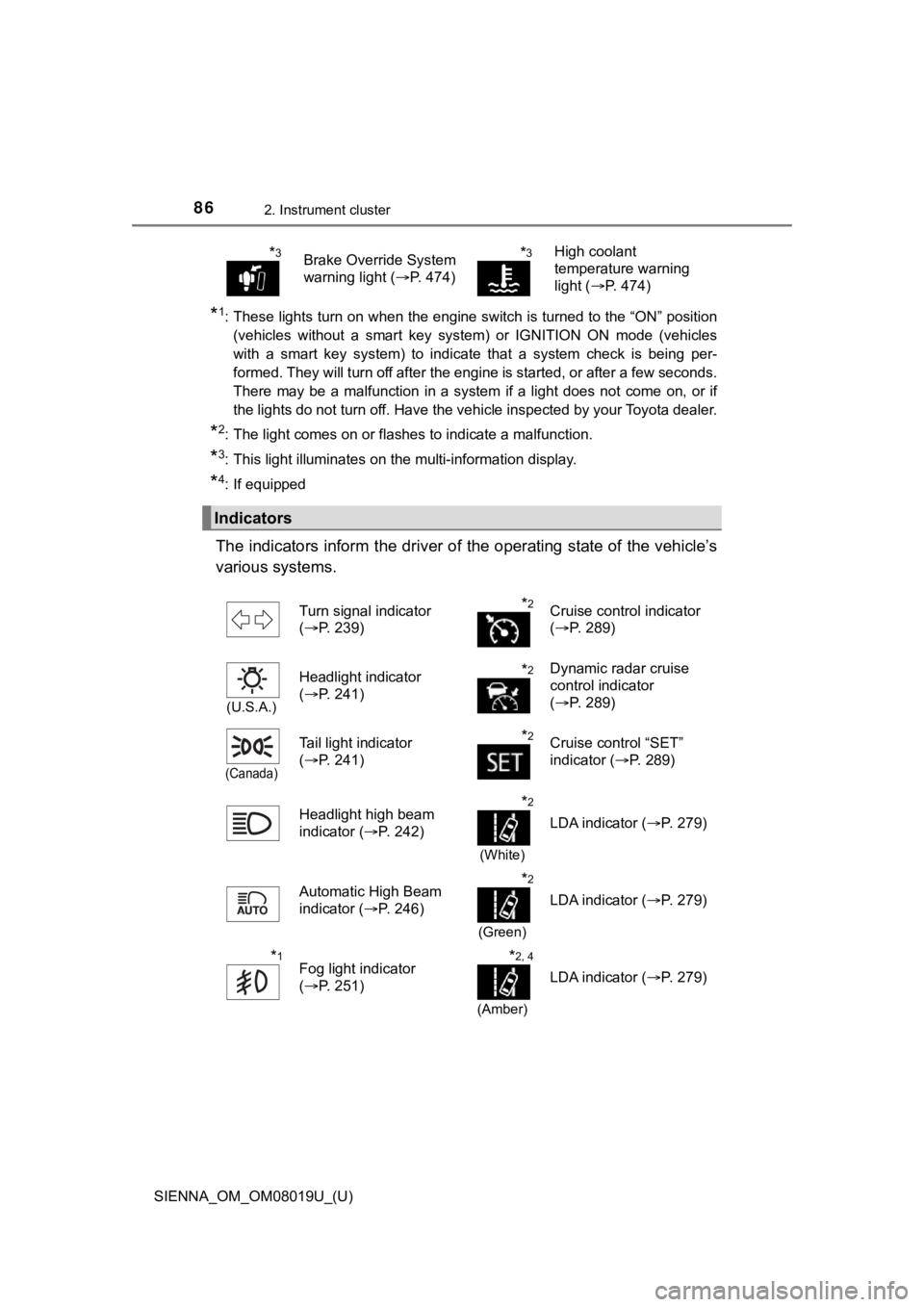
The indicators inform the driver of the operating state of the vehicle’s
various systems.
*3Brake Override System
warning light ( P. 474)*3High coolant
temperature warning
light (P. 474)
Indicators
Turn signal indicator
(P. 239)*2Cruise control indicator
(P. 289)
(U.S.A.)
Headlight indicator
(P. 241)*2Dynamic radar cruise
control indicator
(P. 289)
(Canada)
Tail light indicator
(P. 241)*2Cruise control “SET”
indicator ( P. 289)
Headlight high beam
indicator ( P. 242)
*2
(White)
LDA indicator ( P. 279)
Automatic High Beam
indicator ( P. 246)
*2
(Green)
LDA indicator ( P. 279)
*1Fog light indicator
(P. 251)*2, 4
(Amber)
LDA indicator ( P. 279)
Page 87 of 584
SIENNA_OM_OM08019U_(U)
872. Instrument cluster
2
Instrument cluster
*1: If equipped
*2: This light illuminates on the multi-information display.
*3: These lights turn on when the engine switch is turned to the “ON” position
(vehicles without a smart key system) or IGNITION ON mode (vehicles
with a smart key system) to indicate that a system check is being per-
formed. They will turn off after the engine is started, or after a few seconds.
There may be a malfunction in a system if a light does not come on, or if
the lights do not turn off. Have the vehicle inspected by your Toyota dealer.
*4: The light flashes to indicate that the system is operating.
*5: The light comes on when the system is turned off.
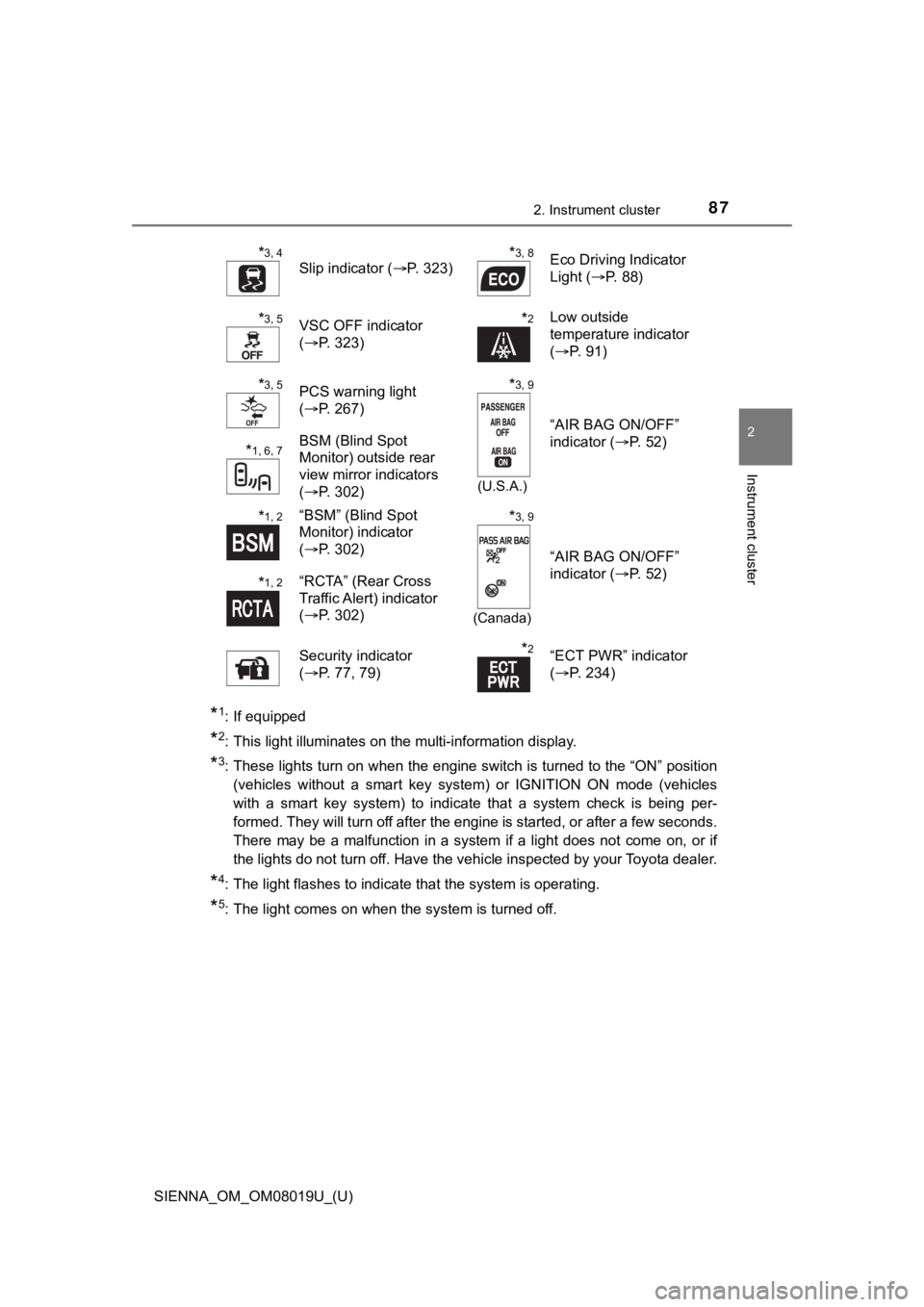
*3, 4
Slip indicator (P. 323)*3, 8Eco Driving Indicator
Light (P. 88)
*3, 5VSC OFF indicator
(P. 323)*2Low outside
temperature indicator
(P. 91)
*3, 5PCS warning light
(P. 267)*3, 9
(U.S.A.)
“AIR BAG ON/OFF”
indicator ( P. 52)
*1, 6, 7BSM (Blind Spot
Monitor) outside rear
view mirror indicators
(P. 302)
*1, 2“BSM” (Blind Spot
Monitor) indicator
(P. 302)*3, 9
(Canada)
“AIR BAG ON/OFF”
indicator ( P. 52)
*1, 2“RCTA” (Rear Cross
Traffic Alert) indicator
(P. 302)
Security indicator
( P. 77, 79)
*2“ECT PWR” indicator
(P. 234)
Page 88 of 584
88
SIENNA_OM_OM08019U_(U)
2. Instrument cluster
*6: In order to confirm operation, the BSM outside rear view mirror indicators
illuminate in the following situations:
• When the engine switch is turned to the “ON” position (vehicles without a smart key system) or IGNITION ON mode (vehicles with a smart ke y sys-
tem) while the BSM function is turned on.
• When the BSM function is turned on while the engine switch is in the
“ON” position (vehicles without a smart key system) or IGNITION ON
mode (vehicles with a smart key system).
If the system is functioning correctly, the BSM outside rear vi ew mirror indi-
cators will turn off after a few seconds.
If the BSM outside rear view mirror indicators do not illuminat e or do not
turn off, there may be a malfunction in the system.
If this occurs, have the vehicle inspected by your Toyota deale r.
*7: This light illuminates on the outside rear view mirrors.
*8: The light does not turn on when the system is disabled.
*9: This light illuminates on the center panel.
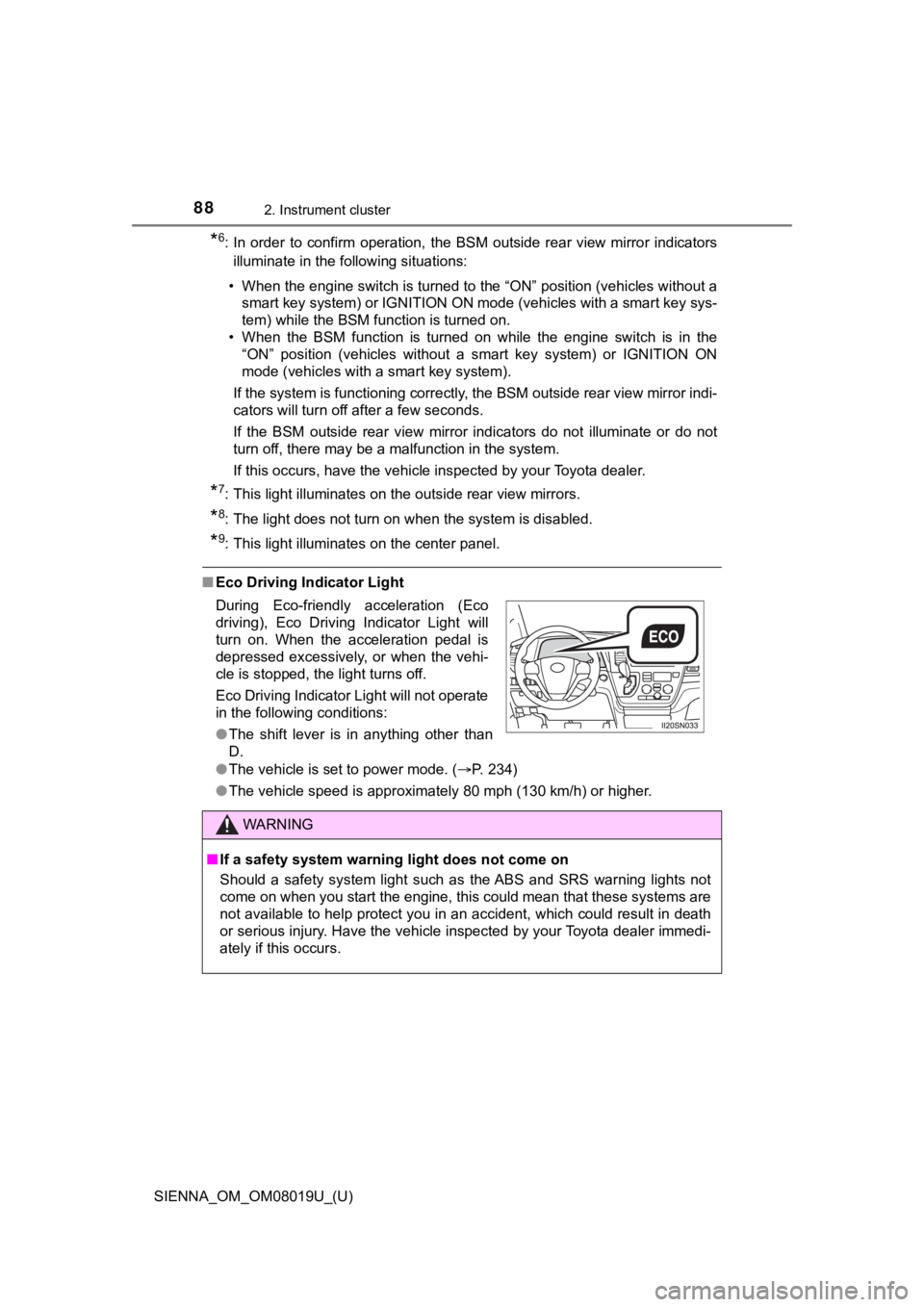
■Eco Driving Indicator Light
●The vehicle is set to power mode. ( P. 234)
● The vehicle speed is approximately 80 mph (130 km/h) or higher.
During Eco-friendly acceleration (Eco
driving), Eco Driving Indicator Light will
turn on. When the acceleration pedal is
depressed excessively, or when the vehi-
cle is stopped, the light turns off.
Eco Driving Indicator Light will not operate
in the following conditions:
●
The shift lever is in anything other than
D.
WARNING
■If a safety system warning light does not come on
Should a safety system light such as the ABS and SRS warning lights not
come on when you start the engine, this could mean that these s ystems are
not available to help protect you in an accident, which could r esult in death
or serious injury. Have the vehicle inspected by your Toyota de aler immedi-
ately if this occurs.
Page 90 of 584
90
SIENNA_OM_OM08019U_(U)
2. Instrument cluster
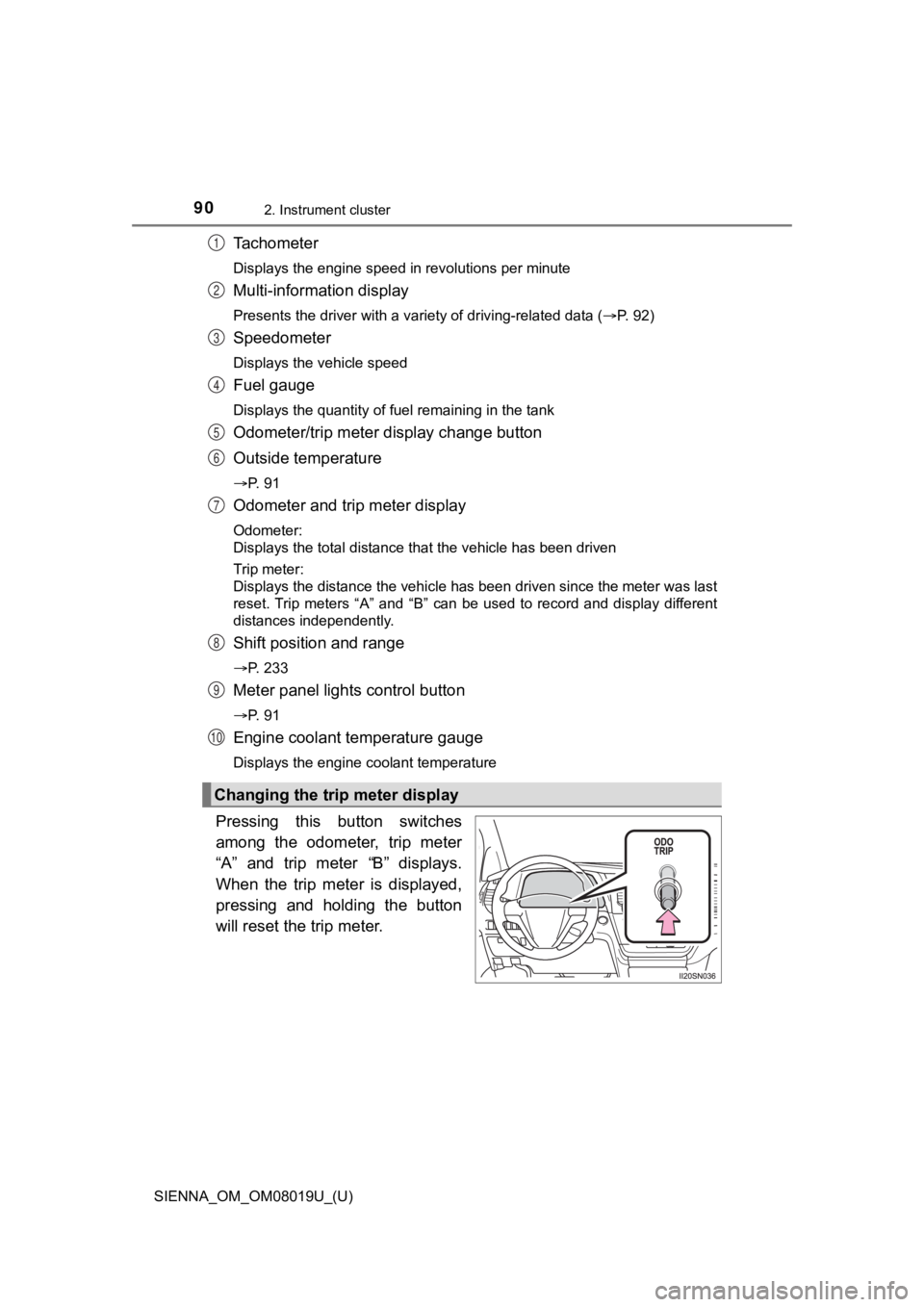
Tachometer
Displays the engine speed in revolutions per minute
Multi-information display
Presents the driver with a variety of driving-related data (P. 92)
Speedometer
Displays the vehicle speed
Fuel gauge
Displays the quantity of fuel remaining in the tank
Odometer/trip meter display change button
Outside temperature
P. 9 1
Odometer and trip meter display
Odometer:
Displays the total distance that the vehicle has been driven
Trip meter:
Displays the distance the vehicle has been driven since the meter was last
reset. Trip meters “A” and “B” can be used to record and display different
distances independently.
Shift position and range
P. 233
Meter panel lights control button
P. 9 1
Engine coolant temperature gauge
Displays the engine coolant temperature
Pressing this button switches
among the odometer, trip meter
“A” and trip meter “B” displays.
When the trip meter is displayed,
pressing and holding the button
will reset the trip meter.
Changing the trip meter display
1
2
3
4
5
6
7
8
9
10
Page 91 of 584
SIENNA_OM_OM08019U_(U)
912. Instrument cluster
2
Instrument cluster
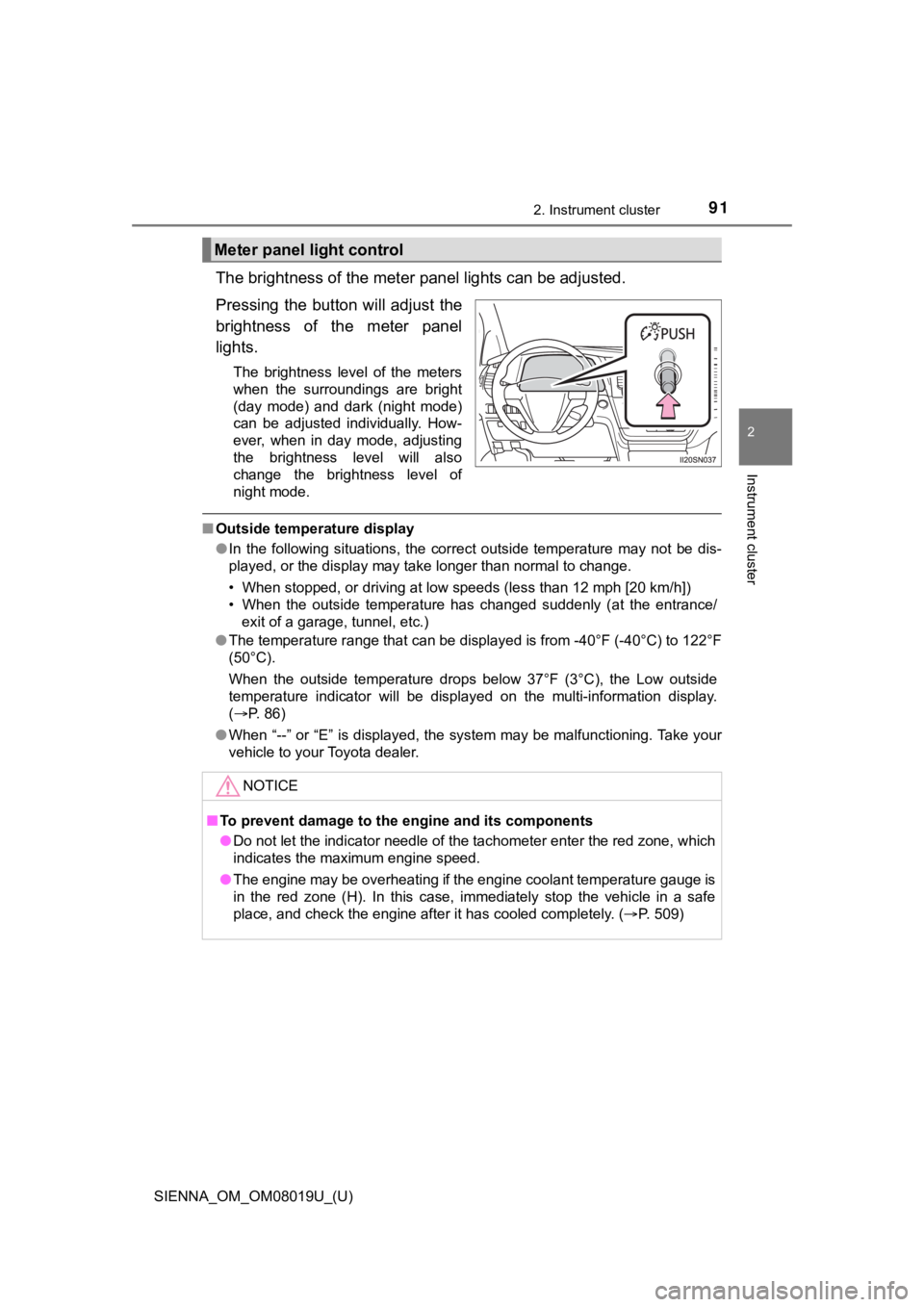
The brightness of the meter panel lights can be adjusted.
Pressing the butto n will adjust the
brightness of the meter panel
lights.
The brightness level of the meters
when the surroundings are bright
(day mode) and dark (night mode)
can be adjusted individually. How-
ever, when in day mode, adjusting
the brightness level will also
change the brightness level of
night mode.
■ Outside temperature display
●In the following situations, the correct outside temperature ma y not be dis-
played, or the display may take longer than normal to change.
• When stopped, or driving at low speeds (less than 12 mph [20 k m/h])
• When the outside temperature has changed suddenly (at the entr ance/
exit of a garage, tunnel, etc.)
● The temperature range that can be displayed is from -40°F (-40° C) to 122°F
(50°C).
When the outside temperature drops below 37°F (3°C), the Low ou tside
temperature indicator will be displayed on the multi-informatio n display.
( P. 86)
● When “--” or “E” is displayed, the system may be malfunctioning. Take your
vehicle to your Toyota dealer.
Meter panel light control
NOTICE
■To prevent damage to the engine and its components
● Do not let the indicator needle of the tachometer enter the red zone, which
indicates the maximum engine speed.
● The engine may be overheating if the engine coolant temperature gauge is
in the red zone (H). In this case, immediately stop the vehicle in a safe
place, and check the engine after it has cooled completely. ( P. 509)
Page 94 of 584

94
SIENNA_OM_OM08019U_(U)
2. Instrument cluster
●Average fuel economy*1, 2
Displays the average fuel consum ption since the function was
reset.
*3
● Tank average fuel economy*1, 2
Displays the average fuel consumption since the vehicle was ref u-
eled.
● Trip average fuel economy
*1, 2
Displays the average fuel consumption since the engine was
started.
● Current fuel economy
*1, 2
Displays the current rat e of fuel consumption.
● Distance to empty
*1
Displays the estimated maximum distance that can be driven with
the quantity of fuel remaining.
• This distance is computed base d on your average fuel consump-
tion. As a result, the actual di stance that can be driven may differ
from that displayed.
• When only a small amount of fuel is added to the tank, the dis -
play may not be updated.
When refueling, turn the engine switch off. If the vehicle is r efu-
eled without turning the engine sw itch off, the display may not be
updated.
● Trip distance
*1
Displays the driving distance after the engine was started.
● Distance
*1
Displays the driving distance s ince the function was reset.*3
●Trip elapsed time*1
Displays the elapsed time sin ce the function was reset.*3
●Elapsed time*1
Displays the elapsed time sin ce the engine was started.
● Trip average speed
*1
Displays the average vehicle spe ed since the function was reset.*3
●Average speed*1
Displays the average vehicle speed since the engine was started .
Drive information