change key battery TOYOTA SIENNA 2018 Owners Manual (in English)
[x] Cancel search | Manufacturer: TOYOTA, Model Year: 2018, Model line: SIENNA, Model: TOYOTA SIENNA 2018Pages: 584, PDF Size: 14.47 MB
Page 108 of 584

108
SIENNA_OM_OM08019U_(U)
3-1. Key information
■When the key battery is fully depleted
P. 436
■ Confirmation of the registered key number
The number of keys already registered to the vehicle can be confirmed. Ask
your Toyota dealer for details.
■ Certification for wireless remote control (vehicles without a smart key
system)
This device complies with Part 15 of the FCC Rules and with RSS -210 of
Industry Canada. Operation is subject to the following two conditions: (1) this
device may not cause harmful interference, and (2) this device must accept
any interference received, including interference that may caus e undesired
operation.
■ Certification for wireless remo te control (vehicles with a smart key sys-
tem)
For vehicles sold in the U.S.A.
FCC ID: HYQ14ADR FCC ID: HYQ14AEH
FCC ID: HYQ13CZM FCC ID: HYQ13CZN
FCC ID: NI4TMLF8-20
NOTE:
This device complies with part 15 of the FCC Rules. Operation is subject to
the following two conditions: (1) This device may not cause har mful interfer-
ence, and (2) this device must accept any interference received, including
interference that may cause undesired operation.
FCC WARNING:
Changes or modifications not expressly approved by the party re sponsible for
compliance could void the user’s authority to operate the equip ment.
For vehicles sold in Canada
NOTE:
Operation is subject to the following two conditions: (1) this device may not
cause interference, and (2) this device must accept any interfe rence, includ-
ing interference that may cause undesired operation of the devi ce.
This device complies with Industry Canada licence-exempt RSS standard(s).
Operation is subject to the following two conditions: (1) this device may not
cause interference, and (2) this device must accept any interfe rence, includ-
ing interference that may cause undesired operation of the devi ce.
■ Customization
Settings (e.g. wireless remote control system) can be changed.
(Customizable features: P. 543, 544)
Page 119 of 584

SIENNA_OM_OM08019U_(U)
1193-2. Opening, closing and locking the doors
3
Operation of each component
Vehicles with a smart key system
The smart key system uses weak radio waves. In the following si tuations, the
communication between the electronic key and the vehicle may be affected,
preventing the smart key system and wireless remote control from operating
properly. (Way of coping P. 503)
● When the electronic key battery is depleted
● Near a TV tower, electric power plant, gas station, radio stati on, large dis-
play, airport or other facility that generates strong radio wav es or electrical
noise
● When carrying a portable radio, cellular phone, cordless phone or other
wireless communication devices
● When the electronic key is in contact with, or is covered by the following
objects
• Cards to which aluminum foil is attached
• Cigarette boxes that have aluminum foil inside
• Metallic wallets or bags
• Coins
• Hand warmers made of metal
• Media such as CDs and DVDs
● When multiple electronic keys are in the vicinity
● When another wireless key (that emits radio waves) is being use d nearby
● When carrying or using the electronic key together with the fol lowing
devices that emit radio waves
• Another vehicle’s electronic key
• A wireless key that emits radio waves
• Personal computers or personal digital assistants (PDAs)
• Digital audio players
• Portable game systems
● If window tint with a metallic content or metallic objects are attached to the
rear window
● Vehicles with AUTO ACCESS SEAT: If the wireless remote control of the
AUTO ACCESS SEAT is operated simultaneously, the AUTO ACCESS
SEAT may not operate properly.
For details, refer to “AUTO ACCESS SEAT OWNER’S MANUAL”.
■ Customization
Settings (e.g. unlocking function using a key) can be changed.
(Customizable features: P. 543)
Page 128 of 584

128
SIENNA_OM_OM08019U_(U)
3-2. Opening, closing and locking the doors
■When the battery is disconnected (vehicles with power sliding d oors)
The power sliding door system must be initialized in order to ensure proper
operation. To initialize it, close the sliding doors completely by hand.
■ Conditions affecting the operation of the smart key system or w ireless
remote control
P. 118
■ Customization
Settings (e.g. opening and closing operation) can be changed.
(Customizable features: P. 545)
WARNING
■To prevent an accident
Observe the following precautions while driving.
Failure to do so may cause a door to open unexpectedly and an occupant to
fall out of the vehicle, resulting in death or serious injury.
● Ensure that all doors are properly closed and locked.
● Set the sliding door child-protector locks when children are se ated in the
vehicle.
● Do not operate the inside handle of the doors while driving.
■ When children are in the vehicle
Observe the following precautions.
Failure to do so may result in death or serious injury.
● Do not leave children alone in the vehicle.
If a child is accidentally locked in the vehicle, they could have heat
exhaustion or other injuries.
● Do not allow a child to open or close the sliding door.
Doing so may cause the sliding door to move unexpectedly, or cause the
child’s hands, head, or neck to be caught by the moving sliding door.
■ Operating the sliding doors
Observe the following precautions.
Failure to do so may cause parts of the body to be caught, resu lting in death
or serious injury.
● When opening or closing a sliding door, thoroughly check to mak e sure the
surrounding area is safe.
Page 145 of 584
SIENNA_OM_OM08019U_(U)
1453-2. Opening, closing and locking the doors
3
Operation of each component
■Battery-saving function
In the following circumstances, the entry function is disabled in order to pre-
vent the vehicle battery from discharging and the electronic ke y battery from
discharging.
● When the entry function has not been used for 5 days or more
● When the electronic key has been left within approximately 6 ft. (2 m) of the
vehicle for 10 minutes or more
● If the entry function has not been used for 14 days or more, th e vehicle can-
not be unlocked by a door other than the driver’s door. To unlock the vehicle,
grip the driver’s door handle or use the wireless remote contro l or the
mechanical key.
The system will resume operation when...
● The vehicle is locked using the lock sensor when carrying the electronic key
on your person.
● The vehicle is locked/unlocked using the wireless remote contro l. (P. 1 1 1 )
● The vehicle is locked/unlocked using the mechanical key. ( P. 503)
■ Conditions affecting operation
P. 119
■ Notes for the entry function
●Even when the electronic key is within the effective range (det ection areas),
the system may not operate properly in the following cases.
• The electronic key is too close to the window or outside door handle, near
the ground, or in a high place when the doors are locked or unl ocked.
• The electronic key is on the instrument panel, floor or in the glove box
when the engine is started or engine switch modes are changed.
● Do not leave the electronic key on top of the instrument panel or near the
door pockets when exiting the vehicle. Depending on the radio w ave recep-
tion conditions, it may be detected by the antenna outside the cabin and the
door will become lockable from the outside, possibly trapping the electronic
key inside the vehicle.
● As long as the electronic key is within the effective range, th e doors may be
locked or unlocked by anyone. However, only the doors detecting the elec-
tronic key can be used to unlock the vehicle.
● The doors may unlock or lock if a large amount of water splashe s on the
door handle, such as in the rain or in a car wash when the elec tronic key is
within the effective range. (The doors will automatically be lo cked after
approximately 60 seconds if the doors are not opened and closed.)
● If the wireless remote control is used to lock the doors when t he electronic
key is near the vehicle, there is a possibility that the door m ay not be
unlocked by the smart key system. (Use the wireless remote cont rol to
unlock the doors.)
● If power slide door is unable to operate due to prohibition by the power slid-
ing door main switch, the door unlock and open operation will n ot be per-
formed. ( P. 124)
Page 231 of 584
SIENNA_OM_OM08019U_(U)
2314-2. Driving procedures
4
Driving
■Steering lock
After turning the engine switch off and opening and closing the doors, the
steering wheel will be locked due to the steering lock function.
Operating the engine switch again automatically cancels the ste ering lock.
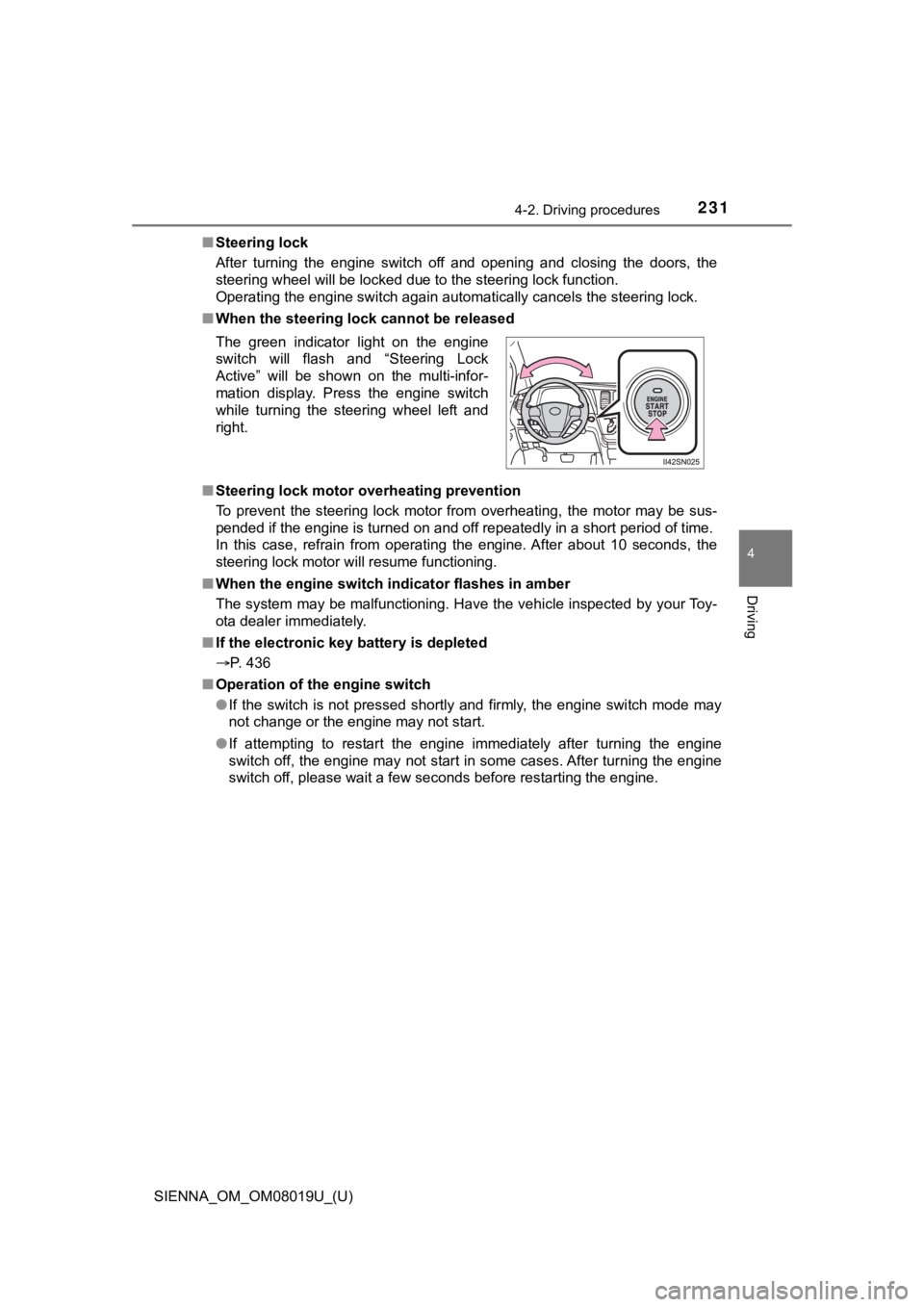
■ When the steering lock cannot be released
■ Steering lock motor overheating prevention
To prevent the steering lock motor from overheating, the motor may be sus-
pended if the engine is turned on and off repeatedly in a short period of time.
In this case, refrain from operating the engine. After about 10 seconds, the
steering lock motor will resume functioning.
■ When the engine switch indicator flashes in amber
The system may be malfunctioning. Have the vehicle inspected by your Toy-
ota dealer immediately.
■ If the electronic key battery is depleted
P. 436
■ Operation of the engine switch
●If the switch is not pressed shortly and firmly, the engine swi tch mode may
not change or the engine may not start.
● If attempting to restart the engine immediately after turning t he engine
switch off, the engine may not start in some cases. After turni ng the engine
switch off, please wait a few seconds before restarting the eng ine.
The green indicator light on the engine
switch will flash and “Steering Lock
Active” will be shown on the multi-infor-
mation display. Press the engine switch
while turning the steering wheel left and
right.
Page 245 of 584
SIENNA_OM_OM08019U_(U)
2454-3. Operating the lights and wipers
4
Driving
■Automatic light off system
Vehicles without a smart key system
● When the headlights are on: The headlights and tail lights turn off 30 sec-
onds after a door is opened and closed if the engine switch is turned to the
“ACC” or “LOCK” position. (The lights turn off immediately if on the
key is pressed after all the doors are locked.)
● When only the tail lights are on: The tail lights turn off automatically if the
engine switch is turned to the “ACC” or “LOCK” position and the driver’s
door is opened.
To turn the lights on again, turn the engine switch to the “ON” position, or turn
the light switch off once and then back to the
or .
Vehicles with a smart key system
● When the headlights are on: The headlights and tail lights turn off 30 sec-
onds after a door is opened and closed if the engine switch is turned to
ACCESSORY mode or turned off. (The lights turn off immediately if
on the key is pressed after all the doors are locked.)
● When only the tail lights are on: The tail lights turn off automatically if the
engine switch is turned to ACCESSORY mode or turned off and the driver’s
door is opened.
To turn the lights on again, turn the engine switch to IGNITION ON mode, or
turn the light switch off and then back to or .
■ Light reminder buzzer
Vehicles without a smart key system
A buzzer sounds when the engine switch is turned to the “LOCK” position, the
key is removed and the driver’s door is opened while the lights are turned on.
Vehicles with a smart key system
A buzzer sounds when the engine switch is turned off and the driver’s door is
opened while the lights are turned on.
■ Customization
Settings (e.g. light sensor sensitivity) can be changed.
(Customizable features: P. 546)
NOTICE
■To prevent battery discharge
Do not leave the lights on longer than necessary when the engin e is not
running.
■ Headlight leveling
When the vehicle is loaded, headlight level should be adjusted to appropri-
ate dial setting. ( P. 243)
Page 349 of 584
SIENNA_OM_OM08019U_(U)
3495-2. Using the interior lights
5
Interior features
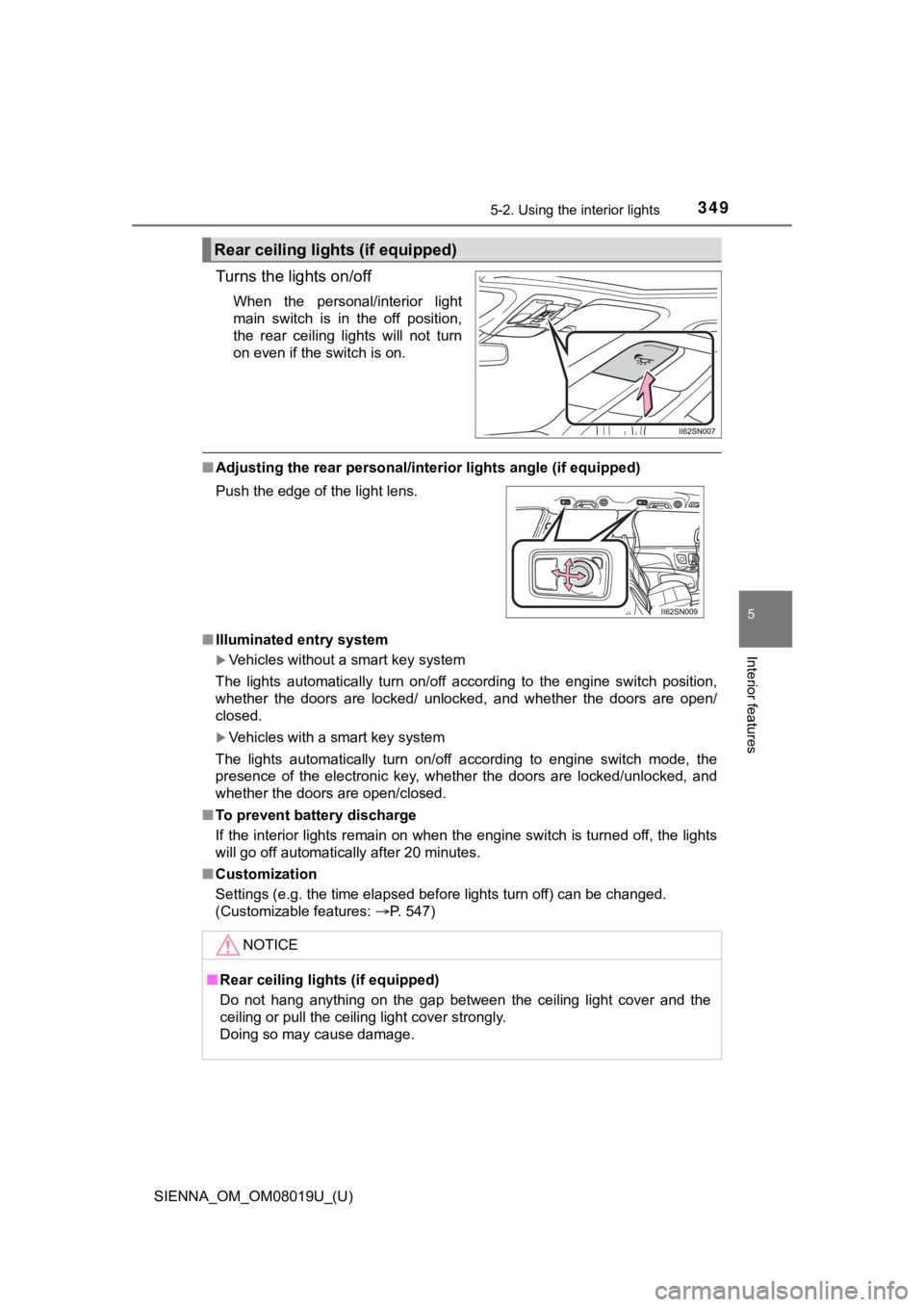
Turns the lights on/off
When the personal/interior light
main switch is in the off position,
the rear ceiling lights will not turn
on even if the switch is on.
■Adjusting the rear per sonal/interior lights angle (if equipped)
■ Illuminated entry system
Vehicles without a smart key system
The lights automatically turn on/off according to the engine sw itch position,
whether the doors are locked/ unlocked, and whether the doors a re open/
closed.
Vehicles with a smart key system
The lights automatically turn on/off according to engine switch mode, the
presence of the electronic key, whether the doors are locked/un locked, and
whether the doors are open/closed.
■ To prevent battery discharge
If the interior lights remain on when the engine switch is turned off, the lights
will go off automatically after 20 minutes.
■ Customization
Settings (e.g. the time elapsed before lights turn off) can be changed.
(Customizable features: P. 547)
Rear ceiling lights (if equipped)
Push the edge of the light lens.
NOTICE
■Rear ceiling lights (if equipped)
Do not hang anything on the gap between the ceiling light cover and the
ceiling or pull the ceiling light cover strongly.
Doing so may cause damage.
Page 504 of 584

5047-2. Steps to take in an emergency
SIENNA_OM_OM08019U_(U)
■Stopping the engine
Shift the shift lever to P and press the engine switch as you normally do when
stopping the engine.
■ Replacing the key battery
As this above procedure is a temporary measure, it is recommended that the
electronic key battery be replaced immediately when the battery depletes.
( P. 436)
■ Alarm (if equipped)
Using the mechanical key to lock the doors will not set the ala rm system.
If a door is unlocked using the mechanical key when the alarm system is set,
the alarm may be triggered. ( P. 79)
■ Changing engine switch modes
Within 10 seconds of the buzzer sounding, release the brake ped al and press
the engine switch.
The engine does not start and modes will be changed each time t he switch is
pressed. ( P. 229)
■ When the electronic key does not work properly
●Check if the battery-saving mode is set. If it is set, cancel t he function.
( P. 145)
● Make sure that the smart key system has not been deactivated in the cus-
tomization setting. If it is off, turn the function on.
(Customizable features P. 544)