fuel consumption TOYOTA SIENNA 2018 Owners Manual (in English)
[x] Cancel search | Manufacturer: TOYOTA, Model Year: 2018, Model line: SIENNA, Model: TOYOTA SIENNA 2018Pages: 584, PDF Size: 14.47 MB
Page 2 of 584
TABLE OF CONTENTS2
SIENNA_OM_OM08019U_(U)For your information....................... 8
Reading this manual .................... 12
How to search .............................. 13
Pictorial index .............................. 14
1-1. For safe use
Before driving ...................... 26
For safe driving ................... 28
Seat belts ............................ 30
SRS airbags ........................ 38
Front passenger occupant classification system ......... 52
Safety information for children ........................ 57
Child restraint systems ........ 58
Installing child restraints ...... 62
Exhaust gas precautions ..... 76
1-2. Theft deterrent system Engine immobilizer system............................... 77
Alarm ................................... 79 2. Instrument cluster
Warning lights and indicators ........................... 84
Gauges and meters ............. 89
Multi-information display ...... 92
Fuel consumption information......................... 99
3-1. Key information Keys................................... 104
3-2. Opening, closing and locking the doors
Front doors ........................ 110
Sliding doors ...................... 121
Back door .......................... 133
Smart key system .............. 143
3-3. Adjusting the seats Front seats......................... 149
Rear seats ......................... 152
Driving position memory .... 169
Head restraints .................. 173
1For safety and security
2Instrument cluster
3Operation of each
component
Page 83 of 584
83
SIENNA_OM_OM08019U_(U)
Instrument cluster2
2. Instrument clusterWarning lights and indicators .......................... 84
Gauges and meters ............ 89
Multi-information display ..... 92
Fuel consumption information ........................ 99
Page 94 of 584

94
SIENNA_OM_OM08019U_(U)
2. Instrument cluster
●Average fuel economy*1, 2
Displays the average fuel consum ption since the function was
reset.
*3
● Tank average fuel economy*1, 2
Displays the average fuel consumption since the vehicle was ref u-
eled.
● Trip average fuel economy
*1, 2
Displays the average fuel consumption since the engine was
started.
● Current fuel economy
*1, 2
Displays the current rat e of fuel consumption.
● Distance to empty
*1
Displays the estimated maximum distance that can be driven with
the quantity of fuel remaining.
• This distance is computed base d on your average fuel consump-
tion. As a result, the actual di stance that can be driven may differ
from that displayed.
• When only a small amount of fuel is added to the tank, the dis -
play may not be updated.
When refueling, turn the engine switch off. If the vehicle is r efu-
eled without turning the engine sw itch off, the display may not be
updated.
● Trip distance
*1
Displays the driving distance after the engine was started.
● Distance
*1
Displays the driving distance s ince the function was reset.*3
●Trip elapsed time*1
Displays the elapsed time sin ce the function was reset.*3
●Elapsed time*1
Displays the elapsed time sin ce the engine was started.
● Trip average speed
*1
Displays the average vehicle spe ed since the function was reset.*3
●Average speed*1
Displays the average vehicle speed since the engine was started .
Drive information
Page 95 of 584

SIENNA_OM_OM08019U_(U)
952. Instrument cluster
2
Instrument cluster
●AWD control (if equipped)
Displays the torque distribution between the front and rear axl es of
the AWD control system
● Digital speedometer
*1
●Display off
A blank screen is displayed.
*1: Can be registered to Drive information 1 through 3. ( P. 96)
*2: Use the displayed fuel consumption as a reference.
*3: Resetting procedures:
• Select a function to be reset using the meter control switches and then
press and hold to reset.
• If there is more than one function that can be reset, check bo xes will be
displayed next to those functions.
Page 96 of 584
96
SIENNA_OM_OM08019U_(U)
2. Instrument cluster
The settings of the following items can be changed, refer to P. 540
● Language
Select to change the l anguage on the display.
● Units
Select to change the unit for meas ure of the fuel consumption and
outside temperature.
● Drive information 1 through 3
Select to select up to 2 items th at will be displayed on a Drive infor-
mation screen, up to 3 Drive in formation screens can be set.
● Eco Driving Indicator Light
Select to activate/deactivate the Eco Driving Indicator Light.
(
P. 8 8 )
● switch settings
You can register 1 screen as the top screen. To register, press and
hold while the desired screen is displayed.
● Pop-up display
Select to set the following pop-up displays, which may appear i n
some situations, on/off. • Instrument panel bright ness adjustment display
• Route guidance display of the navigation system-linked system (if equipped)
• Incoming call display of t he hands-free phone system
• Shift position display
Settings display
Page 99 of 584
99
SIENNA_OM_OM08019U_(U)
2. Instrument cluster
2
Instrument cluster
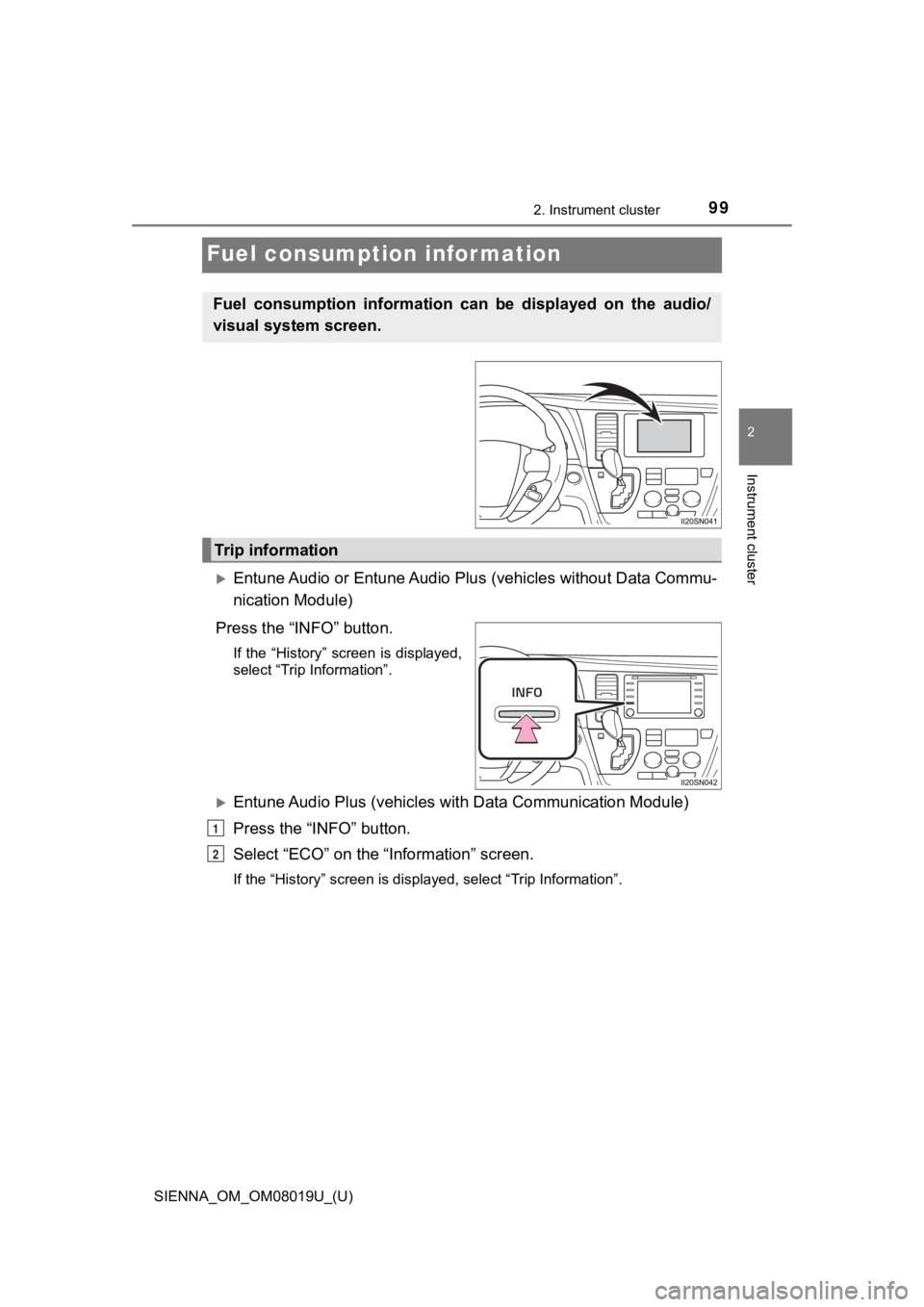
Fuel consumption information
Entune Audio or Entune Audio Plus (vehicles without Data Commu-
nication Module)
Press the “INFO” button.
If the “History” screen is displayed,
select “Trip Information”.
Entune Audio Plus (vehicles wi th Data Communication Module)
Press the “INFO” button.
Select “ECO” on the “Information” screen.
If the “History” screen is displayed, select “Trip Information” .
Fuel consumption information can be displayed on the audio/
visual system screen.
Trip information
1
2
Page 100 of 584
100
SIENNA_OM_OM08019U_(U)
2. Instrument cluster
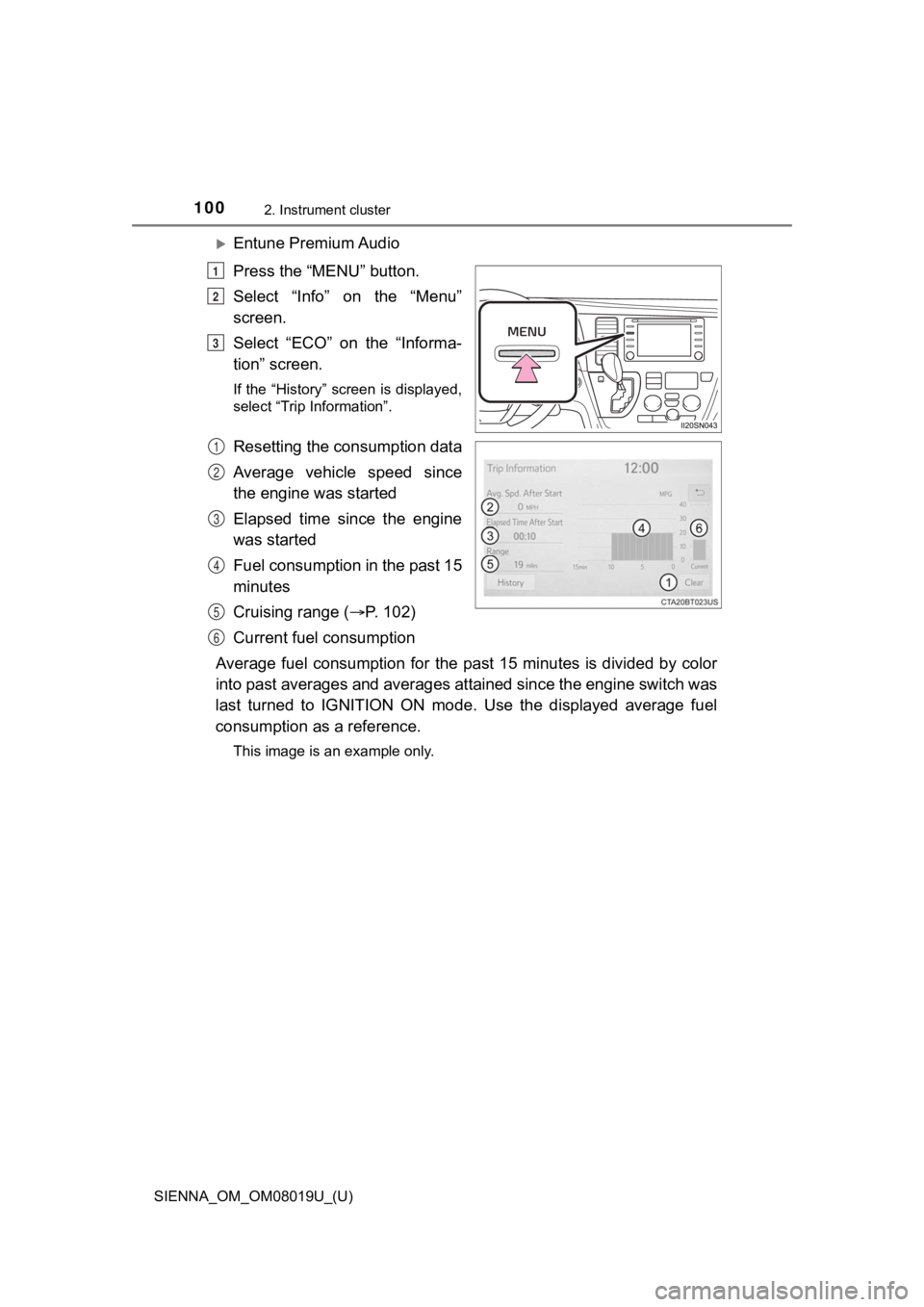
Entune Premium Audio
Press the “MENU” button.
Select “Info” on the “Menu”
screen.
Select “ECO” on the “Informa-
tion” screen.
If the “History” screen is displayed,
select “Trip Information”.
Resetting the consumption data
Average vehicle speed since
the engine was started
Elapsed time since the engine
was started
Fuel consumption in the past 15
minutes
Cruising range (P. 102)
Current fuel consumption
Average fuel consumption for the past 15 minutes is divided by color
into past averages and averages attained since the engine switch was
last turned to IGNITION ON mode. Use the displayed average fuel
consumption as a reference.
This image is an example only.
1
2
3
1
2
3
4
5
6
Page 101 of 584
SIENNA_OM_OM08019U_(U)
1012. Instrument cluster
2
Instrument cluster
Entune Audio or Entune Audio Plus (vehicles without Data Commu-
nication Module)
Press the “INFO” button.
If the “Trip Information” screen is displayed, select “History” .
Entune Audio Plus (vehicles with Data Communication Module)
Press the “INFO” button.
Select “ECO” on the “Information” screen.
If the “Trip Information” screen is displayed, select “History” .
Entune Premium Audio
Press the “MENU” button.
Select “Info” on the “Menu” screen.
Select “ECO” on the “Information” screen.
If the “Trip Information” screen is displayed, select “History” .
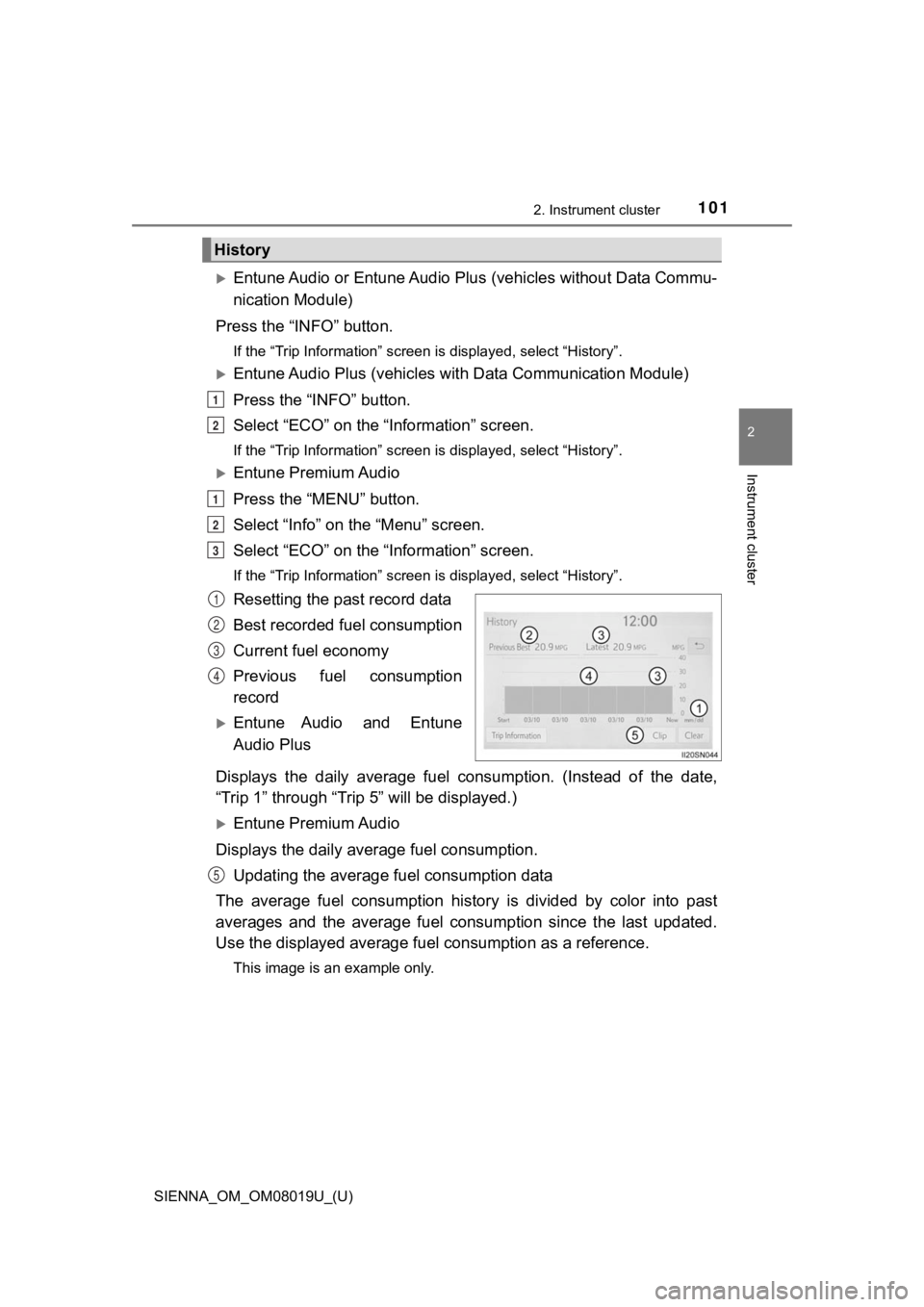
Resetting the past record data
Best recorded fuel consumption
Current fuel economy
Previous fuel consumption
record
Entune Audio and Entune
Audio Plus
Displays the daily average fuel consumption. (Instead of the da te,
“Trip 1” through “Trip 5” will be displayed.)
Entune Premium Audio
Displays the daily average fuel consumption. Updating the average fuel consumption data
The average fuel consumption histo ry is divided by color into past
averages and the average fuel co nsumption since the last updated.
Use the displayed average fuel consumption as a reference.
This image is an example only.
History
1
2
1
2
3
1
2
3
4
5
Page 102 of 584

102
SIENNA_OM_OM08019U_(U)
2. Instrument cluster
■Updating the past record data
Update the average fuel consumption by selecting “Clip” to meas ure the cur-
rent fuel consumption again.
■ Resetting the data
The fuel consumption data can be deleted by selecting “Clear”.
■ Cruising range
Displays the estimated maximum distance that can be driven with the quan-
tity of fuel remaining.
This distance is computed based on your average fuel consumptio n.
As a result, the actual distance that can be driven may differ from that dis-
played.
Page 338 of 584
3385-1. Using the air conditioning system and defogger
SIENNA_OM_OM08019U_(U)
■Using automatic mode
Fan speed is adjusted automatically according to the temperatur e setting and
the ambient conditions.
Therefore, the fan may stop for a while until warm or cool air is ready to flow
immediately after the “AUTO” button is pressed.
■ When the outside temperature exceeds 75°F (24°C) and the air co ndition-
ing system is on
● In order to reduce the air conditioning power consumption, the air condition-
ing system may switch to recirculated air mode automatically.
This may also reduce fuel consumption.
● Recirculated air mode is selected as a default mode when the en gine switch
is turned to the “ON” position (vehicles without a smart key sy stem) or
IGNITION ON mode (vehicles with a smart key system).
● It is possible to switch to outside air mode at any time by pre ssing .
■ Fogging up of the windows
●The windows will easily fog up when the humidity in the vehicle is high.
Pressing “A/C” button on will dehumidify the air from the outle ts and defog
the windshield effectively.
● If you turn “A/C” off, the windows may fog up more easily.
● The windows may fog up if the recirculated air mode is used.
■ Outside/recirculated air mode
●When driving on dusty roads such as tunnels or in heavy traffic , set
to the recirculated air mode. This is effective in preventing outside air from
entering the vehicle interior. During cooling operation, setting the recircu-
lated air mode will also cool the vehicle interior effectively.
● Outside/recirculated air mode may automatically switch dependin g on the
temperature setting or the inside temperature.