AUX TOYOTA SIENNA 2019 Accessories, Audio & Navigation (in English)
[x] Cancel search | Manufacturer: TOYOTA, Model Year: 2019, Model line: SIENNA, Model: TOYOTA SIENNA 2019Pages: 441, PDF Size: 9.89 MB
Page 8 of 441

TABLE OF CONTENTS
8
SIENNA_Navi+MM_OM08027U_(U)
18.05.08 11:51
1. BASIC FUNCTION........................... 12
BUTTONS OVERVIEW ......................... 12
“Menu” SCREEN.................................... 15
HOME SCREEN .................................... 17
2. QUICK REFERENCE....................... 21
“Setup” SCREEN ................................... 21
3. NAVIGATION OPERATION ............ 23
REGISTERING HOME .......................... 23
REGISTERING FAVORITE DESTINATIONS .................................. 24
OPERATION FLOW: ROUTE GUIDANCE ............................ 25
SETTING HOME AS THE DESTINATION .................................... 26
4. FUNCTION INDEX ..... ...................... 27
FUNCTION INDEX ................................ 27
1. BASIC INFORMATION BEFORE
OPERATION .................................. 30
INITIAL SCREEN ................................... 30
TOUCH SCREEN GESTURES ............. 32
TOUCH SCREEN OPERATION ............ 33
HOME SCREEN OPERATION .............. 35
ENTERING LETTERS AND NUMBERS/
LIST SCREEN OPERATION............... 36
SCREEN ADJUSTMENT ....................... 40
LINKING MULTI-INFORMATION DISPLAY AND THE SYSTEM............. 42
2. CONNECTIVITY SETTINGS ........... 43
REGISTERING/CONNECTING A Bluetooth® DEVICE ............................. 43
SETTING Bluetooth® DETAILS ............. 49
Wi-Fi® Hotspot ....................................... 58
Apple CarPlay ........................................ 62
3. OTHER SETTINGS ......................... 65
GENERAL SETTINGS ........................... 65
VOICE SETTINGS ................................. 71
VEHICLE SETTINGS ............................. 72
1. BASIC OPERATION ....................... 82
QUICK REFERENCE ............................. 82
SOME BASICS....................................... 84
2. RADIO OPERATION ....................... 91
AM/FM/SiriusXM (SXM) RADIO ............. 91
INTERNET RADIO ............................... 103
3. MEDIA OPERATION ..................... 104
CD ........................................................ 104
USB MEMORY ..................................... 107
iPod/iPhone .......................................... 110
Bluetooth
® AUDIO................................ 114
AUX ...................................................... 119
4. AUDIO/VISUAL REMOTE CONTROLS ................................. 122
STEERING SWITCHES ....................... 122
5. SETUP ........................................... 125
AUDIO SETTINGS ............................... 125
6. TIPS FOR O PERATING THE
AUDIO/VISUAL SYSTEM ............ 128
OPERATING INFORMATION .............. 128
1QUICK GUIDE
2BASIC FUNCTION
3AUDIO/VISUAL SYSTEM
Page 79 of 441
3
79
SIENNA_Navi+MM_OM08027U_(U)
18.05.08 11:51
1
2
3
4
5
6
7
8
9
1. QUICK REFERENCE ..................... 82
2. SOME BASICS .............................. 84
TURNING THE SYSTEM ON AND OFF ...................................... 84
SELECTING AN AUDIO SOURCE ....... 84
DISC SLOT ............................................ 85
USB/AUX PORT .................................... 86
SOUND SETTINGS............................... 87
AUDIO SCREEN ADJUSTMENT .......... 89
VOICE COMMAND SYSTEM ................ 90
1. AM/FM/SiriusXM (SXM) RADIO ......................................... 91
OVERVIEW............................................ 91
PRESETTING A STATION .................... 94
CACHING A RADIO PROGRAM ........... 94
SELECTING A STA TION FROM THE
LIST ..................................................... 96
RADIO OPTIONS .................................. 97
RADIO BROADCAST DATA SYSTEM .............................................. 97
USING HD Radio™ TECHNOLOGY ..... 98
AVAILABLE HD Radio™ TECHNOLOGY ................................... 98
HD Radio™ TROUBLESHOOTING GUIDE ................................................. 99
HOW TO SUBSCRIBE TO SiriusXM Radio Services .................................. 100
DISPLAYING THE RADIO ID .............. 101
REFER TO THE TABLE BELOW TO IDENTIFY THE PROBLEM AND
TAKE THE SUGGESTED
CORRECTIVE ACTION .................... 102
2. INTERNET RADIO ..... ................. 103
LISTENING TO INTERNET RADIO..... 103
1. CD ................................................ 104
OVERVIEW.......................................... 104
2. USB MEMORY ............................ 107
OVERVIEW.......................................... 107
1BASIC OPERATION2RADIO OPERATION
3MEDIA OPERATION
AUDIO/VISUAL SYSTEM
Page 80 of 441
80
SIENNA_Navi+MM_OM08027U_(U)
18.05.08 11:51
3. iPod/iPhone ................................. 110
OVERVIEW.......................................... 110
4. Bluetooth® AUDIO ...................... 114
OVERVIEW.......................................... 114
REGISTERING/CONNECTING A
Bluetooth
® DEVICE........................... 118
5. AUX .............................................. 119
OVERVIEW.......................................... 119
1. STEERING SWITCHES ............... 122
1. AUDIO SETTINGS ....................... 125
AUDIO SETTINGS SCREEN............... 125
1. OPERATING INFORMATION ...... 128
RADIO.................................................. 128
CD PLAYER AND DISC ...................... 129
iPod ...................................................... 131
HIGH-RESOLUTION SOUND SOURCE ........................................... 133
FILE INFORMATION ........................... 133
TERMS ................................................ 136
ERROR MESSAGES ........................... 138
1. REAR SEAT ENTERTAINMENT SYSTEM FEATURES . ............... 139
DISPLAY .............................................. 140
DISC SLOT .......................................... 141
SD CARD SLOT ................................... 142
REMOTE CONTROLLER .................... 142
HEADPHONE JACKS .......................... 147
OPERATING FROM THE FRONT
SEATS ............................................... 148
DISCS THAT CAN BE USED............... 149
SD CARD THAT CAN BE USED ......... 150
2. PLAYING A Blu-ray Disc™ (BD) AND DVD DISCS ...................... 151
REMOTE CONTROLLER .................... 151
TURNING ON THE BD/DVD MODE .... 152
PLAYING/PAUSING A DISC................ 152
OPERATING THE DISC MENU ........... 152
OPTION SCREEN................................ 152
BD/DVD VIDEO DISCS........................ 162
4AUDIO/VISUAL REMOTE
CONTROLS
5SETUP
6TIPS FOR OPERATING THE
AUDIO/VISUAL SYSTEM
7REAR SEAT ENTERTAINMENT
SYSTEM OPERATION
Page 83 of 441
83
1. BASIC OPERATION
SIENNA_Navi+MM_OM08027U_(U)
18.05.08 11:51
AUDIO/VISUAL SYSTEM
3
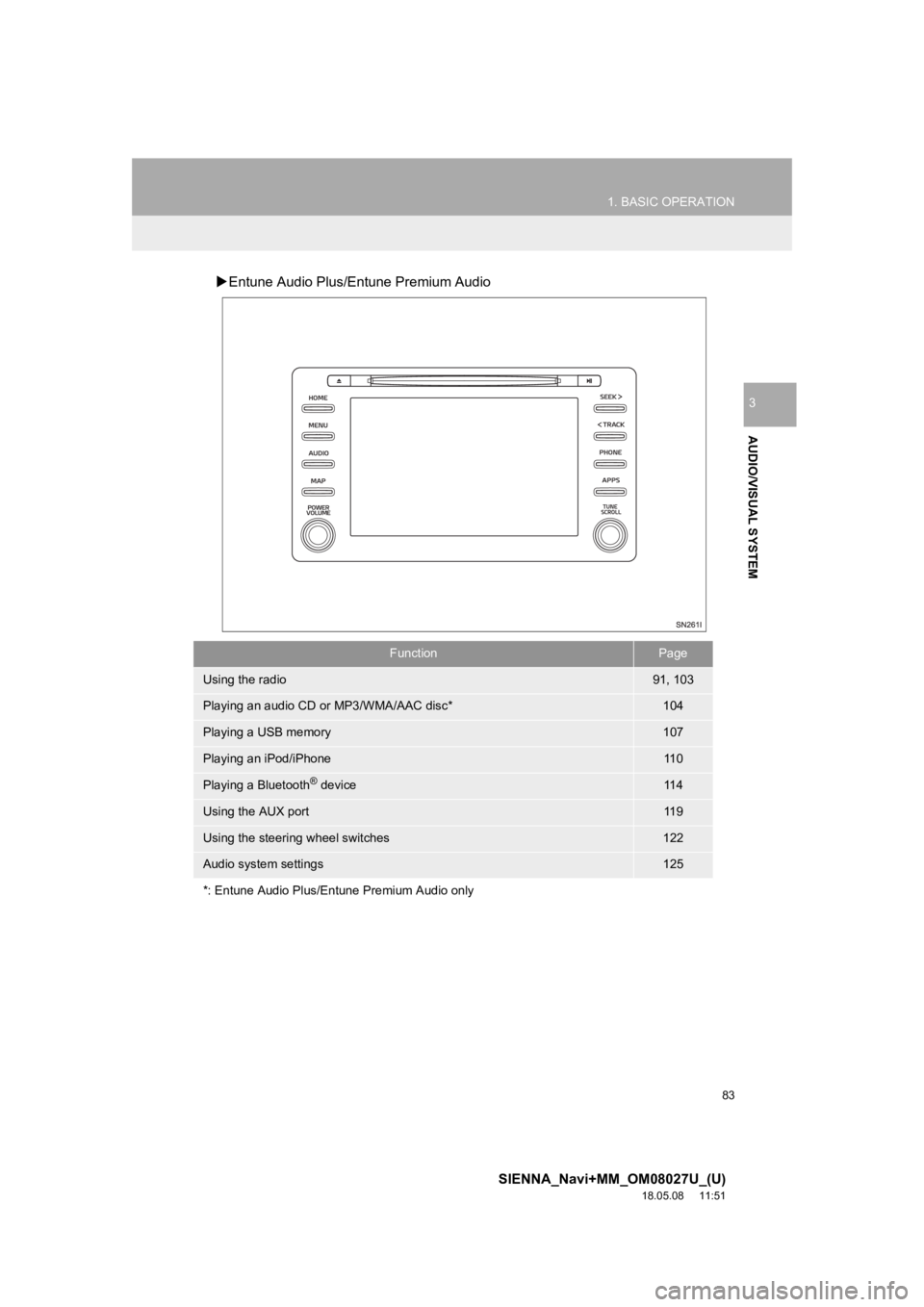
Entune Audio Plus/Entune Premium Audio
FunctionPage
Using the radio91, 103
Playing an audio CD or MP3/WMA/AAC disc*104
Playing a USB memory107
Playing an iPod/iPhone11 0
Playing a Bluetooth® device11 4
Using the AUX port11 9
Using the steering wheel switches122
Audio system settings125
*: Entune Audio Plus/Entune Premium Audio only
Page 86 of 441
86
1. BASIC OPERATION
SIENNA_Navi+MM_OM08027U_(U)
18.05.08 11:51
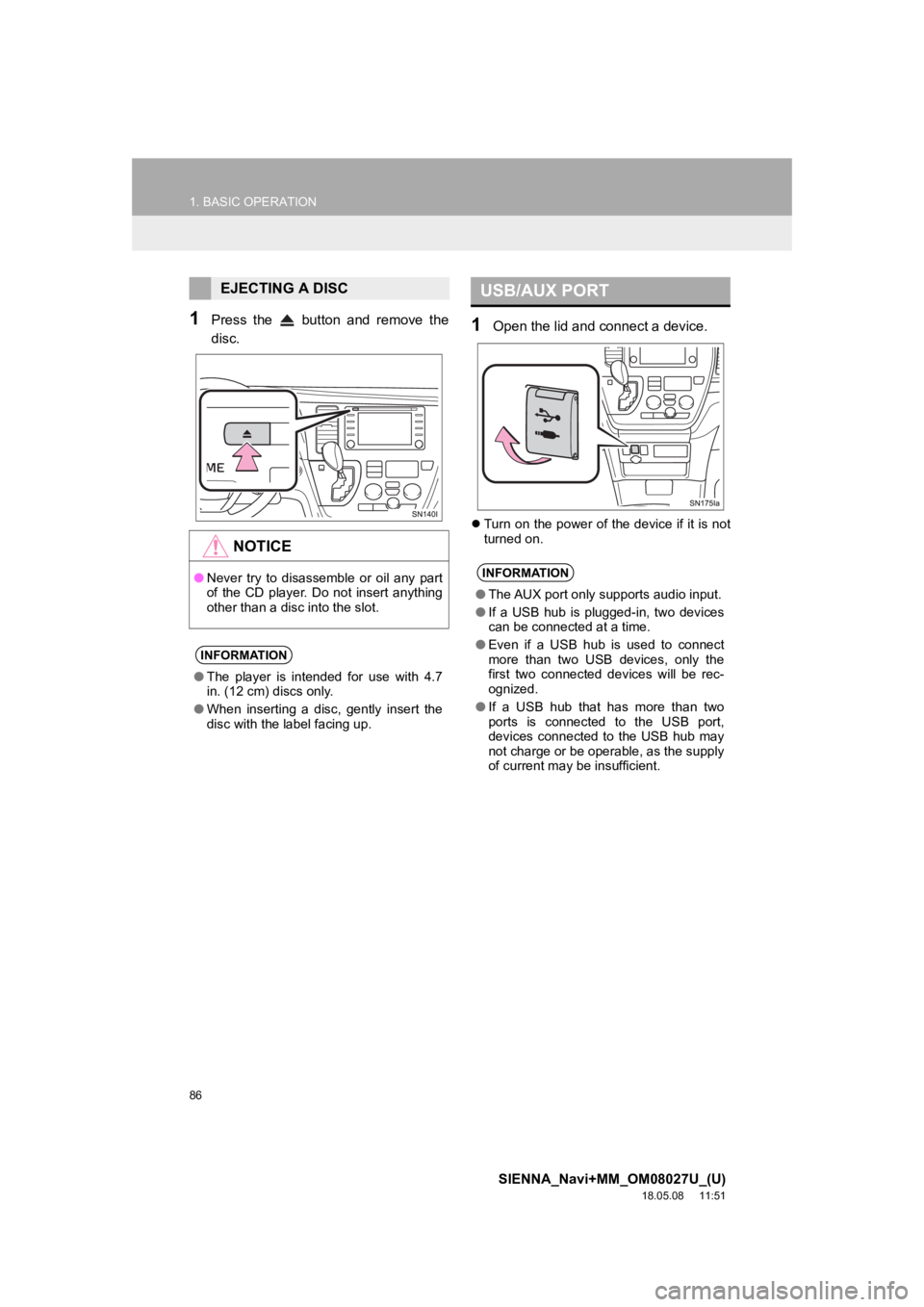
1Press the button and remove the
disc.1Open the lid and connect a device.
Turn on the power of the device if it is not
turned on.
EJECTING A DISC
NOTICE
●Never try to disassemble or oil any part
of the CD player. Do not insert anything
other than a disc into the slot.
INFORMATION
●The player is intended for use with 4.7
in. (12 cm) discs only.
● When inserting a disc, gently insert the
disc with the label facing up.
USB/AUX PORT
INFORMATION
●The AUX port only supports audio input.
● If a USB hub is plugged-in, two devices
can be connected at a time.
● Even if a USB hub is used to connect
more than two USB devices, only the
first two connected devices will be rec-
ognized.
● If a USB hub that has more than two
ports is connected to the USB port,
devices connected to the USB hub may
not charge or be operable, as the supply
of current may be insufficient.
Page 101 of 441
101
2. RADIO OPERATION
SIENNA_Navi+MM_OM08027U_(U)
18.05.08 11:51
AUDIO/VISUAL SYSTEM
3If “Ch 000” is selected using the
“TUNE/SCROLL” knob, the ID code,
which is 8 alphanumeric characters,
will be displayed. If another channel is
selected, the ID code will no longer be
displayed. The channel (000) alter-
nates between displaying the radio ID
and the specific radio code.
INFORMATION
● About SiriusXM Services:
Most in-car trials today include Siri-
usXM’s best package — All Access. It
includes every channel available on your
radio, plus streaming.
● SiriusXM All Access subscription:
Listen everywhere with All Access. You
get every channel available in your ride,
plus you can listen on the app and
online — so you can enjoy the best Siri-
usXM has to offer, anywhere life takes
you. It’s the only package that gives you
all of our premium programming, includ-
ing Howard Stern, every NFL, MLB
® and
NBA game, every NASCAR® race,
NHL® games, 24/7 talk channels dedi-
cated to the biggest leagues, and more.
You get all kinds of commercial-free
music, including artistdedicated chan-
nels and more, plus sports, news, talk
and entertainment.
● SiriusXM radio operation:
Look for the Sirius, XM, SiriusXM, Band,
SAT, AUX, Radio or Source button and
you’re in.
If you can’t hear us, it’s easy to get
started:
U.S.A.
• Locate your Radio ID by turning to
Channel 0. If you don’t see your num-
ber there, go to siriusxm.com/
activationhelp to find it.
• Visit siriusxm.com/refresh or call
1-855-MYREFRESH (697-3373) to
send a refresh signal to your radio.
Canada
• Locate your Radio ID by turning to
Channel 0.
• Visit siriusxm.ca/refresh
to send a
refresh signal to your radio or call
1-888-539-7474 for service.
DISPLAYING THE RADIO ID
Each SiriusXM tuner is identified with a
unique radio ID. The radio ID is re-
quired when activating an SiriusXM
service or when reporting a problem.
Page 119 of 441
119
3. MEDIA OPERATION
SIENNA_Navi+MM_OM08027U_(U)
18.05.08 11:51
AUDIO/VISUAL SYSTEM
3
5. AUX
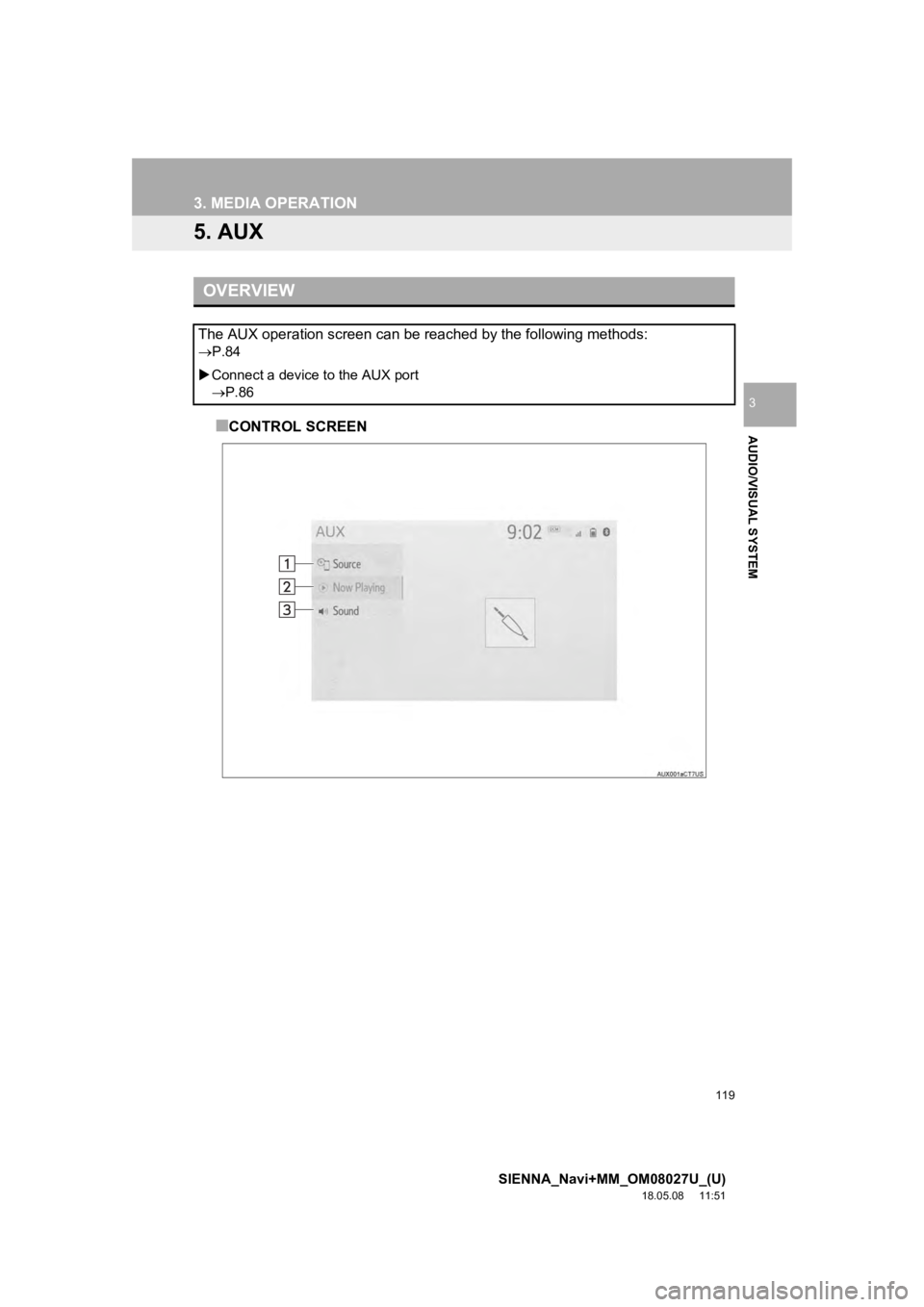
■CONTROL SCREEN
OVERVIEW
The AUX operation screen can be reached by the following methods:
P.84
Connect a device to the AUX port
P.86
Page 124 of 441
124
4. AUDIO/VISUAL REMOTE CONTROLS
SIENNA_Navi+MM_OM08027U_(U)
18.05.08 11:51
“MODE/HOLD” switch
ModeOperationFunction
AM, FM,
SXM*1, AUX
PressChange audio modes
Press and holdMute*2 (Press and hold again to resume the sound.)
Audio CD/
MP3/WMA/
AAC disc*
1,
USB*3,
iPod/
iPhone,
Bluetooth
®
audio*3,
APPS*3
PressChange audio modes
Press and holdPause (Press and hold again to resume the play mode.)
*
1: Entune Audio Plus/Entune Premium Audio only
*2: If cached radio is enabled, pres sing and holding the “MODE/HOL D” switch pauses the broad-
cast. (Press and hold again to play back the cached radio progr am.)
*
3: When an Apple CarPlay connection is established, this function will be unavailable.
INFORMATION
●In the APPS mode, some operation may be done on the screen depe nding on the
selected APPS.
Page 434 of 441

434
ALPHABETICAL INDEX
SIENNA_Navi+MM_OM08027U_(U)
18.05.08 11:51
A
AM/FM/SiriusXM (SXM) radio ................... 91Available HD Radio™ technology ......... 98
Caching a radio program ....................... 94
Displaying the radio id ......................... 101
HD Radio™ troubleshooting guide ........ 99
If the satellite radio tuner malfunctions..................................... 102
Overview ............................................... 91
Presetting a station................................ 94
Radio broadcast data system ................ 97
Radio options ........................................ 97
Selecting a station from the list ............. 96
Using HD Radio™ technology............... 98
Apple CarPlay ........................................... 62
Audio settings ......................................... 125 Audio settings screen .......................... 125
Audio/visual remote controls ................... 122
Audio/visual system .................................. 79
AUX......................................................... 119 Overview ............................................. 119
B
Basic function...................................... 12, 29
Basic information before operation ........... 30
Basic operation ................................. 82, 332
Bluetooth
® audio ..................................... 114
Overview ............................................. 114
Registering/connecting a Bluetooth
®
device .............................................. 118 Bluetooth
® phone message function.......306
Calling the message sender ................310
Checking received messages..............307
Displaying the message screen...........306
Receiving a message ..........................306
Replying to a message (Dictation reply) ................................308
Replying to a message (Quick reply).....................................309
Buttons overview .......................................12
C
CD ...........................................................10 4
Overview..............................................104
Checking around the vehicle ...................260 Screen display .....................................260
Checking the front and around the vehicle .................................................261
Screen display .....................................261
Checking the rear and around the vehicle .................................................267
Guide lines displayed on the screen ..............................................269
Parking ................................................272
Screen display .....................................267
Checking the sides of the vehicle............264 Screen display .....................................264
Clock settings ............................................67
Command list ..........................................211
Connectivity settings .................................43
Copyrights and trademarks .....................194
Customizing the panoramic view monitor.................................................276
Changing the body color displayed in the panoramic view monitor .........276
ALPHABETICAL INDEX
Page 438 of 441

438
ALPHABETICAL INDEX
SIENNA_Navi+MM_OM08027U_(U)
18.05.08 11:51
Receiving weather information................ 221Displaying weather screen .................. 221
Weather guidance service ................... 223
Registering favorite destinations ............... 24
Registering home ...................................... 23
Registering/connecting a Bluetooth
®
device .................................................... 43
Profiles .................................................. 47
Registering a Bluetooth
® audio
player for the first time ....................... 45
Registering a Bluetooth
® phone for the
first time ............................................. 43
Route guidance ....................................... 361
Route guidance screen ........................... 361 During freeway driving......................... 363
Screen for route guidance ................... 361
Turn list screen .................................... 365
Turn-by-turn arrow screen ................... 366
When approaching an intersection ...... 365
Route options operation .......................... 368
Adjacent road ...................................... 371
Detour setting ...................................... 370
Reordering destinations ...................... 368
Selecting route type............................. 369
Setting route preferences .................... 369
S
Screen adjustment ....................................40
Setting Bluetooth® details .........................49
Bluetooth® settings screen ....................49
Connecting a Bluetooth® device............50
Deleting a Bluetooth® device.................53
Editing the Bluetooth® device
information .........................................53
Registering a Bluetooth
® device............52
Setting Bluetooth® system.....................55
Setting home as the destination ................26
Setup ...............................125, 311, 379, 408
“Setup” screen...........................................21
Some basics......................................84, 293
About the contacts in the contact list.....................................................296
Audio screen adjustment .......................89
Disc slot .................................................85
Registering/connecting a Bluetooth
®
phone ...............................................294
Selecting an audio source .....................84
Sound settings .......................................87
Turning the system on and off ...............84
USB/AUX port........................................86
Using the phone switch/ microphone ......................................294
Voice command system ................90, 295
When selling or disposing of the vehicle ..............................................296
Starting route guidance ...........................356 A route from the Toyota Entune center (Vehicles with DCM) .............360
Confirm destination screen ..................357
Route overview screen ........................357
Steering switches ....................................122