clock reset TOYOTA SIENNA 2019 Accessories, Audio & Navigation (in English)
[x] Cancel search | Manufacturer: TOYOTA, Model Year: 2019, Model line: SIENNA, Model: TOYOTA SIENNA 2019Pages: 441, PDF Size: 9.89 MB
Page 68 of 441
68
3. OTHER SETTINGS
SIENNA_Navi+MM_OM08027U_(U)
18.05.08 11:51
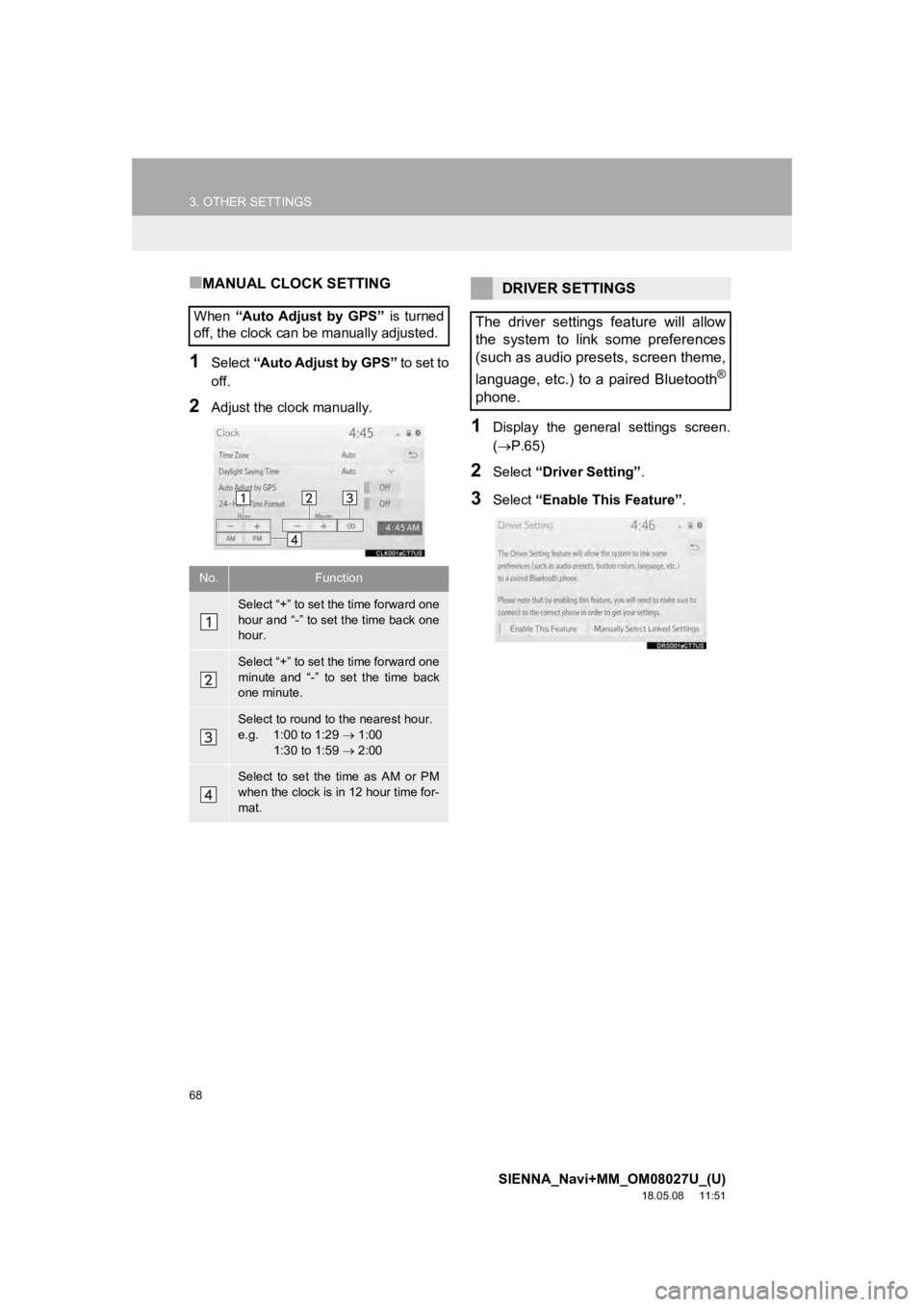
■MANUAL CLOCK SETTING
1Select “Auto Adjust by GPS” to set to
off.
2Adjust the clock manually.
1Display the general settings screen.
( P.65)
2Select “Driver Setting” .
3Select “Enable This Feature” .
When
“Auto Adjust by GPS” is turned
off, the clock can be manually adjusted.
No.Function
Select “+” to set the time forward one
hour and “-” to set the time back one
hour.
Select “+” to set the time forward one
minute and “-” to set the time back
one minute.
Select to round to the nearest hour.
e.g. 1:00 to 1:29 1:00
1:30 to 1:59 2:00
Select to set the time as AM or PM
when the clock is in 12 hour time for-
mat.
DRIVER SETTINGS
The driver settings feature will allow
the system to link some preferences
(such as audio presets, screen theme,
language, etc.) to a paired Bluetooth
®
phone.
Page 434 of 441

434
ALPHABETICAL INDEX
SIENNA_Navi+MM_OM08027U_(U)
18.05.08 11:51
A
AM/FM/SiriusXM (SXM) radio ................... 91Available HD Radio™ technology ......... 98
Caching a radio program ....................... 94
Displaying the radio id ......................... 101
HD Radio™ troubleshooting guide ........ 99
If the satellite radio tuner malfunctions..................................... 102
Overview ............................................... 91
Presetting a station................................ 94
Radio broadcast data system ................ 97
Radio options ........................................ 97
Selecting a station from the list ............. 96
Using HD Radio™ technology............... 98
Apple CarPlay ........................................... 62
Audio settings ......................................... 125 Audio settings screen .......................... 125
Audio/visual remote controls ................... 122
Audio/visual system .................................. 79
AUX......................................................... 119 Overview ............................................. 119
B
Basic function...................................... 12, 29
Basic information before operation ........... 30
Basic operation ................................. 82, 332
Bluetooth
® audio ..................................... 114
Overview ............................................. 114
Registering/connecting a Bluetooth
®
device .............................................. 118 Bluetooth
® phone message function.......306
Calling the message sender ................310
Checking received messages..............307
Displaying the message screen...........306
Receiving a message ..........................306
Replying to a message (Dictation reply) ................................308
Replying to a message (Quick reply).....................................309
Buttons overview .......................................12
C
CD ...........................................................10 4
Overview..............................................104
Checking around the vehicle ...................260 Screen display .....................................260
Checking the front and around the vehicle .................................................261
Screen display .....................................261
Checking the rear and around the vehicle .................................................267
Guide lines displayed on the screen ..............................................269
Parking ................................................272
Screen display .....................................267
Checking the sides of the vehicle............264 Screen display .....................................264
Clock settings ............................................67
Command list ..........................................211
Connectivity settings .................................43
Copyrights and trademarks .....................194
Customizing the panoramic view monitor.................................................276
Changing the body color displayed in the panoramic view monitor .........276
ALPHABETICAL INDEX