lock TOYOTA SIENNA 2019 Accessories, Audio & Navigation (in English)
[x] Cancel search | Manufacturer: TOYOTA, Model Year: 2019, Model line: SIENNA, Model: TOYOTA SIENNA 2019Pages: 441, PDF Size: 9.89 MB
Page 16 of 441
16
1. BASIC FUNCTION
SIENNA_Navi+MM_OM08027U_(U)
18.05.08 11:51
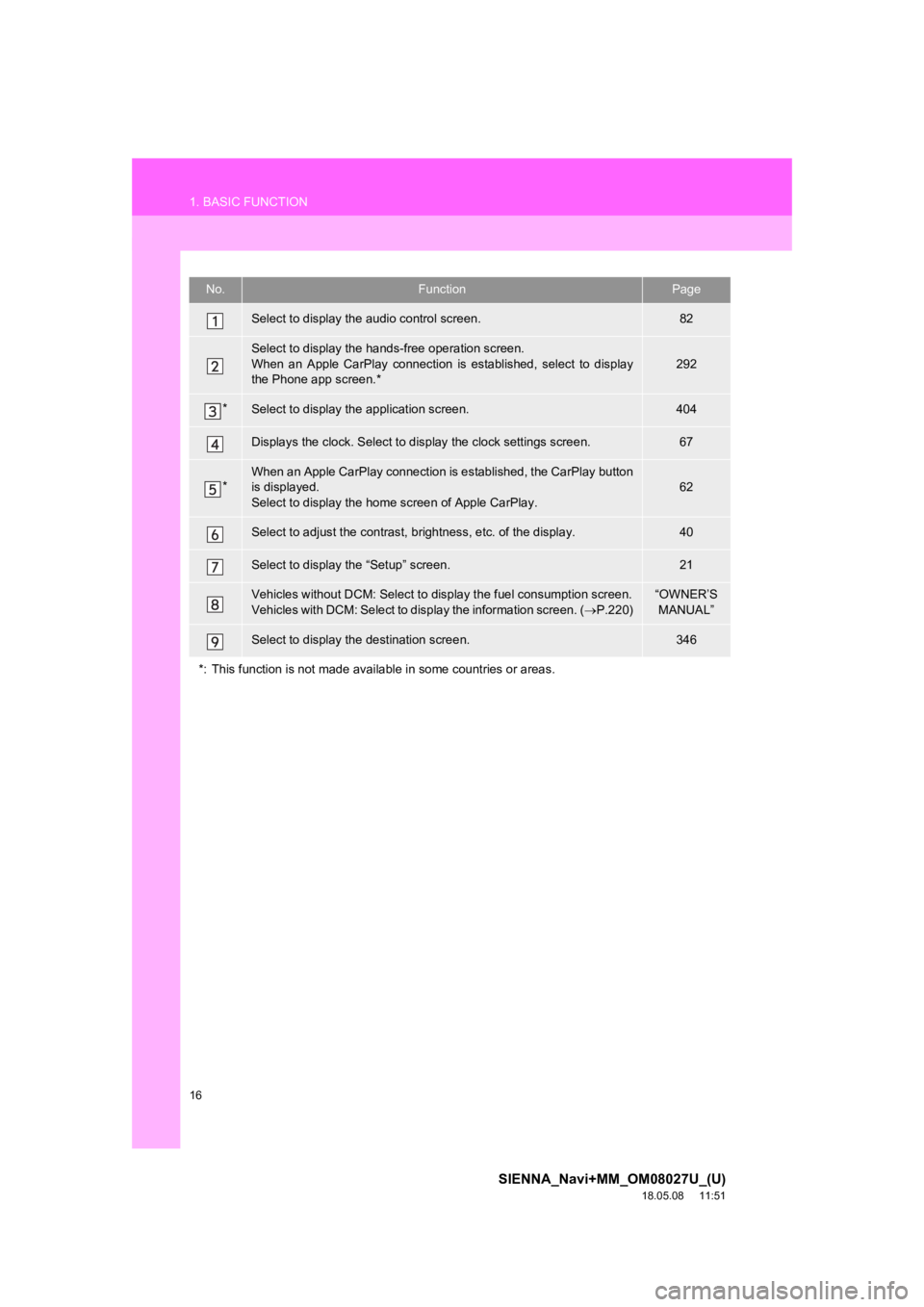
No.FunctionPage
Select to display the audio control screen.82
Select to display the hands-free operation screen.
When an Apple CarPlay connection is established, select to display
the Phone app screen.*
292
*Select to display the application screen.404
Displays the clock. Select to d isplay the clock settings screen .67
*When an Apple CarPlay connection is established, the CarPlay button
is displayed.
Select to display the home screen of Apple CarPlay.62
Select to adjust the contrast, b rightness, etc. of the display.40
Select to display the “Setup” screen.21
Vehicles without DCM: Select to di splay the fuel consumption screen.
Vehicles with DCM: Select to display the information screen. ( P.220)“OWNER’S
MANUAL”
Select to display the destination screen.346
*: This function is not made available in some countries or area s.
Page 17 of 441
17
1. BASIC FUNCTION
SIENNA_Navi+MM_OM08027U_(U)
18.05.08 11:51
QUICK GUIDE
1
3. HOME SCREEN
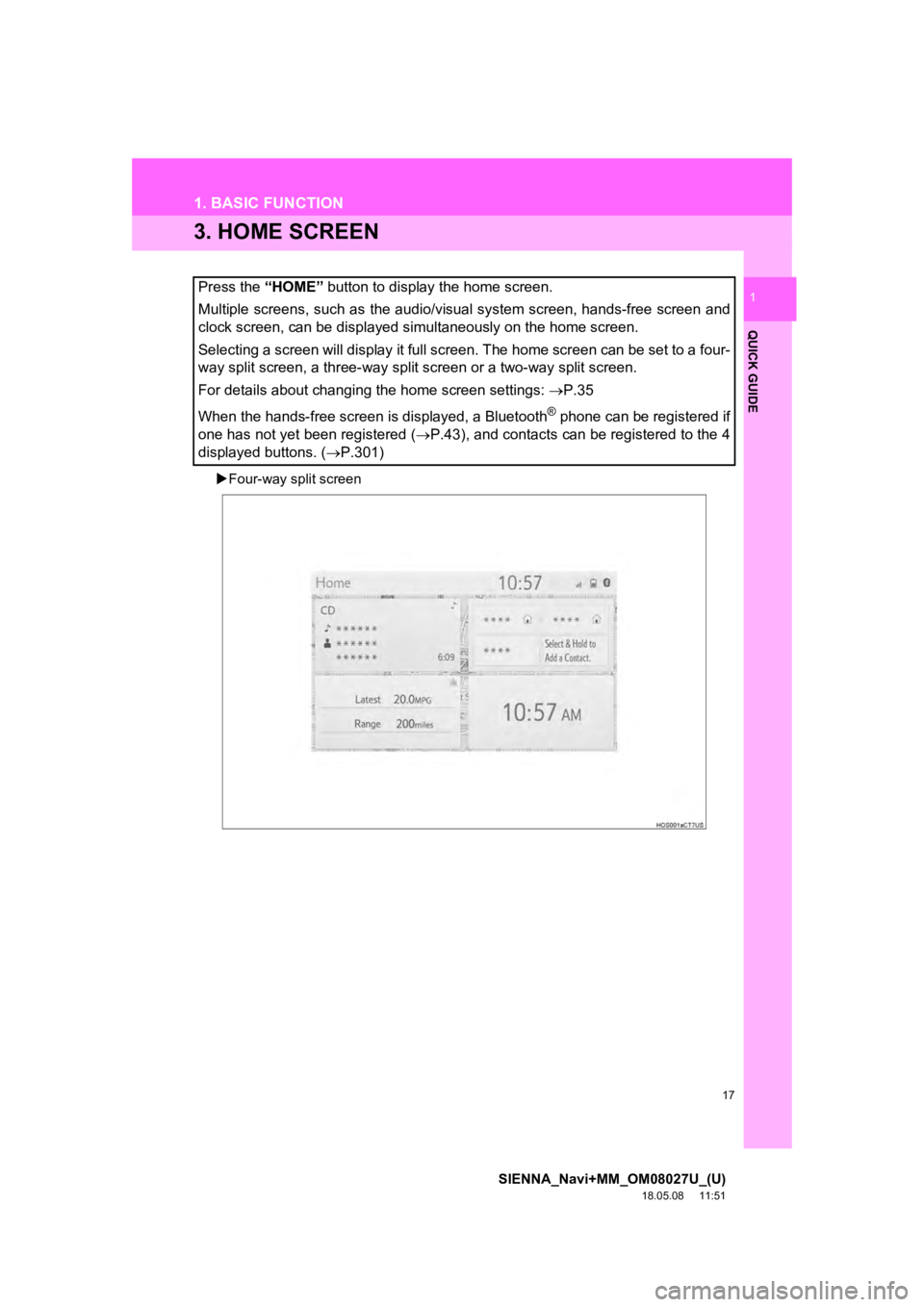
Four-way split screen
Press the “HOME” button to display the home screen.
Multiple screens, such as the audio/visual system screen, hands -free screen and
clock screen, can be displayed simultaneously on the home scree n.
Selecting a screen will display it full screen. The home screen can be set to a four-
way split screen, a three-way split screen or a two-way split s creen.
For details about changing the home screen settings: P.35
When the hands-free screen is displayed, a Bluetooth
® phone can be registered if
one has not yet been registered ( P.43), and contacts can be registered to the 4
displayed buttons. ( P.301)
Page 35 of 441
35
1. BASIC INFORMATION BEFORE OPERATION
SIENNA_Navi+MM_OM08027U_(U)
18.05.08 11:51
BASIC FUNCTION
2
4. HOME SCREEN OPERATION
1Press the “HOME” button.
2Check that the home screen is dis-
played.
Selecting a screen will display it full
screen.
1Press the “MENU” button.
2Select “Setup” .
3Select “General” .
4Select “Customize H ome Screen”.
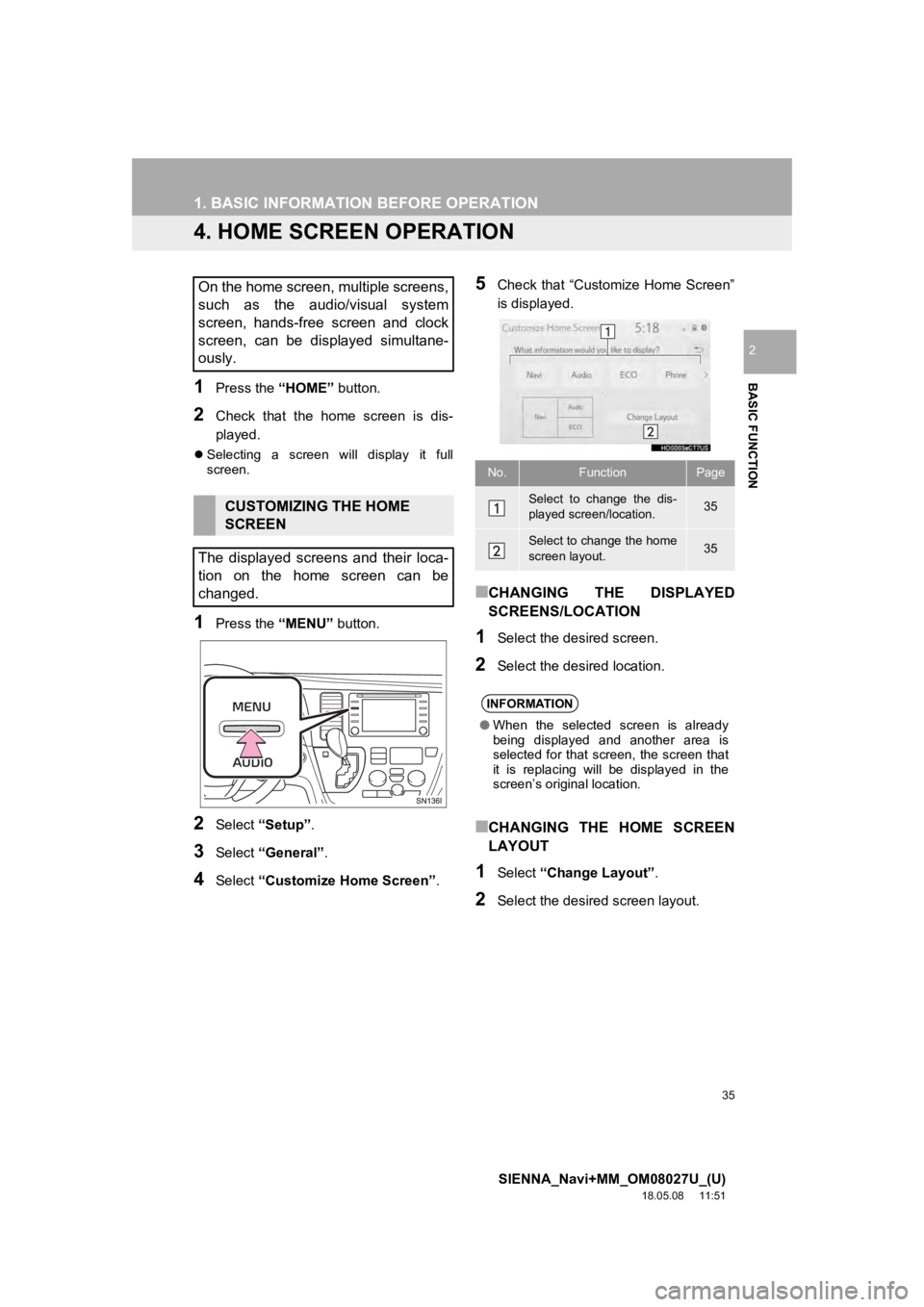
5Check that “Customize Home Screen”
is displayed.
■CHANGING THE DISPLAYED
SCREENS/LOCATION
1Select the desired screen.
2Select the desired location.
■CHANGING THE HOME SCREEN
LAYOUT
1Select “Change Layout” .
2Select the desired screen layout.
On the home screen, multiple screens,
such as the audio/visual system
screen, hands-free screen and clock
screen, can be displayed simultane-
ously.
CUSTOMIZING THE HOME
SCREEN
The displayed screens and their loca-
tion on the home screen can be
changed.
No.FunctionPage
Select to change the dis-
played screen/location.35
Select to change the home
screen layout.35
INFORMATION
● When the selected screen is already
being displayed and another area is
selected for that screen, the screen that
it is replacing will be displayed in the
screen’s original location.
Page 65 of 441
65
SIENNA_Navi+MM_OM08027U_(U)
18.05.08 11:51
BASIC FUNCTION
2
3. OTHER SETTINGS
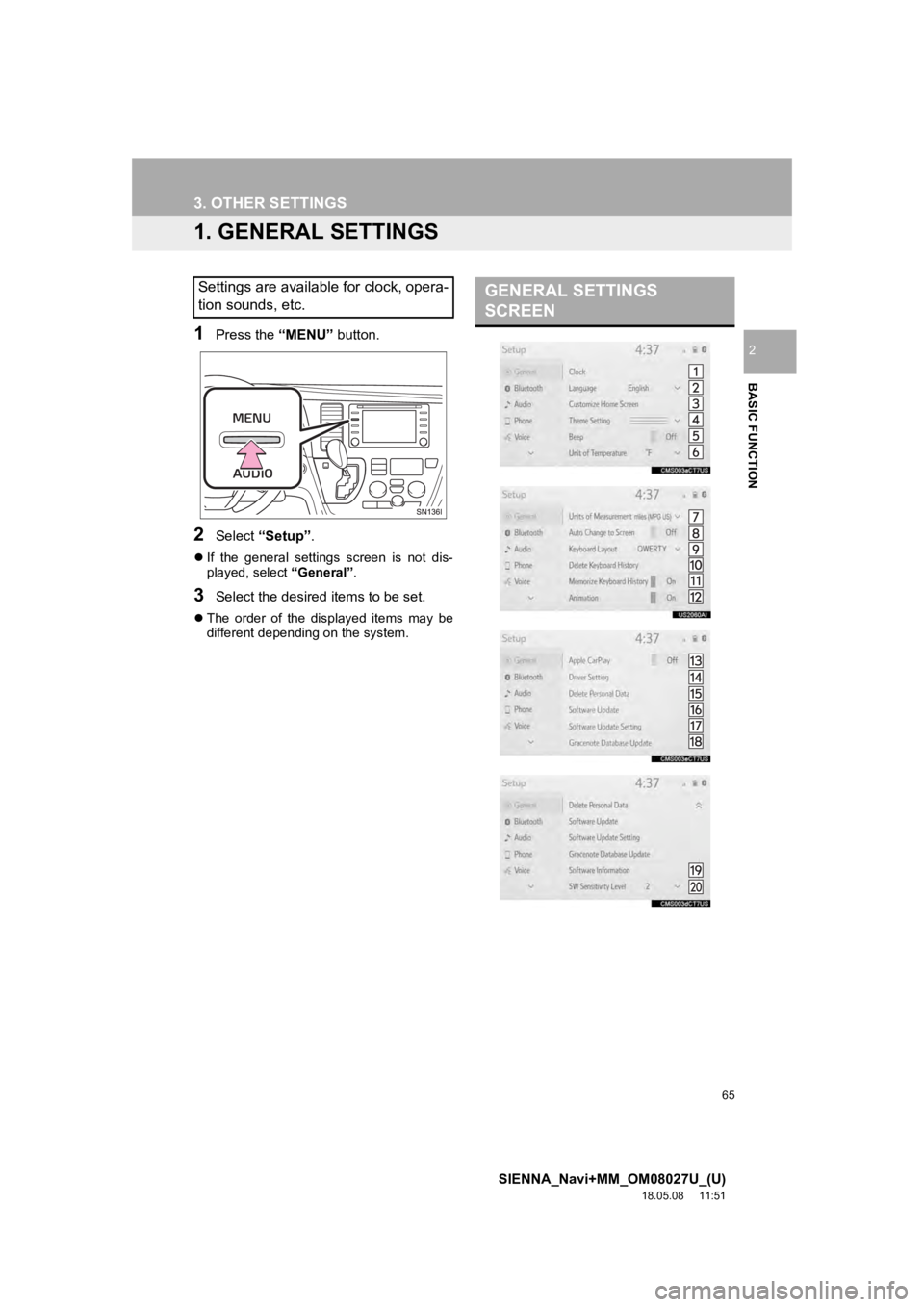
1. GENERAL SETTINGS
1Press the “MENU” button.
2Select “Setup” .
If the general settings screen is not dis-
played, select “General”.
3Select the desired items to be set.
The order of the displayed items may be
different dependi ng on the system.
Settings are available for clock, opera-
tion sounds, etc.GENERAL SETTINGS
SCREEN
Page 66 of 441
66
3. OTHER SETTINGS
SIENNA_Navi+MM_OM08027U_(U)
18.05.08 11:51
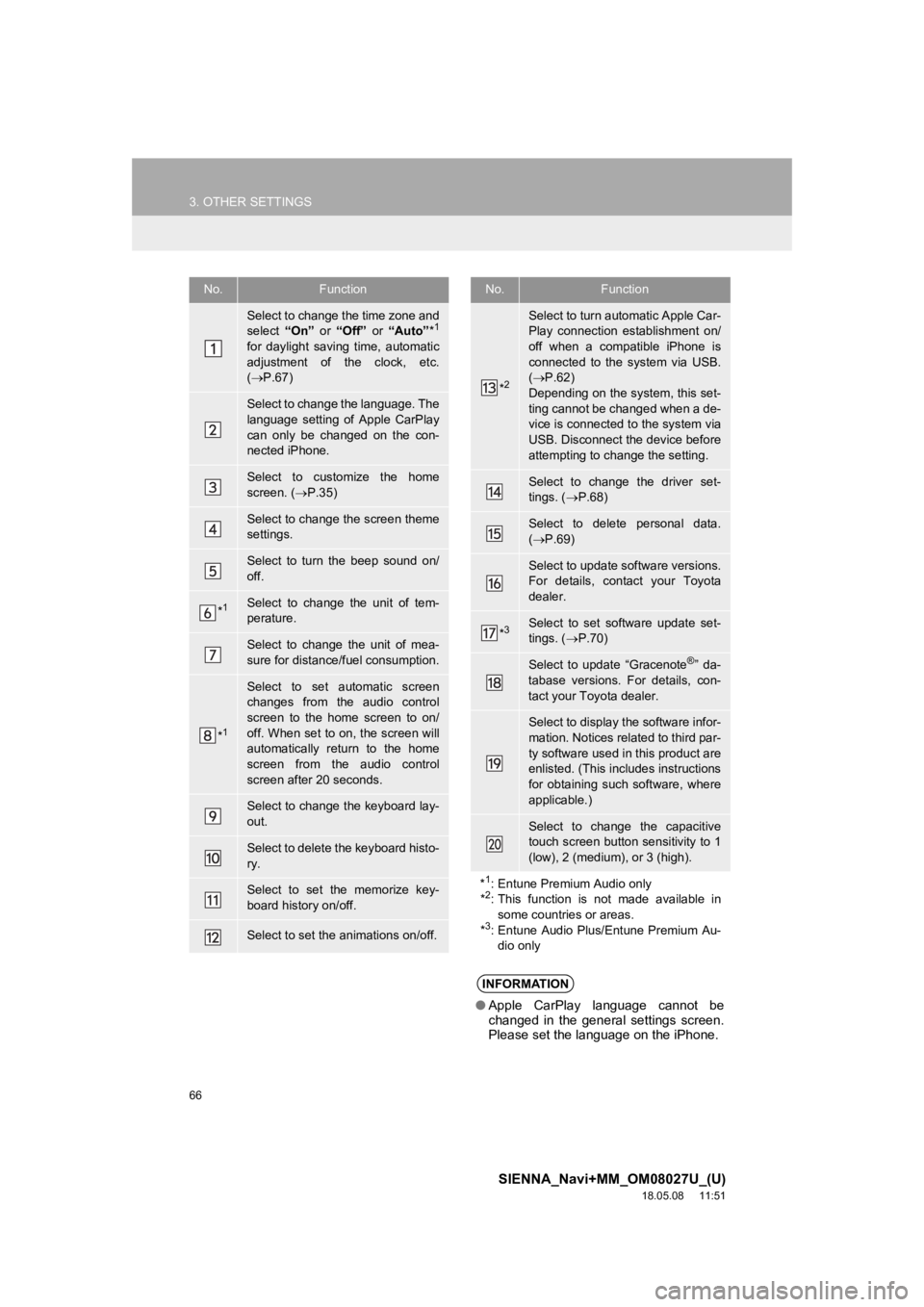
No.Function
Select to change the time zone and
select “On” or “Off” or “Auto” *1
for daylight saving time, automatic
adjustment of the clock, etc.
( P.67)
Select to change the language. The
language setting of Apple CarPlay
can only be changed on the con-
nected iPhone.
Select to customize the home
screen. ( P.35)
Select to change the screen theme
settings.
Select to turn the beep sound on/
off.
*1Select to change the unit of tem-
perature.
Select to change the unit of mea-
sure for distance/fuel consumption.
*1
Select to set automatic screen
changes from the audio control
screen to the home screen to on/
off. When set to on, the screen will
automatically return to the home
screen from the audio control
screen after 20 seconds.
Select to change the keyboard lay-
out.
Select to delete the keyboard histo-
ry.
Select to set the memorize key-
board history on/off.
Select to set the animations on/off.
*2
Select to turn automatic Apple Car-
Play connection establishment on/
off when a compatible iPhone is
connected to the system via USB.
( P.62)
Depending on the system, this set-
ting cannot be changed when a de-
vice is connected to the system via
USB. Disconnect the device before
attempting to change the setting.
Select to change the driver set-
tings. ( P.68)
Select to delete personal data.
( P.69)
Select to update software versions.
For details, contact your Toyota
dealer.
*3Select to set software update set-
tings. ( P.70)
Select to update “Gracenote®” da-
tabase versions. For details, con-
tact your Toyota dealer.
Select to display the software infor-
mation. Notices related to third par-
ty software used in this product are
enlisted. (This includes instructions
for obtaining such software, where
applicable.)
Select to change the capacitive
touch screen button sensitivity to 1
(low), 2 (medium), or 3 (high).
*
1: Entune Premium Audio only
*2: This function is not made available in
some countries or areas.
*
3: Entune Audio Plus/Entune Premium Au- dio only
INFORMATION
● Apple CarPlay language cannot be
changed in the general settings screen.
Please set the language on the iPhone.
No.Function
Page 67 of 441
67
3. OTHER SETTINGS
SIENNA_Navi+MM_OM08027U_(U)
18.05.08 11:51
BASIC FUNCTION
2
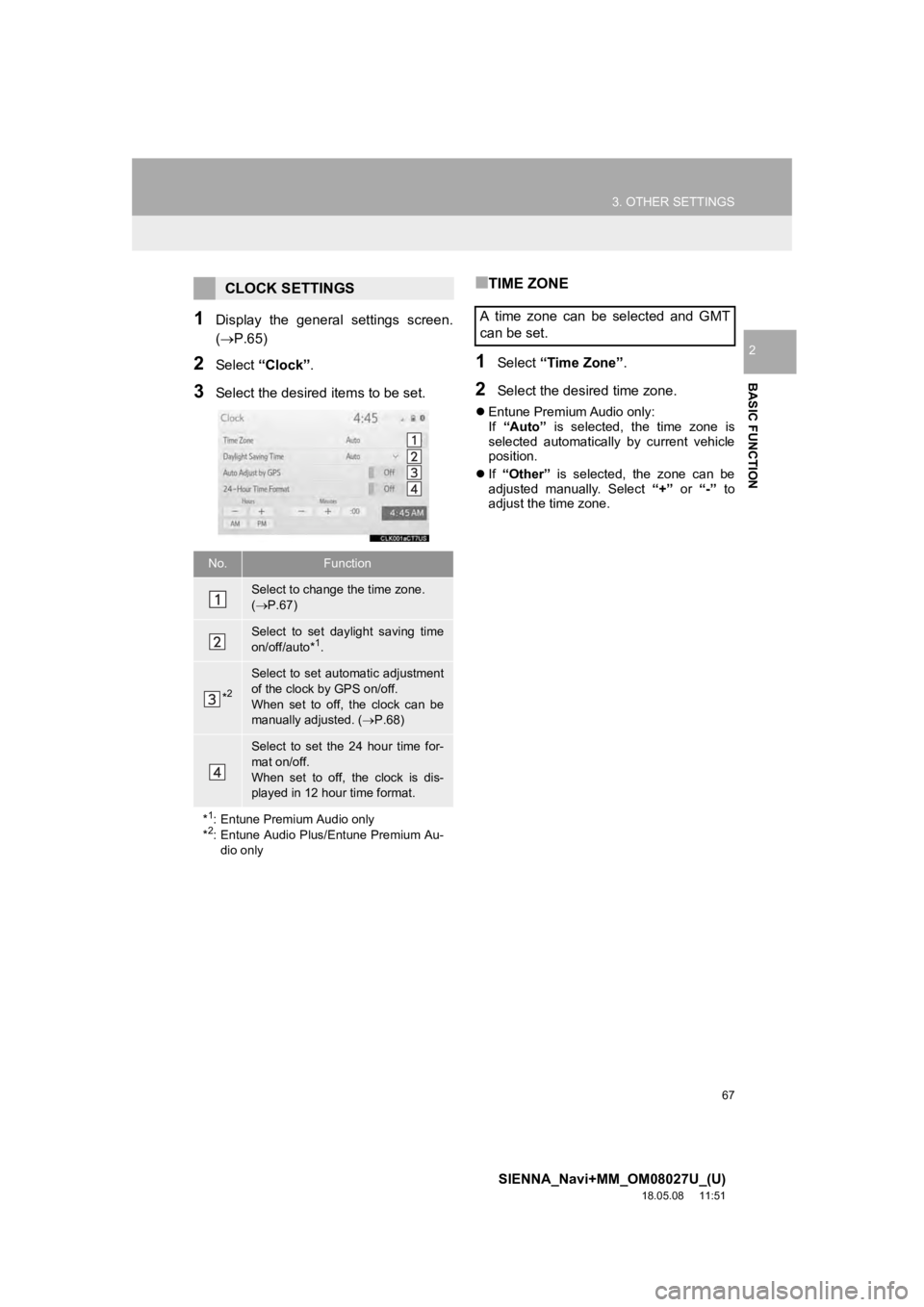
1Display the general settings screen.
(P.65)
2Select “Clock”.
3Select the desired items to be set.
■TIME ZONE
1Select “Time Zone” .
2Select the desired time zone.
Entune Premium Audio only:
If “Auto” is selected, the time zone is
selected automatically by current vehicle
position.
If “Other” is selected, the zone can be
adjusted manually. Select “+” or “-” to
adjust the time zone.
CLOCK SETTINGS
No.Function
Select to change the time zone.
( P.67)
Select to set daylight saving time
on/off/auto*1.
*2
Select to set automatic adjustment
of the clock by GPS on/off.
When set to off, the clock can be
manually adjusted. ( P.68)
Select to set the 24 hour time for-
mat on/off.
When set to off, the clock is dis-
played in 12 hour time format.
*
1: Entune Premium Audio only
*2: Entune Audio Plus/Entune Premium Au-
dio only
A time zone can be selected and GMT
can be set.
Page 68 of 441
68
3. OTHER SETTINGS
SIENNA_Navi+MM_OM08027U_(U)
18.05.08 11:51
■MANUAL CLOCK SETTING
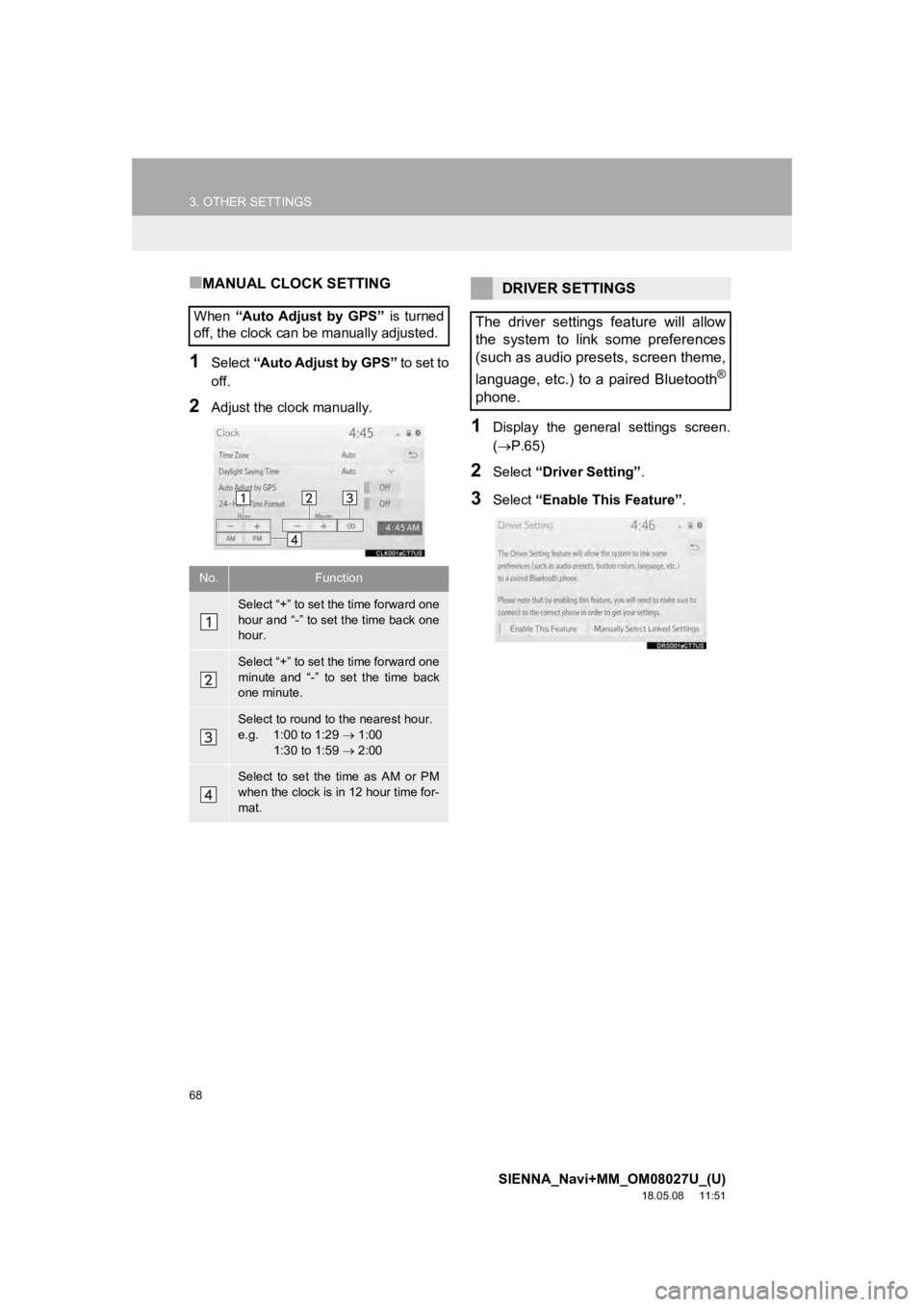
1Select “Auto Adjust by GPS” to set to
off.
2Adjust the clock manually.
1Display the general settings screen.
( P.65)
2Select “Driver Setting” .
3Select “Enable This Feature” .
When
“Auto Adjust by GPS” is turned
off, the clock can be manually adjusted.
No.Function
Select “+” to set the time forward one
hour and “-” to set the time back one
hour.
Select “+” to set the time forward one
minute and “-” to set the time back
one minute.
Select to round to the nearest hour.
e.g. 1:00 to 1:29 1:00
1:30 to 1:59 2:00
Select to set the time as AM or PM
when the clock is in 12 hour time for-
mat.
DRIVER SETTINGS
The driver settings feature will allow
the system to link some preferences
(such as audio presets, screen theme,
language, etc.) to a paired Bluetooth
®
phone.
Page 128 of 441
128
SIENNA_Navi+MM_OM08027U_(U)
18.05.08 11:51
6. TIPS FOR OPERATING THE AUDIO/VISUAL SYSTEM
1. OPERATING INFORMATION
Fading and drifting stations: Generally, the
effective range of FM is about 25 miles (40
km). Once outside this range, you may no-
tice fading and drifting, which increase with
the distance from the radio transmitter.
They are often accompanied by distortion.
Multi-path: FM signals are reflective, mak-
ing it possible for 2 signals to reach the ve-
hicle’s antenna at the same time. If this
happens, the signals will cancel each other
out, causing a momentary flutter or loss of
reception.
Static and fluttering: These occur when
signals are blocked by buildings, trees or
other large objects. Increasing the bass
level may reduce static and fluttering.
Station swapping: If the FM signal being
listened to is interrupted or weakened, and
there is another strong station nearby on
the FM band, the radio may tune in the
second station until the original signal can
be picked up again.
Fading: AM broadcasts are reflected by
the upper atmosphere — especially at
night. These reflected signals can interfere
with those received directly from the radio
station, causing the radio station to sound
alternately st rong and weak.
NOTICE
●To avoid damage to the audio/visual
system:
• Be careful not to spill beverages over
the audio/visual system.
• Do not put anything other than an appropriate disc into the disc slot.
INFORMATION
● The use of a cellular phone inside or
near the vehicle may cause a noise from
the speakers of the audio/visual system
which you are listening to. However, this
does not indicate a malfunction.
RADIO
Usually, a problem with radio reception
does not mean there is a problem with
the radio — it is just the normal result
of conditions outside the vehicle.
For example, nearby buildings and ter-
rain can interfere with FM reception.
Power lines or phone wires can inter-
fere with AM signals. And of course, ra-
dio signals have a limited range. The
farther the vehicle is from a station, the
weaker its signal will be. In addition, re-
ception conditions change constantly
as the vehicle moves.
Here, some common reception prob-
lems that probably do not indicate a
problem with the radio are described.
FM
AM
Page 140 of 441
140
7. REAR SEAT ENTERTAINMENT SYSTEM OPERATION
SIENNA_Navi+MM_OM08027U_(U)
18.05.08 11:51
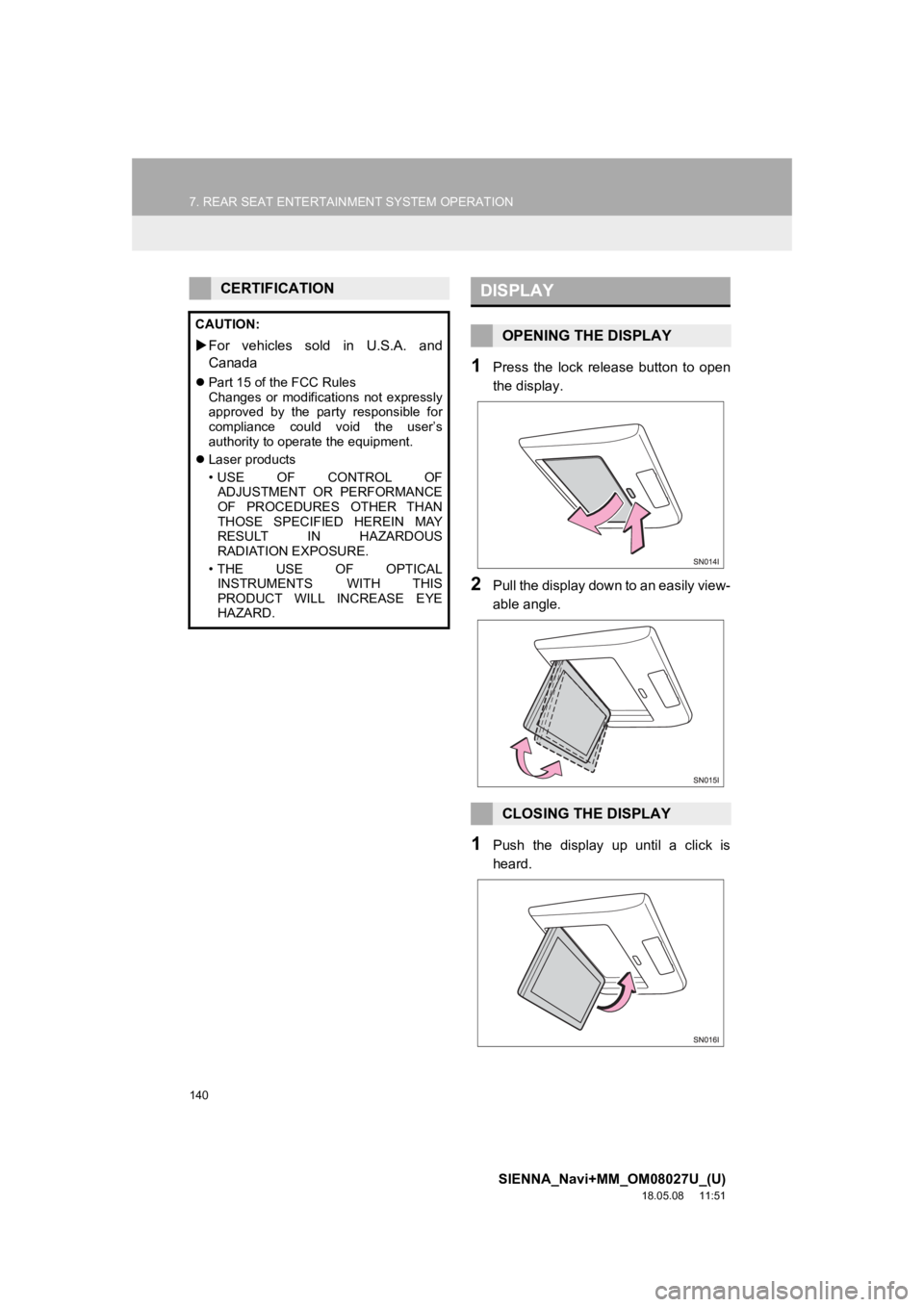
1Press the lock release button to open
the display.
2Pull the display down to an easily view-
able angle.
1Push the display up until a click is
heard.
CERTIFICATION
CAUTION:
For vehicles sold in U.S.A. and
Canada
Part 15 of the FCC Rules
Changes or modifications not expressly
approved by the party responsible for
compliance could void the user’s
authority to operate the equipment.
Laser products
• USE OF CONTROL OF
ADJUSTMENT OR PERFORMANCE
OF PROCEDURES OTHER THAN
THOSE SPECIFIED HEREIN MAY
RESULT IN HAZARDOUS
RADIATION EXPOSURE.
•THE USE OF OPTICAL INSTRUMENTS WITH THIS
PRODUCT WILL INCREASE EYE
HAZARD.
DISPLAY
OPENING THE DISPLAY
CLOSING THE DISPLAY
Page 147 of 441
147
7. REAR SEAT ENTERTAINMENT SYSTEM OPERATION
SIENNA_Navi+MM_OM08027U_(U)
18.05.08 11:51
AUDIO/VISUAL SYSTEM
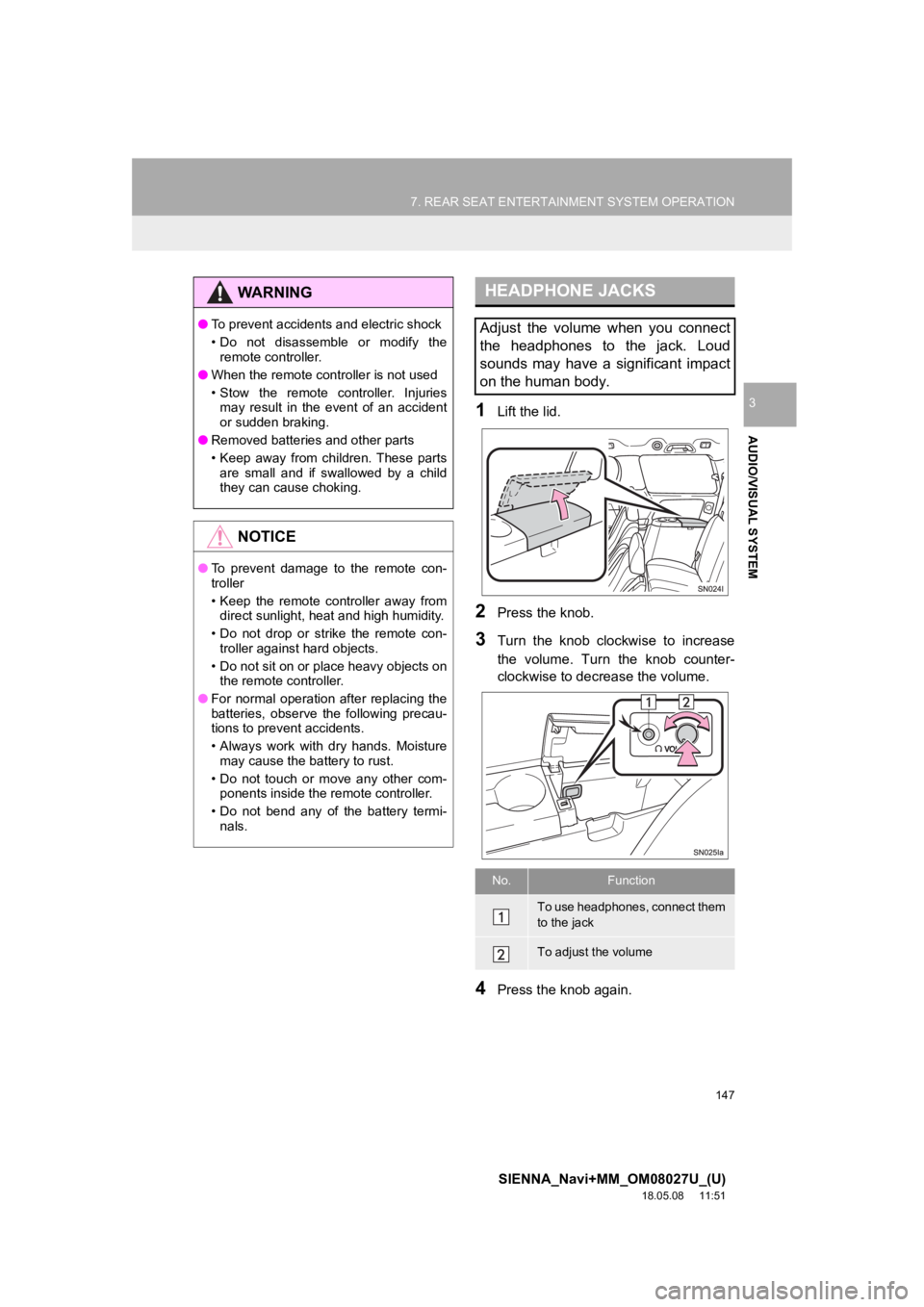
31Lift the lid.
2Press the knob.
3Turn the knob clockwise to increase
the volume. Turn the knob counter-
clockwise to decrease the volume.
4Press the knob again.
WA R N I N G
●To prevent accidents and electric shock
• Do not disassemble or modify the
remote controller.
● When the remote controller is not used
• Stow the remote controller. Injuries
may result in the event of an accident
or sudden braking.
● Removed batteries and other parts
• Keep away from children. These parts
are small and if swallowed by a child
they can cause choking.
NOTICE
● To prevent damage to the remote con-
troller
• Keep the remote controller away from
direct sunlight, heat and high humidity.
• Do not drop or strike the remote con- troller against hard objects.
• Do not sit on or place heavy objects on the remote controller.
● For normal operation after replacing the
batteries, observe the following precau-
tions to prevent accidents.
• Always work with dry hands. Moisture
may cause the battery to rust.
• Do not touch or move any other com- ponents inside the remote controller.
• Do not bend any of the battery termi- nals.
HEADPHONE JACKS
Adjust the volume when you connect
the headphones to the jack. Loud
sounds may have a significant impact
on the human body.
No.Function
To use headphones, connect them
to the jack
To adjust the volume