SEAT ADJUST TOYOTA SIENNA 2019 Owners Manual (in English)
[x] Cancel search | Manufacturer: TOYOTA, Model Year: 2019, Model line: SIENNA, Model: TOYOTA SIENNA 2019Pages: 64, PDF Size: 1.22 MB
Page 6 of 64
6Pictorial index
SIENNA_AAS_OM08030U_(U)
Pictorial index
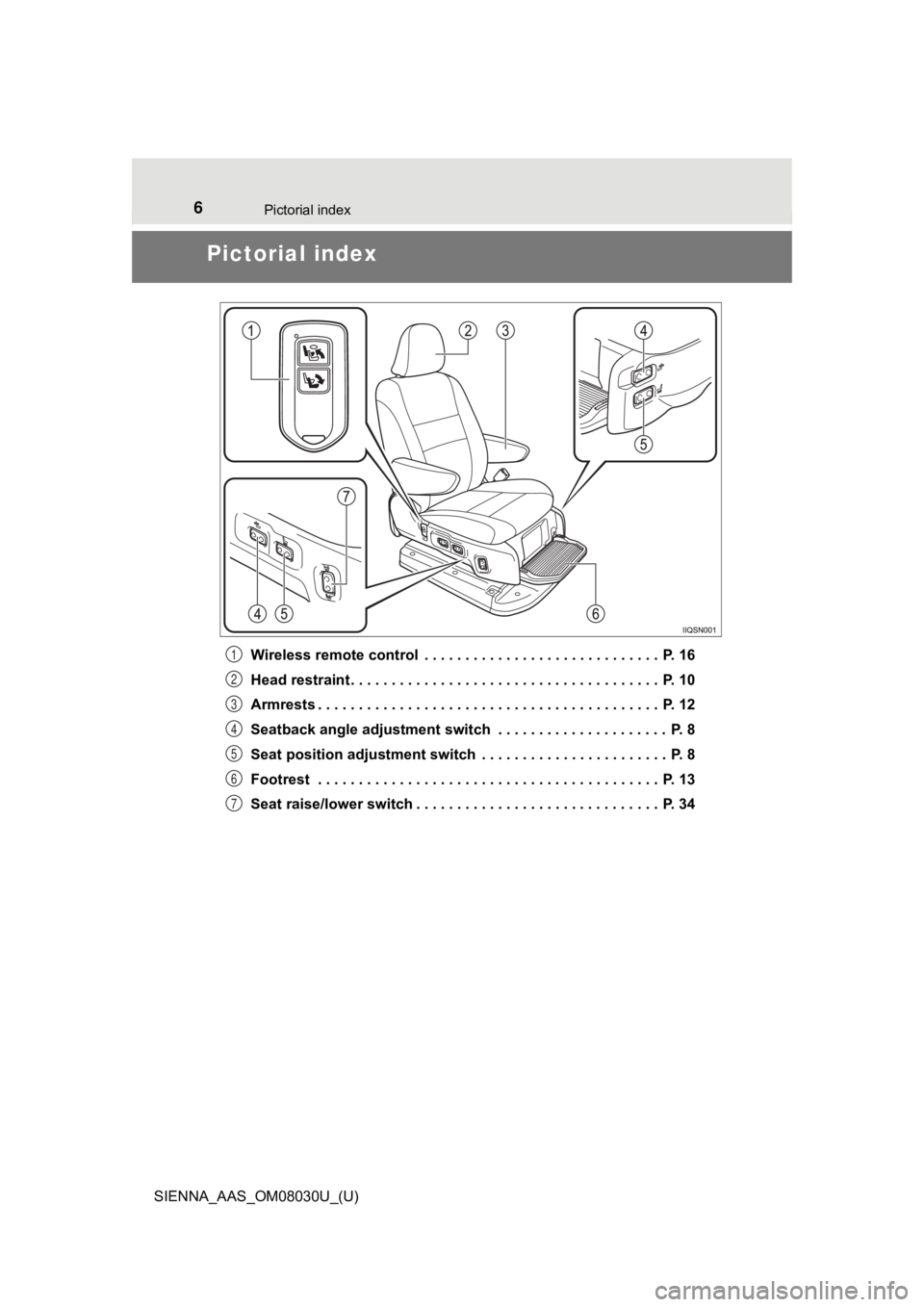
Wireless remote control . . . . . . . . . . . . . . . . . . . . . . . . . . . . . P. 16
Head restraint . . . . . . . . . . . . . . . . . . . . . . . . . . . . . . . . . . . . . . P. 10
Armrests . . . . . . . . . . . . . . . . . . . . . . . . . . . . . . . . . . . . . . . . . . P. 12
Seatback angle adjustment switch . . . . . . . . . . . . . . . . . . . . . P. 8
Seat position adjustment switch . . . . . . . . . . . . . . . . . . . . . . . P. 8
Footrest . . . . . . . . . . . . . . . . . . . . . . . . . . . . . . . . . . . . . . . . . . P. 13
Seat raise/lower switch . . . . . . . . . . . . . . . . . . . . . . . . . . . . . . P. 341
2
3
4
5
6
7
Page 8 of 64
81-1. AUTO ACCESS SEAT
SIENNA_AAS_OM08030U_(U)
AUTO ACCESS SEAT
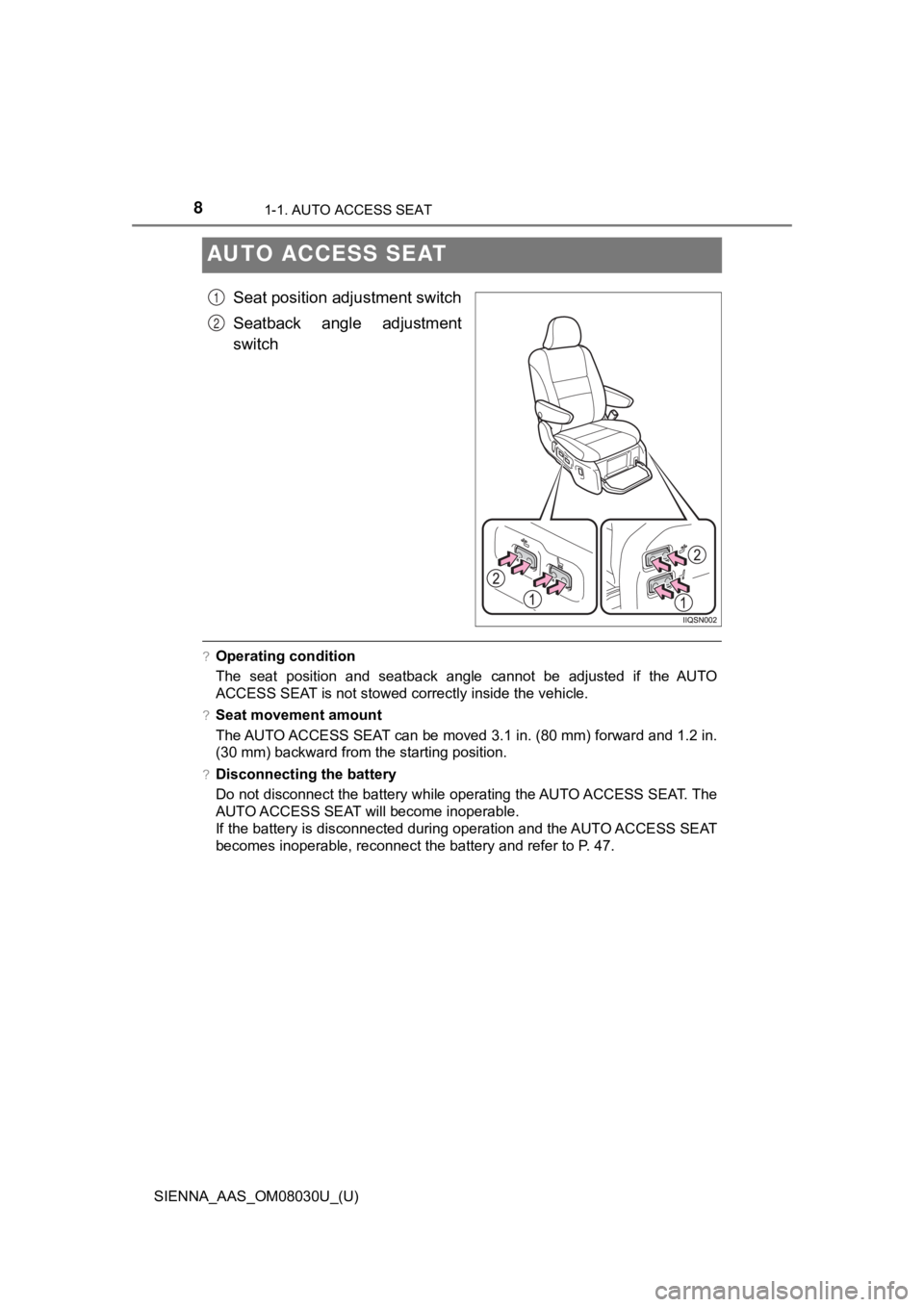
Seat position adjustment switch
Seatback angle adjustment
switch
?Operating condition
The seat position and seatback angle cannot be adjusted if the AUTO
ACCESS SEAT is not stowed correctly inside the vehicle.
?Seat movement amount
The AUTO ACCESS SEAT can be moved 3.1 in. (80 mm) forward and 1 .2 in.
(30 mm) backward from the starting position.
?Disconnecting the battery
Do not disconnect the battery while operating the AUTO ACCESS S EAT. The
AUTO ACCESS SEAT will become inoperable.
If the battery is disconnected during operation and the AUTO AC CESS SEAT
becomes inoperable, reconnect the battery and refer to P. 47.
1
2
Page 9 of 64
91-1. AUTO ACCESS SEAT
SIENNA_AAS_OM08030U_(U)
1
AUTO ACCESS SEAT
WARNING
Observe the following precautions.
Failing to do so may cause death or serious injury in the event of sudden
braking, sudden swerving or an accident.
?Wearing a seat belt
Read and follow the explanations and precautions under the “Sea t belts”
headings in Section 1-1 of the “OWNER’S MANUAL”.
?Child restraint lock func tion belt precaution
Read and follow the explanations and precautions under the “Sea t belts”
headings in Section 1-1 of the “OWNER’S MANUAL”.
?When installing a child restraint system to the AUTO ACCESS SEA T
Read and follow the explanations and precautions under the “Ins talling child
restraints” headings in Section 1-1 of the “OWNER’S MANUAL”.
?Seatback angle adjustment
Do not recline the seat more than necessary when the vehicle is in motion
to reduce the risk of sliding under the lap belt during a colli sion.
If the seat is too reclined, the lap belt may slide past the hips and apply
restraint forces directly to the abdomen or your neck may contact the shoul-
der belt.
NOTICE
?To prevent seat damage
Release the switch once the adjustment operation has been compl eted.
If you continue to press the switch once the operation has been completed,
a fault may occur.
Page 11 of 64
111-1. AUTO ACCESS SEAT
SIENNA_AAS_OM08030U_(U)
1
AUTO ACCESS SEAT
?Adjusting the height of the head restraint
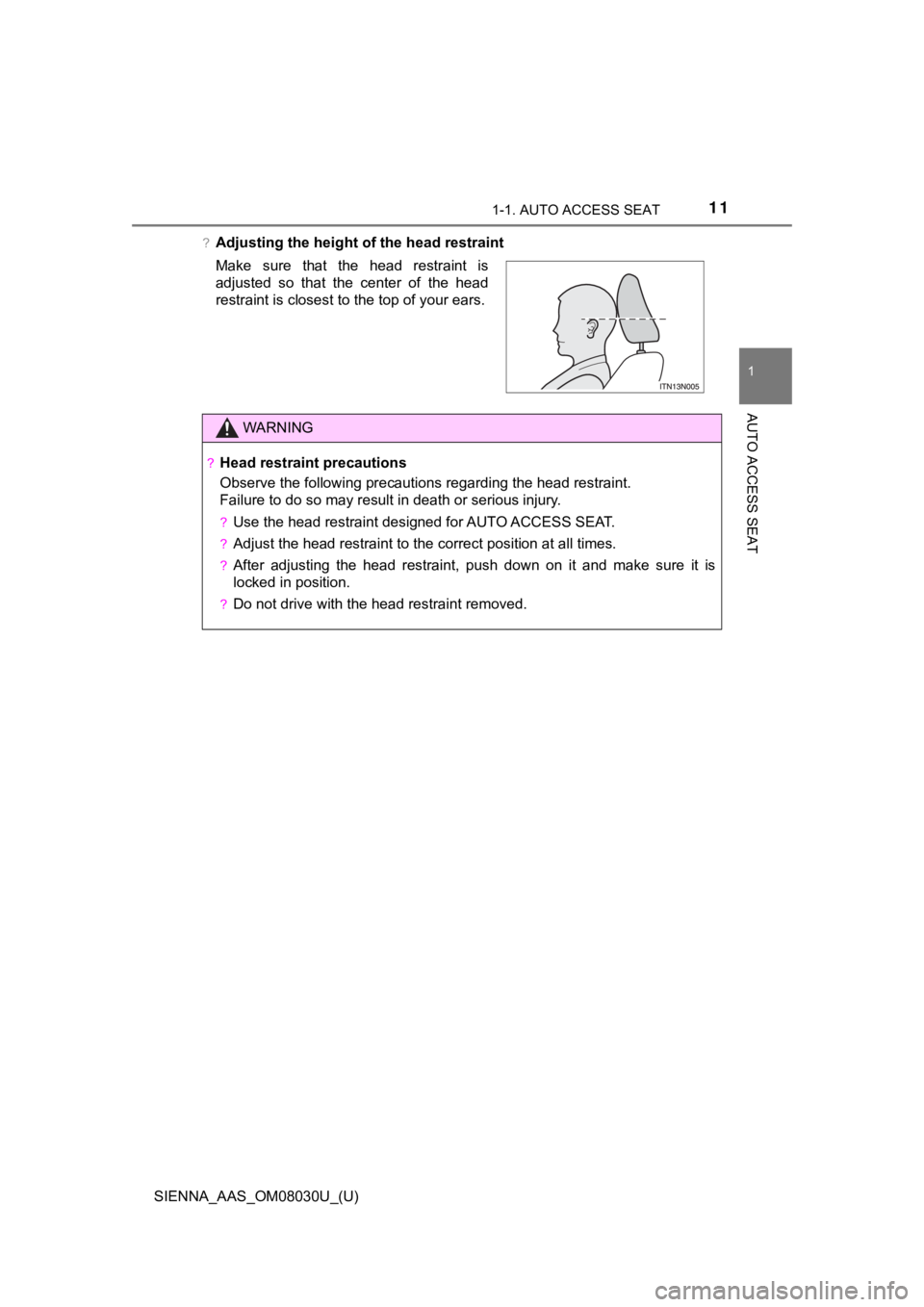
Make sure that the head restraint is
adjusted so that the center of the head
restraint is closest to the top of your ears.
WARNING
?Head restraint precautions
Observe the following precautions regarding the head restraint.
Failure to do so may result in death or serious injury.
?Use the head restraint designed for AUTO ACCESS SEAT.
?Adjust the head restraint to the correct position at all times.
?After adjusting the head restraint, push down on it and make su re it is
locked in position.
?Do not drive with the head restraint removed.
Page 21 of 64
211-2. Operating the AUTO ACCESS SEAT
SIENNA_AAS_OM08030U_(U)
1
AUTO ACCESS SEAT
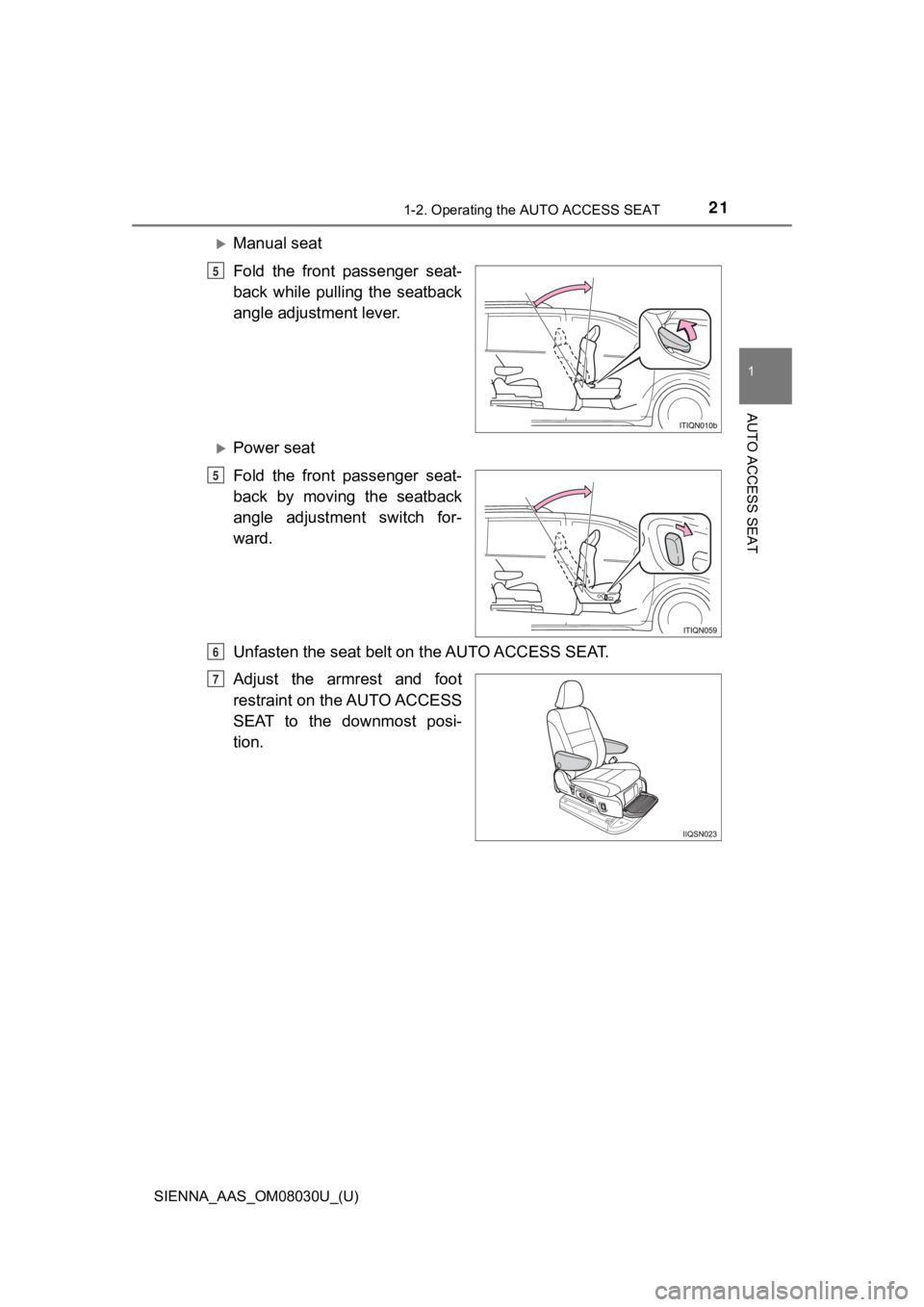
Manual seat
Fold the front passenger seat-
back while pulling the seatback
angle adjustment lever.
Power seat
Fold the front passenger seat-
back by moving the seatback
angle adjustment switch for-
ward.
Unfasten the seat belt on the AUTO ACCESS SEAT.
Adjust the armrest and foot
restraint on the AUTO ACCESS
SEAT to the downmost posi-
tion.
5
5
6
7
Page 31 of 64
311-2. Operating the AUTO ACCESS SEAT
SIENNA_AAS_OM08030U_(U)
1
AUTO ACCESS SEAT
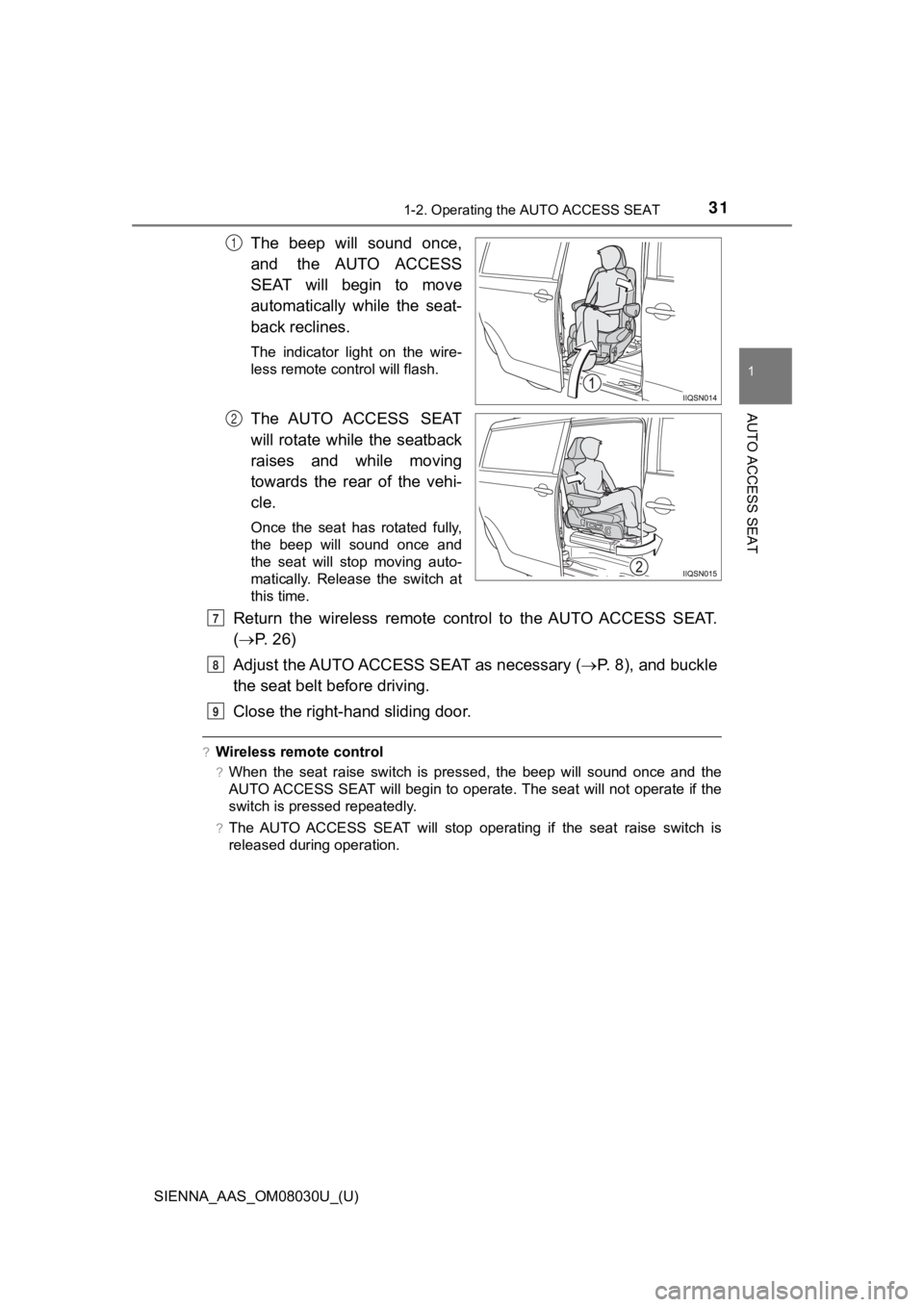
The beep will sound once,
and the AUTO ACCESS
SEAT will begin to move
automatically while the seat-
back reclines.
The indicator light on the wire-
less remote control will flash.
The AUTO ACCESS SEAT
will rotate while the seatback
raises and while moving
towards the rear of the vehi-
cle.
Once the seat has rotated fully,
the beep will sound once and
the seat will stop moving auto-
matically. Release the switch at
this time.
Return the wireless remote control to the AUTO ACCESS SEAT.
( P. 26)
Adjust the AUTO ACCESS SEAT as necessary ( P. 8), and buckle
the seat belt before driving.
Close the right-hand sliding door.
?Wireless remote control
?When the seat raise switch is pressed, the beep will sound once and the
AUTO ACCESS SEAT will begin to operate. The seat will not opera te if the
switch is pressed repeatedly.
?The AUTO ACCESS SEAT will stop operating if the seat raise switch is
released during operation.
1
2
7
8
9
Page 32 of 64
321-2. Operating the AUTO ACCESS SEAT
SIENNA_AAS_OM08030U_(U)
?Jam protection function
If the operation of the AUTO ACCESS SEAT is interrupted by collision with an
obstacle etc., the beep will sound twice and the seat will retreat slightly and
then stop. If this happens, make sure that the hands, feet etc. of the occupant
will not hit the body of the vehicle, and operate the seat once again after
removing the obstacle.
?Conditions which will halt operation
If another wireless remote control or the seat raise/lower switch are operated
while the AUTO ACCESS SEAT is being operated by wireless remote control,
the AUTO ACCESS SEAT will stop operating.
?If the AUTO ACCESS SEAT h as not been stowed properly
The following operations cannot be carried out.
?Power sliding door function (right-hand sliding door only)
?Shifting
?Adjustment of the seat position and seatback angle of the AUTO ACCESS
SEAT
WARNING
?Before returning the AUTO ACCESS SEAT to the vehicle
?Check that the right-hand third seat occupant is safe.
Their feet etc. may get caught between the AUTO ACCESS SEAT and the
vehicle body, possibly causing an injury.
?Make sure that the right-hand sliding door is fully open. Otherwise, the
hands or feet of the occupant may hit the door when the AUTO AC CESS
SEAT is operated, possibly causing an injury.
Page 46 of 64
463. When you think a malfunction has occurred
SIENNA_AAS_OM08030U_(U)
If the AUTO ACCESS SEAT retreats a little and then stops
ReasonCorrection procedure
The AUTO ACCESS SEAT has
hit an obstacle, or operation
has been otherwise obstructed.Remove the obstacle and try operating
the AUTO ACCESS SEAT again.
If the shift lever cannot be moved from P
ReasonCorrection procedure
The AUTO ACCESS SEAT has
not been locked in place after
being stowed.
Press and hold the seat raise switch on
the wireless remote control or the raise
side of the seat raise/lower switch, and
confirm that the AUTO ACCESS SEAT
stops automatically and the beep sounds
once. Then, try shifting the shift lever
again.
If the seat position or the seatback angle of the AUTO ACCESS
SEAT cannot be adjusted
ReasonCorrection procedure
An attempt has been made to
adjust the AUTO ACCESS
SEAT while it is raising, lower-
ing or rotating, or while it is out-
side the vehicle.Press and hold the seat raise switch on
the wireless remote control or the raise
side of the seat raise/lower switch, and
confirm that the AUTO ACCESS SEAT
stops automatically and the beep sounds
once. Then, try adjusting the seat again.
Page 48 of 64
483. When you think a malfunction has occurred
SIENNA_AAS_OM08030U_(U)
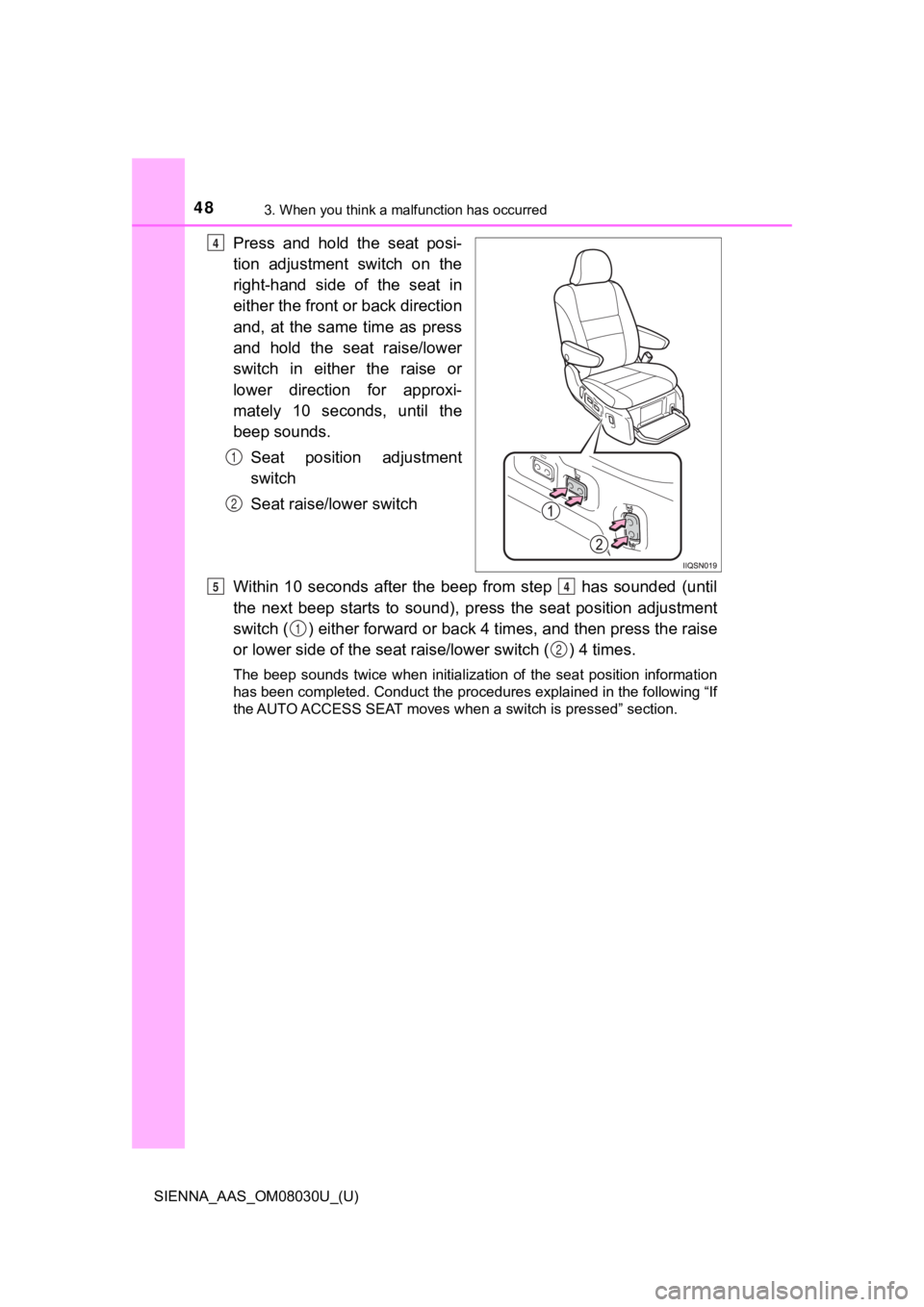
Press and hold the seat posi-
tion adjustment switch on the
right-hand side of the seat in
either the front or back direction
and, at the same time as press
and hold the seat raise/lower
switch in either the raise or
lower direction for approxi-
mately 10 seconds, until the
beep sounds.Seat position adjustment
switch
Seat raise/lower switch
Within 10 seconds after the beep from step has sounded (until
the next beep starts to sound), press the seat position adjustm ent
switch ( ) either forward or back 4 times, and then press the raise
or lower side of the seat raise/lower switch ( ) 4 times.
The beep sounds twice when initialization of the seat position information
has been completed. Conduct the procedures explained in the following “If
the AUTO ACCESS SEAT moves when a switch is pressed” section.
4
1
2
54
1
2
Page 49 of 64
493. When you think a malfunction has occurred
SIENNA_AAS_OM08030U_(U)
3
When trouble arises
?Initialize the seat position information before conducting the opera-
tions listed here.
?The movements of the seat while conducting these operations wil l
be different from normal.
?If the seat resets while the operations from step to step are
being carried out, a long beep wi ll sound, and the seat’s move-
ments will return to normal.
Adjust the head restraint to the downmost position. ( P. 1 0 )
Fold the footrest up. ( P. 1 3 )
Fold the front pas senger seatback. ( P. 2 1 )
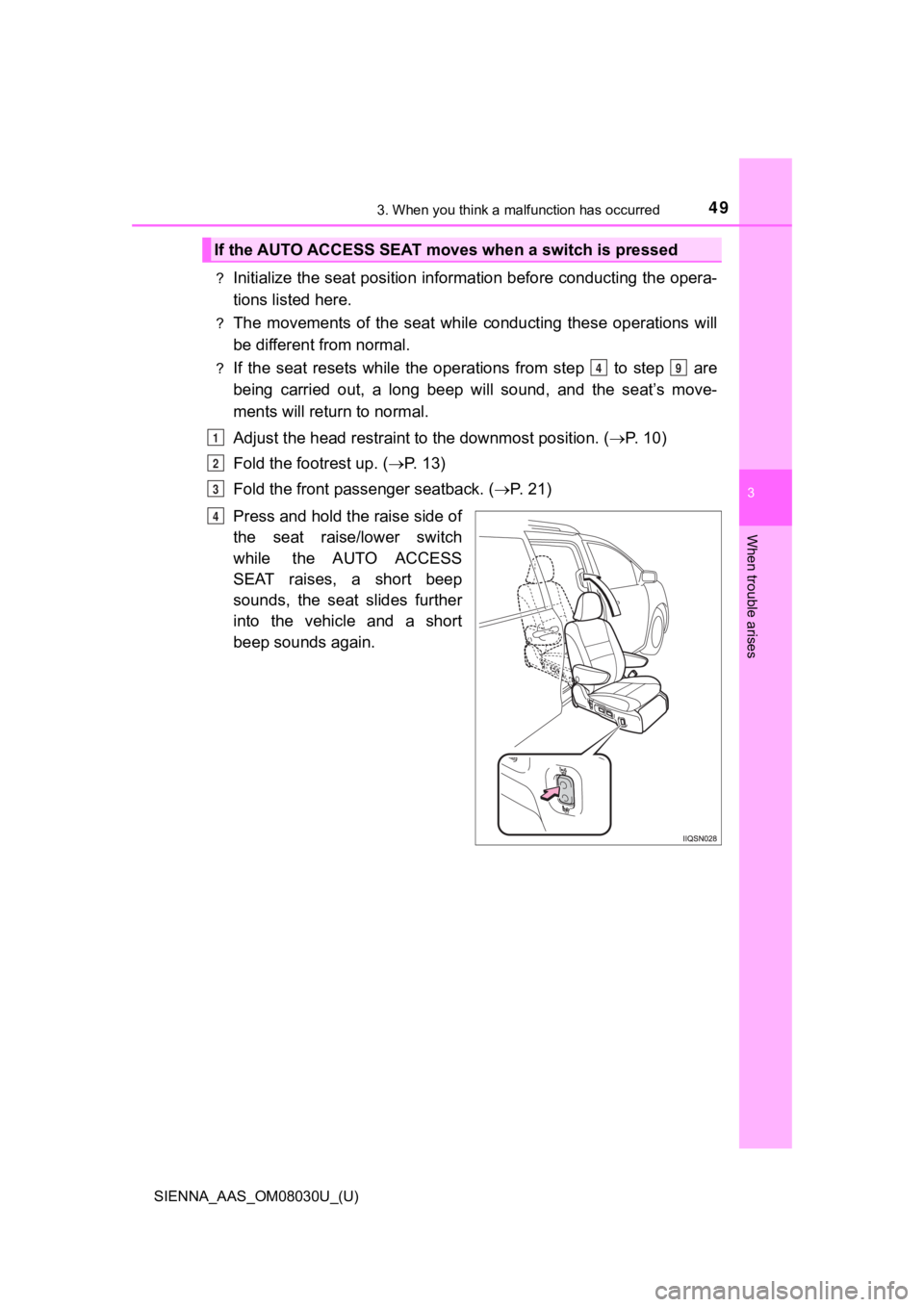
Press and hold the raise side of
the seat raise/lower switch
while the AUTO ACCESS
SEAT raises, a short beep
sounds, the seat slides further
into the vehicle and a short
beep sounds again.
If the AUTO ACCESS SEAT moves when a switch is pressed
49
1
2
3
4