remote control TOYOTA SIENNA 2019 Owners Manual (in English)
[x] Cancel search | Manufacturer: TOYOTA, Model Year: 2019, Model line: SIENNA, Model: TOYOTA SIENNA 2019Pages: 64, PDF Size: 1.22 MB
Page 1 of 64
SIENNA_AAS_OM08030U_(U)
Pictorial indexSearch by illustration
1AUTO
ACCESS SEATInformation regarding the AUTO ACCESS SEAT,
including usage procedure
2MaintenanceChecking fuses and replacing the battery of the
wireless remote control
3When trouble
arisesPoints to check when you think a malfunction has
occurred
IndexAlphabetical listing of information contained in this
manual
This manual contains information about the AUTO
ACCESS SEAT. Refer to the “OWNER’S MANUAL” for
other information regarding your vehicle.
Page 2 of 64
TABLE OF CONTENTS2
SIENNA_AAS_OM08030U_(U)Reading this manual ...................... 4
How to search ................................ 5
Pictorial index ................................ 6
1-1. AUTO ACCESS SEAT
AUTO ACCESS SEAT .......... 8
Head restraint...................... 10
Armrests .............................. 12
Footrest ............................... 13
Correct riding posture.......... 14
Wireless remote control ...... 16
1-2. Operating
th e AUTO ACCESS SEAT
Before operating the AUTO ACCESS SEAT ................. 20
Moving the AUTO ACCESS SEAT outside
the vehicle ......................... 26
Returning the AUTO ACCESS SEAT to
the vehicle ......................... 30
Operating with the seat raise/lower switch.............. 34 2. Maintenance
Checking and replacingfuses .................................. 38
Wireless remote control battery ............................... 40
3. When you think a
ma lfunction has occurred
AUTO ACCESS SEAT ........ 44
If the AUTO ACCESS SEAT does not move while
outside the vehicle............. 47
Wireless remote control ....... 59
Alphabetical index ............... 62
1AUTO ACCESS SEAT
2Maintenance
3When trouble arises
Index
Page 6 of 64
6Pictorial index
SIENNA_AAS_OM08030U_(U)
Pictorial index
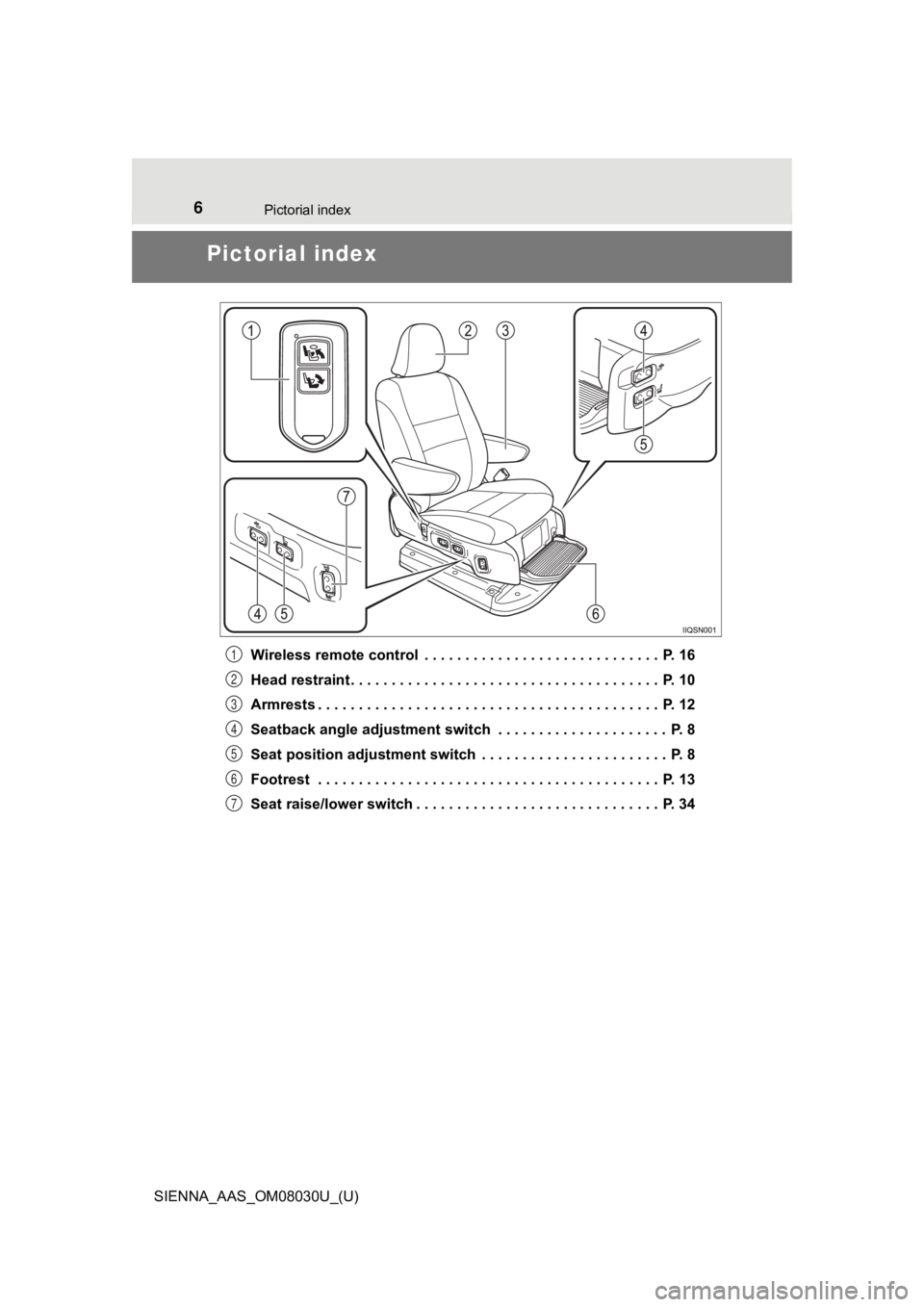
Wireless remote control . . . . . . . . . . . . . . . . . . . . . . . . . . . . . P. 16
Head restraint . . . . . . . . . . . . . . . . . . . . . . . . . . . . . . . . . . . . . . P. 10
Armrests . . . . . . . . . . . . . . . . . . . . . . . . . . . . . . . . . . . . . . . . . . P. 12
Seatback angle adjustment switch . . . . . . . . . . . . . . . . . . . . . P. 8
Seat position adjustment switch . . . . . . . . . . . . . . . . . . . . . . . P. 8
Footrest . . . . . . . . . . . . . . . . . . . . . . . . . . . . . . . . . . . . . . . . . . P. 13
Seat raise/lower switch . . . . . . . . . . . . . . . . . . . . . . . . . . . . . . P. 341
2
3
4
5
6
7
Page 7 of 64
7
SIENNA_AAS_OM08030U_(U)
AUTO ACCESS SEAT1
1-1. AUTO ACCESS SEATAUTO ACCESS SEAT .......... 8
Head restraint ..................... 10
Armrests.............................. 12
Footrest ............................... 13
Correct riding posture ......... 14
Wireless remote control ...... 16
1-2. Operating
the AUTO ACC ESS SEAT
Before operating the AUTO ACCESS SEAT................. 20
Moving the AUTO ACCESS SEAT outside
the vehicle......................... 26
Returning the AUTO ACCESS SEAT to
the vehicle......................... 30
Operating with the seat raise/lower switch ............. 34
Page 16 of 64
161-1. AUTO ACCESS SEAT
SIENNA_AAS_OM08030U_(U)
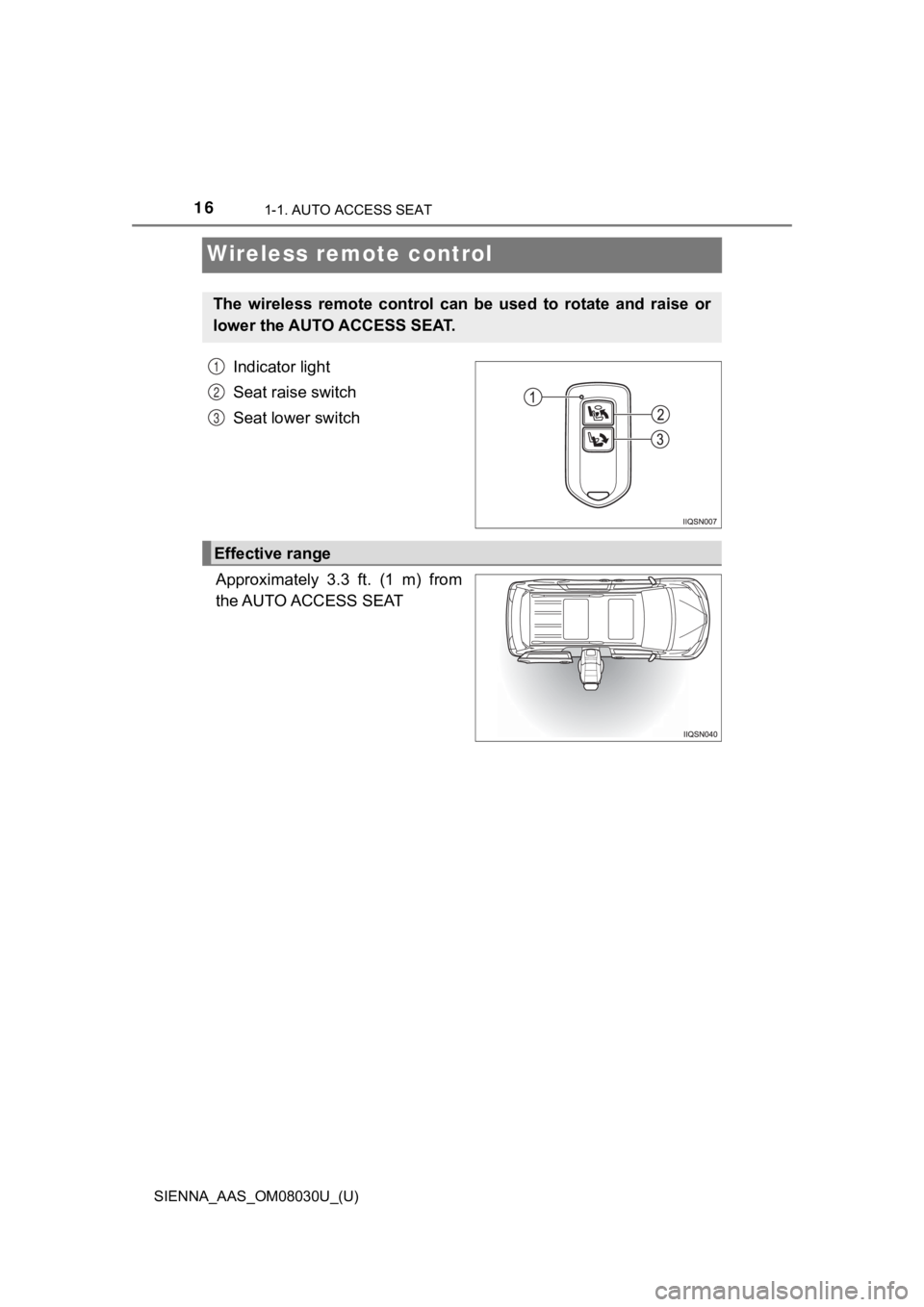
Wireless remote control
Indicator light
Seat raise switch
Seat lower switch
Approximately 3.3 ft. (1 m) from
the AUTO ACCESS SEAT
The wireless remote control can be used to rotate and raise or
lower the AUTO ACCESS SEAT.
1
2
3
Effective range
Page 17 of 64

171-1. AUTO ACCESS SEAT
SIENNA_AAS_OM08030U_(U)
1
AUTO ACCESS SEAT
?Operating conditions
?The effective range of the wireless remote control changes in accordance
with surroundings.
?Interference from other radio waves may cause the AUTO ACCESS S EAT
to stop moving temporarily even when pressing the wireless remo te control
switches. In this event, do the following:
• Stand in a different place and press the switch.
Press the switch once again after moving. The AUTO ACCESS SEAT will
not operate if you hold the switch down while changing position .
• Operate the seat raise/lower switch ( P. 34)
?Battery
?The lifespan of the battery is about 6 months, but this may cha nge in accor-
dance with usage.
?If the battery is discharged, the AUTO ACCESS SEAT may not operate
even if the wireless remote control is operated or the indicato r light will stop
flashing. In these events, replace the battery with a new one. ( P. 40)
?When riding in an aircraft
When bringing a wireless remote control onto an aircraft, make sure you do
not press any buttons on the wireless remote control while inside the aircraft
cabin. If you are carrying the wireless remote control in your bag etc., ensure
that the buttons are not likely to be pressed accidentally. Pre ssing a button
may cause the wireless remote control to emit radio waves that could inter-
fere with the operation of the aircraft.
Page 18 of 64

181-1. AUTO ACCESS SEAT
SIENNA_AAS_OM08030U_(U)
?Conditions affecting operation
If you use the wireless remote control to operate the AUTO ACCESS SEAT at
the same time as doing any of the following, the AUTO ACCESS SEAT m a y
not operate properly:
?Operating the AUTO ACCESS SEAT using another wireless remote co ntrol
?Operating the AUTO ACCESS SEAT using the seat raise/lower switch
?Using the smart key system
?Unlocking and locking the doors using the wireless remote control
?When replacing either the transmitter or the receiver of the wi reless
remote control
It is necessary to replace both the transmitter and the receive r. Contact your
Toyota dealer.
?Certification for the wireless remote control
U.S.A.
FCC ID: HYQ12BDF
FCC ID: HYQ13BDH
NOTE:
This device complies with part 15 of the FCC Rules. Operation is subject to
the following two conditions: (1) This device may not cause har mful interfer-
ence, and (2) this device must accept any interference received, including
interference that may cause undesired operation.
FCC WARNING:
Changes or modifications not expressly approved by the party re sponsible for
compliance could void the user’s authority to operate the equip ment.
Canada
NOTE:
Operation is subject to the following two conditions: (1) this device may not
cause interference, and (2) this device must accept any interfe rence, includ-
ing interference that may cause undesired operation of the devi ce.
Page 19 of 64
191-1. AUTO ACCESS SEAT
SIENNA_AAS_OM08030U_(U)
1
AUTO ACCESS SEAT
WARNING
?Wireless remote control precautions
Observe the following precautions to reduce the risk of injury.
?Operate the AUTO ACCESS SEAT from a position from which you can
see the occupant of the seat.
?Make sure that the occupant’s head, arms and legs will not get caught
between the seat and the body of the vehicle.
?Steady the AUTO ACCESS SEAT and the occupant with your hand whi le
operating.
NOTICE
?To prevent wireless remote control damage
?Observe the following:
• Do not expose the wireless remote control to high temperatures by
placing it in direct sunlight.
• Do not disassemble the wireless remote control.
• Do not drop the wireless remote control, subject it to strong shocks or
bend it.
• Do not get the wireless remote control wet.
?Do not wipe the wireless remote control with thinner, gasoline or benzene.
The surface of it may be damaged.
When cleaning the wireless remote control, wipe it using a wrun g cloth
soaked in water or lukewarm water.
?Do not attach metallic or magnetic materials to the wireless re mote control
or place the wireless remote control close to such materials.
?Do not attach metallic window tinting or other metallic objects such as non-
genuine antenna to the windows.
?Do not attach accessories to the wireless remote control. These could get
caught in the AUTO ACCESS SEAT during operation.
Page 22 of 64
221-2. Operating the AUTO ACCESS SEAT
SIENNA_AAS_OM08030U_(U)
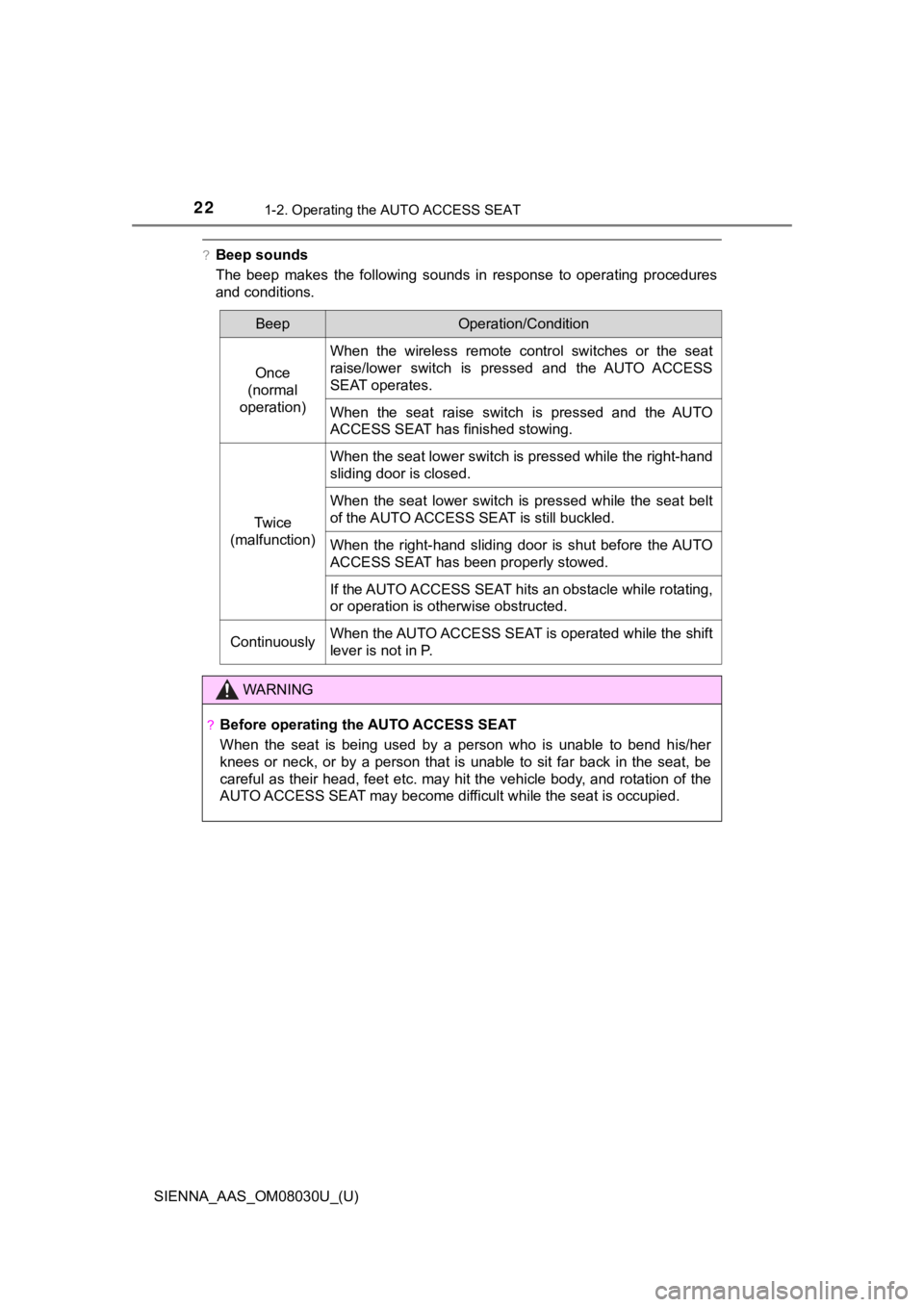
?Beep sounds
The beep makes the following sounds in response to operating procedures
and conditions.
BeepOperation/Condition
Once
(normal
operation)
When the wireless remote control switches or the seat
raise/lower switch is pressed and the AUTO ACCESS
SEAT operates.
When the seat raise switch is pressed and the AUTO
ACCESS SEAT has finished stowing.
Tw i c e
(malfunction)
When the seat lower switch is pressed while the right-hand
sliding door is closed.
When the seat lower switch is pressed while the seat belt
of the AUTO ACCESS SEAT is still buckled.
When the right-hand sliding door is shut before the AUTO
ACCESS SEAT has been properly stowed.
If the AUTO ACCESS SEAT hits an obstacle while rotating,
or operation is otherwise obstructed.
ContinuouslyWhen the AUTO ACCESS SEAT is operated while the shift
lever is not in P.
WARNING
?Before operating the AUTO ACCESS SEAT
When the seat is being used by a person who is unable to bend h is/her
knees or neck, or by a person that is unable to sit far back in the seat, be
careful as their head, feet etc. may hit the vehicle body, and rotation of the
AUTO ACCESS SEAT may become difficult while the seat is occupied.
Page 26 of 64
261-2. Operating the AUTO ACCESS SEAT
SIENNA_AAS_OM08030U_(U)
Moving the AUTO ACCESS SEAT outside
the vehicle
Park the vehicle on a flat surface and leave the engine running .
Shift the shift lever to P and set the parking brake.
Confirm the following: • The occupant is sitting correctly in the AUTO ACCESS SEAT. ( P. 14)
• The seat belt is not caught up in the AUTO ACCESS SEAT.
• The occupant of the right-h and third seat is safe.
• The condition of the AUTO ACCESS SEAT ( P. 2 0 )
Open the right-hand sl iding door fully.
Fold the front pas senger seatback. ( P. 2 1 )
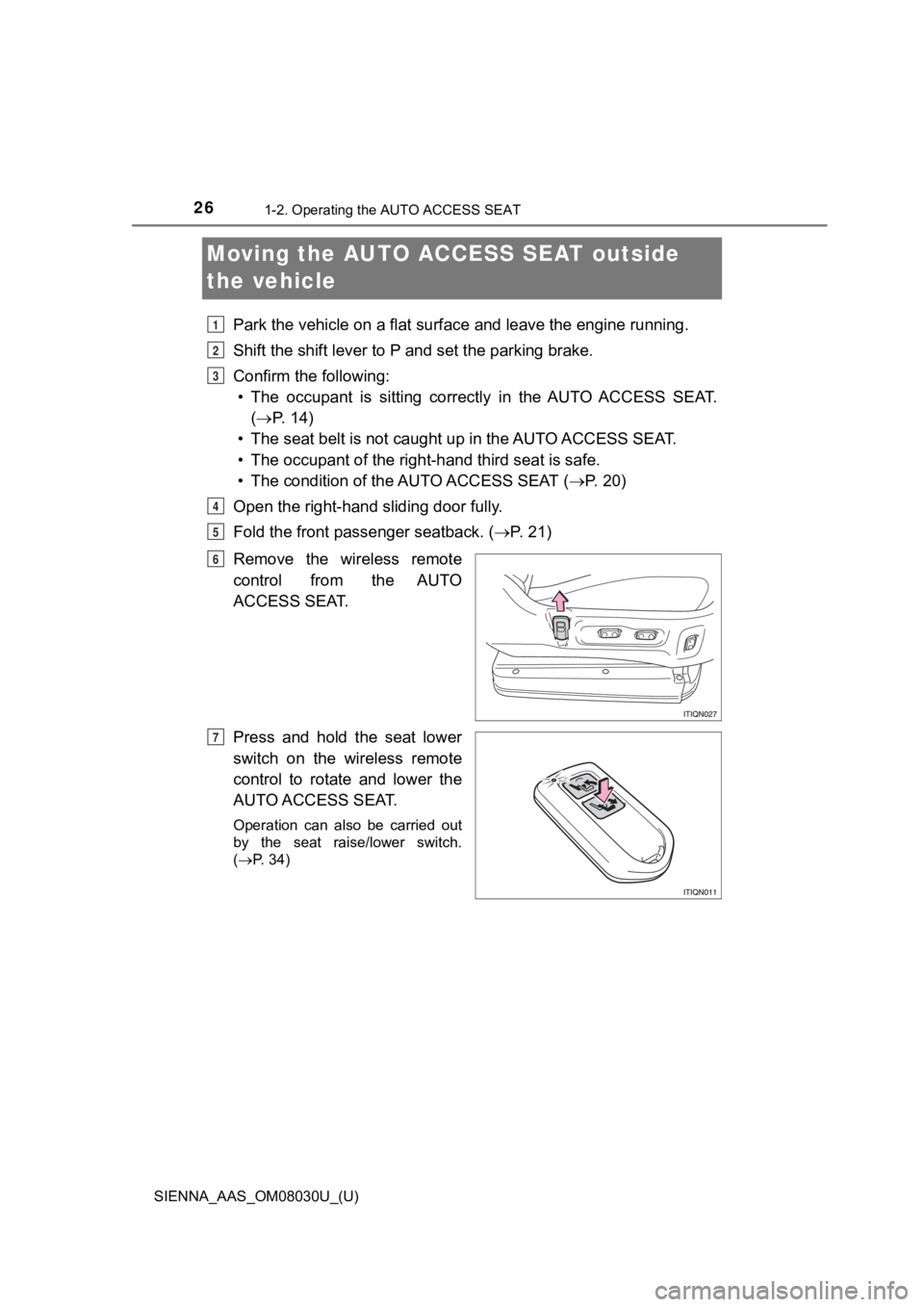
Remove the wireless remote
control from the AUTO
ACCESS SEAT.
Press and hold the seat lower
switch on the wireless remote
control to rotate and lower the
AUTO ACCESS SEAT.
Operation can also be carried out
by the seat raise/lower switch.
( P. 34)
1
2
3
4
5
6
7