change time TOYOTA SIENNA 2019 Owners Manual (in English)
[x] Cancel search | Manufacturer: TOYOTA, Model Year: 2019, Model line: SIENNA, Model: TOYOTA SIENNA 2019Pages: 56, PDF Size: 3.1 MB
Page 2 of 56
SIENNA 2019
This Quick Reference Guide is a summary of basic vehicle
operations. It contains brief descriptions of fundamental
operations so you can locate and use the vehicle’s main
equipment quickly and easily.
The Quick Reference Guide is not intended as a substitute for
the Owner’s Manual located in your vehicle’s glove box. We
strongly encourage you to review the Owner’s Manual and
supplementary manuals so you will have a better understanding
of your vehicle’s capabilities and limitations.
Your dealership and the entire staff of Toyota Motor North
America, Inc. wish you many years of satisfied driving in your
new Sienna.
A word about safe vehicle operations
This Quick Reference Guide is not a full description of Sienna operation\
s.
Every Sienna owner should review the Owner’s Manual that accompanies \
this
vehicle.
Pay special attention to the boxed information highlighted in color throughout
the Owner’s Manual. Each box contains safe operating instructions to \
help you
avoid injury or equipment malfunction.
All information in this Quick Reference Guide is current at the time of \
printing.
Toyota reserves the right to make changes at any time without notice.
NOTES
53
Page 14 of 56
12
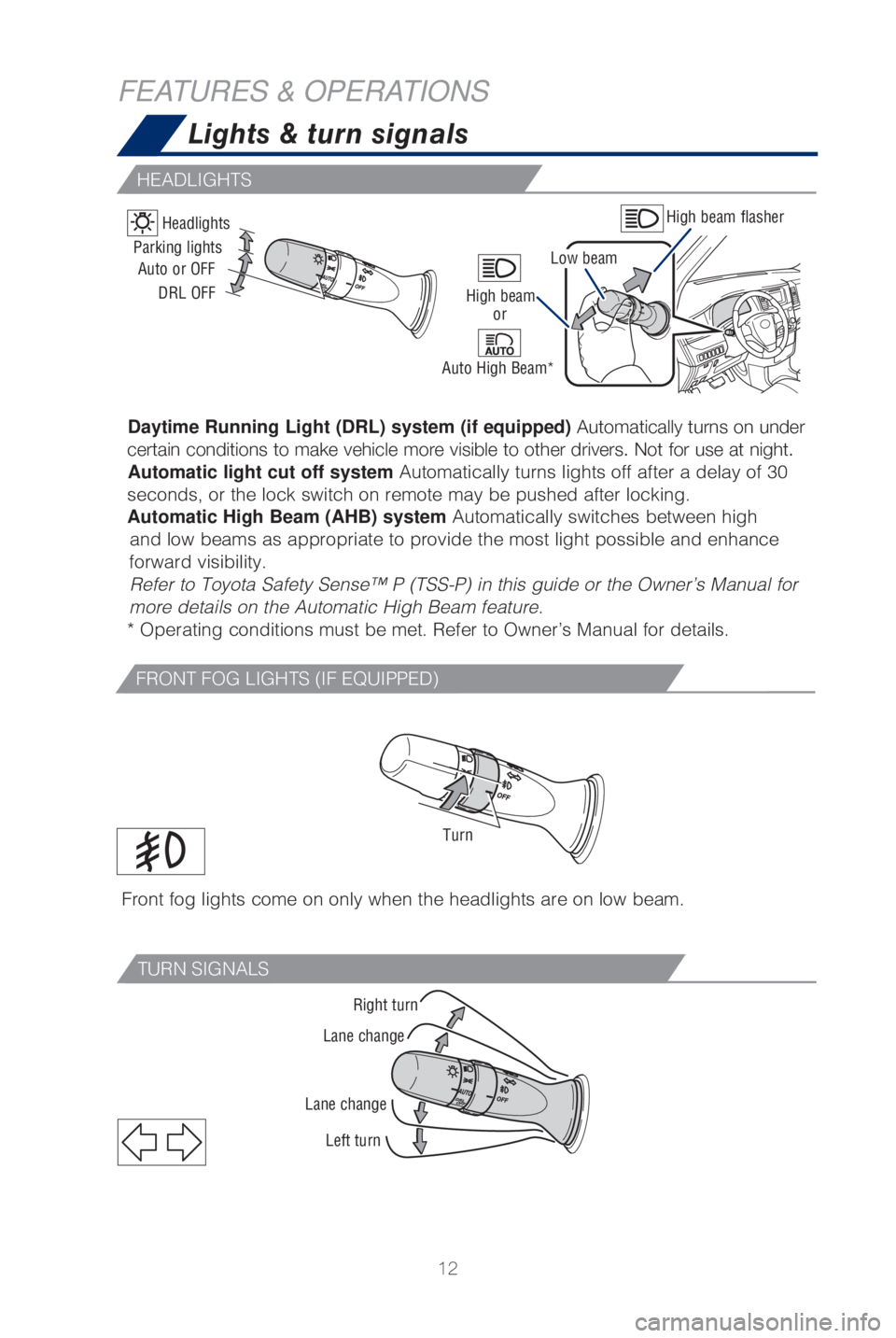
Right turn
Lane change
Lane change Left turn
TURN SIGNALS
FEATURES & OPERATIONS Lights & turn signals
High beam flasher
Low beam
Headlights
Daytime Running Light (DRL) system (if equipped)
Automatically turns on under
certain conditions to make vehicle more visible to other drivers. Not fo\
r use at night. Automatic light cut off system Automatically turns lights off after a delay of 30
seconds, or the lock switch on remote may be pushed after locking.
Automatic High Beam (AHB) system Automatically switches between high and low beams as appropriate to provide the most light possible and enha\
nce
forward visibility. Refer to Toyota Safety Sense™ P (TSS-P) in this guide or the Owner’\
s Manual for
more details on the Automatic High Beam feature.
* Operating conditions must be met. Refer to Owner’s Manual for detai\
ls.
Parking lights
High beam
Auto or OFF
DRL OFF
Auto High Beam*or
Front fog lights come on only when the headlights are on low beam.
Turn
FRONT FOG LIGHTS (IF EQUIPPED)
HEADLIGHTS
Page 25 of 56

23
OVERVIEW
FEATURES & OPERATIONS
TOYOTA SAFETY SENSE
SAFETY & EMERGENCY FEATURES“>>”
Use to search within the selected audio medium (radio, CD, etc.).
Steering wheel telephone switches
Microphone
Bluetooth® technology allows dialing or receipt of calls without removing your han\
ds
from the steering wheel or using a cable to connect the compatible telep\
hone and
the system.
* Push and hold to access Mobile Assistant. When a compatible smartphone \
is
Bluetooth® connected push and hold the Voice Command switch 2-3 seconds to
access Siri® Eyes Free.
Refer to the “Bluetooth
® Device Pairing Section” in this guide for more information
about phone connections and compatibility.
Refer to the “Navigation and Multimedia System Owner’s Manual” \
for more details.
Steering wheel switches
& telephone controls (Bluetooth®)
Back switch
Enter switch
End call
NOTE: Concentrating on the road should always be your first priority while
driving. Do not use the Entune™ 3.0 system if it will distract you.
Volume control
Voice command
switch/
Mobile Assistant
access*
Start call
“MODE/HOLD”
Push to change an audio
mode. Push and hold to turn
the audio mutes or pauses.
Type A (with moonroof) Type B (without moonroof)
“ , ”
Select an item/Change pages
Page 38 of 56

36
TOYOTA SAFETY SENSE™
CHANGING PCS ALERT TIMING
FarMiddle
(default) Near
(1) Press “” switches and select from the MID.
(2) Press “
or ” switches and select the setting function from the MID
and then press “
”. The setting screen is displayed.
(3) Select “Sensitivity” and then press “
.” Each time “” is pressed, the
response to the PCS alert timing changes as shown above. You can press “
” to
go back to the menu.
Note: PCS is enabled each time the engine switch is turned to Ignition On. The
system can be disabled/enabled and the alert timing of the system can be changed.
(Alert timing only, brake operation remains the same).
Monocular camera sensor
Millimeter
wave radar
As part of the Pre-Collision System, this function is also designed to f\
irst provide an
alert and then automatic braking if needed.In certain conditions, the PCS system included with the TSS-P package ma\
y also
help to detect a pedestrian in front of your vehicle. With Toyota Safety\
Sense™ P,
PCS uses an in-vehicle camera and front-grill mounted millimeter-wave ra\
dar to
help detect a pedestrian in front of your vehicle in certain conditions.\
The in-vehicle
camera of PCS detects a potential pedestrian based on size, profile, and\
motion of
the detected pedestrian. However, a pedestrian may not be detected depen\
ding
on the conditions, including the surrounding brightness and the motion, \
posture,
size, and angle of the potential detected pedestrian, preventing the sys\
tem from
operating or engaging. Refer to a Toyota Owner’s Manual for additional information.
PCS PEDESTRIAN DETECTION
Page 39 of 56

37
OVERVIEW
FEATURES & OPERATIONS
TOYOTA SAFETY SENSE
SAFETY & EMERGENCY FEATURES
(1) Press “” switches and select from the MID.
(2) Press “
or ” switches and select the setting function from the MID
and then press “
”. The setting screen is displayed.
(3) Select
and then press “.” The Pre-Collision System will be disabled.
You can press “
” to go back to the menu.
Note: PCS is enabled each time the engine switch is turned to Ignition On. The
system can be disabled/enabled and the alert timing of the system can be changed.
(Alert timing only, brake operation remains the same).
DISABLING PRE-COLLISION SYSTEM (PCS)
LDA in TSS-P uses an in-vehicle camera designed to detect visible white \
and
yellow lane markers in front of the vehicle and the vehicle’s positio\
n on the road.
If the system determines that the vehicle is starting to unintentionally\
deviate from
its lane, the system alerts the driver with an audio and visual alert. W\
hen the alerts
occur, the driver must check the surrounding road situation and carefull\
y operate
the steering wheel to move the vehicle back to the center part of their \
lane.
LDA is designed to function at speeds of approximately 32 MPH or higher \
on
relatively straight roadways.
In addition to the alert function, LDA w/SA also features a steering ass\
ist
function. When enabled, if the system determines that the vehicle is on \
a path
to unintentionally depart from its lane, the system may provide small co\
rrective
steering inputs to the steering wheel for a short period of time to help\
keep the
vehicle in its lane.
Lane Departure Alert with Steering Assist
(LDA w/SA)
Page 41 of 56

39
OVERVIEW
FEATURES & OPERATIONS
TOYOTA SAFETY SENSE
SAFETY & EMERGENCY FEATURES
DISABLING STEERING ASSIST
(1) Press “” switches to find and select .
(2) Press “
or ” switches to find the setting function and then press
“
”. The LDA Steering Assist system will be disabled.
(3) You can press “
” to go back to the menu.
Note: Operation of the LDA system and setting adjustments continues in the same
condition regardless of Ignition cycle until changed by the driver or the system is reset.
ADJUSTING LDA ALERT SENSITIVITY
The driver can adjust the sensitivity of the LDA (warning) function from the
Multi-Information Display (MID) customization screen.
High - Is designed to warn approximately before the front tire crosses the
lane marker.
Normal - Is designed to warn approximately when the front tire crosses
the lane marker.
(1) Press “
” switches to find and select .
(2) Press “
or ” switches to find the setting function and then press
“
”. The setting screen is displayed.
(3) Select “Sensitivity” and then press “
.” Each time “” is pressed, the
response to the LDA alert sensitivity changes. You can press “
” to go back to the
menu.
Note: Operation of the LDA system and setting adjustments continues in the
same condition regardless of Ignition cycle until changed by the driver or the
system is reset.
SWAY WARNING SYSTEM
SWS is a function of LDA and is designed to detect swaying based on the \
vehicle
location in the lane and the driver’s steering wheel operation. To he\
lp prevent
swaying, the system alerts the driver using a buzzer sound and a warning\
displays
in the MID.
Continuous lane deviations from
swaying.
Gentle swaying from driver’s
inattentiveness.
Acute steering wheel operation after the
number of operations decrease due to driver’s
inattentiveness.
Page 42 of 56

40
TOYOTA SAFETY SENSE™
(1) Press “” switches to find and select .
(2) Press “
or ” switches and select the setting function and then press
“
.”
(3) Press “
” each time to change the setting.
(4) Press “
” to go back to the menu.
(1) Press “
” switches to find and select .
(2) Press “
or ” switches and select the setting function and then press
“
.”
(3) Press “
” each time to change the setting.
(4) Press “
” to go back to the menu.
Note: Operation of the LDA system and setting adjustments continues in the
same condition regardless of Ignition cycle until changed by the driver or the
system is reset.
ADJUSTING SWAY ALERT SENSITIVITY
DISABLING LDA SWAY WARNING SYSTEM
Page 44 of 56

42
TOYOTA SAFETY SENSE™
ADJUSTING DISTANCE
To change the vehicle-to-vehicle distance
Push the “
” button to cycle
through the settings, which will
change progressively. Preceding vehicle mark
This mode employs a radar sensor to detect the presence of vehicles up t\
o
approximately 328 ft (100 m) ahead, determines the current vehicle-to-vehicle
following distance and operates to maintain a preset following distance \
from the
vehicle ahead. These distances vary based on vehicle speed.
Note: Vehicle-to-vehicle distance will close in when traveling on long downhill slopes.
LONG
(default setting)MIDDLE SHORT
(1)
Constant speed cruising when there are no vehicles ahead
The vehicle travels at the speed set by the driver. The desired vehicle-\
to-
vehicle distance can also be set by operating the vehicle-to-vehicle dis\
tance
control.
(2) Deceleration cruising and follow-up cruising when a preceding vehicle
driving slower than the set speed appears When a vehicle is detected running ahead of you, the system automaticall\
y
decelerates your vehicle. When a greater reduction in vehicle speed is
necessary, the system applies the brakes (the brake lights will come on at this
time). The system will respond to changes in the speed of the vehicle ahead
in order to maintain the vehicle-to-vehicle distance set by the driver. \
A warning
tone warns you when the system cannot decelerate sufficiently to prevent\
your
vehicle from closing in on the vehicle ahead.
(3) Acceleration when there are no longer any preceding vehicles driving
slower than the set speed The system accelerates until the set speed is reached. The system then
returns to constant speed cruising.
Note: When your vehicle is too close to a vehicle ahead, and sufficient automatic
deceleration via the cruise control is not possible, the display will flash and the buzzer
will sound to alert the driver. An example of this would be if another driver cuts in
front of you while you are following a vehicle. Depress the brake pedal to ensure an
appropriate vehicle-to-vehicle distance.
(1) (2) (3)
Page 48 of 56

46
SAFETY & EMERGENCY FEATURES
Seat belts
Tire Pressure Monitoring (warning) System (TPMS)
System reset initialization
1. Push and hold “
SET” button until
the indicator blinks three times.
2. Wait a few minutes to allow initialization to complete.
After adjusting tire pressures, or after tires have been rotated or repl\
aced, turn the
ignition switch to “ON” and press and hold the “
SET” button until indicator blinks
three times. Let the vehicle sit for a few minutes to allow initializati\
on to complete.
Refer to the load label on the door jamb or the Owner’s Manual for ti\
re inflation
specifications.
If the tire pressure indicator flashes for more than 60 seconds and then\
remains on,
take the vehicle to your local Toyota dealer.
NOTE: The warning light may come on due to temperature changes or changes
in tire pressure from natural air leakage. If the system has not been initialized
recently, setting the tire pressures to factory specifications should turn off the
light.
Keep as low on
hips as possible
Take up slack
Too high
NOTE: If a passenger’s seat belt is fully extended, then retracted even slightly,
the Automatic locking retractor (ALR) will prevent it from being re-extended
beyond that point, unless fully retracted again. This feature is used to help
hold child restraint systems securely.
To find more information about seat belts, and how to install a child re\
straint
system, refer to the Owner’s Manual.
Page 55 of 56

SIENNA 2019
This Quick Reference Guide is a summary of basic vehicle
operations. It contains brief descriptions of fundamental
operations so you can locate and use the vehicle’s main
equipment quickly and easily.
The Quick Reference Guide is not intended as a substitute for
the Owner’s Manual located in your vehicle’s glove box. We
strongly encourage you to review the Owner’s Manual and
supplementary manuals so you will have a better understanding
of your vehicle’s capabilities and limitations.
Your dealership and the entire staff of Toyota Motor North
America, Inc. wish you many years of satisfied driving in your
new Sienna.
A word about safe vehicle operations
This Quick Reference Guide is not a full description of Sienna operation\
s.
Every Sienna owner should review the Owner’s Manual that accompanies \
this
vehicle.
Pay special attention to the boxed information highlighted in color throughout
the Owner’s Manual. Each box contains safe operating instructions to \
help you
avoid injury or equipment malfunction.
All information in this Quick Reference Guide is current at the time of \
printing.
Toyota reserves the right to make changes at any time without notice.
NOTES
53