phone TOYOTA SIENNA 2019 Owners Manual (in English)
[x] Cancel search | Manufacturer: TOYOTA, Model Year: 2019, Model line: SIENNA, Model: TOYOTA SIENNA 2019Pages: 56, PDF Size: 3.1 MB
Page 3 of 56
1
OVERVIEW
FEATURES & OPERATIONS
TOYOTA SAFETY SENSE
SAFETY & EMERGENCY FEATURES
INDEX
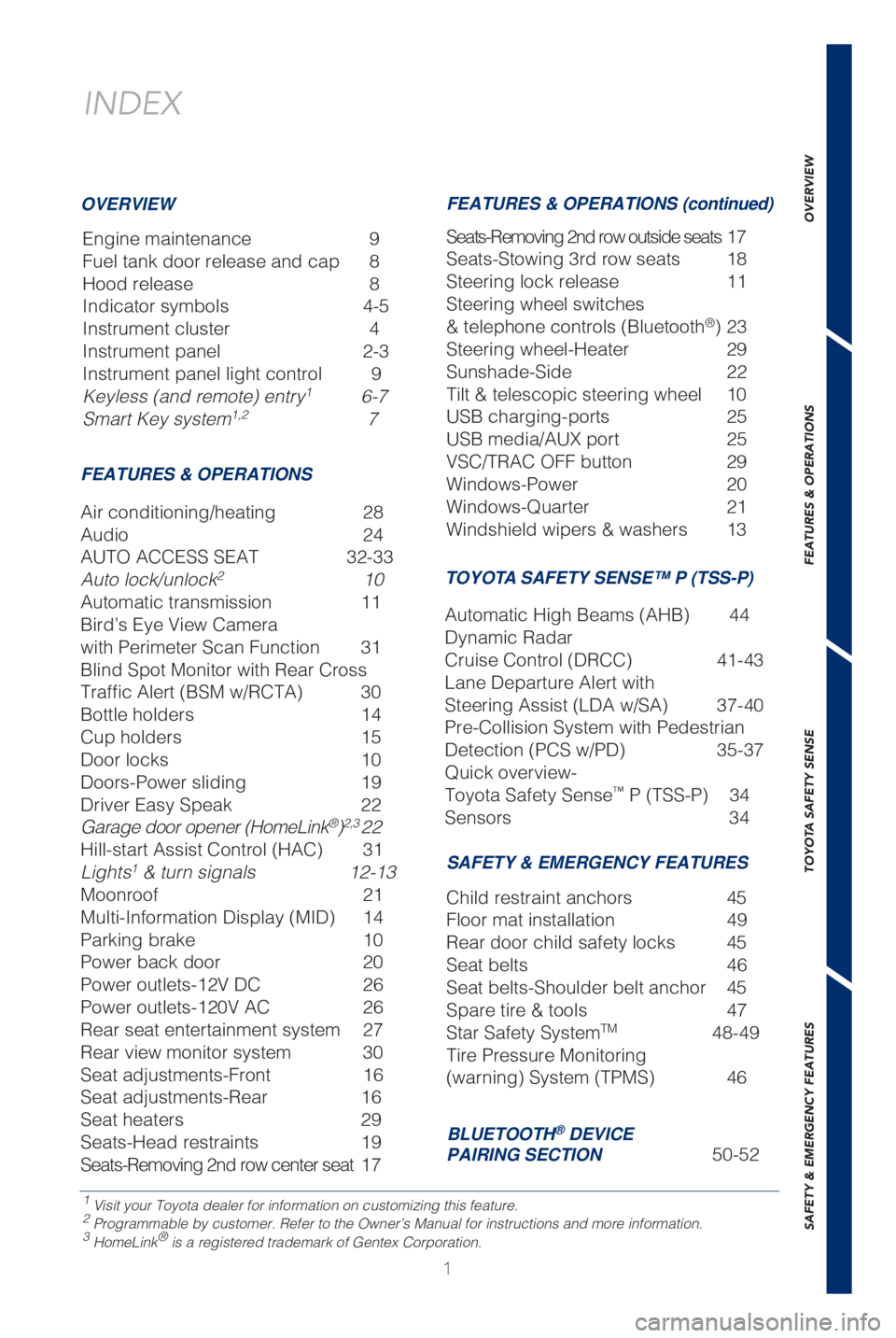
Engine maintenance 9
Fuel tank door release and cap 8
Hood release 8
Indicator symbols 4-5
Instrument cluster 4
Instrument panel 2-3
Instrument panel light control 9
Keyless (and remote) entry
1 6-7
Smart Key system1,2 7
1 Visit your Toyota dealer for information on customizing this feature.2 Programmable by customer. Refer to the Owner’s Manual for instructio\
ns and more information.3 HomeLink® is a registered trademark of Gentex Corporation.
OVERVIEW
FEATURES & OPERATIONS FEATURES & OPERATIONS (continued)
SAFETY & EMERGENCY FEATURES
Air conditioning/heating 28
Audio
24
AUTO ACCESS SEAT 32-33
Auto lock/unlock
2 10
Automatic transmission 11
Bird’s Eye View Camera
with Perimeter Scan Function 31
Blind Spot Monitor with Rear Cross
Traffic Alert (BSM w/RCTA) 30
Bottle holders 14
Cup holders 15
Door locks 10
Doors-Power sliding 19
Driver Easy Speak 22
Garage door opener (HomeLink
®)2,3 22
Hill-start Assist Control (HAC) 31
Lights
1 & turn signals 12-13
Moonroof 21
Multi-Information Display (MID) 14
Parking brake 10
Power back door 20
Power outlets-12V DC 26
Power outlets-120V AC 26
Rear seat entertainment system 27
Rear view monitor system 30
Seat adjustments-Front 16
Seat adjustments-Rear 16
Seat heaters 29
Seats-Head restraints 19
Seats-Removing 2nd row center seat 17 Seats-Removing 2nd row outside seats 17
Seats-Stowing 3rd row seats 18
Steering lock release
11
Steering wheel switches
& telephone controls (Bluetooth
®) 23
Steering wheel-Heater 29
Sunshade-Side 22
Tilt & telescopic steering wheel 10
USB charging-ports 25
USB media/AUX port 25
VSC/TRAC OFF button 29
Windows-Power 20
Windows-Quarter 21
Windshield wipers & washers 13
Child restraint anchors 45
Floor mat installation 49
Rear door child safety locks 45
Seat belts 46
Seat belts-Shoulder belt anchor 45
Spare tire & tools 47
Star Safety System
TM 48-49
Tire Pressure Monitoring
(warning) System (TPMS) 46
BLUETOOTH® DEVICE
PAIRING SECTION 50-52
TOYOTA SAFETY SENSE™ P (TSS-P)
Automatic High Beams (AHB) 44
Dynamic Radar
Cruise Control (DRCC) 41-43
Lane Departure Alert with
Steering Assist (LDA w/SA) 37-40
Pre-Collision System with Pedestrian
Detection (PCS w/PD) 35-37
Quick overview-
Toyota Safety Sense
™ P (TSS-P) 34
Sensors 34
Page 4 of 56
2
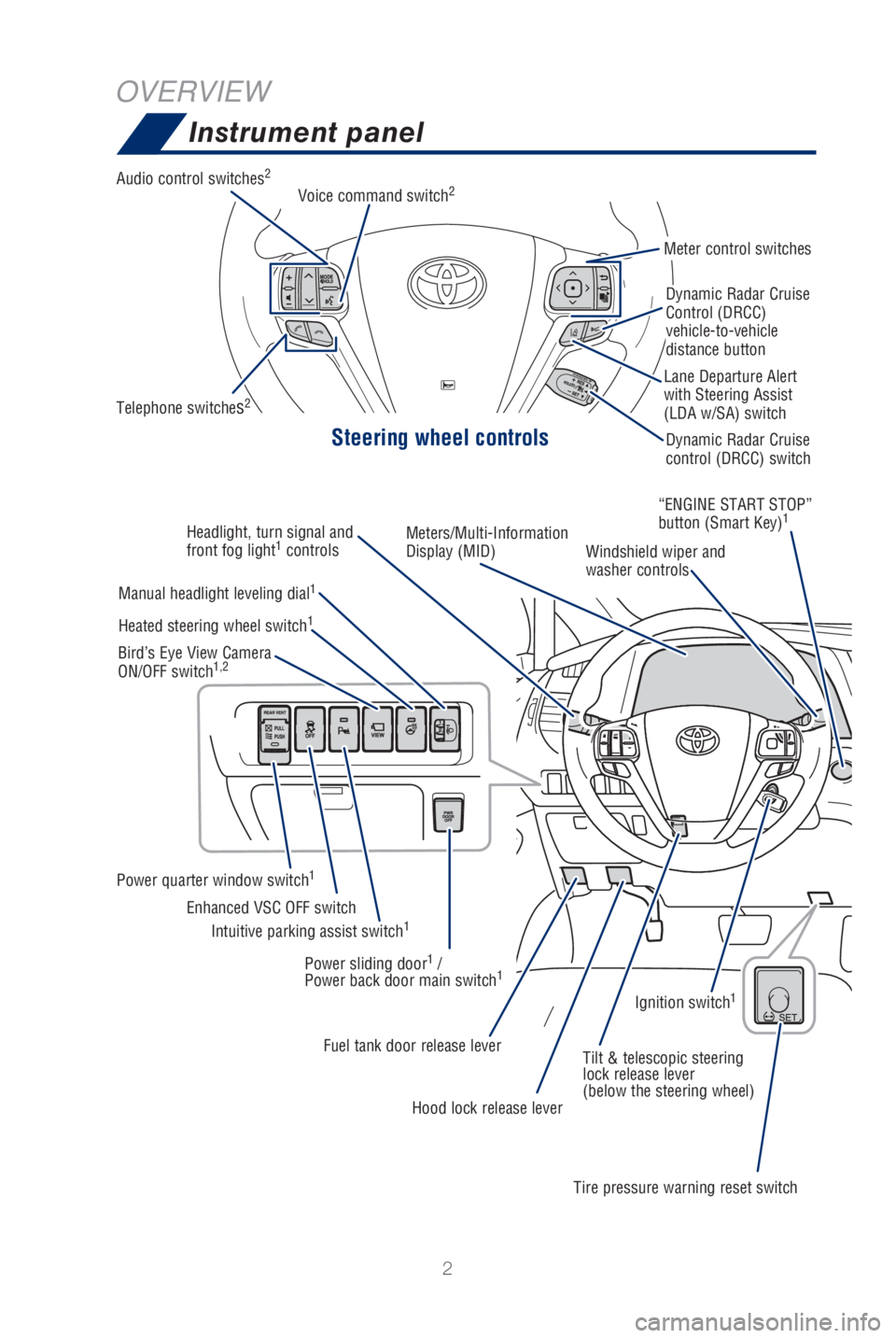
OVERVIEWInstrument panel
Steering wheel controls
Audio control switches2
Telephone switches2
Meter control switches
Dynamic Radar Cruise
Control (DRCC)
vehicle-to-vehicle
distance button
Dynamic Radar Cruise
control (DRCC) switch
Lane Departure Alert
with Steering Assist
(LDA w/SA) switch
Voice command switch
2
Headlight, turn signal and
front fog light1
controls Meters/Multi-Information
Display (MID)
Windshield wiper and
washer controls“ENGINE START STOP”
button (Smart Key)
1
Manual headlight leveling dial1
Power quarter window switch1
Intuitive parking assist switch1Enhanced VSC OFF switch
Heated steering wheel switch
1
Bird’s Eye View Camera
ON/OFF switch1,2
Power sliding door1 /
Power back door main switch1
Fuel tank door release lever Tilt & telescopic steering
lock release lever
(below the steering wheel)
Hood lock release lever
Tire pressure warning reset switchIgnition switch
1
Page 24 of 56
 22
Driver Easy Speak (if equipped)
FEATURES & OPERATIONS
This feature utilizes the vehicle’s built-in microphone to amplify th\
e driver’s voice
through the rear speakers. To activate this featur")
22
Driver Easy Speak (if equipped)
FEATURES & OPERATIONS
This feature utilizes the vehicle’s built-in microphone to amplify th\
e driver’s voice
through the rear speakers. To activate this feature, select “Driver E\
asy Speak”
from the Apps screen on the audio unit. The feature must be turned on ev\
ery time
you enter the vehicle, and automatically turns off when any door (including the
liftgate) is opened. There are 7 volume settings.
Garage door opener (HomeLink®)* (if equipped)
HomeLink® indicator lightGarage door operation
indicators Buttons
Garage door openers manufactured under license from HomeLink®* can be
programmed to operate garage doors, estate gates, security lighting, etc\
.
Refer to “Garage door opener,” Section 5-4 in the Owner’s Manua\
l, for more
details.
For programming assistance, contact HomeLink
® at 1-800-355-3515, or visit http://
www.homelink.com.
*
HomeLink® is a registered trademark of Gentex Corporation.
Sunshade-Side (if equipped)
Rear quarter windowRear door window
Hook Hook
Pull
Pull
Page 25 of 56

23
OVERVIEW
FEATURES & OPERATIONS
TOYOTA SAFETY SENSE
SAFETY & EMERGENCY FEATURES“>>”
Use to search within the selected audio medium (radio, CD, etc.).
Steering wheel telephone switches
Microphone
Bluetooth® technology allows dialing or receipt of calls without removing your han\
ds
from the steering wheel or using a cable to connect the compatible telep\
hone and
the system.
* Push and hold to access Mobile Assistant. When a compatible smartphone \
is
Bluetooth® connected push and hold the Voice Command switch 2-3 seconds to
access Siri® Eyes Free.
Refer to the “Bluetooth
® Device Pairing Section” in this guide for more information
about phone connections and compatibility.
Refer to the “Navigation and Multimedia System Owner’s Manual” \
for more details.
Steering wheel switches
& telephone controls (Bluetooth®)
Back switch
Enter switch
End call
NOTE: Concentrating on the road should always be your first priority while
driving. Do not use the Entune™ 3.0 system if it will distract you.
Volume control
Voice command
switch/
Mobile Assistant
access*
Start call
“MODE/HOLD”
Push to change an audio
mode. Push and hold to turn
the audio mutes or pauses.
Type A (with moonroof) Type B (without moonroof)
“ , ”
Select an item/Change pages
Page 29 of 56
 27
OVERVIEW
FEATURES & OPERATIONS
TOYOTA SAFETY SENSE
SAFETY & EMERGENCY FEATURES
Rear seat entertainment system (if equipped)
Refer to Section 3-7 of the “Navigation and Multimedia System Owner’\")
27
OVERVIEW
FEATURES & OPERATIONS
TOYOTA SAFETY SENSE
SAFETY & EMERGENCY FEATURES
Rear seat entertainment system (if equipped)
Refer to Section 3-7 of the “Navigation and Multimedia System Owner’\
s Manual” for
more information.
Front audio Blu-ray / DVD player
Display
Headphone jacks and
headphone volume control
120V AC Power outlets
120V AC Power outlets Remote control
HDMI port
Page 53 of 56

51
To begin the Bluetooth® Pairing process, press the HOME button on the faceplate of
your multimedia system.
Bluetooth® Pairing for your phone
Pairing your phone is the first step in connecting with your Toyota for \
hands-free
calling and for audio streaming via Bluetooth. This pairing process is q\
uick and easy.
All you have to do is setup the phone and multimedia system to form a co\
nnection.
1
Select "Bluetooth", then select
"Add New Device"on display
screen.
Ensure Bluetooth is turned on for
your device.
Select "Device Name".
iPhone bluetooth MenuAndroid bluetooth Menu
1
Some Android devices may have slightly different SETTINGS screen layout\
depending on manufacturer of device and Android OS version.
Check the display on your smart
phone. Does the PIN XXXX
match the PIN displayed? If it
does select "Pair".
Press [MENU] on the faceplate, then select "Setup" on display screen.
Entune™ 3.0 Audio/Entune™ 3.0 Audio Plus Entune™ 3.0 Premium Audio
STEP 1
STEP 2
STEP 4
STEP 3
STEP 5
Page 54 of 56

52
BLUETOOTH® DEVICE PAIRING
"Connecting" displays while
device is forming the connection
to your multimedia system.Enable Notifications (text
message). While pairing your
device message will display:
"You may need to allow
message access on your
phone".
Note: You may also select
"Skip" on display screen to skip
enabling notifications. If skipped
proceed to Step 8.
Turn on "Show Notifications" for
iPhone or "ON" for Android.
A confirmation will appear once
your phone has been paired and
connected.
iPhoneAndroid
Bluetooth® Pairing for your phone (cont.)
STEP 6
STEP 8
STEP 7
STEP 9