start stop button TOYOTA SIENNA 2019 Owners Manual (in English)
[x] Cancel search | Manufacturer: TOYOTA, Model Year: 2019, Model line: SIENNA, Model: TOYOTA SIENNA 2019Pages: 56, PDF Size: 3.1 MB
Page 4 of 56
2
OVERVIEWInstrument panel
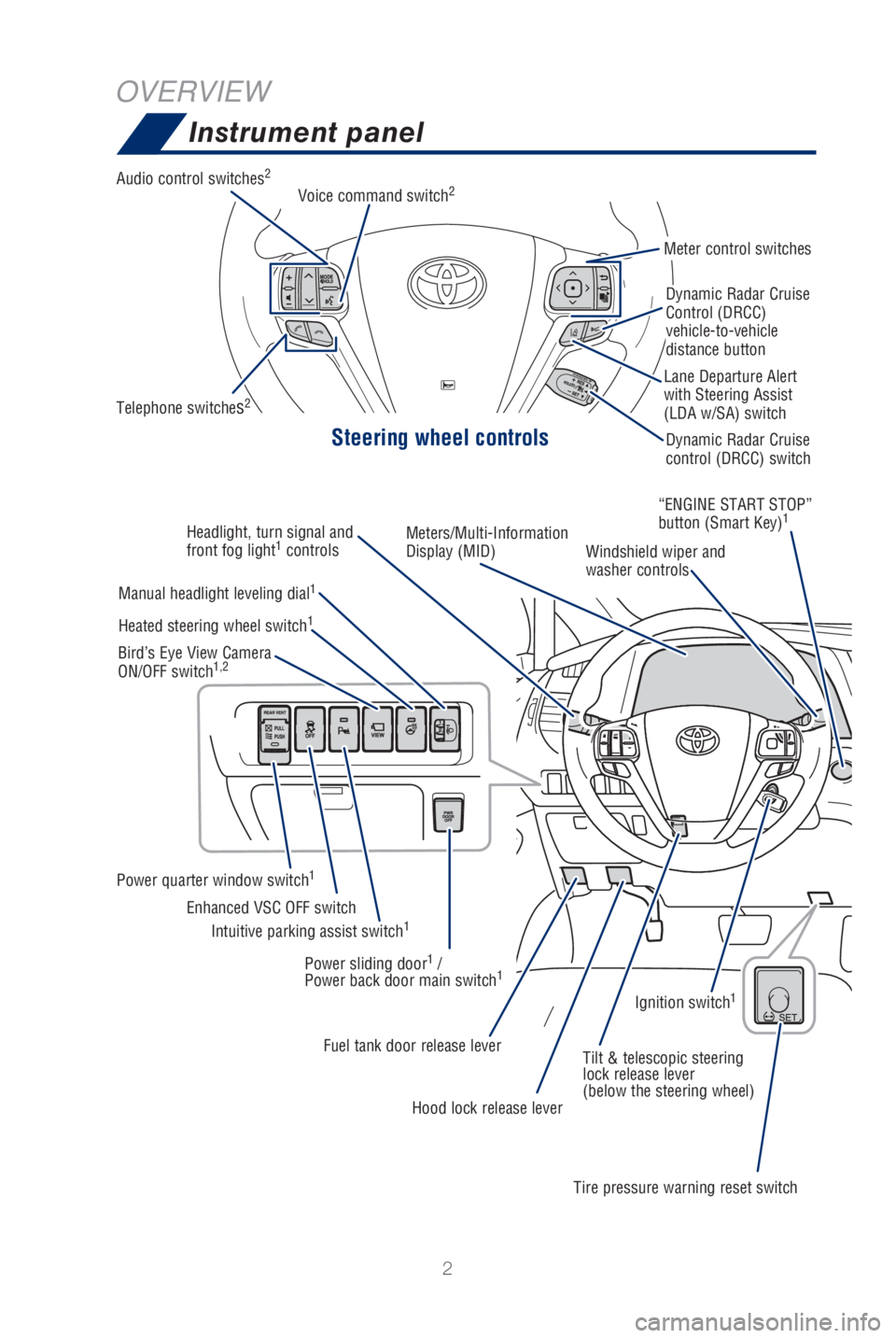
Steering wheel controls
Audio control switches2
Telephone switches2
Meter control switches
Dynamic Radar Cruise
Control (DRCC)
vehicle-to-vehicle
distance button
Dynamic Radar Cruise
control (DRCC) switch
Lane Departure Alert
with Steering Assist
(LDA w/SA) switch
Voice command switch
2
Headlight, turn signal and
front fog light1
controls Meters/Multi-Information
Display (MID)
Windshield wiper and
washer controls“ENGINE START STOP”
button (Smart Key)
1
Manual headlight leveling dial1
Power quarter window switch1
Intuitive parking assist switch1Enhanced VSC OFF switch
Heated steering wheel switch
1
Bird’s Eye View Camera
ON/OFF switch1,2
Power sliding door1 /
Power back door main switch1
Fuel tank door release lever Tilt & telescopic steering
lock release lever
(below the steering wheel)
Hood lock release lever
Tire pressure warning reset switchIgnition switch
1
Page 9 of 56
7
OVERVIEW
FEATURES & OPERATIONS
TOYOTA SAFETY SENSE
SAFETY & EMERGENCY FEATURES
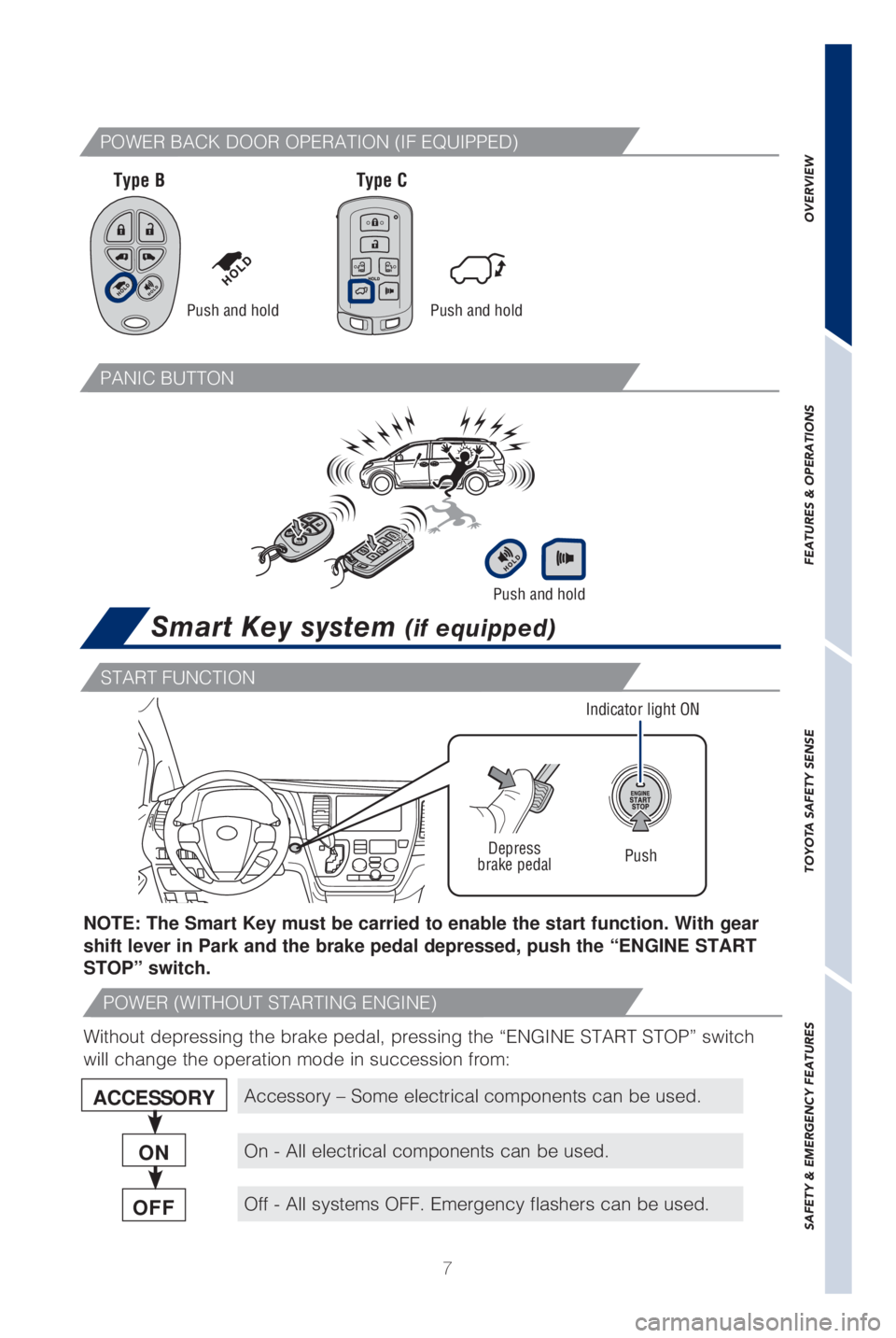
Smart Key system (if equipped)
Push and hold
ACCESSORY
ON
OFF
NOTE: The Smart Key must be carried to enable the start function. With gear
shift lever in Park and the brake pedal depressed, push the “ENGINE START
STOP” switch.
Push
Depress
brake pedal
Indicator light ON
Without depressing the brake pedal, pressing the “ENGINE START STOP”\
switch
will change the operation mode in succession from:
Accessory – Some electrical components can be used.
On - All electrical components can be used.
Off - All systems OFF. Emergency flashers can be used.
Push and hold
START FUNCTION
POWER (WITHOUT STARTING ENGINE)
Push and hold
Type B Type C
POWER BACK DOOR OPERATION (IF EQUIPPED)
PANIC BUTTON
Page 31 of 56

29
OVERVIEW
FEATURES & OPERATIONS
TOYOTA SAFETY SENSE
SAFETY & EMERGENCY FEATURES
Seat heaters (if equipped)
Front
passenger’s seatDriver’s seat
VSC/TRAC OFF switch
VSC OFF button
The VSC OFF switch can be used to help free a stuck vehicle in surroundi\
ngs like
mud, dirt or snow. While the vehicle is stopped, press switch to disable\
the TRAC
system.
To disable both VSC and TRAC systems, press and hold the switch for at l\
east 3
seconds.
Refer to the Owner’s Manual for limitations and more information.
Steering wheel-heater (if equipped)
Ignition/“ENGINE START STOP” switch must be in “ACC” or “\
ON”/ACCESSORY or
IGNITION ON position for use. Ignition/“ENGINE START STOP” switch must be in “ACC” or “\
ON”/ACCESSORY or
IGNITION ON position for use.
Page 33 of 56
 31
OVERVIEW
FEATURES & OPERATIONS
TOYOTA SAFETY SENSE
SAFETY & EMERGENCY FEATURES
The Bird’s Eye View Camera with Perimeter Scan function assists the d\
river in
viewing the surroundings, when opera")
31
OVERVIEW
FEATURES & OPERATIONS
TOYOTA SAFETY SENSE
SAFETY & EMERGENCY FEATURES
The Bird’s Eye View Camera with Perimeter Scan function assists the d\
river in
viewing the surroundings, when operating at low speeds or parking, by co\
mbining
front, side and rear cameras and displaying an overhead image on the Ent\
une™
3.0 screen.
To view or turn OFF the screen, press the camera switch when the shift l\
ever is in
the “P” position. It will display two angles, the Moving view and \
the See Through
view.
Refer to section 6-3 in the “Navigation and Multimedia System Owner’\
s Manual” for
limitations and more details on this system.
Bird’s Eye View Camera
with Perimeter Scan Function (if equipped)
Moving viewSee through view
Rotation pause switch Rotation pause switch
Display mode switching button Display mode switching button
Body color setting switch
Body color setting switch
Hill-start Assist Control (HAC) (if equipped)
HAC helps prevent rolling backwards on an incline. To engage, push furth\
er down
on brake pedal while at a complete stop until a beep sounds and slip ind\
icator
illuminates. HAC holds for approximately 2 seconds after releasing brake\
pedal.
Refer to the Owner’s Manual for more details.
Brake
pedal