low beam TOYOTA SIENNA 2019 Owners Manual (in English)
[x] Cancel search | Manufacturer: TOYOTA, Model Year: 2019, Model line: SIENNA, Model: TOYOTA SIENNA 2019Pages: 584, PDF Size: 14.5 MB
Page 246 of 584
246
SIENNA_OM_OM08025U_(U)
4-3. Operating the lights and wipers
Automatic High Beam
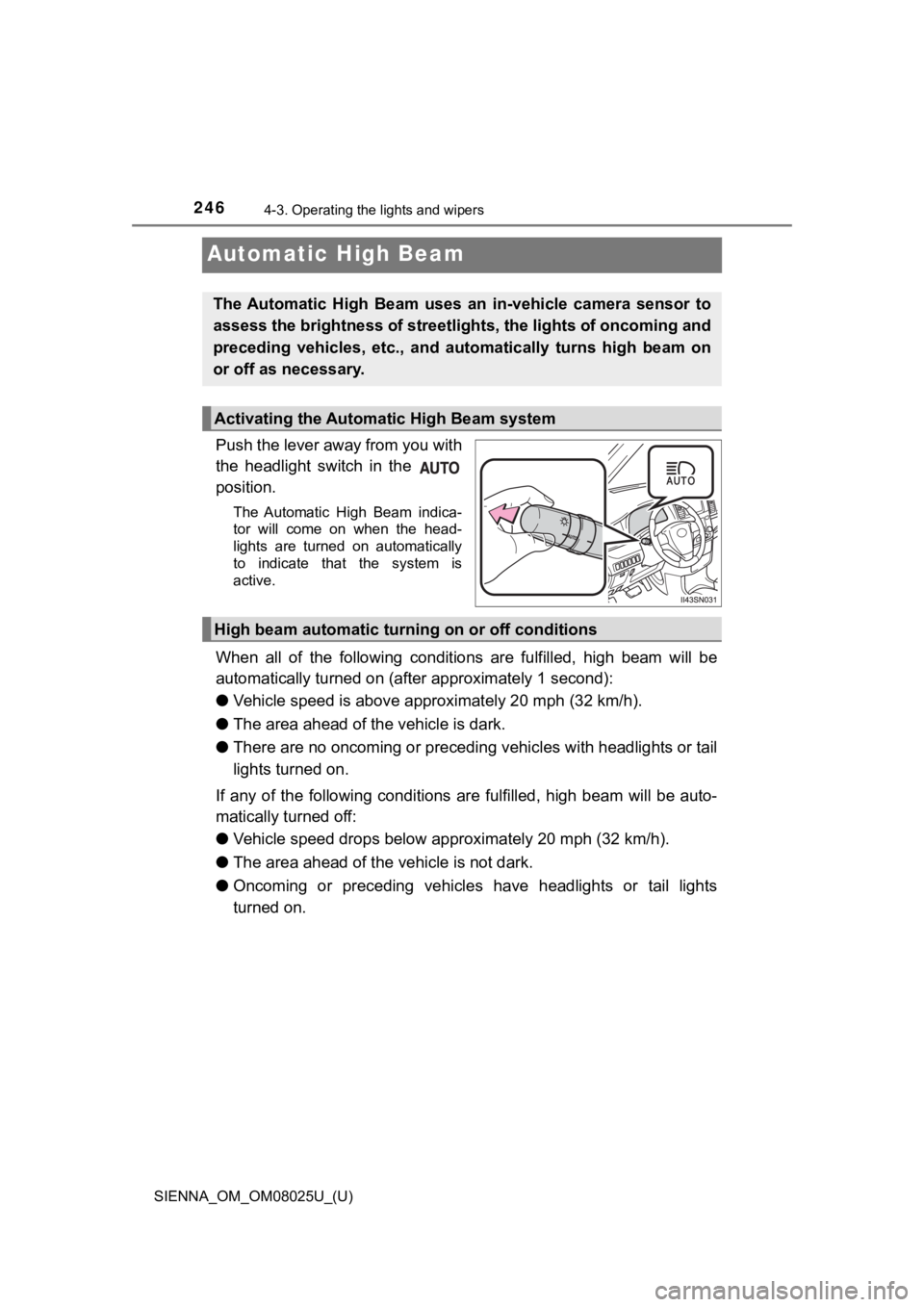
Push the lever away from you with
the headlight switch in the
position.
The Automatic High Beam indica-
tor will come on when the head-
lights are turned on automatically
to indicate that the system is
active.
When all of the following conditions are fulfilled, high beam will be
automatically turned on (after approximately 1 second):
● Vehicle speed is above appr oximately 20 mph (32 km/h).
● The area ahead of the vehicle is dark.
● There are no oncoming or precedi ng vehicles with headlights or tail
lights turned on.
If any of the following conditions are fulfilled, high beam wil l be auto-
matically turned off:
● Vehicle speed drops below app roximately 20 mph (32 km/h).
● The area ahead of the vehicle is not dark.
● Oncoming or preceding vehicles have headlights or tail lights
turned on.
The Automatic High Beam uses an in-vehicle camera sensor to
assess the brightness of streetli ghts, the lights of oncoming and
preceding vehicles, etc., and au tomatically turns high beam on
or off as necessary.
Activating the Automatic High Beam system
High beam automatic tur ning on or off conditions
Page 247 of 584
SIENNA_OM_OM08025U_(U)
2474-3. Operating the lights and wipers
4
Driving
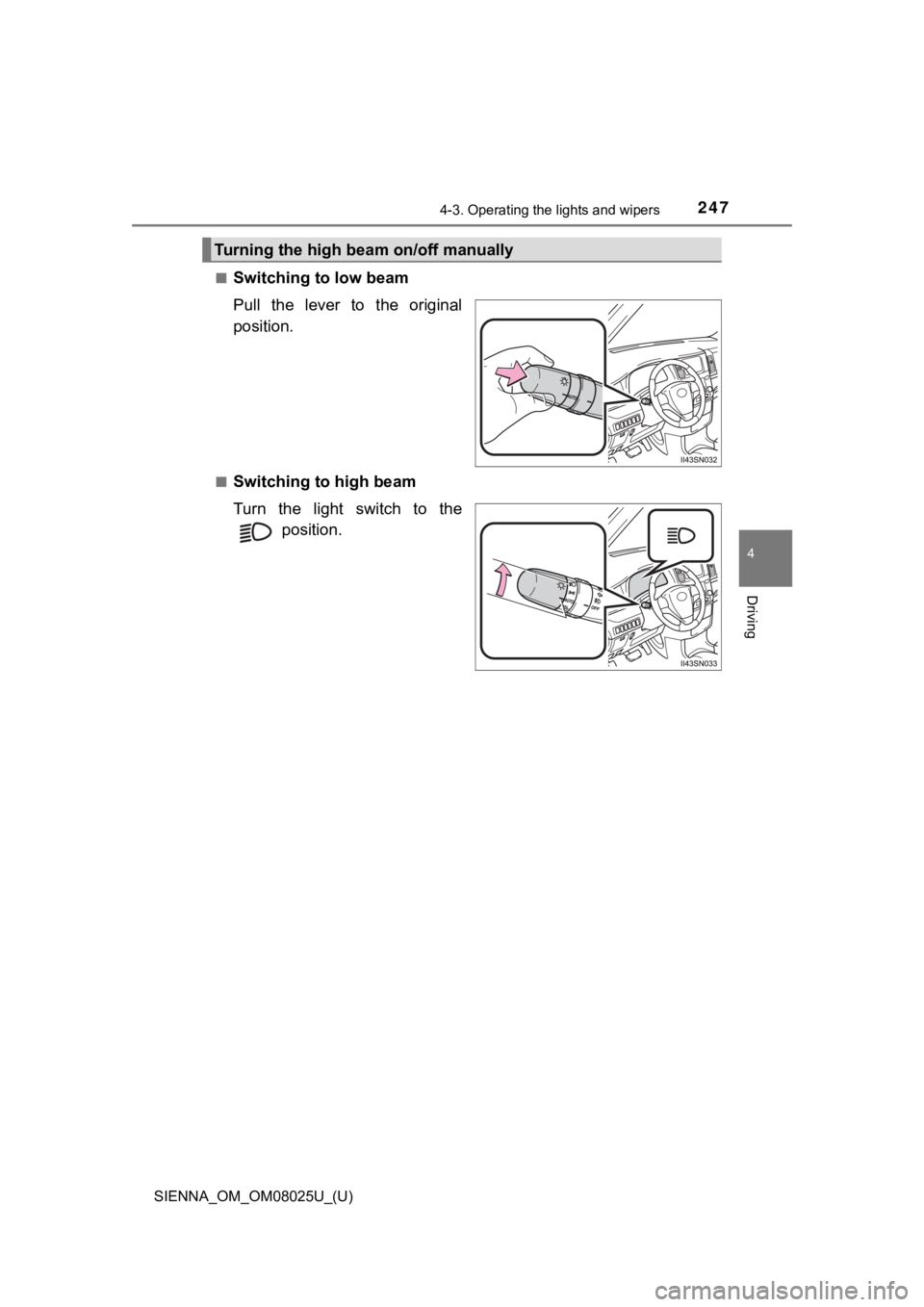
■Switching to low beam
Pull the lever to the original
position.
■Switching to high beam
Turn the light switch to the position.
Turning the high beam on/off manually
Page 248 of 584

248
SIENNA_OM_OM08025U_(U)
4-3. Operating the lights and wipers
■The Automatic High Beam can be operated when
The engine switch is in the “ON” position (vehicles without a s mart key sys-
tem) or IGNITION ON mode (vehicles with a smart key system).
■ Camera sensor detection information
●High beam may not be automatically turned off in the following situations:
• When oncoming vehicles suddenly appear from a curve.
• When the vehicle is cut in front of by another.
● High beam may be turned off if an oncoming vehicle that is usin g fog lights
without using the headlights is detected.
● Houselights, streetlights, red traffic signals, and illuminated billboards or
signs may cause the high beam to turn off.
● The following factors may affect the amount of time taken to tu rn high beam
on or off:
• The brightness of headlights, fog lights, and tail lights of o ncoming and
preceding vehicles
• Road conditions (wetness, ice, snow etc.)
• The number of passengers and amount of baggage
● High beam may be turned on or off when unexpected by the driver .
Page 249 of 584
SIENNA_OM_OM08025U_(U)
2494-3. Operating the lights and wipers
4
Driving
●In the situations below, the system may not be able to correctl y detect the
surrounding brightness levels, and may flash or expose nearby p edestrians
to the high beam. Therefore, you should consider turning the hi gh beam on
or off manually rather than relying on the Automatic High Beam system.
• In bad weather (rain, snow, fog, sandstorms etc.)
• The windshield is obscured by fog, mist, ice, dirt etc.
• The windshield is cracked or damaged.
• The camera sensor is deformed or dirty.
• Surrounding brightness levels are equal to those of headlights , tail lights
or fog lights.
• Vehicles ahead have headlights that are either switched off, d irty, are
changing color, or are not aimed properly.
• When driving through an area of intermittently changing brightness and
darkness
• When frequently and repeatedly driving ascending/descending roads, or roads with rough, bumpy or uneven surfaces (such as stone-paved
roads, gravel tracks etc.)
• When frequently and repeatedly taking curves or driving on a w inding
road
• There is a highly reflective object ahead of the vehicle, such as a sign or a mirror.
• The vehicle’s headlights are damaged or dirty.
• The vehicle is lifting or tilting, due to a flat tire, a trailer being towed etc.
• The high beam and low beam are repeatedly being switched betwe en in
an abnormal manner.
• The driver believes that the high beam may be causing problems or dis-
tress to other drivers or pedestrians nearby.
■ Customization
The Automatic High Beam can be turned off.
(Customizable features: P. 546)
Page 250 of 584
250
SIENNA_OM_OM08025U_(U)
4-3. Operating the lights and wipers
WARNING
■Limitations of the Automatic High Beam
Do not rely on the Automatic High Beam. Always drive safely, ta king care to
observe your surroundings and turning high beam on or off manua lly if nec-
essary.
NOTICE
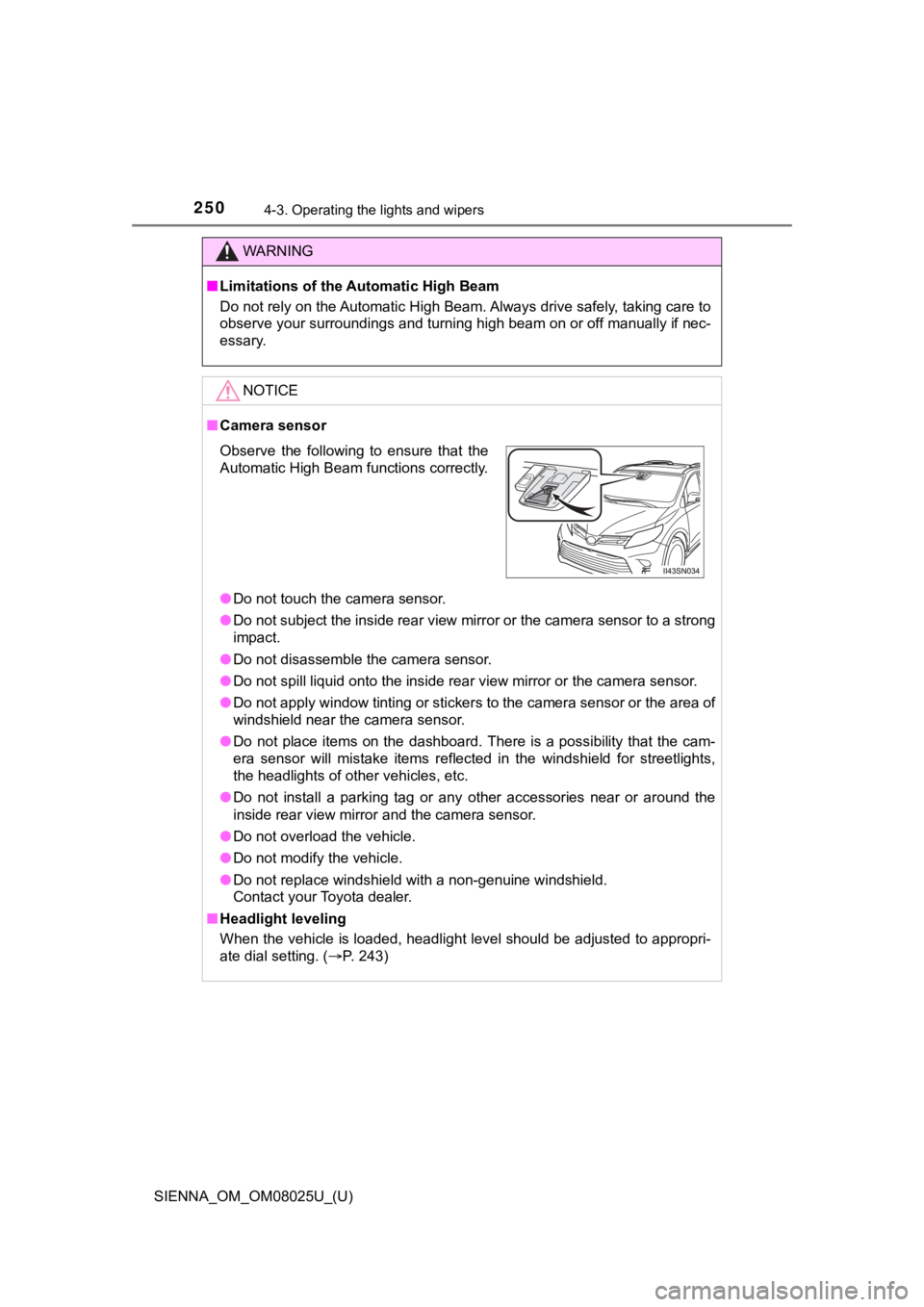
■ Camera sensor
● Do not touch the camera sensor.
● Do not subject the inside rear view mirror or the camera sensor to a strong
impact.
● Do not disassemble the camera sensor.
● Do not spill liquid onto the inside rear view mirror or the cam era sensor.
● Do not apply window tinting or stickers to the camera sensor or the area of
windshield near the camera sensor.
● Do not place items on the dashboard. There is a possibility tha t the cam-
era sensor will mistake items reflected in the windshield for s treetlights,
the headlights of other vehicles, etc.
● Do not install a parking tag or any other accessories near or a round the
inside rear view mirror and the camera sensor.
● Do not overload the vehicle.
● Do not modify the vehicle.
● Do not replace windshield with a non-genuine windshield.
Contact your Toyota dealer.
■ Headlight leveling
When the vehicle is loaded, headlight level should be adjusted to appropri-
ate dial setting. ( P. 243)
Observe the following to ensure that the
Automatic High Beam functions correctly.
Page 251 of 584
251
SIENNA_OM_OM08025U_(U)
4-3. Operating the lights and wipers
4
Driving
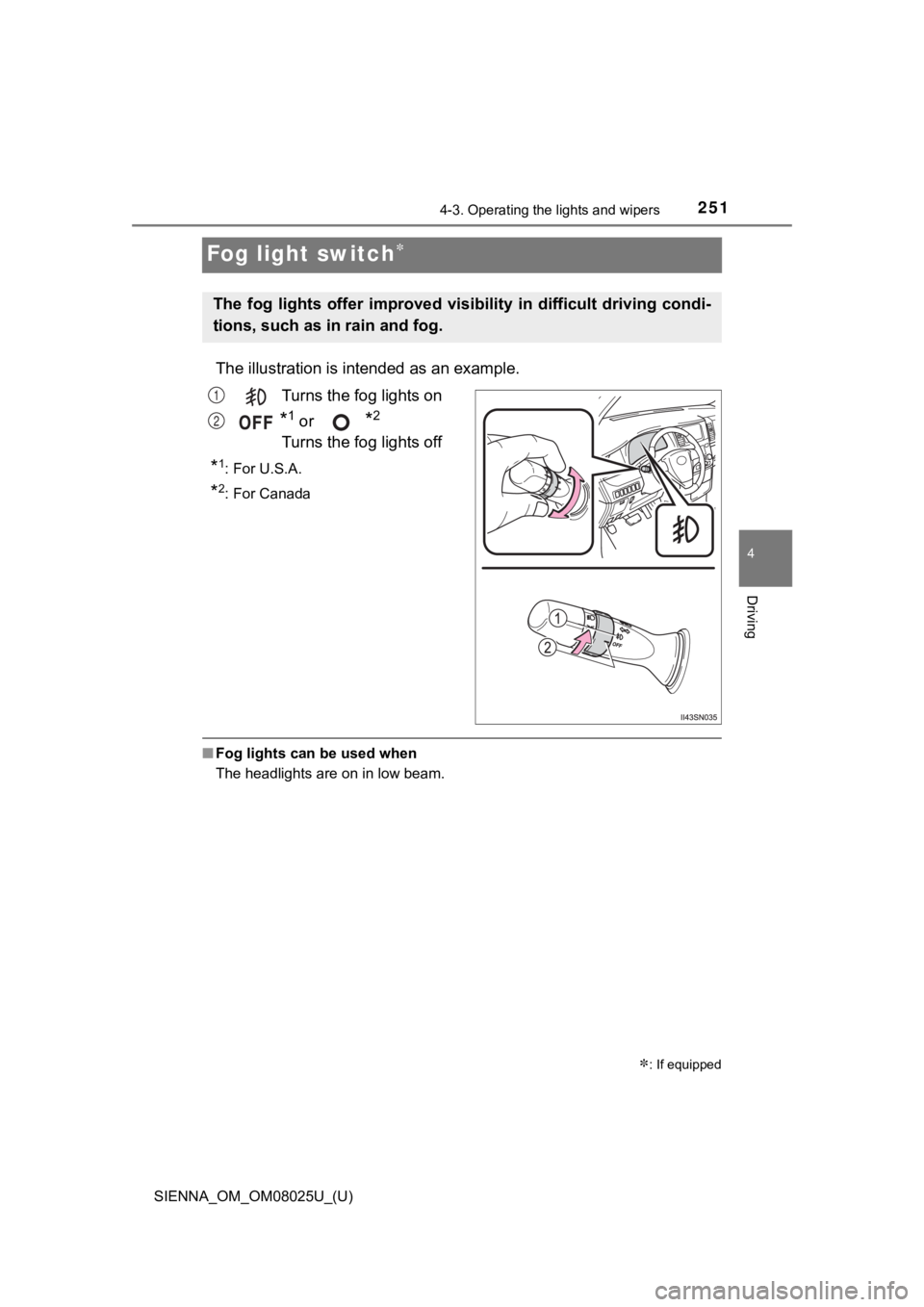
Fog light switch
The illustration is intended as an example.
Turns the fog lights on
*1 or *2
Turns the fog lights off
*1: For U.S.A.
*2: For Canada
■ Fog lights can be used when
The headlights are on in low beam.
: If equipped
The fog lights offer improved visibility in difficult driving c ondi-
tions, such as in rain and fog.
1
2
Page 261 of 584
261
SIENNA_OM_OM08025U_(U)
4-5. Using the driving support systems
4
Driving
Toyota Safety Sense P
◆PCS (Pre-Collision system)
P. 2 6 7
◆LDA (Lane Departure Aler t with steering control)
P. 2 7 9
◆Automatic High Beam
P. 2 4 6
◆Dynamic radar cruise control
P. 2 8 9
The Toyota Safety Sense P consists of the following drive assis t
systems and contributes to a safe and comfortable driving expe-
rience:
WARNING
■ Toyota Safety Sense P
The Toyota Safety Sense P is designed to operate under the assu mption
that the driver will drive safely, and is designed to help redu ce the impact to
the occupants and the vehicle in the case of a collision or ass ist the driver in
normal driving conditions.
As there is a limit to the degree of recognition accuracy and control perfor-
mance that this system can provide, do not overly rely on this system. The
driver is always responsible for paying attention to the vehicl e’s surround-
ings and driving safely.
Page 286 of 584
286
SIENNA_OM_OM08025U_(U)
4-5. Using the driving support systems
■Conditions in which functions may not operate properly
In the following situations, the camera sensor may not detect w hite (yellow)
lines and various functions may not operate normally.
● There are shadows on the road that run parallel with, or cover, the white
(yellow) lines.
● The vehicle is driven in an area without white (yellow) lines, such as in front
of a tollgate or checkpoint, or at an intersection, etc.
● The white (yellow) lines are cracked, “Botts’ dots”, “Raised pa vement
marker” or stones are present.
● The white (yellow) lines cannot be seen or are difficult to see due to sand,
etc.
● The vehicle is driven on a road surface that is wet due to rain , puddles, etc.
● The traffic lines are yellow (which may be more difficult to re cognize than
lines that are white).
● The white (yellow) lines cross over a curb, etc.
● The vehicle is driven on a bright surface, such as concrete.
● The vehicle is driven on a surface that is bright due to reflec ted light, etc.
● The vehicle is driven in an area where the brightness changes s uddenly,
such as at the entrances and exits of tunnels, etc.
● Light from the headlights of an oncoming vehicle, the sun, etc. enters the
camera.
● The vehicle is driven where the road diverges, merges, etc.
● The vehicle is driven on a slope.
● The vehicle is driven on a road which tilts left or right, or a winding road.
● The vehicle is driven on an unpaved or rough road.
● The vehicle is driven around a sharp curve.
● The traffic lane is excessively narrow or wide.
● The vehicle is extremely tilted due to carrying heavy luggage or having
improper tire pressure.
● The distance to the preceding vehicle is extremely short.
● The vehicle is moving up and down a large amount due to road co nditions
during driving (poor roads or road seams).
● The headlight lenses are dirty and emit a faint amount of light at night, or the
beam axis has deviated.
● The vehicle is struck by a crosswind.
● The vehicle has just changed lanes or crossed an intersection.
● Snow tires, etc. are equipped.
Page 443 of 584
SIENNA_OM_OM08025U_(U)
4436-3. Do-it-yourself maintenance
6
Maintenance and care
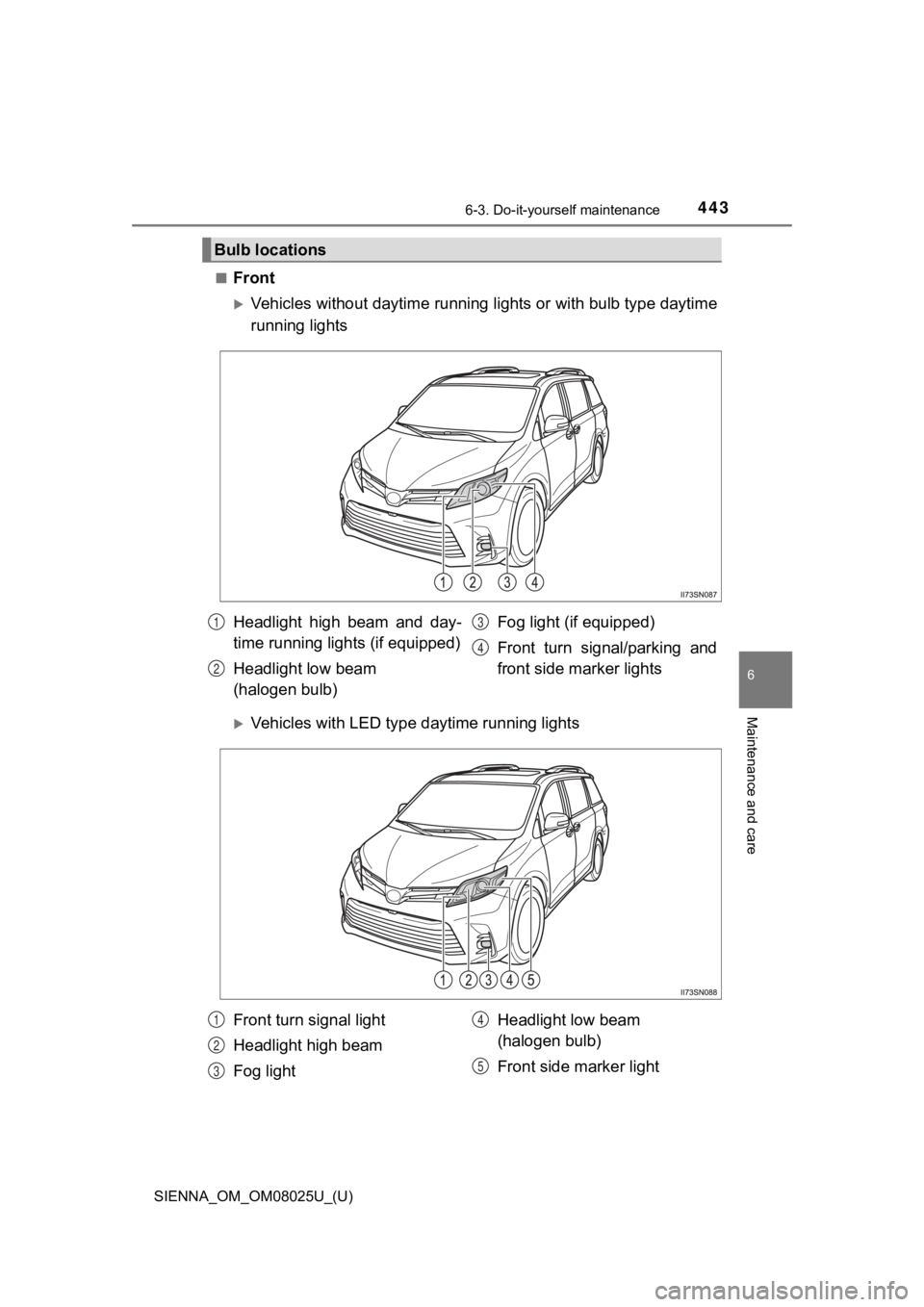
■Front
Vehicles without daytime running lights or with bulb type daytime
running lights
Vehicles with LED type daytime running lights
Bulb locations
Headlight high beam and day-
time running lights (if equipped)
Headlight low beam
(halogen bulb) Fog light (if equipped)
Front turn signal/parking and
front side marker lights1
2
3
4
Front turn signal light
Headlight high beam
Fog light
Headlight low beam
(halogen bulb)
Front side marker light1
2
3
4
5
Page 445 of 584
SIENNA_OM_OM08025U_(U)
4456-3. Do-it-yourself maintenance
6
Maintenance and care
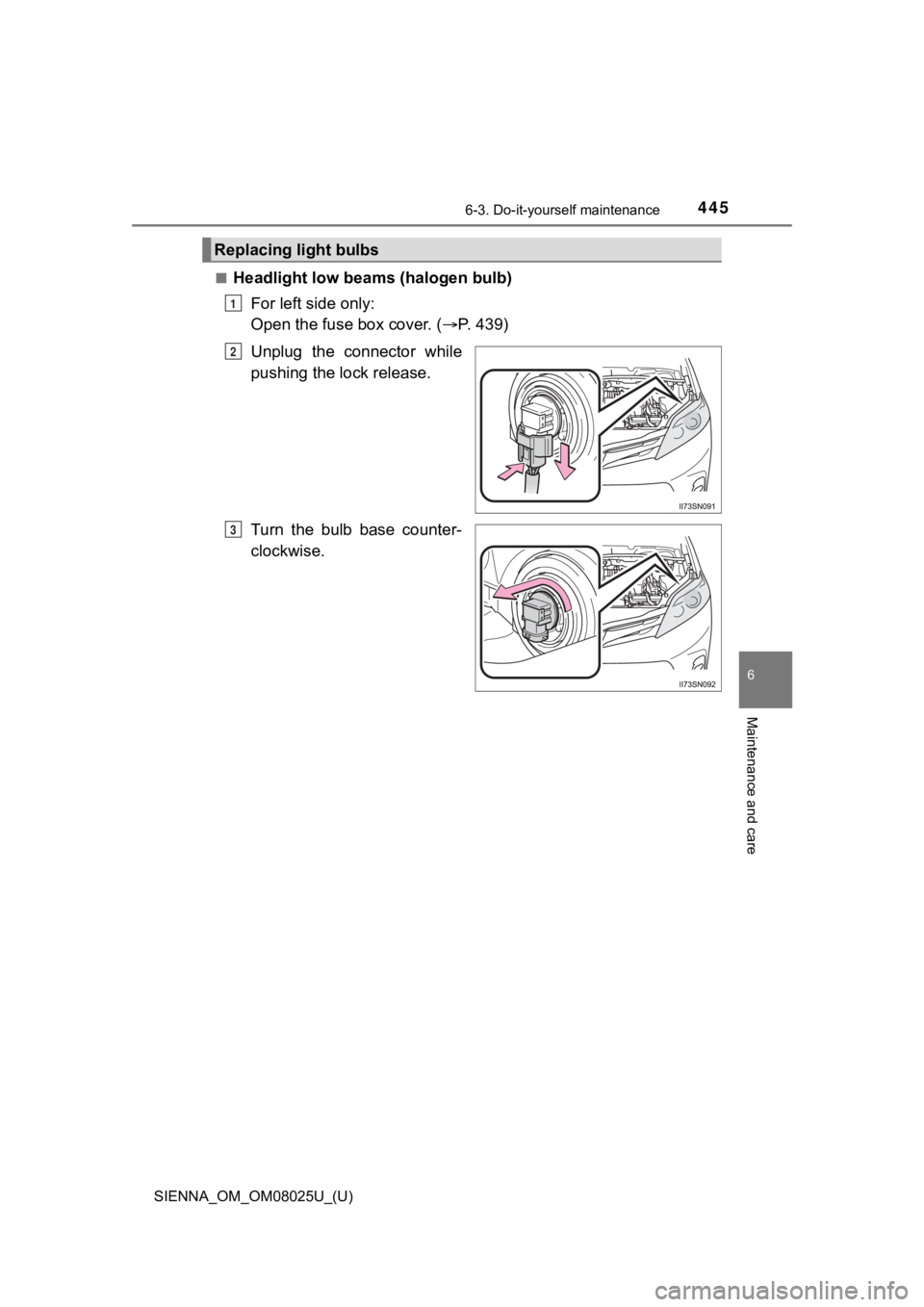
■Headlight low beams (halogen bulb)
For left side only:
Open the fuse box cover. ( P. 439)
Unplug the connector while
pushing the lock release.
Turn the bulb base counter-
clockwise.
Replacing light bulbs
1
2
3