phone TOYOTA SIENNA 2019 Owners Manual (in English)
[x] Cancel search | Manufacturer: TOYOTA, Model Year: 2019, Model line: SIENNA, Model: TOYOTA SIENNA 2019Pages: 584, PDF Size: 14.5 MB
Page 6 of 584
TABLE OF CONTENTS6
SIENNA_OM_OM08025U_(U)Reporting safety defects
for U.S. owners ........................ 552
Seat belt instructions for Canadian owners
(in French) ............................... 553
SRS airbag instructions for Canadian owners
(in French) ............................... 555
What to do if... (Troubleshooting) .................... 566
Alphabetical index...................... 570
9For owners
Index
For vehicles with an Entune Audio, Entune Audio Plus or Entune
Premium Audio, refer to the “NAVIGATION AND MULTIMEDIA
SYSTEM OWNER’S MANUAL” for information regarding the equip-
ment listed below.
• Navigation system
• Rear view monitor system
• Audio/visual system• Panoramic view monitor
• Hands-free system (for cellu- lar phone)
For details about AUTO ACCESS SEAT, refer to the “AUTO
ACCESS SEAT OWNER’S MANUAL”.
Page 11 of 584
SIENNA_OM_OM08025U_(U)
11
The SRS airbag and seat belt pretensioner devices in your Toyota contain
explosive chemicals. If the vehicle is scrapped with the airbag s and seat belt
pretensioners left as they are, this may cause an accident such as fire. Be
sure to have the systems of the SRS airbag and seat belt preten sioner
removed and disposed of by a qualified service shop or by your Toyota dealer
before you scrap your vehicle.
Special handling may apply,
See www.dtsc.ca.gov/hazardouswaste/perchlorate.
Your vehicle has components that may contain perchlorate. These compo-
nents may include airbag, seat belt pretensioners, and wireless remote con-
trol batteries.
Scrapping of your Toyota
Perchlorate Material
WARNING
■ General precautions while driving
Driving under the influence: Never drive your vehicle when unde r the influ-
ence of alcohol or drugs that have impaired your ability to operate your vehi-
cle. Alcohol and certain drugs delay reaction time, impair judg ment and
reduce coordination, which could lead to an accident that could result in
death or serious injury.
Defensive driving: Always drive defensively. Anticipate mistake s that other
drivers or pedestrians might make and be ready to avoid acciden ts.
Driver distraction: Always give your full attention to driving. Anything that
distracts the driver, such as adjusting controls, talking on a cellular phone or
reading can result in a collision with resulting death or serio us injury to you,
your occupants or others.
■ General precaution regar ding children’s safety
Never leave children unattended in the vehicle, and never allow children to
have or use the key.
Children may be able to start the vehicle or shift the vehicle into neutral.
There is also a danger that children may injure themselves by p laying with
the windows, the moon roof, or other features of the vehicle. In addition,
heat build-up or extremely cold temperatures inside the vehicle can be fatal
to children.
Page 21 of 584
21Pictorial index
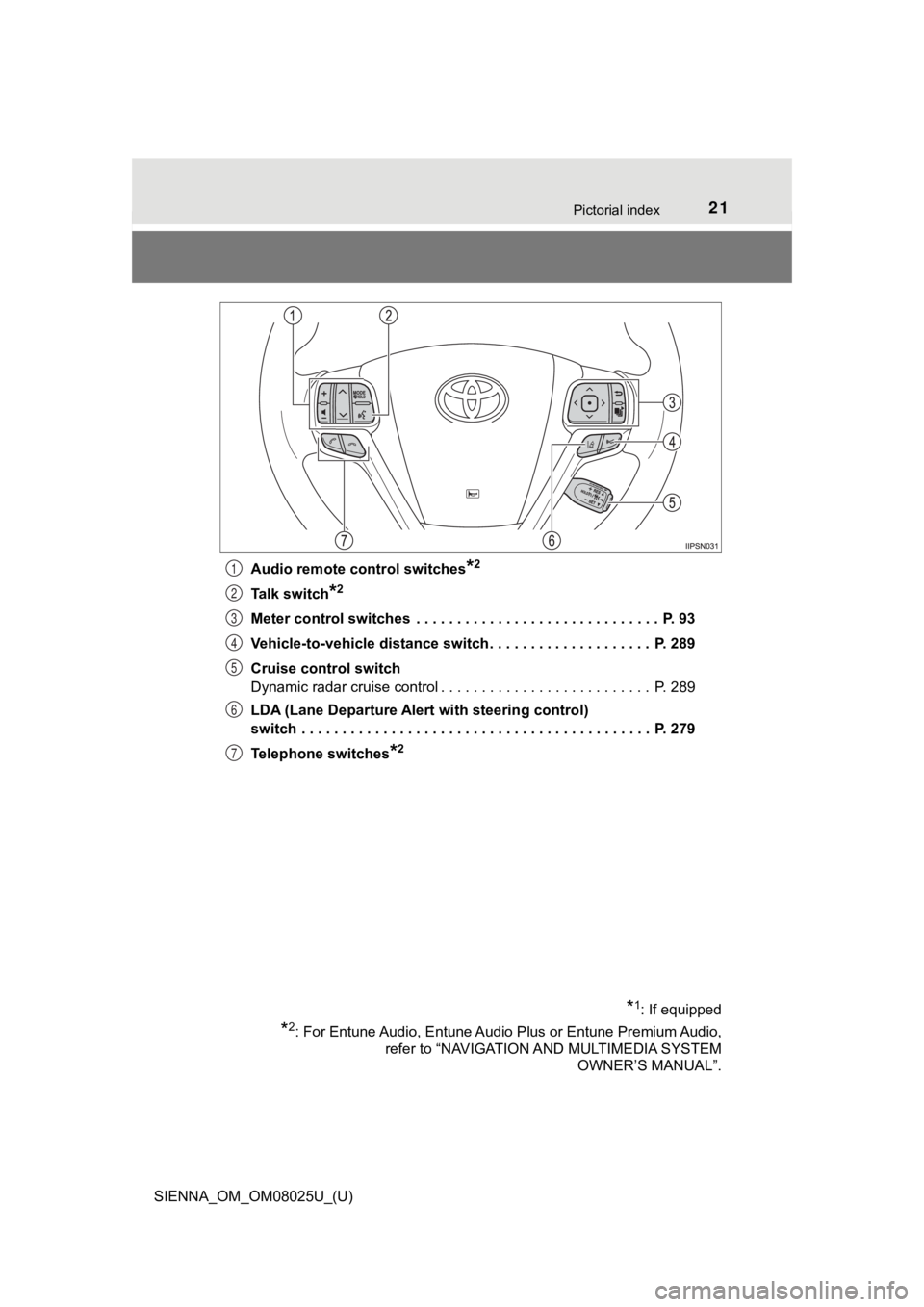
SIENNA_OM_OM08025U_(U)Audio remote control switches
*2
Talk switch*2
Meter control switches . . . . . . . . . . . . . . . . . . . . . . . . . . . . . . P. 93
Vehicle-to-vehicle distance switch . . . . . . . . . . . . . . . . . . . . P. 289
Cruise control switch
Dynamic radar cruise control . . . . . . . . . . . . . . . . . . . . . . . . . . P. 289
LDA (Lane Departure Alert with steering control)
switch . . . . . . . . . . . . . . . . . . . . . . . . . . . . . . . . . . . . . . . . . . . P. 279
Telephone switches
*2
1
2
3
4
5
6
7
*1: If equipped
*2: For Entune Audio, Entune Audio Plus or Entune Premium Audio,
refer to “NAVIGATION AND MULTIMEDIA SYSTEM OWNER’S MANUAL”.
Page 96 of 584
96
SIENNA_OM_OM08025U_(U)
2. Instrument cluster
The settings of the following items can be changed, refer to P. 540
● Language
Select to change the l anguage on the display.
● Units
Select to change the unit for meas ure of the fuel consumption and
outside temperature.
● Drive information 1 through 3
Select to select up to 2 items th at will be displayed on a Drive infor-
mation screen, up to 3 Drive in formation screens can be set.
● Eco Driving Indicator Light
Select to activate/deactivate the Eco Driving Indicator Light.
(
P. 8 8 )
● switch settings
You can register 1 screen as the top screen. To register, press and
hold while the desired screen is displayed.
● Pop-up display
Select to set the following pop-up displays, which may appear i n
some situations, on/off. • Instrument panel bright ness adjustment display
• Route guidance display of the navigation system-linked system (if equipped)
• Incoming call display of t he hands-free phone system
• Shift position display
Settings display
Page 107 of 584
SIENNA_OM_OM08025U_(U)
1073-1. Key information
3
Operation of each component
■When required to leave the vehicle’s key with a parking attendant
Lock the glove box as circumstances demand. ( P. 351)
On vehicles without the smart key system, provide the attendant with the
valet key.
On vehicles with the smart key system, remove the mechanical ke y for your
own use and provide the attendant with the electronic key only.
■ If you lose your keys
New genuine keys can be made by your Toyota dealer using a mast er key
(vehicles without a smart key system) or the other key (vehicle s with a smart
key system) and the key number stamped on your key number plate. Keep
the plate in a safe place such as your wallet, not in the vehic le.
■ When riding in an aircraft
When bringing a key with wireless remote control function onto an aircraft,
make sure you do not press any buttons on the key while inside the aircraft
cabin. If you are carrying the key in your bag etc., ensure tha t the buttons are
not likely to be pressed accidentally. Pressing a button may cause the key to
emit radio waves that could interfere with the operation of the aircraft.
■ Conditions affecting the operation of the smart key system or w ireless
remote control
P. 118
■ Key battery depletion
Vehicles without a smart key system
If the wireless remote control function does not operate, the b attery may be
depleted. Replace the battery when necessary. ( P. 436)
Vehicles with a smart key system
● The standard battery life is 1 to 2 years.
● If the battery becomes low, an alarm will sound in the cabin wh en the engine
stops. ( P. 436, 481)
● As the electronic key always receives radio waves, the battery will become
depleted even if the electronic key is not used. The following symptoms indi-
cate that the electronic key battery may be depleted. Replace the battery
when necessary. ( P. 436)
• The smart key system or the wireless remote control does not o perate.
• The detection area becomes smaller.
• The LED indicator on the key surface does not turn on.
● To avoid serious deterioration, do not leave the electronic key within 3 ft.
(1 m) of the following electrical appliances that produce a magnetic field.
•TVs
• Personal computers
• Cellular phones, cordless phones and battery chargers
• Recharging cellular phones or cordless phones
• Induction cookers
• Table lamps
Page 118 of 584

118
SIENNA_OM_OM08025U_(U)
3-2. Opening, closing and locking the doors
■When all the doors are locked with the wireless remote control or key
The doors cannot be unlocked with the door lock switch.
The door lock switch can be reset by unlocking all the doors wi th the wireless
remote control or key.
■ Using the mechanical key (vehicles with a smart key system)
The doors can also be locked and unlocked with the mechanical k ey.
( P. 503)
■ Conditions affecting the operation of the smart key system or w ireless
remote control
Vehicles without a smart key system
The wireless remote control function may not operate normally i n the follow-
ing situations:
● Near a TV tower, radio station, electric power plant, airport o r other facility
that generates strong radio waves
● When carrying a portable radio, cellular phone or other wireles s communi-
cation devices
● When multiple wireless keys are in the vicinity
● When the wireless key is in contact with, or is covered by, a m etallic object
● When a wireless key (that emits radio waves) is being used near by
● When the wireless key has been left near an electrical applianc e such as a
personal computer
● If window tint with a metallic content or metallic objects is a ttached to the
rear window
● Vehicles with AUTO ACCESS SEAT: If the wireless remote control of the
AUTO ACCESS SEAT is operated simultaneously, the AUTO ACCESS
SEAT may not operate properly.
For details, refer to “AUTO ACCESS SEAT OWNER’S MANUAL”.
Page 119 of 584
SIENNA_OM_OM08025U_(U)
1193-2. Opening, closing and locking the doors
3
Operation of each component
Vehicles with a smart key system
The smart key system uses weak radio waves. In the following si tuations, the
communication between the electronic key and the vehicle may be affected,
preventing the smart key system and wireless remote control from operating
properly. (Way of coping P. 503)
● When the electronic key battery is depleted
● Near a TV tower, electric power plant, gas station, radio stati on, large dis-
play, airport or other facility that generates strong radio wav es or electrical
noise
● When carrying a portable radio, cellular phone, cordless phone or other
wireless communication devices
● When the electronic key is in contact with, or is covered by the following
objects
• Cards to which aluminum foil is attached
• Cigarette boxes that have aluminum foil inside
• Metallic wallets or bags
• Coins
• Hand warmers made of metal
• Media such as CDs and DVDs
● When multiple electronic keys are in the vicinity
● When another wireless key (that emits radio waves) is being use d nearby
● When carrying or using the electronic key together with the fol lowing
devices that emit radio waves
• Another vehicle’s electronic key
• A wireless key that emits radio waves
• Personal computers or personal digital assistants (PDAs)
• Digital audio players
• Portable game systems
● If window tint with a metallic content or metallic objects are attached to the
rear window
● Vehicles with AUTO ACCESS SEAT: If the wireless remote control of the
AUTO ACCESS SEAT is operated simultaneously, the AUTO ACCESS
SEAT may not operate properly.
For details, refer to “AUTO ACCESS SEAT OWNER’S MANUAL”.
■ Customization
Settings (e.g. unlocking function using a key) can be changed.
(Customizable features: P. 543)
Page 385 of 584
385
SIENNA_OM_OM08025U_(U)
5-4. Using the other interior features
5
Interior features
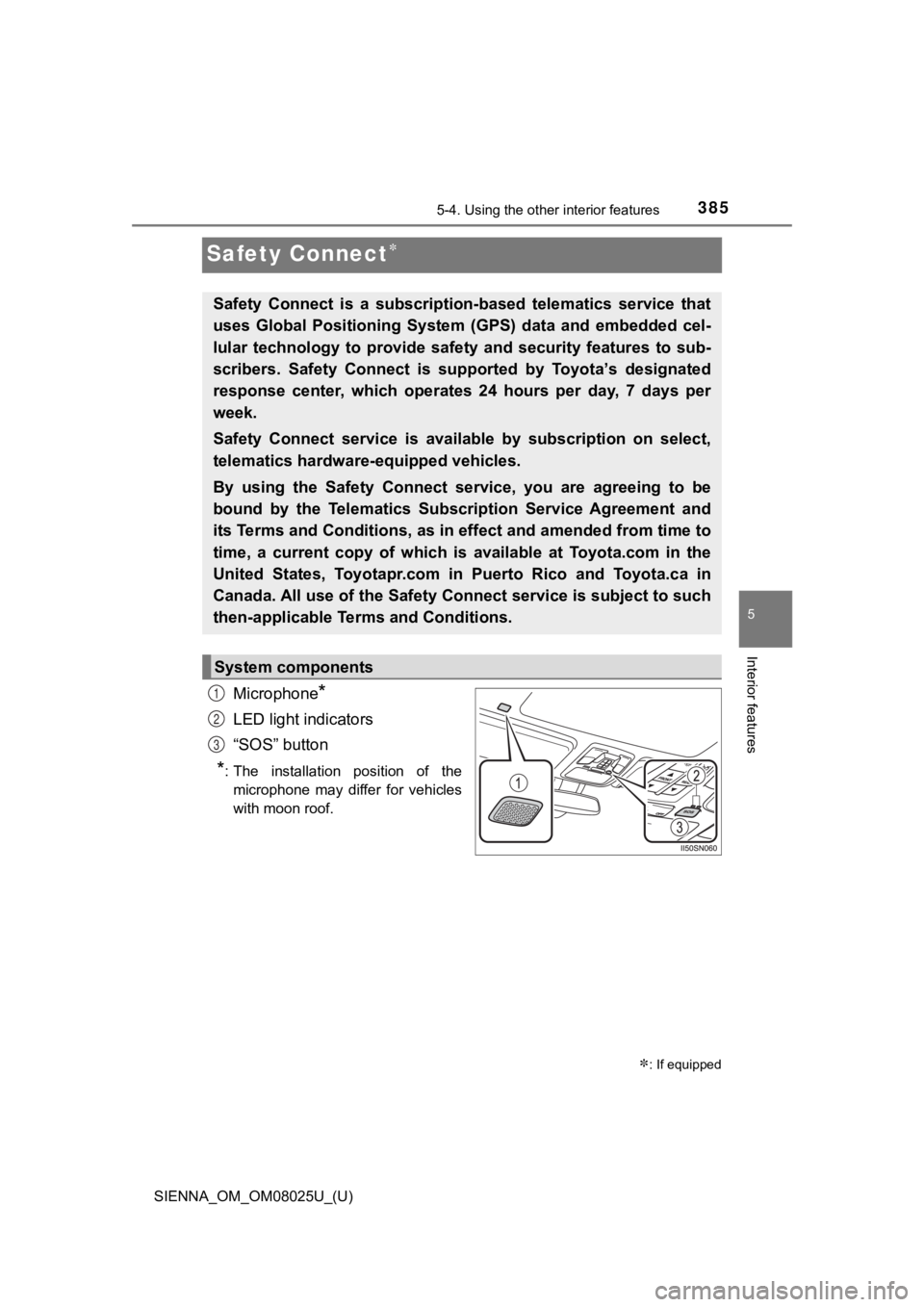
Safety Connect
Microphone*
LED light indicators
“SOS” button
*: The installation position of themicrophone may differ for vehicles
with moon roof.
: If equipped
Safety Connect is a subscription-based telematics service that
uses Global Positioning System ( GPS) data and embedded cel-
lular technology to provide saf ety and security features to sub -
scribers. Safety Connect is s upported by Toyota’s designated
response center, which operates 24 hours per day, 7 days per
week.
Safety Connect service is avai lable by subscription on select,
telematics hardware -equipped vehicles.
By using the Safety Connect service, you are agreeing to be
bound by the Telematics Subscription Service Agreement and
its Terms and Conditions, as in e ffect and amended from time to
time, a current copy of which is available at Toyota.com in the
United States, Toyotapr.com in Puerto Rico and Toyota.ca in
Canada. All use of the Safety Connect service is subject to suc h
then-applicable Terms and Conditions.
System components
1
2
3
Page 387 of 584
SIENNA_OM_OM08025U_(U)
3875-4. Using the other interior features
5
Interior features
■Safety Connect Services Information
●Phone calls using the vehicles Bluetooth® technology will not be possible
during Safety Connect.
● Safety Connect is available beginning Fall 2009 on select Toyot a models (in
the contiguous United States only). Contact with the Safety Con nect
response center is dependent upon the telematics device being i n operative
condition, cellular connection availability, and GPS satellite signal reception,
which can limit the ability to reach the response center or rec eive emer-
gency service support. Enrollment and Telematics Subscription S ervice
Agreement are required. A variety of subscription terms is available;
charges vary by subscription term selected and location.
● Automatic Collision Notification, Emergency Assistance and Stolen Vehicle
Location are available in the United States, including Hawaii a nd Alaska,
Puerto Rico and Canada, and Enhanced Roadside Assistance are av ailable
in the United States, Puerto Rico and Canada.
● Automatic Collision Notification, Emergency Assistance, Stolen Vehicle and
Enhanced Road Assistance are not available in the U.S. Virgin I slands.
For vehicles first sold in the U.S. Virgin Islands, no Safety C onnect services
will function in or outside the U.S. Virgin Islands.
● Safety Connect services are not subject to section 255 of the T elecommuni-
cations Act and the device is not TTY compatible.
■ Languages
The Safety Connect response center will offer support in multip le languages.
The Safety Connect system will offer voice prompts in English, Spanish, and
French. Please indicate your language of choice when enrolling.
■ When contacting the response center
You may be unable to contact the response center if the network is busy.
When the engine switch is turned to the “ON” position (vehicles with-
out a smart key system) or IGNITION ON mode (vehicles with a sm art
key system), the red indicator light comes on for 2 seconds the n turns
off. Afterward, the green indicator light comes on, indicating that the
service is active.
The following indicator light patterns indicate specific system usage
conditions:
● Green indicator light on = Active service
● Green indicator light flashing = Safety Connect call in process
● Red indicator light (except at vehicle start-up) = System malfunction
(contact your Toyota dealer)
● No indicator light (off) = Saf ety Connect service not active
Safety Connect LED light Indicators
Page 389 of 584
SIENNA_OM_OM08025U_(U)
3895-4. Using the other interior features
5
Interior features
■Enhanced Roadside Assistance
Enhanced Roadside Assistance adds GPS data to the already
included warranty-based Toyota roadside service.
Subscribers can press the “SOS” button to reach a Safety Connec t
response-center agent, who can he lp with a wide range of needs,
such as: towing, flat tire, fuel delivery, etc. For a description of the
Enhanced Roadside Assistance se rvices and their limitations,
please see the Safety Connect Te rms and Conditions, which are
available at Toyota.com in the United States, Toyotapr.com in
Puerto Rico and Toyota.ca in Canada.
Important! Read this informatio n before using Safety Connect.
■Exposure to radio frequency signals
The Safety Connect system installed in your vehicle is a low-po wer
radio transmitter and receiver. I t receives and also sends out radio
frequency (RF) signals.
In August 1996, the Federal Communications Commission (FCC)
adopted RF exposure guidelines with safety levels for mobile wi re-
less phones. Those guidelines are consistent with the safety stan-
dards previously set by the following U.S. and international
standards bodies.
● ANSI (American National Stand ards Institute) C95.1 [1992]
● NCRP (National Council on Radi ation Protection and Measure-
ment) Report 86 [1986]
● ICNIRP (International Commission on Non-Ionizing Radiation
Protection) [1996]
Those standards were based on comprehensive and periodic eval-
uations of the relevant scienti fic literature. Over 120 scientists, engi-
neers, and physicians from unive rsities, and government health
agencies and industries reviewed the available body of research to
develop the ANSI Standard (C95.1).
The design of Safety Connect complies with the FCC guidelines i n
addition to those standards.
Safety information for Safety Connect