park assist TOYOTA SIENNA HYBRID 2021 Accessories, Audio & Navigation (in English)
[x] Cancel search | Manufacturer: TOYOTA, Model Year: 2021, Model line: SIENNA HYBRID, Model: TOYOTA SIENNA HYBRID 2021Pages: 332, PDF Size: 11.73 MB
Page 4 of 332
4TABLE OF CONTENTS
7-2. Toyota parking assist mon-itor
Toyota parking assist monitor.................................... 207
Estimated course line dis- play mode.................... 210
Parking assist guide line dis- play mode.................... 212
Distance guide line display mode ........................... 213
Toyota parking assist monitor precautions.................. 213
Things you should know 219
7-3. Panoramic view monitor Panoramic view monitor 221
Checking around the vehicle .................................... 227
Checking the front and around the vehicle ....... 228
Checking the s ides of the
vehicle ......................... 231
Checking the rear and around the vehicle ....... 234
When folding the outside rear view mirrors ................. 241
Magnifying function ....... 242
Customizing the panoramic view monitor ................ 243
Panoramic view monitor pre- cautions ....................... 244
Things you should know 254
8-1. Phone operation (Hands- free system for cellular
phones)
Quick reference............. 258Some basics ..................
259
Placing a call using the Bluetooth
® hands-free sys-
tem .............................. 263
Receiving a call using the Bluetooth
® hands-free sys-
tem .............................. 266
Talking on the Bluetooth
®
hands-free system ....... 267
Bluetooth
® phone message
function ........................ 270
8-2. Setup Phone settings............... 274
8-3. What to do if... Troubleshooting............. 284
9-1. Connected services over- view
Connected services ....... 290
Type A: Function achieved by using a smartphone or DCM.................................... 291
Type B: Function achieved by using DCM and the system.................................... 294
Type C: Function achieved by using DCM .............. 295
Type D: Function achieved by using DCM and a smart-
phone ........... ...............298
9-2. Connected services opera- tion
Toyota apps.... ...............300
Destination Assist .......... 303
8Phone
9Connected services
Page 197 of 332
197
7
7
Peripheral monitoring system
Peripheral monitoringsystem
7-1. Rear view monitor system
Rear view monitor system.................................. 198
Rear view monitor system precautions................ 200
Things you should know .................................. 205
7-2. Toyota parking assist monitor
Toyota parking assist moni- tor .............................. 207
Estimated course line dis- play mode.................. 210
Parking assist guide line display mode ............. 212
Distance guide line display mode ......................... 213
Toyota parking assist moni- tor precautions .......... 213
Things you should know .................................. 219
7-3. Panoramic view monitor Panoramic view monitor.................................. 221
Checking around the vehicle .................................. 227
Checking the front and around the vehicle ..... 228
Checking the s ides of the
vehicle ....................... 231
Checking the rear and around the vehicle ..... 234When folding the outside
rear view mirrors........ 241
Magnifying function ..... 242
Customizing the panoramic view monitor .............. 243
Panoramic view monitor precautions ................ 244
Things you should know
.................................. 254
Page 198 of 332
1987-1. Rear view monitor system
7-1.Rear view monitor system
●The screen illustrations used in
this text are intended as exam-
ples, and may differ from the
image that is actually displayed on
the screen.
The rear view monitor system is
a supplemental device intended
to assist the driver when back-
ing up. When backing up, be
sure to visually check all around
the vehicle both directly and
using the mirrors before pro-
ceeding. If you do not, you may
hit another vehicle, and could
possibly cause an accident.
Pay attention to the following
precautions when using the rear
view monitor system.
Rear view monitor sys-
tem
The rear view monitor sys-
tem assists the driver by
displaying an image of the
view behind the vehicle with
fixed guide lines on the
screen while backing up, for
example while parking.
Driving precautions
WARNING
●Never depend on t he rear view
monitor system entirely when
backing up. The image and the
position of the guide lines dis-
played on the screen may differ
from the actual state.
Use caution, just as you would
when backing up any vehicle.
●Be sure to back up slowly,
depressing the brake pedal to
control vehicle speed.
●The instructions given are only
guide lines. When and how
much to turn the steering wheel
will vary according to traffic con-
ditions, road surface condi-
tions, vehicle condition, etc.
when parking. It is necessary to
be fully aware o f this before
using the rear view monitor sys-
tem.
●When parking, be sure to check
that the parking space will
accommodate your vehicle
before maneuvering into it.
●Do not use the rear view moni-
tor system in t he following
cases:
• On icy or slick road surfaces, or in snow
• When using tire chains or emer- gency tires
• When the back door is not closed completely
• On roads that are not flat or straight, such as curves or
slopes
●In low temperatures, the screen
may darken or the image may
become faint. The image could
distort when the vehicle is mov-
ing, or you may become unable
to see the image on the screen.
Be sure to visually check all
around the vehicle both directly
and using the mirrors before
proceeding.
●If the tire sizes are changed, the
position of the fixed guide lines
displayed on the screen may
change.
Page 207 of 332
2077-2. Toyota parking assist monitor
7
Peripheral monitoring system
7-2.Toyota parking assist monitor
*: If equipped
●The screen illustrations used in
this text are intended as exam-
ples, and may differ from the
image that is actually displayed on
the screen.
The parking assist monitor is a
supplemental device intended to
assist the driver when backing
up. When backing up, be sure to
visually check all around the
vehicle both directly and using
the mirrors before proceeding. If
you do not, you may hit another
vehicle, and could possibly
cause an accident.
Pay attention to the following
precautions when using the
parking assist monitor.
Toyota parking assist
monitor*
The parking assist monitor
assists the driver by dis-
playing an image of the view
behind the vehicle while
backing up, for example
while parking.
When the display is
changed to the wide rear
view mode, a wider lateral
view behind the vehicle will
be displayed.
Driving precautions
WARNING
●Never depend on the parking
assist monitor entirely when
backing up. The image and the
position of the guide lines dis-
played on the screen may differ
from the actual state.
Use caution, just as you would
when backing up any vehicle.
●Be sure to back up slowly,
depressing the brake pedal to
control vehicle speed.
●If you seem likely to hit nearby
vehicles, obstacles, people or
mount the shoulder, depress
the brake pedal to stop the vehi-
cle.
●The instructions given are only
guidelines. When and how
much to turn the steering wheel
will vary according to traffic con-
ditions, road surface condi-
tions, vehicle condition, etc.
when parking. It is necessary to
be fully aware o f this before
using the parking assist system.
●When parking, be sure to check
that the parking space will
accommodate your vehicle
before maneuvering into it.
●Do not use the parking assist
monitor in the f ollowing cases:
• On icy or slick road surfaces, or in snow
• When using tire chains or emer- gency tires
• When the back door is not closed completely
• On roads that are not flat or straight, such as curves or
slopes
• If the suspension has been modified or tires of a size other
than specified are installed
Page 208 of 332
2087-2. Toyota parking assist monitor
The parking assist monitor
screen will be displayed if the
shift position is shifted to the “R”
while the power switch is in ON.
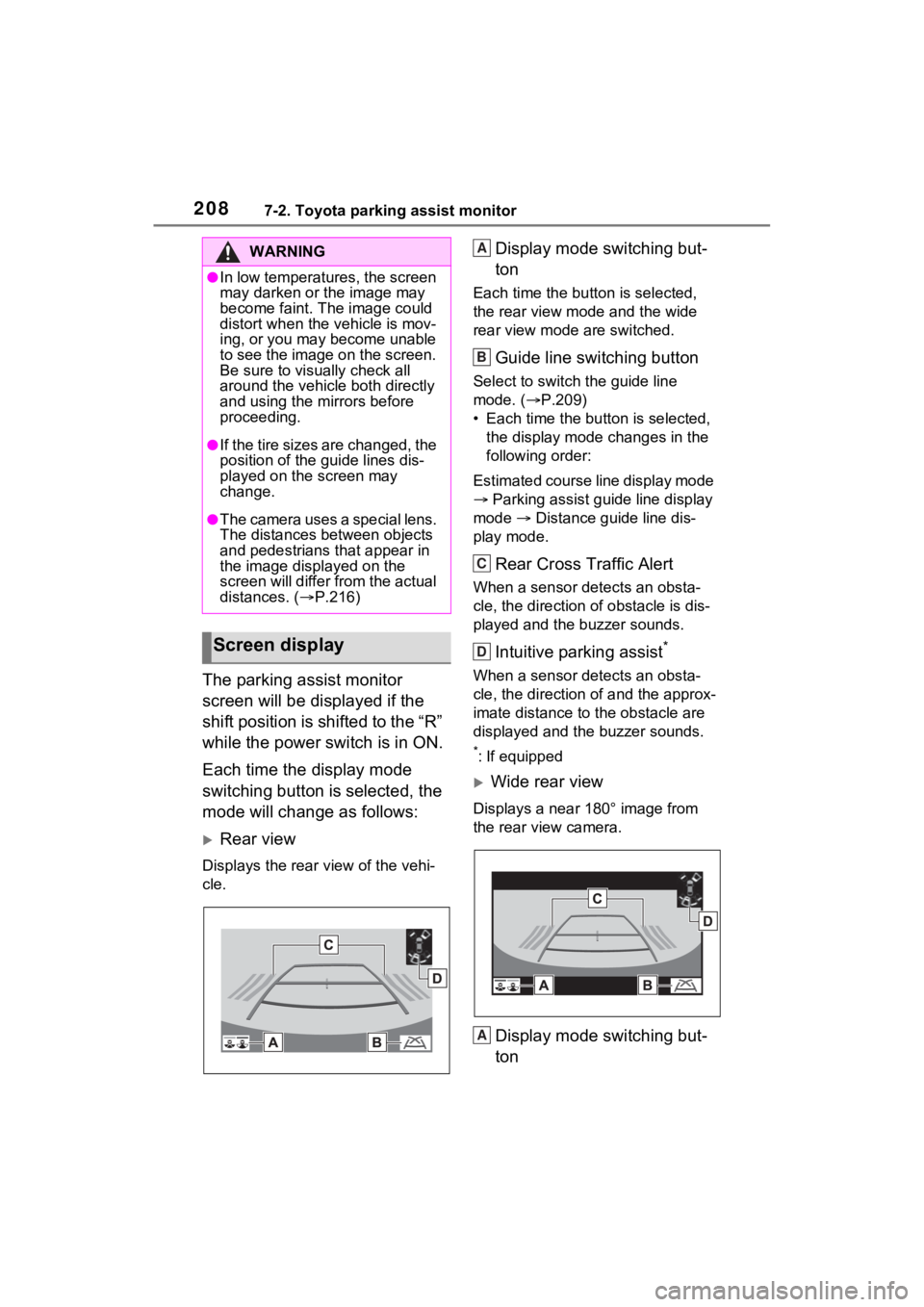
Each time the display mode
switching button is selected, the
mode will change as follows:
Rear view
Displays the rear view of the vehi-
cle.
Display mode switching but-
ton
Each time the button is selected,
the rear view mode and the wide
rear view mode are switched.
Guide line switching button
Select to switch the guide line
mode. ( P.209)
• Each time the bu tton is selected,
the display mode changes in the
following order:
Estimated course line display mode
Parking assist guide line display
mode Distance guide line dis-
play mode.
Rear Cross Traffic Alert
When a sensor detects an obsta-
cle, the direction of obstacle is dis-
played and the buzzer sounds.
Intuitive parking assist*
When a sensor detects an obsta-
cle, the direction of and the approx-
imate distance to the obstacle are
displayed and the buzzer sounds.
*: If equipped
Wide rear view
Displays a near 180° image from
the rear view camera.
Display mode switching but-
ton
WARNING
●In low temperatures, the screen
may darken or the image may
become faint. The image could
distort when the vehicle is mov-
ing, or you may become unable
to see the image on the screen.
Be sure to visually check all
around the vehicle both directly
and using the mirrors before
proceeding.
●If the tire sizes are changed, the
position of the guide lines dis-
played on the screen may
change.
●The camera uses a special lens.
The distances between objects
and pedestrians that appear in
the image displayed on the
screen will differ from the actual
distances. ( P.216)
Screen display
A
B
C
D
A
Page 209 of 332
2097-2. Toyota parking assist monitor
7
Peripheral monitoring system
Each time the button is selected,
the rear view mode and the wide
rear view mode are switched.
Guide line switching button
Select to switch the guide line
mode. ( P.209)
• Each time the button is selected, the display mode changes in the
following order:
Estimated course line display mode
Parking assist guide line display
mode Distance guide line dis-
play mode.
Rear Cross Traffic Alert
When a sensor detects an obsta-
cle, the direction of obstacle is dis-
played and the buzzer sounds.
Intuitive parking assist*
When a sensor detects an obsta-
cle, the direction of and the approx-
imate distance to the obstacle are
displayed and the buzzer sounds.
*: If equipped
●For details about the Intuitive
parking assist, refer to the
“OWNER’S MANUAL”.
The parking assist monitor is
canceled when the shift position
is shifted into any position other
than the “R”.
Use any of the following modes.
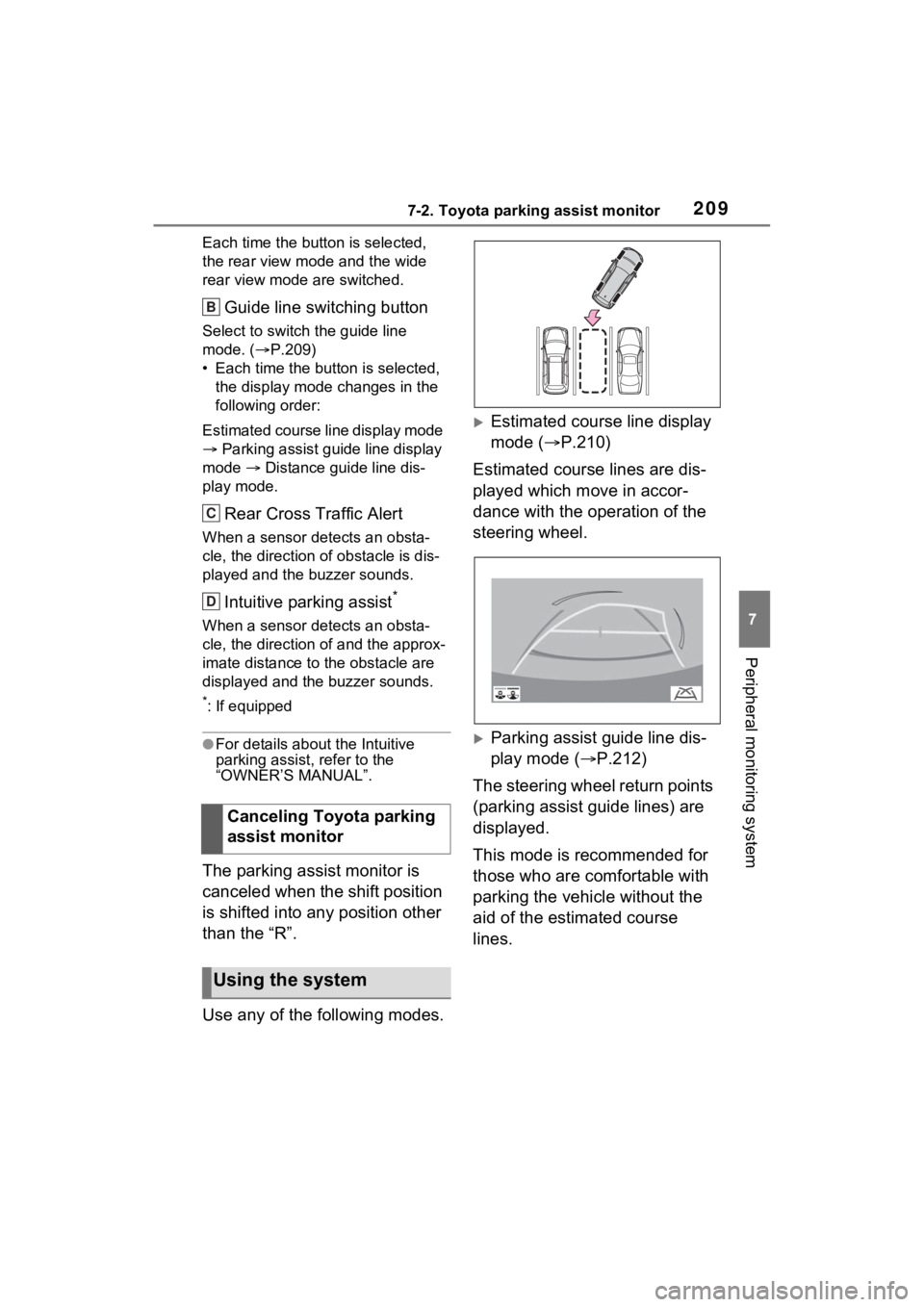
Estimated course line display
mode ( P.210)
Estimated course lines are dis-
played which move in accor-
dance with the operation of the
steering wheel.
Parking assist guide line dis-
play mode ( P.212)
The steering wheel return points
(parking assist guide lines) are
displayed.
This mode is recommended for
those who are comfortable with
parking the vehicle without the
aid of the estimated course
lines.
Canceling Toyota parking
assist monitor
Using the system
B
C
D
Page 210 of 332
2107-2. Toyota parking assist monitor
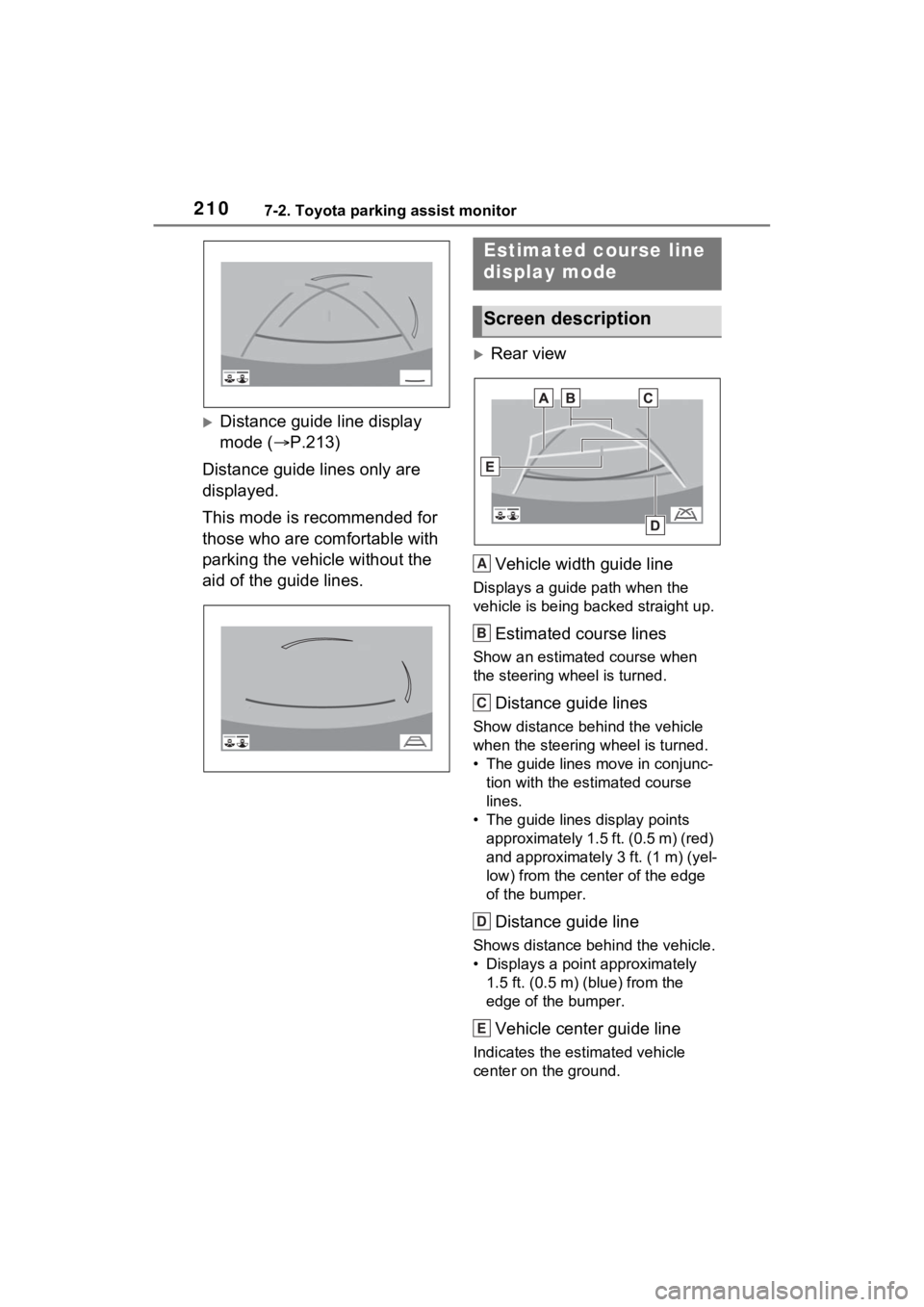
Distance guide line display
mode (P.213)
Distance guide lines only are
displayed.
This mode is recommended for
those who are comfortable with
parking the vehicle without the
aid of the guide lines.
Rear view
Vehicle width guide line
Displays a guide path when the
vehicle is being backed straight up.
Estimated course lines
Show an estimated course when
the steering wheel is turned.
Distance guide lines
Show distance behind the vehicle
when the steering wheel is turned.
• The guide lines move in conjunc- tion with the estimated course
lines.
• The guide lines display points approximately 1.5 ft. (0.5 m) (red)
and approximately 3 ft. (1 m) (yel-
low) from the ce nter of the edge
of the bumper.
Distance guide line
Shows distance behind the vehicle.
• Displays a point approximately 1.5 ft. (0.5 m) (blue) from the
edge of the bumper.
Vehicle center guide line
Indicates the es timated vehicle
center on the ground.
Estimated course line
display mode
Screen description
A
B
C
D
E
Page 211 of 332
2117-2. Toyota parking assist monitor
7
Peripheral monitoring system
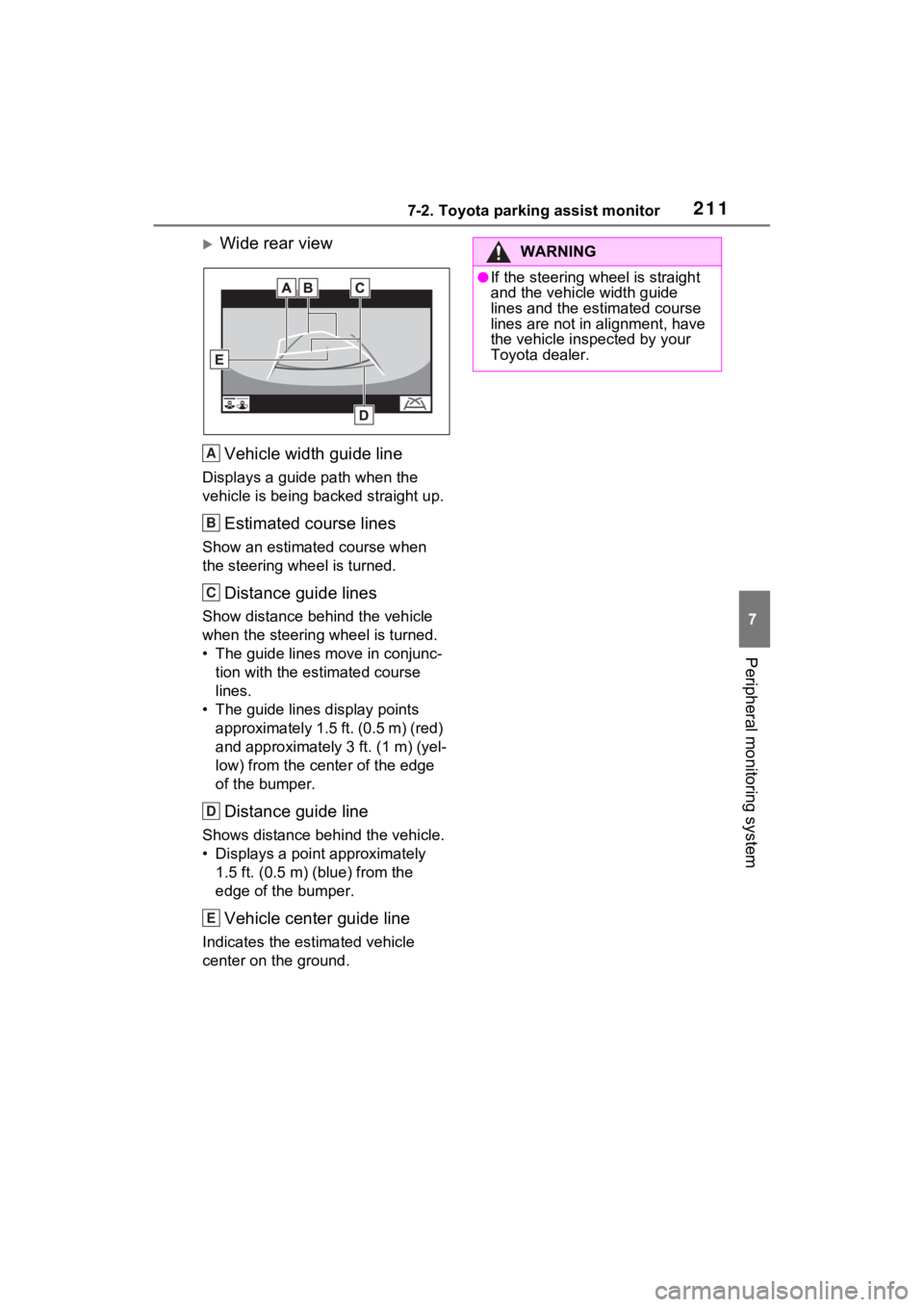
Wide rear viewVehicle width guide line
Displays a guide path when the
vehicle is being b acked straight up.
Estimated course lines
Show an estimate d course when
the steering wheel is turned.
Distance guide lines
Show distance behind the vehicle
when the steering wheel is turned.
• The guide lines move in conjunc- tion with the estimated course
lines.
• The guide lines display points approximately 1.5 ft. (0.5 m) (red)
and approximately 3 ft. (1 m) (yel-
low) from the cent er of the edge
of the bumper.
Distance guide line
Shows distance behind the vehicle.
• Displays a point approximately 1.5 ft. (0.5 m) (blue) from the
edge of the bumper.
Vehicle center guide line
Indicates the estimated vehicle
center on the ground.
A
B
C
D
E
WARNING
●If the steering wheel is straight
and the vehicle width guide
lines and the estimated course
lines are not in alignment, have
the vehicle inspected by your
Toyota dealer.
Page 212 of 332
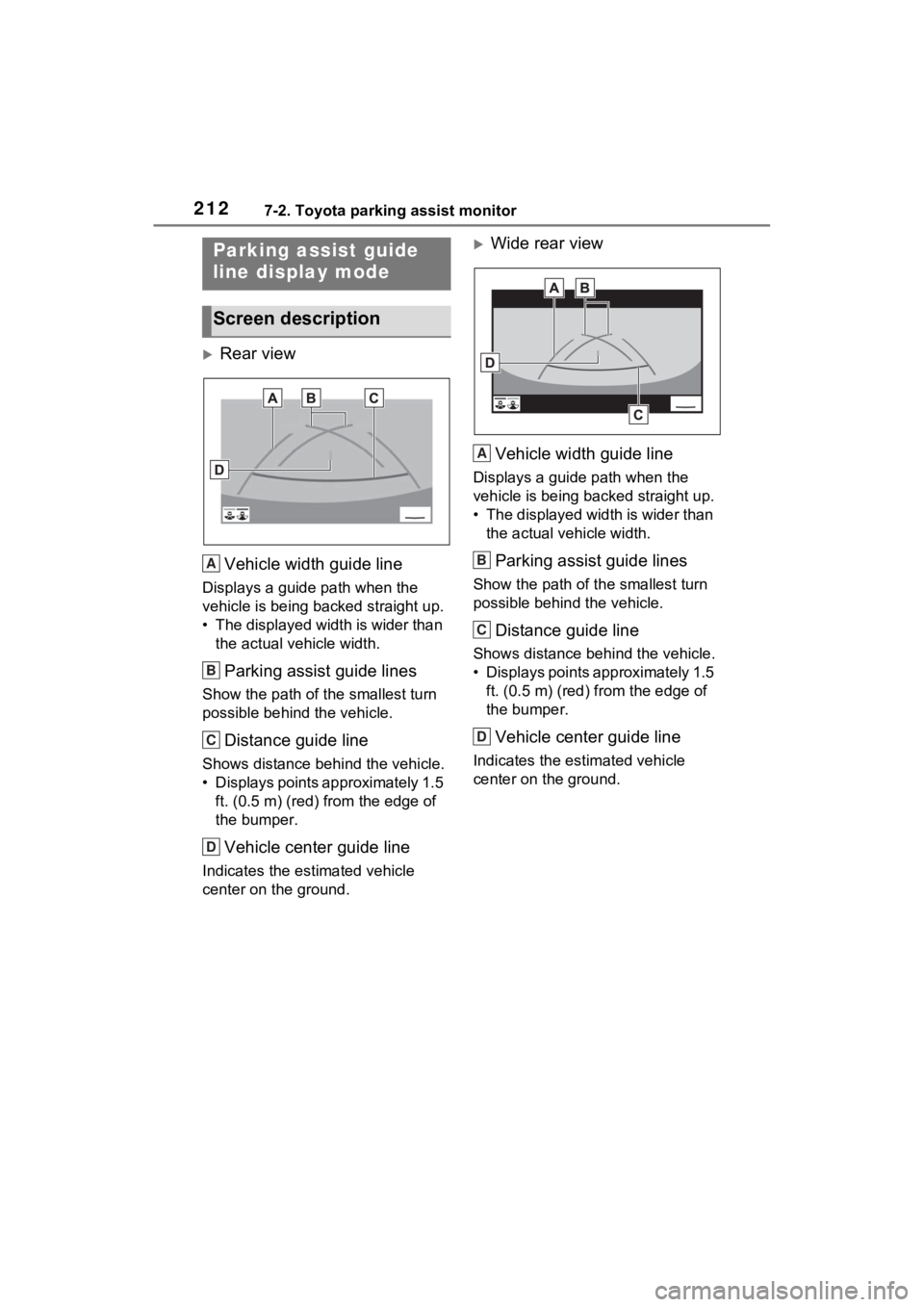
2127-2. Toyota parking assist monitor
Rear viewVehicle width guide line
Displays a guide path when the
vehicle is being b acked straight up.
• The displayed width is wider than the actual vehicle width.
Parking assist guide lines
Show the path of the smallest turn
possible behind the vehicle.
Distance guide line
Shows distance behind the vehicle.
• Displays points approximately 1.5 ft. (0.5 m) (red) f rom the edge of
the bumper.
Vehicle center guide line
Indicates the estimated vehicle
center on the ground.
Wide rear view
Vehicle width guide line
Displays a guide path when the
vehicle is being backed straight up.
• The displayed width is wider than the actual veh icle width.
Parking assist guide lines
Show the path of th e smallest turn
possible behind the vehicle.
Distance guide line
Shows distance behind the vehicle.
• Displays points approximately 1.5 ft. (0.5 m) (red) fr om the edge of
the bumper.
Vehicle center guide line
Indicates the es timated vehicle
center on the ground.
Parking assist guide
line display mode
Screen description
A
B
C
D
A
B
C
D
Page 213 of 332
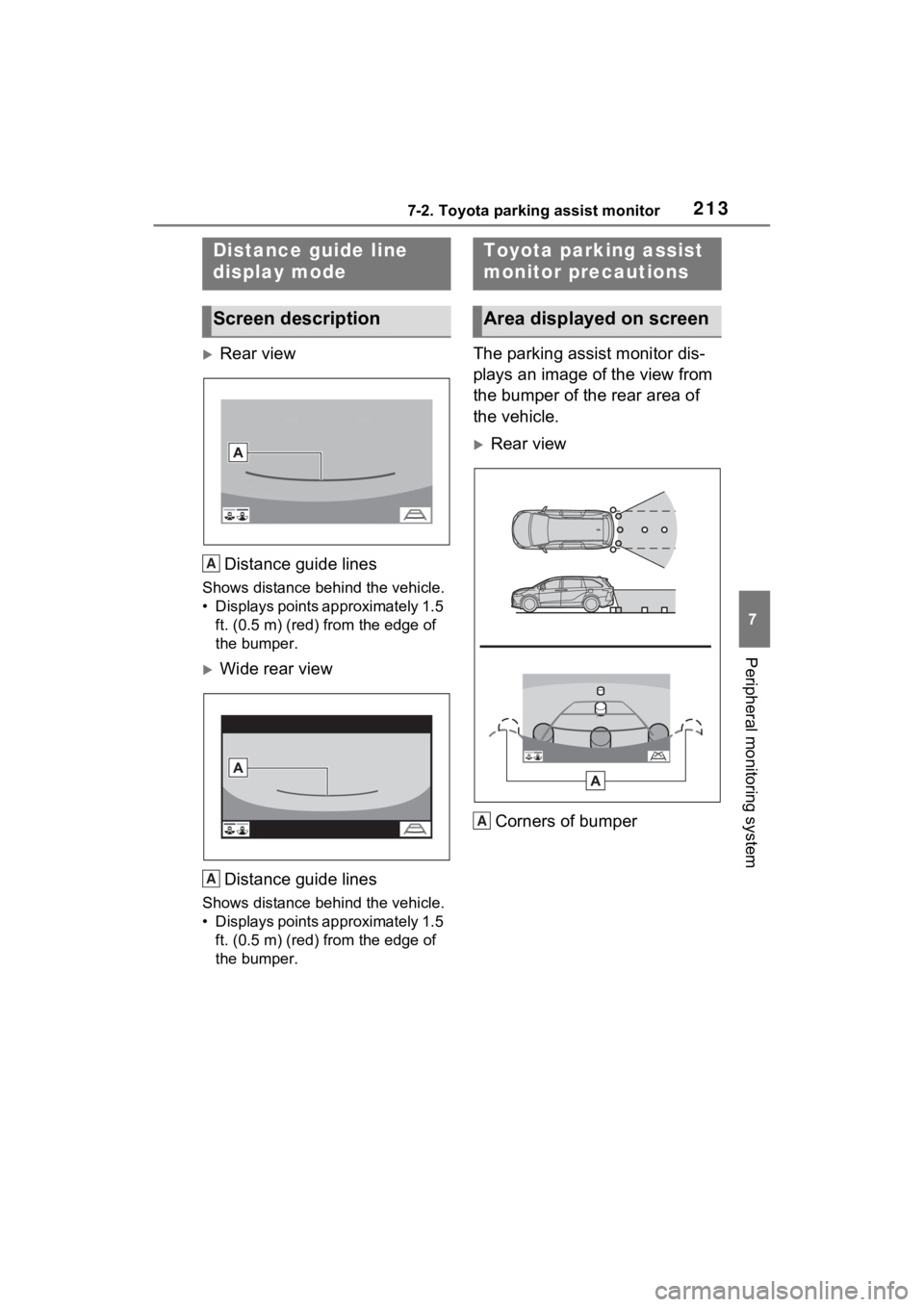
2137-2. Toyota parking assist monitor
7
Peripheral monitoring system
Rear viewDistance guide lines
Shows distance behind the vehicle.
• Displays points approximately 1.5 ft. (0.5 m) (red) f rom the edge of
the bumper.
Wide rear view
Distance guide lines
Shows distance behind the vehicle.
• Displays points approximately 1.5 ft. (0.5 m) (red) f rom the edge of
the bumper.
The parking assist monitor dis-
plays an image of the view from
the bumper of the rear area of
the vehicle.
Rear view
Corners of bumper
Distance guide line
display mode
Screen description
A
A
Toyota parking assist
monitor precautions
Area displayed on screen
A