center console TOYOTA SIENNA HYBRID 2021 Owners Manual (in English)
[x] Cancel search | Manufacturer: TOYOTA, Model Year: 2021, Model line: SIENNA HYBRID, Model: TOYOTA SIENNA HYBRID 2021Pages: 76, PDF Size: 6 MB
Page 24 of 76
22
FEATURES & OPERATIONS
CONSOLE BOX
2ND CENTER SEAT (8-PASSENGER MODELS)
3RD ROW SEAT
Type A
Type B
Vehicles without spare tire
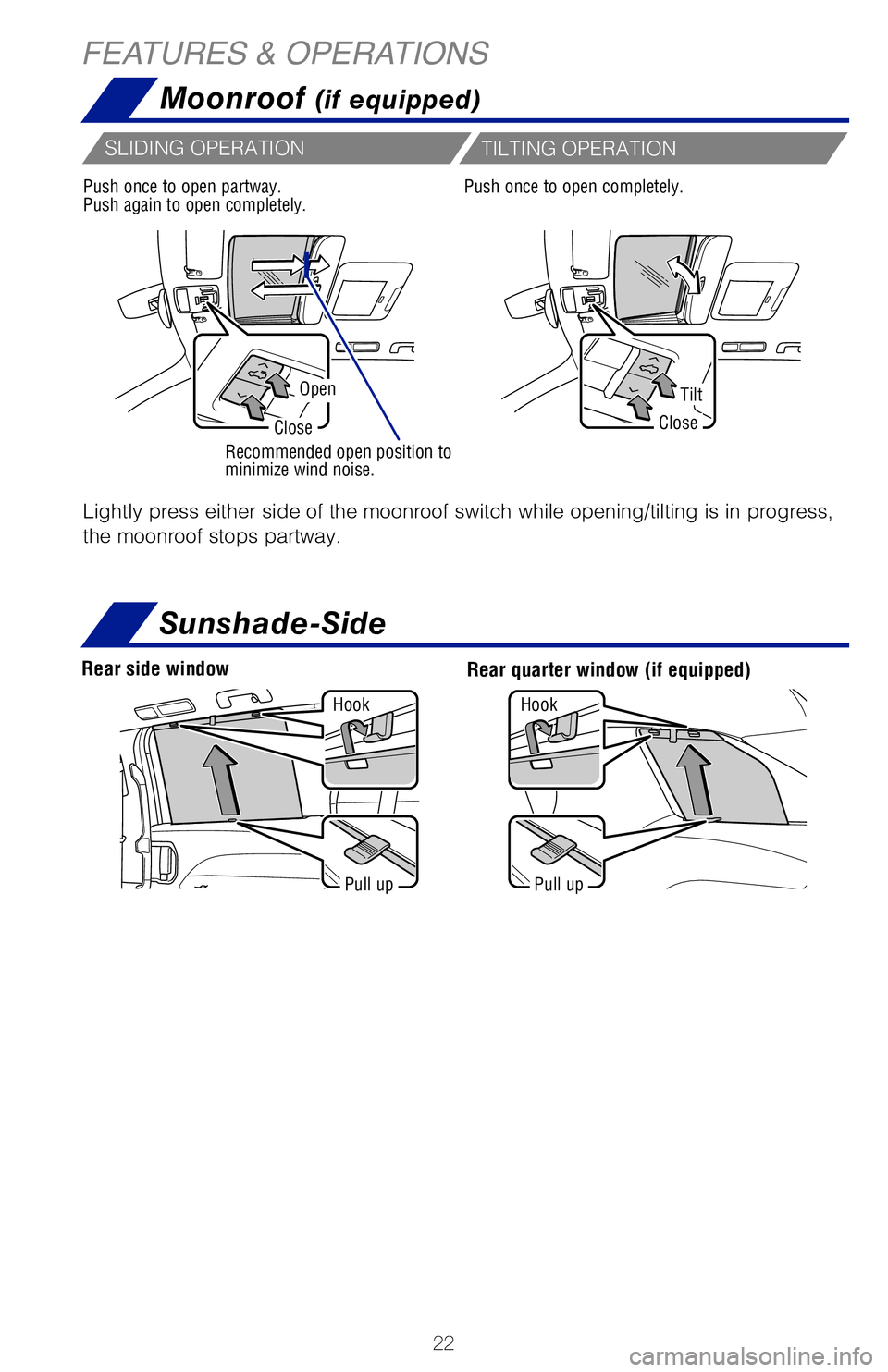
Moonroof (if equipped)
OpenTilt
CloseClose
Recommended open position to
minimize wind noise.
Lightly press either side of the moonroof switch while opening/tilting is in progress,
the moonroof stops partway.
Push once to open partway.
Push again to open completely.Push once to open completely.
SLIDING OPERATION
TILTING OPERATION
Pull upPull up
Hook
Hook
Sunshade-Side
Rear quarter window (if equipped)Rear side window
MY21_Sienna_QRG_V4_ML_0929.indd 2210/5/20 12:14 PM
Page 25 of 76
23
OVERVIEW
FEATURES & OPERATIONS
TOYOTA SAFETY SENSE
SAFETY & EMERGENCY FEATURES
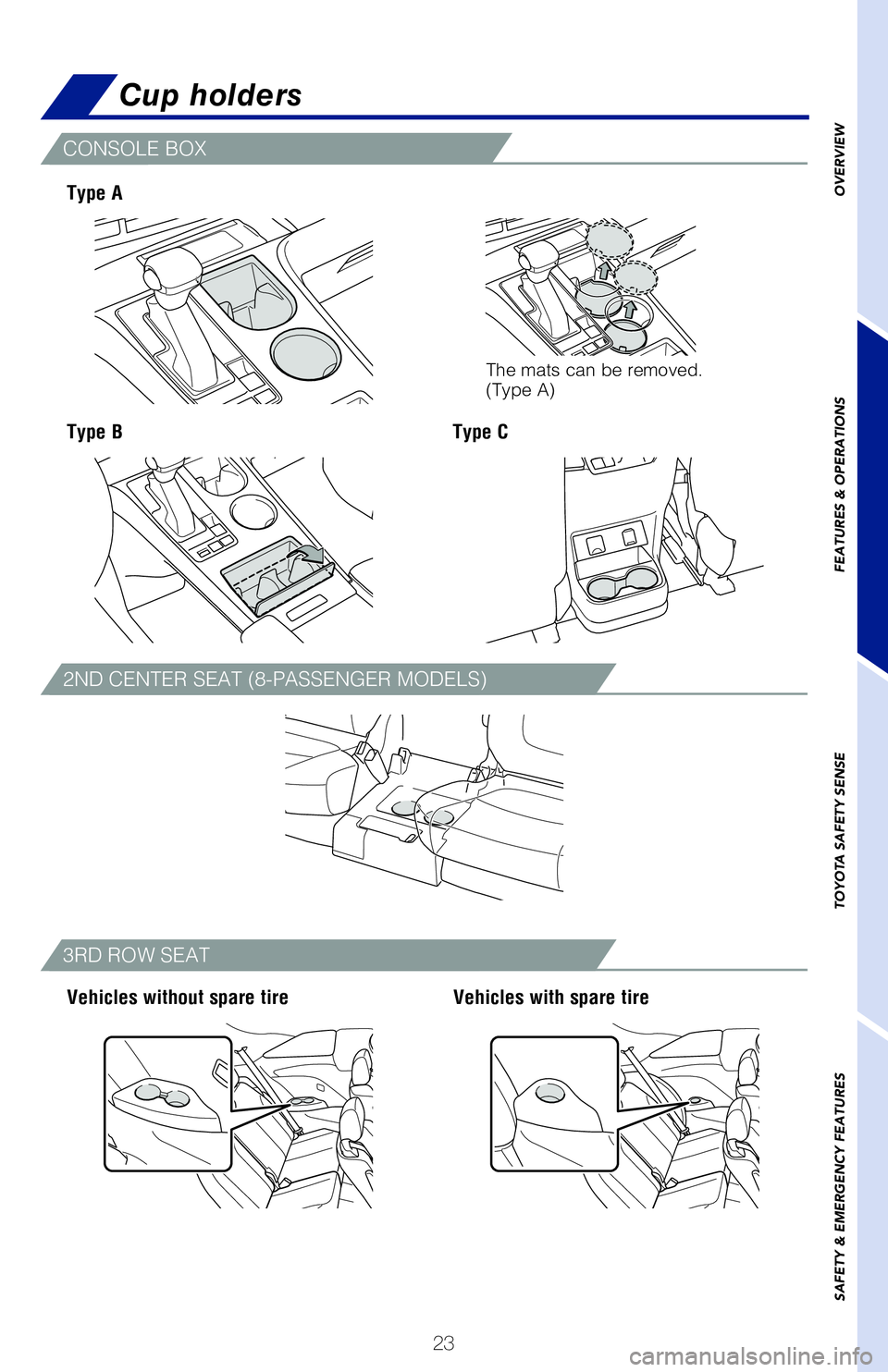
Cup holders
CONSOLE BOX
2ND CENTER SEAT (8-PASSENGER MODELS)
3RD ROW SEAT
Type A
Type B
Vehicles without spare tire Vehicles with spare tire
Type C
Lightly press either side of the moonroof switch while opening/tilting i\
s in progress,
the moonroof stops partway.
Push once to open completely.
Sunshade-Side
Rear quarter window (if equipped)
The mats can be removed.
(Type A)
MY21_Sienna_QRG_V4_ML_0929.indd 2310/5/20 12:14 PM
Page 34 of 76
 32
FEATURES & OPERATIONS
Check that the “Ready” indicator is illuminated, then press the AC\
120V master
switch. The power outlets can be used when the indicator on the AC 120 V\
master
switch")
32
FEATURES & OPERATIONS
Check that the “Ready” indicator is illuminated, then press the AC\
120V master
switch. The power outlets can be used when the indicator on the AC 120 V\
master
switch is illuminated.
To turn off the 120 V outlets, press the master switch and observe that \
the switch is
no longer illuminated.
Refer to the Owner’s Manual for more details.
Rear of console box
The vehicle must be in the “ACCESSORY” or “IGNITION ON” mode\
for use.
OUTLET LOCATION
POWER OUTLET ON/OFF MASTER SWITCH
Power switchCharge area
Operation indicator light
Qi Wireless charger (if equipped)
A mobile device can be charged wirelessly on the tray. (1) Press the wireless
charger power switch and the green operation indicator light turns on. (2) Place
a compatible mobile device on the tray as shown in the illustration. An \
amber
indicator illuminates while charging is in progress. When charging is co\
mplete, the
indicator illuminates green. Some phones, cases or cover type wireless c\
hargers
may not cause the green indicator to illuminate even though it is fully \
charged.
The vehicle must be in the “ACCESSORY” or “IGNITION ON” mode\
for use.
Refer to the Owner’s Manual for limitations and more details on this \
system before
attempting to use it.
Press (1)
When the vehicle is turned off, the last state
(ON/OFF) of the wireless charger is retained.
Place device nearest the center of charging
area for best results. Moving device may
result in stopping or restarting the charging
process.
Place (2)
MY21_Sienna_QRG_V4_ML_0929.indd 3210/5/20 12:14 PM
Page 35 of 76
33
OVERVIEW
FEATURES & OPERATIONS
TOYOTA SAFETY SENSE
SAFETY & EMERGENCY FEATURES
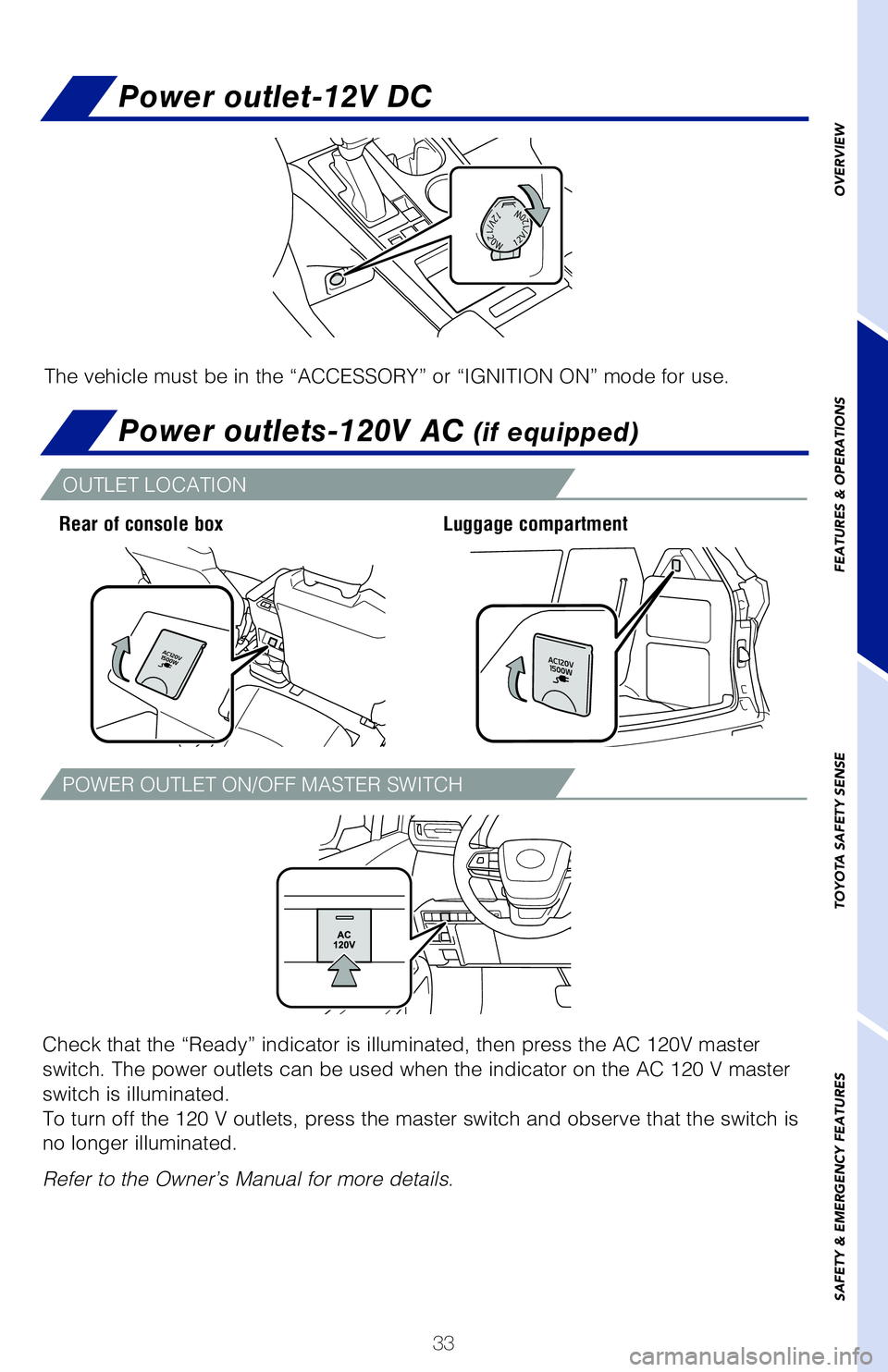
Power outlet-12V DC
Power outlets-120V AC (if equipped)
Check that the “Ready” indicator is illuminated, then press the AC\
120V master
switch. The power outlets can be used when the indicator on the AC 120 V\
master
switch is illuminated.
To turn off the 120 V outlets, press the master switch and observe that \
the switch is
no longer illuminated.
Refer to the Owner’s Manual for more details.
Rear of console box Luggage compartment
The vehicle must be in the “ACCESSORY” or “IGNITION ON” mode\
for use.
OUTLET LOCATION
POWER OUTLET ON/OFF MASTER SWITCH
Qi Wireless charger (if equipped)
A mobile device can be charged wirelessly on the tray. (1) Press the wireless
charger power switch and the green operation indicator light turns on. (2) Place
a compatible mobile device on the tray as shown in the illustration. An \
amber
indicator illuminates while charging is in progress. When charging is co\
mplete, the
indicator illuminates green. Some phones, cases or cover type wireless c\
hargers
may not cause the green indicator to illuminate even though it is fully \
charged.
The vehicle must be in the “ACCESSORY” or “IGNITION ON” mode\
for use.
Refer to the Owner’s Manual for limitations and more details on this \
system before
attempting to use it.
When the vehicle is turned off, the last state
(ON/OFF) of the wireless charger is retained.
Place device nearest the center of charging
area for best results. Moving device may
result in stopping or restarting the charging
process.
MY21_Sienna_QRG_V4_ML_0929.indd 3310/5/20 12:14 PM