ignition TOYOTA SIENNA HYBRID 2021 Owners Manual (in English)
[x] Cancel search | Manufacturer: TOYOTA, Model Year: 2021, Model line: SIENNA HYBRID, Model: TOYOTA SIENNA HYBRID 2021Pages: 76, PDF Size: 6 MB
Page 32 of 76
30
FEATURES & OPERATIONS
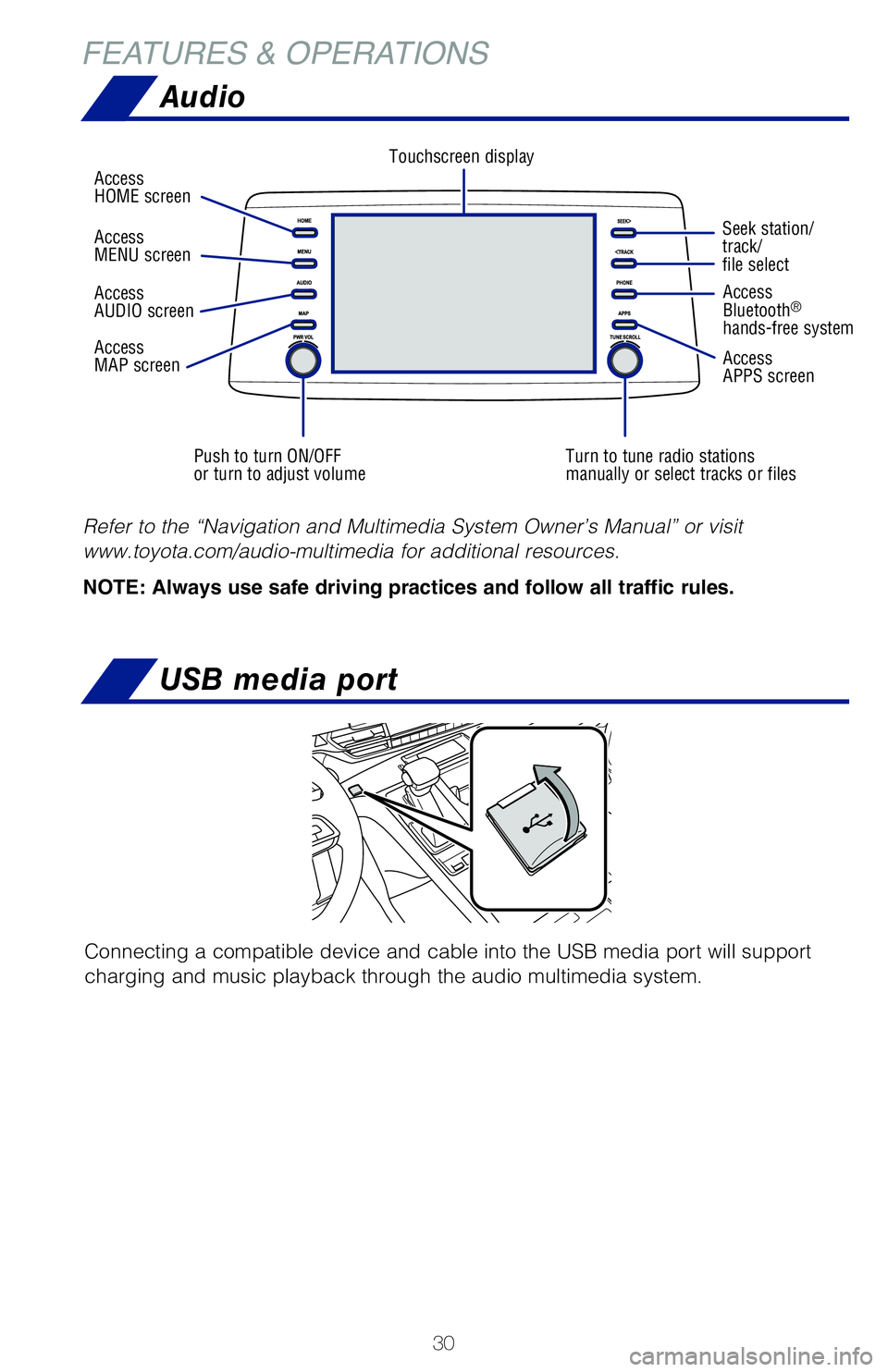
Audio
Push to turn ON/OFF
or turn to adjust volumeTurn to tune radio stations
manually or select tracks or filesSeek station/
track/
file select
Access
HOME screen
Touchscreen display
Access
Bluetooth
®
hands-free system
Access
APPS screen
Access
AUDIO screen
Access
MAP screen Access
MENU screen
Refer to the “Navigation and Multimedia System Owner’s Manual” or visit
www.toyota.com/audio-multimedia for additional resources.
NOTE: Always use safe driving practices and follow all traffic rules.
USB media port
Connecting a compatible device and cable into the USB media port will support
charging and music playback through the audio multimedia system.
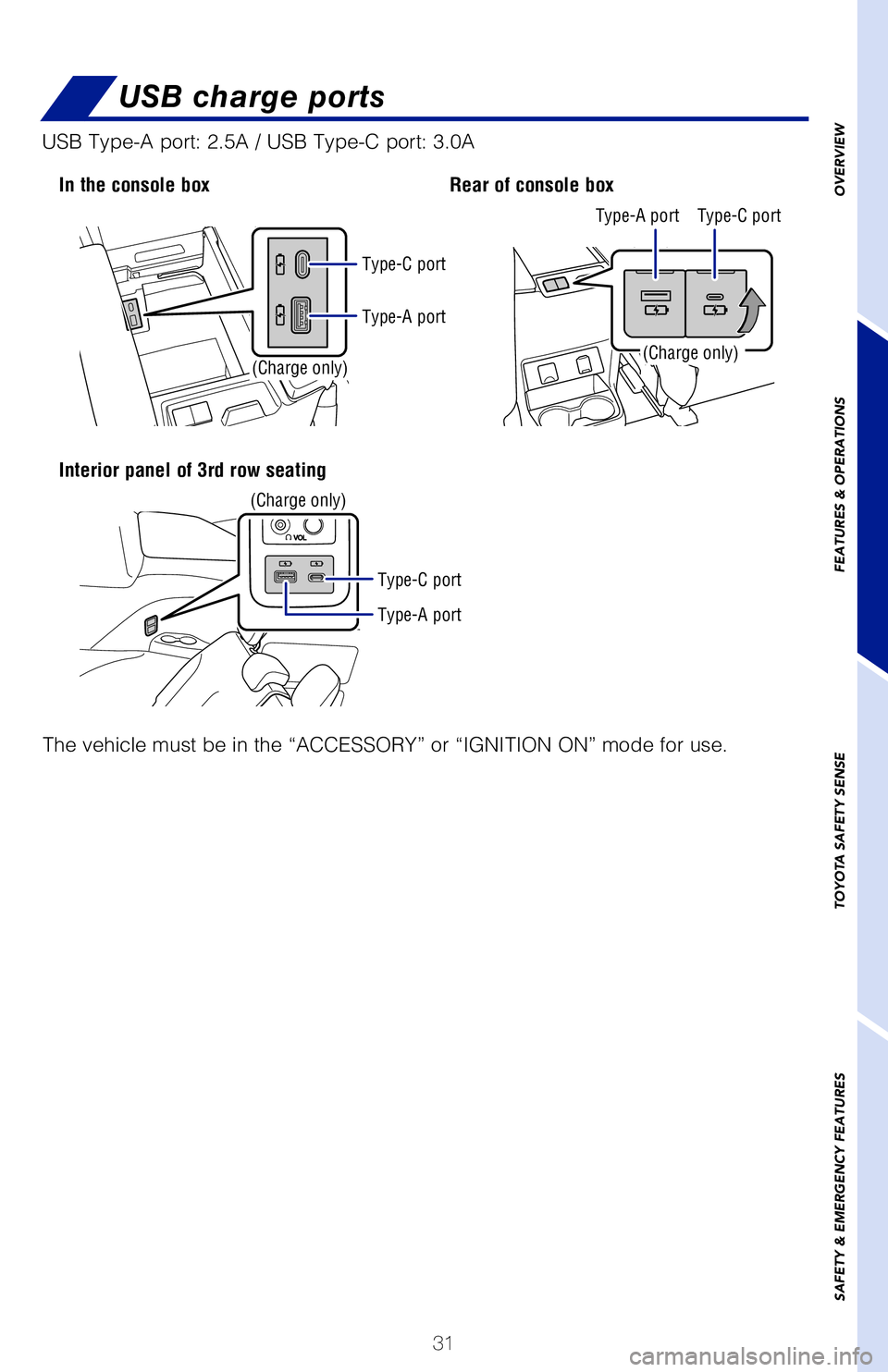
In the console box
Interior panel of 3rd row seating
The vehicle must be in the “ACCESSORY” or “IGNITION ON” mode for use.
USB Type-A port: 2.5A / USB Type-C port: 3.0A
MY21_Sienna_QRG_V4_ML_0929.indd 3010/5/20 12:14 PM
Page 33 of 76
31
OVERVIEW
FEATURES & OPERATIONS
TOYOTA SAFETY SENSE
SAFETY & EMERGENCY FEATURES
Seek station/
track/
file select
Access
Bluetooth
®
hands-free system
Access
APPS screen
Refer to the “Navigation and Multimedia System Owner’s Manual” \
or visit
www.toyota.com/audio-multimedia for additional resources.
NOTE: Always use safe driving practices and follow all traffic rules.
USB charge ports
Connecting a compatible device and cable into the USB media port will su\
pport
charging and music playback through the audio multimedia system.
In the console box
Interior panel of 3rd row seating Rear of console box
(Charge only)
(Charge only)(Charge only)
The vehicle must be in the “ACCESSORY” or “IGNITION ON” mode\
for use.
USB Type-A port: 2.5A / USB Type-C port: 3.0A
Type-A port
Type-A port Type-A port Type-C port
Type-C port
Type-C port
MY21_Sienna_QRG_V4_ML_0929.indd 3110/5/20 12:14 PM
Page 34 of 76
 32
FEATURES & OPERATIONS
Check that the “Ready” indicator is illuminated, then press the AC\
120V master
switch. The power outlets can be used when the indicator on the AC 120 V\
master
switch")
32
FEATURES & OPERATIONS
Check that the “Ready” indicator is illuminated, then press the AC\
120V master
switch. The power outlets can be used when the indicator on the AC 120 V\
master
switch is illuminated.
To turn off the 120 V outlets, press the master switch and observe that \
the switch is
no longer illuminated.
Refer to the Owner’s Manual for more details.
Rear of console box
The vehicle must be in the “ACCESSORY” or “IGNITION ON” mode\
for use.
OUTLET LOCATION
POWER OUTLET ON/OFF MASTER SWITCH
Power switchCharge area
Operation indicator light
Qi Wireless charger (if equipped)
A mobile device can be charged wirelessly on the tray. (1) Press the wireless
charger power switch and the green operation indicator light turns on. (2) Place
a compatible mobile device on the tray as shown in the illustration. An \
amber
indicator illuminates while charging is in progress. When charging is co\
mplete, the
indicator illuminates green. Some phones, cases or cover type wireless c\
hargers
may not cause the green indicator to illuminate even though it is fully \
charged.
The vehicle must be in the “ACCESSORY” or “IGNITION ON” mode\
for use.
Refer to the Owner’s Manual for limitations and more details on this \
system before
attempting to use it.
Press (1)
When the vehicle is turned off, the last state
(ON/OFF) of the wireless charger is retained.
Place device nearest the center of charging
area for best results. Moving device may
result in stopping or restarting the charging
process.
Place (2)
MY21_Sienna_QRG_V4_ML_0929.indd 3210/5/20 12:14 PM
Page 35 of 76
33
OVERVIEW
FEATURES & OPERATIONS
TOYOTA SAFETY SENSE
SAFETY & EMERGENCY FEATURES
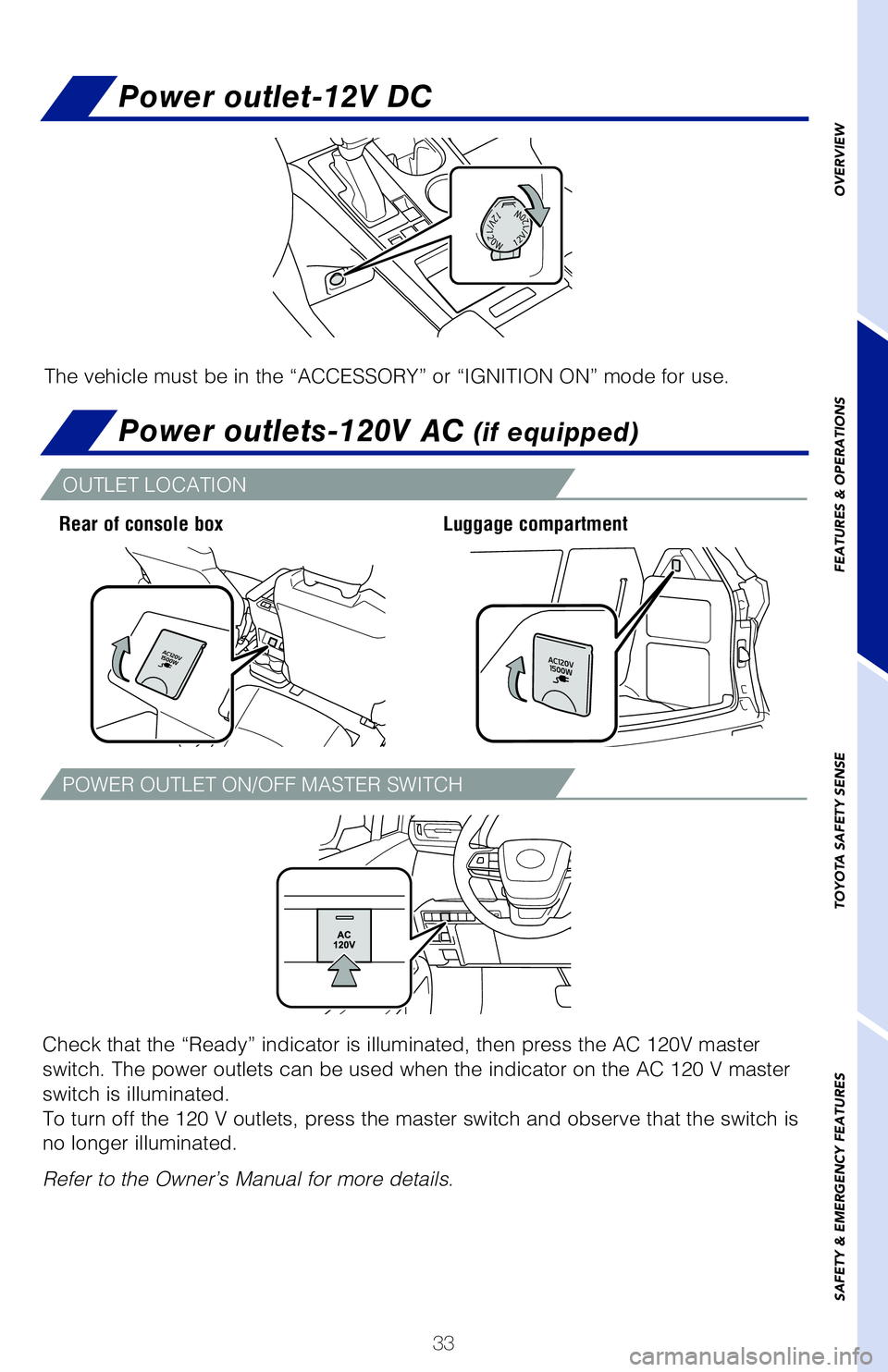
Power outlet-12V DC
Power outlets-120V AC (if equipped)
Check that the “Ready” indicator is illuminated, then press the AC\
120V master
switch. The power outlets can be used when the indicator on the AC 120 V\
master
switch is illuminated.
To turn off the 120 V outlets, press the master switch and observe that \
the switch is
no longer illuminated.
Refer to the Owner’s Manual for more details.
Rear of console box Luggage compartment
The vehicle must be in the “ACCESSORY” or “IGNITION ON” mode\
for use.
OUTLET LOCATION
POWER OUTLET ON/OFF MASTER SWITCH
Qi Wireless charger (if equipped)
A mobile device can be charged wirelessly on the tray. (1) Press the wireless
charger power switch and the green operation indicator light turns on. (2) Place
a compatible mobile device on the tray as shown in the illustration. An \
amber
indicator illuminates while charging is in progress. When charging is co\
mplete, the
indicator illuminates green. Some phones, cases or cover type wireless c\
hargers
may not cause the green indicator to illuminate even though it is fully \
charged.
The vehicle must be in the “ACCESSORY” or “IGNITION ON” mode\
for use.
Refer to the Owner’s Manual for limitations and more details on this \
system before
attempting to use it.
When the vehicle is turned off, the last state
(ON/OFF) of the wireless charger is retained.
Place device nearest the center of charging
area for best results. Moving device may
result in stopping or restarting the charging
process.
MY21_Sienna_QRG_V4_ML_0929.indd 3310/5/20 12:14 PM
Page 52 of 76
50
TOYOTA SAFETY SENSE™
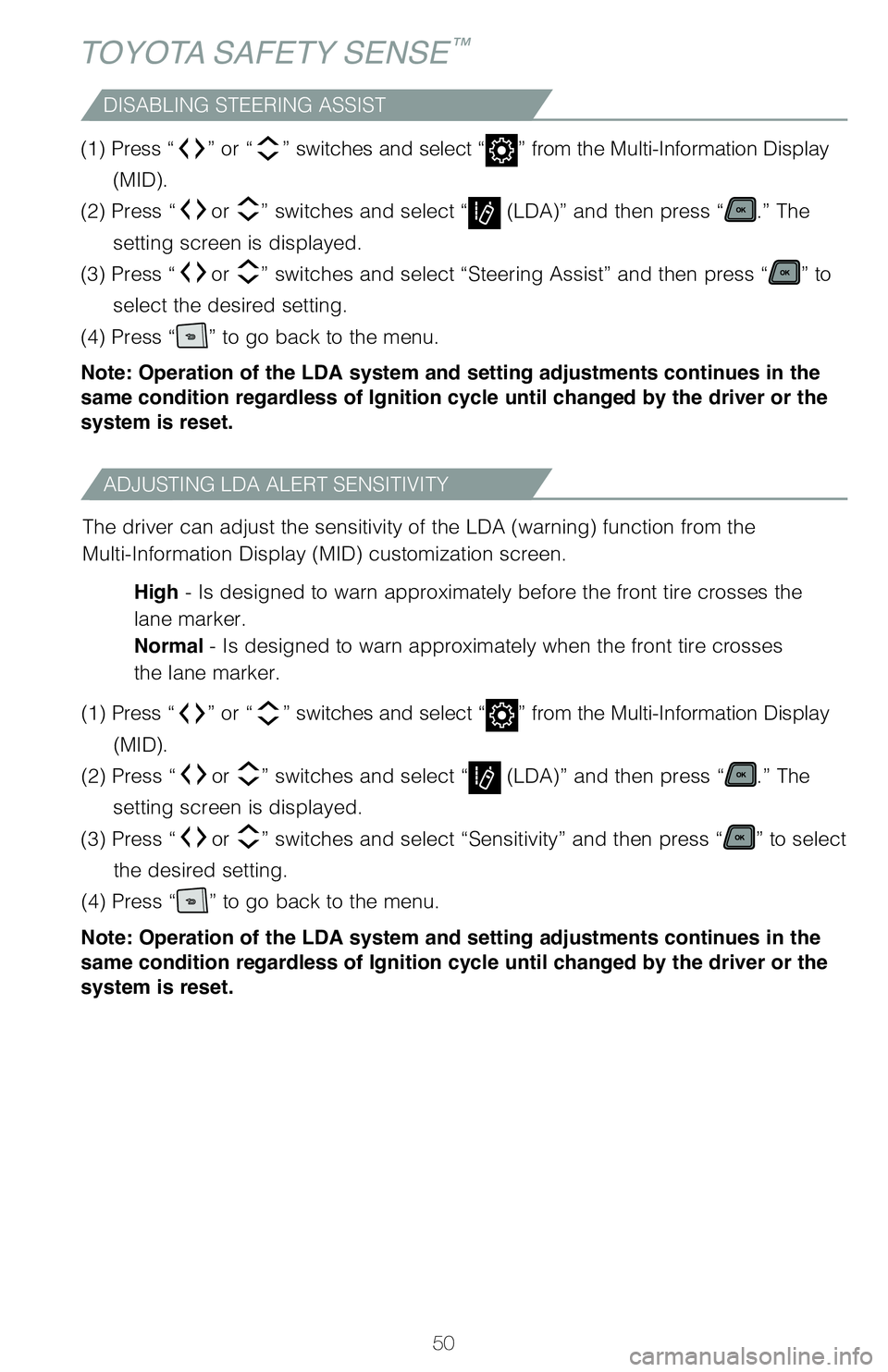
DISABLING STEERING ASSIST
(1) Press “” or “” switches and select “” from the Multi-Information Display
(MID).
(2) Press “
or ” switches and select “ (LDA)” and then press “.” The
setting screen is displayed.
(3) Press “
or ” switches and select “Steering Assist” and then press “” to
select the desired setting.
(4) Press “
” to go back to the menu.
Note: Operation of the LDA system and setting adjustments continues in the
same condition regardless of Ignition cycle until changed by the driver or the
system is reset.
ADJUSTING LDA ALERT SENSITIVITY
The driver can adjust the sensitivity of the LDA (warning) function fr\
om the
Multi-Information Display (MID) customization screen.
High - Is designed to warn approximately before the front tire crosses the
lane marker.
Normal - Is designed to warn approximately when the front tire crosses
the lane marker.
(1) Press “
” or “” switches and select “” from the Multi-Information Display
(MID).
(2) Press “
or ” switches and select “ (LDA)” and then press “.” The
setting screen is displayed.
(3) Press “
or ” switches and select “Sensitivity” and then press “” to select
the desired setting.
(4) Press “
” to go back to the menu.
Note: Operation of the LDA system and setting adjustments continues in the
same condition regardless of Ignition cycle until changed by the driver or the
system is reset.
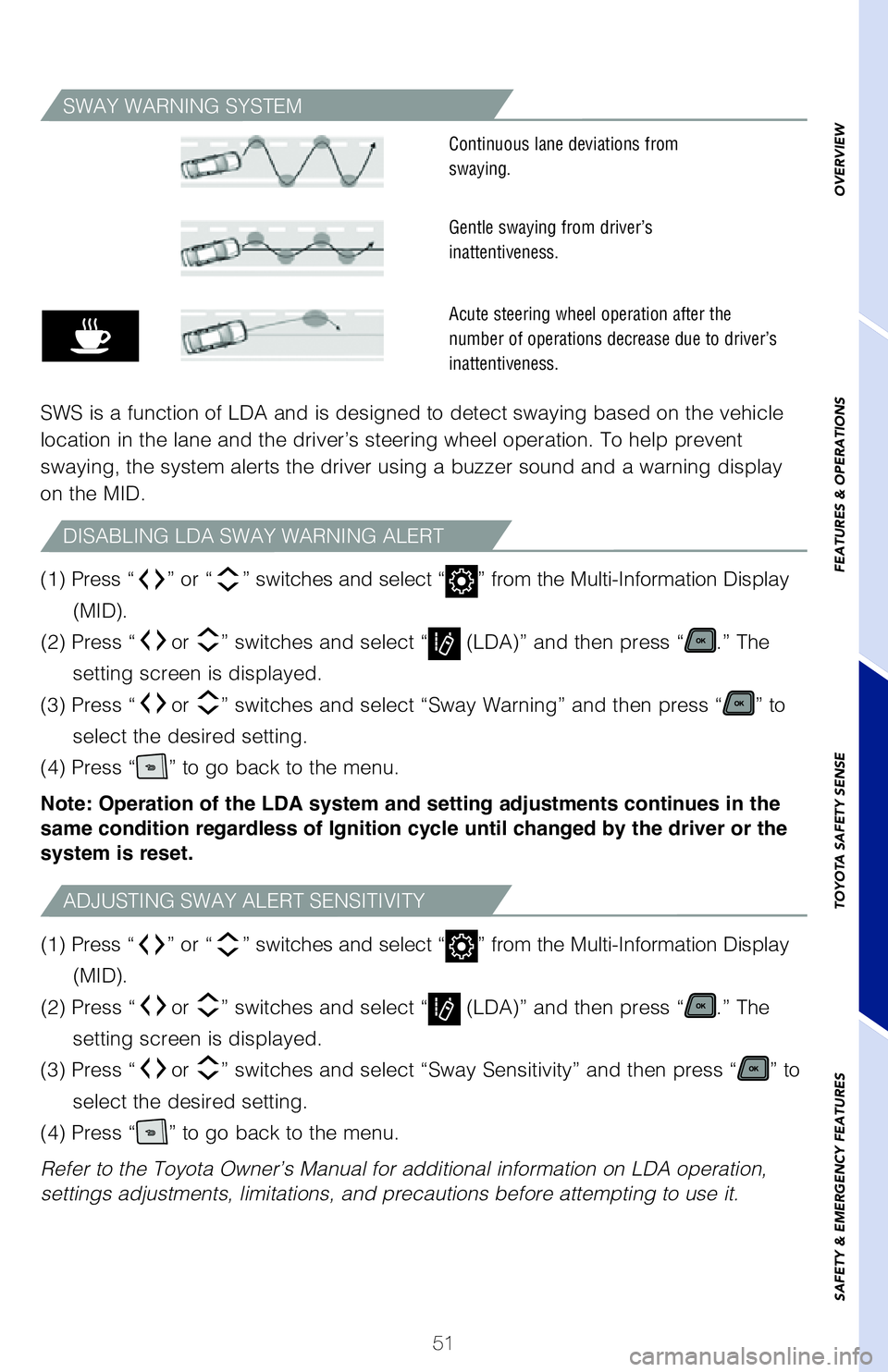
SWAY WARNING SYSTEM
SWS is a function of LDA and is designed to detect swaying based on the \
vehicle
location in the lane and the driver’s steering wheel operation. To he\
lp prevent
swaying, the system alerts the driver using a buzzer sound and a warning\
display
on the MID.
ADJUSTING SWAY ALERT SENSITIVITY
DISABLING LDA SWAY WARNING ALERT
(1) Press “” or “ ” switches and select “” from the Multi-Information Display
(MID).
(2) Press “ or
” switches and select “
(LDA)” and then press “.” The
setting screen is displayed.
(3) Press “ or
” switches and select “Sway Sensitivity” and then press “
” to
select the desired setting.
(4) Press “
” to go back to the menu.
Refer to the Toyota Owner’s Manual for additional information on LDA \
operation,
settings adjustments, limitations, and precautions before attempting to \
use it.
(1) Press
Page 53 of 76
51
OVERVIEW
FEATURES & OPERATIONS
TOYOTA SAFETY SENSE
SAFETY & EMERGENCY FEATURES
(1) Press “” or “ ” switches and select “” from the Multi-Information Display
(MID).
(2) Press “ or
” switches and select “
(LDA)” and then press “.” The
setting screen is displayed.
(3) Press “ or
” switches and select “Steering Assist” and then press “
” to
select the desired setting.
(4) Press “
” to go back to the menu.
Note: Operation of the LDA system and setting adjustments continues in the
same condition regardless of Ignition cycle until changed by the driver or the
system is reset.
The driver can adjust the sensitivity of the LDA (warning) function fr\
om the
Multi-Information Display (MID) customization screen.
High - Is designed to warn approximately before the front tire crosses the
lane marker.
Normal - Is designed to warn approximately when the front tire crosses
the lane marker.
(1) Press “
” or “ ” switches and select “
” from the Multi-Information Display
(MID).
(2) Press “ or
” switches and select “
(LDA)” and then press “.” The
setting screen is displayed.
(3) Press “ or
” switches and select “Sensitivity” and then press “
” to select
the desired setting.
(4) Press “
” to go back to the menu.
Note: Operation of the LDA system and setting adjustments continues in the
same condition regardless of Ignition cycle until changed by the driver or the
system is reset.
SWAY WARNING SYSTEM
SWS is a function of LDA and is designed to detect swaying based on the \
vehicle
location in the lane and the driver’s steering wheel operation. To he\
lp prevent
swaying, the system alerts the driver using a buzzer sound and a warning\
display
on the MID.
Continuous lane deviations from
swaying.
Gentle swaying from driver’s
inattentiveness.
Acute steering wheel operation after the
number of operations decrease due to driver’s
inattentiveness.
ADJUSTING SWAY ALERT SENSITIVITY
DISABLING LDA SWAY WARNING ALERT
(1) Press “” or “” switches and select “” from the Multi-Information Display
(MID).
(2) Press “
or ” switches and select “ (LDA)” and then press “.” The
setting screen is displayed.
(3) Press “
or ” switches and select “Sway Sensitivity” and then press “” to
select the desired setting.
(4) Press “
” to go back to the menu.
Refer to the Toyota Owner’s Manual for additional information on LDA \
operation,
settings adjustments, limitations, and precautions before attempting to \
use it. (1) Press “
” or “” switches and select “” from the Multi-Information Display
(MID).
(2) Press “
or ” switches and select “ (LDA)” and then press “.” The
setting screen is displayed.
(3) Press “
or ” switches and select “Sway Warning” and then press “” to
select the desired setting.
(4) Press “
” to go back to the menu.
Note: Operation of the LDA system and setting adjustments continues in the
same condition regardless of Ignition cycle until changed by the driver or the
system is reset.
MY21_Sienna_QRG_V4_ML_0929.indd 5110/5/20 12:15 PM
Page 54 of 76
 52
TOYOTA SAFETY SENSE™
When Full-Speed Range Dynamic Radar Cruise Control (DRCC) is enabled a\
nd
lane markers are detectable, Lane Tracing Assist (LTA) uses the lines \
on the road
and/or preced")
52
TOYOTA SAFETY SENSE™
When Full-Speed Range Dynamic Radar Cruise Control (DRCC) is enabled a\
nd
lane markers are detectable, Lane Tracing Assist (LTA) uses the lines \
on the road
and/or preceding vehicles to help keep the vehicle centered in its lane.\
See www.toyota.com/safety-sense for model applicability.
Refer to the Toyota Owner’s Manual for a list of additional situation\
s in which the
system operation may be limited.
Lane Tracing Assist (LTA)
TURNING THE LTA SYSTEM ON/OFF
Press the LTA switch to turn the LTA system on. Depress again to turn it\
off.
Note: Operation of the LTA system and setting adjustments continues in the
same condition regardless of Ignition cycle until changed by the driver or the
system is reset.
Refer to the Toyota Owner’s Manual for additional information on LTA \
operation,
settings adjustments, limitations, and precautions before attempting to \
use it.
LANE TRACING ASSIST
LTA function display(1)
Lane Tracing Assist (LTA) indicator flashes orange when operating.
The LTA function displays when the Multi-Information Display (MID) is switched
to the driving assist system information screen.
(1) The system displays solid white lines on the LTA indicator when vi\
sible lane markers on the road are detected. A side flashes orange to alert the dri\
ver when
the vehicle deviates from its lane.
(2) The system displays outlines on the LTA indicator when lane marker\
s on the road are not detected or the function is temporarily canceled.
Note: When operation conditions are no longer met, a function may be
temporarily canceled. However, when the operation conditions are met again,
operation of the function is automatically restored. For example, LTA may not
function on the side(s) where white/yellow lines are not detectable.
MY21_Sienna_QRG_V4_ML_0929.indd 5210/5/20 12:15 PM
Page 55 of 76
 53
OVERVIEW
FEATURES & OPERATIONS
TOYOTA SAFETY SENSE
SAFETY & EMERGENCY FEATURES
When Full-Speed Range Dynamic Radar Cruise Control (DRCC) is enabled a\
nd
lane markers are detectable, Lane Tracing")
53
OVERVIEW
FEATURES & OPERATIONS
TOYOTA SAFETY SENSE
SAFETY & EMERGENCY FEATURES
When Full-Speed Range Dynamic Radar Cruise Control (DRCC) is enabled a\
nd
lane markers are detectable, Lane Tracing Assist (LTA) uses the lines \
on the road
and/or preceding vehicles to help keep the vehicle centered in its lane.\
See www.toyota.com/safety-sense for model applicability.
Refer to the Toyota Owner’s Manual for a list of additional situation\
s in which the
system operation may be limited.
Lane Tracing Assist (LTA)
Press the LTA switch to turn the LTA system on. Depress again to turn it\
off.
Note: Operation of the LTA system and setting adjustments continues in the
same condition regardless of Ignition cycle until changed by the driver or the
system is reset.
Refer to the Toyota Owner’s Manual for additional information on LTA \
operation,
settings adjustments, limitations, and precautions before attempting to \
use it.
LANE TRACING ASSIST
LTA function display
Operation display
of steering wheel
operation support Follow-up
cruising display
LTA indicator
Lane markers
(2)
(1)
Lane Tracing Assist (LTA) indicator flashes orange when operating.
The LTA function displays when the Multi-Information Display (MID) is switched
to the driving assist system information screen.
(1) The system displays solid white lines on the LTA indicator when vi\
sible lane markers on the road are detected. A side flashes orange to alert the dri\
ver when
the vehicle deviates from its lane.
(2) The system displays outlines on the LTA indicator when lane marker\
s on the road are not detected or the function is temporarily canceled.
Note: When operation conditions are no longer met, a function may be
temporarily canceled. However, when the operation conditions are met again,
operation of the function is automatically restored. For example, LTA may not
function on the side(s) where white/yellow lines are not detectable.
MY21_Sienna_QRG_V4_ML_0929.indd 5310/5/20 12:15 PM
Page 56 of 76
54
TOYOTA SAFETY SENSE™
DISABLING STEERING ASSIST
(1) Press “” or “” switches and select “” from the Multi-Information Display
(MID).
(2) Press “
or ” switches and select “ (LTA)” and then press “.” The
setting screen is displayed.
(3) Press “
or ” switches and select “Steering Assist” and then press “” to
select the desired setting.
(4) Press “
” to go back to the menu.
Note: Operation of the LTA system and setting adjustments continues in the
same condition regardless of Ignition cycle until changed by the driver or the
system is reset.
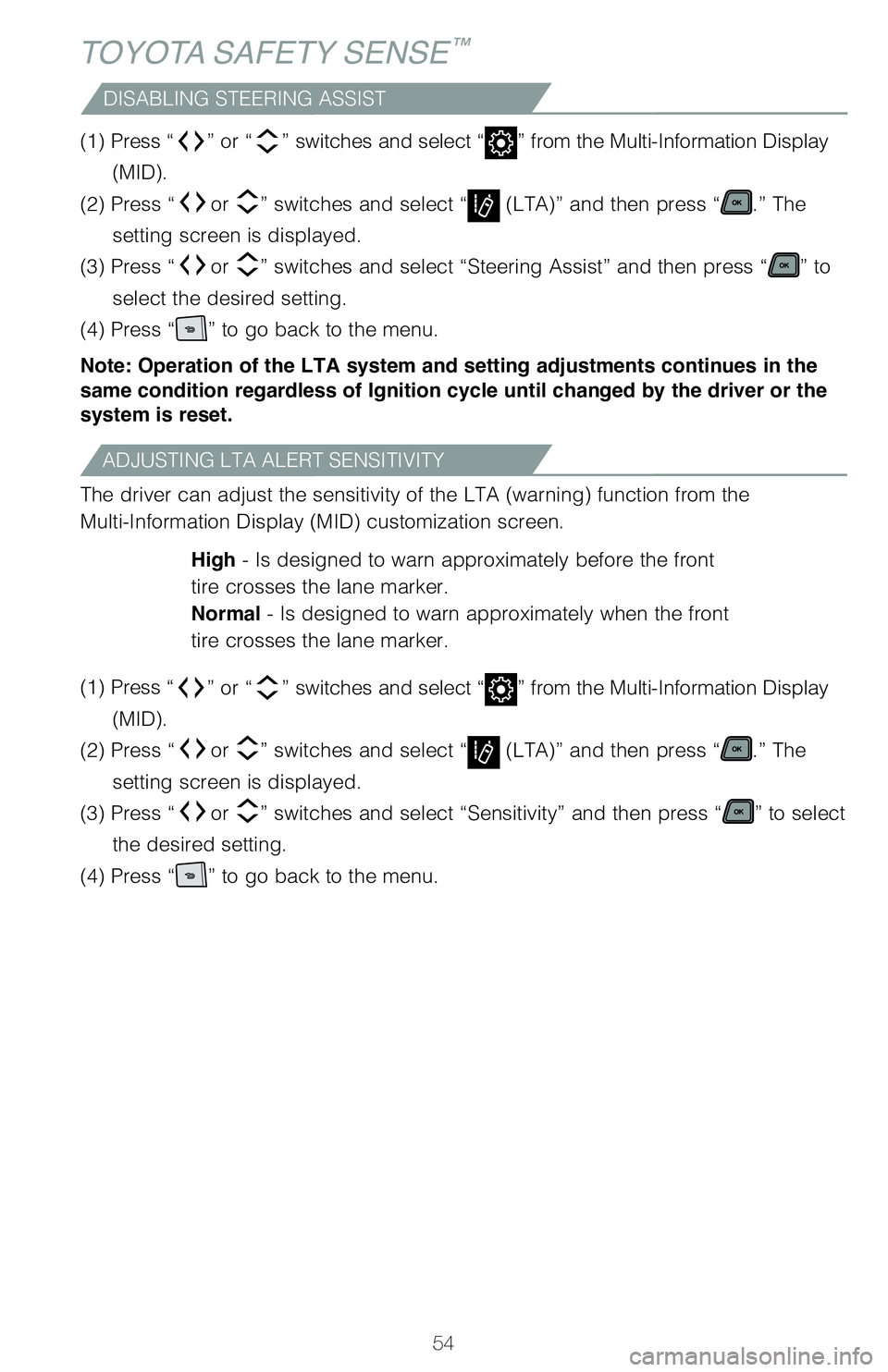
ADJUSTING LTA ALERT SENSITIVITY
The driver can adjust the sensitivity of the LTA (warning) function fr\
om the
Multi-Information Display (MID) customization screen.
High - Is designed to warn approximately before the front
tire crosses the lane marker.
Normal - Is designed to warn approximately when the front
tire crosses the lane marker.
(1) Press “
” or “” switches and select “” from the Multi-Information Display
(MID).
(2) Press “
or ” switches and select “ (LTA)” and then press “.” The
setting screen is displayed.
(3) Press “
or ” switches and select “Sensitivity” and then press “” to select
the desired setting.
(4) Press “
” to go back to the menu.
LANE CENTERING
The lane centering function is linked with Full-Speed Range Dynamic Rada\
r Cruise
Control (DRCC) and provides the required assistance by operating the s\
teering
wheel to keep the vehicle in its current lane.
When dynamic radar cruise control with full-speed range is not operating\
, the lane
centering function does not operate.
(1) Press “” or “ ” switches and select “” from the Multi-Information Display
(MID).
(2) Press “ or
” switches and select “
(LTA)” and then press “.” The
setting screen is displayed.
(3) Press “ or
” switches and select “Lane Center” and then press “
” to
select the desired setting.
(4) Press “
” to go back to the menu.
Note: Operation of the LTA system and setting adjustments continues in the
same condition regardless of Ignition cycle until changed by the driver or the
system is reset.
Refer to the Toyota Owner’s Manual for additional information on LTA \
operation,
settings adjustments, limitations, and precautions before attempting to \
use it.
DISABLING LANE CENTERING FUNCTION
MY21_Sienna_QRG_V4_ML_0929.indd 5410/5/20 12:15 PM
Page 57 of 76
55
OVERVIEW
FEATURES & OPERATIONS
TOYOTA SAFETY SENSE
SAFETY & EMERGENCY FEATURES
(1) Press “” or “ ” switches and select “” from the Multi-Information Display
(MID).
(2) Press “ or
” switches and select “
(LTA)” and then press “.” The
setting screen is displayed.
(3) Press “ or
” switches and select “Steering Assist” and then press “
” to
select the desired setting.
(4) Press “
” to go back to the menu.
Note: Operation of the LTA system and setting adjustments continues in the
same condition regardless of Ignition cycle until changed by the driver or the
system is reset.
The driver can adjust the sensitivity of the LTA (warning) function fr\
om the
Multi-Information Display (MID) customization screen.
High - Is designed to warn approximately before the front
tire crosses the lane marker.
Normal - Is designed to warn approximately when the front
tire crosses the lane marker.
(1) Press “
” or “ ” switches and select “
” from the Multi-Information Display
(MID).
(2) Press “ or
” switches and select “
(LTA)” and then press “.” The
setting screen is displayed.
(3) Press “ or
” switches and select “Sensitivity” and then press “
” to select
the desired setting.
(4) Press “
” to go back to the menu.
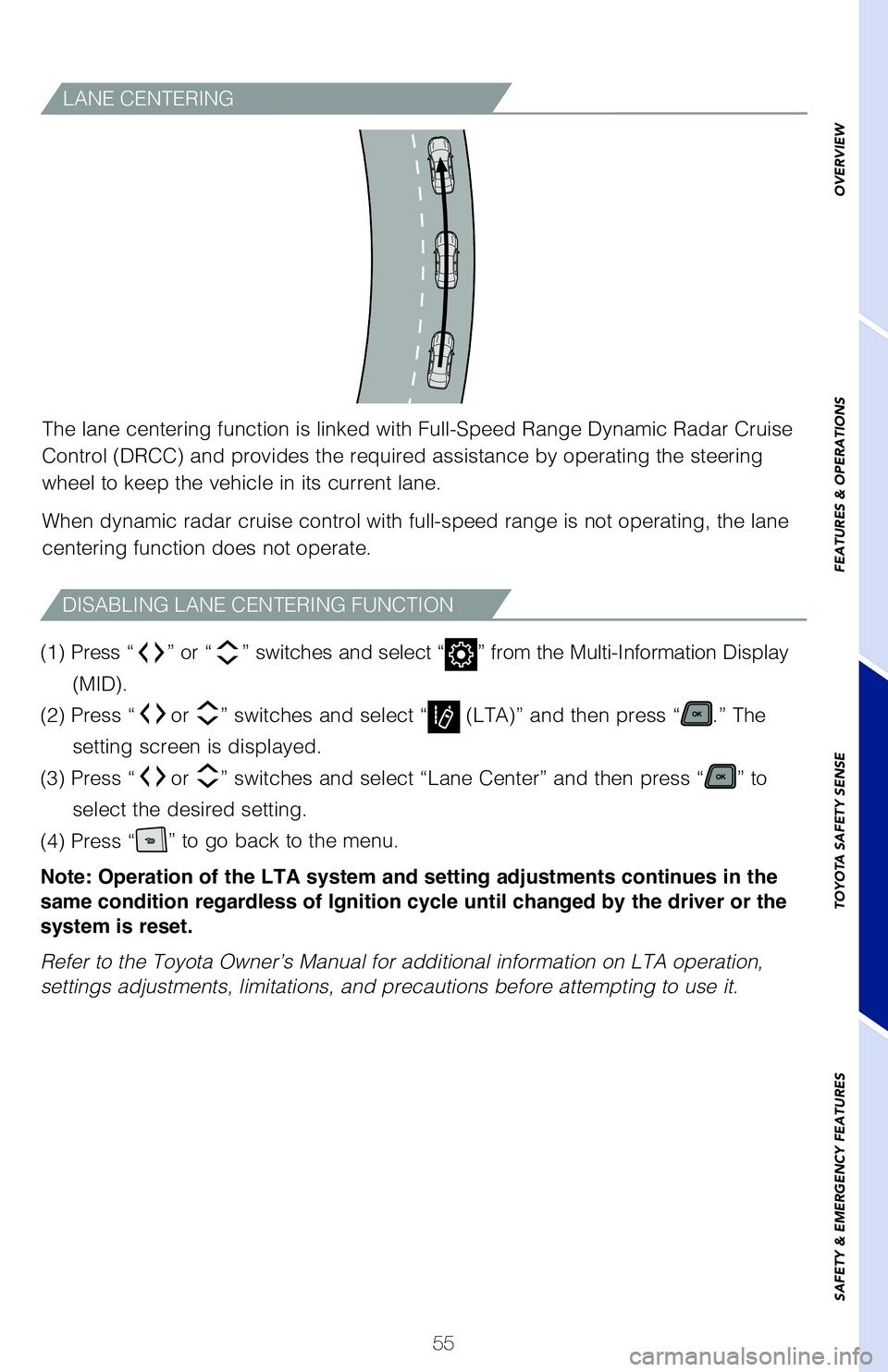
LANE CENTERING
The lane centering function is linked with Full-Speed Range Dynamic Rada\
r Cruise
Control (DRCC) and provides the required assistance by operating the s\
teering
wheel to keep the vehicle in its current lane.
When dynamic radar cruise control with full-speed range is not operating\
, the lane
centering function does not operate.
(1) Press “
” or “” switches and select “” from the Multi-Information Display
(MID).
(2) Press “
or ” switches and select “ (LTA)” and then press “.” The
setting screen is displayed.
(3) Press “
or ” switches and select “Lane Center” and then press “” to
select the desired setting.
(4) Press “
” to go back to the menu.
Note: Operation of the LTA system and setting adjustments continues in the
same condition regardless of Ignition cycle until changed by the driver or the
system is reset.
Refer to the Toyota Owner’s Manual for additional information on LTA \
operation,
settings adjustments, limitations, and precautions before attempting to \
use it.
DISABLING LANE CENTERING FUNCTION
MY21_Sienna_QRG_V4_ML_0929.indd 5510/5/20 12:15 PM