Power TOYOTA SIENNA HYBRID 2021 (in English) Owner's Manual
[x] Cancel search | Manufacturer: TOYOTA, Model Year: 2021, Model line: SIENNA HYBRID, Model: TOYOTA SIENNA HYBRID 2021Pages: 601, PDF Size: 32.07 MB
Page 108 of 601
1082-1. Instrument cluster
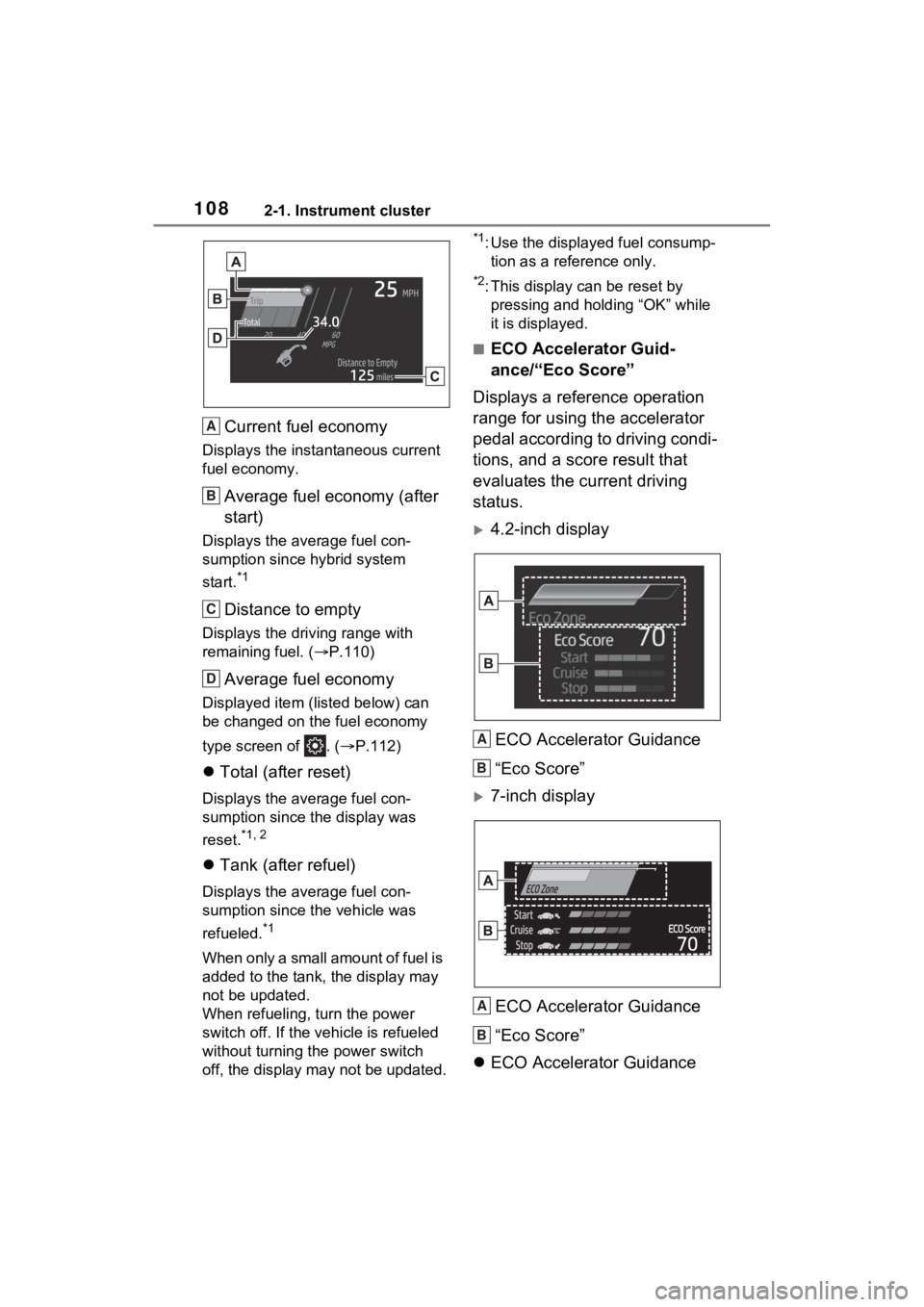
Current fuel economy
Displays the instantaneous current
fuel economy.
Average fuel economy (after
start)
Displays the average fuel con-
sumption since hybrid system
start.
*1
Distance to empty
Displays the driving range with
remaining fuel. (P.110)
Average fuel economy
Displayed item (listed below) can
be changed on the fuel economy
type screen of . ( P.112)
Total (after reset)
Displays the average fuel con-
sumption since the display was
reset.
*1, 2
Tank (after refuel)
Displays the average fuel con-
sumption since the vehicle was
refueled.
*1
When only a small amount of fuel is
added to the tank, the display may
not be updated.
When refueling, turn the power
switch off. If the vehicle is refueled
without turning the power switch
off, the display m ay not be updated.
*1: Use the displayed fuel consump-
tion as a reference only.
*2: This display can be reset by pressing and holding “OK” while
it is displayed.
■ECO Accelerator Guid-
ance/“Eco Score”
Displays a reference operation
range for using the accelerator
pedal according to driving condi-
tions, and a score result that
evaluates the current driving
status.
4.2-inch display
ECO Accelerator Guidance
“Eco Score”
7-inch displayECO Accelerator Guidance
“Eco Score”
ECO Accelerator Guidance
A
B
C
D
A
B
A
B
Page 109 of 601
1092-1. Instrument cluster
2
Vehicle status information and indicators
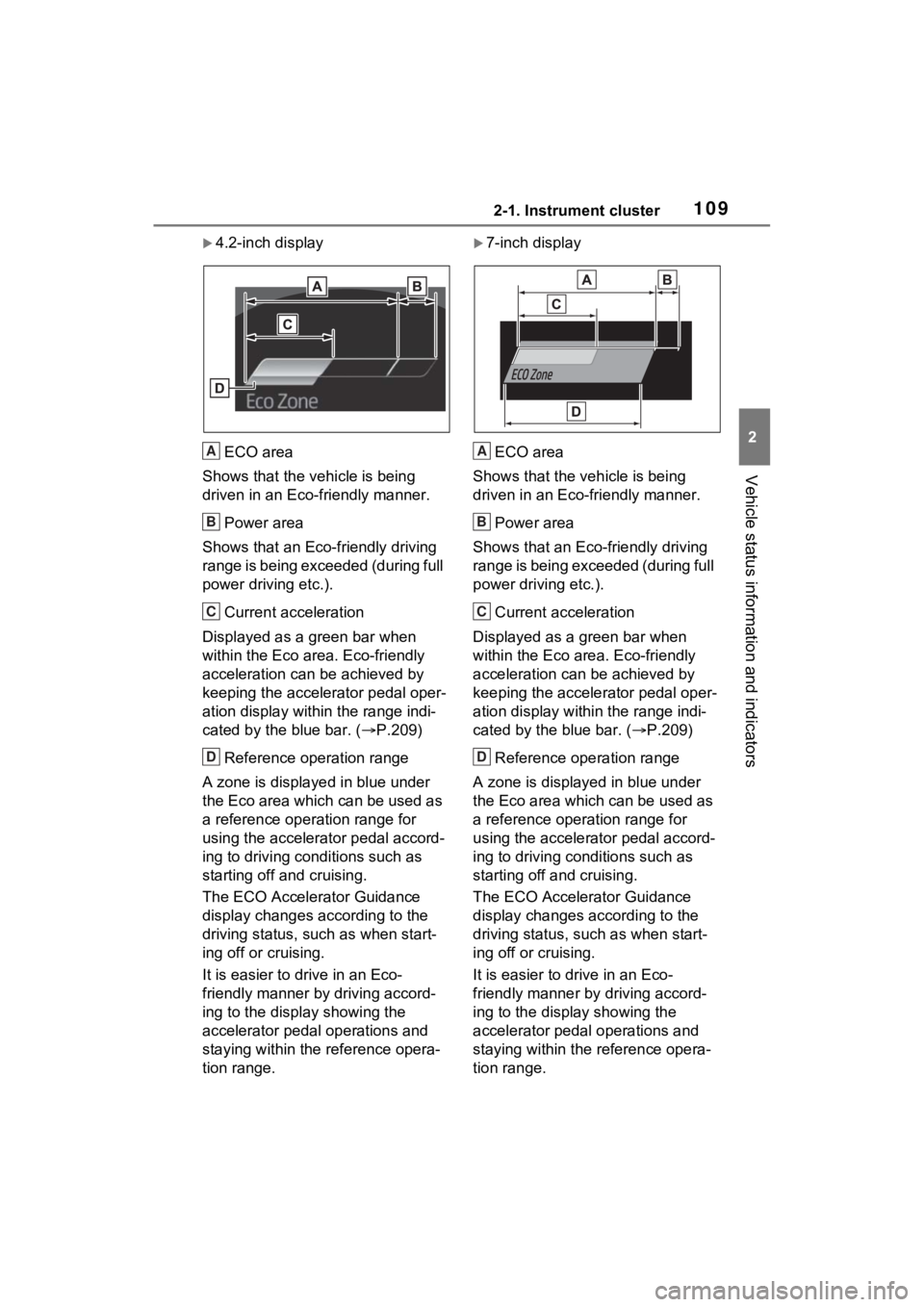
4.2-inch displayECO area
Shows that the vehicle is being
driven in an Eco-friendly manner.
Power area
Shows that an Eco-friendly driving
range is being exceeded (during full
power driving etc.).
Current acceleration
Displayed as a green bar when
within the Eco area. Eco-friendly
acceleration can be achieved by
keeping the accelerator pedal oper-
ation display within the range indi-
cated by the blue bar. ( P.209)
Reference operation range
A zone is displayed in blue under
the Eco area which can be used as
a reference operation range for
using the accelerator pedal accord-
ing to driving conditions such as
starting off and cruising.
The ECO Accelera tor Guidance
display changes according to the
driving status, such as when start-
ing off or cruising.
It is easier to drive in an Eco-
friendly manner by driving accord-
ing to the display showing the
accelerator pedal operations and
staying within the reference opera-
tion range.7-inch display
ECO area
Shows that the vehicle is being
driven in an Eco-friendly manner.
Power area
Shows that an Eco-friendly driving
range is being exceeded (during full
power driving etc.).
Current acceleration
Displayed as a green bar when
within the Eco area. Eco-friendly
acceleration can be achieved by
keeping the accelerator pedal oper-
ation display within the range indi-
cated by the blue bar. ( P.209)
Reference operation range
A zone is displayed in blue under
the Eco area which can be used as
a reference operation range for
using the accelerator pedal accord-
ing to driving conditions such as
starting off and cruising.
The ECO Accelerator Guidance
display changes according to the
driving status, such as when start-
ing off or cruising.
It is easier to drive in an Eco-
friendly manner by driving accord-
ing to the display showing the
accelerator pedal operations and
staying within the reference opera-
tion range.
A
B
C
D
A
B
C
D
Page 111 of 601
1112-1. Instrument cluster
2
Vehicle status information and indicators
played.*
*
: The score result is displayed only when “Eco Score” is selected for
“Trip Summary”. ( P.112)
■Change the speedometer
display (7-inch display)
P.115
■Distance to empty
●This distance is computed based
on your averag e fuel consump-
tion. As a result, the actual dis-
tance that can be driven may
differ from tha t displayed.
●When only a small amount of fuel
is added to the tank, the display
may not be updated. When refuel-
ing, turn the power switch off. If
the vehicle is refueled without
turning the power switch off, the
display may not be updated.
●When “Refuel” is displayed, the
remaining fuel amount is low and
the distance that can be driven
with the remaining fuel cannot be
calculated.
Refuel immediately.
■ECO Accelerator Guid-
ance/“Eco Score” will not oper-
ate when
The ECO Accelerator Guid-
ance/“Eco Score” will not operate in
the following situations:
●The Hybrid System Indicator is not
operating.
●The vehicle is being driven using
the dynamic radar cruise control
with full-speed range.
■Driving support system
information display
Select to display the operational status of the following systems:
LTA (Lane Tracing Assist)
( P.275)
Dynamic radar cruise control
with full-speed range
( P.288)
RSA (Road Sign Assist) (if
equipped) ( P.285)
■Navigation system-linked
display (if equipped)
Select to display the following
navigation system-linked infor-
mation.
Route guidance
Compass display (north-up
display/heading-up display)
■Route guidance to destination
display
When the route guidance to destina-
tion display is enabled on the head-
up display, it will not be displayed on
the multi-information display.
( P.118)
Select to enable selection of an
audio source or track on the dis-
play.
■Drive information (4.2-inch
display)
2 items that are selected using
the “Drive Info Items” setting
Driving support system
information display ( )
Audio system-linked dis-
play (if equipped) ( )
Vehicle information dis-
play ( )
Page 115 of 601

1152-1. Instrument cluster
2
Vehicle status information and indicators
Select to change each notification
level used to warn the driver when
the system recognizes a speed limit
sign.
RCD (Rear Camera
Detection) (if equipped)
( P.315)
• RCD (Rear Camera Detection)
on/off
Select to enable/disable the RCD
function.
•“Volume”
Select to change the RCD buzzer
volume.
■ Vehicle Settings
PSD (Power Sliding
Doors) ( P.137)
Select to set up the following items.
• “Left Hands Free PSD” (if
equipped)
Select to enable/disable the left-
hand power sliding door kick sen-
sor.
• “Right Hands F ree PSD” (if
equipped)
Select to enable/d isable the right-
hand power sliding door kick sen-
sor.
• “Left PSD Alert Volume”
Select to set the volume of the
buzzer which sounds when the left-
hand power sliding door system
operates.
• “Right PSD Alert Volume”
Select to set the volume of the
buzzer which sounds when the
right-hand power sliding door sys-
tem operates.
PBD (Power Back Door)
(if equipped) ( P.153)
Select to set up t he following items.
• PBD (Power Back Door) on/off
Select to enable/disable the power
back door system.
• “Hands Free”
Select to enable/disable the kick
sensor.
• “PBD Opening Adjustment”
Select the open position when
power back door is fully open.
•“Volume”
Select to set the volume of the
buzzer which sounds when the
power back door system operates.
Rear Seat Reminder
( P.134)
Select to enable/disable the rear
seat reminder function.
“TPWS Setting” (Tire Pres-
sure Warning System)
( P.427)
• “Setting Pressure”
Select to initialize the tire pressure
warning system.
• “Identifying Each Wheel & Posi- tion”
Select to register the ID codes of
the tire pressure se nsors to the tire
pressure warning system.
Select to change the tire pressure
warning system sen sor ID code set.
To enable this function, a second
set of tire pressure warning system
sensor ID codes must be registered
by a Toyota dealer. For information
regarding changing the registered
Page 116 of 601

1162-1. Instrument cluster
ID code set, contact your Toyota
dealer.
• “Setting UNIT”
Select to change the units of the
tire pressure displayed.
“Oil Maintenance” ( P.418)
Select to reset the Oil maintenance.
■ Meter Settings
“Language”
Select to change the language on
the multi-inform ation display.
“Units”
Select to change t he units of mea-
sure displayed.
Digital Speed (7-inch display)
Select to enable/disable the speed-
ometer display.
EV indicator ( P.80)
Select to enable/disable the EV
indicator.
Driving information display
settings
Select to set up the following items.
• “Hybrid System”
Select to enable/disable the ECO
Accelerator Guidance ( P.108).
• “Fuel Economy”
Select to change the average fuel
economy display ( P.106).
Audio settings
Select to enable/d isable the audio
system-linked display.
Vehicle information dis-
play settings
• “Display Contents” Select to displa
y the following
items.
“Energy monitor”
Select to enable/disable the Energy
monitor ( P.122)
“AWD” (AWD models)
Select to enable /disable the AWD
system display ( P.112).
• “Drive Info Type” (4.2-inch dis- play)
Select to change the drive informa-
tion type between trip and total
( P.111).
• “Drive Info Items” (4.2-inch dis- play)
Select to set the items on the upper
and lower side of the drive informa-
tion screen. from th ree items, aver-
age speed, distance and total time.
“Trip Summary” (4.2-inch dis-
play)
Select to set the items displayed
when the power switch is turned off.
“Pop-Up Display”
Select to enable/d isable the follow-
ing pop-up displays, which may
appear in some situations.
• TbT Navigation (if equipped)
• Telephone (if equipped)
• Audio operation
• Volume operation
• Voice control (if equipped)
• Brightness
“Multi-Information Display
OFF”
A blank screen is displayed.
“Default Settings”
Page 117 of 601
1172-1. Instrument cluster
2
Vehicle status information and indicators
Select to reset the meter display
settings.
■Suspension of the settings dis-
play
●In the following situations, opera-
tion of the setting s display will be
temporarily suspended.
• When a warning message appears on the multi-information
display
• When the vehicle begins to move
●Settings for functions not
equipped to the vehicle are not
displayed.
●When a function is turned off, the
related settings for that function
are not selectable.
Select to display warning mes-
sages and measures to be
taken if a malfunction is detected. (
P.477)
Displays suggestions to the
driver in the following situations.
To select a response to a dis-
played suggestion, use the
meter control switches.
■Suggestion to turn on the
headlights
If the headlight switch is in other
than or , and the vehicle
speed is 3 mph (5 km/h) or
higher for a certain amount of
time when the surroundings are
dark, a suggestion message will
be displayed.
■Suggestion to turn off the
headlights
If the headlights are left on for a
certain amount of time after the
power switch has been turned
off, a suggestion message will
be displayed.
When the headlight switch is in
the AUTO position: The mes-
sage asking if you wish to turn
the headlights off is displayed.
To turn the headlights off, select
“Yes”.
If the driver’s door is opened after
the power switch is turned off, this
suggestion message will not be dis-
played.
■Customization
The suggestion fu nction can be
turned on/off. (Customizable fea-
WARNING
■Cautions during setting up
the display
As the hybrid system needs to be
operating during setting up the
display, ensure that the vehicle is
parked in a place with adequate
ventilation. In a closed area such
as a garage, exhaust gases
including harmful carbon monox-
ide (CO) may collect and enter
the vehicle. This may lead to
death or a seri ous health hazard.
NOTICE
■During setting up the display
To prevent 12-vo lt battery dis-
charge, ensure that the hybrid
system is operating while setting
up the display features.
Warning message dis-
play ( )
Suggestion function
Page 119 of 601
1192-1. Instrument cluster
2
Vehicle status information and indicators
Displays the following items:
• Speed limit of the current road (linked to the navigation system)
(U.S.A. only)
• RSA (Road Sign Assist) display (if equipped) ( P.285)
• Speedometer
• Shift position/shift range ( P.238)
Hybrid System Indica-
tor/tachometer/outside tem-
perature display area
( P.121)
■Head-up display will operate
when
The power swit ch is in ON.
■When using the head-up dis-
play
The head-up display may seem
dark or hard to see when viewed
through sunglasses, especially
polarized sunglasses. Adjust the
brightness of the head-up display or
remove your sunglasses.
■Street name display (vehicles
with navigation system)
Only street names which are
included in the map data will be dis-
played.
■Outside temperature display
●In the following si tuations, the cor-
rect outside tempe rature may not
be displayed, or the display may
take longer than normal to
change.
• When stopped, or driving at low speeds (less than 12 mph [20
km/h])
• When the outside temperature has changed suddenly (at the
entrance/exit of a garage, tunnel,
etc.)
●When “-” or “E” is displayed, the
system may be malfunctioning.
Take your vehicle to your Toyota dealer.
●Displays the outsi
de temperature
within the range of -40°F (-40°C)
to 122°F (50°C).
●When the outside temperature is
approximately 37°F (3°C) or
lower, the low outside temperature
indicator will flash for approxi-
mately 10 seconds, then stay on.
CWARNING
■When using the head-up dis-
play
●Check that the position and
brightness of the head-up dis-
play image does not interfere
with safe driving. Incorrect
adjustment of the image’s posi-
tion or brightness may obstruct
the driver’s view and lead to an
accident, resulting in death or
serious injury.
●Do not continuously look at the
head-up display while driving as
you may fail to see pedestrians,
objects on the road, etc. ahead
of the vehicle.
NOTICE
■Head-up display projector
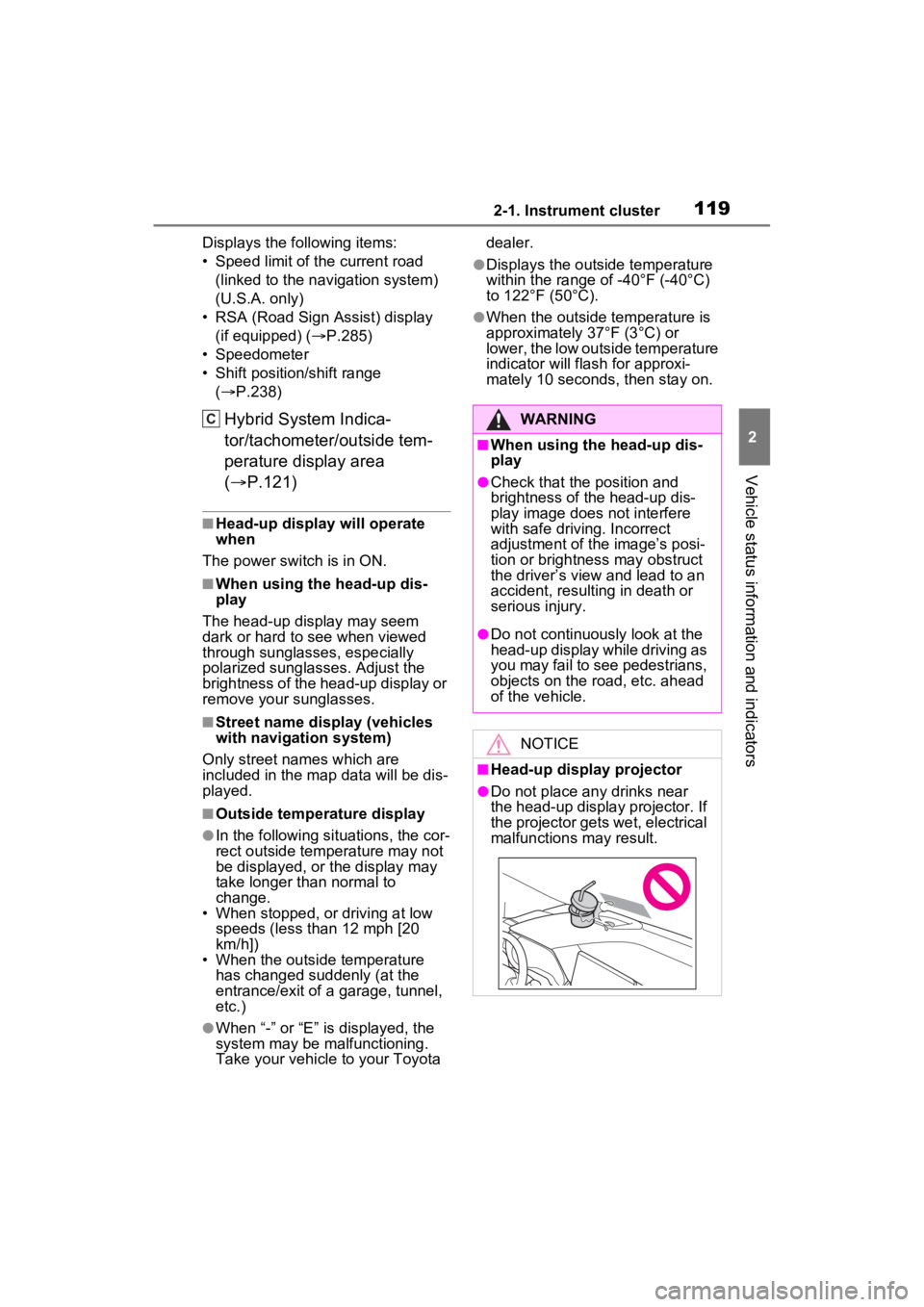
●Do not place any drinks near
the head-up display projector. If
the projector gets wet, electrical
malfunctions may result.
Page 120 of 601
1202-1. Instrument cluster
■Enabling/disabling the
head-up display
Select on the multi-informa-
tion display, select “Vehicle Set-
tings” (4.2-inch) / (7-inch)
and then select “HUD Main”.
“ON” and “OFF” switches each
time when “OK” is pressed.
■Changing settings of the
head-up display
The following settings can be
changed on “HUD Main” of the
multi-information display.
( P.112)
Press and hold “OK” to display
the following settings:
“HUD Brightness/Position”
Select to adjust t he brightness or
vertical position of the head-up dis-
play.
“HUD Driving Support”
• Tachometer Settings
Blank/Hybrid System/Tachometer
Select to change the display to
blank (no display)/Hybrid System Indicator/tachometer.
Select to enable/d
isable the follow-
ing items:
• Navigation (if equipped)
• Driving Assist
• Compass (if equipped)
•Audio
“HUD Rotation”
Select to adjus t the angle of the
head-up display.
P r e s s t h e o r s w i t c h t o a d j u s t
the angle of the head-up display.
■Enabling/disabling of the head-
up display
If the head-up display is disabled, it
will remain disabled when the power
switch is turned off then back to ON.
■Display brightness
The brightness of the head-up dis-
play can be adjusted on of the
multi-information di splay. Also, it is
automatically adjusted according to
the ambient brightness.
■Head-up display automatic
position adjustment (vehicles
with driving position memory)
If the display position is recorded
into memory, the head-up display
will be automatically adjusted to the
desired position. ( P.178)
■When the 12-volt battery is dis-
connected
The customize settings of the head-
up display will be reset.
●Do not place anything on or put
stickers onto the head-up dis-
play projector.
Doing so could interrupt head-
up display indications.
●Do not touch the inside of the
head-up display projector or
thrust sharp edges or the like
into the projector.
Doing so could cause mechani-
cal malfunctions.
Using the head-up display
Page 122 of 601
1222-1. Instrument cluster
Details of content displayed on the
head-up display may differ from
that displayed on the multi-informa-
tion display.
■Audio system operation
status
Displayed when an audio
remote control switch on the
steering wheel is operated.
■Hands-free system status
Displayed when the hands-free
system is operated.
■When a pop-up display is dis-
played
When a pop-up display is displayed,
a current display may no longer be
displayed. In this case, the display
will return after the pop-up display
disappears.
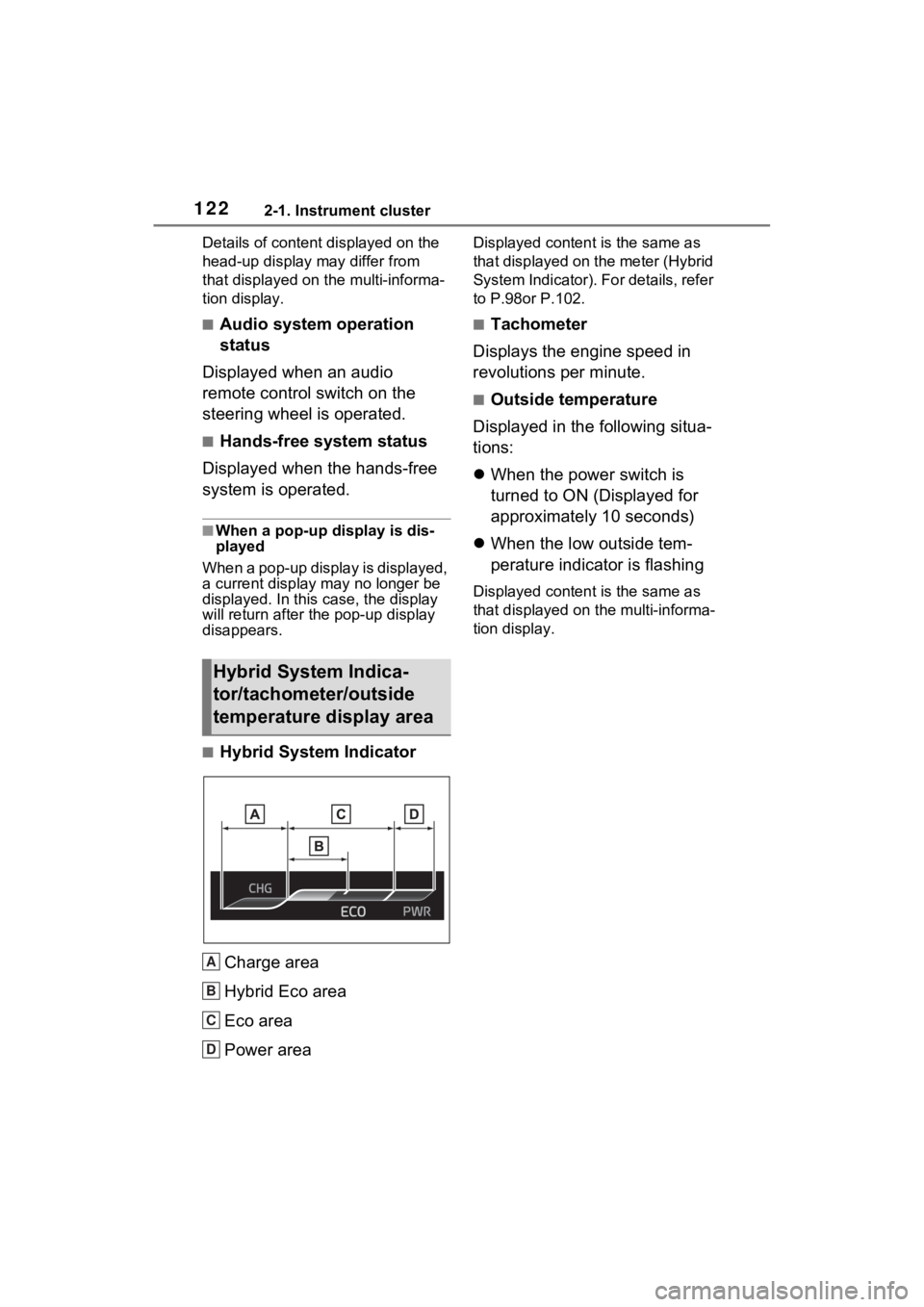
■Hybrid System Indicator
Charge area
Hybrid Eco area
Eco area
Power area
Displayed content is the same as
that displayed on the meter (Hybrid
System Indicator). For details, refer
to P.98or P.102.
■Tachometer
Displays the engine speed in
revolutions per minute.
■Outside temperature
Displayed in the following situa-
tions:
When the power switch is
turned to ON (Displayed for
approximately 10 seconds)
When the low outside tem-
perature indicator is flashing
Displayed content is the same as
that displayed on the multi-informa-
tion display.
Hybrid System Indica-
tor/tachometer/outside
temperature display area
A
B
C
D
Page 126 of 601
1262-1. Instrument cluster
One symbol indicates 50 Wh. Up to
5 symbols are shown.
Current fuel consumption
Resetting the consumption
data
Average vehicle speed since
the hybrid system was
started
Elapsed time since the hybrid
system was started
Cruising range (P.126)
Average fuel consumption for
the past 15 minutes is divided
by color into past averages and
averages attained since the
power switch was last turned to
ON. Use the displayed average
fuel consumption as a refer-
ence.
■History
Audio or Audio Plus (vehicles
without Data Communication
Module)
1 Press the “MENU” button.
2 Select “Info” on the “Menu”
screen.
If a screen other than “History” is
displayed, select “History”.
Audio or Audio Plus (vehicles
with Data Communication
Module)/Premium Audio
1 Press the “MENU” button.
2 Select “Info” on the “Menu”
screen.
3 Select “ECO” on the “Infor-
mation” screen.
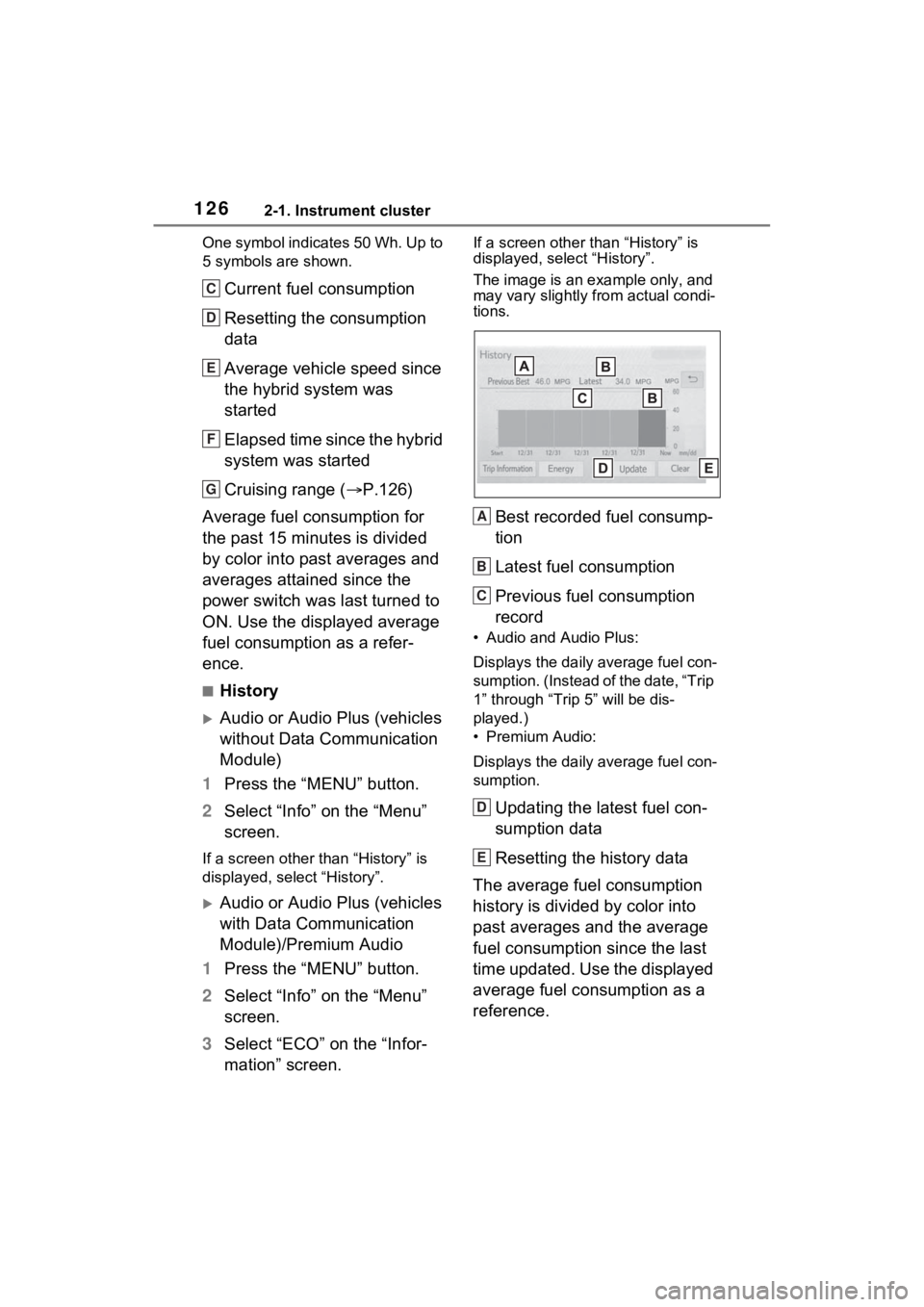
If a screen other than “History” is
displayed, select “History”.
The image is an example only, and
may vary slightly from actual condi-
tions.
Best recorded fuel consump-
tion
Latest fuel consumption
Previous fuel consumption
record
• Audio and Audio Plus:
Displays the daily average fuel con-
sumption. (Instead of the date, “Trip
1” through “Trip 5” will be dis-
played.)
• Premium Audio:
Displays the daily average fuel con-
sumption.
Updating the latest fuel con-
sumption data
Resetting the history data
The average fuel consumption
history is divided by color into
past averages and the average
fuel consumption since the last
time updated. Use the displayed
average fuel consumption as a
reference.
C
D
E
F
G
A
B
C
D
E