ECO mode TOYOTA SIENNA HYBRID 2021 (in English) Service Manual
[x] Cancel search | Manufacturer: TOYOTA, Model Year: 2021, Model line: SIENNA HYBRID, Model: TOYOTA SIENNA HYBRID 2021Pages: 601, PDF Size: 32.07 MB
Page 238 of 601

2374-2. Driving procedures
4
Driving
■Situations in which EV drive
mode cannot be turned on
It may not be po ssible to turn EV
drive mode on in t he following situa-
tions. If it cannot be turned on, a
buzzer will sound and a message
will be shown on the multi-informa-
tion display.
●The temperature of the hybrid sys-
tem is high.
The vehicle has been left in the
sun, driven on a hill, driven at high
speeds, etc.
●The temperature of the hybrid sys-
tem is low.
The vehicle has been left in tem-
peratures lower than about 32°F
(0°C) for a long period of time etc.
●The gasoline engine is warming
up.
●The hybrid battery (traction bat-
tery) is low.
The remaining batt ery level indi-
cated in the Energy monitor dis-
play is low. ( P.122)
●Vehicle speed is high.
●The accelerator pedal is
depressed firmly or the vehicle is
on a hill etc.
●The windshield defogger is in use.
Use the EV drive mode when it
becomes available.
■Switching to EV drive mode
when the gasoline engine is
cold
If the hybrid system is started while
the gasoline engine is cold, the gas-
oline engine will star t automatically
after a short peri od of time in order
to warm up.
In this case, you will become unable
t o s w i t c h t o E V d r i v e m o d e . A f t e r t h e
hybrid system has started and the
“READY” indicator has illuminated,
press the EV drive mode switch
before the gasoline engine starts to
switch to EV drive mode.
■Automatic cancelation of EV
drive mode
When driving in EV drive mode, the
gasoline engine may automatically
restart in the follo wing situations.
When EV drive mode is canceled, a
buzzer will sound, the EV drive
mode indicator will flash and go off
and a message will be shown on the
multi-informat ion display.
●The hybrid battery (traction bat-
tery) becomes low.
The remaining batt ery level indi-
cated in the Ener gy monitor dis-
play is low. ( P.122)
●Vehicle speed is high.
●The accelerator pedal is
depressed firmly or the vehicle is
on a hill etc.
Drive the vehicle for a while before
attempting to turn on the EV drive
mode again.
■Possible driving distance when
driving in EV drive mode
EV drive mode’s possible driving
distance ranges from a few hundred
meters to approximately 0.6 mile (1
km). However, depending on vehi-
cle conditions, there are situations
when EV drive mode cannot be
used.
(The distance tha t is possible
depends on the hybrid battery [trac-
tion battery] level a nd driving condi-
tions.)
■Fuel economy
The hybrid system is designed to
achieve the best possible fuel econ-
omy during normal driving (using
the gasoline engine and electric
motor [traction motor]). Driving in
EV drive mode more than neces-
sary may lower fuel economy.
■If “EV Mode Unavailable” is
shown on the multi-information
display
The EV drive mode is not available.
The reason the EV drive mode is
not available (the vehicle is idling,
Page 239 of 601
2384-2. Driving procedures
battery charge is low, vehicle speed
is higher than the EV drive mode
operating speed range or accelera-
tor pedal is depressed too much)
may be displayed. Use the EV drive
mode when it becomes available.
■If “EV Mode Deactivated” is
shown on the multi-information
display
The EV drive mode has been auto-
matically canceled. The reason the
EV drive mode is not available (the
battery charge is low, vehicle speed
is higher than the EV drive mode
operating speed range or accelera-
tor pedal is depressed too much)
may be displayed. Drive the vehicle
for a while before attempting to turn
on the EV drive mode again.
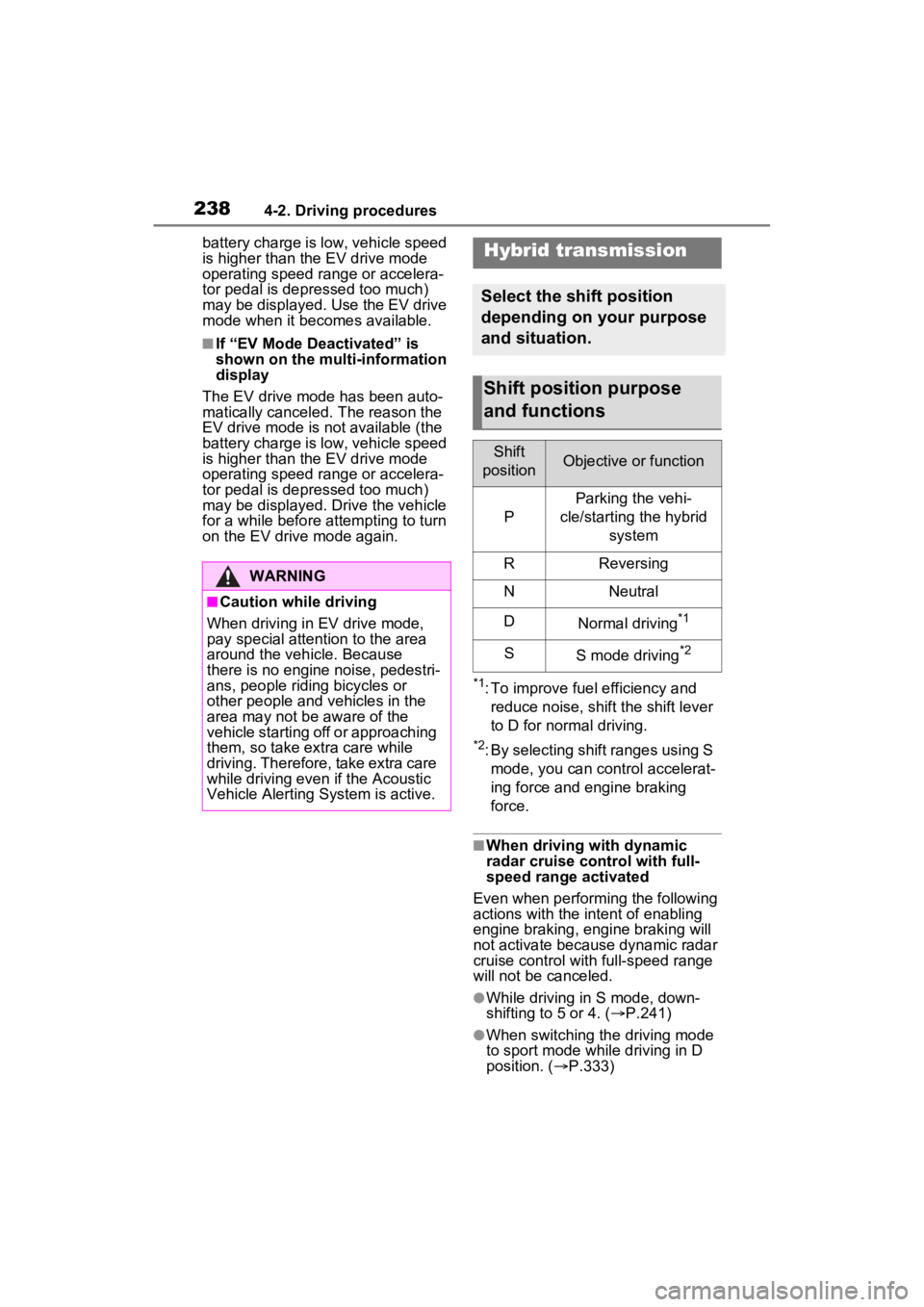
*1: To improve fuel efficiency and reduce noise, shift the shift lever
to D for normal driving.
*2: By selecting shift ranges using S mode, you can control accelerat-
ing force and engine braking
force.
■When driving with dynamic
radar cruise control with full-
speed range activated
Even when perform ing the following
actions with the intent of enabling
engine braking, engine braking will
not activate because dynamic radar
cruise control with full-speed range
will not be canceled.
●While driving in S mode, down-
shifting to 5 or 4. ( P.241)
●When switching th e driving mode
to sport mode while driving in D
position. ( P.333)
WARNING
■Caution while driving
When driving in EV drive mode,
pay special attention to the area
around the vehicle. Because
there is no engine noise, pedestri-
ans, people riding bicycles or
other people and vehicles in the
area may not be aware of the
vehicle starting off or approaching
them, so take extra care while
driving. Therefore, take extra care
while driving even if the Acoustic
Vehicle Alerting System is active.
Hybrid transmission
Select the shift position
depending on your purpose
and situation.
Shift position purpose
and functions
Shift
positionObjective or function
P
Parking the vehi-
cle/starting the hybrid system
RReversing
NNeutral
DNormal driving*1
SS mode driving*2
Page 246 of 601
2454-2. Driving procedures
4
Driving
■If “Parking Brake Unavailable”
is displayed on the multi-infor-
mation display
Operate the parking brake switch. If
the message does not disappear
after operating the switch several
times, the system may be malfunc-
tioning. Have the vehicle inspected
by your Toyota dealer.
■Parking brake operation sound
When the parking brake operates, a
motor sound (whirring sound) may
be heard. This does not indicate a
malfunction.
■Parking brake indicator light
●Depending on the power switch
mode, the parking brake indicator
light will turn on and stay on as
described below:
ON: Comes on until the parking
brake is released.
Not in ON: Stays on for approxi-
mately 15 seconds.
●When the power switch is turned
off with the parking brake set, the
parking brake indicator light will
stay on for about 15 seconds. This
does not indicate a malfunction.
■When the parking brake switch
malfunctions
Automatic mode (automatic brake
setting and releas ing) will be turned
on automatically.
■Parking the vehicle
P.208
■Parking brake engaged warning
buzzer
A buzzer will sound if the vehicle is
driven with the parking brake
engaged. “Parking Brake ON” is dis-
played on the multi-information dis-
play (with the vehicle reaching a
speed of 3 mph [5 km/h]).
■If the brake system warning
light comes on
P.466
■Usage in winter time
P.344
WARNING
■When parking the vehicle
Do not leave a child in the vehicle
alone. The parking brake may be
released unintentionally by a child
and there is the danger of the
vehicle moving that may lead to
an accident resulting in death or
serious injury.
■Parking brake switch
Do not set any objects near the
parking brake switch. Objects
may interfere with the switch and
may lead the parking brake to
unexpectedly operate.
NOTICE
■When parking the vehicle
Before you leave the vehicle, shift
the shift lever to P, set the parking
brake and make s ure that the
vehicle does not move.
■When the system malfunc-
tions
Stop the vehicle in a safe place
and check the warning messages.
■When the parking brake can-
not be released due to a mal-
function
Driving the vehicle with the park-
ing brake set will lead to brake
components overheating, which
may affect braking performance
and increase brake wear. Have
the vehicle inspected by your
Toyota dealer immediately if this
occurs.
Page 249 of 601
2484-3. Operating the lights and wipers
4-3.Operating the lights and wipers
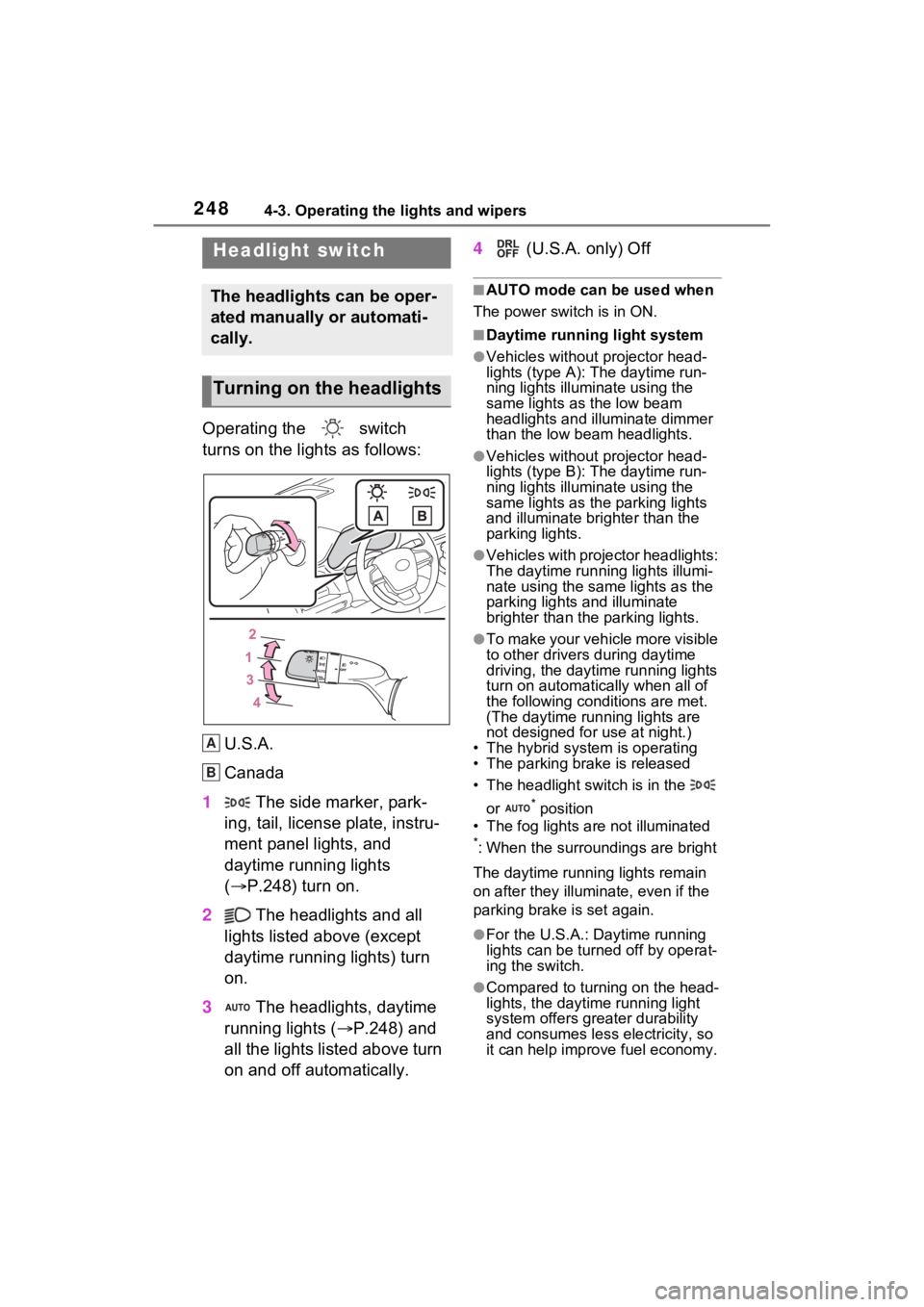
Operating the switch
turns on the lights as follows:U.S.A.
Canada
1 The side marker, park-
ing, tail, license plate, instru-
ment panel lights, and
daytime running lights
( P.248) turn on.
2 The headlights and all
lights listed above (except
daytime running lights) turn
on.
3 The headlights, daytime
running lights ( P.248) and
all the lights listed above turn
on and off automatically. 4
(U.S.A. only) Off
■AUTO mode can be used when
The power switch is in ON.
■Daytime running light system
●Vehicles without projector head-
lights (type A): The daytime run-
ning lights illuminate using the
same lights as the low beam
headlights and illu minate dimmer
than the low beam headlights.
●Vehicles without projector head-
lights (type B): The daytime run-
ning lights illuminate using the
same lights as the parking lights
and illuminate brighter than the
parking lights.
●Vehicles with projector headlights:
The daytime runn ing lights illumi-
nate using the same lights as the
parking lights and illuminate
brighter than the parking lights.
●To make your vehicle more visible
to other drivers during daytime
driving, the daytime running lights
turn on automatically when all of
the following conditions are met.
(The daytime running lights are
not designed for use at night.)
• The hybrid system is operating
• The parking brake is released
• The headlight switch is in the
or
* position
• The fog lights are not illuminated
*: When the surroundings are bright
The daytime running lights remain
on after they illumi nate, even if the
parking brake is set again.
●For the U.S.A.: Daytime running
lights can be turned off by operat-
ing the switch.
●Compared to turning on the head-
lights, the daytime running light
system offers greater durability
and consumes less electricity, so
it can help improve fuel economy.
Headlight switch
The headlights can be oper-
ated manually or automati-
cally.
Turning on the headlights
A
B
Page 258 of 601
2574-3. Operating the lights and wipers
4
Driving
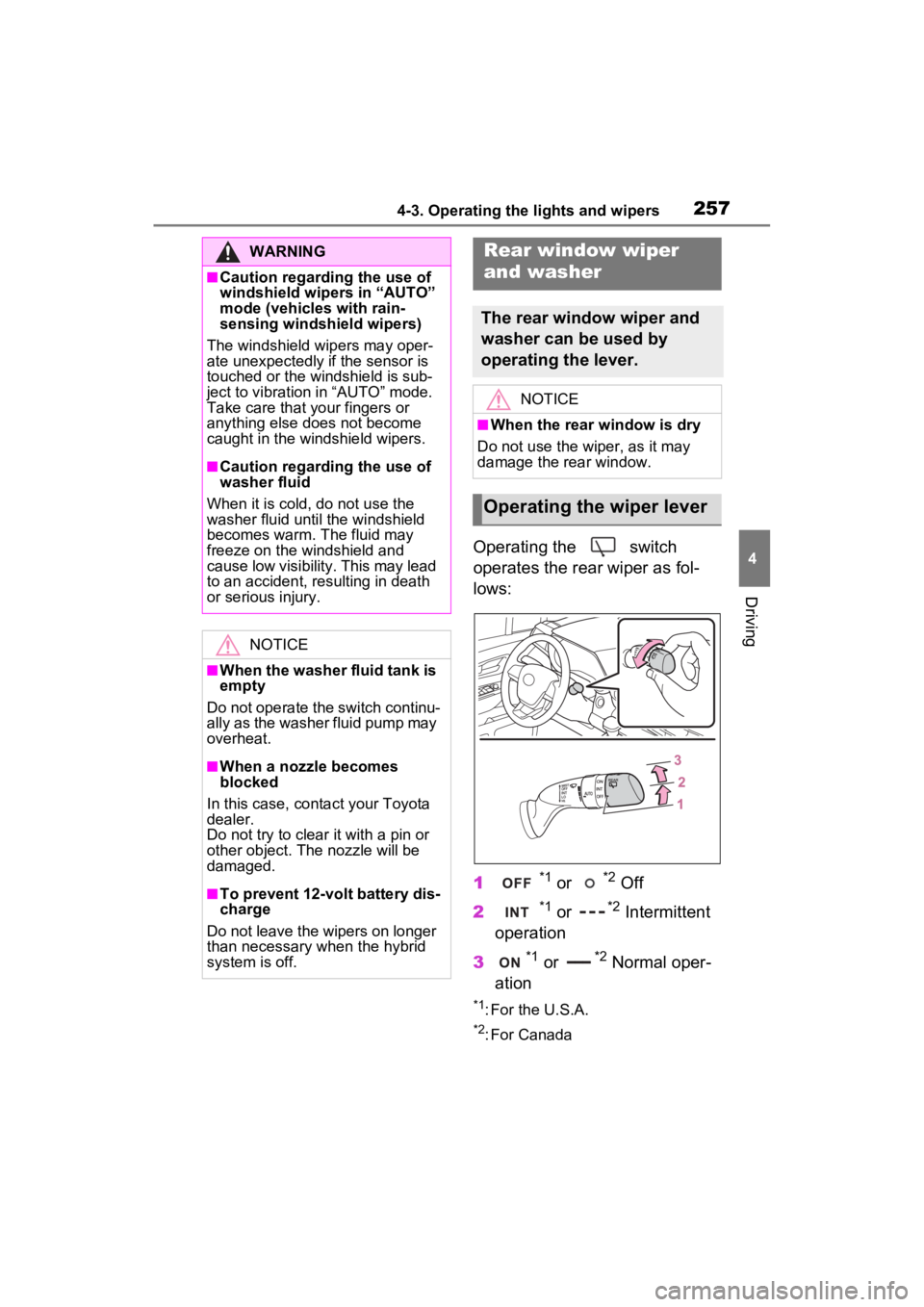
Operating the switch
operates the rear wiper as fol-
lows:
1
*1 or *2 Off
2
*1 or *2 Intermittent
operation
3
*1 or *2 Normal oper-
ation
*1: For the U.S.A.
*2: For Canada
WARNING
■Caution regarding the use of
windshield wipers in “AUTO”
mode (vehicles with rain-
sensing windshield wipers)
The windshield wipers may oper-
ate unexpectedly if the sensor is
touched or the windshield is sub-
ject to vibration in “AUTO” mode.
Take care that y our fingers or
anything else does not become
caught in the windshield wipers.
■Caution regarding the use of
washer fluid
When it is cold, do not use the
washer fluid until the windshield
becomes warm. The fluid may
freeze on the windshield and
cause low visibility. This may lead
to an accident, resulting in death
or serious injury.
NOTICE
■When the washer fluid tank is
empty
Do not operate the switch continu-
ally as the washer fluid pump may
overheat.
■When a nozzle becomes
blocked
In this case, conta ct your Toyota
dealer.
Do not try to clear it with a pin or
other object. The nozzle will be
damaged.
■To prevent 12-volt battery dis-
charge
Do not leave the wipers on longer
than necessary when the hybrid
system is off.
Rear window wiper
and washer
The rear window wiper and
washer can be used by
operating the lever.
NOTICE
■When the rear window is dry
Do not use the wiper, as it may
damage the rear window.
Operating the wiper lever
Page 284 of 601

2834-5. Using the driving support systems
4
Driving
This function operates when all of
the following cond itions are met.
• Setting for “Sway Warning” in the
screen of the mu lti-information
display is set to “ON”. ( P.104)
• Vehicle speed is approximately 32 mph (50 km/h) or more.
• Width of traffic lane is approxi- mately 9.8 ft. ( 3 m) or more.
• No system malfunctions are detected. ( P.285)
●Lane centering function
This function oper ates when all of
the following cond itions are met.
• LTA is turned on.
• Setting for “Steering Assist” and
“Lane Center” in the screen of
the multi-information display are
set to “ON”. ( P.104)
• This function recognizes white (yellow) lane lines or the position
of a preceding vehicle (except
when the preceding vehicle is
small, such as a motorcycle).
• The dynamic radar cruise control
with full-speed range is operating
in vehicle-to-vehic le distance con-
trol mode.
• Width of traffic lane is approxi-
mately 10 to 13 ft. (3 to 4 m).
• Turn signal lever is not operated.
• Vehicle is not being driven around a sharp curve.
• No system malfunctions are detected. ( P.285)
• Vehicle does not accelerate or decelerate by a fixed amount or
more.
• Steering wheel is not operated with a steering force level suitable
for changing lanes.
• ABS, VSC, TRAC and PCS are not operating.
• TRAC or VSC is not turned off.
• Hands off steering wheel warning
is not displayed. ( P.284)
• The vehicle is being driven in the
center of a lane.
• Steering assist function is not operating.
■Temporary cancelation of func-
tions
●When operation conditions are no
longer met, a function may be
temporarily canceled. However,
when the operation conditions are
met again, operation of the func-
tion is automatically restored.
( P.282)
●If the operation conditions
( P.282) are no longer met while
the lane centering function is
operating, the steering wheel may
vibrate and the buzzer may sound
to indicate that the function has
been temporarily canceled. How-
ever, if the “Steering wheel vibra-
tion” customization setting is set to
“On”, the system will notify the
driver by vibrating the steering
wheel instead of sounding the
buzzer.
■Steering assist function/lane
centering function
●Depending on the vehicle speed,
lane departure situation, road con-
ditions, etc., the driver may not
feel the function is operating or
the function may not operate at
all.
●The steering control of the func-
tion is overridden by the driver’s
steering wheel operation.
●Do not attempt to test the opera-
tion of the steering assist function.
■Lane departure alert function
●The warning buzzer may be diffi-
cult to hear due to external noise,
audio playback, etc. Also, it may
be difficult to fee l steering wheel
vibrations due to the road condi-
tions, etc.
●If the edge of the course* is not
clear or straight, the lane depar-
ture alert function may not oper-
ate.
●Vehicle with BSM: It may not be
possible for the system to deter-
mine if there is a danger of a colli-
Page 292 of 601
2914-5. Using the driving support systems
4
Driving
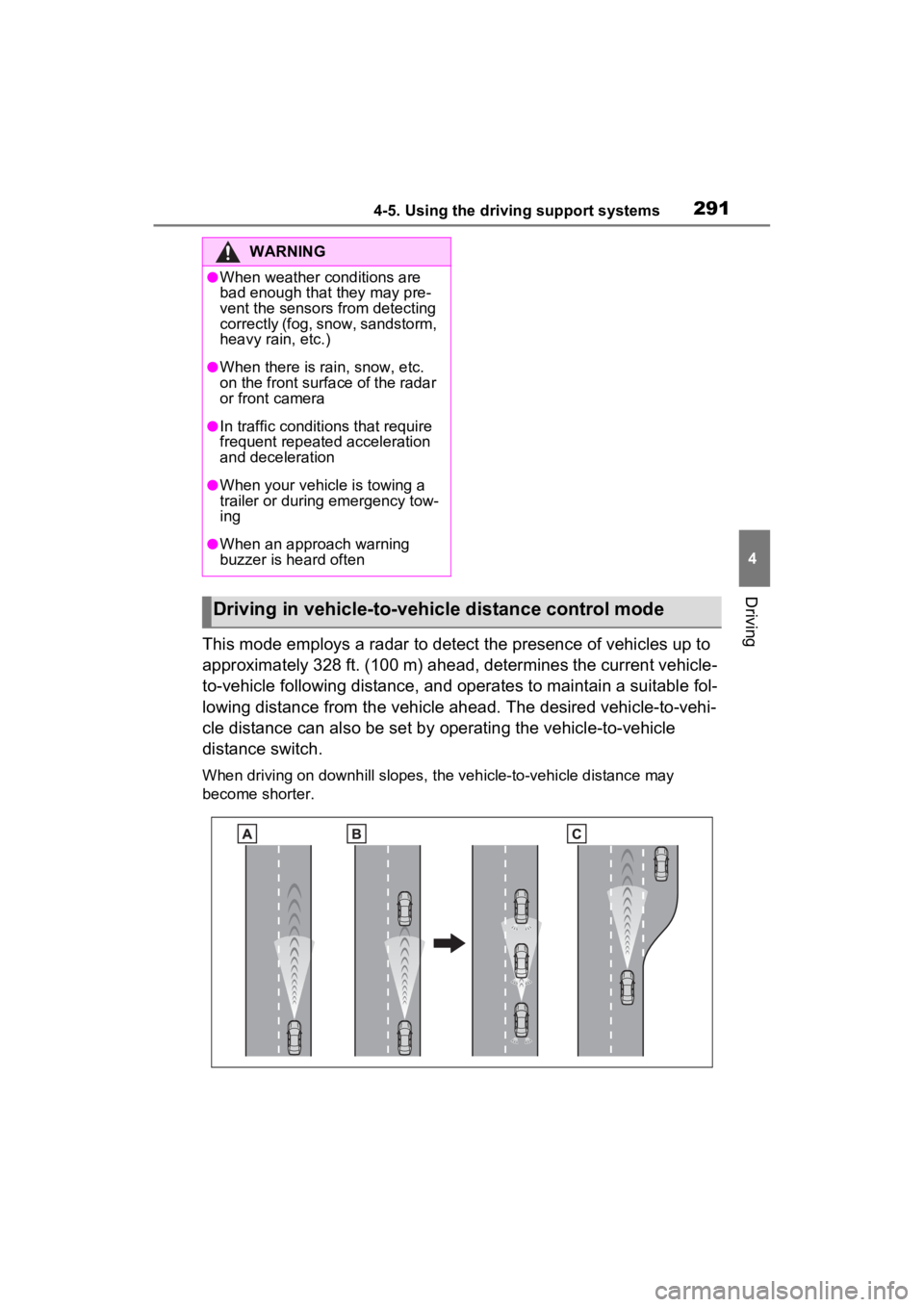
This mode employs a radar to detect the presence of vehicles up to
approximately 328 ft. (100 m) ahead, determines the current vehicle-
to-vehicle following distance, and operates to maintain a suitable fol-
lowing distance from the vehicle ahead. The desired vehicle-to- vehi-
cle distance can also be set by operating the vehicle-to-vehicle
distance switch.
When driving on downhill slopes, the vehicle-to-vehicle distanc e may
become shorter.
WARNING
●When weather conditions are
bad enough that they may pre-
vent the sensors from detecting
correctly (fog, snow, sandstorm,
heavy rain, etc.)
●When there is rain, snow, etc.
on the front surface of the radar
or front camera
●In traffic conditions that require
frequent repeated acceleration
and deceleration
●When your vehicle is towing a
trailer or during emergency tow-
ing
●When an approach warning
buzzer is heard often
Driving in vehicle-to-vehicle distance control mode
Page 294 of 601
2934-5. Using the driving support systems
4
Driving
again to deactivate the cruise con-
trol.
If the cruise control main switch is
pressed and held for 1.5 seconds
or more, the syste m turns on in
constant speed control mode.
( P.296)
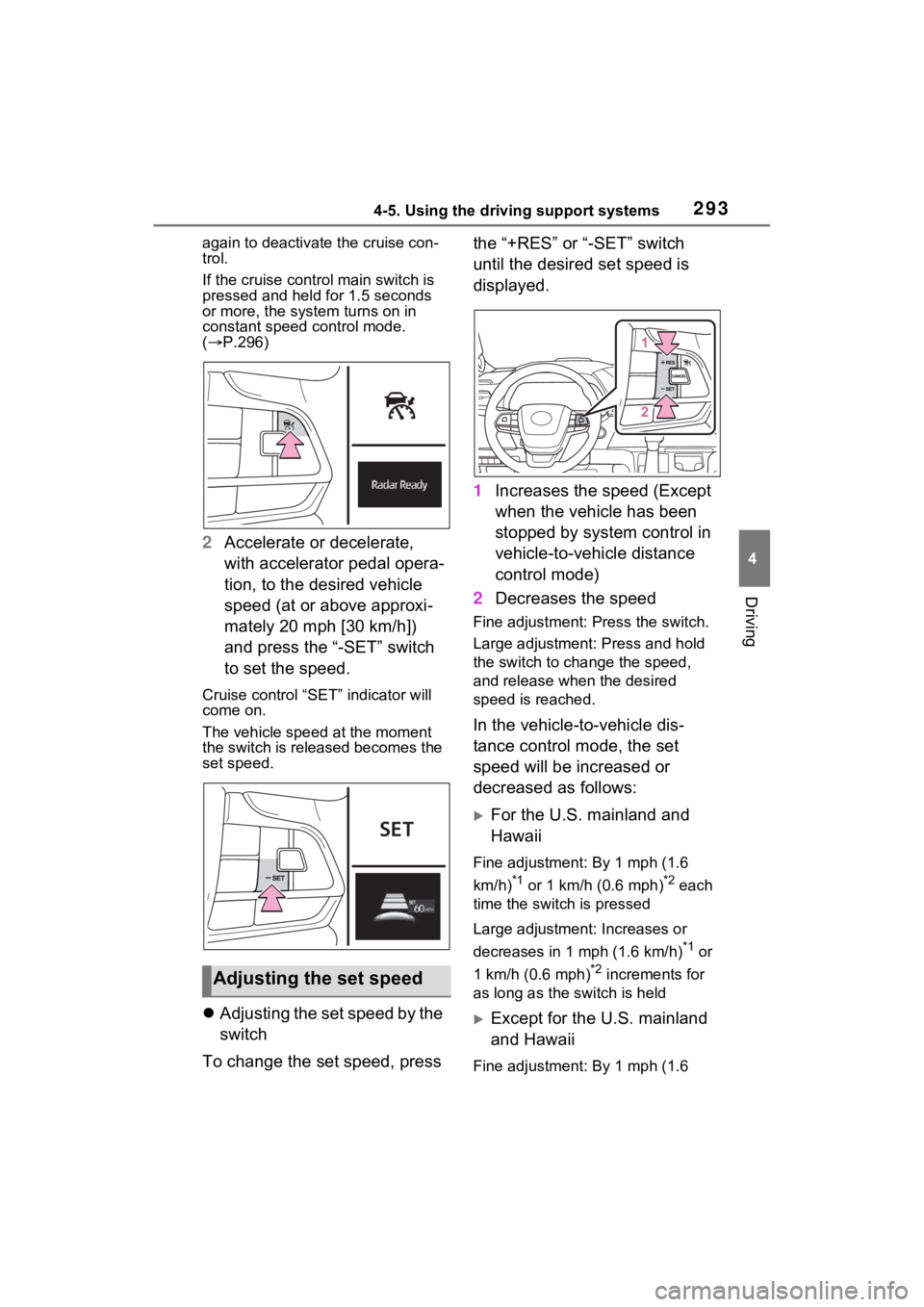
2 Accelerate or decelerate,
with accelerator pedal opera-
tion, to the desired vehicle
speed (at or above approxi-
mately 20 mph [30 km/h])
and press the “-SET” switch
to set the speed.
Cruise control “SET” indicator will
come on.
The vehicle speed at the moment
the switch is released becomes the
set speed.
Adjusting the set speed by the
switch
To change the set speed, press the “+RES” or “-SET” switch
until the desired set speed is
displayed.
1
Increases the speed (Except
when the vehicle has been
stopped by system control in
vehicle-to-vehicle distance
control mode)
2 Decreases the speed
Fine adjustment: Press the switch.
Large adjustment: Press and hold
the switch to cha nge the speed,
and release when the desired
speed is reached.
In the vehicle-to-vehicle dis-
tance control mode, the set
speed will be increased or
decreased as follows:
For the U.S. mainland and
Hawaii
Fine adjustment: By 1 mph (1.6
km/h)
*1 or 1 km/h (0.6 mph)*2 each
time the switch is pressed
Large adjustment: Increases or
decreases in 1 mph (1.6 km/h)
*1 or
1 km/h (0.6 mph)
*2 increments for
as long as the switch is held
Except for the U.S. mainland
and Hawaii
Fine adjustment: By 1 mph (1.6
Adjusting the set speed
Page 297 of 601
2964-5. Using the driving support systems
■Warnings may not occur
when
In the following instances, warn-
ings may not occur even when
the vehicle-to-vehicle distance is
small.
When the speed of the pre-
ceding vehicle matches or
exceeds your vehicle speed
When the preceding vehicle is
traveling at an extremely slow
speed
Immediately after the cruise
control speed was set
When depressing the acceler-
ator pedal
When constant speed control
mode is selected, your vehicle
will maintain a set speed without
controlling the vehicle-to-vehi-
cle distance. Select this mode
only when vehicle-to-vehicle dis-
tance control mode does not
function correctly due to a dirty
radar, etc. 1
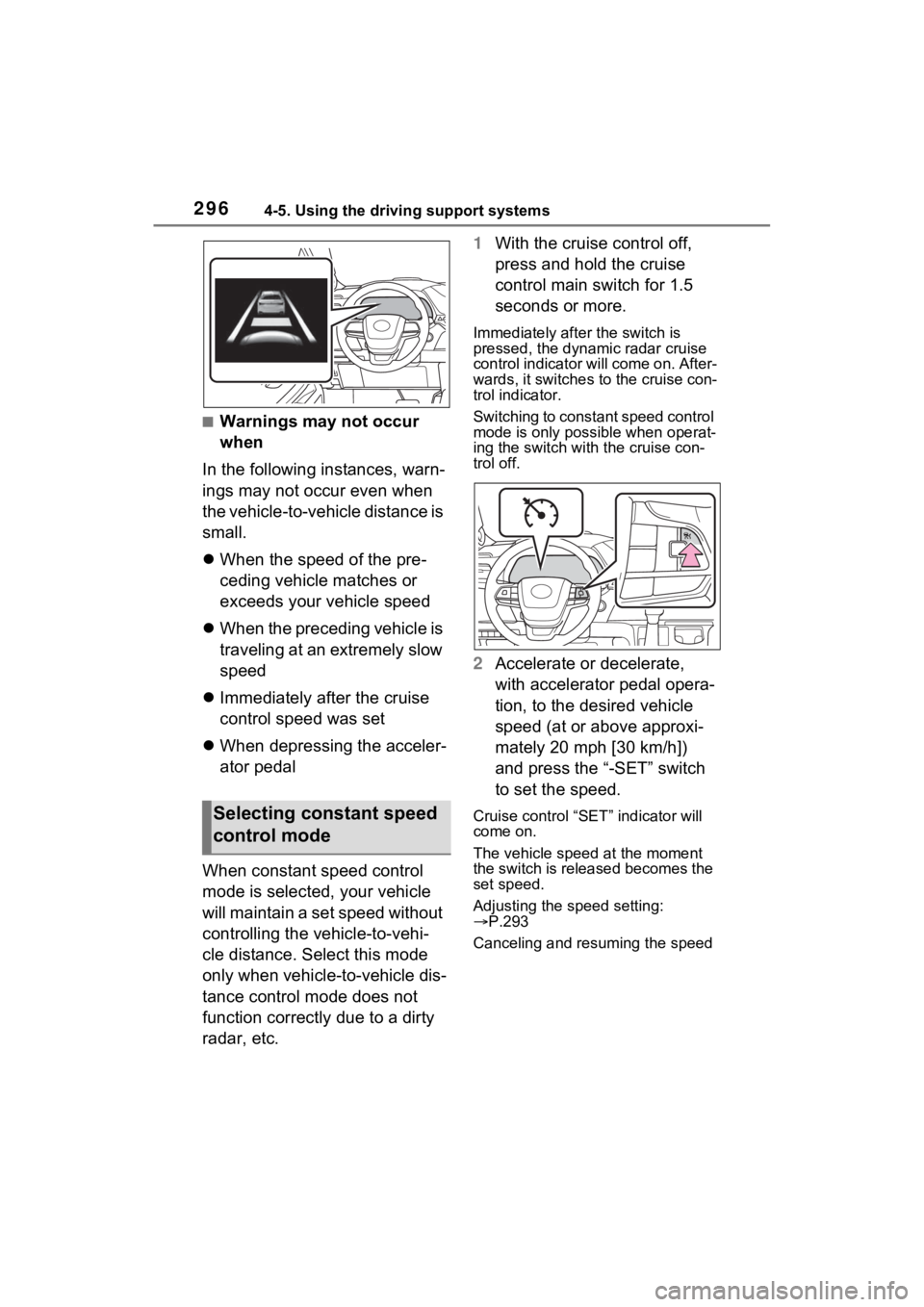
With the cruise control off,
press and hold the cruise
control main switch for 1.5
seconds or more.
Immediately after the switch is
pressed, the dynamic radar cruise
control indicator will come on. After-
wards, it switches to the cruise con-
trol indicator.
Switching to const ant speed control
mode is only possible when operat-
ing the switch with the cruise con-
trol off.
2 Accelerate or decelerate,
with accelerator pedal opera-
tion, to the desired vehicle
speed (at or above approxi-
mately 20 mph [30 km/h])
and press the “-SET” switch
to set the speed.
Cruise control “SET” indicator will
come on.
The vehicle speed at the moment
the switch is released becomes the
set speed.
Adjusting the speed setting:
P.293
Canceling and resuming the speed Selecting constant speed
control mode
Page 298 of 601
2974-5. Using the driving support systems
4
Driving
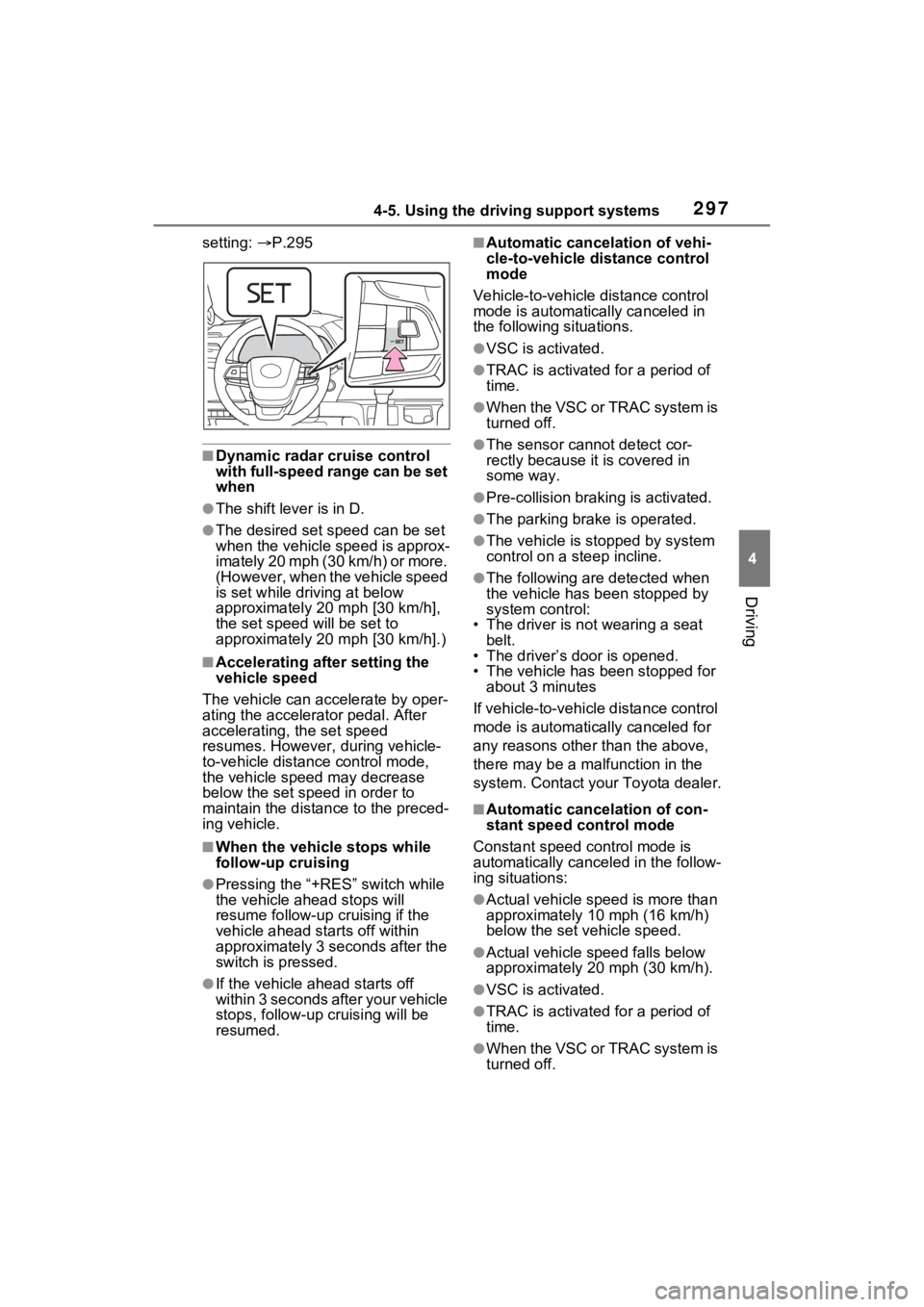
setting: P.295
■Dynamic radar cruise control
with full-speed range can be set
when
●The shift lever is in D.
●The desired set speed can be set
when the vehicle speed is approx-
imately 20 mph (30 km/h) or more.
(However, when the vehicle speed
is set while driving at below
approximately 20 mph [30 km/h],
the set speed will be set to
approximately 20 mph [30 km/h].)
■Accelerating after setting the
vehicle speed
The vehicle can accelerate by oper-
ating the accelerator pedal. After
accelerating, the set speed
resumes. However, during vehicle-
to-vehicle distance control mode,
the vehicle spee d may decrease
below the set speed in order to
maintain the distance to the preced-
ing vehicle.
■When the vehicle stops while
follow-up cruising
●Pressing the “+RES” switch while
the vehicle ahead stops will
resume follow-up cruising if the
vehicle ahead starts off within
approximately 3 seconds after the
switch is pressed.
●If the vehicle ahead starts off
within 3 seconds after your vehicle
stops, follow-up cruising will be
resumed.
■Automatic cancelation of vehi-
cle-to-vehicle d istance control
mode
Vehicle-to-vehicle distance control
mode is automatically canceled in
the following situations.
●VSC is activated.
●TRAC is activated for a period of
time.
●W h en t he V S C o r T RA C sys te m is
turned off.
●The sensor cannot detect cor-
rectly because i t is covered in
some way.
●Pre-collision braking is activated.
●The parking brake is operated.
●The vehicle is stopped by system
control on a steep incline.
●The following are detected when
the vehicle has been stopped by
system control:
• The driver is not wearing a seat belt.
• The driver’s door is opened.
• The vehicle has been stopped for
about 3 minutes
If vehicle-to-vehicle distance control
mode is automatically canceled for
any reasons other than the above,
there may be a malfunction in the
system. Contact your Toyota dealer.
■Automatic cancelation of con-
stant speed control mode
Constant speed control mode is
automatically cance led in the follow-
ing situations:
●Actual vehicle speed is more than
approximately 10 mph (16 km/h)
below the set vehicle speed.
●Actual vehicle speed falls below
approximately 20 mph (30 km/h).
●VSC is activated.
●TRAC is activated for a period of
time.
●W h en t he V S C o r T RA C sys te m is
turned off.