low beam TOYOTA SIENNA HYBRID 2021 Owners Manual (in English)
[x] Cancel search | Manufacturer: TOYOTA, Model Year: 2021, Model line: SIENNA HYBRID, Model: TOYOTA SIENNA HYBRID 2021Pages: 601, PDF Size: 32.07 MB
Page 95 of 601
952-1. Instrument cluster
2
Vehicle status information and indicators
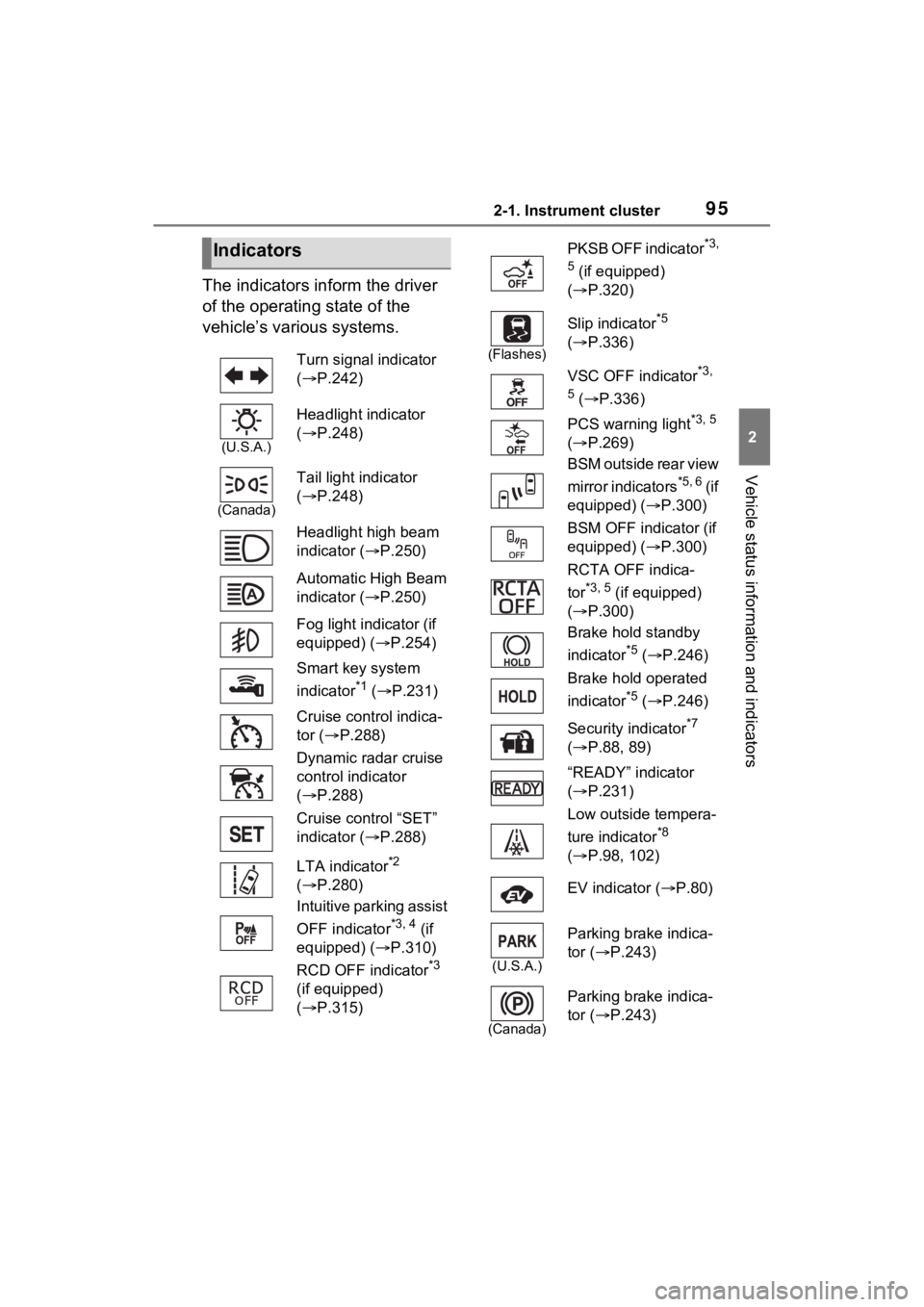
The indicators inform the driver
of the operating state of the
vehicle’s various systems.
Indicators
Turn signal indicator
( P.242)
(U.S.A.)
Headlight indicator
( P.248)
(Canada)
Tail light indicator
( P.248)
Headlight high beam
indicator ( P.250)
Automatic High Beam
indicator ( P.250)
Fog light indicator (if
equipped) ( P.254)
Smart key system
indicator
*1 ( P.231)
Cruise control indica-
tor ( P.288)
Dynamic radar cruise
control indicator
( P.288)
Cruise control “SET”
indicator ( P.288)
LTA indicator
*2
( P.280)
Intuitive parking assist
OFF indicator
*3, 4 (if
equipped) ( P.310)
RCD OFF indicator
*3
(if equipped)
( P.315)
PKSB OFF indicator*3,
5
(if equipped)
( P.320)
(Flashes)
Slip indicator*5
( P.336)
VSC OFF indicator
*3,
5
( P.336)
PCS warning light
*3, 5
( P.269)
BSM outside rear view
mirror indicators
*5, 6 ( i f
equipped) ( P.300)
BSM OFF indicator (if
equipped) ( P.300)
RCTA OFF indica-
tor
*3, 5 (if equipped)
( P.300)
Brake hold standby
indicator
*5 ( P.246)
Brake hold operated
indicator
*5 ( P.246)
Security indicator
*7
( P.88, 89)
“READY” indicator
( P.231)
Low outside tempera-
ture indicator
*8
( P.98, 102)
EV indicator ( P.80)
(U.S.A.)
Parking brake indica-
tor ( P.243)
(Canada)
Parking brake indica-
tor (P.243)
Page 249 of 601
2484-3. Operating the lights and wipers
4-3.Operating the lights and wipers
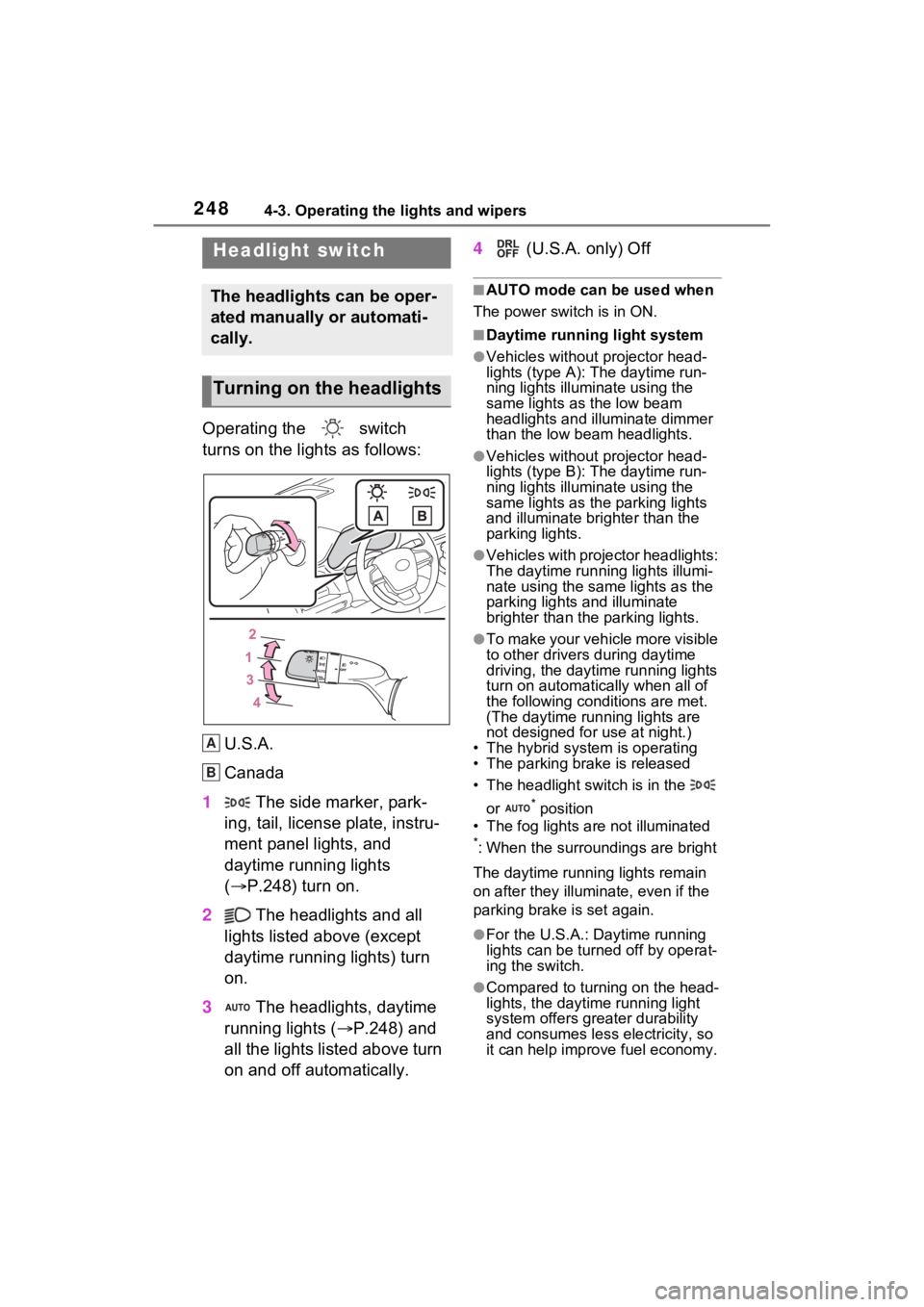
Operating the switch
turns on the lights as follows:U.S.A.
Canada
1 The side marker, park-
ing, tail, license plate, instru-
ment panel lights, and
daytime running lights
( P.248) turn on.
2 The headlights and all
lights listed above (except
daytime running lights) turn
on.
3 The headlights, daytime
running lights ( P.248) and
all the lights listed above turn
on and off automatically. 4
(U.S.A. only) Off
■AUTO mode can be used when
The power switch is in ON.
■Daytime running light system
●Vehicles without projector head-
lights (type A): The daytime run-
ning lights illuminate using the
same lights as the low beam
headlights and illu minate dimmer
than the low beam headlights.
●Vehicles without projector head-
lights (type B): The daytime run-
ning lights illuminate using the
same lights as the parking lights
and illuminate brighter than the
parking lights.
●Vehicles with projector headlights:
The daytime runn ing lights illumi-
nate using the same lights as the
parking lights and illuminate
brighter than the parking lights.
●To make your vehicle more visible
to other drivers during daytime
driving, the daytime running lights
turn on automatically when all of
the following conditions are met.
(The daytime running lights are
not designed for use at night.)
• The hybrid system is operating
• The parking brake is released
• The headlight switch is in the
or
* position
• The fog lights are not illuminated
*: When the surroundings are bright
The daytime running lights remain
on after they illumi nate, even if the
parking brake is set again.
●For the U.S.A.: Daytime running
lights can be turned off by operat-
ing the switch.
●Compared to turning on the head-
lights, the daytime running light
system offers greater durability
and consumes less electricity, so
it can help improve fuel economy.
Headlight switch
The headlights can be oper-
ated manually or automati-
cally.
Turning on the headlights
A
B
Page 252 of 601
2514-3. Operating the lights and wipers
4
Driving
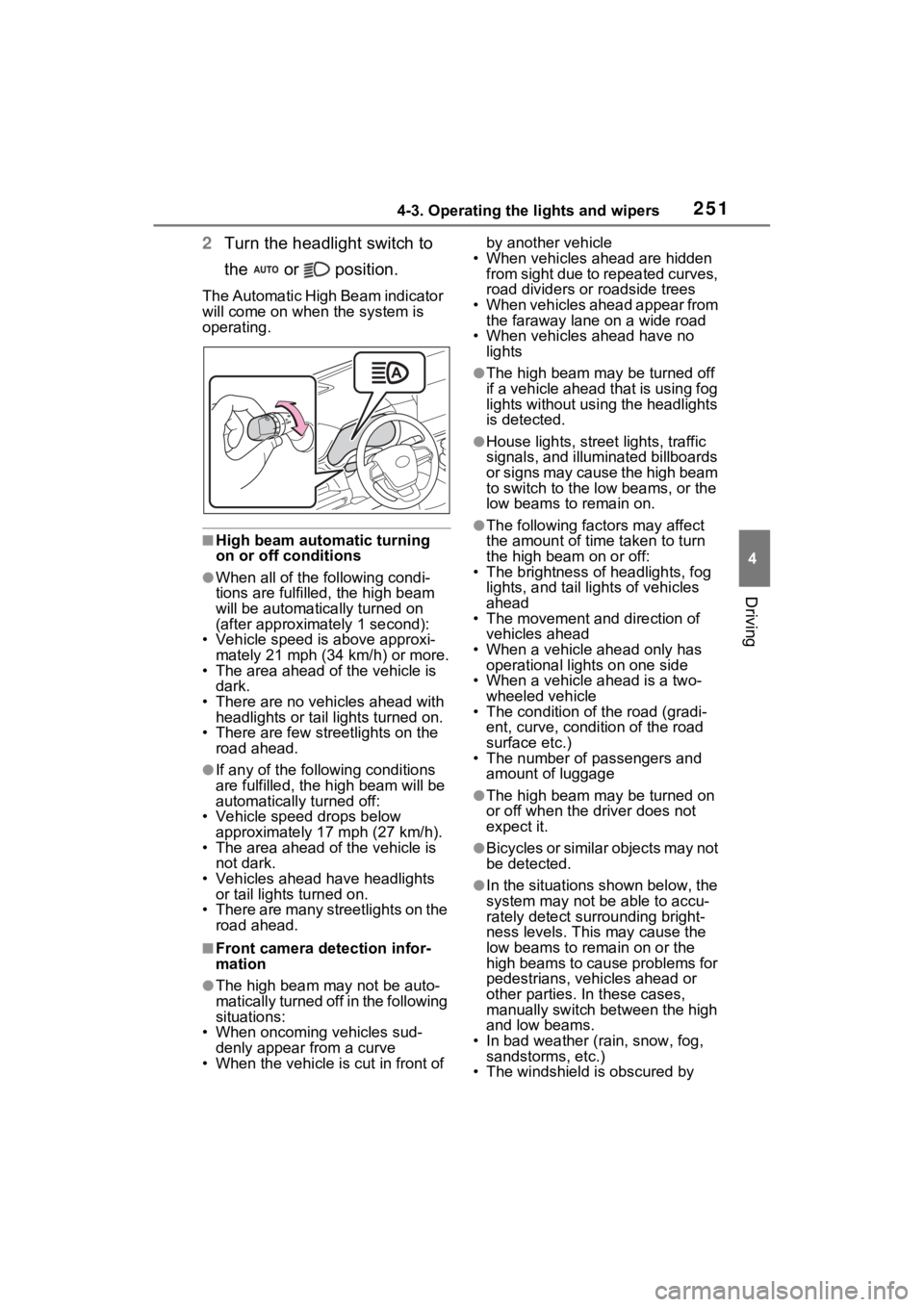
2Turn the headlight switch to
the or position.
The Automatic High Beam indicator
will come on when the system is
operating.
■High beam automatic turning
on or off conditions
●When all of the following condi-
tions are fulfille d, the high beam
will be automatica lly turned on
(after approximately 1 second):
• Vehicle speed is above approxi-
mately 21 mph (34 km/h) or more.
• The area ahead of the vehicle is dark.
• There are no vehicles ahead with headlights or tail lights turned on.
• There are few streetlights on the
road ahead.
●If any of the following conditions
are fulfilled, the h igh beam will be
automatically turned off:
• Vehicle speed drops below
approximately 17 mph (27 km/h).
• The area ahead of the vehicle is not dark.
• Vehicles ahead have headlights or tail lights turned on.
• There are many streetlights on the
road ahead.
■Front camera detection infor-
mation
●The high beam may not be auto-
matically turned off in the following
situations:
• When oncoming vehicles sud-
denly appear from a curve
• When the vehicle is cut in front of by another vehicle
• When vehicles ahead are hidden from sight due to repeated curves,
road dividers or roadside trees
• When vehicles ahead appear from the faraway lane on a wide road
• When vehicles ahead have no lights
●The high beam ma y be turned off
if a vehicle ahead that is using fog
lights without using the headlights
is detected.
●House lights, street lights, traffic
signals, and illuminated billboards
or signs may cause the high beam
to switch to the low beams, or the
low beams to remain on.
●The following fact ors may affect
the amount of time taken to turn
the high beam on or off:
• The brightness of headlights, fog
lights, and tail lig hts of vehicles
ahead
• The movement and direction of
vehicles ahead
• When a vehicle ahead only has
operational lights on one side
• When a vehicle ahead is a two- wheeled vehicle
• The condition of the road (gradi-
ent, curve, condition of the road
surface etc.)
• The number of passengers and
amount of luggage
●The high beam ma y be turned on
or off when the d river does not
expect it.
●Bicycles or similar objects may not
be detected.
●In the situations shown below, the
system may not be able to accu-
rately detect surrounding bright-
ness levels. This may cause the
low beams to remain on or the
high beams to cause problems for
pedestrians, vehicles ahead or
other parties. In these cases,
manually switch between the high
and low beams.
• In bad weather (rain, snow, fog, sandstorms, etc.)
• The windshield is obscured by
Page 253 of 601
2524-3. Operating the lights and wipers
fog, mist, ice, dirt, etc.
• The windshield is cracked or dam- aged
• The front camera is deformed or
dirty
• When the temperature of the front
camera is extremely high
• Surrounding brightness levels are equal to those of h eadlights, tail
lights or fog lights
• When headlights or tail lights of vehicles ahead are turned off,
dirty, changing color, or not aimed
properly
• When the vehicle is hit by water,
snow, dust, etc. fr om a preceding
vehicle
• When driving thr ough an area of
intermittently changing brightness
and darkness
• When frequently and repeatedly
driving ascending/descending
roads, or roads with rough, bumpy
or uneven surfaces (such as
stone-paved roads, gravel roads,
etc.)
• When frequently and repeatedly
taking curves or driving on a wind-
ing road
• There is a highly reflective object
ahead of the vehicle, such as a
sign or mirror
• The back of a vehicle ahead is
highly reflective, such as a con-
tainer on a truck
• The vehicle’s headlights are dam-
aged or dirty, or are not aimed
properly
• The vehicle is listing or titling due
to a flat tire, a trailer being towed,
etc.
• The high beam and low beam are
repeatedly being switched
between in an abnormal manner
• The driver believes that the high
beam may be causing problems
or distress to other drivers or
pedestrians nearby
■Temporarily lowering sensor
sensitivity
The sensitivity of the sensor can be
temporarily lowered. 1
Turn the power s witch off while
the following conditions are met.
●The headlight switch is in or
position.
●The headlight switch lever is in the
original position.
●Automatic High Beam switch is
on.
2 Turn the power switch to ON.
3 Within 60 seconds after step 2,
repeat pushing the headlight
switch lever to the high beam
position then pulling it to the orig-
inal position quickly 10 times,
then leave the lever in the origi-
nal position.
4 If the sensitivity is changed, the
Automatic High Beam indicator
turns on and off 3 times.
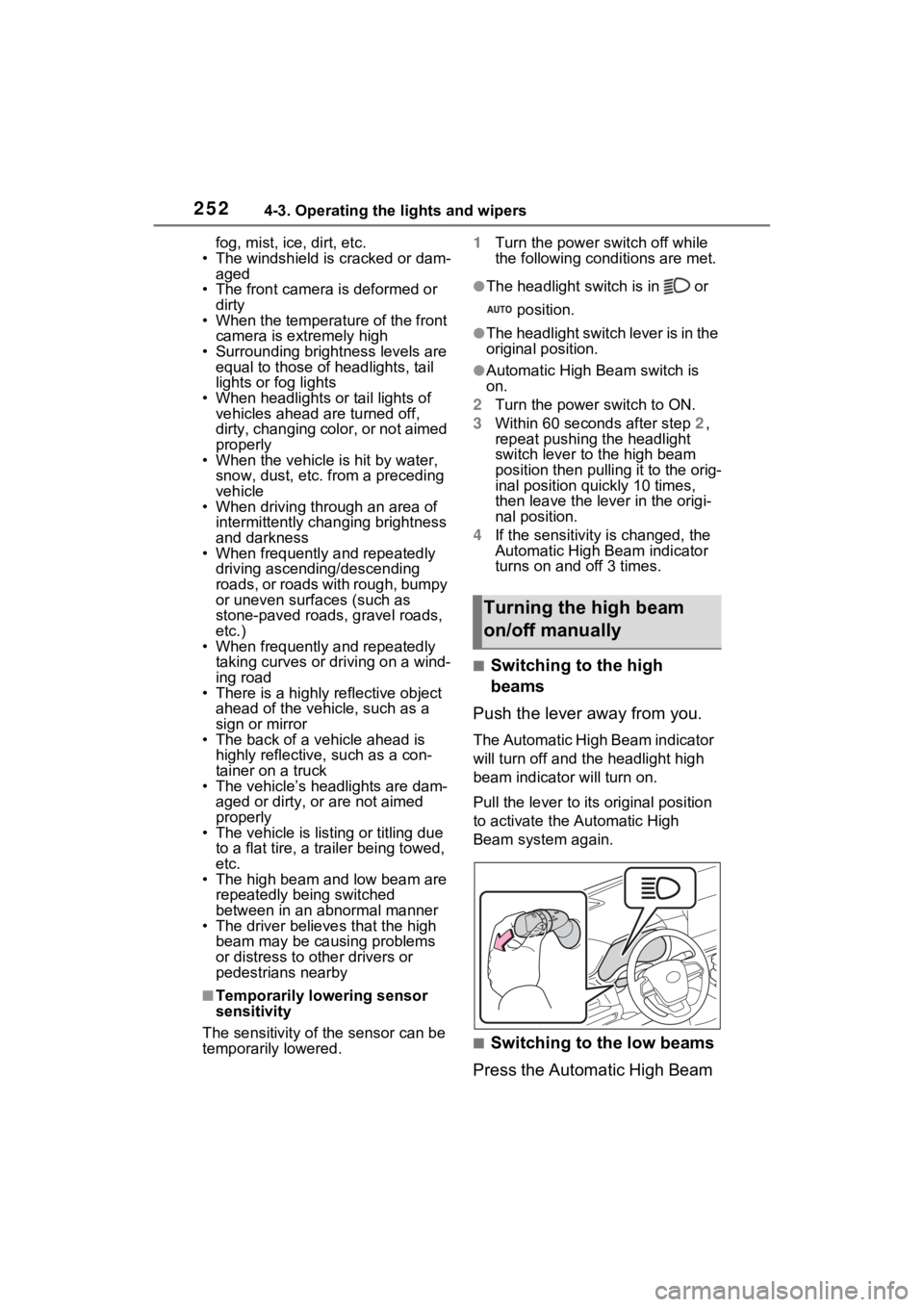
■Switching to the high
beams
Push the lever away from you.
The Automatic High Beam indicator
will turn off and the headlight high
beam indicator will turn on.
Pull the lever to its original position
to activate the Automatic High
Beam system again.
■Switching to the low beams
Press the Automatic High Beam
Turning the high beam
on/off manually
Page 254 of 601
2534-3. Operating the lights and wipers
4
Driving
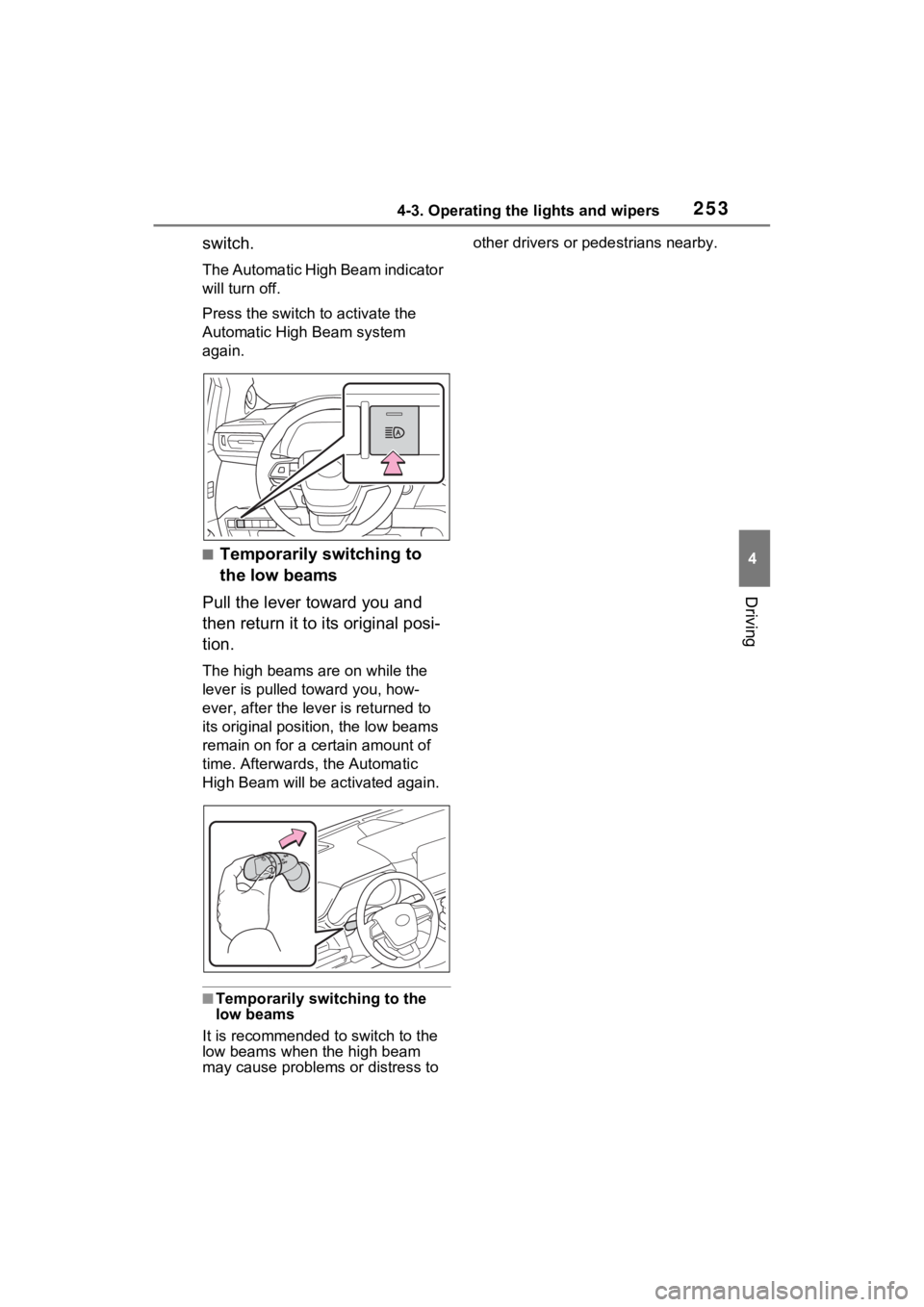
switch.
The Automatic High Beam indicator
will turn off.
Press the switch to activate the
Automatic High Beam system
again.
■Temporarily switching to
the low beams
Pull the lever toward you and
then return it to its original posi-
tion.
The high beams are on while the
lever is pulled toward you, how-
ever, after the lever is returned to
its original position, the low beams
remain on for a certain amount of
time. Afterwards, the Automatic
High Beam will be a ctivated again.
■Temporarily switching to the
low beams
It is recommended to switch to the
low beams when the high beam
may cause problems or distress to other drivers or
pedestrians nearby.
Page 255 of 601
2544-3. Operating the lights and wipers
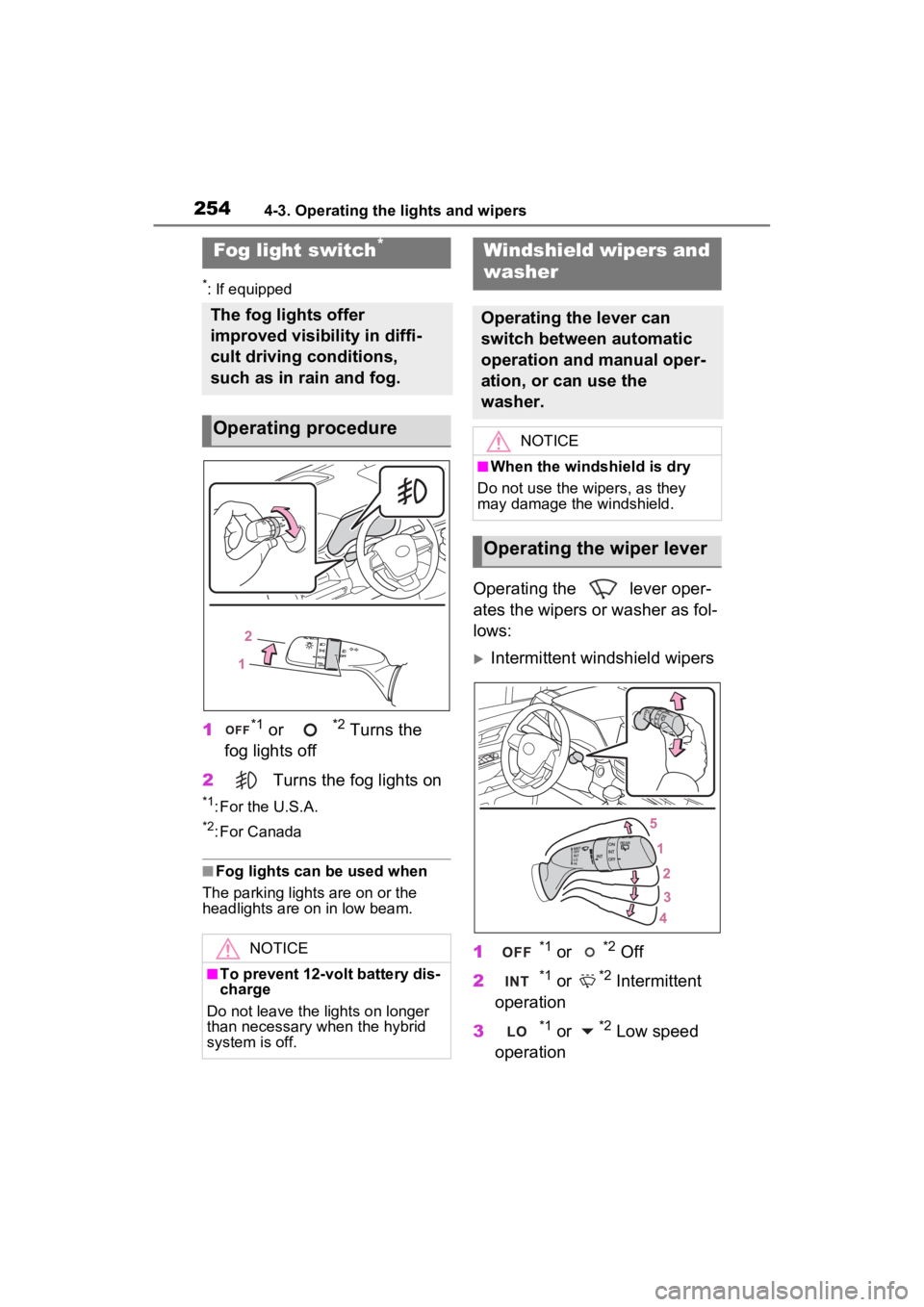
*: If equipped
1*1 or *2 Turns the
fog lights off
2 Turns the fog lights on
*1: For the U.S.A.
*2: For Canada
■Fog lights can be used when
The parking lights are on or the
headlights are on in low beam.
Operating the lever oper-
ates the wipers or washer as fol-
lows:
Intermittent windshield wipers
1
*1 or *2 Off
2
*1 or *2 Intermittent
operation
3
*1 or *2 Low speed
operation
Fog light switch*
The fog lights offer
improved visibility in diffi-
cult driving conditions,
such as in rain and fog.
Operating procedure
NOTICE
■To prevent 12-volt battery dis-
charge
Do not leave the lights on longer
than necessary when the hybrid
system is off.
Windshield wipers and
washer
Operating the lever can
switch between automatic
operation and manual oper-
ation, or can use the
washer.
NOTICE
■When the windshield is dry
Do not use the wipers, as they
may damage the windshield.
Operating the wiper lever
Page 263 of 601
2624-5. Using the driving support systems
4-5.Using the driving support systems
■PCS (Pre-Collision System)
P.267
■LTA (Lane Tracing Assist)
P.275
■AHB (Automatic High
Beam)
P.250
■RSA (Road Sign Assist) (if
equipped)
P.285
■Dynamic radar cruise con-
trol with full-speed range
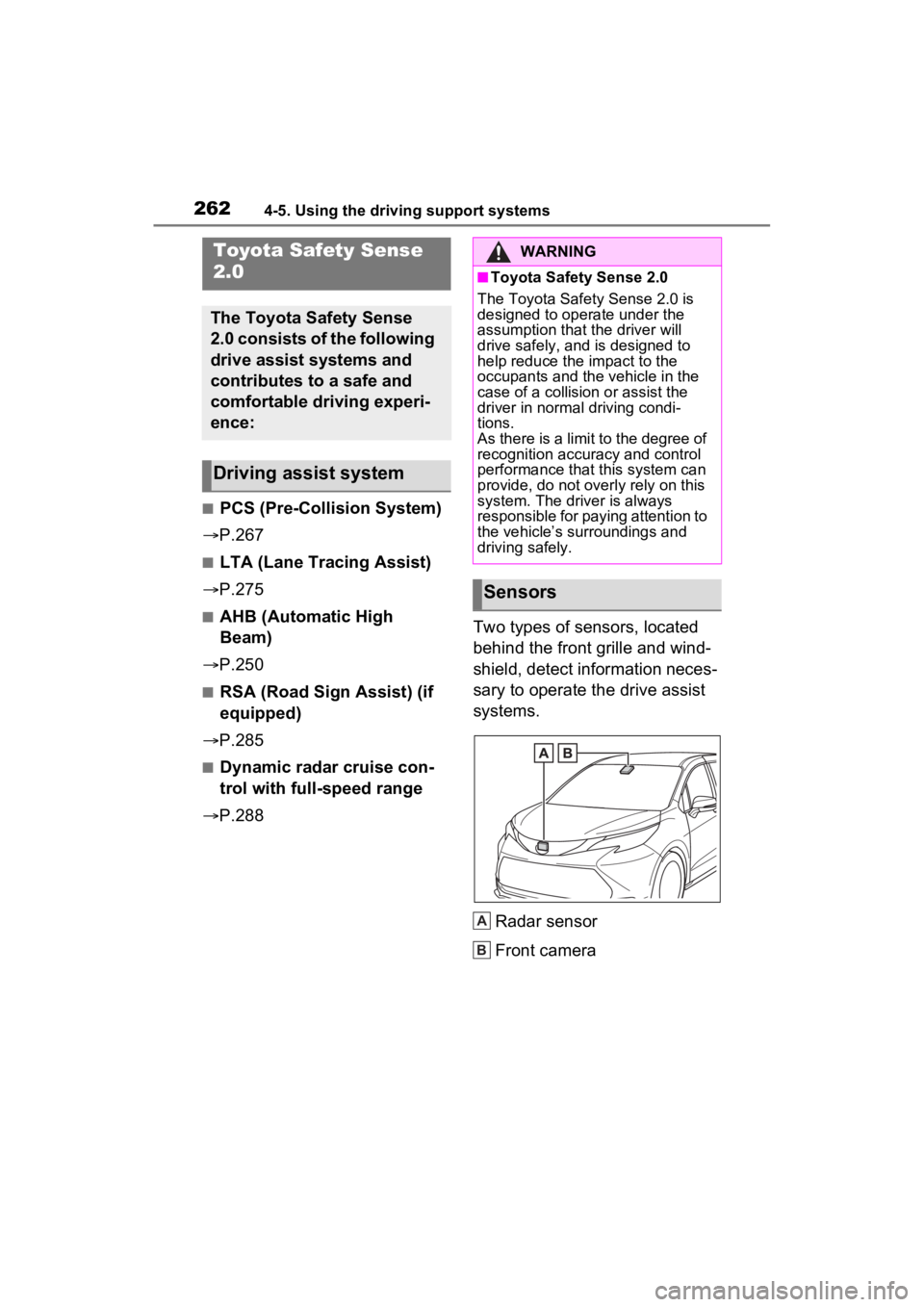
P.288 Two types of sensors, located
behind the front grille and wind-
shield, detect information neces-
sary to operate the drive assist
systems.
Radar sensor
Front camera
Toyota Safety Sense
2.0
The Toyota Safety Sense
2.0 consists of the following
drive assist systems and
contributes to a safe and
comfortable driving experi-
ence:
Driving assist system
WARNING
■Toyota Safety Sense 2.0
The Toyota Safety Sense 2.0 is
designed to operate under the
assumption that the driver will
drive safely, and is designed to
help reduce the impact to the
occupants and the vehicle in the
case of a collision or assist the
driver in normal driving condi-
tions.
As there is a limit to the degree of
recognition accuracy and control
performance that this system can
provide, do not overly rely on this
system. The driver is always
responsible for paying attention to
the vehicle’s su rroundings and
driving safely.
Sensors
A
B
Page 481 of 601

4807-2. Steps to take in an emergency
ing the power switch to OFF with the
shift lever in any position other than
P.
Shift the shift lever to P.
■If “Shift Is in N Release Acceler-
ator Before Shifting” is shown
Message is displayed when the
accelerator pedal has been
depressed and the shift lever is in N.
Release the accelerator pedal and
shift the shift lever to D or R.
■If “Accelerator Pedal is
Pressed” is displayed
The accelerator pedal has been
depressed when the shift lever is in
P. Release the accelerator pedal.
■If “Press Brake When Vehicle Is
Stopped Hybrid System May
Overheat” is shown
Message is displayed when the
accelerator pedal is depressed to
maintain the vehicle position when
stopped on a upward slope, etc.
If this continues, the hybrid system
may overheat.
Release the accelerator pedal and
depress the brake pedal.
■If “Auto Power Off to Conserve
Battery” is shown
Power was turned off due to the
automatic power off function.
Next time when starting the hybrid
system, operate th e hybrid system
for approximatel y 5 minutes to
recharge the 12-volt battery.
■If “High Power Consumption
Power to Climate Temporarily
Limited” is displayed
Turn off unnecessary electronic
equipment to reduce power con-
sumption.
Please wait until th e power supply
returns to normal.
■If “Headlight System Malfunc-
tion Visit Your D ealer” is dis-
played
The following systems may be mal- functioning.
Have the vehicle inspected by your
Toyota dealer immediately.
●The LED headlight system
●Automatic High Beam
■If “Radar Cruise Control
Unavailable” is shown
The dynamic radar cruise control
with full-speed range system is sus-
pended temporarily or until the prob-
lem shown in the message is
resolved. (causes and coping meth-
ods: P.265)
■If a message that indicates the
malfunction of front camera is
displayed
The following systems may be sus-
pended until the problem shown in
the message is resolved. (P.265,
466)
●PCS (Pre-Collision System)
●LTA (Lane Tracing Assist)
●Automatic High Beam
●RSA (Road Sign Assist) (if
equipped)
●Dynamic radar cruise control with
full-speed range
■If “Oil Maintenance Required
Soon” is displayed
Indicates that the engine oil should
be scheduled to be changed.
Check the engine oil and change it if
necessary.
After changing the engine oil, make
sure to reset t he message.
( P.418)
■If “Oil Maintenance Required
Visit Your Deale r” is displayed
Indicates that the engine oil should
be changed.
Check and change the engine oil
and oil filter by yo ur Toyota dealer.
After changing the engine oil, make
sure to reset t he message.
( P.418)
Page 499 of 601
4987-2. Steps to take in an emergency
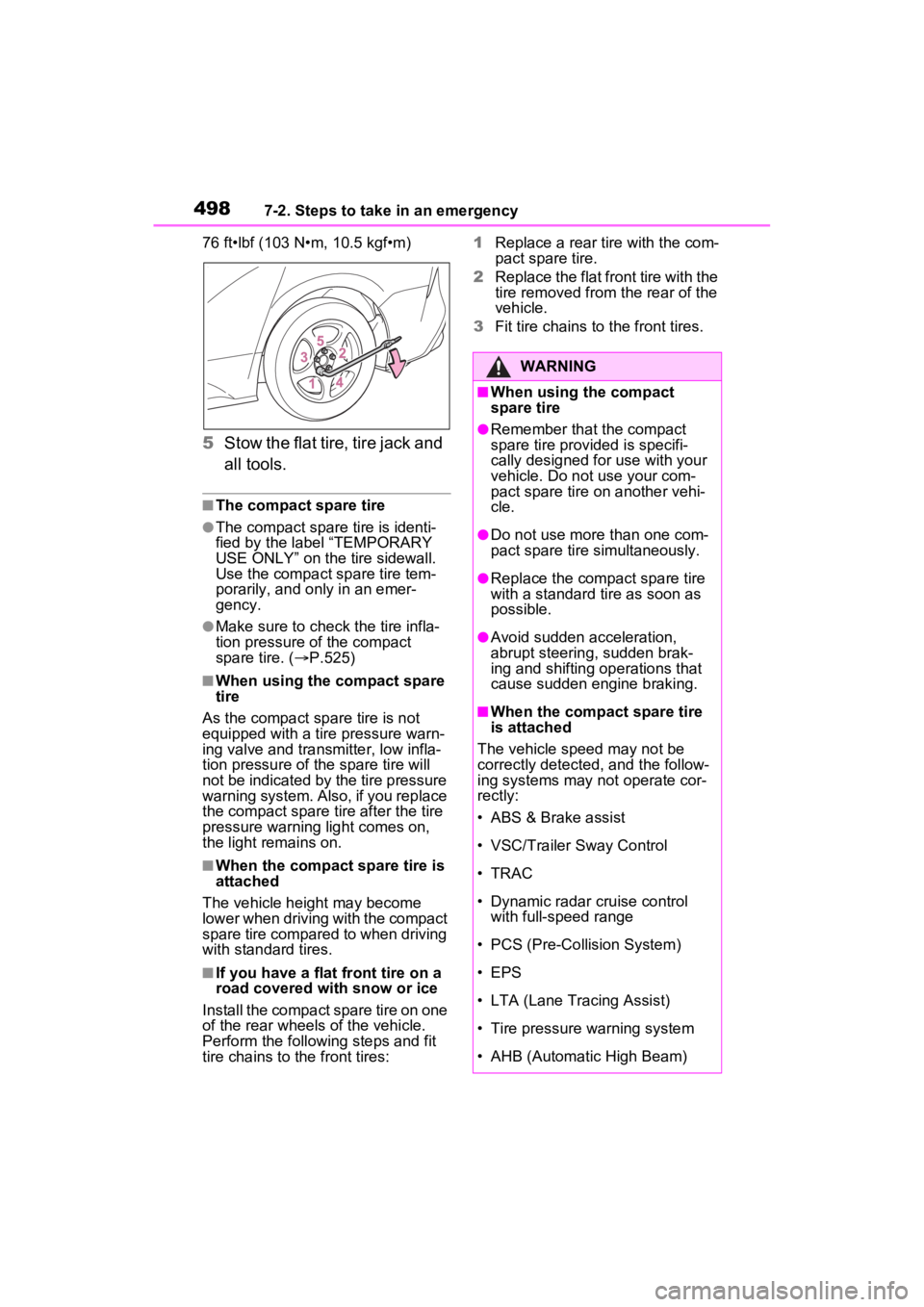
76 ft•lbf (103 N•m, 10.5 kgf•m)
5Stow the flat tire, tire jack and
all tools.
■The compact spare tire
●The compact spare tire is identi-
fied by the label “TEMPORARY
USE ONLY” on the tire sidewall.
Use the compact s pare tire tem-
porarily, and only in an emer-
gency.
●Make sure to check the tire infla-
tion pressure of the compact
spare tire. ( P.525)
■When using the compact spare
tire
As the compact sp are tire is not
equipped with a tire pressure warn-
ing valve and transmitter, low infla-
tion pressure of the spar e tire will
not be indicated by the tire pressure
warning system. Also, if you replace
the compact spare tire after the tire
pressure warning light comes on,
the light remains on.
■When the compact spare tire is
attached
The vehicle height may become
lower when driving with the compact
spare tire compared to when driving
with standard tires.
■If you have a flat front tire on a
road covered with snow or ice
Install the compact spare tire on one
of the rear wheels of the vehicle.
Perform the following steps and fit
tire chains to the front tires: 1
Replace a rear tire with the com-
pact spare tire.
2 Replace the flat front tire with the
tire removed from the rear of the
vehicle.
3 Fit tire chains to the front tires.
WARNING
■When using the compact
spare tire
●Remember that the compact
spare tire provided is specifi-
cally designed for use with your
vehicle. Do not use your com-
pact spare tire on another vehi-
cle.
●Do not use more than one com-
pact spare tire simultaneously.
●Replace the comp act spare tire
with a standard tire as soon as
possible.
●Avoid sudden acceleration,
abrupt steering, sudden brak-
ing and shifting operations that
cause sudden engine braking.
■When the compact spare tire
is attached
The vehicle speed may not be
correctly detected, and the follow-
ing systems may not operate cor-
rectly:
• ABS & Brake assist
• VSC/Trailer Sway Control
• TRAC
• Dynamic radar cruise control with full-speed range
• PCS (Pre-Collision System)
• EPS
• LTA (Lane Tracing Assist)
• Tire pressure warning system
• AHB (Automatic High Beam)
Page 524 of 601
5238-1. Specifications
8
Vehicle specifications
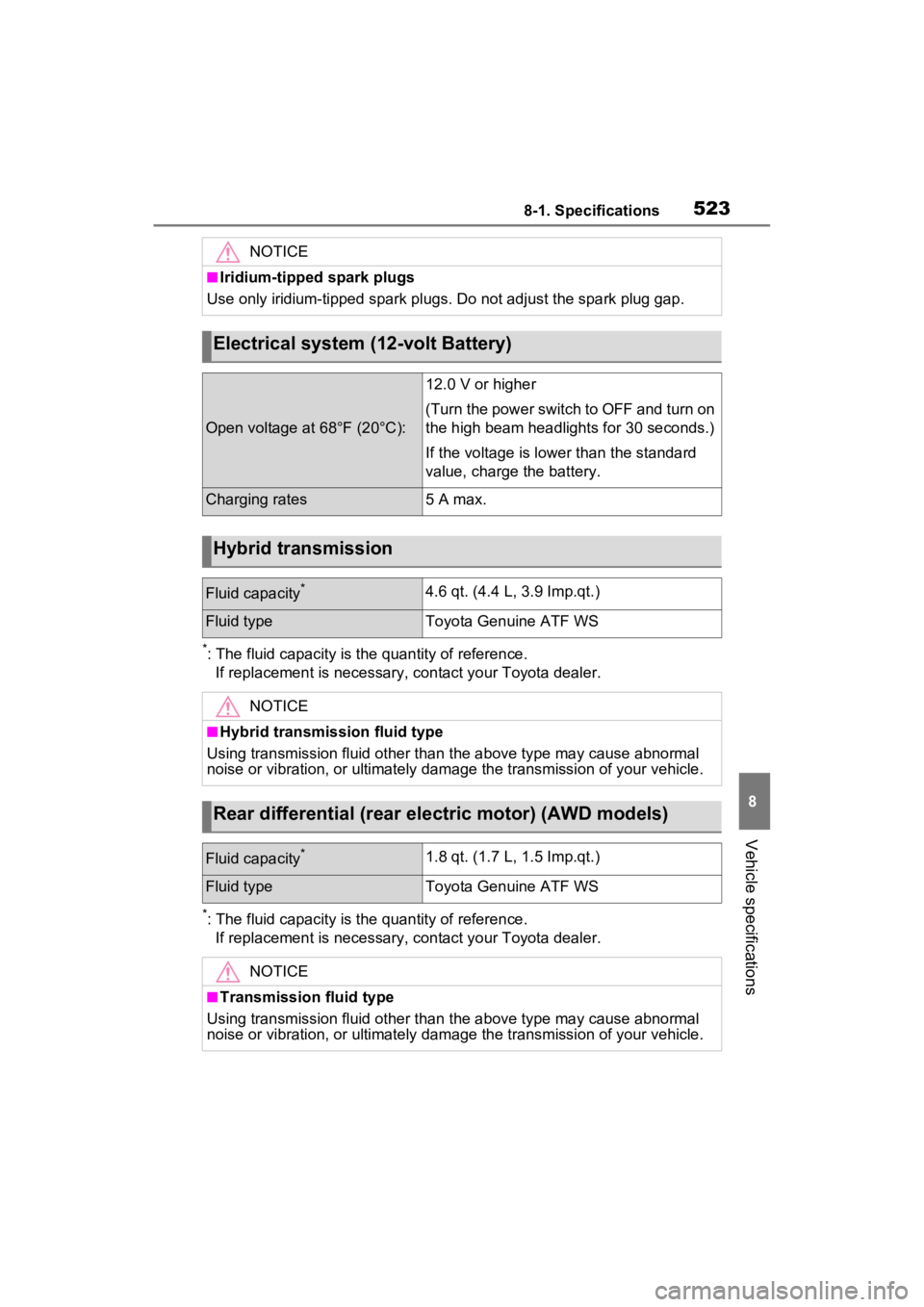
*: The fluid capacity is the quantity of reference.If replacement is necessary, contact y our Toyota dealer.
*: The fluid capacity is the quantity of reference.
If replacement is necessary, contact y our Toyota dealer.
NOTICE
■Iridium-tipped spark plugs
Use only iridium-tipped spark plugs. Do not adjust the spark pl ug gap.
Electrical system (12-volt Battery)
Open voltage at 68°F (20°C):
12.0 V or higher
(Turn the power switch to OFF and turn on
the high beam headlights for 30 seconds.)
If the voltage is lower than the standard
value, charge the battery.
Charging rates5 A max.
Hybrid transmission
Fluid capacity*4.6 qt. (4.4 L, 3.9 Imp.qt.)
Fluid typeToyota Genuine ATF WS
NOTICE
■Hybrid transmission fluid type
Using transmission fluid other than the above type may cause ab normal
noise or vibration, or ultimately damage the transmission of yo ur vehicle.
Rear differential (rear electric motor) (AWD models)
Fluid capacity*1.8 qt. (1.7 L, 1.5 Imp.qt.)
Fluid typeToyota Genuine ATF WS
NOTICE
■Transmission fluid type
Using transmission fluid other than the above type may cause ab normal
noise or vibration, or ultimately damage the transmission of yo ur vehicle.