change time TOYOTA SUPRA 1996 User Guide
[x] Cancel search | Manufacturer: TOYOTA, Model Year: 1996, Model line: SUPRA, Model: TOYOTA SUPRA 1996Pages: 188, PDF Size: 3.84 MB
Page 94 of 188

92This function does not work properly un- less
the blank portions on the tape have 3
seconds or more between one program
and another.
SKIPº button: Use for automatic skip-
ping of blank portions between programs. Push the SKIPº button. SKIPº appears
on the display. The player will automati-
cally skip any blank portions of 15 sec-
onds or more and play the next program,
even if it is on the other side. To cancel it,
push the button once again.
SCANº button: Use for program-to-
program scanning.Push the SCANº button. With SCANº on
the display, each program will be played
for 12 seconds and scan to the next. To
continue listening to the program of yourchoice, simply push the SCANº button
once again.
The player will automatically reverse di-
rections at the end of the tape and keep scanning. R VMº button (radio monitor system):
Use for automatic station reception. Push the R
VMº button. R VMº appears on
the display. In this mode, if you push the
REWIND or FAST FORWARD button
when listening to the tape, the system will change the radio mode and automatically
receive the last station which was set. Atthe time, the received station condition
appears on the display.
The system will be cancelled out when the
power source is severed (battery discon- nected, burnt fuse etc.). (i) Listening to the Compact DiscThis Compact Disc player does not need
to use an adaptor for 8 cm (3.2 in.) Discs. Do not use an adaptor when listening to 8
cm (3.2 in.) Discs, which cause tracking
errors or interfere with Disc ejection.
1. Put the Compact Disc into the slot, with
the label side up and lightly push it in. The
Disc player will grab the Disc and slide it
into place to play it from the track 1 pro-
gram. As this is done, the DISCº light will
come on. The track number will appear on
the display.
If the Compact Disc is already in the slot,
push the CDº button. The Compact Disc player can also beturned on by pushing the PWR VOLº
knob if
the Compact Disc player was play-
ing when the system was turned off by
pushing the knob.
If the radio or cassette tape player is on
when playing the Disc, it will automatically
turn off.
If the Disc is inserted with the label side
down, the Disc will automatically be ejected.
2. Turn the PWR VOLº knob to adjust the volume.
3. Select your program. (See (j) Selec- ting a programº.)
When the end of the Disc is reached, the
player starts playing the track 1 program again.
4. Adjust the tone and sound balance. (See (d) Adjusting the toneº and (e) Ad-
justing the sound balanceº.)
5. Push the EJECT button to eject the
Disc. As this is done, the Compact Disc
player will turn off. If the radio or cassette
tape player was on when the Disc was in-
serted, it will automatically turn on again.
6. Push the PWR VOLº knob to turn the
Compact Disc player off.
Page 97 of 188

95
5. With your identification number ap-
pearing on the display, press the SCANº button and hold it in until SECº appears
on the display. SECº will go off to indicate the system is set. If invalid buttons have
been used, Errº will appear on the display
before SECº appears. Try again from the
step 3.
Once the system is set, the indicator light
turns on and off with the ignition switch in
OFFº and SECº will appear each time the key is turned to the ACCº position.
To change the identification number for some reason, cancel the system (See
Cancelling the anti-theft systemº) and
set it again with a new number.The system will be activated if the electri-
cal power source is disconnected from the
radio unit. When the system is activated,
the audio system cannot be turned on even after the power supply resumes and
SECº will appear on the display. If this
happens, such as when the battery is dis-
charged, see If the anti-theft system isactivatedº.Cancelling the anti-theft system
1. Follow the steps 1 to 4 described in
Setting the anti-theft systemº.
2. With your identification number ap-
pearing on the display, press the SCANº
button and hold it in until - - -º appears
on the display. - - -º will go off to indicate
the system is cancelled. If invalid buttons
have been used, Errº will appear on the
display and SECº appears. Try again from
step 3 in Setting the anti-theft systemº.
Page 105 of 188
Part 1Cigarette lighter and ashtray
Clock
103
OPERATION OF INSTRUMENTS AND CONTROLSÐ
Chapter 1-8 Other equipment
Clock
Cigarette lighter and ashtray
Glovebox
Luggage cover
Traction control system
Floor mat
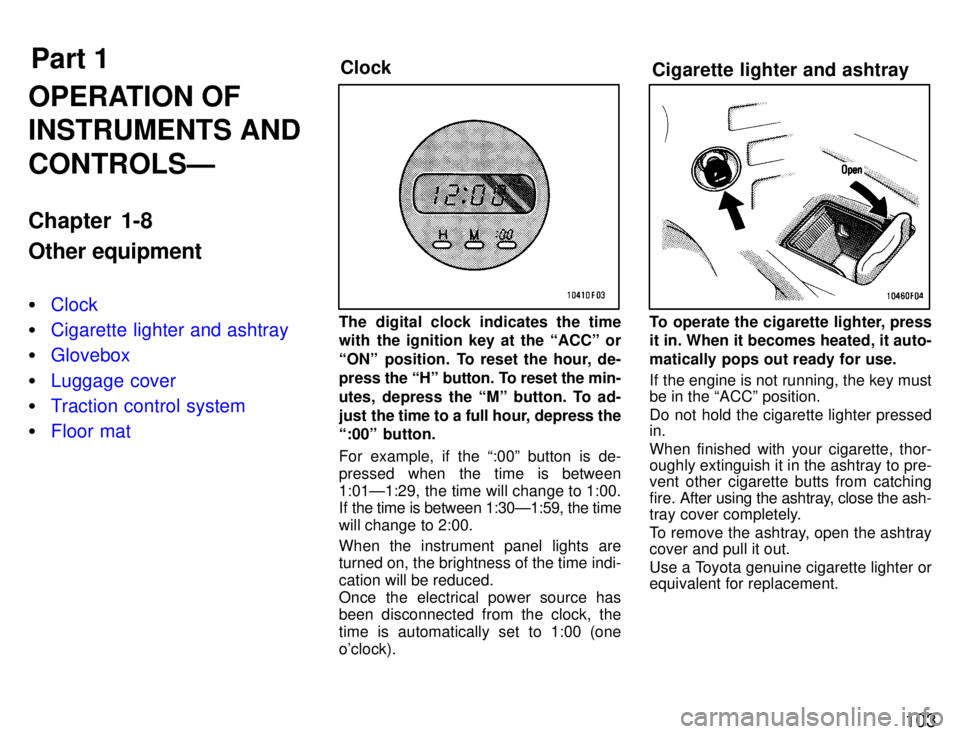
The digital clock indicates the time
with the ignition key at the ACCº or
ONº position. To reset the hour, de-
press the
Hº button. To reset the min-
utes, depress the Mº button. To ad-
just the time to a full hour, depress the
:00º button.
For example, if the :00º button is de-
pressed when the time is between
1:01Ð1:29, the time will change to 1:00.
If the time is between 1:30Ð1:59, the time
will change to 2:00. When the instrument panel lights are turned on, the brightness of the time indi- cation will be reduced.
Once the electrical power source has
been disconnected from the clock, the
time is automatically set to 1:00 (oneo'clock).To operate the cigarette lighter, press
it in. When it becomes heated, it auto-
matically pops out ready for use.
If the engine is not running, the key must be in the ACCº position.
Do not hold the cigarette lighter pressed in. When finished with your cigarette, thor-
oughly extinguish it in the ashtray to pre-
vent other cigarette butts from catching
fire. After using the ashtray, close the ash-
tray cover completely.
To remove the ashtray, open the ashtray cover and pull it out.
Use a Toyota genuine cigarette lighter or equivalent for replacement.
Page 112 of 188
11 0
CAUTION!
Avoid inhaling the engine exhaust.
It contains carbon monoxide,
which is a colorless and odorless
gas. It can cause unconsciousness
or even death.
Make sure the exhaust system has
no holes or loose connections. The
system should be checked from
time to time. If you hit something,
or notice a change in the sound of
the exhaust, have the system
checked immediately.
Do not run the engine in a garage or
enclosed area except for the time
needed to drive the vehicle in or
out. The exhaust gases cannot es-
cape, making this a particularly
dangerous situation.
Do not remain for a long time in a
parked vehicle with the engine run-
ning. If it is unavoidable, however,
do so only in an unconfined area and adjust the heating or cooling
system to force outside air into the vehicle.
Keep the back door closed while
driving. An open or unsealed back
door may cause exhaust gases to
be drawn into the vehicle. If you
must drive with the back door
open to accommodate a large ob-
ject, close the windows, open all
the instrument panel vents and have the heating or cooling sys- tem deliver fresh air into the ve-
hicle by turning the fan to high
speed with the air intake control
button in the OUTSIDE AIR mode.
To allow proper operation of your
vehicle's ventilation system, keep
the inlet grilles in front of the wind-
shield clear of snow, leaves, or
other obstructions.
If you smell exhaust fumes in the
vehicle, drive with the windows
open and the back door closed.
Have the cause immediately lo-cated and corrected. FUNCTIONS OF ENGINE OIL
Engine oil has the primary functions of lu-
bricating and cooling the inside of the en-
gine,
and plays a major role in maintaining
the engine in proper working order. ENGINE OIL CONSUMPTION
It is normal that an engine should con-
sume some engine oil during normal
engine operation. The causes of oil
consumption in a normal engine are
as follows. Oil is used to lubricate pistons, piston
rings and cylinders. A thin film of oil is left on the cylinder wall when a piston
moves downwards in the cylinder.
High negative pressure generated
when the vehicle is decelerating sucks
some of this oil into the combustion
chamber. This oil as well as some part
of the oil film left on the cylinder wall is
burned by the high temperature com-
bustion gases during the combustionprocess.
Oil is also used to lubricate the stems
of the intake valves. Some of this oil is
sucked into the combustion chamber
together with the intake air and is
burned along with the fuel. High tem- perature exhaust gases also burn the
oil used to lubricate the exhaust valve stems.
Engine exhaust cautions
Facts about engine oil consumption
Page 113 of 188
111
The amount of engine oil consumed
depends on
the viscosity of the oil, the
quality of the oil and the conditions
the vehicle is driven under.
More oil is consumed by high-speed driv-
ing and frequent acceleration and decel- eration.
A new engine consumes more oil, since
its pistons, piston rings and cylinder walls
have not become conditioned.
When judging the amount of oil con-
sumption, note that the oil may be- come diluted and make it difficult to
judge the true level accurately.
As an example, if a vehicle is used for re-
peated short trips, and consumes a nor- mal amount of oil, the dipstick may not
show any drop in the oil level at all, even
after 1000 km (600 miles) or more. This is
because the oil is gradually becoming di-
luted with fuel or moisture, making it ap-
pear that the oil level has not changed.
The diluting ingredients evaporate out
when the vehicle is then driven at high
speeds, as on an expressway, making it appear that oil is excessively consumed
after driving at high speeds. IMPORTANCE OF ENGINE OIL LEVEL CHECK
One of the most important points in proper vehicle maintenance is to keep the engine
oil at the optimum level so that oil function
will
not be impaired. Therefore, it is essen-
tial that the oil level be checked regularly.
Toyota recommends that the oil level be checked every time you refuel the vehicle.
NOTICE
Failure to check the oil level regularly could lead to serious
engine trouble due to insufficientoil.
For detailed information on oil level check,
see Checking the engine oil levelº in Chapter 7-2. TANDEM MASTER CYLINDER BRAKE SYSTEM
The tandem master cylinder brake sys-
tem is a hydraulic system with two sepa-
rate sub-systems. If either sub-system
should fail, the other w
ill still work. Howev-
er, the pedal will be harder to press, and
your stopping distance will be longer.
Also, the brake system warning light may come on.
Do not drive your vehicle with only
a single brake system. Have your
brakes fixed immediately.
CAUTION!
BRAKE BOOSTER
The brake booster uses engine vacuum to
power-assist the brakes. If the engine
should quit while you are driving, you can
bring the vehicle to a stop with normal
pedal pressure. There is enough reservevacuum for one or two stopsÐbut no more!
Do not pump the brake pedal if the
engine stalls. Each push on the
pedal uses up your vacuum re- serve.
CAUTION!
Brake system
Page 147 of 188

145
Service reminder indicators and
warn-
ing buzzers Check that all service reminder indicators
and warning buzzers function properly. Steering wheel
Be alert for changes in steering condition, such as hard steering or strange noise. Seats Check that all front seat controls such as
seat adjusters, seatback recliner, etc. op- erate smoothly and that all latches lock
securely in any position. For folding-down
rear seatback, check that the latches lock
securely. Make sure the front headrestsare firmly secured. Seat belts
Check that the seat belt system such as
buckles, retractors and anchors operate
properly and smoothly. Make sure the belt
webbing is not cut, frayed, worn or dam- aged. Accelerator pedal Check the pedal for smooth operation and
uneven pedal effort or catching. Clutch pedal Check the pedal for smooth operation. Brake pedal Check
the pedal for smooth operation and
that the pedal has the proper clearance. Check the brake booster function. Brakes
At a safe place, check that the brakes do not pull to one side when applied. Parking brake Check that the lever has the proper travel and that, on a safe incline, your vehicle is
held securely with only the parking brake applied.
Automatic transmission Parkº mech-
anismCheck the lock release button of the selec-
tor lever for proper and smooth operation.
On a safe incline, check that your vehicle is held securely with the selector lever inPº position and all brakes released.
IN THE ENGINE COMPARTMENT Items listed below should be checked
from time to time , e.g. each time when
refueling.
Washer fluid
Make sure there is sufficient fluid in the
tank. See Chapter 7-3 for additional infor-
mation.
Engine coolant level Make sure the coolant level is between
the FULLº and LOWº lines on the see-
through reservoir when the engine is cold.
See Chapter 7-2 for additional informa-tion. Battery electrolyte level Make sure the electrolyte level of all bat-
tery cells is correct. Add only distilled wa-
ter when replenishing. See Chapter 7-3
for additional information. Brake fluid level
Make sure the brake fluid level is correct. See Chapter 7-2 for additional informa- tion.
Engine oil level
Check the l
evel on the dipstick with the en-
gine turned off and the vehicle parked on
a level spot. See Chapter 7-2 for addition-
al information. Power steering fluid level Check the level on the dipstick. The level
should be in the HOTº or COLDº range
depending on the fluid temperature. See Chapter 7-2 for additional information. Exhaust system
If you notice any change in the sound of
the exhaust or smell exhaust fumes, have the cause located and corrected immedi-
ately. (See engine exhaust cautions in
Part 2.)
Page 161 of 188
159
Your Supra has been fitted with specially
developed
tires which provide exceptional
dynamic performance under general road
conditions. However, you may also notice
that your tires wear more rapidly than standard tires as a result of their superiorperformance. The effectiveness of snow tires is lost
if the tread wears down below 4 mm(0.16 in.).
Check the tires regularly for damage
such as cuts, splits and cracks. If anydamage is found, consult with a tech-
nician and have the tire repaired or re- placed. Even if the damage does not appear seri-
ous, a qualified technician should ex-
amine the damage. Objects which havepenetrated the tire may have caused in- ternal damage.
Any tires which are over six years old
must be checked by a qualified techni-
cian even if damage is not obvious.
Tires deteriorate with age even if they
have never or seldom been used.
This also applies to the spare tire and tires
stored for future use. REPLACING YOUR TIRES
When replacing a tire, use only the
same size and construction as origi-
nally installed and with the same or
greater load capacity.
Using
any other size or type of tire may se-
riously affect handling, ride, speedome-
ter/odometer calibration, ground clear-
ance, and clearance between the body
and tires or snow chains.
CAUTION
Do not mix radial, bias belted, or
bias-ply tires on your vehicle. It can cause dangerous handling charac-
teristics, resulting in loss of control.!
Toyota recommends all four tires, or at least both of the front or rear tires be
replaced at a time as a set.
See If you have a flat tireº in Part 4 for tire
change procedure.
When a tire is replaced, the wheel
should always be balanced.
An unbalanced wheel may affect vehicle
handling and tire life. Wheels can get out
of balance with regular use and should
therefore be balanced occasionally.
When replacing a tubeless tire, the air
valve should also be replaced with a
new one.
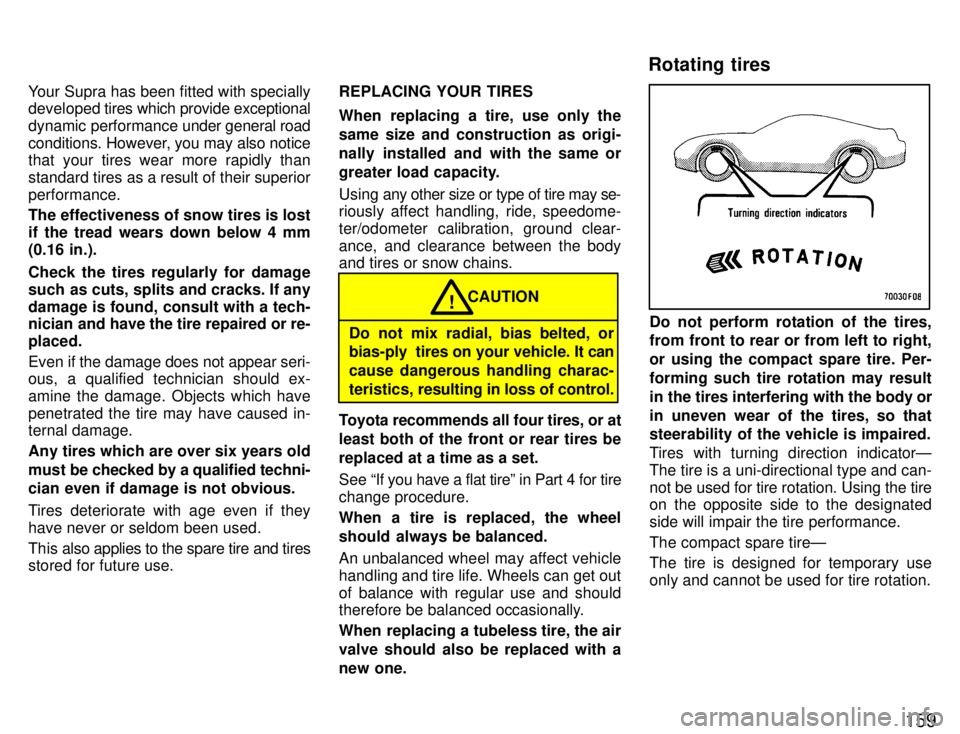
Do not perform rotation of the tires,
from front to rear or from left to right,
or using the compact spare tire. Per-forming such tire rotation may result
in the tires interfering with the body or
in uneven wear of the tires, so that
steerability of the vehicle is impaired.
Tires with turning direction indicatorÐ
The tire is a uni-directional type and can-not be used for tire rotation. Using the tire
on the opposite side to the designated
side will impair the tire performance. The compact spare tireÐ
The tire is designed for temporary use
only and cannot be used for tire rotation.
Rotating tires