ignition TOYOTA SUPRA 1996 Owner's Manual
[x] Cancel search | Manufacturer: TOYOTA, Model Year: 1996, Model line: SUPRA, Model: TOYOTA SUPRA 1996Pages: 188, PDF Size: 3.84 MB
Page 96 of 188

94
Setting the anti-theft system
1. Make sure the radio unit is turned off with the ignition switch in ACCº.
2. While holding the 1 and 6 buttons in,
push and hold the PWR VOLº knob in un-
til SECº appears on the display.3. Press the 1 button while holding the right side of TUNEº button in. - - -º will
appear on the display.4. Input your identification number by
pressing the 1, 2 and 3 buttons repeated-
ly. Use the 1 button for the first digit, the
2 button for the second digit and the 3 but- ton for the last digit. For example, if your
number is 210, press the 1 button three
times, the 2 button twice and the 3 button once. If the display returns to - - -º while inputting, try again.
We recommend that your identification
number be associated with something
easy to remember. In case you are unsure
of the number, write it in a notebook you
normally carry. Do not leave it behind in your vehicle.
Page 97 of 188

95
5. With your identification number ap-
pearing on the display, press the SCANº button and hold it in until SECº appears
on the display. SECº will go off to indicate the system is set. If invalid buttons have
been used, Errº will appear on the display
before SECº appears. Try again from the
step 3.
Once the system is set, the indicator light
turns on and off with the ignition switch in
OFFº and SECº will appear each time the key is turned to the ACCº position.
To change the identification number for some reason, cancel the system (See
Cancelling the anti-theft systemº) and
set it again with a new number.The system will be activated if the electri-
cal power source is disconnected from the
radio unit. When the system is activated,
the audio system cannot be turned on even after the power supply resumes and
SECº will appear on the display. If this
happens, such as when the battery is dis-
charged, see If the anti-theft system isactivatedº.Cancelling the anti-theft system
1. Follow the steps 1 to 4 described in
Setting the anti-theft systemº.
2. With your identification number ap-
pearing on the display, press the SCANº
button and hold it in until - - -º appears
on the display. - - -º will go off to indicate
the system is cancelled. If invalid buttons
have been used, Errº will appear on the
display and SECº appears. Try again from
step 3 in Setting the anti-theft systemº.
Page 105 of 188

Part 1Cigarette lighter and ashtray
Clock
103
OPERATION OF INSTRUMENTS AND CONTROLSÐ
Chapter 1-8 Other equipment
Clock
Cigarette lighter and ashtray
Glovebox
Luggage cover
Traction control system
Floor mat
The digital clock indicates the time
with the ignition key at the ACCº or
ONº position. To reset the hour, de-
press the
Hº button. To reset the min-
utes, depress the Mº button. To ad-
just the time to a full hour, depress the
:00º button.
For example, if the :00º button is de-
pressed when the time is between
1:01Ð1:29, the time will change to 1:00.
If the time is between 1:30Ð1:59, the time
will change to 2:00. When the instrument panel lights are turned on, the brightness of the time indi- cation will be reduced.
Once the electrical power source has
been disconnected from the clock, the
time is automatically set to 1:00 (oneo'clock).To operate the cigarette lighter, press
it in. When it becomes heated, it auto-
matically pops out ready for use.
If the engine is not running, the key must be in the ACCº position.
Do not hold the cigarette lighter pressed in. When finished with your cigarette, thor-
oughly extinguish it in the ashtray to pre-
vent other cigarette butts from catching
fire. After using the ashtray, close the ash-
tray cover completely.
To remove the ashtray, open the ashtray cover and pull it out.
Use a Toyota genuine cigarette lighter or equivalent for replacement.
Page 106 of 188

104
To open the glovebox door, pull the
lever. To lock the glovebox door, insert
the master key and turn it clockwise.
With the instrument panel lights on, the
glovebox light w ill come on when the door
is open.
To reduce the chance of injury in
case of an accident or a sudden
stop, always keep the glovebox
door closed while driving. CAUTION
!
When you open the back door, the lug-
gage cover tilts up for easy access to the luggage area.
For additional luggage space, unhook the retractable cords and lift the cover out of the retainers.AUTOMATIC MODE
The traction control system automati-
cally controls spinning of the rear
wheels which may occur when accel-
erating on
slippery road surfaces, thus
assisting driver control and driving
power to the rear wheels. When you turn the ignition switch on, the trac-
tion control system always turns on
automatically, and the slip indicator
light and SNOWº indicator light will come on. The indicator lights will go
off after about 3 seconds.
Glovebox Luggage cover Traction control system
Page 111 of 188
109
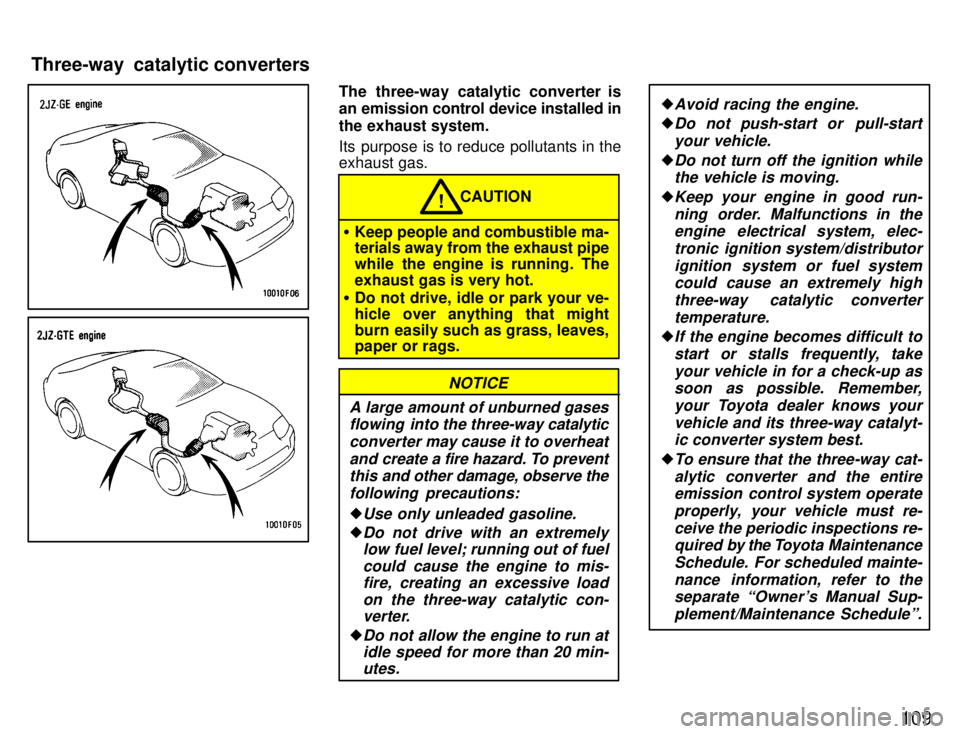
The three-way catalytic converter is
an emission control device installed in
the exhaust system.
Its purpose is to reduce pollutants in the exhaust gas.
CAUTION!
Keep people and combustible ma- terials away from the exhaust pipe
while the engine is running. The
exhaust gas is very hot.
Do not drive, idle or park your ve-
hicle over anything that might
burn easily such as grass, leaves, paper or rags.
A large amount of unburned gases
flowing into the three-way catalytic
converter may cause it to overheat and create a fire hazard. To preventthis and other damage, observe the
following precautions:
Use only unleaded gasoline.
Do not drive with an extremely low fuel level; running out of fuel
could cause the engine to mis-fire, creating an excessive load
on the three-way catalytic con-verter.
Do not allow the engine to run atidle speed for more than 20 min-
utes.
NOTICE
Avoid racing the engine.
Do not push-start or pull-start
your vehicle.
Do not turn off the ignition whilethe vehicle is moving.
Keep your engine in good run-
ning order. Malfunctions in theengine electrical system, elec-
tronic ignition system/distributorignition system or fuel systemcould cause an extremely high
three-way catalytic converter
temperature.
If the engine becomes difficult to start or stalls frequently, takeyour vehicle in for a check-up assoon as possible. Remember,
your Toyota dealer knows your
vehicle and its three-way catalyt-ic converter system best.
To ensure that the three-way cat-
alytic converter and the entireemission control system operate
properly, your vehicle must re-
ceive the periodic inspections re-quired by the Toyota Maintenance
Schedule. For scheduled mainte-
nance information, refer to theseparate Owner's Manual Sup-
plement/Maintenance Scheduleº.
Three-way catalytic converters
Page 114 of 188
11 2
Even if the power assist is com-
pletely lost, the brakes will still
work. But you will have to push the
pedal hardÐmuch harder t han nor-
mal. And your braking distance will
be longer.
ANTI-LOCK BRAKE SYSTEM
The anti-lock brake system is designed to prevent lock-up of the wheels during sud-
den braking or braking on slippery road surfaces. This assists the driver in con-
trolling the vehicle under these circum-stances.
The anti-lock brake system becomes op- erative after the vehicle has accelerated
to a speed in excess of approximately 10
km/h (6 mph). It stops operating when the
vehicle decelerates to a speed below
approximately 5 km/h (3 mph).
You may hear a sound in the engine
compartment for a few seconds when the
engine is started or just after the vehicle is started. This means that the anti-lock
brake system is in the self check mode,
and does not indicate a malfunction.
When the anti-lock brake system function is in action, you may feel the brake pedal
pulsating and hear a noise. In this situa-
tion, to let the anti-lock brake system work for you, just hold the brake pedal
down more firmly. Do not pump the brake. The brake pedal pulsation caused by the
anti-lock brake system may indicate haz- ardous road surface conditions. Althoughthe anti-lock brake system assists in pro-
viding
vehicle control, it is still important to
drive with all due care, because the anti-
lock brake system cannot overcome the
laws of physics that act on your vehicle: Braking c apability is dependent on tire
friction with the road surface.
Even though the anti-lock brake sys-
tem is operating, a driver cannot main- tain full control on certain slippery road
surfaces, when cornering at highspeeds, or in violent maneuvers.
Avoid high speeds on wet roads. The
anti-lock brake system cannot elimi-
nate the risk of hydroplaning and lossof tire friction.
Always maintain a safe distance from the
vehicle in front of you. Compared with ve-
hicles not fitted with an anti-lock brake
system, your vehicle may require a longer
stopping distance in the following cases: Driving on rough, gravel or snow-cov-
ered roads.
Driving with tire chains installed.
Driving on roads where the road sur-
face is pitted or has other differences in surface height.
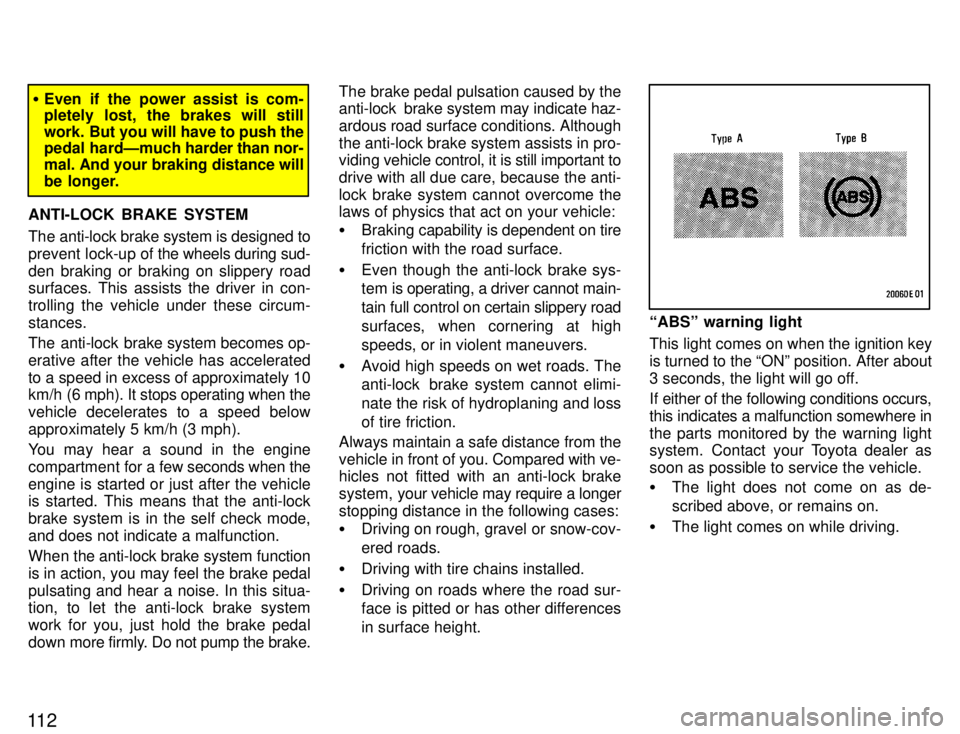
ABSº warning light
This light comes on when the ignition key is turned to the ONº position. After about
3 seconds, the light will go off.
If either of the following conditions occurs, this indicates a malfunction somewhere inthe parts monitored by the warning light
system. Contact your Toyota dealer as
soon as possible to service the vehicle. The light does not come on as de-
scribed above, or remains on.
The light comes on while driving.
Page 136 of 188

134(b) Towing with wheel lift type truck From frontÐ
Manual transmission:
We recommend using a towing dollyunder the rear wheels. If you do not
use a towing dolly, release the parking brake and put the transmission in neu-tral.
Automatic transmission:Use a towing dolly under the rear wheels.
NOTICE
Never tow a vehicle with an automatic transmission from the
front with the rear wheels on the ground, as this may cause seriousdamage to the transmission.
From rearÐ Place the ignition key in the
ACCº position.
NOTICE
Do not tow with the key removed or in the LOCKº position, as the
steering lock mechanism is not strong enough to hold the frontwheels straight while towing.
(c) Towing with sling type truck
NOTICE
Do not tow with sling type truck, either from the front or rear. This
may cause body damage.
If towing service is not available in an
emergency, your vehicle may be tem-
porarily towed by a cable secured to
either emergency towing eyelet under
the front of the vehicle or the left emer-
gency towing eyelet under the rear of the vehicle. A driver must be in the vehicle to steer it and operate the brakes.
Towing in this manner may be done only
on hard-surfaced roads for a short dis-
tance and at low speeds. Also, the
wheels, axles, drive train, steering and brakes must all be in good condition.
ÐEmergency towing
Page 137 of 188

135
Before towing, release the parking brake
and put the transmission in neutral
(manual) or
Nº (automatic). The key must
be in ACCº (engine off) or ONº (engine running).
CAUTION!
If the engine is not running, the
power assist for the brakes and
steering will not work so steering
and braking will be much harder
than usual.
If you cannot shift the selector lever
out of Pº position to other positions
even though the brake pedal is de-pressed, use the shift lock override
button as follows:
1. Turn the ignition key to LOCKº
position. Make sure the parking brakeis on.
2. Pry up the cover with a flat-bladed screwdriver or equivalent.3. Insert the screwdriver or equivalent
into the hole to push down the shift
lock override button. You can shift out of Pº position only while pushing thebutton.
4. Shift into Nº position.
5. Insert the cover.
6. Start the engine. For your safety, keep the brake pedal depressed.
Be sure to have the system checked by
your Toyota dealer as soon as possible.
If you cannot shift automatic
transmission selector lever
Page 153 of 188
151
When the engine is running, keep
hands, clothing, and tools away
from the moving fan and engine
drive belts. (Removing rings,
watches, and ties is advisable.)
Right after driving, the engine
compartmentÐthe engine, radia-
tor, exhaust manifold, power
steering fluid reservoir and spark
plug boots, etc.Ðwill be hot. So be
careful not to touch them. Oil,
fluids and spark plugs may also be
hot.
If the engine is hot, do not remove
the radiator cap or loosen the
drain plugs to prevent burning yourself.
Do not smoke, cause sparks or al-
low open flames around fuel or
the battery. Their fumes are flam- mable.
Be extremely cautious when
working on the battery. It contains
poisonous and corrosive sulfuricacid.
Do not get under your vehicle with
just the body jack supporting it.
Always use automotive jack
stands or other solid supports. CAUTION
!
Be sure that the ignition is off if you
work near the electric cooling fans
or radiator grille. With the ignition
on, the electric cooling fan will au-
tomatically start to run if the engine
coolant temperature is high and/or
the air conditioning is on.
Use eye protection whenever you
work on or under your vehicle
where you may be exposed to fly-
ing or falling material, fluid spray,etc.
Used engine oil contains potential-
ly harmful contaminants which
may cause skin disorders such as
inflammation or skin cancer, so
care should be taken to avoid pro-
longed and repeated contact with
it. To remove used engine oil from
your skin, wash thoroughly with
soap and water.
Do not leave used oil within the reach of children.
Dispose of used oil and filter only
in a safe and acceptable manner.
Do not dispose of used oil and fil-
ter in household trash, in sewers
or onto the ground. Call your deal-
er or a service station for informa-
tion concerning recycling or dis- posal.
Remember that battery and igni-
tion cables carry high currents or
voltages. Be careful of accidental-
ly causing a short circuit.
Add only demineralized or dis-tilled water to fill the radiator. And
if you spill some of the coolant, besure to wash it off with water to
prevent it from damaging the
parts or paint.
Do not overfill automatic trans-mission fluid, or the transmission
could be damaged.
Do not drive with the air cleaner fil-ter removed, or excessive enginewear could result. Also backfiringcould cause a fire in the engine
compartment.
Be careful not to scratch the glasssurface with the wiper frame.
When closing the engine hood,
check to see that you have not for-
gotten any tools, rags, etc.
NOTICE
Page 169 of 188

167
If the headlights or other electrical
components do not work, check the
fuses. If any of the fuses are blown,
they must be replaced.
See Fuse locationsº in Chapter 7-1 for
locations of the fuses.
Turn the ignition switch and inopera-
tive component off. Pull a suspected
fuse straight out and check it. Determine which fuse may be causing the
problem. The lid of the fuse box shows the name of the circuit for each fuse. See Part8 of this manual for the functions con-
trolled by each circuit.
Type A fuses can be pulled out by using the pull-out tool. If you are not sure whether the fuse has
blown, try replacing the suspected fuse with one that you know is good.
If the fuse has blown, push a new fuse
into the clip.
Only install a fuse with the amperage rat-
ing designated on the fuse box lid.
If you do not have a spare fuse, in an
emergency you can pull out the CIGº,
RAD NO.2º, DOMEº or HTRº fuse,
which
may be dispensable for normal driv-
ing, and use it if its amperage rating is the
same. If you cannot use one of the same amper-
age, use one that is lower, but as close as
possible to, the rating. If the amperage is
lower than that specified, the fuse might
blow out again but this does not indicate
anything wrong. Be sure to get the correct
fuse as soon as possible and return the
substitute to its original clip.
It is a good idea to purchase a set of spare
fuses and keep them in your vehicle for emergencies.
If the new fuse immediately blows out, there is a problem with the electrical sys-
tem. Have your Toyota dealer correct it as
soon as possible.
Checking and replacing fuses