light TOYOTA SUPRA 1996 Service Manual
[x] Cancel search | Manufacturer: TOYOTA, Model Year: 1996, Model line: SUPRA, Model: TOYOTA SUPRA 1996Pages: 188, PDF Size: 3.84 MB
Page 84 of 188

82
3. Press the 1º button while holding the right side of TUNEº button in. - - -º and
the tape operation indicator will appear on
the display.4. Input your identification number by
pressing the 1º, 2º and 3º buttons re-
peatedly. Use the 1º button for the firstdigit, the 2º button for the second digit
and the 3º button for the last digit. For ex- ample, if your number is 824, press the 1º
button nine times, the 2º button three
times and the 3º button five times. If the
display returns to - - -º while inputting,
try again.
We recommend that your identification
number be associated with something
easy to remember. In case you are unsure
of the number, write it in a notebook you
normally carry. Do not leave it behind inyour vehicle.5. With your identification number ap-
pearing on the display, press the SCANº button and hold it in until SECº appears
on the display. SECº will go off to indicate the system is set. If invalid buttons have
been used, Errº will appear on the display
before SECº appears. Try again from the
step 3.
Once the system is set, the indicator light
turns on and off with the ignition switch in
OFFº and SECº will appear each time the key is turned to the ACCº position.
To change the identification number for some reason, cancel the system (See
Cancelling the anti-theft systemº) and
set it again with a new number.
Page 85 of 188
83
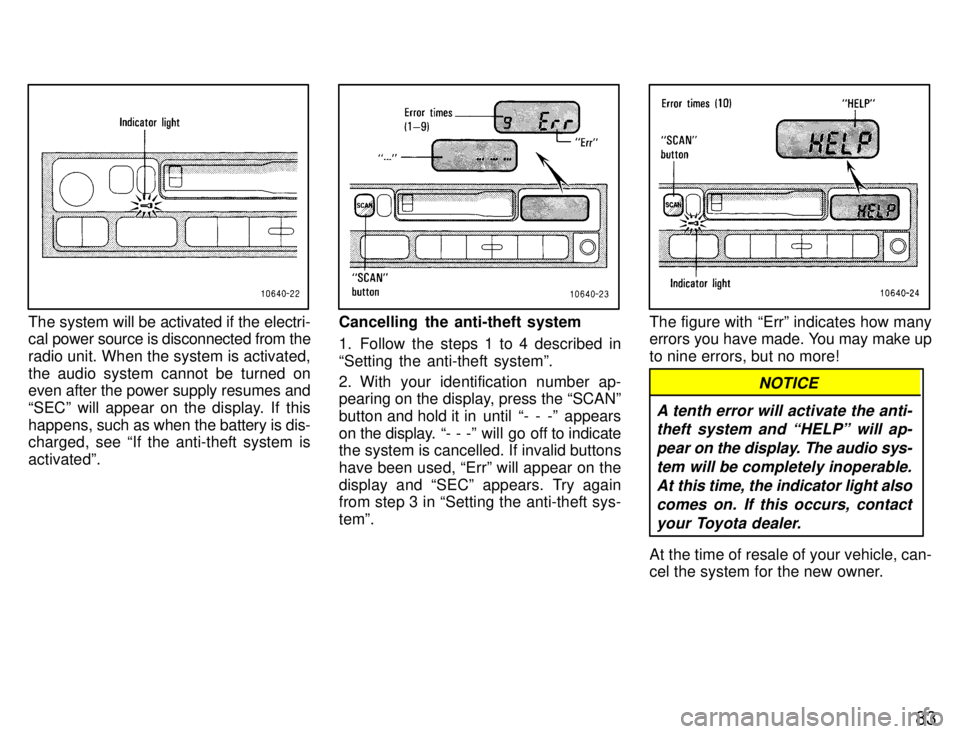
The system will be activated if the electri-
cal power source is disconnected from the
radio unit. When the system is activated,
the audio system cannot be turned on even after the power supply resumes and
SECº will appear on the display. If this
happens, such as when the battery is dis-
charged, see If the anti-theft system isactivatedº.Cancelling the anti-theft system
1. Follow the steps 1 to 4 described in
Setting the anti-theft systemº.
2. With your identification number ap-
pearing on the display, press the SCANº
button and hold it in until - - -º appears
on the display. - - -º will go off to indicate
the system is cancelled. If invalid buttons
have been used, Errº will appear on the
display and SECº appears. Try again
from step 3 in Setting the anti-theft sys- temº.The figure with Errº indicates how many
errors you have made. You may make up
to nine errors, but no more!
A tenth error will activate the anti-
theft system and HELPº will ap-
pear on the display. The audio sys-
tem will be completely inoperable. At this time, the indicator light alsocomes on. If this occurs, contactyour Toyota dealer.
NOTICE
At the time of resale of your vehicle, can-
cel the system for the new owner.
Page 92 of 188

90The radio has two FM selections, FM1º
and FM2º. You can preset any desired six
stations in each selection. W
hen you pre-
set an FM station, check which selection you have used.
2. Tune in the desired station. (See (b)
Selecting a stationº.)
3. Push one of the station selector but-
tons and hold it until a beep is heard. This
sets the station to the button and the but-
ton number will appear on the display.
To change the preset station to a dif ferent
one, follow the same procedure.
The preset station will be cancelled when
the power source is severed (battery dis-connected, burnt fuse, etc.). (d) Adjusting the tone Automatic tone adjustment Push the EQº button repeatedly until the
desired frequency response pattern ap-
pears on the display. This function auto-matically controls the tone in accordance with the selected pattern.
To change the preset mode, adjust the manual tone control knobs as you like. (See the following Manual tone adjust- mentº.) To memorize the setting you have se-
lected, push the EQº button for 2 sec-
onds until a beep is heard. To cancel the
memory,
push the EQº button for 10 sec-
onds until the second beep is heard.
To cancel all the memory which you have
set, push the EQº button for 20 seconds until the third beep is heard. Manual tone adjustment
Before using the tone controls, push the
EQº button repeatedly until your desired
response pattern appears on the display.
To adjust a low-pitched tone, push the
BASSº knob (if pushed in) and turn it. At the time, the BASSº display will change.
To adjust a middle-pitched tone, push the
MID BALº knob (if pushed in) and turn it.
At the time, the MIDº display will change.
To adjust a high-pitched tone, push the
TREB FADEº knob (if pushed in), and
turn it. At the time, the TREBº display will
change. (e) Adjusting the sound balance
To balance the sound between the right
and left speakers, push the MID BALº knob (if pushed in), pull it fully out and turn it.
To balance the sound between the front
and rear speakers, push the TREB
FADEº knob (if pushed in), pull it fully outand turn it. (f) Listening to the cassette tape
1. Put the cassette into the slot, with the
tape side to the right and lightly push it in.The tape player will grab the cassette and
slide it into place to play it. If the radio or
Compact Disc
player is on when inserting
the cassette, it will automatically turn off.
If the cassette is already in the slot, push
the TAPEº button.
At this time, PLAYº will appear on the dis-
play.
The tape player can also be turned on by
pushing the PWR VOLº knob if the tape
player was playing when the system was
turned off by pushing the knob. When a metal or chrome equivalent tape
is inserted, the player will automatically
adapt to it and MTLº will appear on the
display.
2. If using a tape recorded with Dolby
NR*, push the button by the double-D
symbol to select the Dolby B NR or Dolby
C NR mode. The display will indicate
which Dolby noise reduction system is op-
erating. The Dolby B NR mode reduces tape noise by about 10 dB. The Dolby C NR mode re-duces tape noise by another 10 dB, or
about 20 dB total. For best sound repro-
duction, select the same NR mode that was used to record the tape.
Page 94 of 188

92This function does not work properly un- less
the blank portions on the tape have 3
seconds or more between one program
and another.
SKIPº button: Use for automatic skip-
ping of blank portions between programs. Push the SKIPº button. SKIPº appears
on the display. The player will automati-
cally skip any blank portions of 15 sec-
onds or more and play the next program,
even if it is on the other side. To cancel it,
push the button once again.
SCANº button: Use for program-to-
program scanning.Push the SCANº button. With SCANº on
the display, each program will be played
for 12 seconds and scan to the next. To
continue listening to the program of yourchoice, simply push the SCANº button
once again.
The player will automatically reverse di-
rections at the end of the tape and keep scanning. R VMº button (radio monitor system):
Use for automatic station reception. Push the R
VMº button. R VMº appears on
the display. In this mode, if you push the
REWIND or FAST FORWARD button
when listening to the tape, the system will change the radio mode and automatically
receive the last station which was set. Atthe time, the received station condition
appears on the display.
The system will be cancelled out when the
power source is severed (battery discon- nected, burnt fuse etc.). (i) Listening to the Compact DiscThis Compact Disc player does not need
to use an adaptor for 8 cm (3.2 in.) Discs. Do not use an adaptor when listening to 8
cm (3.2 in.) Discs, which cause tracking
errors or interfere with Disc ejection.
1. Put the Compact Disc into the slot, with
the label side up and lightly push it in. The
Disc player will grab the Disc and slide it
into place to play it from the track 1 pro-
gram. As this is done, the DISCº light will
come on. The track number will appear on
the display.
If the Compact Disc is already in the slot,
push the CDº button. The Compact Disc player can also beturned on by pushing the PWR VOLº
knob if
the Compact Disc player was play-
ing when the system was turned off by
pushing the knob.
If the radio or cassette tape player is on
when playing the Disc, it will automatically
turn off.
If the Disc is inserted with the label side
down, the Disc will automatically be ejected.
2. Turn the PWR VOLº knob to adjust the volume.
3. Select your program. (See (j) Selec- ting a programº.)
When the end of the Disc is reached, the
player starts playing the track 1 program again.
4. Adjust the tone and sound balance. (See (d) Adjusting the toneº and (e) Ad-
justing the sound balanceº.)
5. Push the EJECT button to eject the
Disc. As this is done, the Compact Disc
player will turn off. If the radio or cassette
tape player was on when the Disc was in-
serted, it will automatically turn on again.
6. Push the PWR VOLº knob to turn the
Compact Disc player off.
Page 95 of 188
93
You can eject the Disc only once after the
system is turned off.
When ejecting a 8 cm (3.2 in.) Disc, do not
put a 12 cm (4.7 in.) Disc into the slot until
the DISCº light goes off. (j) Selecting a program
Automatic program selection:
Use for
direct access to a desired program.
Push the TRACK UP/DOWN button on ei-
ther side and hold it until the desired pro- gram track number appears on the dis-
play. As you release the button, the player
will start playing the selected program
from the beginning. Manual program selection:
Push either of the FAST FORWARD or
REVERSE buttons and hold it to fast for-
ward or reverse the Disc. Releasing thebutton starts the play from that position.
Scan program selection: Use for pro-
gram-to-program scanning. Push the SCANº button. With SCANº on
the display, each program will be played
for 10 seconds from the beginning and
scan to the next. To continue listening to
the program of your choice, simply push the SCANº button once again. (k) Other Compact Disc player func-
tions
RPTº button: Use for automatic repeat
of the program currently being listened to. Push the RPTº button while the program
is being played. As this is done, RPTº will
appear on the display. When the program
is finished, the Disc will automatically re- turn to the beginning of the program and
the program will be played again. To can-
cel it, push the button once again. RANDº button: Use for automatic ran-
dom selection of Disc programs.
If the RANDº button is pushed while lis- tening to Compact Disc, RANDº will ap-pear on the display and the player will en-
dlessly repeat the programs selected at
random. To continue listening to the pro-
gram of your choice, simply push the
RANDº button once again. (l) Anti-theft system
To deter theft of your radio unit, the sys-
tem is designed so that the radio unit be-
comes
inoperable if the unit is stolen from
the vehicle.
The system is not preset at factory. You
must input a three-digit identification
number decided by you.
NOTICE
If you pushed any wrong buttons on the anti-theft system, the follow-
ing messages will appear on thedisplay.
ErrºÐYou have pushed wrongbuttons.
1-9ºÐIndicates the number oferrors you have made. You maymake up to nine errors, but nomore!
HELPºÐThe number of errors
you can make was exceeded. Theaudio system is completely inoper-
able. Contact your Toyota dealer.
Page 97 of 188

95
5. With your identification number ap-
pearing on the display, press the SCANº button and hold it in until SECº appears
on the display. SECº will go off to indicate the system is set. If invalid buttons have
been used, Errº will appear on the display
before SECº appears. Try again from the
step 3.
Once the system is set, the indicator light
turns on and off with the ignition switch in
OFFº and SECº will appear each time the key is turned to the ACCº position.
To change the identification number for some reason, cancel the system (See
Cancelling the anti-theft systemº) and
set it again with a new number.The system will be activated if the electri-
cal power source is disconnected from the
radio unit. When the system is activated,
the audio system cannot be turned on even after the power supply resumes and
SECº will appear on the display. If this
happens, such as when the battery is dis-
charged, see If the anti-theft system isactivatedº.Cancelling the anti-theft system
1. Follow the steps 1 to 4 described in
Setting the anti-theft systemº.
2. With your identification number ap-
pearing on the display, press the SCANº
button and hold it in until - - -º appears
on the display. - - -º will go off to indicate
the system is cancelled. If invalid buttons
have been used, Errº will appear on the
display and SECº appears. Try again from
step 3 in Setting the anti-theft systemº.
Page 98 of 188
96
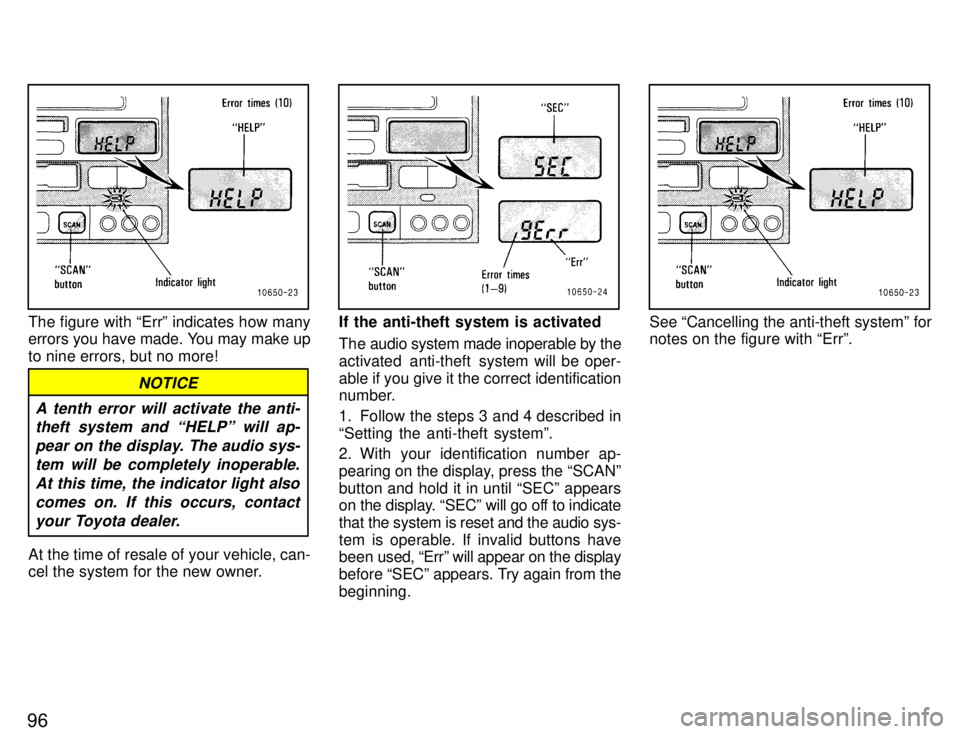
The figure with Errº indicates how many
errors you have made. You may make up
to nine errors, but no more!
A tenth error will activate the anti-theft system and HELPº will ap-
pear on the display. The audio sys-tem will be completely inoperable. At this time, the indicator light alsocomes on. If this occurs, contact your Toyota dealer.
NOTICE
At the time of resale of your vehicle, can-
cel the system for the new owner.
If the anti-theft system is activated
The audio system made inoperable by the
activated anti-theft system will be oper-
able if you give it the correct identification
number.
1. Follow the steps 3 and 4 described in Setting the anti-theft systemº.
2. With your identification number ap-
pearing on the display, press the SCANºbutton and hold it in until SECº appears
on the display. SECº will go off to indicate
that the system is reset and the audio sys-
tem is operable. If invalid buttons have
been used, Errº will appear on the display
before SECº appears. Try again from the
beginning.See Cancelling the anti-theft systemº for notes on the figure with Errº.
Page 101 of 188

99
The automatic air conditioning is an air
conditioning that automatically maintains the set temperature.
This air conditioning features automatic
air intake controls, fan speed and air flow controls which automatically select the
most suitable air intake control, fan speed
and air flow to control the temperature.
You may use manual controls if you desire your own way of setting.
(A) CLIMATE CONTROL Setting operation
1. Turn the temperature control knob at the desired temperature level.
The temperature control knob is used to
set the desired passenger compartment
temperature. The tem
perature of air deliv-
ered to the passenger compartment will
be controlled automatically according to
the setting. The figures on the panel indi-
cate degrees in centigrade or Fahrenheit. 2. Press in the AUTOº button.
As the AUTOº button is pressed in, the fan turns on and operates with the most
suitable air intake control, air flow (except
pressing the FLOOR/WINDSHIELD or
WINDSHIELD button) and fan speed se-lected
automatically according to the tem-
perature. In cold weather, however, the
fan will not operate until the engine cool-
ant warms up sufficiently.
3. If any of the AUTOº button functions is not necessary for your own way of set-
ting, manual control can be made on each
of the functions, leaving the rest of the
functions in operation. Operate the con-
trols as described in Manual control on air
intake, air flow and fan speedº after the
AUTOº button is pressed in.
4. Press in the air conditioning on-off but-
ton.
The air conditioning on-off button is used
to turn on and off the air conditioning.
With the button pressed in the on mode, the air conditioning turns on.
If the system is used for ventilation or
heating in dry weather, press the air con-
ditioning on-off button once again. This
turns off the air conditioning. For year-
round automatic temperature control in-
cluding cooling and dehumidifying opera-
tion, use the air conditioning. 5. Press in the OFFº button turn off thefan speed and temperature control.
Manual control on air intake, air flow
and fan speed
If manual air intake control is de- siredÐ
The air intake control button is used to se-
lect intake air, either outside air or recircu-
lated air. With the button in the OUTSIDE
AIR mode, the OUTSIDE AIR mode indi-
cator light w
ill come on and the system will
take fresh outside air into the unit.
If quick circulation of conditioned air is de- sired, press in the air intake control button
to select the RECIRCULATED AIR mode
for recirculated air. The RECIRCULATED
AIR mode indicator light will come on.
For normal use, it is best to keep the air in-
take control button for outside air. If recir-
culated air is used during heating, the win-
dows will fog up more easily.
If manual air flow selection is de- siredÐ
The air flow outlets from which air is deliv-
ered can be selected manually by press-
ing in the appropriate air flow control but-
ton. The function of each button is as follows:
FACE buttonÐThis button directs the air flow to face level.
Page 102 of 188

100BI-LEVEL buttonÐThis button directs
the air flow to face level and the floor. Ex-
cept in ventilation, the air to the floor is
slightly warmer than that to face level.
FLOOR buttonÐThis button directs the
air flow mostly to the floor.
FLOOR/WINDSHIELD buttonÐThis but- ton directs the air flow to the windshield
and front side windows as well as the floor.
WINDSHIELD buttonÐThis button di-
rects the air flow to the windshield and
front side windows.
Pressing this air flow control button turns
on the air conditioning. This is to clear up
the front view more quickly.
Pressing the air conditioning on-off but-
ton in the off mode turns off the air condi- tioning.
If you push the WINDSHIELD button once
again, it returns to the last air flow button used. Do not use the WINDSHIELD button dur-
ing cooling operation in extremely humid
weather.
The difference between the tem-
perature of the outside air and that of the windshield could cause the outer surface
of the windshield to fog up blocking yourvision. If manual fan speed control is de- siredÐ
The fan speed can be fixed at your desired
speed by turning to the appropriate posi-tion of the fan speed control knob. The
higher
the fan speed is, the more air is de-
livered.
(B) WINDSHIELD DEFOGGING AND DEFROSTING
See (A) CLIMATE CONTROLº for details
on each button or lever function.
To remove interior fog on the wind- shieldÐ
1. Turn the temperature control knob for the desired temperature level.
2. Press in the AUTOº button.
3. Set the air intake control button to the OUTSIDE AIR mode.
4. Press in the WINDSHIELD button of the air flow control buttons.
To remove frost or exterior fog on the windshieldÐ
1. Turn the temperature control knob at the maximum temperature.
2. Set the air intake control button to the OUTSIDE AIR mode.
3. Press in the WINDSHIELD button of the air flow control buttons.
4. Turn the fan speed control knob at the
HIº position. 5. Press the air conditioning on-off but- ton in the OFF mode.
(C) OPERATING TIPS
Be sure the air inlet grilles in front of the
windshield are not blocked by leaves or other obstructions.
If air flow control is not satisfactory,
check the dashboard vents. (See
Dashboard ventsº or Lower ventº.)
To help cool down the interior after
parking in the hot sun, drive for the first
few minutes with the windows open.
After the excess heat has blown away,
close the windows.
When driving on dusty roads, close all
windows. If dust thrown up by the ve-
hicle is still drawn into the vehicle after
closing the windows, it is recom-
mended that the air intake control but-ton be set in the OUTSIDE AIR mode.
If following another vehicle on a dusty
road, or driving in windy and dusty con-
ditions, it is recommended that the air
intake control button be temporarily
set to select the RECIRCULATED AIR
mode, which will close off the outside
passage and prevent outside air and
dust from entering the vehicle interior.
Page 105 of 188
Part 1Cigarette lighter and ashtray
Clock
103
OPERATION OF INSTRUMENTS AND CONTROLSÐ
Chapter 1-8 Other equipment
Clock
Cigarette lighter and ashtray
Glovebox
Luggage cover
Traction control system
Floor mat
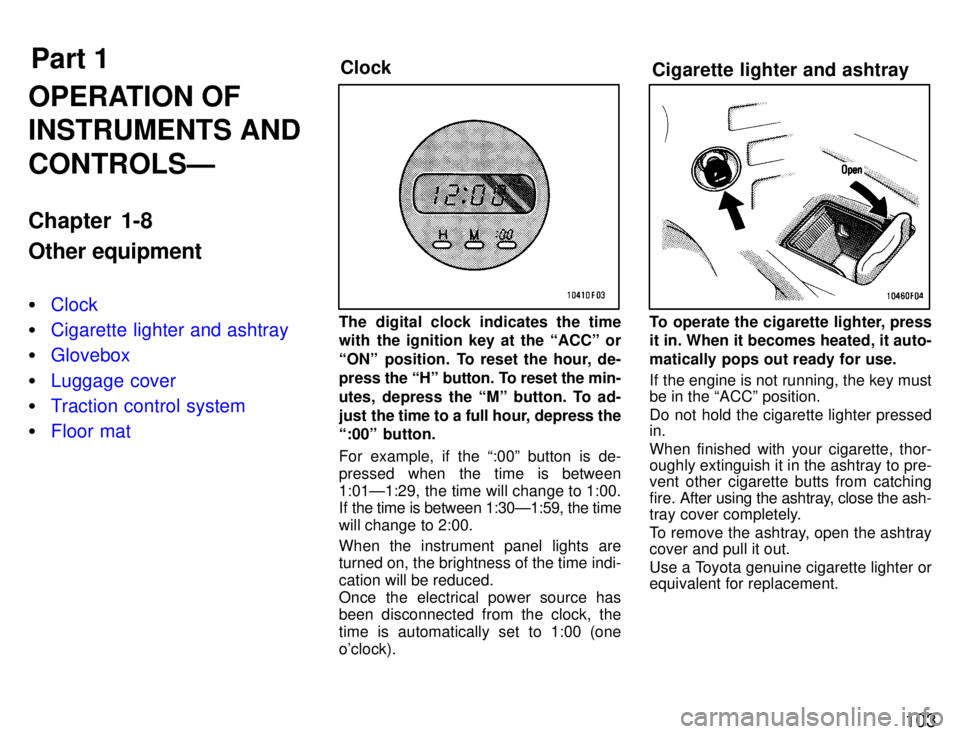
The digital clock indicates the time
with the ignition key at the ACCº or
ONº position. To reset the hour, de-
press the
Hº button. To reset the min-
utes, depress the Mº button. To ad-
just the time to a full hour, depress the
:00º button.
For example, if the :00º button is de-
pressed when the time is between
1:01Ð1:29, the time will change to 1:00.
If the time is between 1:30Ð1:59, the time
will change to 2:00. When the instrument panel lights are turned on, the brightness of the time indi- cation will be reduced.
Once the electrical power source has
been disconnected from the clock, the
time is automatically set to 1:00 (oneo'clock).To operate the cigarette lighter, press
it in. When it becomes heated, it auto-
matically pops out ready for use.
If the engine is not running, the key must be in the ACCº position.
Do not hold the cigarette lighter pressed in. When finished with your cigarette, thor-
oughly extinguish it in the ashtray to pre-
vent other cigarette butts from catching
fire. After using the ashtray, close the ash-
tray cover completely.
To remove the ashtray, open the ashtray cover and pull it out.
Use a Toyota genuine cigarette lighter or equivalent for replacement.