fog light TOYOTA SUPRA 2020 Owners Manual (in English)
[x] Cancel search | Manufacturer: TOYOTA, Model Year: 2020, Model line: SUPRA, Model: TOYOTA SUPRA 2020Pages: 356, PDF Size: 6.04 MB
Page 144 of 356
1444-1. CONTROLS
Supra Owner's Manual
ing of the Speed Limit Info
display in the instrument clus-
ter and Head-up Display
when the currently valid
speed limit is exceeded.
"Excess speed display": the
speed limit that is detected by
the Speed Limit Info is dis-
played with a marking in the
speedometer in the instru-
ment cluster.
The system may not be fully
functional and may provide
incorrect information in the fol-
lowing situations:
In heavy fog, wet conditions,
or snowfall.
When signs are fully or par-
tially concealed by objects,
stickers or paint.
When driving very close to the
vehicle in front of you.
When driving toward bright
lights or strong reflections.
When the windshield in front
of the interior mirror is fogged
over, dirty or covered by a
sticker, etc.
If the camera has overheated
and been temporarily
switched off due to exces-
sively high temperatures.
In the event of incorrect
detection by the camera.
If the speed limits or road data stored in the navigation sys-
tem are incorrect.
If the speed limits vary with
the time of day and the day of
the week.
In areas not covered by the
navigation system.
When roads differ from the
navigation, such as due to
changes in road routing.
In case of electronic traffic
signs.
When passing buses or trucks
with traffic signs applied to
them.
If the traffic signs are
non-conforming.
When signs that are valid for
a parallel road are detected.
In the presence of coun-
try-specific signs and road
configurations.
During calibration of the cam-
era immediately after vehicle
delivery.
The display can be operated
when necessary.
Entertainment source.
Current audio source.
List of most recent telephone
calls.
System limits
Selection lists
Concept
Page 153 of 356
1534-1. CONTROLS
Supra Owner's Manual
4
CONTROLS
The low beams are switched on
and off automatically depending
on the ambient brightness, for
instance in tunnels, in twilight or
if there is precipitation.
A blue sky with the sun low on
the horizon can cause the lights to be switched on.
If the low beams are switched
on manually, the automatic
headlight control is deactivated.
The LED in the button lights up.
The automatic headlight control
cannot serve as a substitute for
your personal judgment of light-
ing conditions.
For example, the sensors are
unable to detect fog or hazy
weather. In these situations,
switch the light on manually.
If the driver's door is opened
when the drive-ready state is
switched off, the exterior lighting
is automatically switched off.
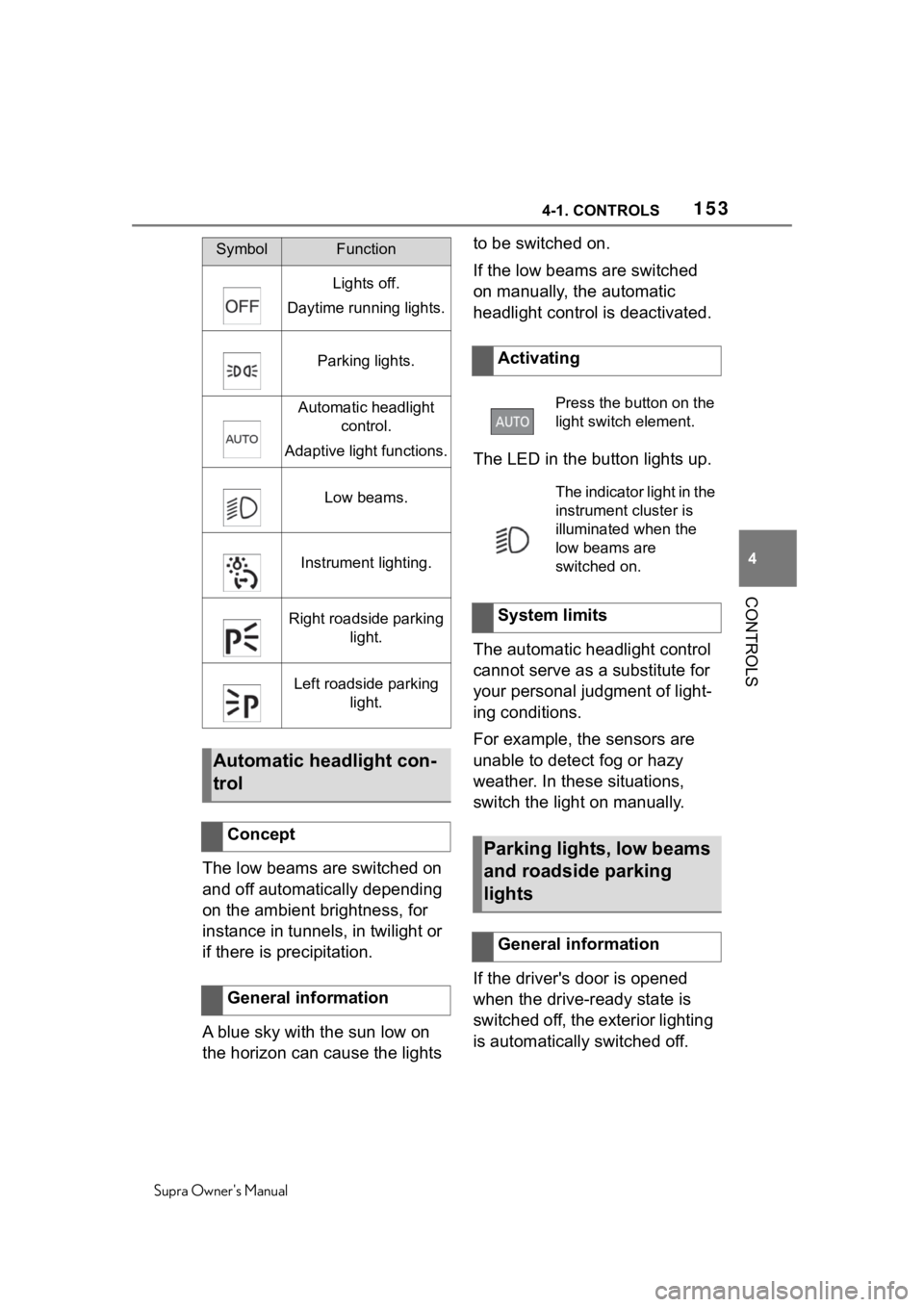
SymbolFunction
Lights off.
Daytime running lights.
Parking lights.
Automatic headlight control.
Adaptive light functions.
Low beams.
Instrument lighting.
Right roadside parking light.
Left roadside parking light.
Automatic headlight con-
trol
Concept
General information
Activating
Press the button on the
light switch element.
The indicator light in the
instrument cluster is
illuminated when the
low beams are
switched on.
System limits
Parking lights, low beams
and roadside parking
lights
General information
Page 157 of 356
1574-1. CONTROLS
Supra Owner's Manual
4
CONTROLS
The setting can only be per-
formed when the vhicle is sta-
tionary. The drive-ready state
must be switched on and the
light must be turned off.
Pull the turn signal lever for
approximately 10 seconds. The
system responds more sensi-
tively.
A vehicle message is displayed.
Pull the turn signal lever again
for approx. 10 seconds. The
sensitivity of the Automatic
high-beam is reset to the factory
settings.
The Automatic high-beam can-
not serve as a substitute for the
driver's personal judgment of
when to use the high beams. In situation that require this, there-
fore switch off manually.
The system is not fully functional
in the following situations, and
driver intervention may be nec-
essary:
In very unfavorable weather
conditions, such as fog or
heavy precipitation.
When detecting poorly-lit road
users such as pedestrians,
cyclists, horseback riders and
wagons; when driving close to
train or ship traffic; or at ani-
mal crossings.
In tight curves, on hilltops or
in depressions, in cross traf-
fic or half-obscured oncoming
traffic on highways.
In poorly-lit towns and cities
or in the presence of highly
reflective signs.
When the windshield in front
of the interior mirror is fogged
over, dirty or covered with
stickers, etc.
The parking lights or low beams
must be switched on to adjust
the brightness.
WA R N I N G
If adjustments have been made or
the sensitivity ha s been modified,
oncoming traffic may be momen-
tarily blinded. There is a risk of an
accident. If adjustments have
been made and the sensitivity has
been modified, make sure that
oncoming traffic is not momentar-
ily blinded. Switch off the high
beams manually if required.
Functional requirements
Adjusting the sensitivity
Resetting the sensitivity
System limits
Instrument lighting
Functional requirement
Page 184 of 356

1844-1. CONTROLS
Supra Owner's Manual
The system may not be fully
functional or may not be avail-
able in the following situations:
In heavy fog, wet conditions,
or snowfall.
In tight curves.
If the driving stability control
systems are deactivated, for
instance VSC OFF.
If the field of view of the cam-
era or the windshield is dirty
or covered in the area of the
interior mirror.
If the camera has overheated
and been temporarily
switched off due to exces-
sively high temperatures.
Depending on the equipment:
if the radar sensors are dirty
or covered.
Depending on the equipment
version: after improperly per-
formed work on the vehicle
paint.
Up to 10 seconds after the
start of the engine via the
Start/Stop button.
During calibration of the cam-
era immediately after vehicle
delivery.
If there are constant blinding
effects because of oncoming
light, for instance from the sun
low in the sky.
When it is dark outside. The lane departure warning
alerts when the vehicle is about
to run off the road or exit the
lane.
This camera-based system
warns starting at a minimum
speed.
The minimum speed is coun-
try-specific and is displayed in
the menu for the Toyota Supra
Safety systems.
Warnings are issued by means
of a steering wheel vibration.
The severity of the steering
wheel vibration can be adjusted.
The system does not provide a
warning if the turn signal is set
before leaving the lane.
If in the speed range up to 130
mph/210 km/h a lane marking is
crossed, the system intervenes
with a brief active steering inter-
vention in addition to vibrating.
The system thus helps keep the
vehicle in the lane.
Functional limitations
Lane departure warning
Concept
General information
Page 188 of 356
1884-1. CONTROLS
Supra Owner's Manual
In the event of multiple active
steering interventions by the
system within 3 minutes without
the driver's intervention at the
steering wheel, an acoustic
warning will sound. A short
warning signal will sound at the
second steering intervention.
Beginning with the third steering
intervention, an continuous
warning will sound.
In addition, a vehicle message is
displayed.
The warning signal and vehicle
message are an encouragement
to pay closer attention to the
lane.
The warning is canceled in the
following situations:
Automatically after approx. 3
seconds.
When returning to your own
lane.
When braking hard.
When using the turn signal.
If VSC Vehicle Stability Con-
trol System intervenes. The system may not be fully
functional in the following situa-
tions:
In heavy fog, wet conditions,
or snowfall.
In the event of missing, worn,
poorly visible, merging,
diverging, or multiple lane
markings such as in construc-
tion areas.
When lane markings are cov-
ered in snow, ice, dirt or
water.
In tight curves or on narrow
lanes.
When lane markings are cov-
ered by objects.
When driving very close to the
vehicle in front of you.
If there are constant blinding
effects because of oncoming
light, for instance from the sun
low in the sky.
Warning signal
End of warning
System limits
Safety information
WA R N I N G
The system can react not at all,
too late, incorrectly, or without jus-
tification due to the system limits.
There is a risk of accidents or risk
of damage to property. Follow the
information regarding the system
limits and actively intervene if
needed.
Functional limitations
Page 192 of 356
1924-1. CONTROLS
Supra Owner's Manual
ota Supra Safety systems and
stored for the driver profile cur-
rently used.
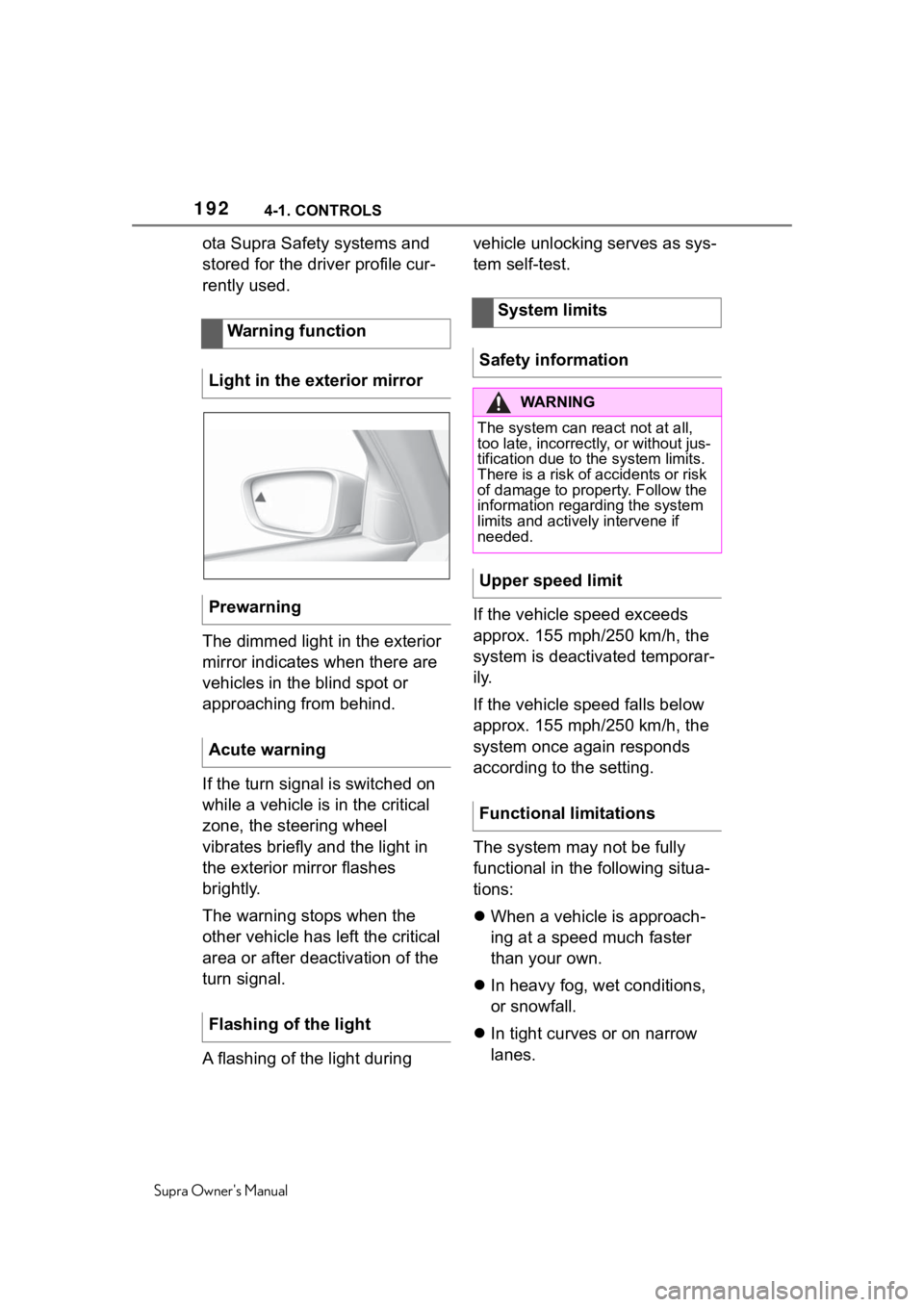
The dimmed light in the exterior
mirror indicates when there are
vehicles in the blind spot or
approaching from behind.
If the turn signal is switched on
while a vehicle is in the critical
zone, the steering wheel
vibrates briefly and the light in
the exterior mirror flashes
brightly.
The warning stops when the
other vehicle has left the critical
area or after deactivation of the
turn signal.
A flashing of the light during vehicle unlocking serves as sys-
tem self-test.
If the vehicle speed exceeds
approx. 155 mph/250 km/h, the
system is deactivated temporar-
ily.
If the vehicle speed falls below
approx. 155 mph/250 km/h, the
system once again responds
according to the setting.
The system may not be fully
functional in the following situa-
tions:
When a vehicle is approach-
ing at a speed much faster
than your own.
In heavy fog, wet conditions,
or snowfall.
In tight curves or on narrow
lanes.
Warning function
Light in the exterior mirror
Prewarning
Acute warning
Flashing of the light
System limits
Safety information
WA R N I N G
The system can react not at all,
too late, incorrectly, or without jus-
tification due to the system limits.
There is a risk of accidents or risk
of damage to property. Follow the
information regarding the system
limits and actively intervene if
needed.
Upper speed limit
Functional limitations
Page 212 of 356

2124-1. CONTROLS
Supra Owner's Manual
sate it by briefly accelerating.
After releasing the accelerator
pedal the system is reactivated
and controls speed inde-
pendently.
In some situations, the vehicle
cannot drive off automatically;
for example:
On steep uphill grades.
From bumps in the road.
In these cases, step on the
accelerator pedal.
The following restrictions can
occur under unfavorable
weather or light conditions:
Poorer vehicle recognition.
Short-term interruptions for
vehicles that are already rec-
ognized.
Examples of unfavorable
weather or light conditions:
Wet conditions.
Snowfall.
Slush.
Fog.
Glare.
Drive attentively, and react to
the current traffic situation. If
necessary, intervene actively,
for instance by braking, steering
or evading. The desired speed is also main-
tained downhill. The speed may
not be maintained on uphill
grades if the engine power is
insufficient.
The system cannot be activated
if the radar sensor is not aligned
correctly. This may be caused
by damage incurred, for
instance during parking.
A vehicle message is displayed
if the system fails.
Have the system checked by
your Toyota dealer.
The system may be impaired
when the detection range of the
radar sensor is partially covered
such as by the license plate
holder.
The function for detecting and
responding when approaching
stationary vehicles may be lim-
ited in the following situations:
During calibration of the cam-
era immediately after vehicle
delivery.
If the camera is malfunction-
ing or dirty. A vehicle mes-
sage is displayed.
Driving off
WeatherEngine power
Malfunction
Radar sensor
Camera
Page 252 of 356
2525-1. DRIVING TIPS
Supra Owner's Manual
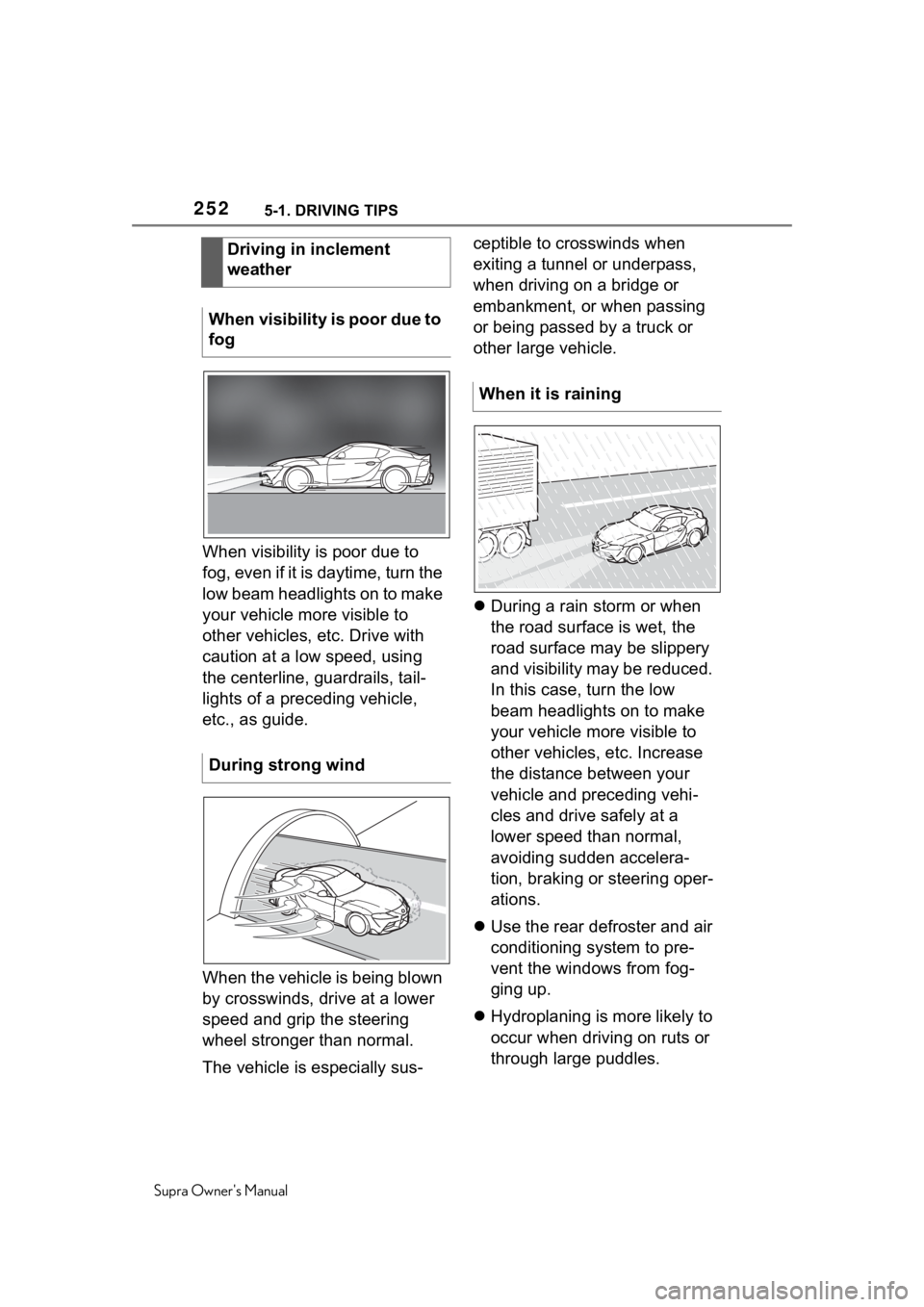
When visibility is poor due to
fog, even if it is daytime, turn the
low beam headlights on to make
your vehicle more visible to
other vehicles, etc. Drive with
caution at a low speed, using
the centerline, guardrails, tail-
lights of a preceding vehicle,
etc., as guide.
When the vehicle is being blown
by crosswinds, drive at a lower
speed and grip the steering
wheel stronger than normal.
The vehicle is especially sus-ceptible to crosswinds when
exiting a tunnel or underpass,
when driving on a bridge or
embankment, or when passing
or being passed by a truck or
other large vehicle.
During a rain storm or when
the road surface is wet, the
road surface may be slippery
and visibility may be reduced.
In this case, turn the low
beam headlights on to make
your vehicle more visible to
other vehicles, etc. Increase
the distance between your
vehicle and preceding vehi-
cles and drive safely at a
lower speed than normal,
avoiding sudden accelera-
tion, braking or steering oper-
ations.
Use the rear defroster and air
conditioning system to pre-
vent the windows from fog-
ging up.
Hydroplaning is more likely to
occur when driving on ruts or
through large puddles.
Driving in inclement
weather
When visibility is poor due to
fog
During strong wind
When it is raining
Page 344 of 356
344Alphabetical Index
Supra Owner's Manual
Changing wheels/tires ........... 270
Chassis number, see Vehicle identification number............. 12
Checking the engine oil level electronically ........................ 293
Checking the oil level electroni- cally ....................................... 293
Child restraint systems, mount- ing .......................................... 111
Child restraint systems, see Transporting ch ildren safely 111
Child seat, mountin g .............. 111
Child seats, see Transporting children safely ...................... 111
Children, seating position ..... 111
Children, transporting safely 111
Chrome surfaces, care .......... 323
Chrome-plated surfaces, care323
Cleaning displays, screens ... 325
Cleaning, Head-up Display .... 325
Climate control ....................... 228
Combination switch, see Turn signals ................................... 121
Combination switch, see Washer/wiper system........... 121
Comfort entry ........................... 86
Comparison of entries, see Entry comparison ............................. 44
Compartments in the doors .. 243
Compressor ............................ 274
Condensation water under the parked vehicle ...................... 255
Condensation, removing from the windows.......................... 232
Condition Based Service CBS ............................................... 300
Confirmation signal from the vehicle ..................................... 91
Connecting electr ical devices,
see Sockets .......................... 240
Connections, Screen Mirroring73
Control Display ......................... 46 Control Display, settings .........58
Control systems, driving stability
...............................................195
Controller ..................................47
Convenient closing with the remote control ........................80
Convenient opening with the remote control ........................80
Coolant ....................................296
Coolant level ...........................297
Coolant temperature ..............140
Cooling system .......................296
Cooling, maximum .................230
Corrosion on brake discs ......254
Cosmetic mirror .... ..................240
Cruise control .........................200
Cruise control with distance con- trol, see Dynami c radar cruise
control with full-speed range ...............................................204
Cruise control without distance control, see Cruise control ..200
Cruise control, active with Stop & Go .......................................204
Cruising range ........................140
Cup holder...............................244
Curtain shield air bag ..............160
Customize Settings, see Driver profiles.....................................64
Customize Settings, see Sport mode switch ..........................131
D
Damage, tires ..... .....................269
Data memory ...............................8
Data protection, settings .........62
Data, see Deleting personal data in the vehicle ...........................63
Data, technical ........................328
Date ............................................59
Daytime running lights...........155
Defogging the windows .........232
Page 346 of 356
346Alphabetical Index
Supra Owner's Manual
Exhaust, see Exhaust gas sys- tem ......................................... 251
Exterior lighting during unlock- ing ............................................ 79
Exterior lighting with the vehicle locked ...................................... 81
Exterior mirror, Automatic Curb Monitor .................................. 106
Exterior mirror, automatic dim- ming feature.......................... 106
Exterior mirrors ...................... 105
Exterior mirrors, malfunction 106
External start .......................... 315
External temperature ............. 140
Eyelet for towing .................... 318
Eyes, see Lashing eyes in the cargo area ............................. 246
F
Failure message, see Vehicle messages .............................. 133
False alarm, see Avoiding unin- tentional alarms...................... 94
Fan, see Air flow ..................... 232
Fastening safety belts, see Safety belts ........................... 100
Filler neck for engine oil ........ 294
Flat tire message, TPM .......... 282
Flat tire warning light, TPM ... 282
Flat tire, changing wheels ..... 287
Flat tire, repairing ................... 272
Flat tire, see Tire Pressure Moni- tor TPM .................................. 278
Flooding .................................. 253
Floor carpet, care ................... 324
Floor mats, care ..................... 324
Fog, removing from the windows ............................................... 232
Fold-away position of the wipers ............................................... 124
Foot brake ............ ................... 253
For Your Own Safety .................. 5 Front airbags...........................160
Front collision mitigation.......174
Front fog lights, see Lights and
bulbs ......................................303
Front lights, see Lights and bulbs ......................................303
Front seats ................................97
Front-seat passenger airbags, automatic deactivation.........170
Front-seat passenger airbags, indicator light ........................171
Fuel ..........................................291
Fuel cap ...................................260
Fuel filler flap ..........................260
Fuel filler flap, unlocking manu- ally .........................................261
Fuel gauge...............................138
Fuel quality..............................291
Fuel recommendation ............291
Fuel, tank capacity .................329
Fuses .......................................305
G
Garage door opener, see Inte- grated Universal Remote Con-
trol ..........................................236
Gasoline ..................................291
Gear change, Automatic trans- mission ..................................125
Gear shift indicator.................142
General driving notes.............251
General settings .......................58
Glare shield, see Sun visor....240
Go function .............................204
Go function, ACC ....................204
GPS geolocation, vehicle posi- tion ...........................................60
H
Handbrake, see Parking brake ............................................... 119