alarm TOYOTA SUPRA 2020 Owners Manual (in English)
[x] Cancel search | Manufacturer: TOYOTA, Model Year: 2020, Model line: SUPRA, Model: TOYOTA SUPRA 2020Pages: 360, PDF Size: 5.97 MB
Page 19 of 360
192-1. QUICK REFERENCE
Supra Owner's Manual
2
QUICK REFERENCE
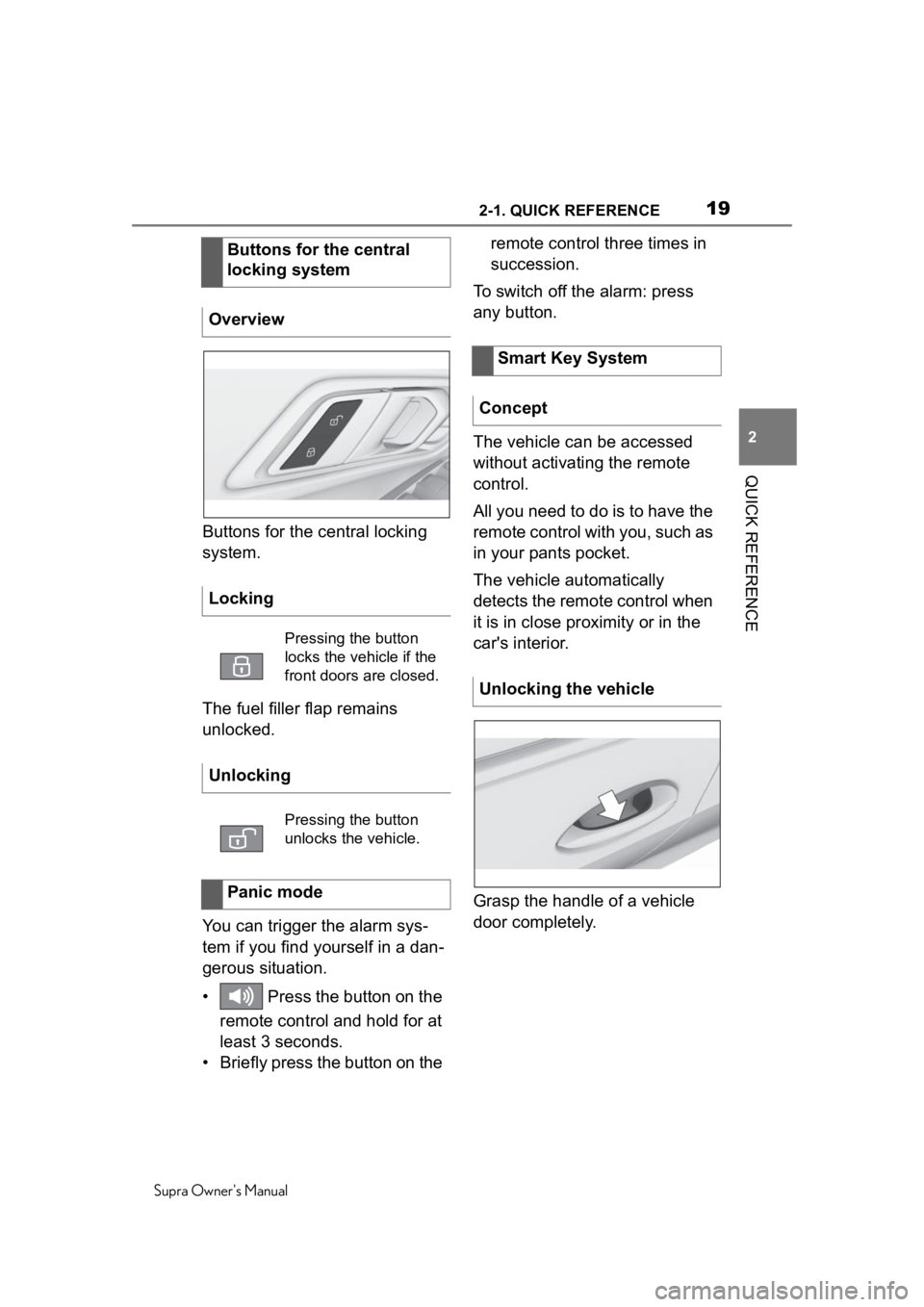
Buttons for the central locking
system.
The fuel filler flap remains
unlocked.
You can trigger the alarm sys-
tem if you find yourself in a dan-
gerous situation.
• Press the button on the remote control and hold for at
least 3 seconds.
• Briefly press the button on the remote control three times in
succession.
To switch off the alarm: press
any button.
The vehicle can be accessed
without activating the remote
control.
All you need to do is to have the
remote control with you, such as
in your pants pocket.
The vehicle automatically
detects the remote control when
it is in close proximity or in the
car's interior.
Grasp the handle of a vehicle
door completely.
Buttons for the central
locking system
Overview
Locking
Pressing the button
locks the vehicle if the
front doors are closed.
Unlocking
Pressing the button
unlocks the vehicle.
Panic mode
Smart Key System
Concept
Unlocking the vehicle
Page 79 of 360
794-1. CONTROLS
Supra Owner's Manual
4
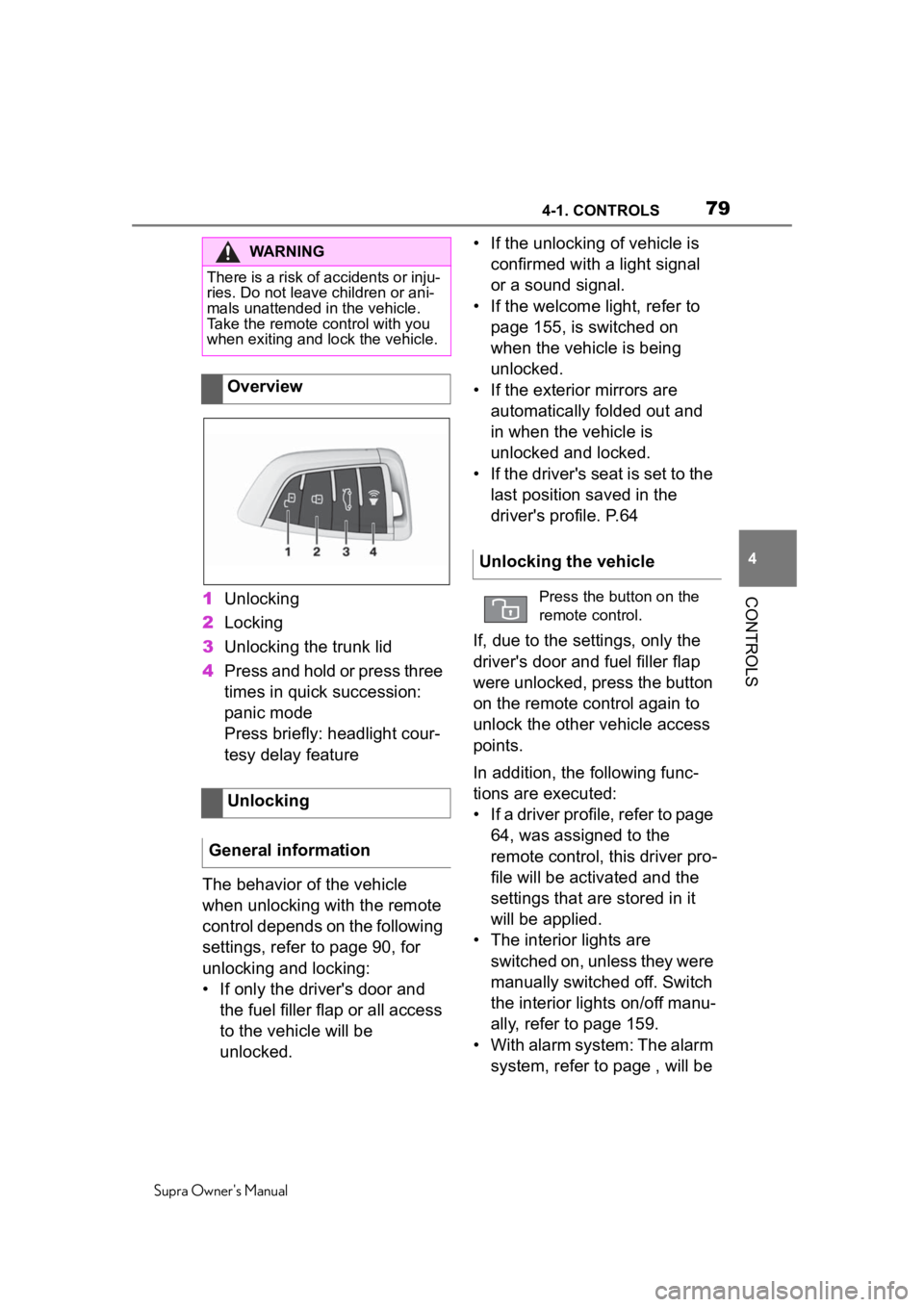
CONTROLS1 Unlocking
2 Locking
3 Unlocking the trunk lid
4 Press and hold or press three
times in quick succession:
panic mode
Press briefly: headlight cour-
tesy delay feature
The behavior of the vehicle
when unlocking with the remote
control depends on the following
settings, refer to page 90, for
unlocking and locking:
• If only the driver's door and the fuel filler flap or all access
to the vehicle will be
unlocked. • If the unlocking of vehicle is
confirmed with a light signal
or a sound signal.
• If the welcome light, refer to page 155, is switched on
when the vehicle is being
unlocked.
• If the exterior mirrors are automatically folded out and
in when the vehicle is
unlocked and locked.
• If the driver's seat is set to the last position saved in the
driver's profile. P.64
If, due to the settings, only the
driver's door and fuel filler flap
were unlocked, press the button
on the remote control again to
unlock the other vehicle access
points.
In addition, the following func-
tions are executed:
• If a driver profile, refer to page 64, was assigned to the
remote control, this driver pro-
file will be activated and the
settings that are stored in it
will be applied.
• The interior lights are switched on, unless they were
manually switched off. Switch
the interior lights on/off manu-
ally, refer to page 159.
• With alarm system: The alarm system, refer to page , will be
WARNING
There is a risk of accidents or inju-
ries. Do not leave children or ani-
mals unattended in the vehicle.
Take the remote control with you
when exiting and lock the vehicle.
Overview
Unlocking
General information
Unlocking the vehicle
Press the button on the
remote control.
Page 80 of 360
804-1. CONTROLS
Supra Owner's Manual
switched off.P.92
After opening one of the front
doors, the vehicle is ready for
operation, refer to page 41.
The light functions may depend
on the ambient brightness.
The windows are opened, as
long as the button on the remote
control is pressed.
The behavior of the vehicle
during locking with the remote
control depends on the following
settings, refer to page 90:
• If the locking of the vehicle is confirmed with a light signal
or a sound signal.
• If the exterior mirrors are automatically folded in and
out when the vehicle is locked
and unlocked.
• If the headlight courtesy delay feature, refer to page 155, is
activated during locking.
1 Close the driver's door. 2
Press the button on the
remote control.
The following functions are exe-
cuted:
• All doors, the trunk lid, and the fuel filler flap are locked.
• With alarm system: The alarm system, refer to page 92, will
be switched on.
If the drive-ready state is still
switched on when you lock the
vehicle, the vehicle horn honks
twice. In this case, the
drive-ready state must be
switched off by means of the
Start/Stop button.
The windows are closed in the
area close to the vehicle, as
long as the button on the remote
control is pressed.
Convenient opening
Opening
Press and hold the button
on the remote control.
Locking
General information
Locking the vehicleWith Smart Key System:
convenient closing
Safety information
WARNING
With convenient closing, body
parts can be jammed. There is a
risk of injury. Make sure that the
area of movement of the doors is
clear during convenient closing.
Closing
Press and hold the button
on the remote control after
locking.
Page 81 of 360
814-1. CONTROLS
Supra Owner's Manual
4
CONTROLS
The function is not available for
the first 10 seconds after lock-
ing.
• The interior lights are switched on, unless they were
manually switched off. Switch
the interior lights on/off manu-
ally, refer to page 159.
• Depending on the settings, the exterior lighting, refer to
page 155, will be switched on.
The light functions may depend
on the ambient brightness.
To avoid locking it in the vehicle,
do not place the remote control
in the cargo area.
You can set up if the doors will
be unlocked when the trunk lid
is opened with the remote con-
trol. Settings, refer to page 90. You can trigger the alarm sys-
tem if you find yourself in a dan-
gerous situation.
To switch off the alarm: press
any button.
Switching on the interior
and exterior lights
Press the button on the
remote control with the
vehicle locked.
Trunk lid
General information
Safety information
WARNING
Body parts can be jammed when
operating the trunk lid. There is a
risk of injury. Make sure that the
area of movement of the trunk lid
is clear during opening and clos-
ing.
NOTICE
During opening, the trunk lid piv-
ots back and up. There is a risk of
damage to property. Make sure
that the area of movement of the
trunk lid is clear during opening
and closing.
Unlocking
Press and hold the button
on the remote control for
approx. 1 second.
Panic mode
• Press the button on the remote control and hold
for at least 3 seconds.
• Briefly press the button on the remote control
three times in succes-
sion.
Page 85 of 360
854-1. CONTROLS
Supra Owner's Manual
4
CONTROLS
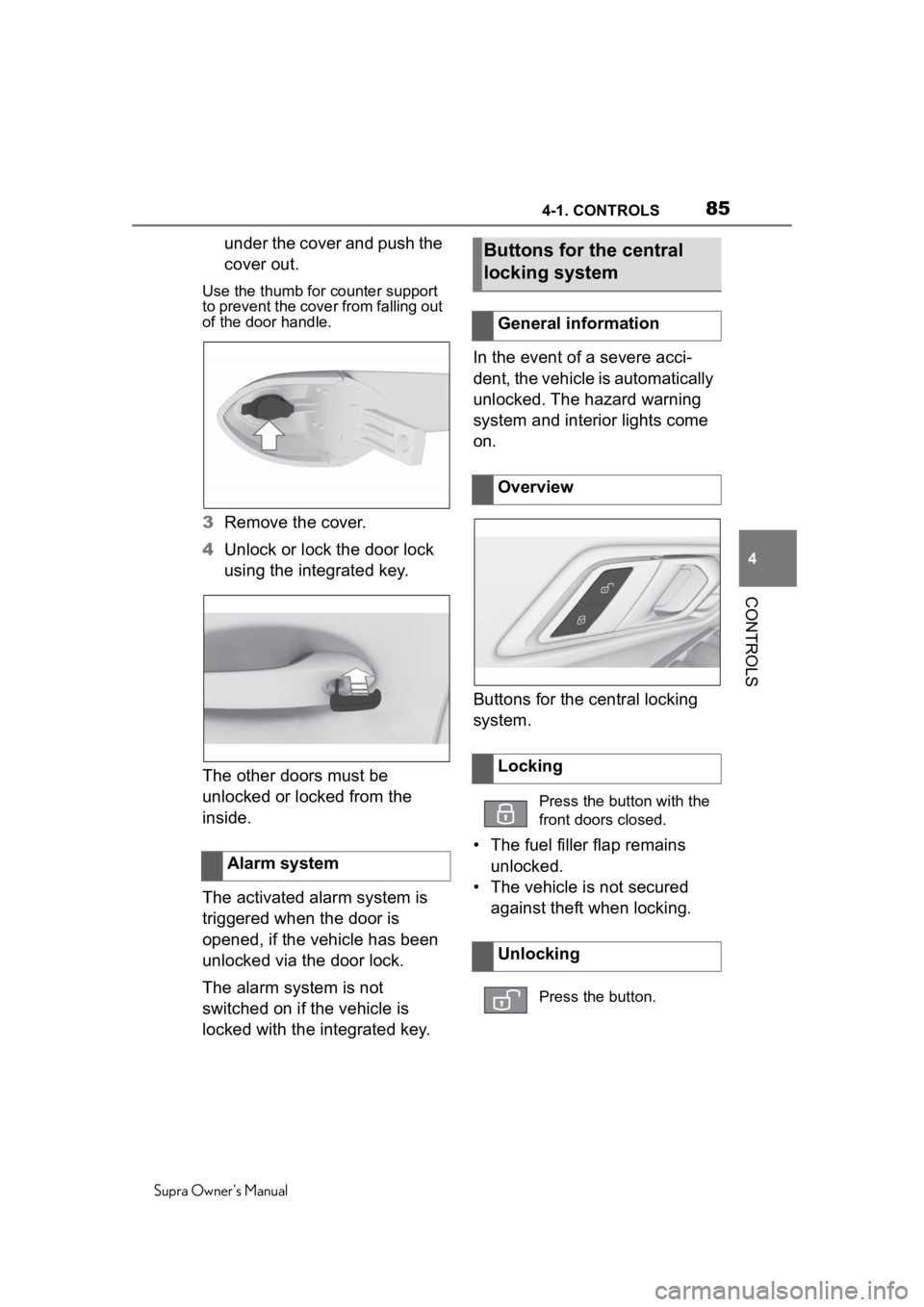
under the cover and push the
cover out.
Use the thumb for counter support
to prevent the cover from falling out
of the door handle.
3 Remove the cover.
4 Unlock or lock the door lock
using the integrated key.
The other doors must be
unlocked or locked from the
inside.
The activated alarm system is
triggered when the door is
opened, if the vehicle has been
unlocked via the door lock.
The alarm system is not
switched on if the vehicle is
locked with the integrated key. In the event of a severe acci-
dent, the vehicle is automatically
unlocked. The hazard warning
system and interior lights come
on.
Buttons for the central locking
system.
• The fuel filler flap remains
unlocked.
• The vehicle is not secured against theft when locking.
Alarm system
Buttons for the central
locking system
General information
Overview
Locking
Press the button with the
front doors closed.
Unlocking
Press the button.
Page 92 of 360
924-1. CONTROLS
Supra Owner's Manual
3"Doors/Key"
4 "Unlock at end of trip"
After drive-ready state is switched
off by pressing t he Start/Stop but-
ton, the locked ve hicle is automati-
cally unlocked.
Via Toyota Supra Command:
1 "My Vehicle"
2 "Vehicle settings"
3 "Doors/Key"
4 "Fold mirrors in when locked"
The exterior mirro rs are automati-
cally folded in during locking.
Via Toyota Supra Command:
1 "My Vehicle"
2 "Vehicle settings"
3 "Doors/Key"
4 "Turn off after door opening"
Opening the front doors establishes
the idle state, refer to page 40.
When the vehicle is locked, the
vehicle alarm system reacts to
the following changes:
• Opening a door, the hood or
the trunk lid. • Movements in the car's inte-
rior.
• Changes in the vehicle tilt, e. g., during attempts at stealing
a wheel or when towing the
vehicle.
• Disconnected battery voltage.
• Improper use of the socket for OBD Onboard Diagnosis.
• Locking the vehicle while a device is connected to the
socket for the OBD Onboard-
Diagnosis. For socket for the
OBD Onboard Diagnosis,
refer to page 304
The alarm system signals the
following changes visually and
acoustically:
• Acoustic alarm: Depending on local regulations, the acoustic
alarm may be suppressed.
• Visual alarm: By flashing of the hazard warning system
and headlights, where
required.
Do not modify the system to
ensure function of the alarm
system.
When you unlock and lock the
vehicle, either with the remote
control or with Comfort entry, the
alarm system is switched off and
on at the same time.
Folding mirrors automati-
cally
Establishing idle state
after opening the front
doors
Alarm system
General information
Switching on/off
Page 93 of 360
934-1. CONTROLS
Supra Owner's Manual
4
CONTROLS
The alarm system is triggered
when a door is opened if the
door was unlocked using the
integrated key in the door lock.
Switching off the alarm, refer to
page 94.
The trunk lid can be opened
even when the alarm system is
switched on.
After the trunk lid is closed, it is
locked and monitored again pro-
vided the doors are locked. The
hazard warning system flashes
once.
You can trigger the alarm sys-
tem if you find yourself in a dan-
gerous situation.
To switch off the alarm: press
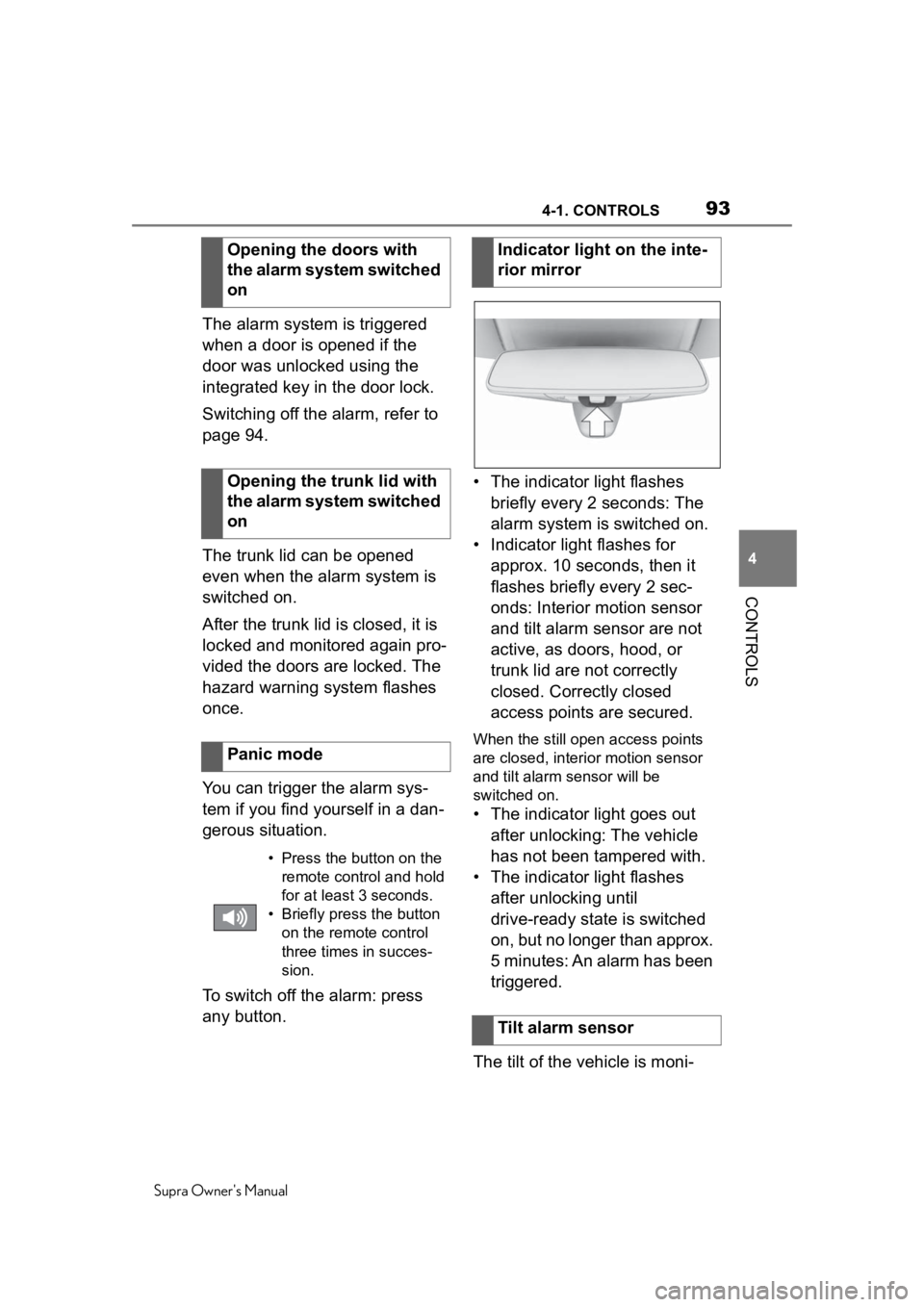
any button. • The indicator light flashes
briefly every 2 seconds: The
alarm system is switched on.
• Indicator light flashes for approx. 10 seconds, then it
flashes briefly every 2 sec-
onds: Interior motion sensor
and tilt alarm sensor are not
active, as doors, hood, or
trunk lid are not correctly
closed. Correctly closed
access points are secured.
When the still open access points
are closed, interior motion sensor
and tilt alarm sensor will be
switched on.
• The indicator light goes out after unlocking: The vehicle
has not been tampered with.
• The indicator light flashes after unlocking until
drive-ready state is switched
on, but no longer than approx.
5 minutes: An alarm has been
triggered.
The tilt of the vehicle is moni-
Opening the doors with
the alarm system switched
on
Opening the trunk lid with
the alarm system switched
on
Panic mode
• Press the button on the
remote control and hold
for at least 3 seconds.
• Briefly press the button on the remote control
three times in succes-
sion.
Indicator light on the inte-
rior mirror
Tilt alarm sensor
Page 94 of 360
944-1. CONTROLS
Supra Owner's Manual
tored.
The alarm system responds in
situations such as attempts to
steal a wheel or when the vehi-
cle is towed.
The car's interior is monitored to
the height of the seats. The
alarm system is switched on
together with the interior motion
sensor even when the window is
open. Falling objects such as
leaves can trigger the alarm
unintentionally.
The tilt alarm sensor and interior
motion sensor can trigger an
alarm, although no unauthorized
action occurred.
Possible situations for an
unwanted alarm:
• In automatic vehicle washes.
• In duplex garages.
• During transport on trains car-rying vehicles, at sea or on a
trailer.
• With animals in the vehicle.
• When the vehicle is locked after start of fueling.
The tilt alarm sensor and the
interior motion sensor can be
switched off in such situations. The indicator light lights up for
approx. 2 seconds and then
continues to flash.
The tilt alarm sensor and interior
motion sensor are switched off
until the vehicle is locked again.
• Unlock the vehicle with the
remote control.
• Unlock the vehicle using the remote control, if needed,
through emergency detection
of the remote control, refer to
page 82.
• With Smart Key System: if you are carrying the remote
control on your person, grasp
the driver side or front pas-
senger side door handle com-
pletely.
Interior motion sensor
Avoiding unintentional
alarms
General informationSwitching off the tilt alarm
sensor and interior motion
sensor
Press the button on the
remote control within 10
seconds as soon as the
vehicle is locked.
Switching off the alarm
Page 220 of 360

2204-1. CONTROLS
Supra Owner's Manual
the perimeter of the vehicle is
not taken into account by the
system.
The system may issue a warn-
ing under the following condi-
tions even though there is no
obstacle within the detection
range:
In heavy rain.
When sensors are very dirty
or covered with ice.
When sensors are covered in
snow.
On rough road surfaces.
On uneven surfaces, such as
speed bumps.
In large buildings with right
angles and smooth walls, for
instance in underground
garages.
In automatic vehicle washes.
Due to heavy exhaust.
Due to other ultrasound
sources, for instance sweep-
ing machines, high pressure
steam cleaners or neon lights.
To prevent false alarms, switch
off Automatic Park Sensors
activ. on obstacle detection,
refer to page 221, for instance in
automatic vehicle washes. A vehicle message is displayed.
Parking Sensor has failed. Have
the system checked by your
Toyota dealer.
The rearview camera provides
assistance in parking and
maneuvering backwards. The
area behind the vehicle is
shown on the Control Display.
False warningsMalfunction
White symbol is displayed,
and the range of the sen-
sors is dimmed on the
Control Display.
Rearview camera
Concept
Safety information
WARNING
The system cannot serve as a
substitute for the driver’s personal
judgment in assessing the traffic
situation. There is a risk of an
accident. Adjust d
riving style to
traffic conditions. Watch traffic
and vehicle surroundings closely
and actively intervene where
appropriate.
Page 304 of 360
3046-1. MOBILITY
Supra Owner's Manual
Sensors and special algorithms
take into account the driving
conditions of the vehicle. CBS
uses these to calculate the need
for maintenance.
The system makes it possible to
adapt the amount of mainte-
nance corresponding to your
user profile.
Information on service require-
ments, refer to page 141, can be
displayed on the Control Dis-
play.
Storage periods during which
the vehicle battery was discon-
nected are not taken into
account.
If this occurs, have a Toyota
dealer update the time-depen-
dent maintenance procedures,
such as checking brake fluid
and, if necessary, changing the
engine oil and the microfil-
ter/activated-charcoal filter.Please consult your "Owner's
Warranty Information Booklet"
or "Owner's Manual Supple-
ment" for additional information
on service requirements.
The manufacturer of your vehi-
cle recommends that mainte-
nance and repair be performed
by a Toyota dealer. Records of
regular maintenance and repair
work should be retained.
Scheduled maintenance should
be performed at specified inter-
vals according to the mainte-
nance schedule.
For details about maintenance
items and schedules, refer to
the "Scheduled Maintenance
Guide" or "Owner's Manual Sup-
plement".
Devices connected to the OBD
socket trigger the alarm system
when the vehicle is locked.
Remove any devices con-
nected at the OBD socket
Condition Based Service
CBS
Concept
General information
Storage periods
"Owner's Warranty Infor-
mation Booklet" or
"Owner's Manual Supple-
ment"
Scheduled maintenance
Socket for OBD Onboard
Diagnosis
General information