steering wheel TOYOTA TACOMA 2009 (in English) Service Manual
[x] Cancel search | Manufacturer: TOYOTA, Model Year: 2009, Model line: TACOMA, Model: TOYOTA TACOMA 2009Pages: 520, PDF Size: 10.75 MB
Page 193 of 520
193
2-5. Driving information
2
When driving
CAUTION
■
Off-road driving precautions
Always observe the following precautions to minimize the risk of serious per-
sonal injury or damage to your vehicle:
●Drive carefully when off the road. Do not take unnecessary risks by driving
in dangerous places.
● Do not grip the steering wheel spokes when driving off-road. A bad bump
could jerk the wheel and injure your hands. Keep both hands and espe-
cially your thumbs on the outside of the rim.
● Always check your brakes for effectiveness immediately after driving in
sand, mud, water or snow.
● After driving through tall grass, mud, rock, sand, rivers, etc., check that
there is no grass, bush, paper, rags, stone, sand, etc. adhering or trapped
on the underbody. Clear off any such matter from the underbody. If the
vehicle is used with these materials trapped or adhering to the underbody,
a breakdown or fire could occur.
● In a rollover crash, an unbelted person is significantly more likely to die
than a person wearing a seat belt. Therefore, the driver and all passengers
should fasten their seat belts whenever the vehicle is moving.
● When driving off-road or in rugged terrain, do not drive at excessive
speeds, jump, make sharp turns, strike objects, etc. This may cause loss
of control or vehicle rollover causing death or serious injury. You are also
risking expensive damage to your vehicle’s suspension and chassis.
Page 215 of 520
215
2-5. Driving information
2
When driving
Trailer towing tips
Your vehicle will handle differently when towing a trailer. The three
main causes of vehicle-trailer ac cidents are driver error, excessive
speed and improper trailer loading. Keep these in mind when towing.
● Before starting out, check the trailer’s light and the vehicle-trailer
connections. Recheck after driving a short distance.
● Practice turning, stopping and reve rsing with the trailer attached in
an area away from traffic until you become accustomed to the feel
of the vehicle.
● Reversing with a trailer attached is difficult and requires practice.
Grip the bottom of the steering wheel and move your hand to the
left to move the trailer to the left. Move your hand to the right to
move the trailer to the right. (Thi s is generally opposite to reversing
without a trailer attached.) Avoid sharp or prolonged turning. Have
someone guide you when reversing to reduce the risk of an acci-
dent.
● As stopping distance is increased when towing a trailer, vehicle-to-
vehicle distance should be increased. For each 10 mph (16 km/h)
of speed, allow at least o ne vehicle and trailer length.
● Avoid sudden braking as you may skid, resulting in jackknifing and
loss of control. This is especiall y true on wet or slippery surfaces.
● Avoid jerky starts or sudden acceleration. For vehicles with a man-
ual transmission, prevent excessive clutch slippage by keeping
engine rpm low and not racing the engine. Always start out in first
gear.
● Avoid jerky steering and sharp turns, and slow down before mak-
ing a turn.
Page 216 of 520
216 2-5. Driving information
●Note that when making a turn, th e trailer wheels will be closer than
the vehicle wheels to the inside of the turn. Compensate by making
a larger than normal turning radius.
● Crosswinds and rough roads will adversely affect handling of your
vehicle and trailer, causing sway . Periodically check the rear to
prepare for being passed by large trucks or buses, which may
cause your vehicle and trailer to sway. If swaying occurs, firmly grip
the steering wheel, reduce speed immediately but gradually, and
steer straight ahead. Never increase speed. If you make no
extreme correction with the stee ring or brakes, your vehicle and
trailer will stabilize.
● Take care when passing other v ehicles. Passing requires consider-
able distance. After passing a vehi cle, do not forget the length of
your trailer, and be sure you hav e plenty of room before changing
lanes.
● In order to maintain engine braking efficiency, do not use fifth gear
(5-speed manual transmission) or sixth gear (6-speed manual
transmission), or do not put the transmission in “D” (automatic
transmission).
● Due to the added load of the trailer, your vehicle’s engine may
overheat on hot days (at temper atures over 85°F [30°C]) when
driving up a long or steep grade. If the engine coolant temperature
gauge indicates overheating, immediately turn off the air condition-
ing (if in use), pull your vehicle off the road and stop in a safe spot.
( P. 456)
● Always place wheel blocks under both the vehicle and the trailer
wheels when parking. Apply the parking brake firmly, and put the
transmission in P (automatic transmission) or in 1 or R (manual
transmission). Avoid parking on a slope, but if unavoidable, do so
only after performing the following:
Apply the brakes and keep them applied.
Page 219 of 520
Interior and exterior features3
219
3-1. Using the air conditioning
system and
defogger ....................... 220
Air conditioning system .... 220
3-2. Using the audio system .......................... 228
Audio system types .......... 228
Using the radio ................. 231
Using the CD player ......... 237
Playing back MP3 and WMA discs ..................... 244
Optimal use of the audio system ........................... 253
Operating the sub woofer (on some Access Cab
models) .......................... 256
Using the AUX adapter .... 257
Using the steering wheel audio switches ............... 259
3-3. Using the hands-free phone system (for
cellular phone) ............. 262
Hands-free phone system (for cellular phone) ......... 262
Using the hands-free phone system ................ 266
Making a phone call ......... 274
Setting a cellular phone ... 279
Security and system setup .............................. 284
Using the phone book ...... 287 3-4. Using the interior
lights ............................. 294
Interior lights list ............... 294
• Interior light .................... 295
• Personal lights ............... 295
3-5. Using the storage features ......................... 296
List of storage features .... 296
• Glove box....................... 296
• Console boxes ............... 297
• Cup holders ................... 298
• Bottle holders ................. 300
• Auxiliary boxes ............... 302
• Overhead console .......... 304
3-6. Other interior features ......................... 305
Sun visors ........................ 305
Vanity mirrors ................... 306
Clock ................................ 307
Outside temperature display (vehicles with
accessory meter) ........... 308
Cigarette lighter................ 309
Power outlet (12V DC) ..... 310
Power outlet (if 115V AC equipped) ....................... 311
Seatback table ................. 317
Floor mat .......................... 318
Luggage compartment features .......................... 319
Garage door opener box ................................. 328
Compass (vehicles with accessory meter) ........... 332
Page 229 of 520
229
3-2. Using the audio system
3
Interior and exterior features■
Using cellular phones
Interference may be heard through the audio system’s speakers if a cellular
phone is being used inside or close to the vehicle while the audio syste\
m is
operating.
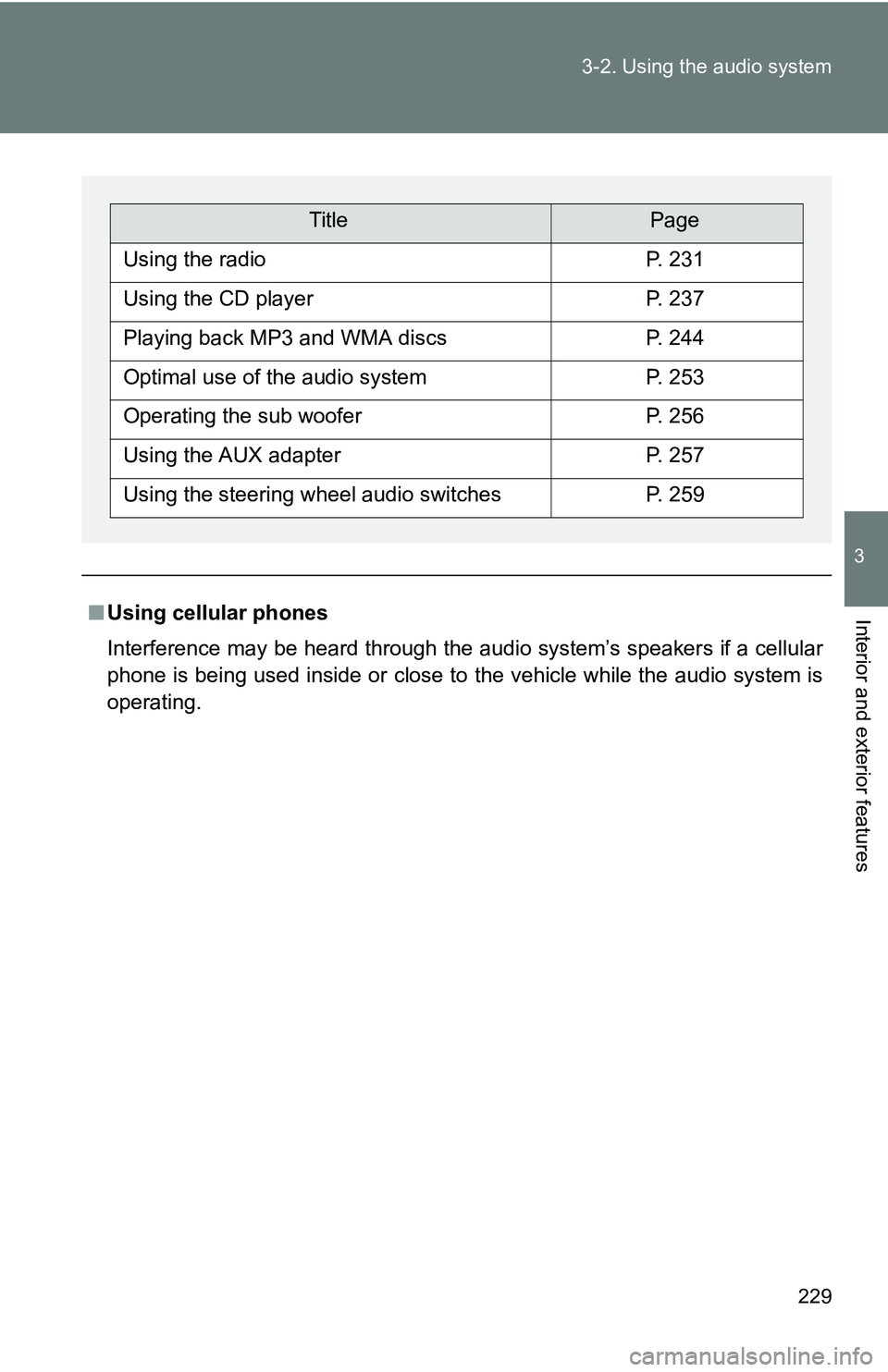
TitlePage
Using the radioP. 231
Using the CD playerP. 237
Playing back MP3 and WMA discsP. 244
Optimal use of the audio systemP. 253
Operating the sub wooferP. 256
Using the AUX adapterP. 257
Using the steering wheel audio switchesP. 259
Page 259 of 520
259
3-2. Using the audio system
3
Interior and exterior features
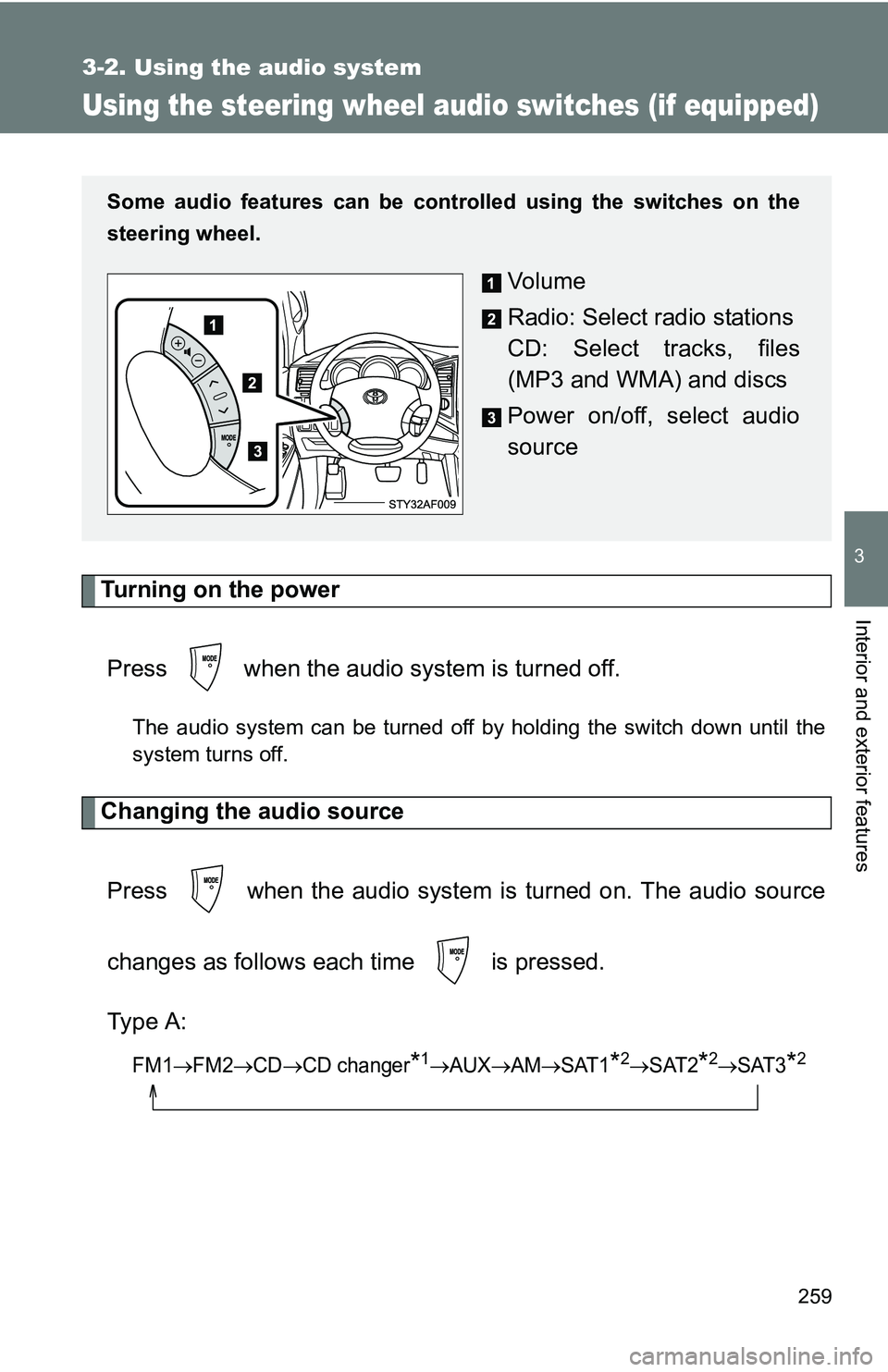
Using the steering wheel audio switches (if equipped)
Turning on the powerPress when the audio system is turned off.
The audio system can be turned off by holding the switch down until the
system turns off.
Changing the audio sourcePress when the audio system is turned on. The audio source
changes as follows each time is pressed.
Type A:
FM1FM2CDCD changer*1AUXAMSAT1*2SAT2*2SAT3*2
Some audio features can be cont rolled using the switches on the
steering wheel.
Vo l u m e
Radio: Select radio stations
CD: Select tracks, files
(MP3 and WMA) and discs
Power on/off, select audio
source
Page 261 of 520
261
3-2. Using the audio system
3
Interior and exterior features
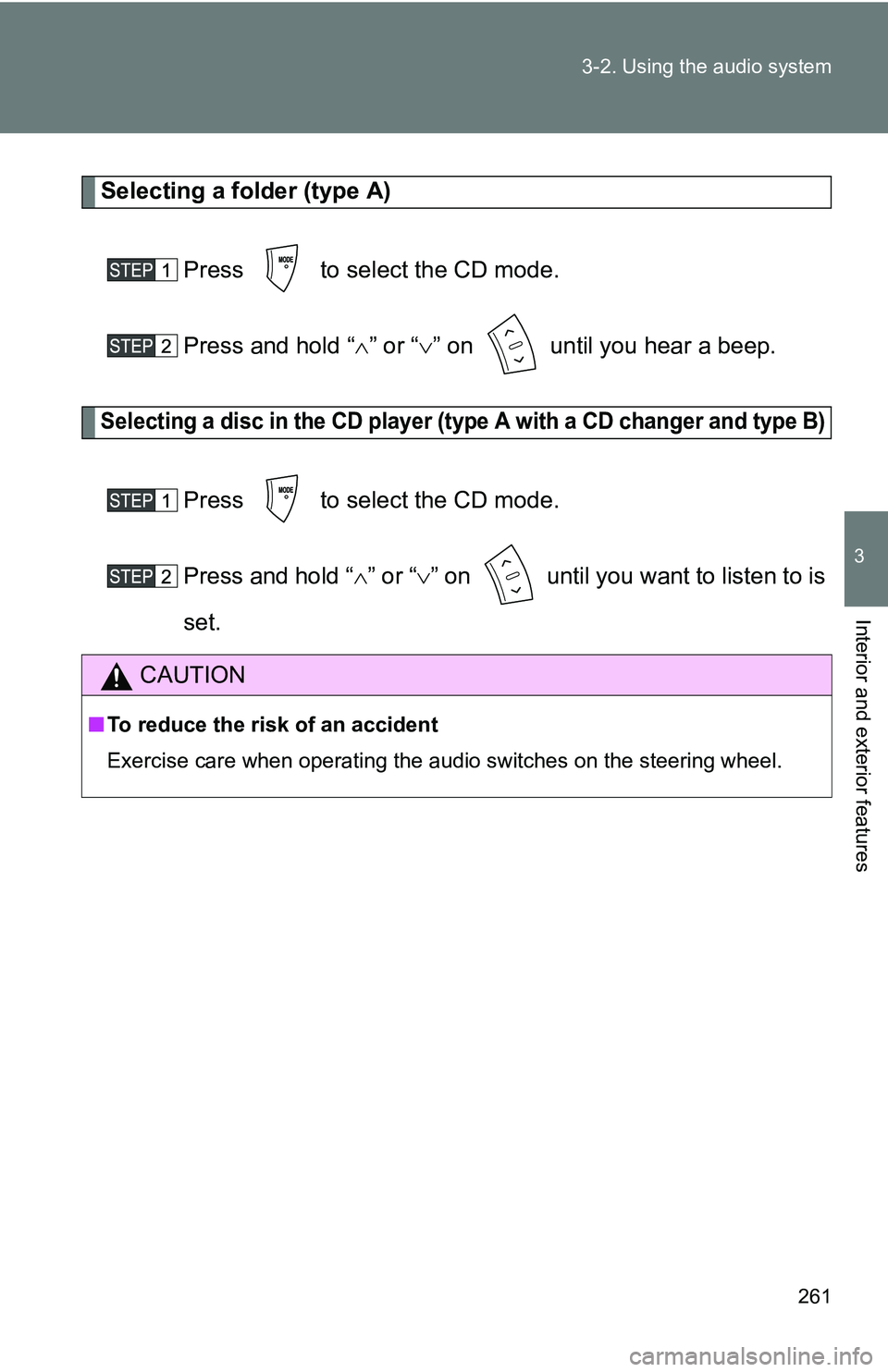
Selecting a folder (type A)
Press to select the CD mode.
Press and hold “ ” or “ ” on until you hear a beep.
Selecting a disc in the CD player (type A with a CD changer and type B)
Press to select the CD mode.
Press and hold “ ” or “ ” on until you want to listen to is
set.
CAUTION
■ To reduce the risk of an accident
Exercise care when operating the audio switches on the steering wheel.
Page 267 of 520
267
3-3. Using the hand
s-free phone system (for cellular phone)
3
Interior and exterior features
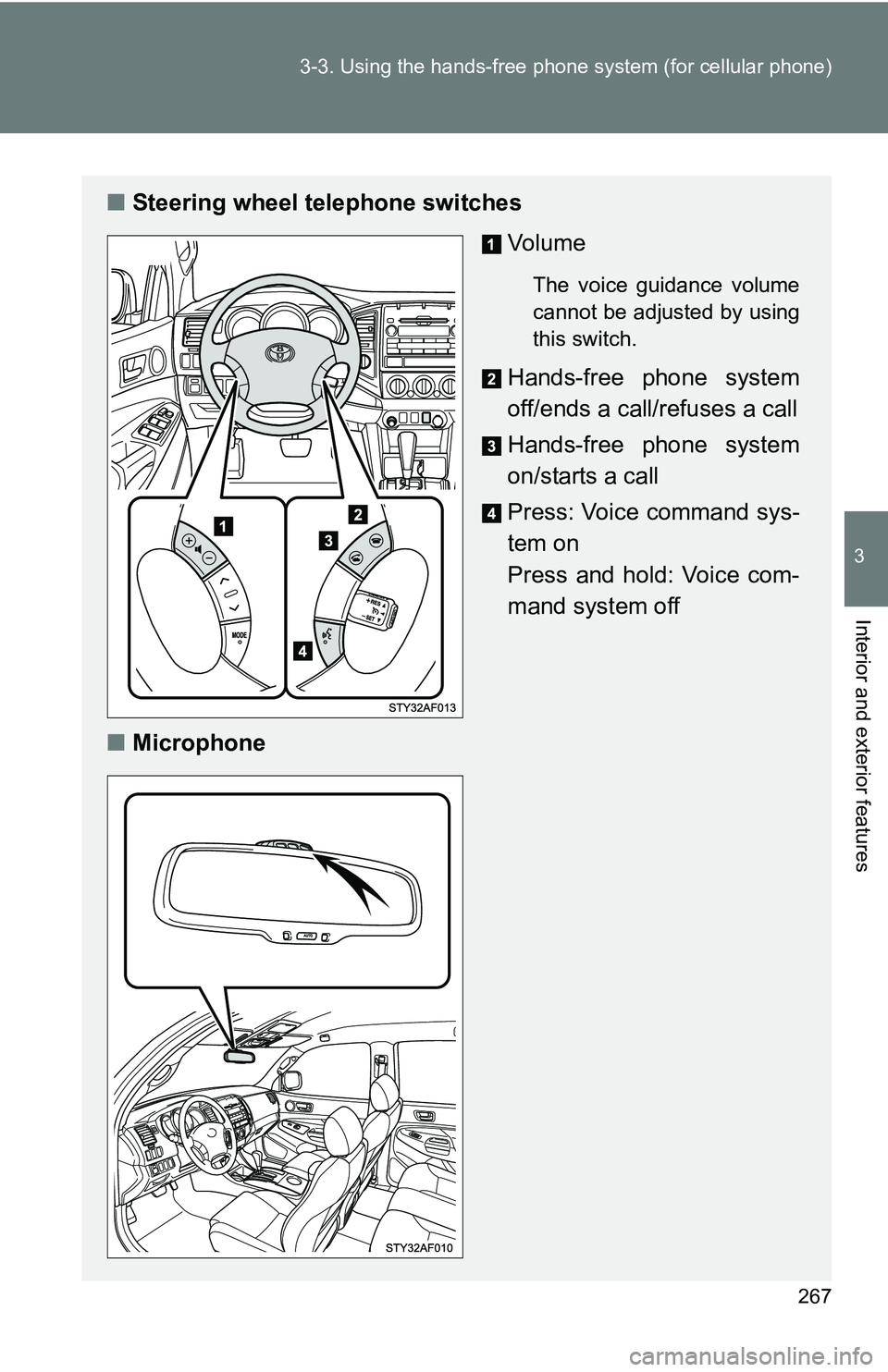
■Steering wheel telephone switches
Vo l u m e
The voice guidance volume
cannot be adjusted by using
this switch.
Hands-free phone system
off/ends a call/refuses a call
Hands-free phone system
on/starts a call
Press: Voice command sys-
tem on
Press and hold: Voice com-
mand system off
■ Microphone
Page 347 of 520
347
4-2. Maintenance
4
Maintenance and care
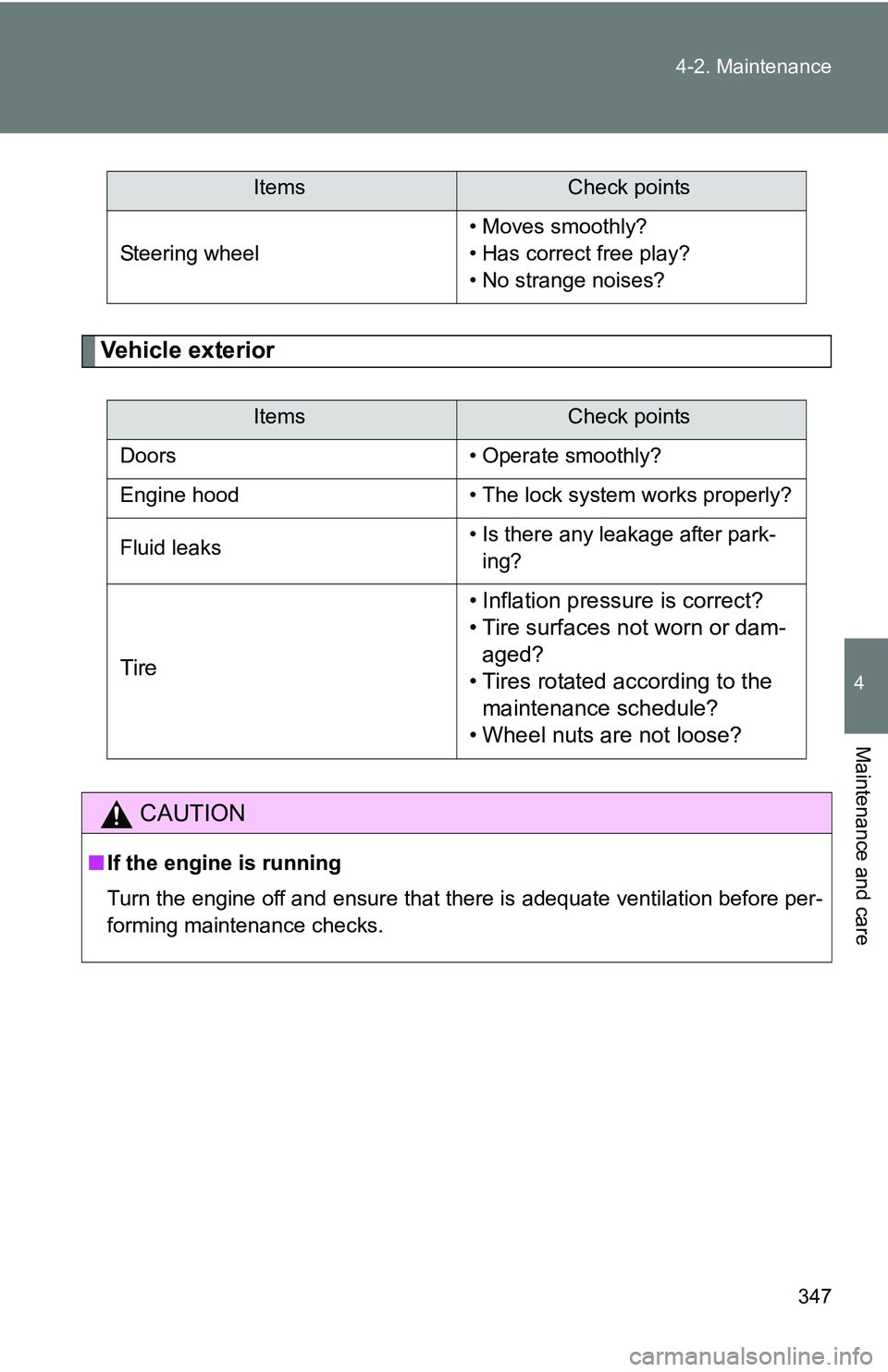
Vehicle exterior
Steering wheel
• Moves smoothly?
• Has correct free play?
• No strange noises?
ItemsCheck points
Doors • Operate smoothly?
Engine hood • The lock system works properly?
Fluid leaks • Is there any leakage after park-
ing?
Tire • Inflation pressure is correct?
• Tire surfaces not worn or dam-
aged?
• Tires rotated according to the maintenance schedule?
• Wheel nuts are not loose?
CAUTION
■ If the engine is running
Turn the engine off and ensure that there is adequate ventilation before per-
forming maintenance checks.
ItemsCheck points
Page 414 of 520
414
5-1. Essential information
If your vehicle needs to be towed
Before towingThe following may indicate a problem with your transmission. Contact
your Toyota dealer before towing.
● The engine is running, but the vehicle will not move.
● The vehicle makes an abnormal sound.
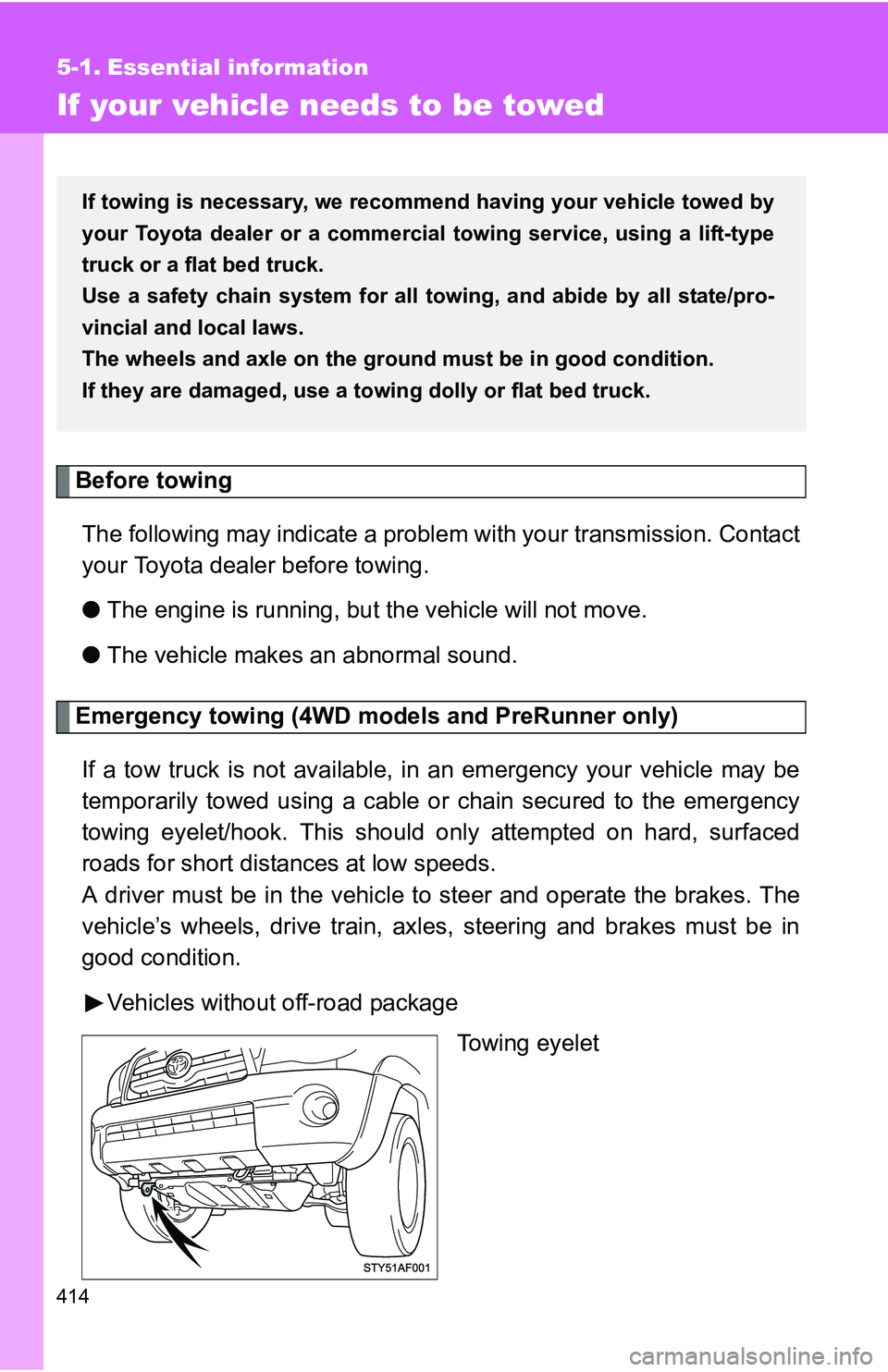
Emergency towing (4WD models and PreRunner only)
If a tow truck is not available, in an emergency your vehicle may be
temporarily towed using a cable or chain secured to the emergency
towing eyelet/hook. This should only attempted on hard, surfaced
roads for short distances at low speeds.
A driver must be in the vehicle to steer and operate the brakes. The
vehicle’s wheels, drive train, axles, steering and brakes must be in
good condition.
Vehicles without off-road package Towing eyelet
If towing is necessary, we recommend having your vehicle towed by
your Toyota dealer or a commerci al towing service, using a lift-type
truck or a flat bed truck.
Use a safety chain system for all to wing, and abide by all state/pro-
vincial and local laws.
The wheels and axle on the groun d must be in good condition.
If they are damaged, use a towing dolly or flat bed truck.