cruise control TOYOTA TACOMA 2010 Owners Manual (in English)
[x] Cancel search | Manufacturer: TOYOTA, Model Year: 2010, Model line: TACOMA, Model: TOYOTA TACOMA 2010Pages: 532, PDF Size: 15.03 MB
Page 3 of 532
1
2
3
4
5
6
7
3
2-4. Using other driving systems
Cruise control ...................... 170
Rear view monitor system
(vehicles with auto
anti-glare inside rear
view mirror) ....................... 173
Four-wheel drive system ..... 177
Active traction control
system .............................. 181
AUTO LSD system.............. 183
Rear differential lock
system .............................. 185
Downhill Assist Control
system .............................. 188
Clutch start cancel switch ... 190
Driving assist systems ........ 191
2-5. Driving information
Off-road precautions
(4WD models and
PreRunner) ....................... 197
Cargo and luggage ............. 202
Vehicle load limits ............... 207
Winter driving tips ............... 209
Trailer towing ...................... 213
Dinghy towing ..................... 226
3-1. Using the air conditioning
system and defogger
Air conditioning system ....... 2283-2. Using the audio system
Audio system types ............ 236
Using the radio ................... 239
Using the CD player ........... 245
Playing back MP3 and
WMA discs ....................... 251
Optimal use of the audio
system .............................. 259
Operating the sub woofer
(on some Access Cab
models) ............................ 262
Using the AUX adapter....... 263
Using the steering wheel
audio switches.................. 265
3-3. Using the hands-free phone
system (for cellular phone)
Hands-free phone system
(for cellular phone) ........... 268
Using the hands-free
phone system ................... 272
Making a phone call ........... 280
Setting a cellular phone ...... 285
Security and system
setup ................................ 290
Using the phone book ........ 293
3-4. Using the interior lights
Interior lights list ................. 300
• Interior light ...................... 301
• Personal lights.................. 301
3Interior and exterior
features
Page 21 of 532
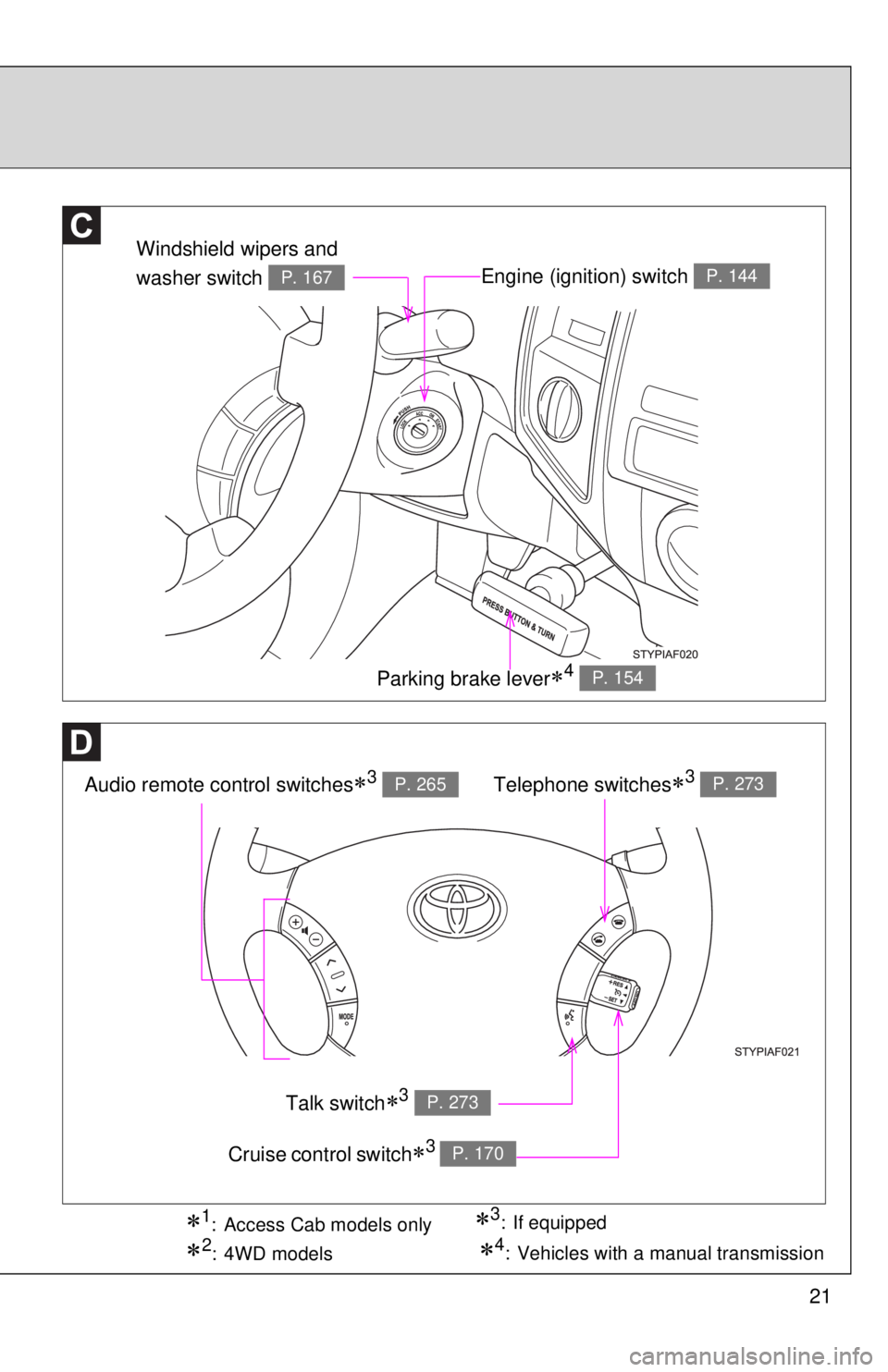
21
Engine (ignition) switch P. 144
Audio remote control switches3 P. 265
Windshield wipers and
washer switch
P. 167
Parking brake lever4 P. 154
Telephone switches3 P. 273
Talk switch3 P. 273
Cruise control switch3 P. 170
3: If equipped1: Access Cab models only
2:4WD models4: Vehicles with a manual transmission
Page 25 of 532

25
Installation of a mobile two-way radio system
As the installation of a mobile two-way radio system in your vehicle could
affect electronic systems such as the multiport fuel injection system/sequen-
tial multiport fuel injection system, cruise control system, anti-lock brake sys-
tem, SRS airbag system and seat belt pretensioner system, be sure to check
with your Toyota dealer for precautionary measures or special instructions
regarding installation.
Scrapping your Toyota
The SRS airbag and seat belt pretensioner devices in your Toyota contain
explosive chemicals. If the vehicle is scrapped with the airbags and seat belt
pretensioners left as they are, this may cause an accident such as fire. Be
sure to have the systems of the SRS airbag and seat belt pretensioner
removed and disposed of by a qualified service shop or by your Toyota
dealer before you scrap your vehicle.
Perchlorate Material
Special handling may apply,
See www.dtsc.ca.gov/hazardouswaste/perchlorate.
Your vehicle has components that may contain perchlorate. These compo-
nents may include airbag, seat belt pretensioners, and wireless remote con-
trol batteries.
Page 133 of 532
When driving2
133
2-1. Driving procedures
Driving the vehicle............ 134
Engine (ignition) switch .... 144
Automatic
Transmission.... 147
Manual Transmission ....... 150
Turn signal lever .............. 153
Parking brake ................... 154
Horn ................................. 156
2-2. Gauges and meters
Gauges and meters ......... 157
Indicators and warning
lights .............................. 160
Accessory meter .............. 163
2-3. Operating the lights and
wipers
Headlight switch ............... 164
Fog light switch ................ 166
Windshield wipers and
washer ........................... 1672-4. Using other driving systems
Cruise control ................... 170
Rear view monitor system
(vehicles with auto
anti-glare inside rear
view mirror) .................... 173
Four-wheel drive
system ........................... 177
Active traction control
system ........................... 181
AUTO LSD system........... 183
Rear differential lock
system ........................... 185
Downhill Assist Control
system ........................... 188
Clutch start cancel
switch ............................. 190
Driving assist systems ..... 191
2-5. Driving information
Off-road precautions
(4WD models and
PreRunner) .................... 197
Cargo and luggage .......... 202
Vehicle load limits ............ 207
Winter driving tips ............ 209
Trailer towing ................... 213
Dinghy towing .................. 226
Page 149 of 532
149 2-1. Driving procedures
2
When driving
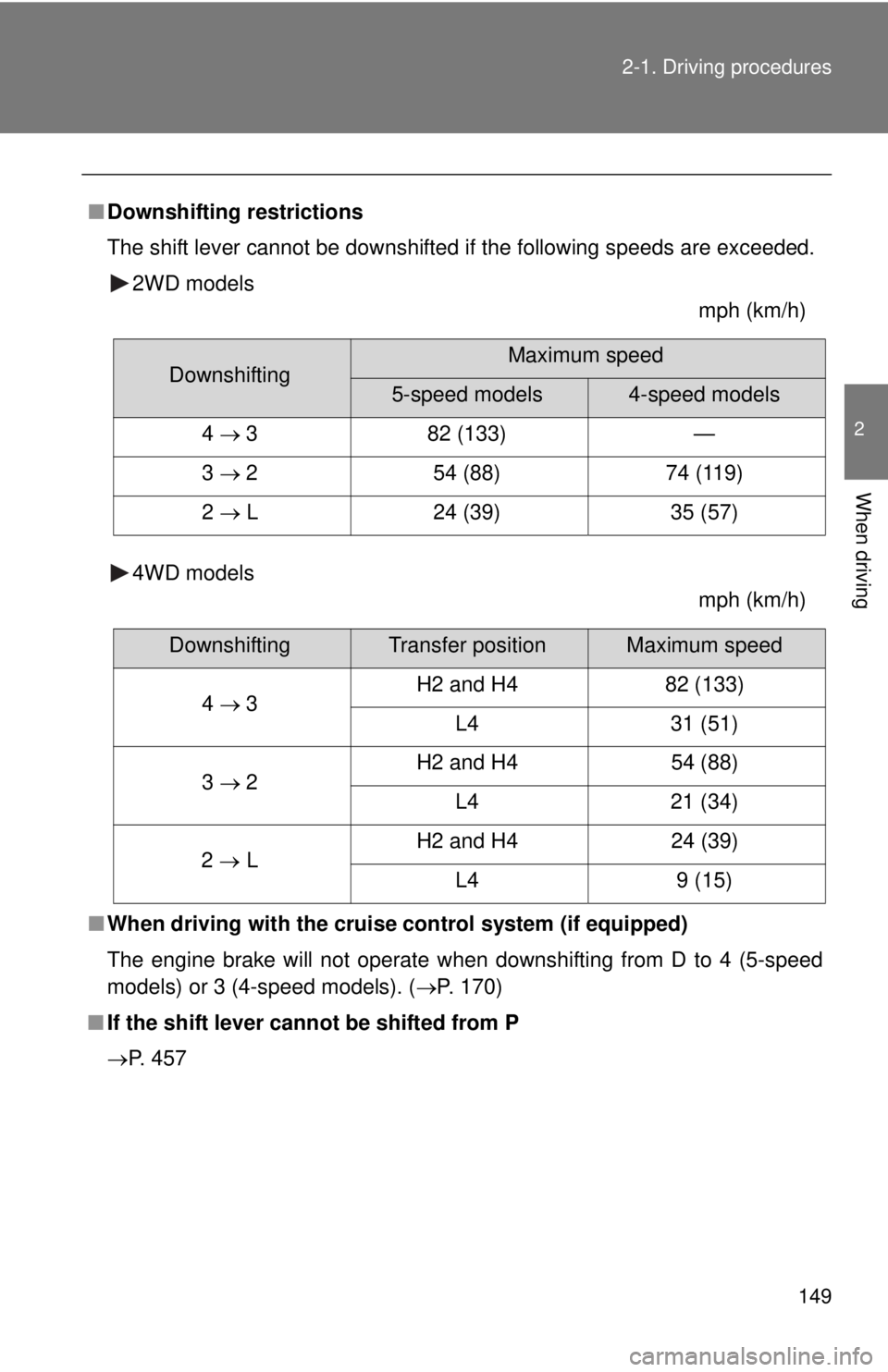
■Downshifting restrictions
The shift lever cannot be downshifted if the following speeds are exceeded.
2WD models
mph (km/h)
4WD models
mph (km/h)
■When driving with the cruise control system (if equipped)
The engine brake will not operate when downshifting from D to 4 (5-speed
models) or 3 (4-speed models). (P. 170)
■If the shift lever cannot be shifted from P
P. 457
DownshiftingMaximum speed
5-speed models4-speed models
4 3 82 (133) —
3 2 54 (88) 74 (119)
2 L 24 (39) 35 (57)
DownshiftingTransfer positionMaximum speed
4 3H2 and H4 82 (133)
L4 31 (51)
3 2H2 and H4 54 (88)
L4 21 (34)
2 LH2 and H4 24 (39)
L4 9 (15)
Page 161 of 532
161 2-2. Gauges and meters
2
When driving
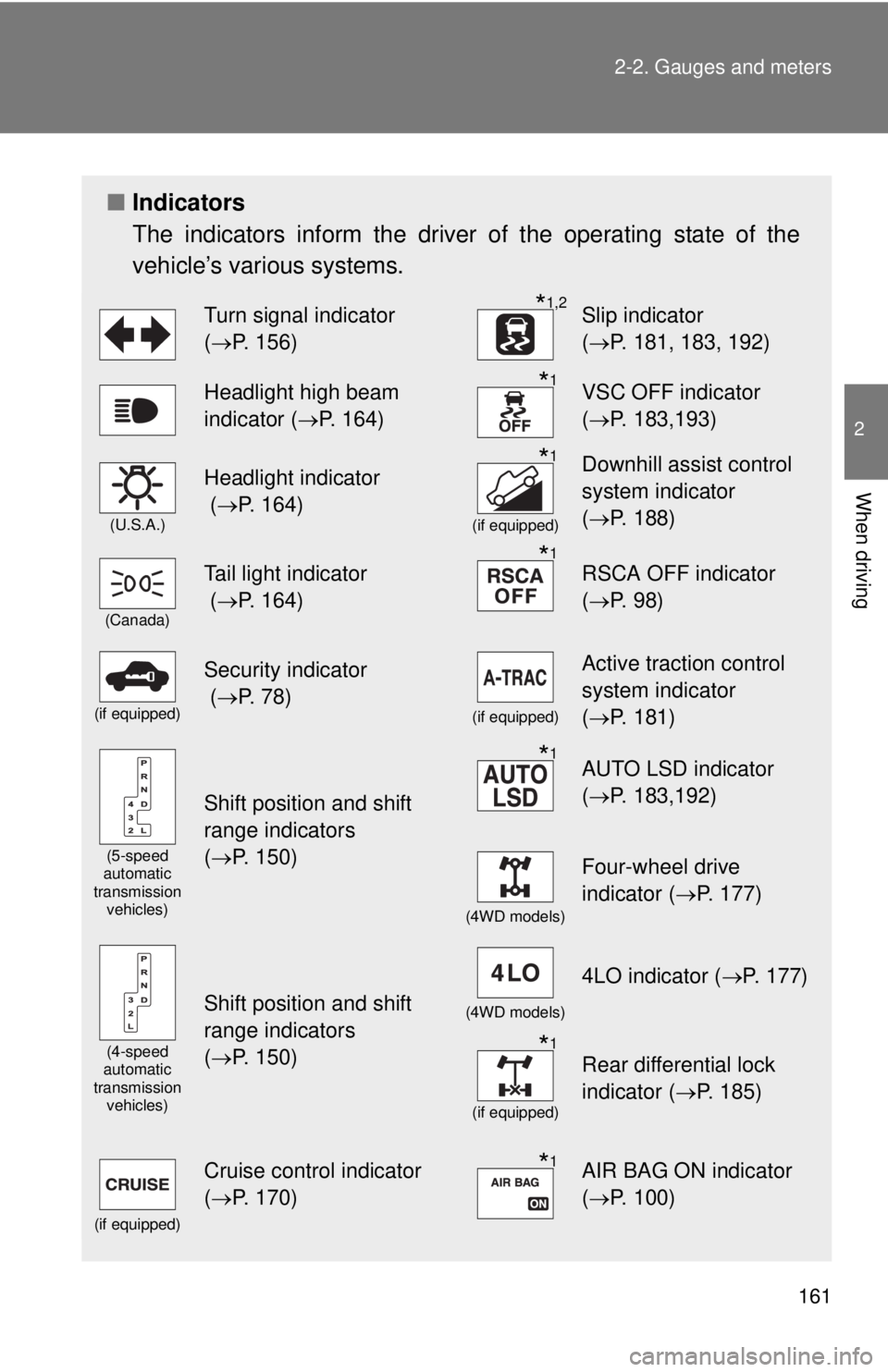
■Indicators
The indicators inform the driver of the operating state of the
vehicle’s various systems.
Turn signal indicator
(P. 156)*1,2Slip indicator
(P. 181, 183, 192)
Headlight high beam
indicator (P. 164)*1VSC OFF indicator
(P. 183,193)
(U.S.A.)
Headlight indicator
(P. 164)*1
(if equipped)
Downhill assist control
system indicator
(P. 188)
(Canada)
Tail light indicator
(P. 164)*1RSCA OFF indicator
(P. 98)
(if equipped)
Security indicator
(P. 78)
(if equipped)
Active traction control
system indicator
(P. 181)
(5-speed
automatic
transmission
vehicles)
Shift position and shift
range indicators
(P. 150)
*1AUTO LSD indicator
(P. 183,192)
(4WD models)
Four-wheel drive
indicator (P. 177)
(4-speed
automatic
transmission
vehicles)
Shift position and shift
range indicators
(P. 150)(4WD models)
4LO indicator (P. 177)
*1
(if equipped)
Rear differential lock
indicator (P. 185)
(if equipped)
Cruise control indicator
(P. 170)*1AIR BAG ON indicator
(P. 100)
Page 170 of 532
170
2-4. Using other driving systems
Cruise control
: If equipped
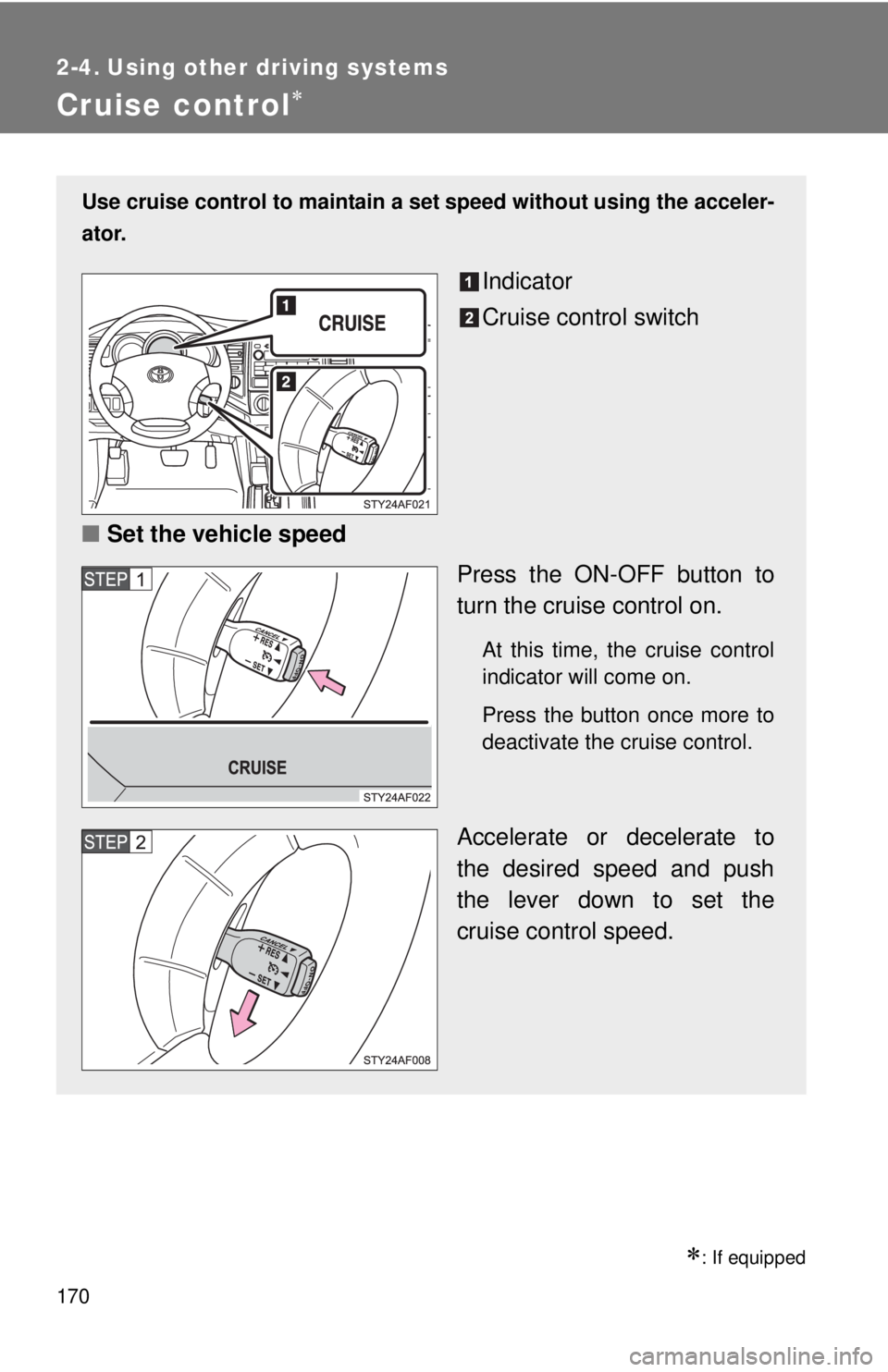
Use cruise control to maintain a set speed without using the acceler-
ator.
Indicator
Cruise control switch
■Set the vehicle speed
Press the ON-OFF button to
turn the cruise control on.
At this time, the cruise control
indicator will come on.
Press the button once more to
deactivate the cruise control.
Accelerate or decelerate to
the desired speed and push
the lever down to set the
cruise control speed.
Page 171 of 532
171 2-4. Using other driving systems
2
When driving
■Cruise control can be set when
●The shift lever is in D, 4 (vehicles with 5-speed automatic transmission)
or 3 (vehicles with 4-speed automatic transmission).
●Vehicle speed is more than approximately 25 mph (40 km/h).
■Accelerating
The vehicle can be accelerated normally. After acceleration, the set speed
resumes.
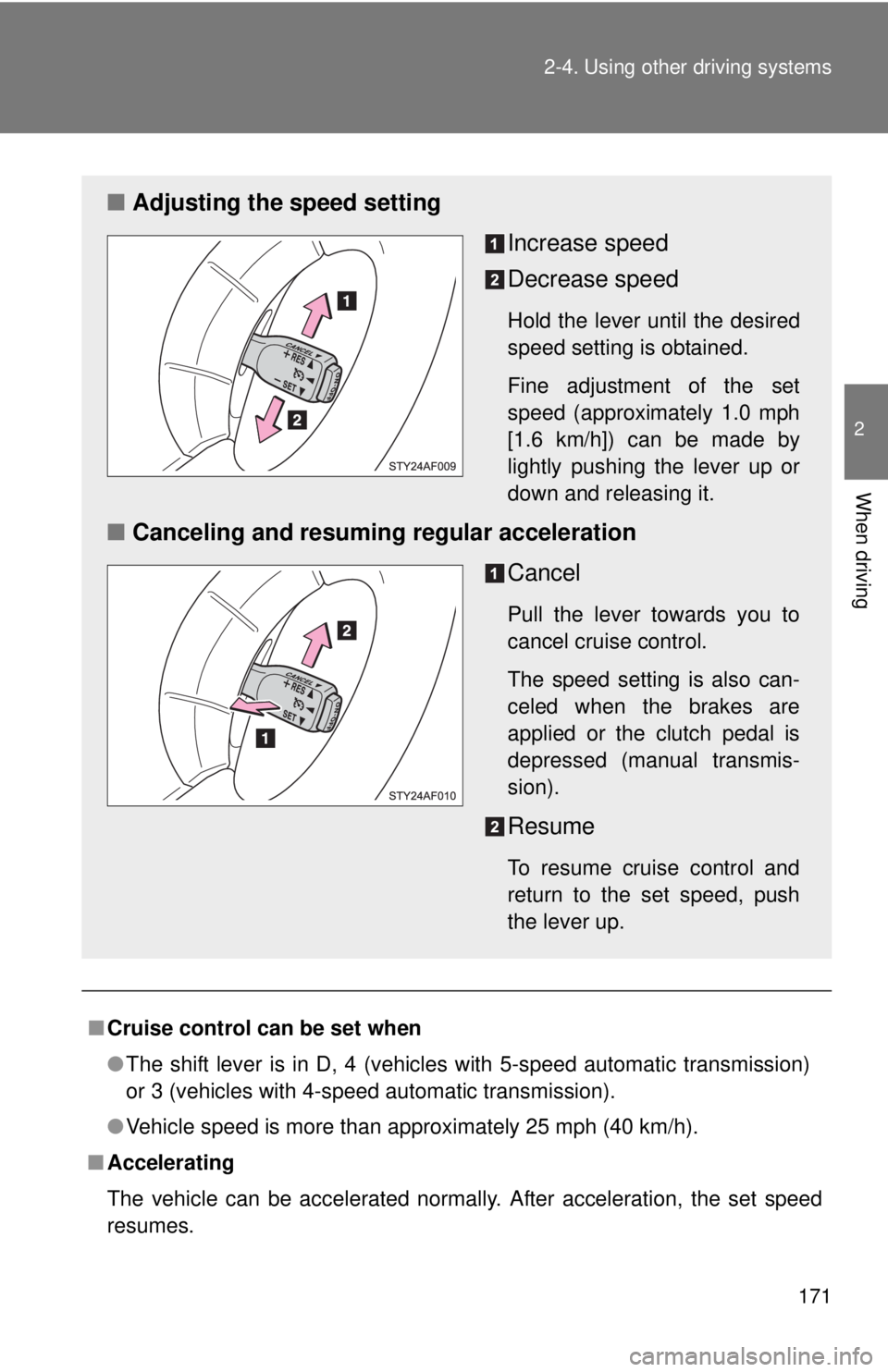
■Adjusting the speed setting
Increase speed
Decrease speed
Hold the lever until the desired
speed setting is obtained.
Fine adjustment of the set
speed (approximately 1.0 mph
[1.6 km/h]) can be made by
lightly pushing the lever up or
down and releasing it.
■Canceling and resuming regular acceleration
Cancel
Pull the lever towards you to
cancel cruise control.
The speed setting is also can-
celed when the brakes are
applied or the clutch pedal is
depressed (manual transmis-
sion).
Resume
To resume cruise control and
return to the set speed, push
the lever up.
Page 172 of 532
172 2-4. Using other driving systems
■Automatic cruise control cancellation
The set speed is automatically canceled in any of the following situations.
●Actual vehicle speed falls more than approximately 10 mph (16 km/h)
below the preset vehicle speed.
At this time, the memorized set speed is not retained.
●Actual vehicle speed is below approximately 25 mph (40 km/h).
●VSC is activated.
■If the cruise control indicator light flashes
Press the ON-OFF button to turn the cruise control off, and then reactivate
the system.
If the cruise control speed cannot be set or if the cruise control cancels
immediately after being activated, there may be a malfunction in the cruise
control system. Have the vehicle inspected by your Toyota dealer.
CAUTION
■To avoid operating the cruise control by mistake
Keep the ON-OFF button off when not in use.
■Situations unsuitable for cruise control
Do not use cruise control in any of the following situations.
Doing so may result in control of the vehicle being lost and could cause an
accident resulting in death or serious injury.
●In heavy traffic
●On roads with sharp bends
●On winding roads
●On slippery roads, such as those covered with rain, ice or snow
●On steep hills
●When towing a trailer or emergency towing
Page 454 of 532

454 5-2. Steps to take in an emergency
CAUTION
■When the spare tire is attached
The vehicle speed may not be correctly detected, and the following sys-
tems may not operate correctly:
●ABS & Brake assist
●VSC
●TRAC
●Active traction control system (if equipped)
●Hill-start assist control system (if equipped)
●Downhill assist control system (if equipped)
●AUTO LSD system
●Cruise control
Also, not only can the following system not be utilized fully, it may actu-
ally negatively effect the drive-train components:
●4WD system