traction control TOYOTA TACOMA 2010 Owners Manual (in English)
[x] Cancel search | Manufacturer: TOYOTA, Model Year: 2010, Model line: TACOMA, Model: TOYOTA TACOMA 2010Pages: 532, PDF Size: 15.03 MB
Page 3 of 532

1
2
3
4
5
6
7
3
2-4. Using other driving systems
Cruise control ...................... 170
Rear view monitor system
(vehicles with auto
anti-glare inside rear
view mirror) ....................... 173
Four-wheel drive system ..... 177
Active traction control
system .............................. 181
AUTO LSD system.............. 183
Rear differential lock
system .............................. 185
Downhill Assist Control
system .............................. 188
Clutch start cancel switch ... 190
Driving assist systems ........ 191
2-5. Driving information
Off-road precautions
(4WD models and
PreRunner) ....................... 197
Cargo and luggage ............. 202
Vehicle load limits ............... 207
Winter driving tips ............... 209
Trailer towing ...................... 213
Dinghy towing ..................... 226
3-1. Using the air conditioning
system and defogger
Air conditioning system ....... 2283-2. Using the audio system
Audio system types ............ 236
Using the radio ................... 239
Using the CD player ........... 245
Playing back MP3 and
WMA discs ....................... 251
Optimal use of the audio
system .............................. 259
Operating the sub woofer
(on some Access Cab
models) ............................ 262
Using the AUX adapter....... 263
Using the steering wheel
audio switches.................. 265
3-3. Using the hands-free phone
system (for cellular phone)
Hands-free phone system
(for cellular phone) ........... 268
Using the hands-free
phone system ................... 272
Making a phone call ........... 280
Setting a cellular phone ...... 285
Security and system
setup ................................ 290
Using the phone book ........ 293
3-4. Using the interior lights
Interior lights list ................. 300
• Interior light ...................... 301
• Personal lights.................. 301
3Interior and exterior
features
Page 26 of 532

26
CAUTION
■General precautions while driving
Driving under the influence: Never drive your vehicle when under the influ-
ence of alcohol or drugs that have impaired your ability to operate your vehi-
cle. Alcohol and certain drugs delay reaction time, impair judgment and
reduce coordination, which could lead to an accident that could result in
death or serious injury.
Defensive driving: Always drive defensively. Anticipate mistakes that other
drivers or pedestrians might make and be ready to avoid accidents.
Driver distraction: Always give your full attention to driving. Anything that dis-
tracts the driver, such as adjusting controls, talking on a cellular phone or
reading can result in a collision with resulting death or serious injury to you,
your occupants or others.
■General precaution regarding children’s safety
Never leave children unattended in the vehicle, and never allow children to
have or use the key.
Children may be able to start the vehicle or shift the vehicle into neutral.
There is also a danger that children may injure themselves by playing with
the cigarette lighter, the windows, or other features of the vehicle. In addi-
tion, heat build-up or extremely cold temperatures inside the vehicle can be
fatal to children.
Page 133 of 532
When driving2
133
2-1. Driving procedures
Driving the vehicle............ 134
Engine (ignition) switch .... 144
Automatic
Transmission.... 147
Manual Transmission ....... 150
Turn signal lever .............. 153
Parking brake ................... 154
Horn ................................. 156
2-2. Gauges and meters
Gauges and meters ......... 157
Indicators and warning
lights .............................. 160
Accessory meter .............. 163
2-3. Operating the lights and
wipers
Headlight switch ............... 164
Fog light switch ................ 166
Windshield wipers and
washer ........................... 1672-4. Using other driving systems
Cruise control ................... 170
Rear view monitor system
(vehicles with auto
anti-glare inside rear
view mirror) .................... 173
Four-wheel drive
system ........................... 177
Active traction control
system ........................... 181
AUTO LSD system........... 183
Rear differential lock
system ........................... 185
Downhill Assist Control
system ........................... 188
Clutch start cancel
switch ............................. 190
Driving assist systems ..... 191
2-5. Driving information
Off-road precautions
(4WD models and
PreRunner) .................... 197
Cargo and luggage .......... 202
Vehicle load limits ............ 207
Winter driving tips ............ 209
Trailer towing ................... 213
Dinghy towing .................. 226
Page 161 of 532
161 2-2. Gauges and meters
2
When driving
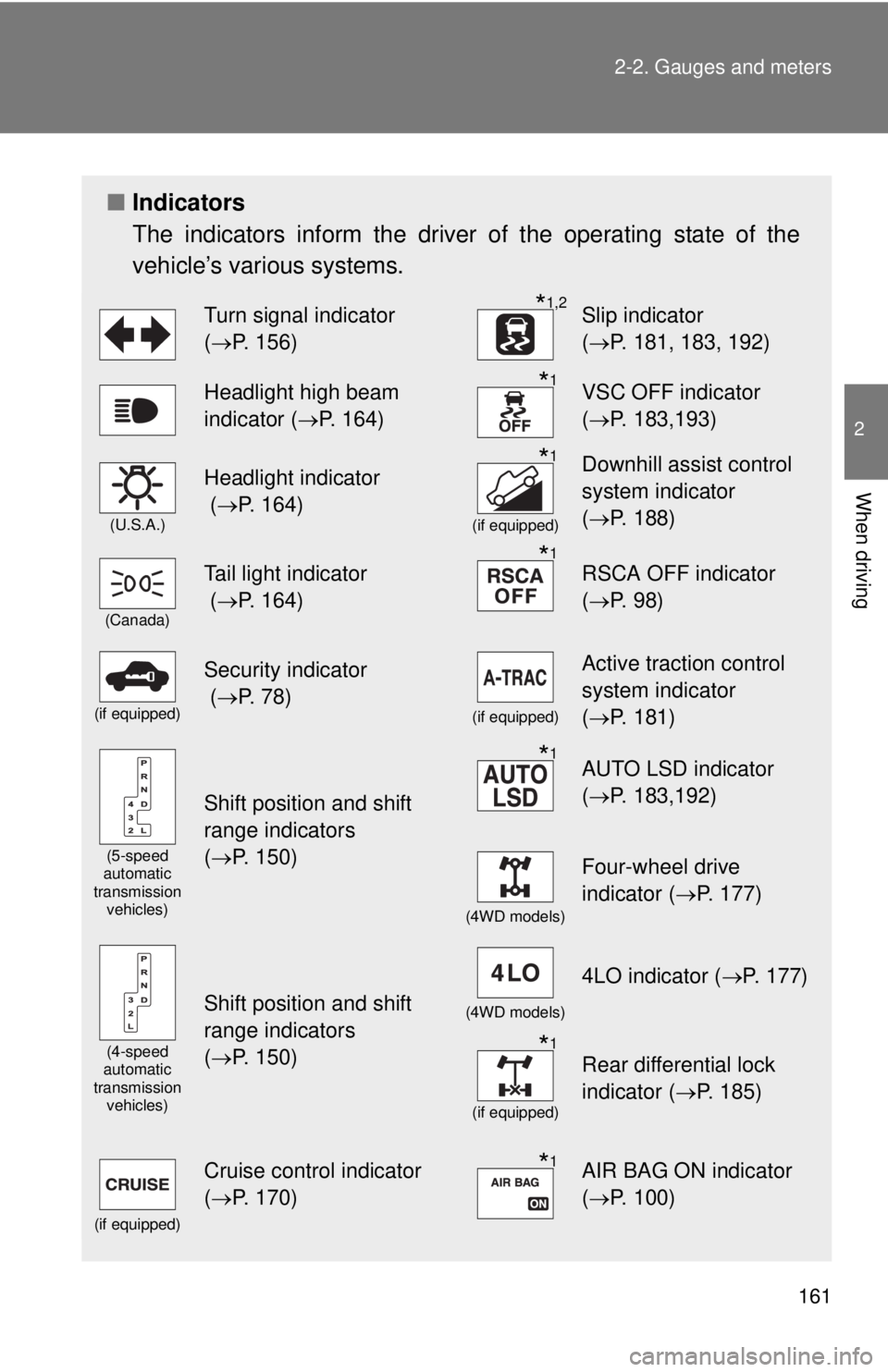
■Indicators
The indicators inform the driver of the operating state of the
vehicle’s various systems.
Turn signal indicator
(P. 156)*1,2Slip indicator
(P. 181, 183, 192)
Headlight high beam
indicator (P. 164)*1VSC OFF indicator
(P. 183,193)
(U.S.A.)
Headlight indicator
(P. 164)*1
(if equipped)
Downhill assist control
system indicator
(P. 188)
(Canada)
Tail light indicator
(P. 164)*1RSCA OFF indicator
(P. 98)
(if equipped)
Security indicator
(P. 78)
(if equipped)
Active traction control
system indicator
(P. 181)
(5-speed
automatic
transmission
vehicles)
Shift position and shift
range indicators
(P. 150)
*1AUTO LSD indicator
(P. 183,192)
(4WD models)
Four-wheel drive
indicator (P. 177)
(4-speed
automatic
transmission
vehicles)
Shift position and shift
range indicators
(P. 150)(4WD models)
4LO indicator (P. 177)
*1
(if equipped)
Rear differential lock
indicator (P. 185)
(if equipped)
Cruise control indicator
(P. 170)*1AIR BAG ON indicator
(P. 100)
Page 177 of 532
177
2-4. Using other driving systems
2
When driving
Four-wheel drive system
: If equipped
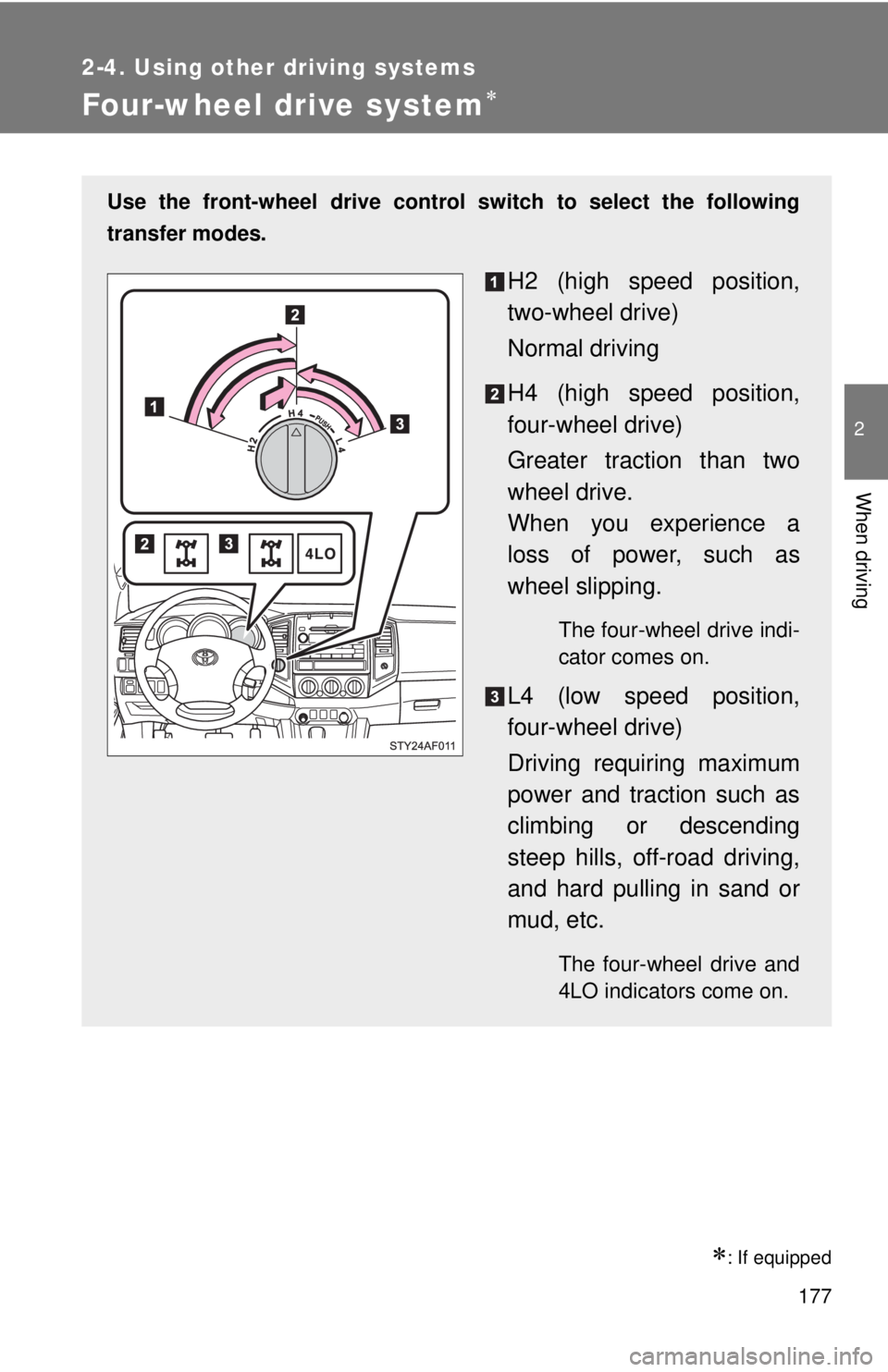
Use the front-wheel drive control switch to select the following
transfer modes.
H2 (high speed position,
two-wheel drive)
Normal driving
H4 (high speed position,
four-wheel drive)
Greater traction than two
wheel drive.
When you experience a
loss of power, such as
wheel slipping.
The four-wheel drive indi-
cator comes on.
L4 (low speed position,
four-wheel drive)
Driving requiring maximum
power and traction such as
climbing or descending
steep hills, off-road driving,
and hard pulling in sand or
mud, etc.
The four-wheel drive and
4LO indicators come on.
Page 181 of 532
181
2-4. Using other driving systems
2
When driving
Active traction control system
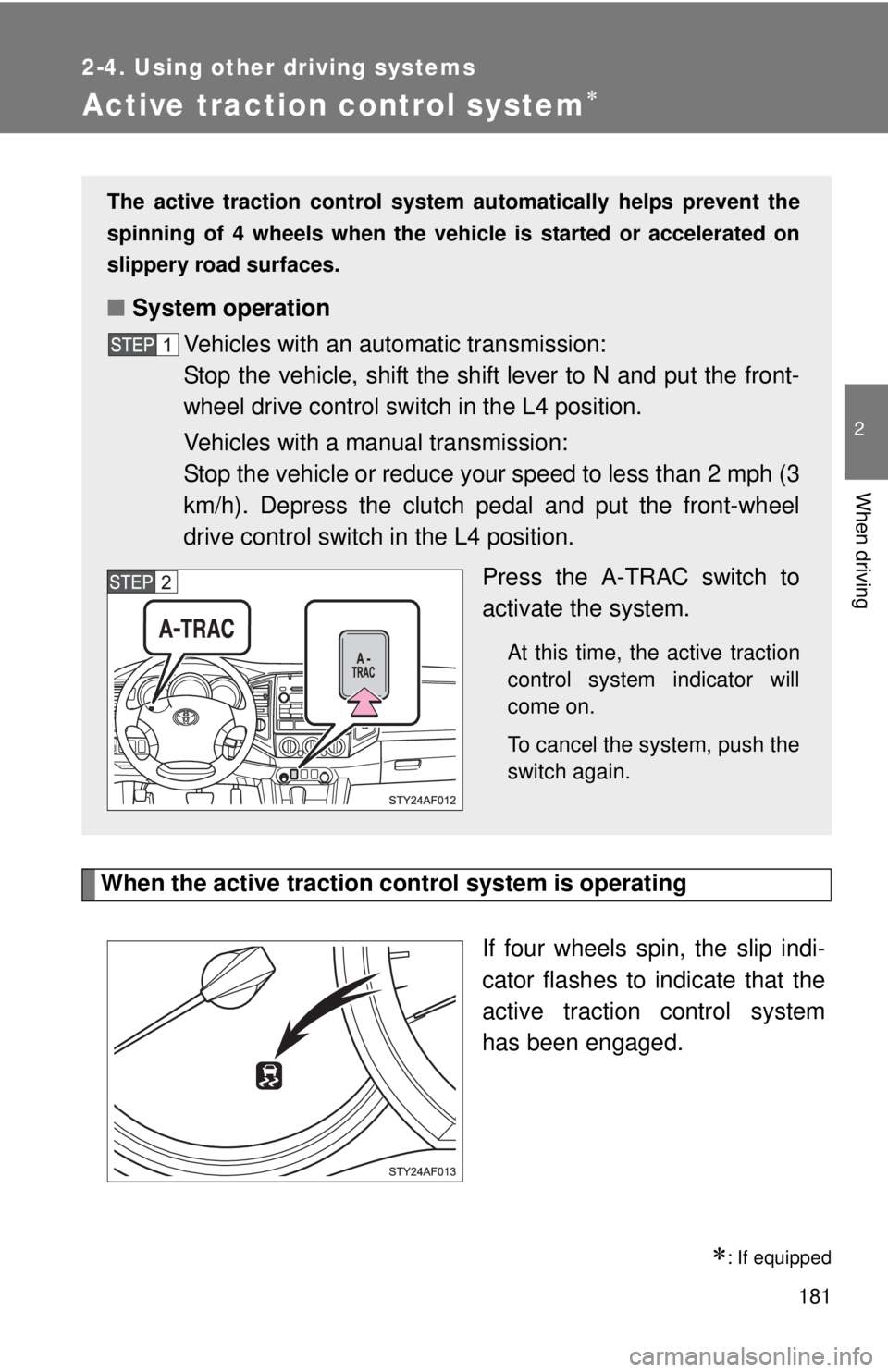
When the active traction control system is operating
If four wheels spin, the slip indi-
cator flashes to indicate that the
active traction control system
has been engaged.
: If equipped
The active traction control system automatically helps prevent the
spinning of 4 wheels when the vehicle is started or accelerated on
slippery road surfaces.
■System operation
Vehicles with an automatic transmission:
Stop the vehicle, shift the shift lever to N and put the front-
wheel drive control switch in the L4 position.
Vehicles with a manual transmission:
Stop the vehicle or reduce your speed to less than 2 mph (3
km/h). Depress the clutch pedal and put the front-wheel
drive control switch in the L4 position.
Press the A-TRAC switch to
activate the system.
At this time, the active traction
control system indicator will
come on.
To cancel the system, push the
switch again.
Page 182 of 532
182 2-4. Using other driving systems
■When the rear differential is locked (vehicles with the rear differential
lock system)
The active traction control system is activated only when the vehicle speed
is less than 3 mph (6 km/h).
■Sounds and vibrations caused by the active traction control system
●A sound may be heard from the engine compartment when the engine is
started or just after the vehicle begins to move. This sound does not indi-
cate that a malfunction has occurred in the system.
●Vibrations may be felt through the vehicle body and steering. It may
occur when the system is operating.
■If the brake system overheats
The system will cease operation, a buzzer will sound and A-TRAC indicator
blink to alert the driver. Stop the vehicle in a safe place. (There is no problem
with continuing normal driving.)
The system will be automatically restored after a short time.
CAUTION
■The active traction control system may not operate effectively when
Directional control and power may not be achievable while driving on slip-
pery road surfaces, even if the active traction control system is operating.
Do not drive the vehicle in conditions where stability and power may be lost.
Page 183 of 532
183
2-4. Using other driving systems
2
When driving
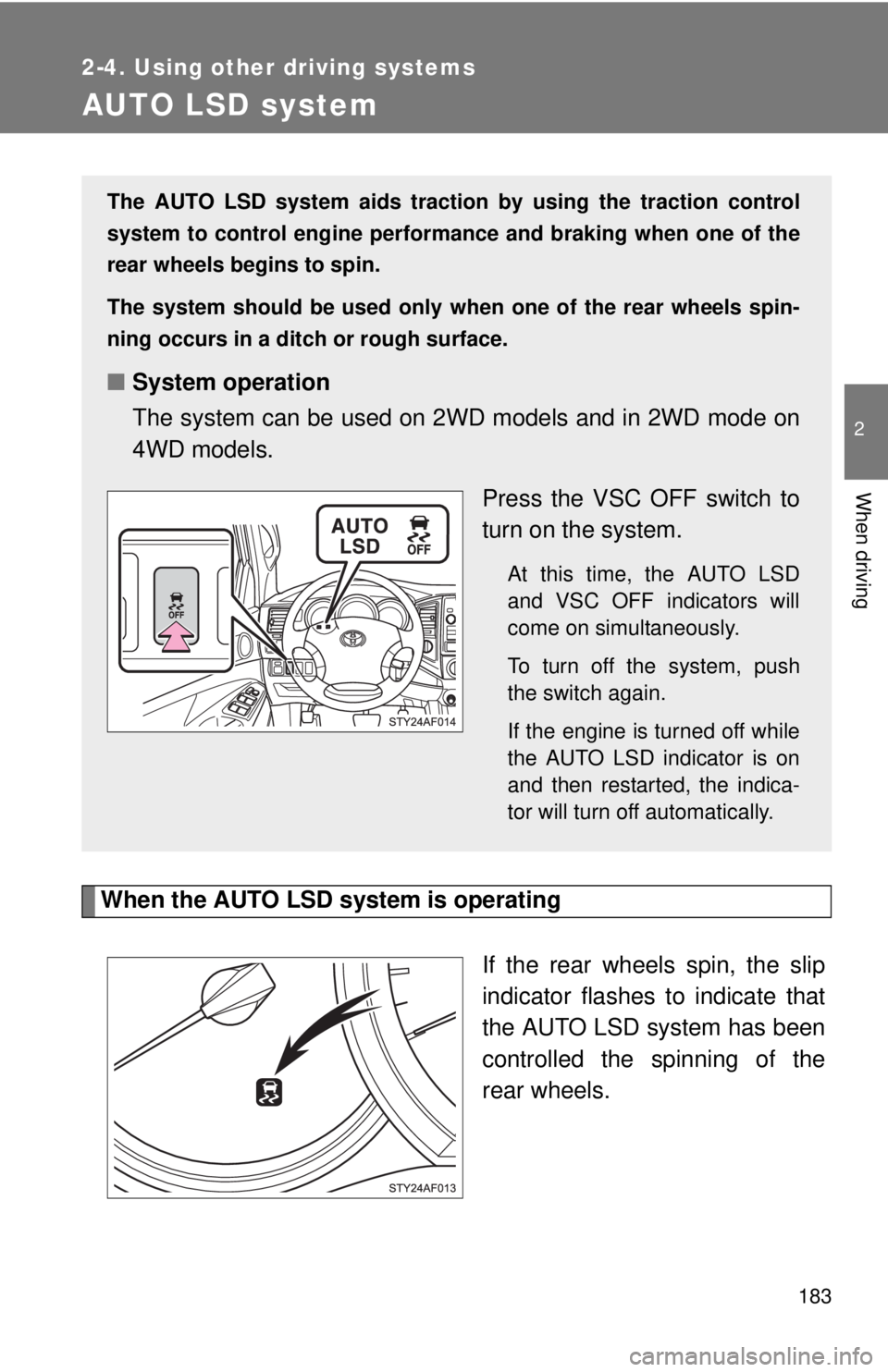
AUTO LSD system
When the AUTO LSD system is operating
If the rear wheels spin, the slip
indicator flashes to indicate that
the AUTO LSD system has been
controlled the spinning of the
rear wheels.
The AUTO LSD system aids traction by using the traction control
system to control engine performance and braking when one of the
rear wheels begins to spin.
The system should be used only when one of the rear wheels spin-
ning occurs in a ditch or rough surface.
■System operation
The system can be used on 2WD models and in 2WD mode on
4WD models.
Press the VSC OFF switch to
turn on the system.
At this time, the AUTO LSD
and VSC OFF indicators will
come on simultaneously.
To turn off the system, push
the switch again.
If the engine is turned off while
the AUTO LSD indicator is on
and then restarted, the indica-
tor will turn off automatically.
Page 191 of 532
191
2-4. Using other driving systems
2
When driving
Driving assist systems
To help enhance driving safety and performance, the following sys-
tems operate automatically in response to various driving situations.
Be aware, however, that these systems are supplementary and
should not be relied upon too heavily when operating the vehicle.
■ABS (Anti-lock Brake System)
Helps to prevent wheel lock when the brakes are applied suddenly, or if
the brakes are applied while driving on a slippery road surface.
■Brake Assist
Generates an increased level of braking force after the brake pedal is
depressed, while the system detects a panic stop situation.
■VSC (Vehicle Stability Control)
Helps the driver to control skidding when swerving suddenly or turning
on slippery road surfaces.
■TRAC (Traction Control)
Maintains drive power and prevents the rear wheels (2WD models) or
four wheels (4WD models) from spinning when starting the vehicle or
accelerating on slippery roads.
■Hill-start assist control (if equipped)
Helps prevent the vehicle from rolling backwards when starting on an
incline or slippery slope. It operates for approximately 5 seconds at
maximum.
Page 405 of 532
405 4-3. Do-it-yourself maintenance
4
Maintenance and care
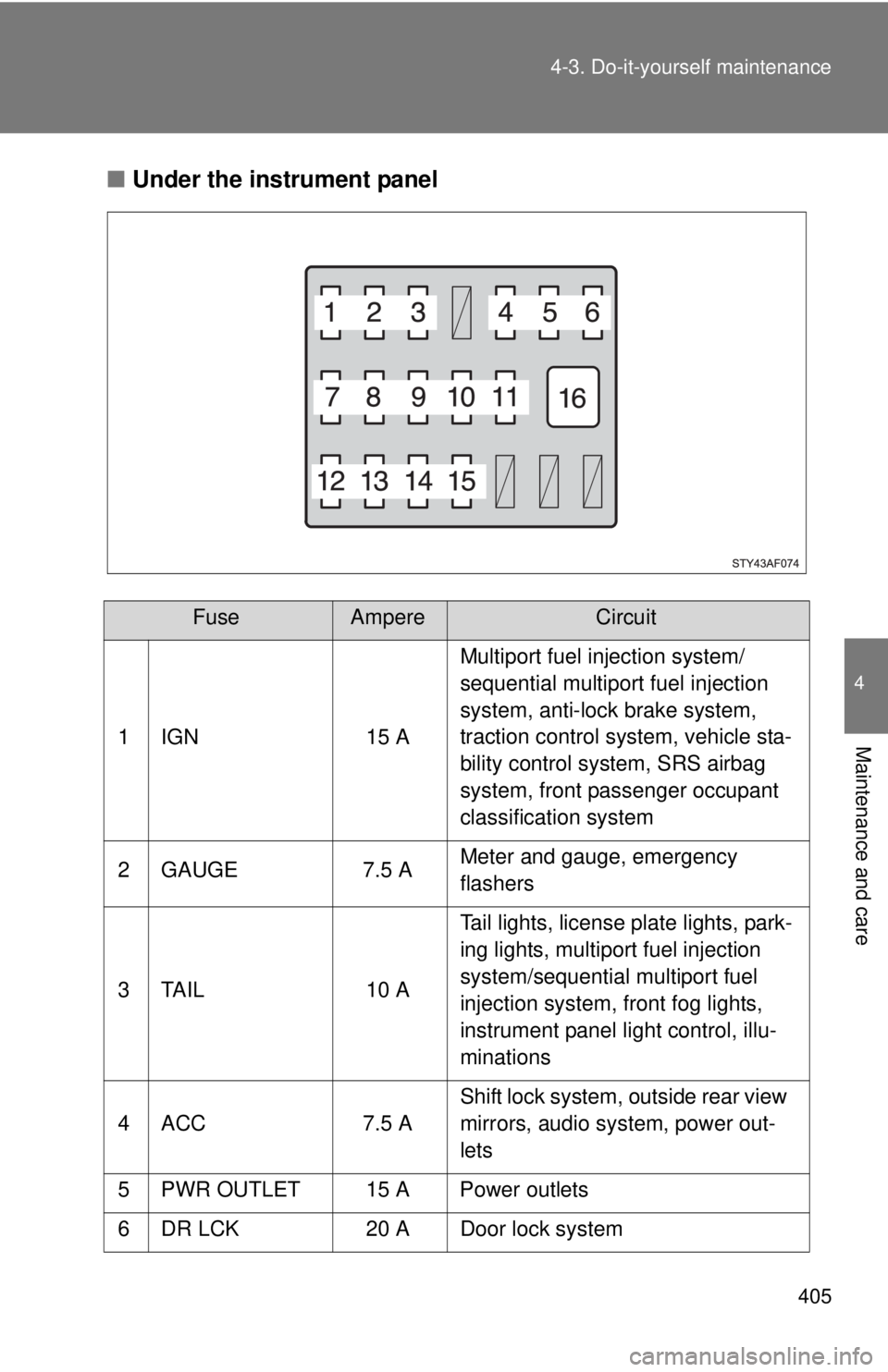
■Under the instrument panel
FuseAmpereCircuit
1 IGN 15 AMultiport fuel injection system/
sequential multiport fuel injection
system, anti-lock brake system,
traction control system, vehicle sta-
bility control system, SRS airbag
system, front passenger occupant
classification system
2 GAUGE 7.5 AMeter and gauge, emergency
flashers
3 TAIL 10 ATail lights, license plate lights, park-
ing lights, multiport fuel injection
system/sequential multiport fuel
injection system, front fog lights,
instrument panel light control, illu-
minations
4 ACC 7.5 AShift lock system, outside rear view
mirrors, audio system, power out-
lets
5 PWR OUTLET 15 A Power outlets
6 DR LCK 20 A Door lock system