audio TOYOTA TACOMA 2014 Accessories, Audio & Navigation (in English)
[x] Cancel search | Manufacturer: TOYOTA, Model Year: 2014, Model line: TACOMA, Model: TOYOTA TACOMA 2014Pages: 276, PDF Size: 19.59 MB
Page 20 of 276
20
1. CONTROLS AND FEATURES
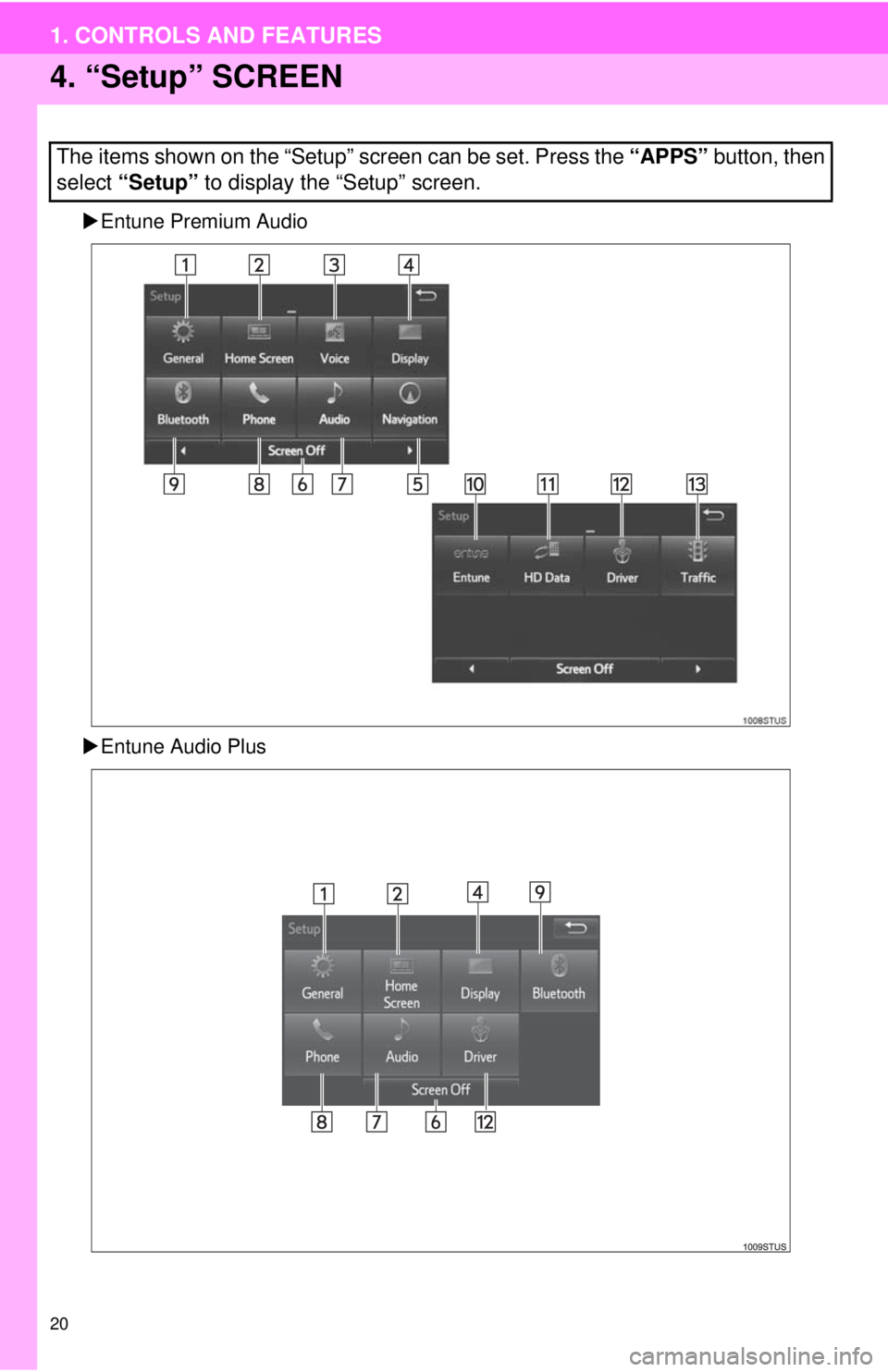
4. “Setup” SCREEN
Entune Premium Audio
Entune Audio Plus
The items shown on the “Setup” screen can be set. Press the “APPS” button, then
select “Setup” to display the “Setup” screen.
Page 21 of 276
21
1. CONTROLS AND FEATURES
1
QUICK GUIDE
No.FunctionPage
Select to change the selected language, operation sound, automatic
screen change settings, etc.53
Select to customize the “Home” screen.34
Select to set the voice settings.58
Select to adjust the contrast and brightness of the screens.39
Select to set memory points (home, preset destinations, address book
entries, areas to avoid), navigation details or to delete previous desti-
nations.
225, 234
Select to turn the screen off.
Select to set radio and external media settings.107
Select to set the phone sound, contacts, message settings, etc.162
Select to set Bluetooth® phones and Bluetooth® audio devices.46
*Select to set Entune settings.262
*Select to set data services settings.132
Select to link the driver’s cellular phone settings (audio presets, lan-
guage, etc.).60
*Select to set traffic information.238
*: Available in the 48 states, D.C. and Alaska
Page 22 of 276
22
2. NAVIGATION OPERATION
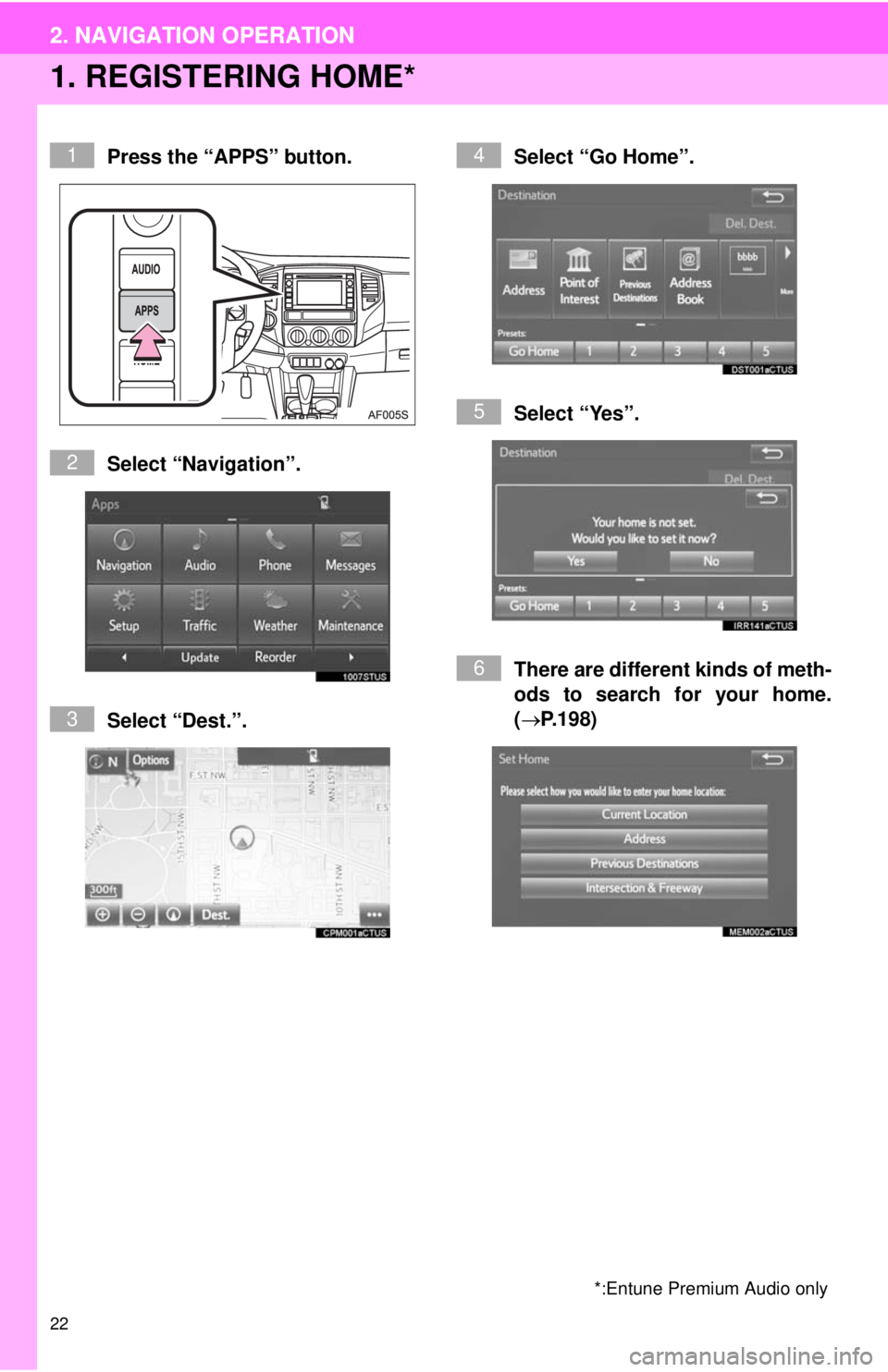
1. REGISTERING HOME*
Press the “APPS” button.
Select “Navigation”.
Select “Dest.”.Select “Go Home”.
Select “Yes”.
There are different kinds of meth-
ods to search for your home.
(P.198)
*:Entune Premium Audio only
1
2
3
4
5
6
2. NAVIGATION OPERATION
Page 24 of 276
24
2. NAVIGATION OPERATION
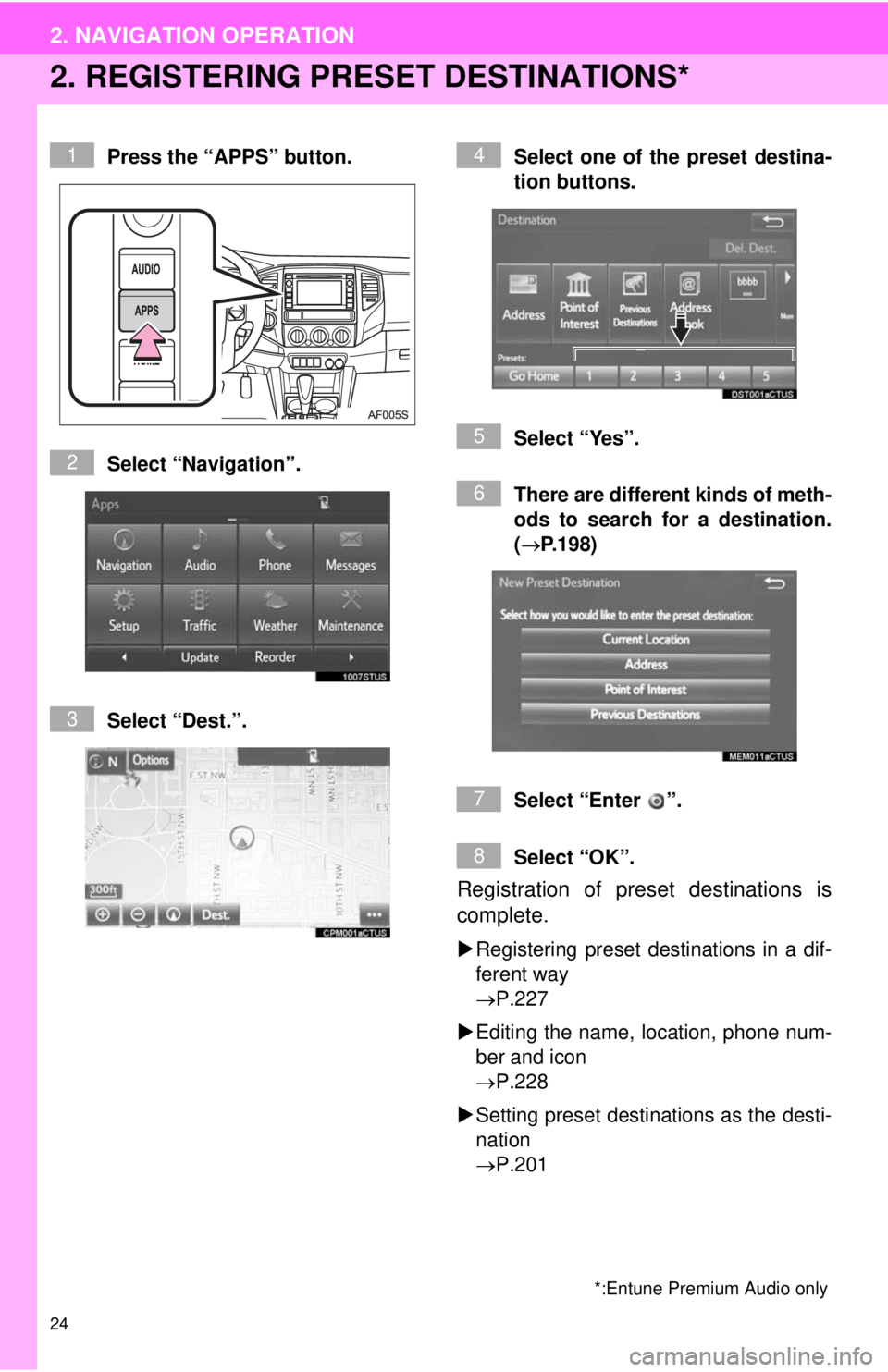
2. REGISTERING PRESET DESTINATIONS*
Press the “APPS” button.
Select “Navigation”.
Select “Dest.”.Select one of the preset destina-
tion buttons.
Select “Yes”.
There are different kinds of meth-
ods to search for a destination.
(P.198)
Select “Enter ”.
Select “OK”.
Registration of preset destinations is
complete.
Registering preset destinations in a dif-
ferent way
P.227
Editing the name, location, phone num-
ber and icon
P.228
Setting preset destinations as the desti-
nation
P.201
*:Entune Premium Audio only
1
2
3
4
5
6
7
8
Page 25 of 276
25
2. NAVIGATION OPERATION
1
QUICK GUIDE
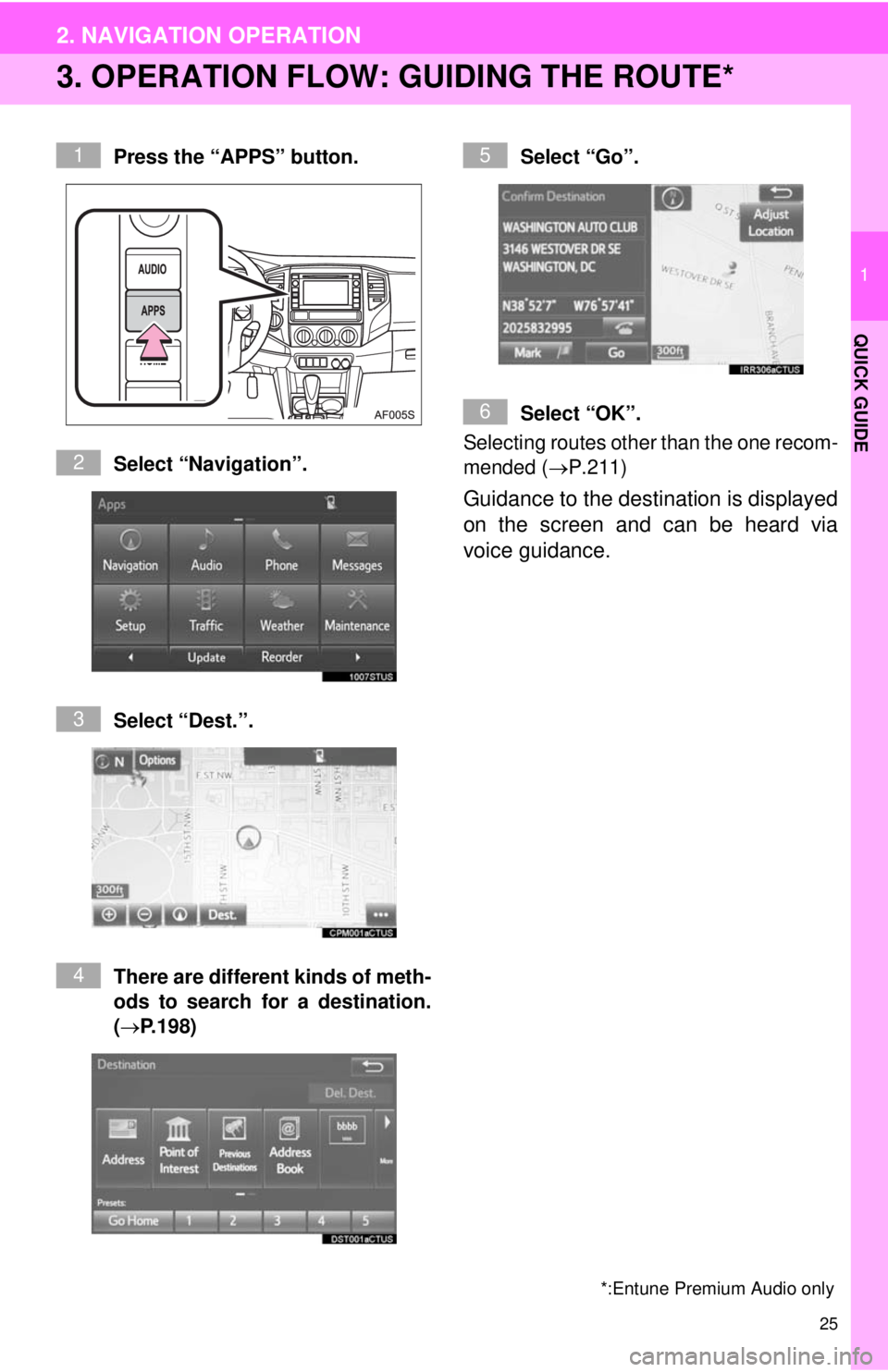
3. OPERATION FLOW: GUIDING THE ROUTE*
Press the “APPS” button.
Select “Navigation”.
Select “Dest.”.
There are different kinds of meth-
ods to search for a destination.
(P.198)Select “Go”.
Select “OK”.
Selecting routes other than the one recom-
mended (P.211)
Guidance to the destination is displayed
on the screen and can be heard via
voice guidance.
*:Entune Premium Audio only
1
2
3
4
5
6
Page 26 of 276
26
2. NAVIGATION OPERATION
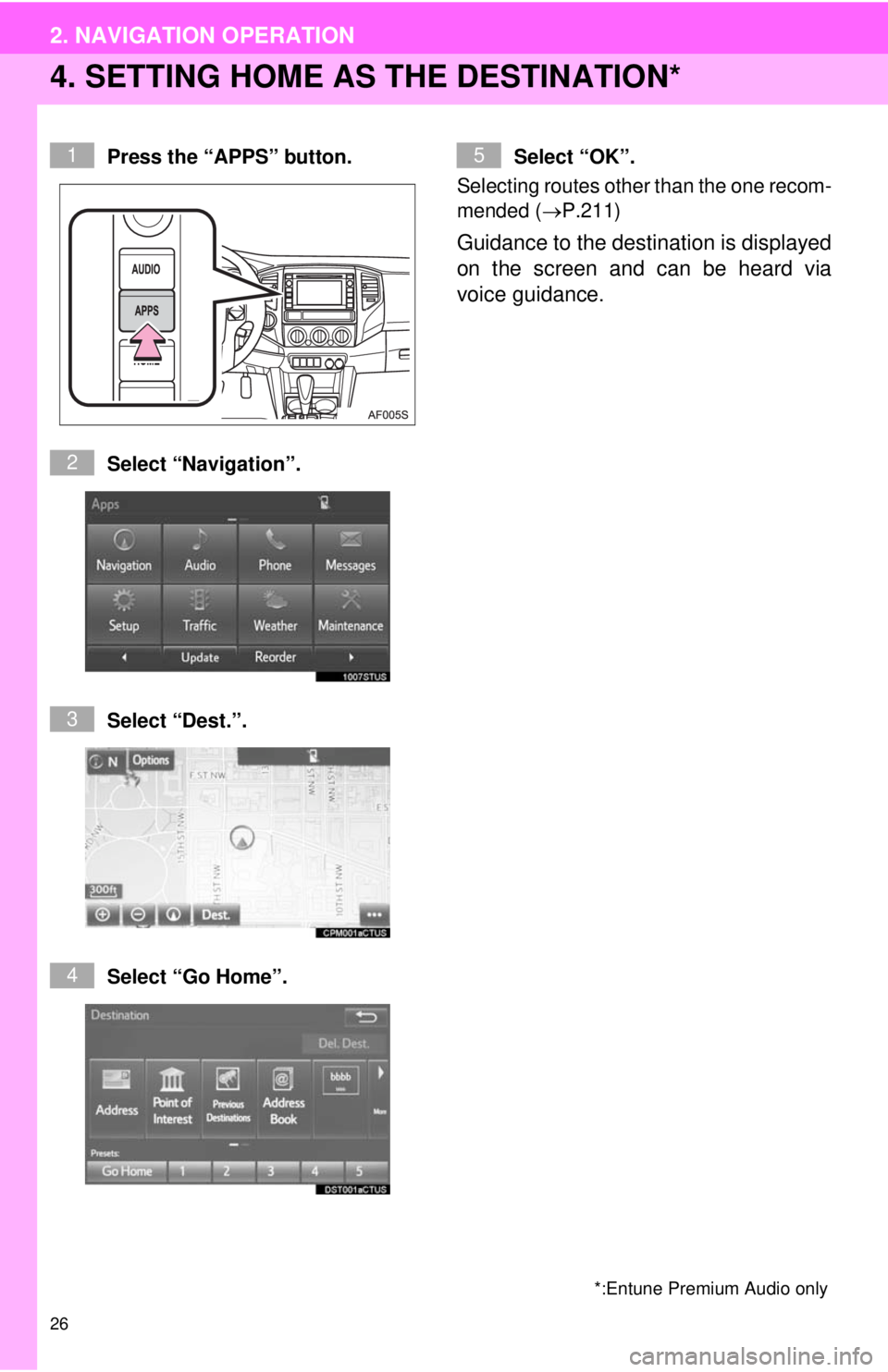
4. SETTING HOME AS THE DESTINATION*
Press the “APPS” button.
Select “Navigation”.
Select “Dest.”.
Select “Go Home”.Select “OK”.
Selecting routes other than the one recom-
mended (P.211)
Guidance to the destination is displayed
on the screen and can be heard via
voice guidance.
*:Entune Premium Audio only
1
2
3
4
5
Page 27 of 276
27
1
QUICK GUIDE
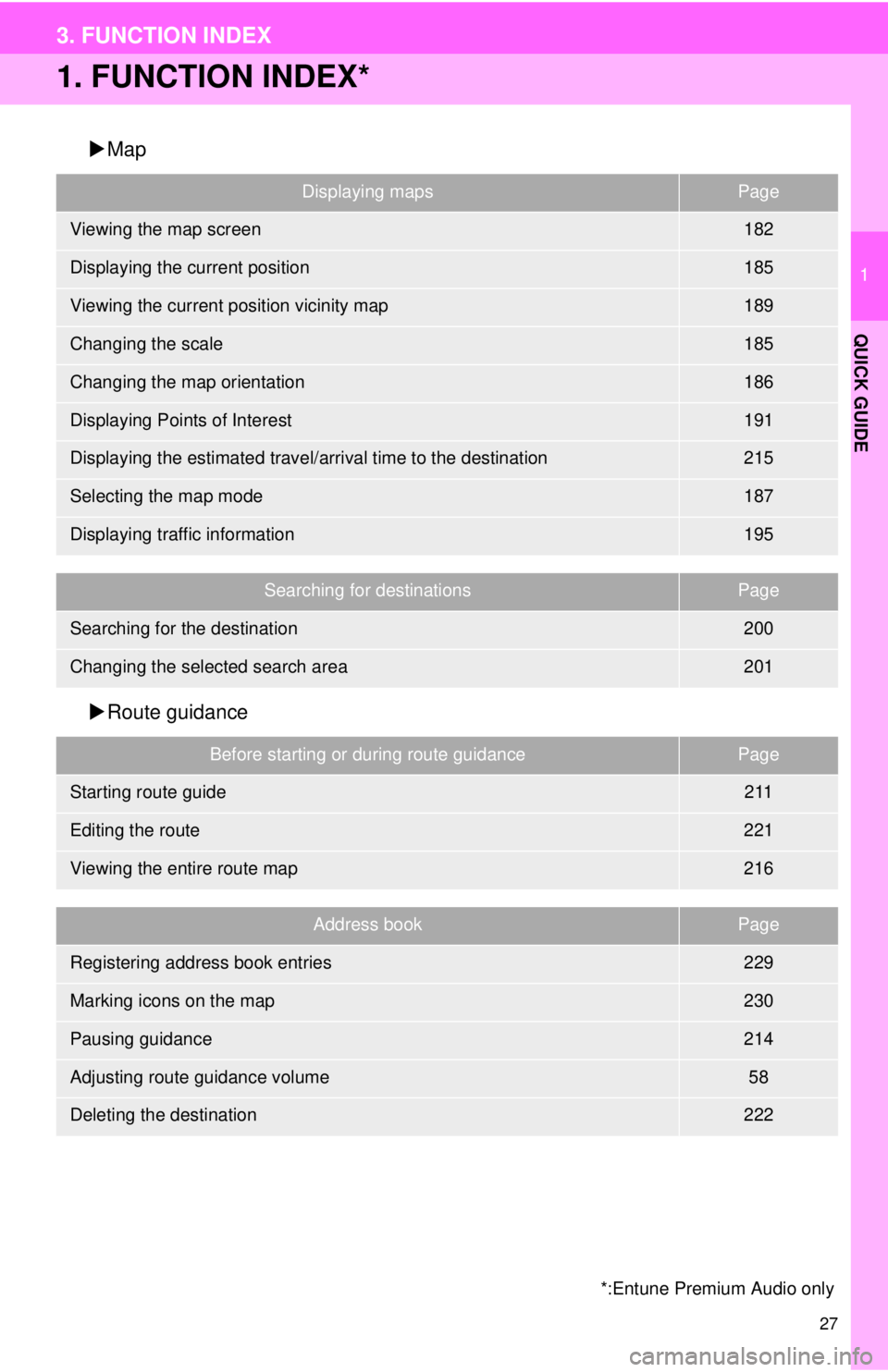
3. FUNCTION INDEX
1. FUNCTION INDEX*
Map
Route guidance
Displaying mapsPage
Viewing the map screen182
Displaying the current position185
Viewing the current position vicinity map189
Changing the scale185
Changing the map orientation186
Displaying Points of Interest191
Displaying the estimated travel/arrival time to the destination215
Selecting the map mode187
Displaying traffic information195
Searching for destinationsPage
Searching for the destination200
Changing the selected search area201
Before starting or during route guidancePage
Starting route guide211
Editing the route221
Viewing the entire route map216
Address bookPage
Registering address book entries229
Marking icons on the map230
Pausing guidance214
Adjusting route guidance volume58
Deleting the destination222
*:Entune Premium Audio only
Page 29 of 276
1
2
3
4
5
6
7
8
9
2
29
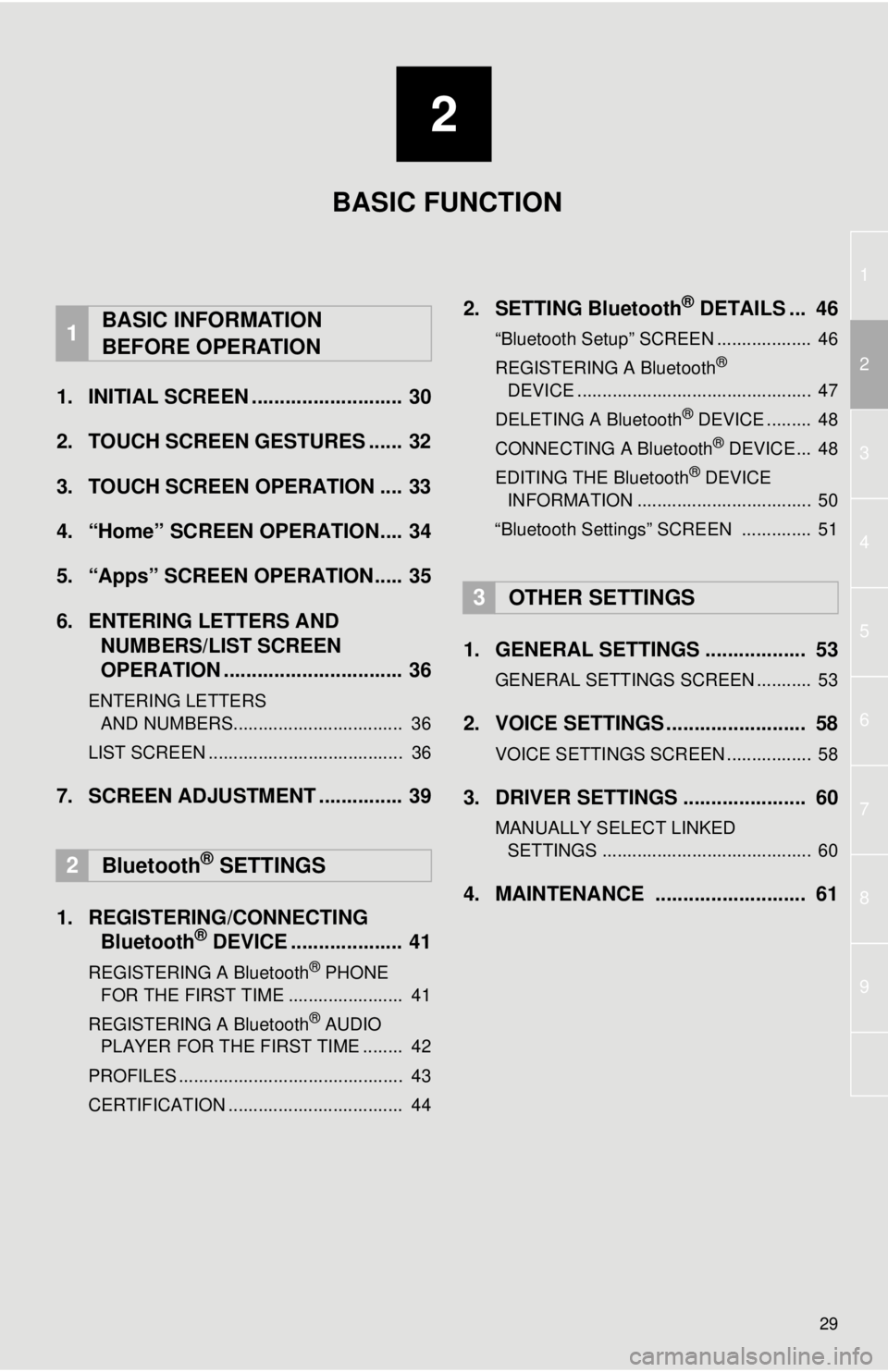
1. INITIAL SCREEN ........................... 30
2. TOUCH SCREEN GESTURES ...... 32
3. TOUCH SCREEN OPERATION .... 33
4. “Home” SCREEN OPERATION.... 34
5. “Apps” SCREEN OPERATION..... 35
6. ENTERING LETTERS AND
NUMBERS/LIST SCREEN
OPERATION ................................ 36
ENTERING LETTERS
AND NUMBERS.................................. 36
LIST SCREEN ....................................... 36
7. SCREEN ADJUSTMENT ............... 39
1. REGISTERING/CONNECTING
Bluetooth
® DEVICE .................... 41
REGISTERING A Bluetooth® PHONE
FOR THE FIRST TIME ....................... 41
REGISTERING A Bluetooth
® AUDIO
PLAYER FOR THE FIRST TIME ........ 42
PROFILES ............................................. 43
CERTIFICATION ................................... 44
2. SETTING Bluetooth® DETAILS ... 46
“Bluetooth Setup” SCREEN ................... 46
REGISTERING A Bluetooth®
DEVICE ............................................... 47
DELETING A Bluetooth
® DEVICE ......... 48
CONNECTING A Bluetooth® DEVICE ... 48
EDITING THE Bluetooth® DEVICE
INFORMATION ................................... 50
“Bluetooth Settings” SCREEN .............. 51
1. GENERAL SETTINGS .................. 53
GENERAL SETTINGS SCREEN ........... 53
2. VOICE SETTINGS ......................... 58
VOICE SETTINGS SCREEN ................. 58
3. DRIVER SETTINGS ...................... 60
MANUALLY SELECT LINKED
SETTINGS .......................................... 60
4. MAINTENANCE ........................... 61
1BASIC INFORMATION
BEFORE OPERATION
2Bluetooth® SETTINGS
3OTHER SETTINGS
BASIC FUNCTION
Page 30 of 276
30
1. BASIC INFORMATION BEFORE OPERATION
1. INITIAL SCREEN
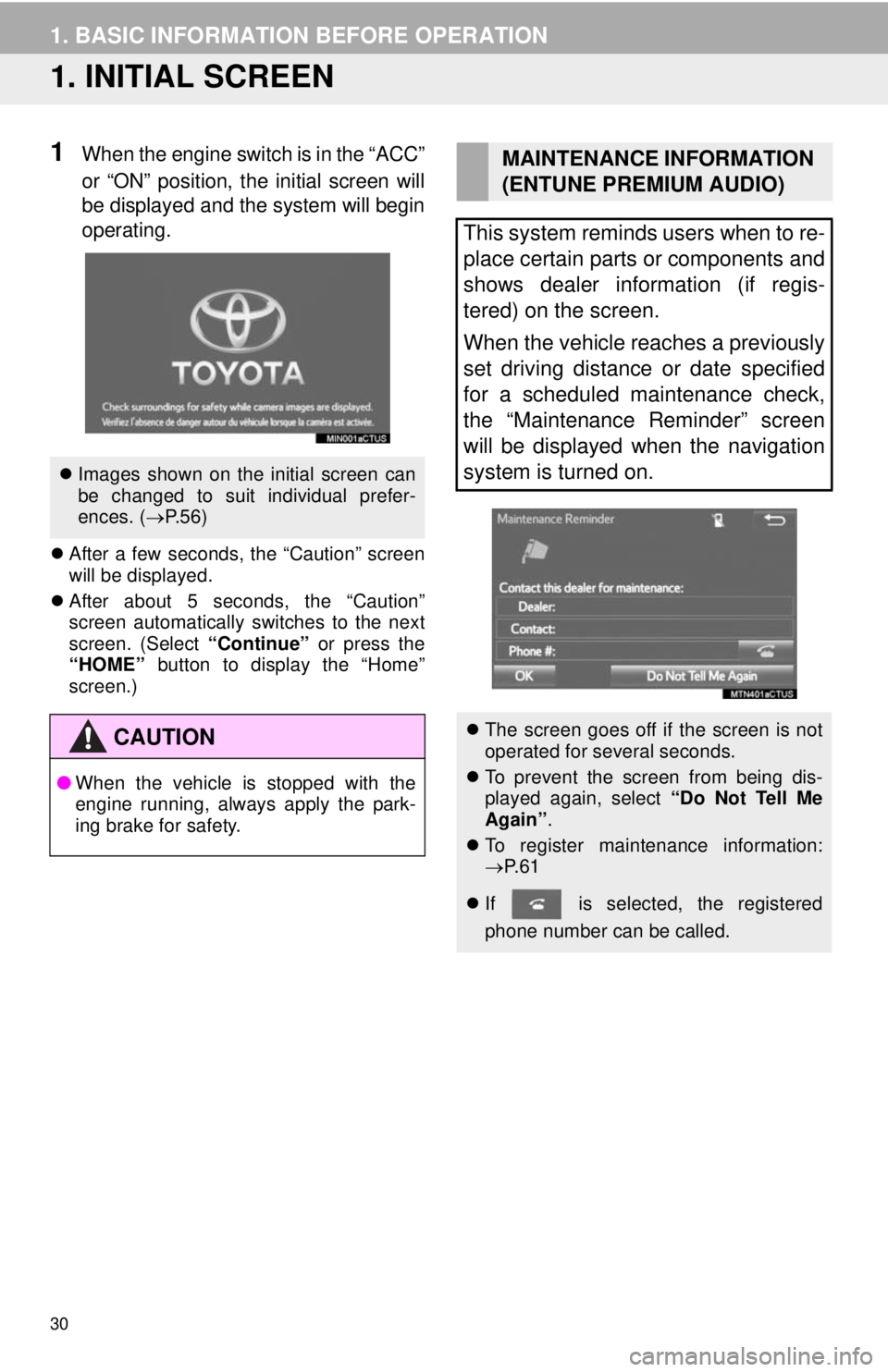
1When the engine switch is in the “ACC”
or “ON” position, the initial screen will
be displayed and the system will begin
operating.
After a few seconds, the “Caution” screen
will be displayed.
After about 5 seconds, the “Caution”
screen automatically switches to the next
screen. (Select “Continue” or press the
“HOME” button to display the “Home”
screen.)
Images shown on the initial screen can
be changed to suit individual prefer-
ences. (P.56)
CAUTION
●When the vehicle is stopped with the
engine running, always apply the park-
ing brake for safety.
MAINTENANCE INFORMATION
(ENTUNE PREMIUM AUDIO)
This system reminds users when to re-
place certain parts or components and
shows dealer information (if regis-
tered) on the screen.
When the vehicle reaches a previously
set driving distance or date specified
for a scheduled maintenance check,
the “Maintenance Reminder” screen
will be displayed when the navigation
system is turned on.
The screen goes off if the screen is not
operated for several seconds.
To prevent the screen from being dis-
played again, select “Do Not Tell Me
Again”.
To register maintenance information:
P. 6 1
If is selected, the registered
phone number can be called.
Page 32 of 276
32
1. BASIC INFORMATION BEFORE OPERATION
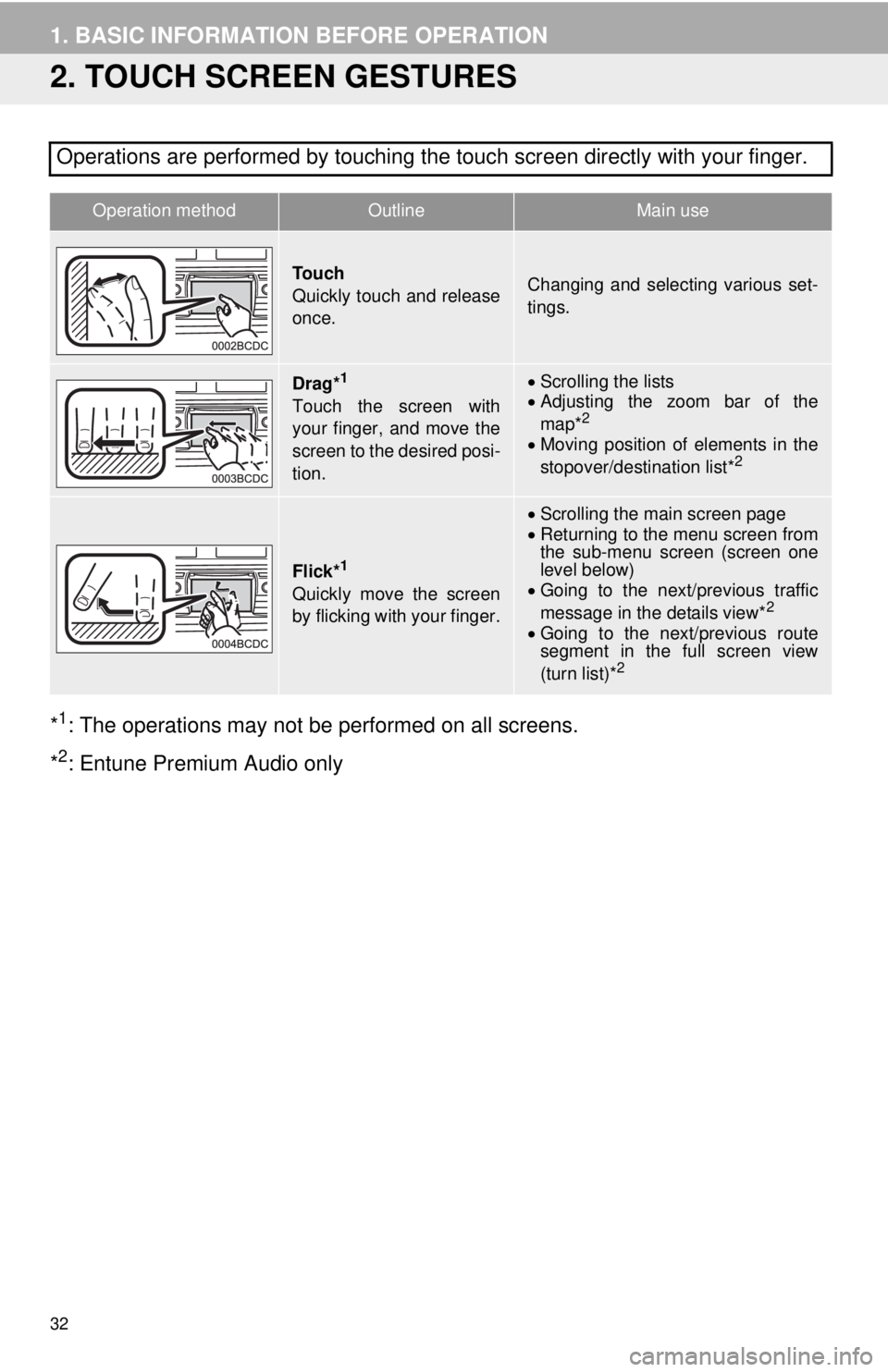
2. TOUCH SCREEN GESTURES
*1: The operations may not be performed on all screens.
*
2: Entune Premium Audio only Operations are performed by touching the touch screen directly with your finger.
Operation methodOutline Main use
To u c h
Quickly touch and release
once.Changing and selecting various set-
tings.
Drag*1
Touch the screen with
your finger, and move the
screen to the desired posi-
tion.
Scrolling the lists
Adjusting the zoom bar of the
map*
2
Moving position of elements in the
stopover/destination list*2
Flick*1
Quickly move the screen
by flicking with your finger.
Scrolling the main screen page
Returning to the menu screen from
the sub-menu screen (screen one
level below)
Going to the next/previous traffic
message in the details view*
2
Going to the next/previous route
segment in the full screen view
(turn list)*
2