audio TOYOTA TACOMA 2014 Accessories, Audio & Navigation (in English)
[x] Cancel search | Manufacturer: TOYOTA, Model Year: 2014, Model line: TACOMA, Model: TOYOTA TACOMA 2014Pages: 276, PDF Size: 19.59 MB
Page 1 of 276
1
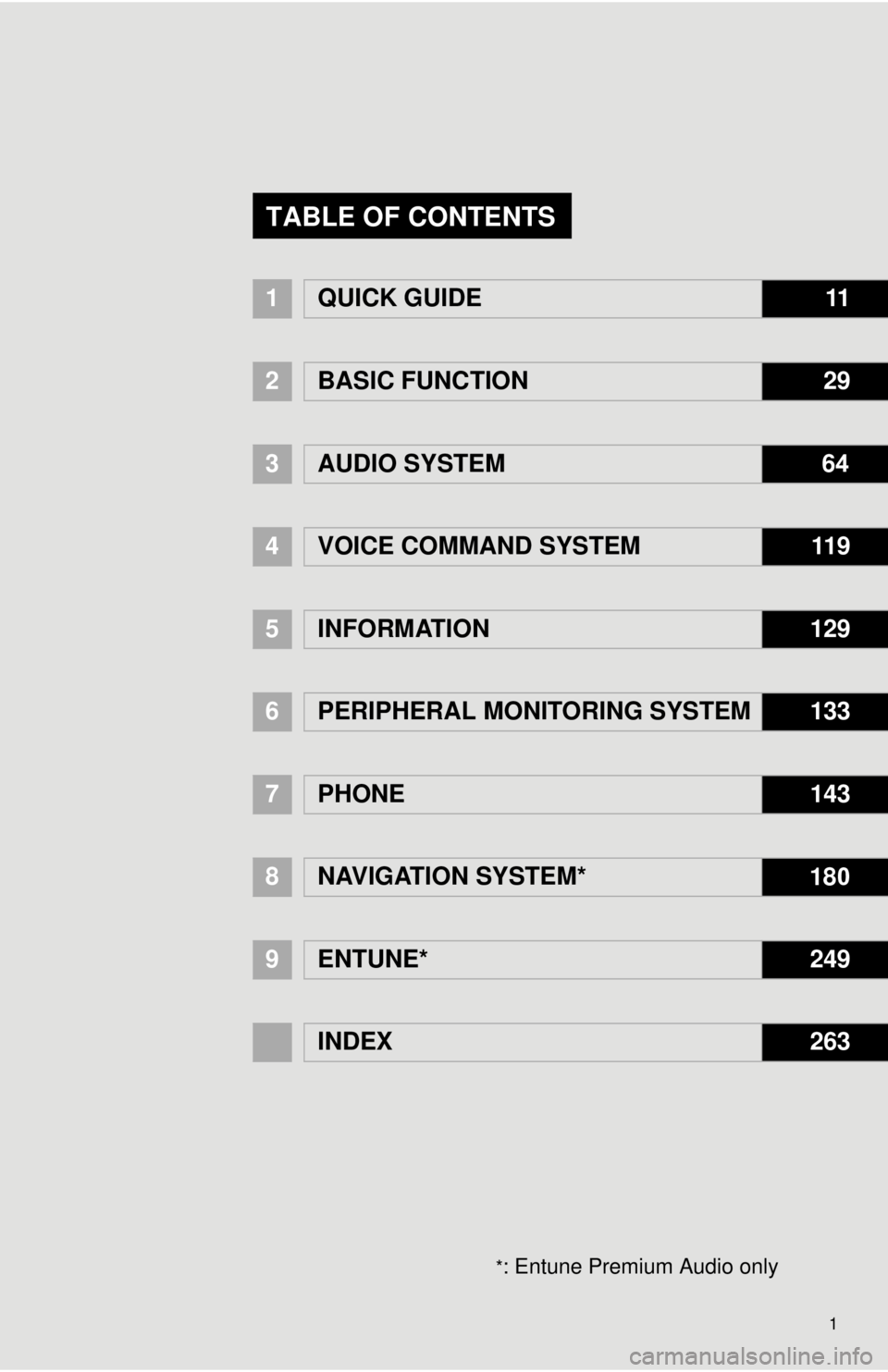
1QUICK GUIDE11
2BASIC FUNCTION29
3AUDIO SYSTEM 64
4
VOICE COMMAND SYSTEM11 9
5INFORMATION129
6PERIPHERAL MONITORING SYSTEM133
7PHONE143
8NAVIGATION SYSTEM* 180
9
ENTUNE*249
INDEX263
TABLE OF CONTENTS
*: Entune Premium Audio only
Page 3 of 276

3
The Navigation System is one of the most technologically advanced vehicle ac-
cessories ever developed. The system receives satellite signals from the Global
Positioning System (GPS) operated by the U.S. Department of Defense. Using
these signals and other vehicle sensors, the system indicates your present po-
sition and assists in locating a desired destination.
The navigation system is designed to select efficient routes from your present
starting location to your destination. The system is also designed to direct you
to a destination that is unfamiliar to you in an efficient manner. Map database is
made based on AISIN AW maps, whose information source comes from
NAVTEQ maps. The calculated routes may not be the shortest nor the least traf-
fic congested. Your own personal local knowledge or “short cut” may at times
be faster than the calculated routes.
The navigation system’s database includes Point of Interest categories to allow
you to easily select destinations such as restaurants and hotels. If a destination
is not in the database, you can enter the street address or a major intersection
close to it and the system will guide you there.
The system will provide both a visual map and audio instructions. The audio in-
structions will announce the distance remaining and the direction to turn in when
approaching an intersection. These voice instructions will help you keep your
eyes on the road and are timed to provide enough time to allow you to maneu-
ver, change lanes or slow down.
Please be aware that all current vehicle navigation systems have certain limita-
tions that may affect their ability to perform properly. The accuracy of the vehi-
cle’s position depends on satellite conditions, road configuration, vehicle
condition or other circumstances. For more information on the limitations of the
system, refer to page 244.
NAVIGATION SYSTEM
Page 6 of 276

6
To use this system in the safest possible
manner, follow all the safety tips shown
below.
This system is intended to assist in reach-
ing the destination and, if used properly,
can do so. The driver is solely responsible
for the safe operation of your vehicle and
the safety of your passengers.
Do not use any feature of this system to
the extent it becomes a distraction and
prevents safe driving. The first priority
while driving should always be the safe op-
eration of the vehicle. While driving, be
sure to observe all traffic regulations.
Prior to the actual use of this system, learn
how to use it and become thoroughly famil-
iar with it. Read the entire Owner’s Manual
to make sure you understand the system.
Do not allow other people to use this sys-
tem until they have read and understood
the instructions in this manual.
For your safety, some functions may be-
come inoperable when driving. Unavail-
able screen buttons are dimmed. Only
when the vehicle is not moving, can the
destination and route selection be done.While driving, listen to the voice instruc-
tions as much as possible and glance at
the screen briefly and only when it is safe.
However, do not totally rely on voice guid-
ance. Use it just for reference. If the sys-
tem cannot determine the current position
correctly, there is a possibility of incorrect,
late, or non-voice guidance.
The data in the system may occasionally
be incomplete. Road conditions, including
driving restrictions (no left turns, street clo-
sures, etc.) frequently change. Therefore,
before following any instructions from the
system, look to see whether the instruction
can be done safely and legally.
This system cannot warn about such
things as the safety of an area, condition of
streets, and availability of emergency ser-
vices. If unsure about the safety of an ar-
ea, do not drive into it. Under no
circumstances is this system a substitute
for the driver’s personal judgement.
Use this system only in locations where it
is legal to do so. Some states/provinces
may have laws prohibiting the use of video
and navigation screens next to the driver.
SAFETY INSTRUCTION
(ENTUNE PREMIUM AUDIO)CAUTION
●For safety, the driver should not operate
the navigation system while he/she is
driving. Insufficient attention to the road
and traffic may cause an accident.
●While driving, be sure to obey the traffic
regulations and maintain awareness of
the road conditions. If a traffic sign on
the road has been changed, route guid-
ance may not have the updated informa-
tion such as the direction of a one way
street.
Page 7 of 276

7
To use this system in the safest possible
manner, follow all the safety tips shown
below.
Do not use any feature of this system to
the extent it becomes a distraction and
prevents safe driving. The first priority
while driving should always be the safe op-
eration of the vehicle. While driving, be
sure to observe all traffic regulations.
Prior to the actual use of this system, learn
how to use it and become thoroughly famil-
iar with it. Read the entire Owner's Manual
to make sure you understand the system.
Do not allow other people to use this sys-
tem until they have read and understood
the instructions in this manual.
For your safety, some functions may be-
come inoperable when driving. Unavail-
able screen buttons are dimmed.
SAFETY INSTRUCTION
(ENTUNE AUDIO PLUS)
CAUTION
●For safety, the driver should not operate
the Multimedia System while he/she is
driving. Insufficient attention to the road
and traffic may cause an accident.
Page 8 of 276

TABLE OF CONTENTS
8
1. CONTROLS AND FEATURES ........ 12
OVERVIEW BUTTONS ......................... 12
“Apps” SCREEN .................................... 14
“Home” SCREEN ................................... 16
“Setup” SCREEN ................................... 20
2. NAVIGATION OPERATION ............ 22
REGISTERING HOME .......................... 22
REGISTERING PRESET
DESTINATIONS .................................. 24
OPERATION FLOW: GUIDING
THE ROUTE........................................ 25
SETTING HOME AS
THE DESTINATION ............................ 26
3. FUNCTION INDEX ........................... 27
FUNCTION INDEX ................................ 27
1. BASIC INFORMATION BEFORE
OPERATION .................................. 30
INITIAL SCREEN ................................... 30
TOUCH SCREEN GESTURES ............. 32
TOUCH SCREEN OPERATION ............ 33
“Home” SCREEN OPERATION ............. 34
“Apps” SCREEN OPERATION .............. 35
ENTERING LETTERS AND NUMBERS/
LIST SCREEN OPERATION............... 36
SCREEN ADJUSTMENT ....................... 39
2. Bluetooth® SETTINGS.................... 41
REGISTERING/CONNECTING
Bluetooth® DEVICE............................. 41
SETTING Bluetooth® DETAILS ............. 46
3. OTHER SETTINGS .......................... 53
GENERAL SETTINGS ........................... 53
VOICE SETTINGS ................................. 58
DRIVER SETTINGS .............................. 60
MAINTENANCE .................................... 61
1. BASIC OPERATION ....................... 66
QUICK REFERENCE ............................. 66
SOME BASICS....................................... 68
2. RADIO OPERATION ....................... 73
AM/FM RADIO ....................................... 73
XM Satellite Radio .................................. 82
INTERNET RADIO ................................. 88
3. MEDIA OPERATION ....................... 89
CD .......................................................... 89
USB MEMORY ....................................... 92
iPod ........................................................ 96
Bluetooth
® AUDIO................................ 100
AUX...................................................... 104
4. AUDIO REMOTE CONTROLS...... 106
STEERING SWITCHES ....................... 106
5. SETUP ........................................... 107
AUDIO SETTINGS ............................... 107
6. TIPS FOR OPERATING
THE AUDIO SYSTEM.................. 109
OPERATING INFORMATION .............. 109
1QUICK GUIDE
2BASIC FUNCTION
3AUDIO SYSTEM
Page 12 of 276
12
1. CONTROLS AND FEATURES
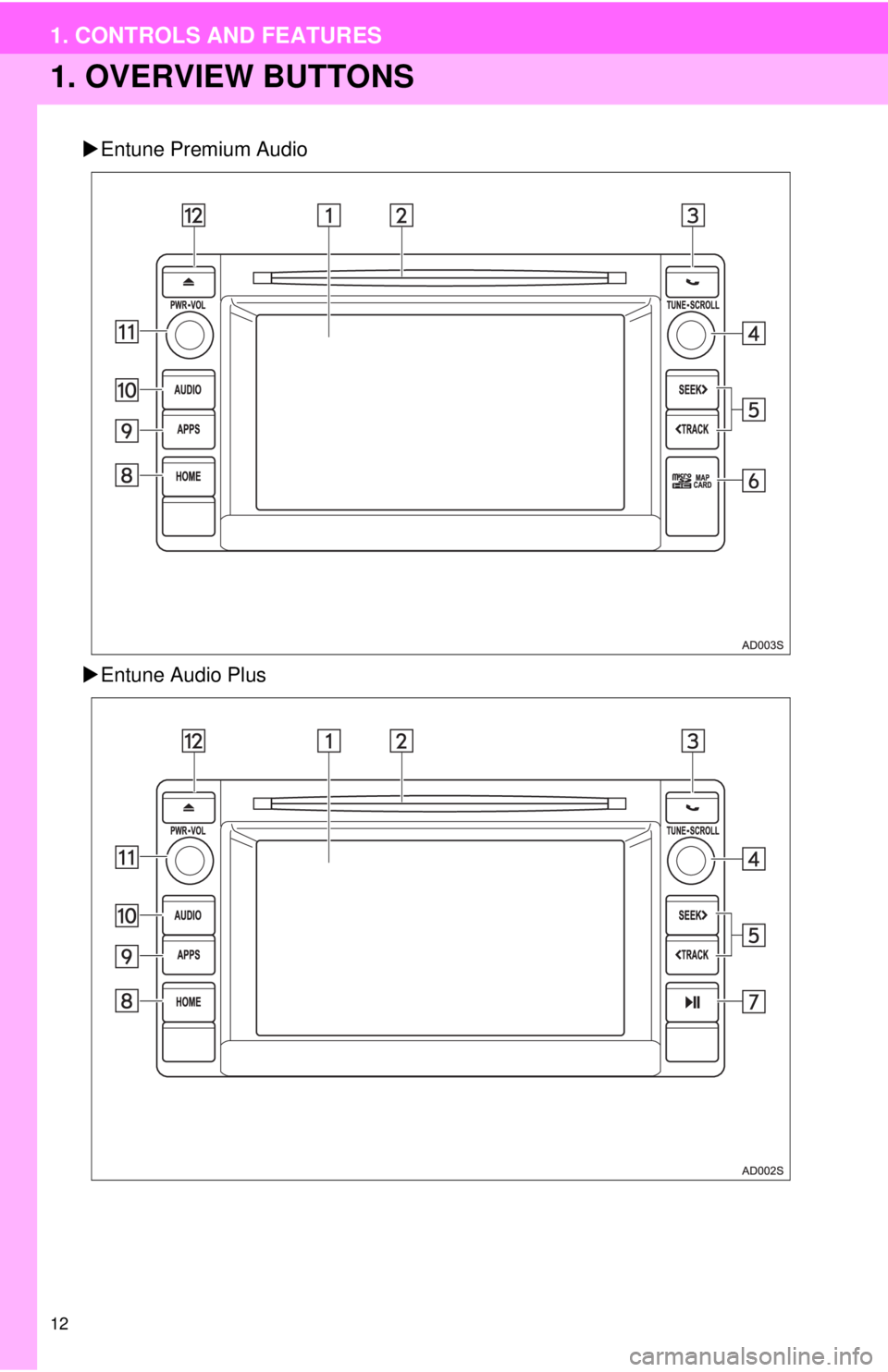
1. OVERVIEW BUTTONS
Entune Premium Audio
Entune Audio Plus
Page 13 of 276
13
1. CONTROLS AND FEATURES
1
QUICK GUIDE
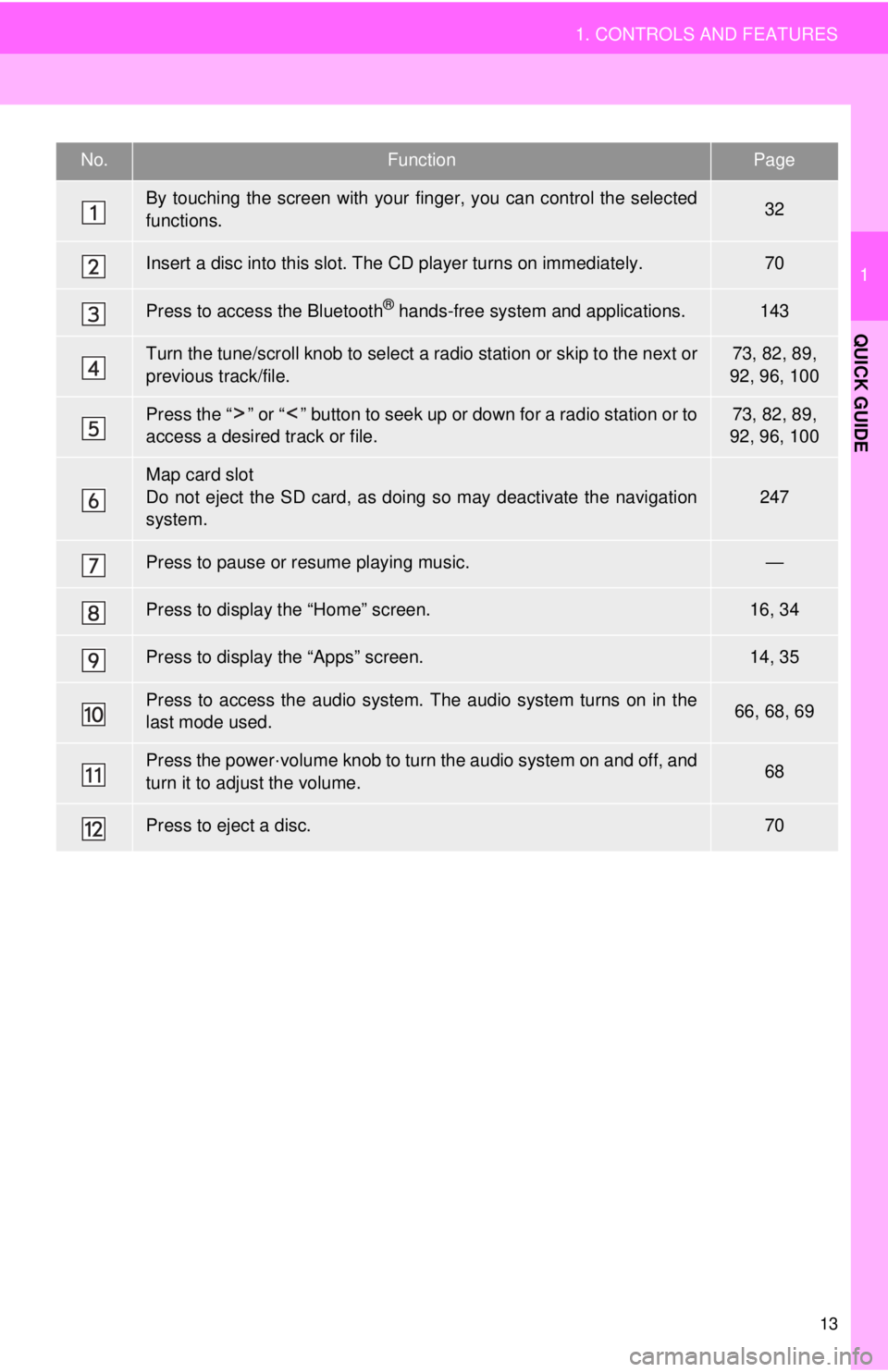
No.FunctionPage
By touching the screen with your finger, you can control the selected
functions.32
Insert a disc into this slot. The CD player turns on immediately.70
Press to access the Bluetooth® hands-free system and applications.143
Turn the tune/scroll knob to select a radio station or skip to the next or
previous track/file.73, 82, 89,
92, 96, 100
Press the “ ” or “ ” button to seek up or down for a radio station or to
access a desired track or file.73, 82, 89,
92, 96, 100
Map card slot
Do not eject the SD card, as doing so may deactivate the navigation
system.247
Press to pause or resume playing music.—
Press to display the “Home” screen.16, 34
Press to display the “Apps” screen.14, 35
Press to access the audio system. The audio system turns on in the
last mode used.66, 68, 69
Press the power·volume knob to turn the audio system on and off, and
turn it to adjust the volume.68
Press to eject a disc.70
Page 14 of 276
14
1. CONTROLS AND FEATURES
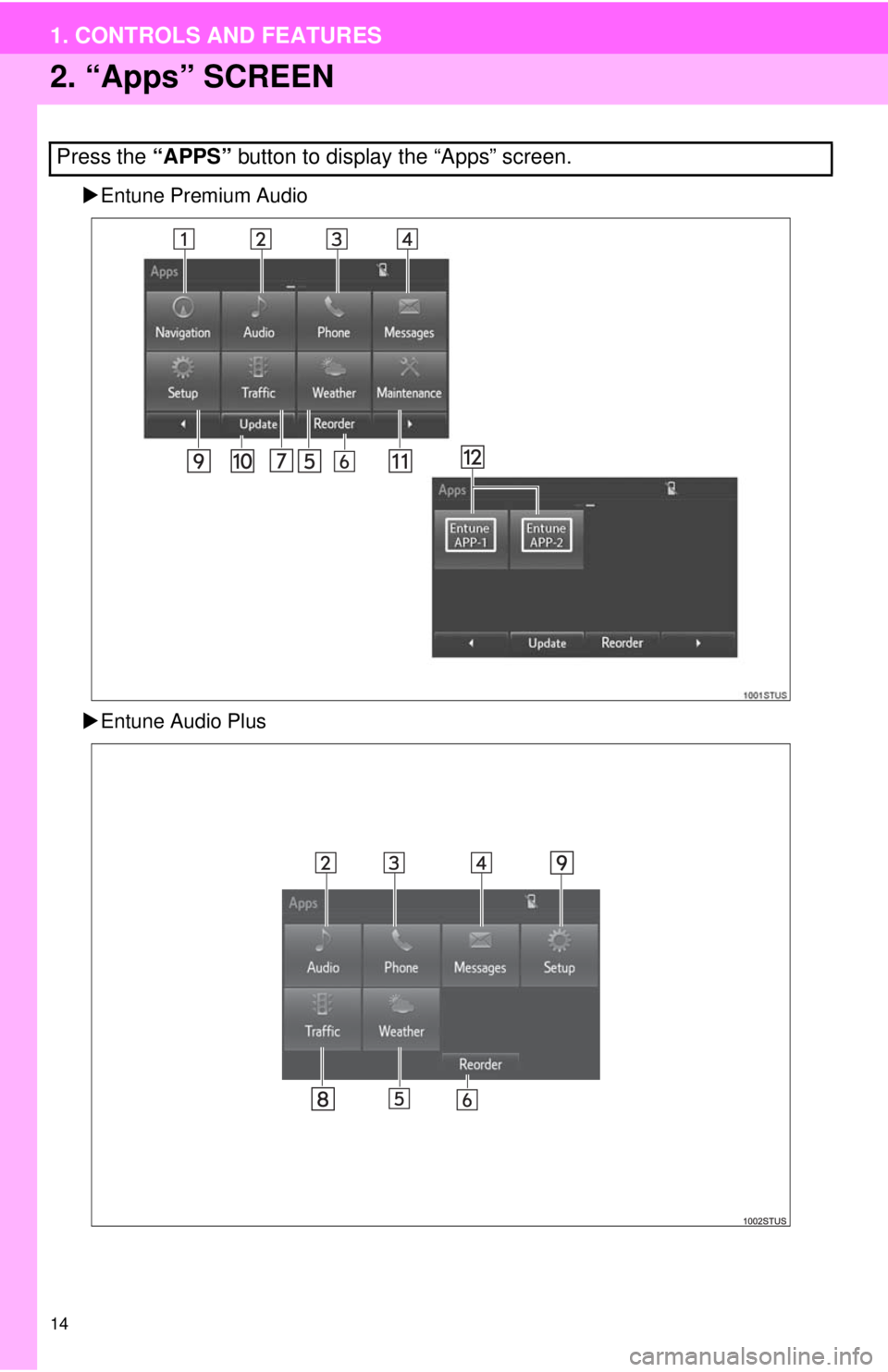
2. “Apps” SCREEN
Entune Premium Audio
Entune Audio Plus
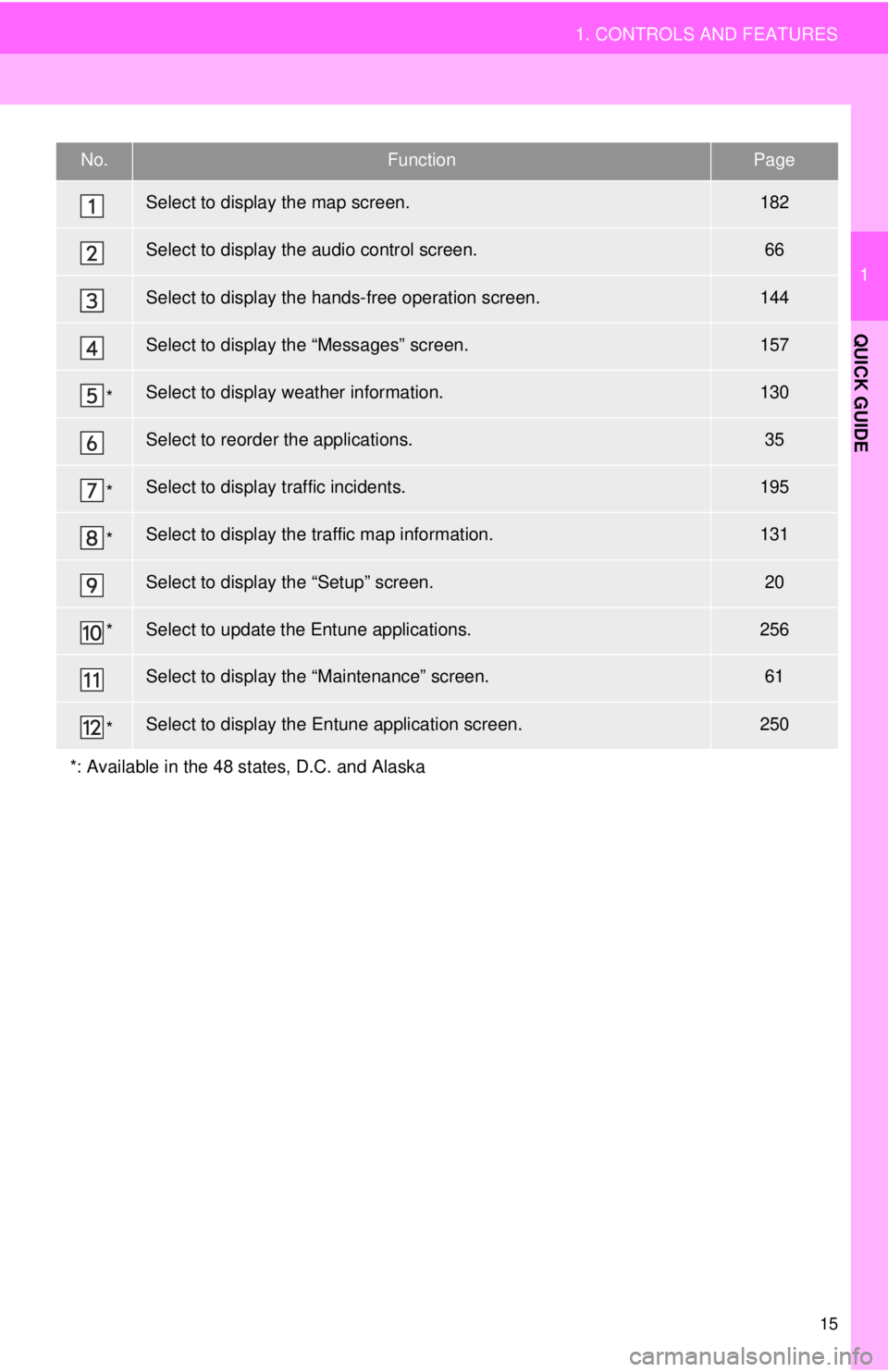
Press the “APPS” button to display the “Apps” screen.
Page 15 of 276
15
1. CONTROLS AND FEATURES
1
QUICK GUIDE
No.FunctionPage
Select to display the map screen.182
Select to display the audio control screen.66
Select to display the hands-free operation screen.144
Select to display the “Messages” screen.157
*Select to display weather information.130
Select to reorder the applications.35
*Select to display traffic incidents.195
*Select to display the traffic map information.131
Select to display the “Setup” screen.20
*Select to update the Entune applications.256
Select to display the “Maintenance” screen.61
*Select to display the Entune application screen.250
*: Available in the 48 states, D.C. and Alaska
Page 16 of 276
16
1. CONTROLS AND FEATURES
3. “Home” SCREEN
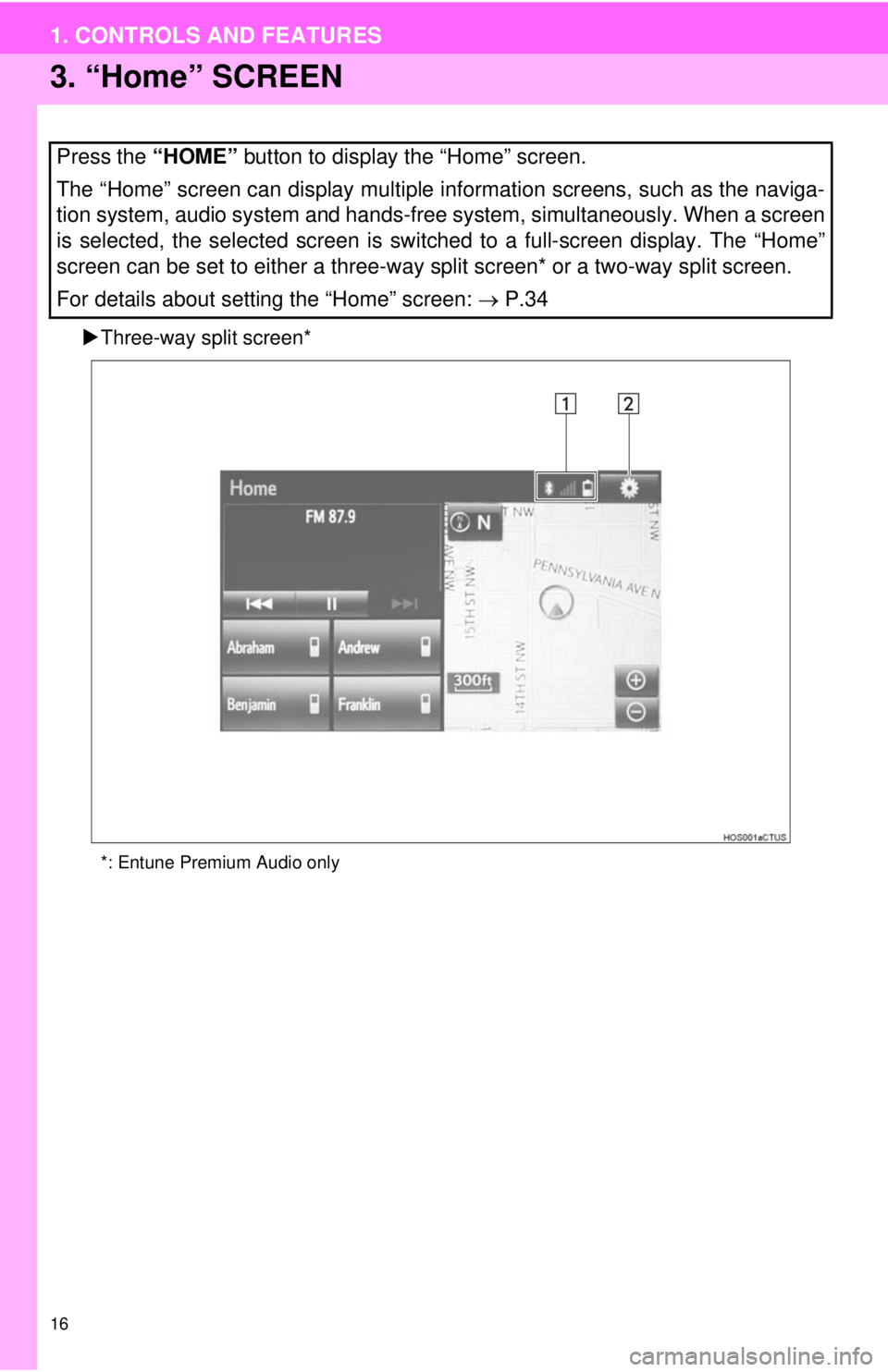
Three-way split screen*
*: Entune Premium Audio only
Press the “HOME” button to display the “Home” screen.
The “Home” screen can display multiple information screens, such as the naviga-
tion system, audio system and hands-free system, simultaneously. When a screen
is selected, the selected screen is switched to a full-screen display. The “Home”
screen can be set to either a three-way split screen* or a two-way split screen.
For details about setting the “Home” screen: P.34