service TOYOTA TACOMA 2014 Owners Manual (in English)
[x] Cancel search | Manufacturer: TOYOTA, Model Year: 2014, Model line: TACOMA, Model: TOYOTA TACOMA 2014Pages: 601, PDF Size: 11.67 MB
Page 4 of 601

TABLE OF CONTENTSIndex
4
3-3. Using the interior lightsInterior lights list ................. 347
• Interior light ...................... 348
• Personal lights ................. 348
3-4. Using the storage features List of storage features....... 349
• Glove box ......................... 350
• Front console box ............ 350
• Cup holders ...................... 351
• Bottle holders ................... 353
• Auxiliary boxes ................. 354
• Overhead console ............ 356
3-5. Other interior features Sun visors .......................... 357
Vanity mirrors ..................... 358
Clock .................................. 359
Power outlets (12 VDC) ..... 360
Power outlet (120 VAC) ..... 361
Seat heaters ....................... 367
Seatback table ................... 369
Floor mat ............................ 370
Luggage compartment features ............................ 372
Garage door opener ........... 381
Compass (vehicles with auto anti-glare inside
rear view mirror) ............... 389 4-1. Maintenance and care
Cleaning and protecting the vehicle exterior ........... 396
Cleaning and protecting the vehicle interior ............ 399
4-2. Maintenance Maintenance requirements .................... 402
General maintenance ......... 404
Emission inspection and maintenance (I/M)
programs .......................... 407
4-3. Do-it-yourself maintenance Do-it-yourself service precautions ....................... 408
Hood ................................... 412
Engine compartment .......... 414
Tires.................................... 430
Tire inflation pressure ......... 439
Wheels................................ 444
Air conditioning filter ........... 447
Wireless remote control battery .............................. 450
Checking and replacing fuses ................................. 452
Light bulbs .......................... 462
4Maintenance and care
Page 28 of 601

28
●Disclosure of the EDR data
Toyota will not disclose the data recorded in an EDR to a third party except
when:
• An agreement from the vehicle’s owner (or the lessee for a leased vehicle) is obtained
• In response to an official request by the police, a court of law or a govern- ment agency
• For use by Toyota in a lawsuit
However, if necessary, Toyota may:
• Use the data for research on vehicle safety performance
• Disclose the data to a third party for research purposes without disclosing information about the specific vehicle or vehicle owner
Scrapping of your Toyota
The SRS airbag and seat belt pretensioner devices in your Toyota contain
explosive chemicals. If the vehicle is scrapped with the airbags and seat belt
pretensioners left as they are, this may cause an accident such as fire. Be
sure to have the systems of the SRS airbag and seat belt pretensioner
removed and disposed of by a qualified service shop or by your Toyota
dealer before you scrap your vehicle.
Perchlorate Material
Special handling may apply,
See www.dtsc.ca.gov/hazardouswaste/perchlorate.
Your vehicle has components that may contain perchlorate. These compo-
nents may include airbag, seat belt pretensioners, and wireless remote con-
trol batteries.
Page 209 of 601

209
2-5. Driving information
2
When driving
Off-road driving
When driving your vehicle off-road, please observe the following pre-
cautions to ensure your driving enjoyment and to help prevent the
closure of areas to off-road vehicles.
● Drive your vehicle only in areas wh ere off-road vehicles are permit-
ted to travel.
● Respect private property. Get owner’s permission before entering
private property.
● Do not enter areas that are closed. Honor gates, barriers and signs
that restrict travel.
● Stay on established roads. When conditions are wet, driving tech-
niques should be changed or trav el delayed to prevent damage to
roads.
■ Additional information for off-road driving
For owners in U.S. mainland, Hawaii and Puerto Rico:
To obtain additional information pertaining to driving your vehicle off-road,
consult the following organizations.
● State and Local Parks and Recreation Departments
● State Motor Vehicle Bureau
● Recreational Vehicle Clubs
● U.S. Forest Service and Bureau of Land Management
Page 219 of 601
219
2-5. Driving information
2
When driving
Winter driving tips
Carry out the necessary preparations and inspections before driving
the vehicle in winter. Always drive the vehicle in a manner appropri-
ate to the prevailing weather conditions.
■ Pre-winter preparations
●Use fluids that are appropriate to the prevailing outside tem-
peratures.
• Engine oil
• Engine coolant
• Washer fluid
● Have a service technician inspect the level and specific grav-
ity of battery electrolyte.
● Have the vehicle fitted with four snow tires or purchase a set
of tire chains for the rear tires.
Ensure that all tires are the same size and brand, and that chains
match the size of the tires.
■Before driving the vehicle
Perform the following according to the driving conditions.
●Do not try to forcibly open a window, scrape an outside rear
view mirror surface or move a wiper or outside rear view mir-
ror that is frozen. Pour warm water over the frozen area to
melt the ice. Wipe away the water immediately to prevent it
from freezing.
● To ensure proper operation of th e climate control system fan,
remove any snow that has accumulated on the air inlet vents
in front of the windshield.
● Remove any ice that has accumu lated on the vehicle chassis.
● Periodically check for and remove any excess ice or snow
that may have accumulated in the wheel well or on the
brakes.
Page 227 of 601
227
2-5. Driving information
2
When driving
Weight limits
● The gross trailer weight must never exceed the TWR described in
the table. ( P. 228, 529)
● The gross combination weight must never exceed the GCWR
described in the table. ( P. 228)
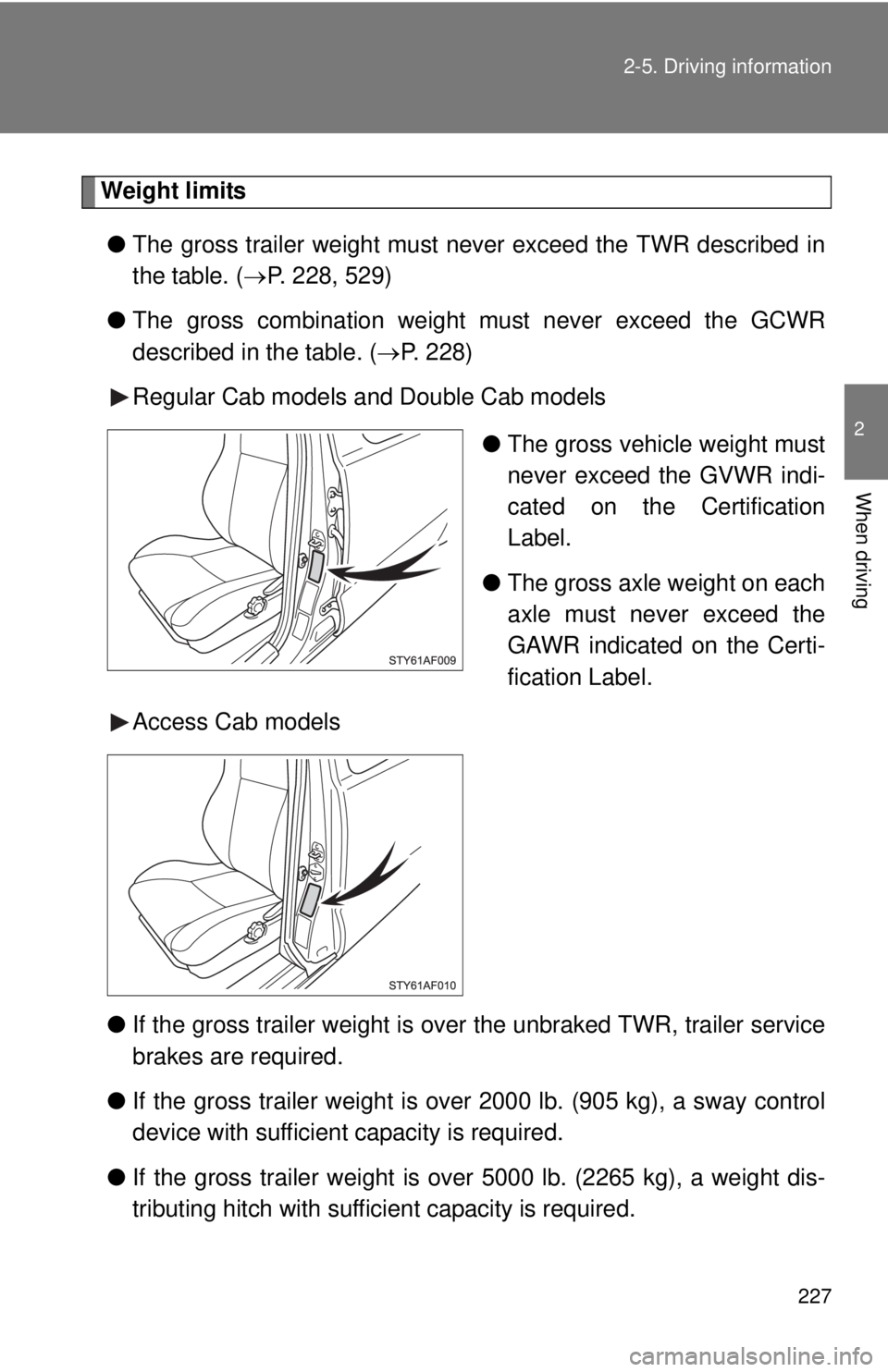
Regular Cab models and Double Cab models
●The gross vehicle weight must
never exceed the GVWR indi-
cated on the Certification
Label.
● The gross axle weight on each
axle must never exceed the
GAWR indicated on the Certi-
fication Label.
Access Cab models
● If the gross trailer weight is over the unbraked TWR, trailer service
brakes are required.
● If the gross trailer weight is over 2000 lb. (905 kg), a sway control
device with sufficient capacity is required.
● If the gross trailer weight is over 5000 lb. (2265 kg), a weight dis-
tributing hitch with sufficient capacity is required.
Page 236 of 601
236 2-5. Driving information
Trailer towing tipsYour vehicle will handle differently when towing a trailer. Help to avoid
an accident, death or serious injury, keep the following in mind when
towing:
● Speed limits for towing a trailer vary by state or province. Do not
exceed the posted towing speed limit.
● Toyota recommends that the vehicle-trailer speed limit is 65 mph
(104 km/h) on a flat, straight, dry road. Do not exceed this limit, the
posted towing speed limit or the speed limit for your trailer as set
forth in your trailer owner’s man ual, whichever is lowest. Instability
of the towing vehicle-trailer combin ation (trailer sway) increases as
speed increases. Exceeding speed limits may cause loss of con-
trol.
● Before starting out, check the trailer lights, tires and the vehicle-
trailer connections. Recheck after driving a short distance.
● Practice turning, stopping and reve rsing with the trailer attached in
an area away from traffic until you become accustomed to the feel
of the vehicle-trailer combination.
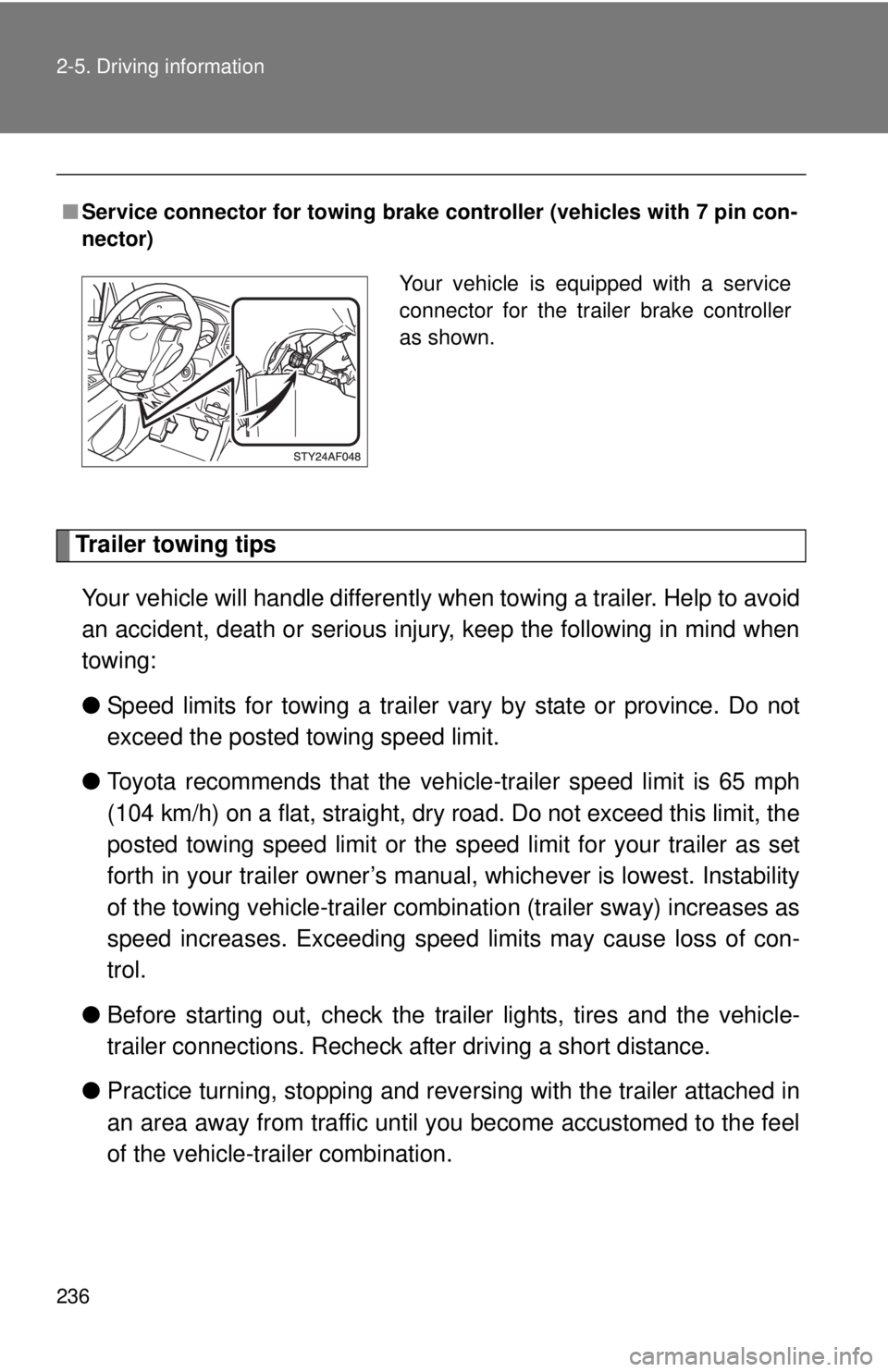
■ Service connector for towing brake co ntroller (vehicles with 7 pin con-
nector)
Your vehicle is equipped with a service
connector for the trailer brake controller
as shown.
Page 303 of 601
303
3-2. Using the multimedia system
3
Interior and exterior features
When making/receiving a call
When using the contacts
SymptomLikely causeSolution
A call cannot be
made/received.Your vehicle is in a out of
cellular service area.
Move to where “Out of
cellular service area.
Please try again later.” no
longer appears on the
display.
SymptomLikely causeSolution
Contact data
cannot be trans-
ferred manually/
automatically.
The profile version of the
connected cellular phone
may not be compatible
with transferring contact
data.
For a list of specific
devices which operation
has been confirmed on
this system, check with
your Toyota dealer or the
following website:
http://www.toyota.com/
bluetooth
Automatic contact trans-
fer function on this sys-
tem is set to off.Set automatic contact
transfer function on this
system to on. (
P. 331)
Passcode has not been
entered on the cellular
phone.Enter the passcode on
the cellular phone if
requested (default pass-
code: 1234).
Transfer operation on the
cellular phone has not
completed.Complete transfer opera-
tion on the cellular phone
(approve transfer opera-
tion on the phone).
Contact data
cannot be
edited.Automatic contact trans-
fer function on this sys-
tem is set to on.Set automatic contact
transfer function on this
system to off. (P. 331)
Page 307 of 601
307
3-2. Using the multimedia system
3
Interior and exterior features
■
Conditions under which th e system will not operate
● If using a cellular phone that does not support Bluetooth
®
●If the cellular phone is turned off
● If you are outside of cellular phone service coverage
● If the cellular phone is not connected
● If the cellular phone’s battery is low
● When outgoing calls are controlled, due to heavy traffic on telephone
lines, etc.
● When the cellular phone itself cannot be used
● When transferring contact data from the cellular phone
■ Bluetooth
® antenna
The antenna is built into the display.
If the portable audio player is behind the seat or in the glove box or console
box, or is touching or covered by metal objects, the connection status may
deteriorate.
If the cellular phone is behind the seat or in the console box, or touching or
covered by metal objects, the connection status may deteriorate.
■ Battery charge/signal status
●This display may not correspond exactly with the portable audio player or
cellular phone itself.
● This system does not have a charging function.
● The portable audio player or cellular phone battery will be depleted
quickly when the device is connected to Bluetooth
®.
■ When using the Bluetooth
® audio and hands-free system at the same
time
The following problems may occur.
● The Bluetooth
® audio connection may be interrupted.
● Noise may be heard during Bluetooth
® audio playback.
Page 309 of 601
309
3-2. Using the multimedia system
3
Interior and exterior features
●
Profiles:
• HFP (Hands Free Profile) Ver. 1.0 or higher (Recommended: Ver. 1.6
or higher)
This is a profile to allow hands-free phone calls using a cellular phone
or head set. It has outgoing and incoming call functions.
• OPP (Object Push Profile) Ver. 1. 1 or higher (Recommended: Ver. 1.2)
This is a profile to transfer contact data. When a Bluetooth
® compatible
cellular phone has both PBAP and OPP, OPP cannot be used.
• PBAP (Phone Book Access Profile) Ver. 1.0 or higher (Recommended:
Ver. 1.1)
This is a profile to transfer contact data.
If the cellular phone does not support HFP, you cannot register it with the
hands-free system. OPP, PBAP services must be selected individually.
■ Certifications for the Bluetooth
®
For vehicles sold in U.S.A.
FCC ID: ACJ932YEAP01A446
This device complies with Part 15 of the FCC Rules. Operation is subject to
the following two conditions: (1) this device may not cause harmful
interference, and (2) this device must accept any interference received,
including interference that may cause undesired operation. For vehicles sold in Canada
IC: 216J-YEAP01A446
This device complies with Industry Canada licence-exempt RSS stan-
dard(s). Operation is subject to the following two conditions: (1) this device
may not cause interference, and (2) this device must accept any interfer-
ence, including interference that may cause undesired operation of the
device.
This radio transmitter (identify the dev ice by certification number, or model
number if Category II) has been approved by Industry Canada to operate
with the antenna types listed below with the maximum permissible gain and
required antenna impedance for each antenna type indicated. Antenna
types not included in this list, having a gain greater than the maximum gain
indicated for that type, are strictly prohibited for use with this device.
Page 317 of 601
317
3-2. Using the multimedia system
3
Interior and exterior features
■
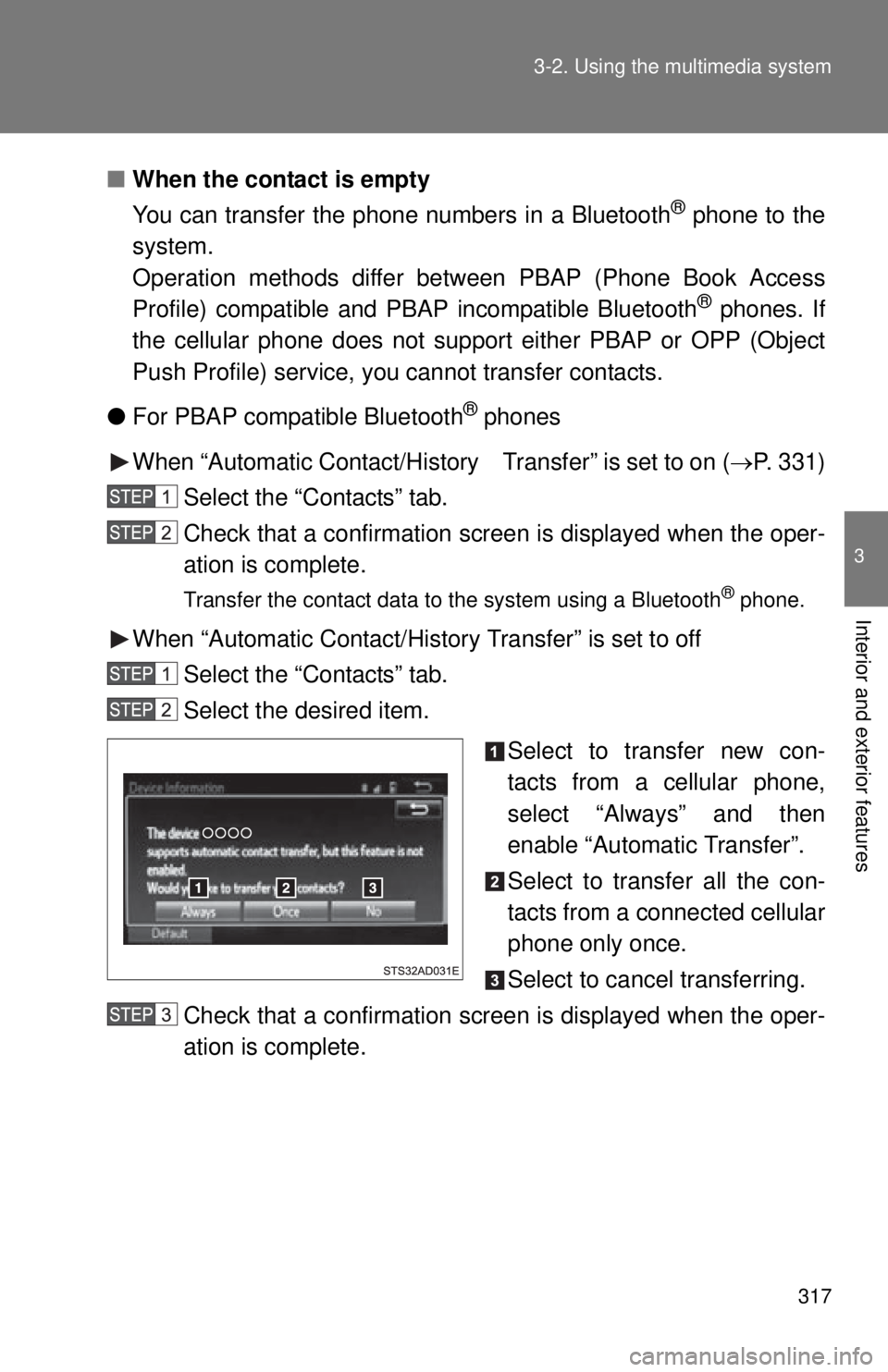
When the contact is empty
You can transfer the phone numbers in a Bluetooth
® phone to the
system.
Operation methods differ be tween PBAP (Phone Book Access
Profile) compatible and PBAP incompatible Bluetooth
® phones. If
the cellular phone does not support either PBAP or OPP (Object
Push Profile) service, you cannot transfer contacts.
● For PBAP compatible Bluetooth
® phones
When “Automatic Contact/History Transfer” is set to on (P. 331)
Select the “Contacts” tab.
Check that a confirmation screen is displayed when the oper-
ation is complete.
Transfer the contact data to the system using a Bluetooth® phone.
When “Automatic Contact/History Transfer” is set to off Select the “Contacts” tab.
Select the desired item.
Select to transfer new con-
tacts from a cellular phone,
select “Always” and then
enable “Automatic Transfer”.
Select to transfer all the con-
tacts from a connected cellular
phone only once.
Select to cancel transferring.
Check that a confirmation screen is displayed when the oper-
ation is complete.