air conditioning TOYOTA TACOMA 2016 Owners Manual (in English)
[x] Cancel search | Manufacturer: TOYOTA, Model Year: 2016, Model line: TACOMA, Model: TOYOTA TACOMA 2016Pages: 640, PDF Size: 40.18 MB
Page 5 of 640
5
1
9 8
7 5 4
3
2
10
6
6-1. Using the air conditioning
system
Manual air conditioning
system............................. 370
Automatic air conditioning
system............................. 376
Seat heaters ...................... 383
6-2. Using the interior lights
Interior lights list ................ 385
• Interior light ................... 386
• Front personal lights ..... 386
• Cargo lamp main
switch ............................ 387
6-3. Using the storage features
List of storage features...... 388
• Glove box...................... 389
• Front console box ......... 390
• Overhead console ......... 390
• Cup holders .................. 391
• Bottle holders ................ 392
• Storage box .................. 393
Luggage compartment
features ........................... 396
6-4. Other interior features
Other interior features ....... 406
• Sun visors ..................... 406
• Vanity mirrors................ 406
• Clock ............................. 407
• Power outlets
(12 V DC) ...................... 408
• Power outlet
(120 V AC) .................... 409
• Wireless charger ........... 414
• Assist grips ................... 419
• Camera mounting
bracket .......................... 420
Garage door opener .......... 421
Compass ........................... 4287-1. Maintenance and care
Cleaning and protecting
the vehicle exterior .......... 434
Cleaning and protecting
the vehicle interior ........... 437
7-2. Maintenance
Maintenance
requirements ................... 440
General maintenance ........ 442
Emission inspection
and maintenance (I/M)
programs ......................... 445
7-3. Do-it-yourself maintenance
Do-it-yourself service
precautions ...................... 446
Hood .................................. 448
Engine compartment ......... 450
Tires................................... 462
Tire inflation pressure ........ 472
Wheels............................... 475
Air conditioning filter .......... 478
Wireless remote control/
electronic key battery ...... 481
Checking and replacing
fuses ................................ 484
Light bulbs ......................... 487
8-1. Essential information
Emergency flashers ........... 500
If your vehicle has to
be stopped in
an emergency.................. 501
6Interior features7Maintenance and care
8When trouble arises
Page 17 of 640
17Pictorial index
Parking brake . . . . . . . . . . . . . . . . . . . . . . . . . . . . . . . . . . . . . P. 202
Applying/releasing . . . . . . . . . . . . . . . . . . . . . . . . . . . . . . . . . . P. 202
Precautions against winter season . . . . . . . . . . . . . . . . . . . . . P. 271
Warning light/warning buzzer/warning message
*5 . . . . . P. 512, 525
Turn signal lever . . . . . . . . . . . . . . . . . . . . . . . . . . . . . . . . . . P. 201
Headlight switch . . . . . . . . . . . . . . . . . . . . . . . . . . . . . . . . . . P. 203
Headlights/parking lights/tail lights/daytime running lights . . . . P. 203
Fog lights
*4 . . . . . . . . . . . . . . . . . . . . . . . . . . . . . . . . . . . . . . . P. 207
Windshield wiper and washer switch . . . . . . . . . . . . . . . . . P. 208
Usage . . . . . . . . . . . . . . . . . . . . . . . . . . . . . . . . . . . . . . . . . . . P. 208
Adding washer fluid . . . . . . . . . . . . . . . . . . . . . . . . . . . . . . . . . P. 461
Warning light/messages
*6. . . . . . . . . . . . . . . . . . . . . . . . P. 513, 523
Hood lock release lever. . . . . . . . . . . . . . . . . . . . . . . . . . . . . P. 448
Tilt and telescopic steering lock release lever . . . . . . . . . . P. 138
Air conditioning system . . . . . . . . . . . . . . . . . . . . . . . . P. 370, 376
Usage (manual type)
*4 . . . . . . . . . . . . . . . . . . . . . . . . . . . . . . P. 370
Usage (automatic type)
*4 . . . . . . . . . . . . . . . . . . . . . . . . . . . . P. 376
Entune Audio system
*7. . . . . . . . . . . . . . . . . . . . . . . . . . . . . P. 280
*1: Vehicles without a smart key system
*2: Vehicles with a smart key system
*3: Vehicles with an automatic transmission
*4: If equipped
*5: Vehicles with a multi-information display
*6: For Canada only
*7: For vehicles with Entune Audio Plus or Entune Premium Audio, refer to
“NAVIGATION AND MULTIMEDIA SYSTEM OWNER’S MANUAL”.
5
6
7
8
9
10
11
Page 180 of 640
1804-1. Before driving
●Slow down before making a turn, in crosswinds, on wet or slippery
surfaces, etc.
Increasing vehicle speed can destabilize the trailer.
●Take care when passing other vehicles. Passing requires consider-
able distance. After passing a vehicle, do not forget the length of
your trailer, and be sure you have plenty of room before changing
lanes.
●Vehicles with an automatic transmission: To maintain engine brak-
ing efficiency and charging system performance when using engine
braking, do not use the transmission in D. If in the S mode, the
transmission shift range position must be in 5 or lower.
●Vehicles with a manual transmission: To maintain engine braking
efficiency and charging system performance when using engine
braking, do not use the fifth gear (5-speed manual transmission) or
the sixth gear (6-speed manual transmission).
●Instability happens more frequently when descending steep or long
downhill grades. Before descending, slow down and downshift. Do
not make sudden downshifts while descending steep or long down-
hill grades.
●Avoid holding the brake pedal down too long or applying the brakes
too frequently. This could cause the brakes to overheat and result in
reduced braking efficiency.
●Due to the added load of the trailer, your vehicle’s engine may over-
heat on hot days (at temperatures over 85°F [30°C]) when driving
up a long or steep grade. If the engine coolant temperature gauge
indicates overheating, immediately turn off the air conditioning (if in
use), pull your vehicle off the road and stop in a safe spot.
(P. 561)
Page 224 of 640
2244-5. Using the driving support systems
●The shape of the obstacle may prevent the sensor from detecting it. Pay
particular attention to the following obstacles:
• Wires, fences, ropes, etc.
• Cotton, snow and other materials that absorb sound waves
• Sharply-angled objects
• Low obstacles
• Tall obstacles with upper sections projecting outwards in the direction of
your vehicle
●The following situations may occur during use.
• Depending on the shape of the obstacle and other factors, the detection
distance may shorten, or detection may be impossible.
• Obstacles may not be detected if they are too close to the sensor.
• There will be a short delay between obstacle detection and display. Even
at slow speeds, there is a possibility that the obstacle will come within the
sensor’s detection areas before the display is shown and the warning
beep sounds.
• Thin posts or objects lower than the sensor may not be detected for colli-
sion when approached, even if they have been detected once.
• It might be difficult to hear beeps due to the volume of audio system or air
flow noise of air conditioning system.
■If a message is displayed on the multi-information display
P. 525
■Customization
Settings (e.g. buzzer volume) can be changed.
(Customizable features P. 592)
■Certification (Canada only)
This ISM device complies with Canadian ICES-001.
Page 358 of 640
3585-10. Bluetooth®
Bluetooth®
■When using the Bluetooth® audio system
●In the following conditions, the system may not function.
• If the portable audio player is turned off
• If the portable audio player is not connected
• If the portable audio player’s battery is low
●There may be a delay if a cellular phone connection is made during
Bluetooth
® audio play.
●Depending on the type of portable audio player that is connected to the sys-
tem, operation may differ slightly and certain functions may not be available.
■When using the hands-free system
●The multimedia system is muted when making a call.
●If both parties speak at the same time, it may be difficult to hear.
●If the received call volume is overly loud, an echo may be heard.
If the Bluetooth
® phone is too close to the system, quality of the sound may
deteriorate and connection status may deteriorate.
●In the following circumstances, it may be difficult to hear the other party:
• When driving on unpaved roads
• When driving at high speeds
• If a roof or window is open
• If the air conditioning is blowing directly on the microphone
• If there is interference from the network of the cellular phone
■Conditions under which the system will not operate
●If using a cellular phone that does not support Bluetooth
®
●If the cellular phone is turned off
●If you are outside of cellular phone service coverage
●If the cellular phone is not connected
●If the cellular phone’s battery is low
●When outgoing calls are controlled, due to heavy traffic on telephone lines,
etc.
●When the cellular phone itself cannot be used
●When transferring contact data from the cellular phone
Page 364 of 640
3645-11. Using the voice command system
■Microphone
P. 330
■When using the microphone
●It is unnecessary to speak directly into the microphone when giving a com-
mand.
●Voice commands may not be recognized if:
• Spoken too quickly.
• Spoken at a low or high volume.
• The roof or windows are open.
• Passengers are talking while voice commands are spoken.
• The air conditioning speed is set high.
• The air conditioning vents are turned towards the microphone.
●In the following conditions, the system may not recognize the command
properly and using voice commands may not be possible:
• The command is incorrect or unclear. Note that certain words, accents or
speech patterns may be difficult for the system to recognize.
• There is excessive background noise, such as wind noise.
Due to natural language speech recognition technology, this system
enables recognition of a command when spoken naturally. However,
the system cannot recognize every variation of each command.
In some situations, it is possible to omit the command for the proce-
dure and directly state the desired operation.
Not all voice commands are displayed in the short cut menu.
This function is available in English, Spanish and French.
■Expression examples for each function
Casual speech recognization
CommandExpression examples
“Call
Call
“Dial
Get me <3334445555>
Page 369 of 640
369
6Interior features
6-1. Using the air conditioning
system
Manual air conditioning
system............................. 370
Automatic air conditioning
system............................. 376
Seat heaters ...................... 383
6-2. Using the interior lights
Interior lights list ................ 385
• Interior light ................... 386
• Front personal lights ..... 386
• Cargo lamp main
switch ............................ 3876-3. Using the storage features
List of storage features ..... 388
• Glove box...................... 389
• Front console box ......... 390
• Overhead console......... 390
• Cup holders .................. 391
• Bottle holders ................ 392
• Storage boxes............... 393
Luggage compartment
features ........................... 396
6-4. Other interior features
Other interior features ....... 406
• Sun visors ..................... 406
• Vanity mirrors................ 406
• Clock ............................. 407
• Power outlets
(12 V DC) ...................... 408
• Power outlet
(120 V AC) .................... 409
• Wireless charger ........... 414
• Assist grips ................... 419
• Camera mounting
bracket .......................... 420
Garage door opener.......... 421
Compass ........................... 428
Page 370 of 640
3706-1. Using the air conditioning system
Manual air conditioning system
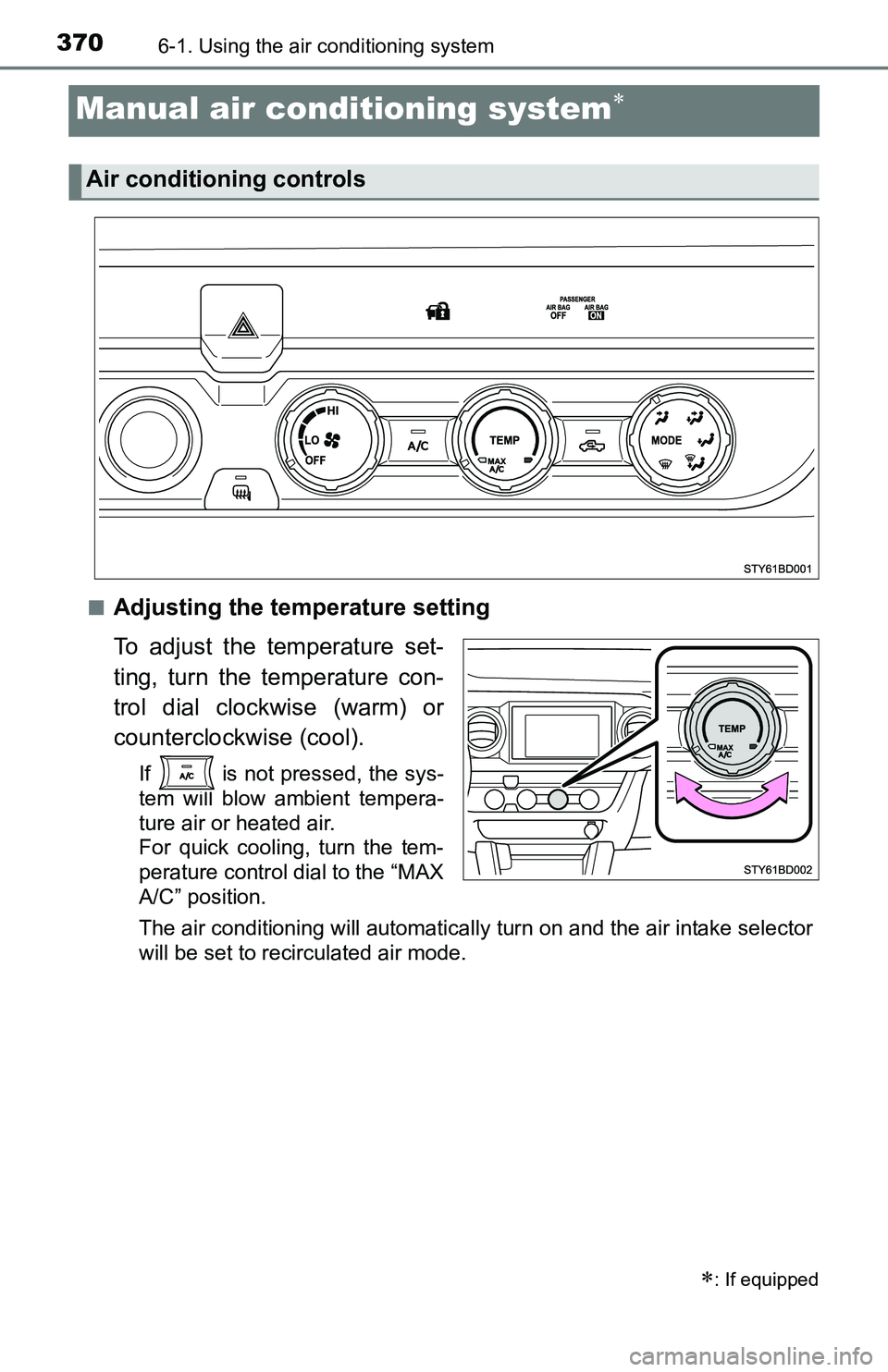
■Adjusting the temperature setting
To adjust the temperature set-
ting, turn the temperature con-
trol dial clockwise (warm) or
counterclockwise (cool).
If is not pressed, the sys-
tem will blow ambient tempera-
ture air or heated air.
For quick cooling, turn the tem-
perature control dial to the “MAX
A/C” position.
The air conditioning will automatically turn on and the air intake selector
will be set to recirculated air mode.
: If equipped
Air conditioning controls
Page 371 of 640
3716-1. Using the air conditioning system
6
Interior features
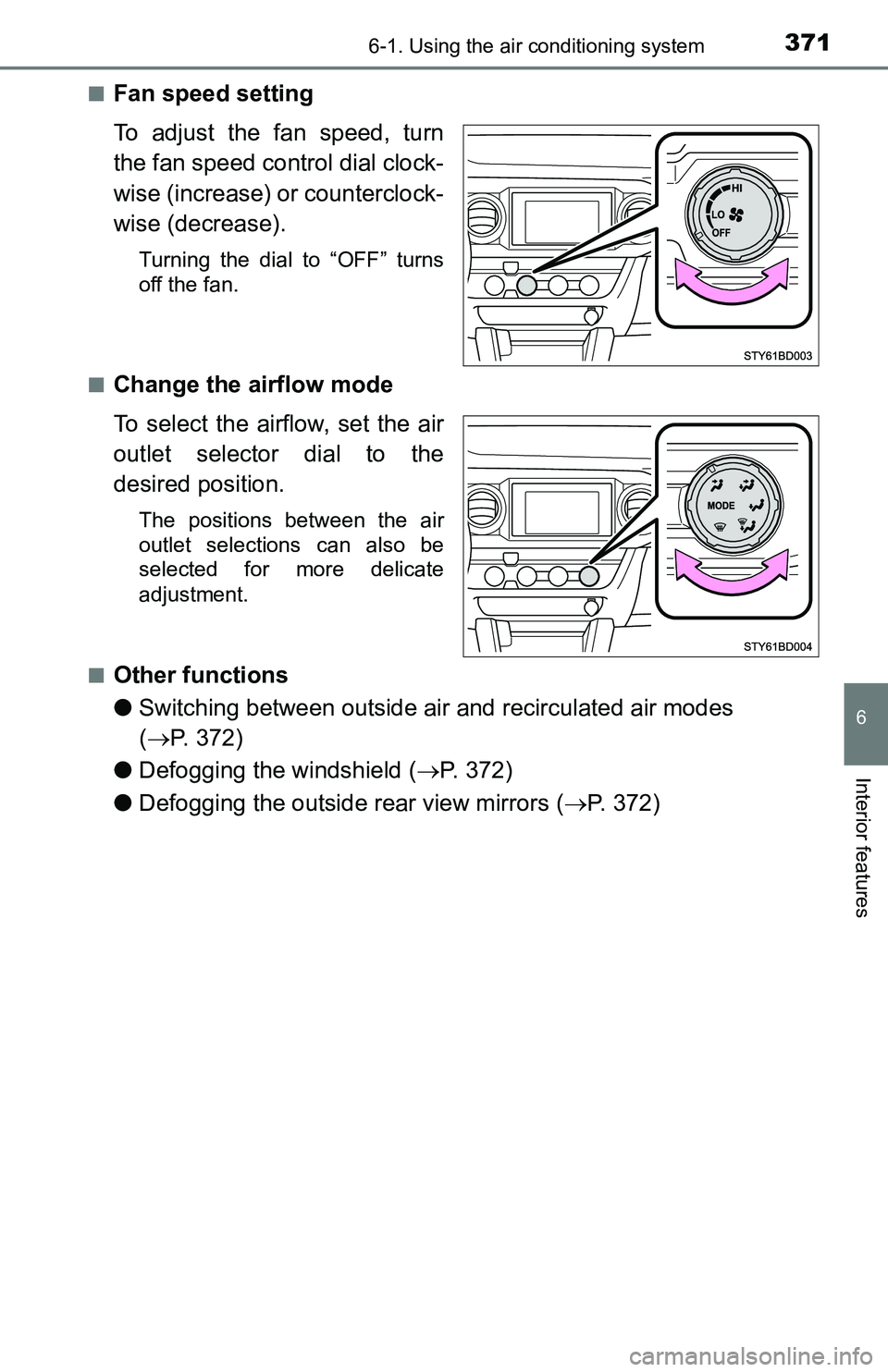
■Fan speed setting
To adjust the fan speed, turn
the fan speed control dial clock-
wise (increase) or counterclock-
wise (decrease).
Turning the dial to “OFF” turns
off the fan.
■
Change the airflow mode
To select the airflow, set the air
outlet selector dial to the
desired position.
The positions between the air
outlet selections can also be
selected for more delicate
adjustment.
■
Other functions
●Switching between outside air and recirculated air modes
(P. 372)
●Defogging the windshield (P. 372)
●Defogging the outside rear view mirrors (P. 372)
Page 372 of 640
3726-1. Using the air conditioning system
■Switching between outside air and recirculated air modes
Press .
The mode switches between outside air mode (introduces air from
outside the vehicle) (indicator off) and recirculated air mode (recy-
cles air inside the vehicle) (indicator on) each time the button is
pressed.
■Defogging the windshield
Defoggers are used to defog the windshield and front side win-
dows.
Set the air outlet selector dial to position.
Set the outside/recirculated air mode button to outside air mode if the recir-
culated air mode is used. (It may switch automatically.)
To defog the windshield and the side windows early, turn the air flow and
temperature up.
■
Defogging the outside rear view mirrors
Defogger is used to defog to remove raindrops, dew and frost from
the outside rear view mirrors.
Press .
The defogger will automatically turn off after approximately 15 minutes.
Other functions