fuel main TOYOTA TACOMA 2016 Owners Manual (in English)
[x] Cancel search | Manufacturer: TOYOTA, Model Year: 2016, Model line: TACOMA, Model: TOYOTA TACOMA 2016Pages: 640, PDF Size: 40.18 MB
Page 6 of 640
TABLE OF CONTENTS6
8-2. Steps to take in an
emergency
If your vehicle needs to
be towed ......................... 503
If you think something is
wrong .............................. 508
Fuel pump shut off
system............................. 509
If a warning light turns on
or a warning buzzer
sounds ............................ 510
If a warning message is
displayed (vehicles with
a multi-information
display)............................ 519
If you have a flat tire .......... 536
If the engine will not
start ................................. 551
If the shift lever cannot
be shifted from P (vehicles
with an automatic
transmission)................... 553
If the electronic key
does not operate properly
(vehicles with a smart
key system) .................... 555
If the vehicle battery is
discharged ...................... 557
If your vehicle overheats ... 561
If the vehicle becomes
stuck................................ 5639-1. Specifications
Maintenance data
(fuel, oil level, etc.) .......... 566
Fuel information ................. 579
Tire information.................. 582
9-2. Customization
Customizable features ....... 592
9-3. Items to initialize
Items to initialize ................ 599
Reporting safety defects
for U.S. owners ........................ 602
Seat belt instructions
for Canadian owners
(in French)................................ 603
SRS airbag instructions
for Canadian owners
(in French)............................... 605
Camper information.................... 613
What to do if...
(Troubleshooting) ..................... 620
Alphabetical index ...................... 6249Vehicle specifications
10For owners
Index
For vehicles with Entune Audio Plus or Entune Premium Audio, refer
to the “NAVIGATION AND MULTIMEDIA SYSTEM OWNER’S MAN-
UAL” for information regarding the multimedia system.
Audio system types: P. 280
Page 8 of 640
8
For your infor mation
Please note that this manual applies to all models and all equipment, includ-
ing options. Therefore, you may find some explanations for equipment not
installed on your vehicle.
All specifications provided in this manual are current at the time of printing.
However, because of the Toyota policy of continual product improvement, we
reserve the right to make changes at any time without notice.
Depending on specifications, the vehicle shown in the illustrations may differ
from your vehicle in terms of equipment.
Approximately five hours after the engine is turned off, you may hear sound
coming from under the vehicle for several minutes. This is the sound of a fuel
evaporation leakage check and it does not indicate a malfunction.
A wide variety of non-genuine spare parts and accessories for Toyota vehi-
cles are currently available in the market. You should know that Toyota does
not warrant these products and is not responsible for their performance,
repair, or replacement, or for any damage they may cause to, or adverse
effect they may have on, your Toyota vehicle.
This vehicle should not be modified with non-genuine Toyota products. Modi-
fication with non-genuine Toyota products could affect its performance, safety
or durability, and may even violate governmental regulations. In addition,
damage or performance problems resulting from the modification may not be
covered under warranty.
Main Owner’s Manual
Noise from under vehicle after turning off the engine
Accessories, spare parts and modification of your Toyota
Page 84 of 640
842. Instrument cluster
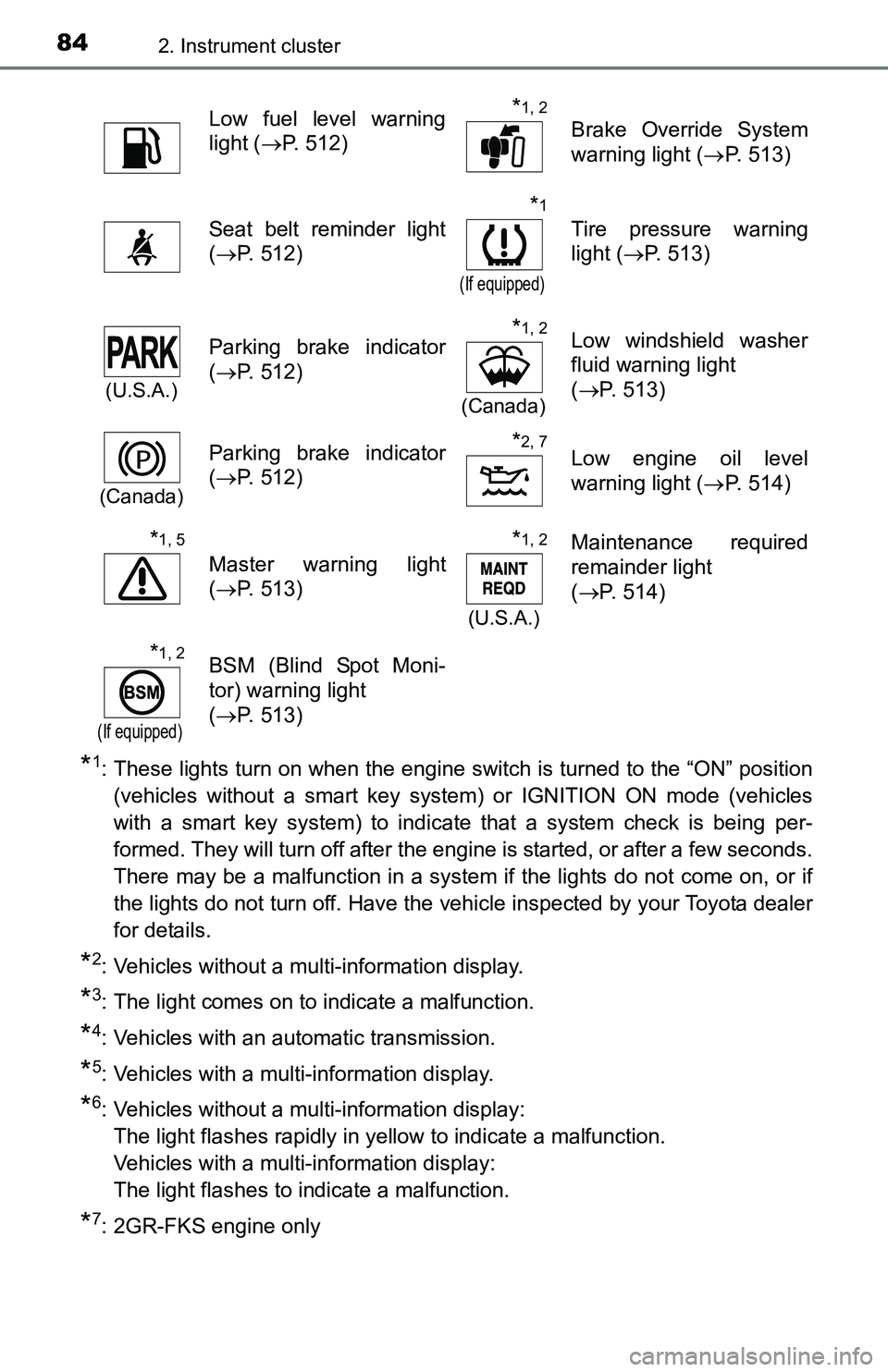
*1: These lights turn on when the engine switch is turned to the “ON” position
(vehicles without a smart key system) or IGNITION ON mode (vehicles
with a smart key system) to indicate that a system check is being per-
formed. They will turn off after the engine is started, or after a few seconds.
There may be a malfunction in a system if the lights do not come on, or if
the lights do not turn off. Have the vehicle inspected by your Toyota dealer
for details.
*2: Vehicles without a multi-information display.
*3: The light comes on to indicate a malfunction.
*4: Vehicles with an automatic transmission.
*5: Vehicles with a multi-information display.
*6: Vehicles without a multi-information display:
The light flashes rapidly in yellow to indicate a malfunction.
Vehicles with a multi-information display:
The light flashes to indicate a malfunction.
*7: 2GR-FKS engine only
Low fuel level warning
light (P. 512)*1, 2
Brake Override System
warning light (P. 513)
Seat belt reminder light
(P. 512)
*1
(If equipped)
Tire pressure warning
light (P. 513)
(U.S.A.)
Parking brake indicator
(P. 512)*1, 2
(Canada)
Low windshield washer
fluid warning light
(P. 513)
(Canada)
Parking brake indicator
(P. 512)*2, 7Low engine oil level
warning light (P. 514)
*1, 5
Master warning light
(P. 513)
*1, 2
(U.S.A.)
Maintenance required
remainder light
(P. 514)
*1, 2
(If equipped)
BSM (Blind Spot Moni-
tor) warning light
(P. 513)
Page 88 of 640
882. Instrument cluster
Gauges and meters
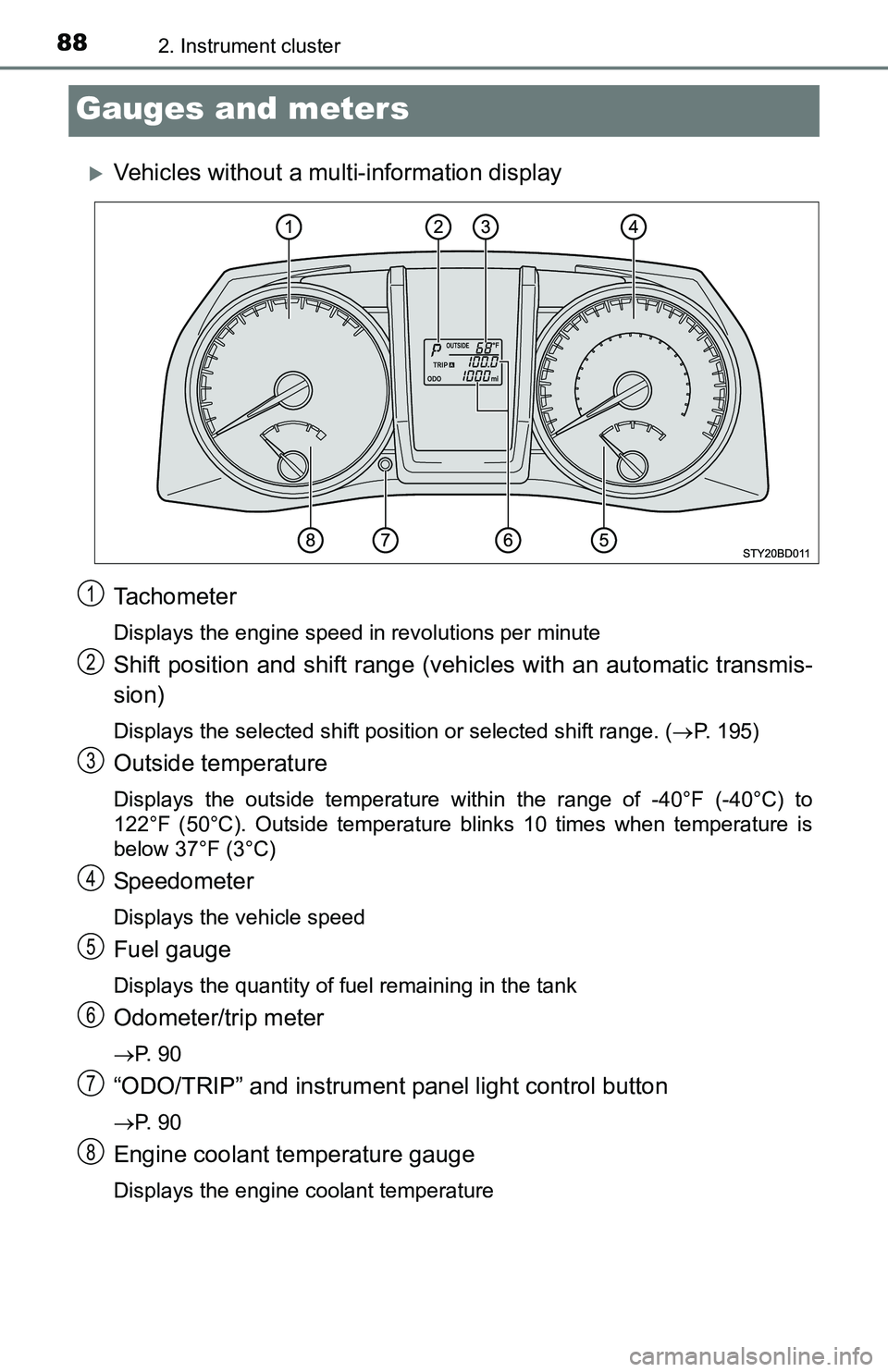
Vehicles without a multi-information display
Tachometer
Displays the engine speed in revolutions per minute
Shift position and shift range (vehicles with an automatic transmis-
sion)
Displays the selected shift position or selected shift range. (P. 195)
Outside temperature
Displays the outside temperature within the range of -40°F (-40°C) to
122°F (50°C). Outside temperature blinks 10 times when temperature is
below 37°F (3°C)
Speedometer
Displays the vehicle speed
Fuel gauge
Displays the quantity of fuel remaining in the tank
Odometer/trip meter
P. 9 0
“ODO/TRIP” and instrument panel light control button
P. 9 0
Engine coolant temperature gauge
Displays the engine coolant temperature
1
2
3
4
5
6
7
8
Page 89 of 640
892. Instrument cluster
2
Instrument cluster
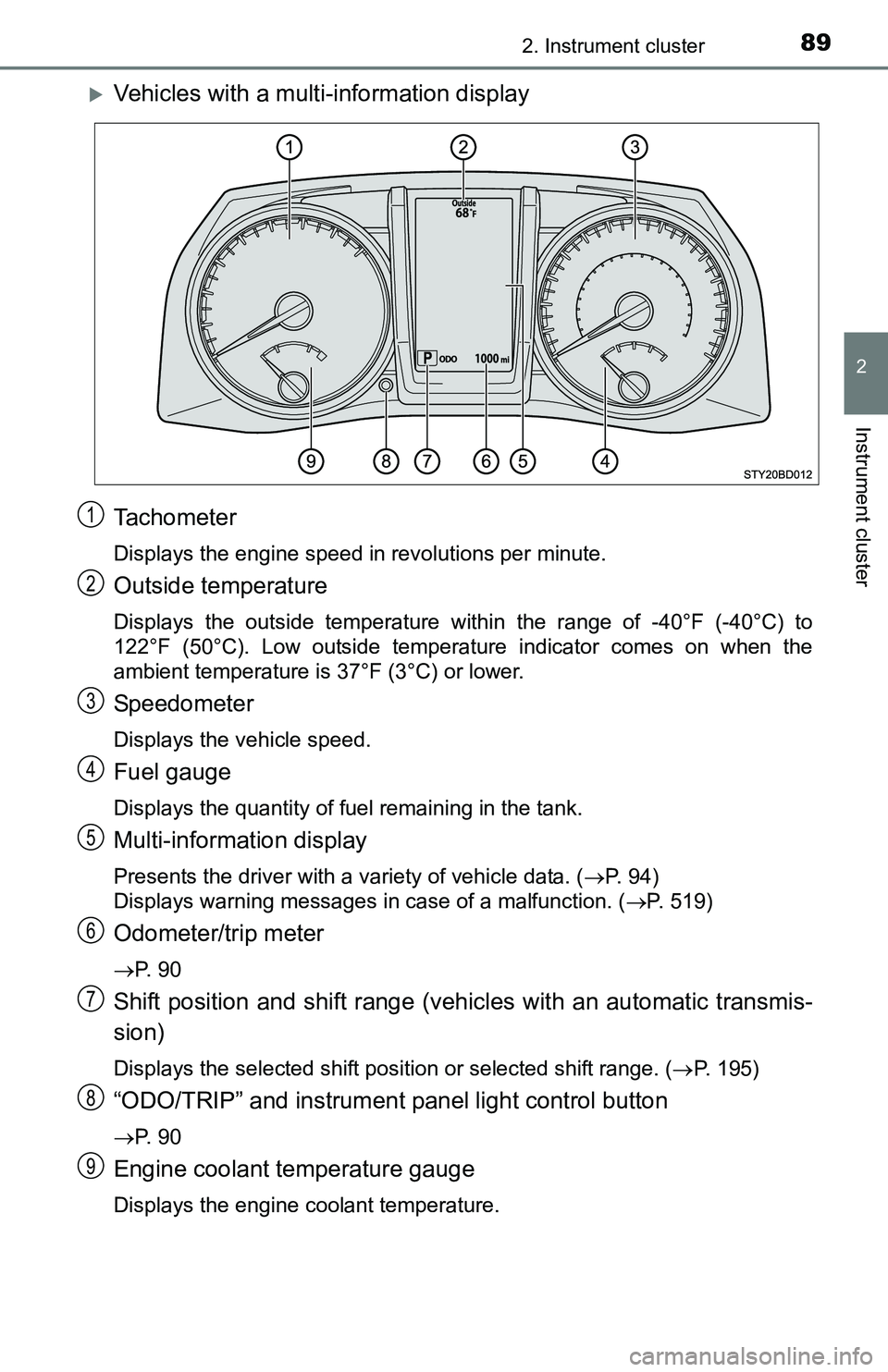
Vehicles with a multi-information display
Tachometer
Displays the engine speed in revolutions per minute.
Outside temperature
Displays the outside temperature within the range of -40°F (-40°C) to
122°F (50°C). Low outside temperature indicator comes on when the
ambient temperature is 37°F (3°C) or lower.
Speedometer
Displays the vehicle speed.
Fuel gauge
Displays the quantity of fuel remaining in the tank.
Multi-information display
Presents the driver with a variety of vehicle data. (P. 94)
Displays warning messages in case of a malfunction. (P. 519)
Odometer/trip meter
P. 9 0
Shift position and shift range (vehicles with an automatic transmis-
sion)
Displays the selected shift position or selected shift range. (P. 195)
“ODO/TRIP” and instrument panel light control button
P. 9 0
Engine coolant temperature gauge
Displays the engine coolant temperature.
1
2
3
4
5
6
7
8
9
Page 94 of 640
942. Instrument cluster
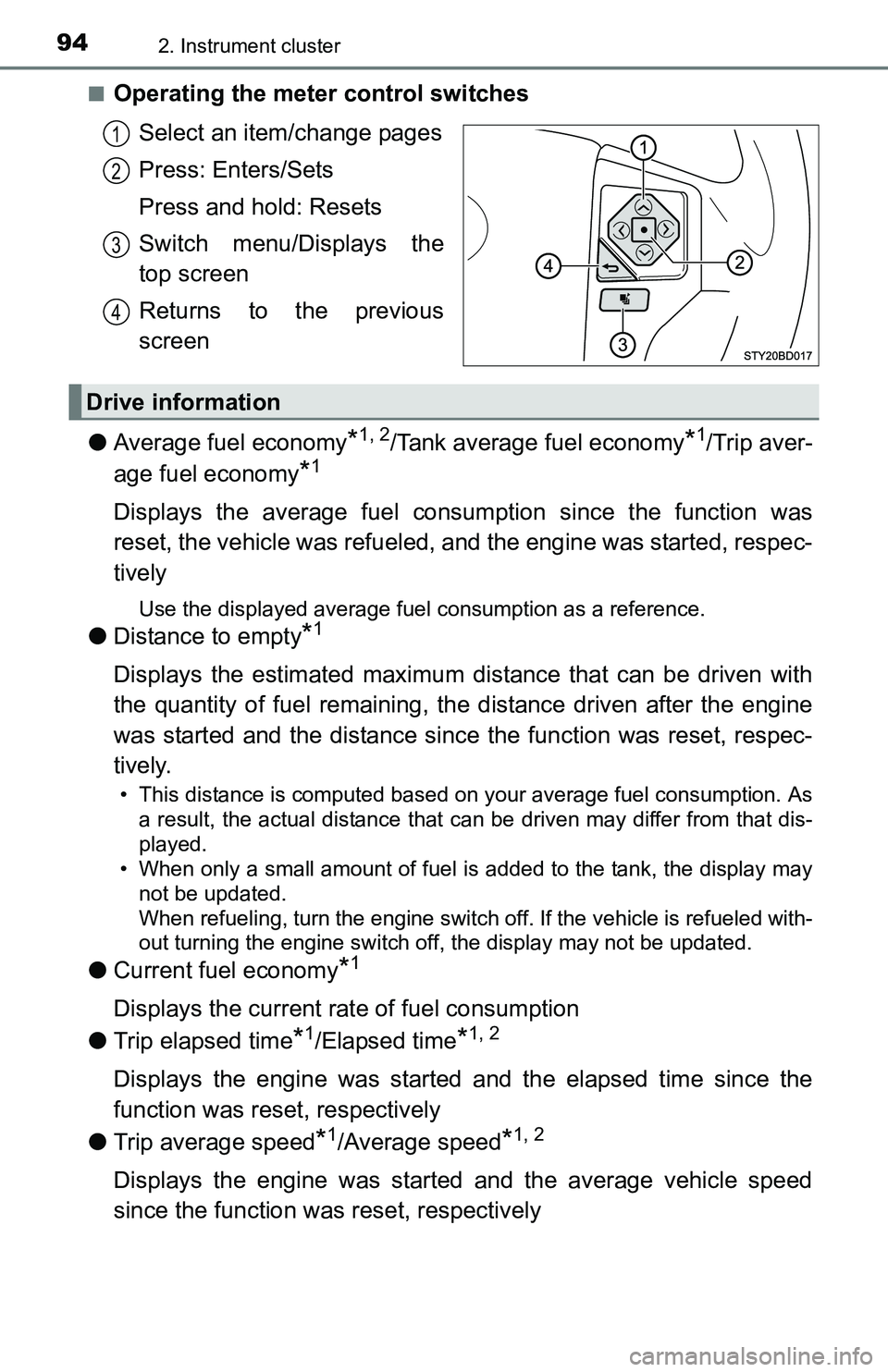
■Operating the meter control switches
Select an item/change pages
Press: Enters/Sets
Press and hold: Resets
Switch menu/Displays the
top screen
Returns to the previous
screen
●Average fuel economy
*1, 2/Tank average fuel economy*1/Trip aver-
age fuel economy
*1
Displays the average fuel consumption since the function was
reset, the vehicle was refueled, and the engine was started, respec-
tively
Use the displayed average fuel consumption as a reference.
●Distance to empty*1
Displays the estimated maximum distance that can be driven with
the quantity of fuel remaining, the distance driven after the engine
was started and the distance since the function was reset, respec-
tively.
• This distance is computed based on your average fuel consumption. As
a result, the actual distance that can be driven may differ from that dis-
played.
• When only a small amount of fuel is added to the tank, the display may
not be updated.
When refueling, turn the engine switch off. If the vehicle is refueled with-
out turning the engine switch off, the display may not be updated.
●Current fuel economy*1
Displays the current rate of fuel consumption
●Trip elapsed time
*1/Elapsed time*1, 2
Displays the engine was started and the elapsed time since the
function was reset, respectively
●Trip average speed
*1/Average speed*1, 2
Displays the engine was started and the average vehicle speed
since the function was reset, respectively
1
2
3
4
Drive information
Page 96 of 640
962. Instrument cluster
■Customizable items
●Language
Select to change the language on the display.
●Units
Select to change the unit of measure for fuel consumption and
temperature.
●Drive information 1 through 3
Select to select up to 2 items that will be displayed on a Drive
information screen, up to 3 Drive information screens can be set.
●Pop-up display
Select to set the following pop-up displays, which may appear in
some situations, on/off.
• Instrument panel brightness adjustment display
• Route guidance display of the navigation system-linked sys-
tem (if equipped)
• Incoming call display of the hands-free phone system
• Shift position display (vehicles with an automatic transmission)
●Accent color
Select to change the accent colors on the screen, such as the
cursor color.
●Speed limit display
*
Select to set the display of speed limit information stored in the
navigation system (if equipped) to on with the speed limit caution
indicator (yellow) enabled, on with the speed limit caution not
enabled, or off. If enabled, the speed limit caution indicator will
come on if the vehicle speed exceeds the displayed speed limit.
●Programming
It is possible to set up a screen desired to be displayed as the
Top Screen by pressing and holding .
There are also screens that cannot be setup as the Top Screen.
●Maintenance system (U.S.A.)
Select to reset the message after the required maintenance is
performed. (P. 441)
●Default settings
Registered or changed meter settings will be deleted or returned
to their default setting.
*: Speed limit display may not be available for some regions.
Page 99 of 640
992. Instrument cluster
2
Instrument cluster
■Past record
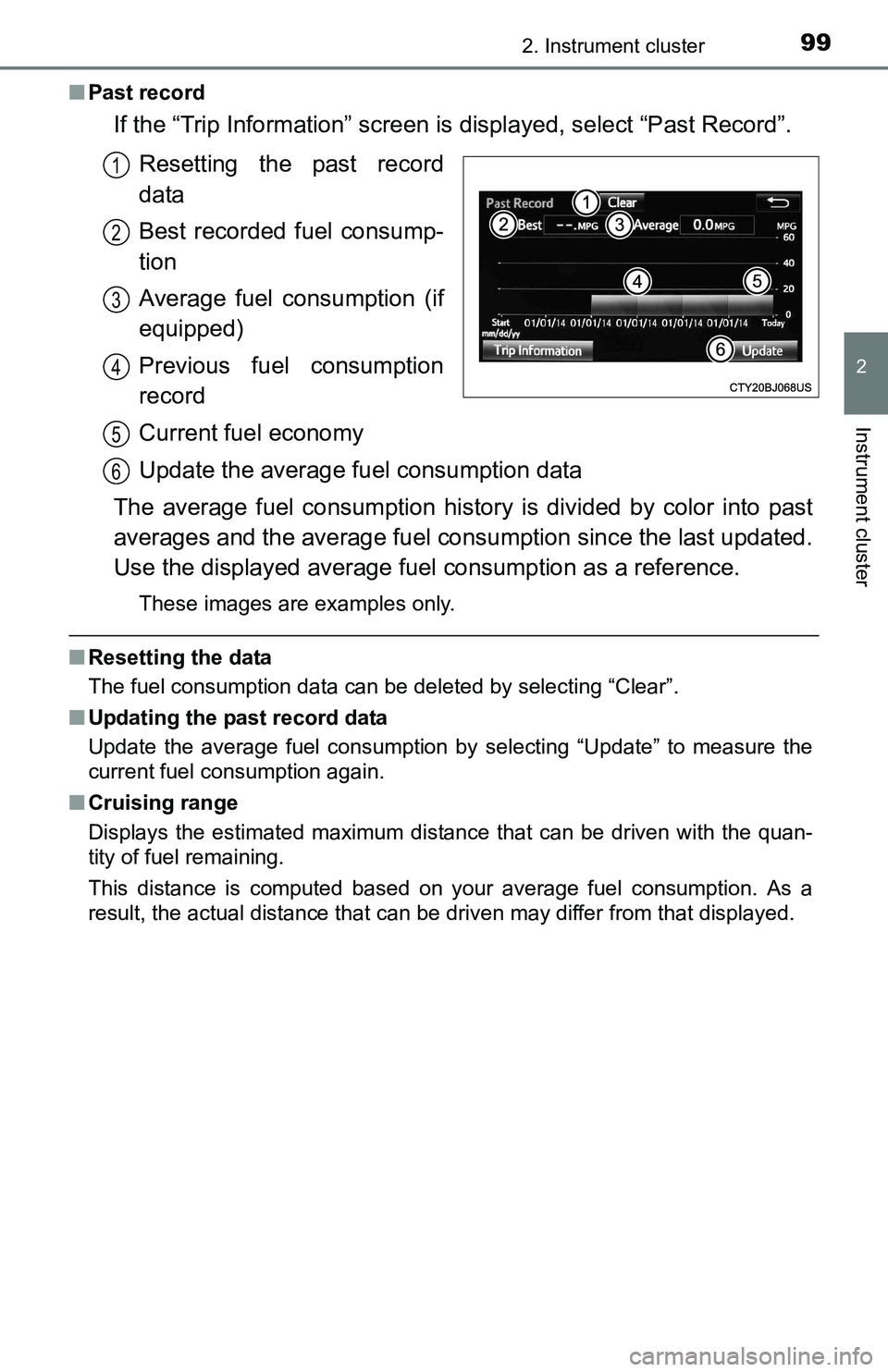
If the “Trip Information” screen is displayed, select “Past Record”.
Resetting the past record
data
Best recorded fuel consump-
tion
Average fuel consumption (if
equipped)
Previous fuel consumption
record
Current fuel economy
Update the average fuel consumption data
The average fuel consumption history is divided by color into past
averages and the average fuel consumption since the last updated.
Use the displayed average fuel consumption as a reference.
These images are examples only.
■Resetting the data
The fuel consumption data can be deleted by selecting “Clear”.
■Updating the past record data
Update the average fuel consumption by selecting “Update” to measure the
current fuel consumption again.
■Cruising range
Displays the estimated maximum distance that can be driven with the quan-
tity of fuel remaining.
This distance is computed based on your average fuel consumption. As a
result, the actual distance that can be driven may differ from that displayed.
1
2
3
4
5
6
Page 163 of 640
1634-1. Before driving
4
Driving
Cargo and luggage
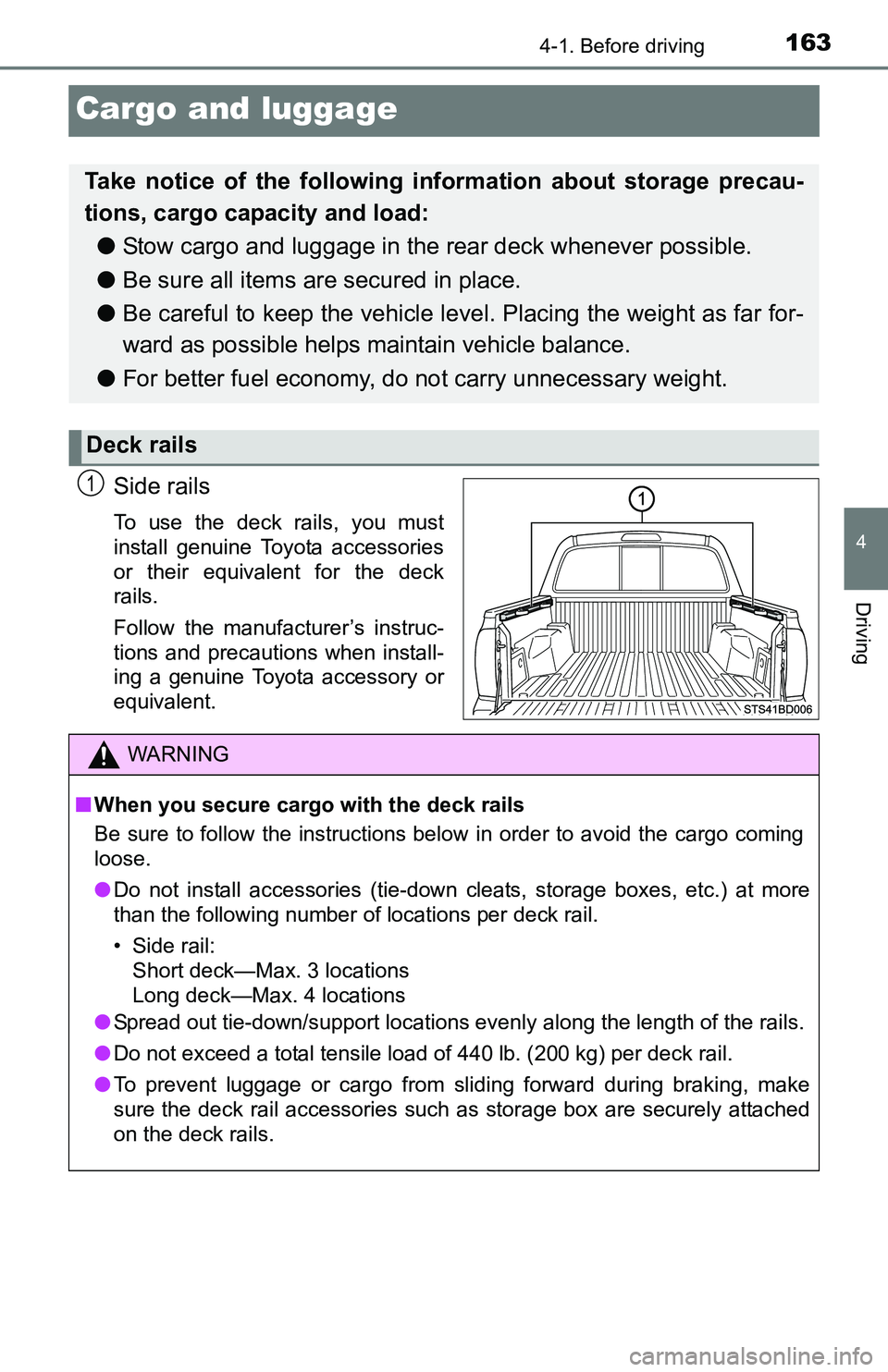
Side rails
To use the deck rails, you must
install genuine Toyota accessories
or their equivalent for the deck
rails.
Follow the manufacturer’s instruc-
tions and precautions when install-
ing a genuine Toyota accessory or
equivalent.
Take notice of the following information about storage precau-
tions, cargo capacity and load:
●Stow cargo and luggage in the rear deck whenever possible.
●Be sure all items are secured in place.
●Be careful to keep the vehicle level. Placing the weight as far for-
ward as possible helps maintain vehicle balance.
●For better fuel economy, do not carry unnecessary weight.
Deck rails
1
WARNING
■When you secure cargo with the deck rails
Be sure to follow the instructions below in order to avoid the cargo coming
loose.
●Do not install accessories (tie-down cleats, storage boxes, etc.) at more
than the following number of locations per deck rail.
• Side rail:
Short deck—Max. 3 locations
Long deck—Max. 4 locations
●Spread out tie-down/support locations evenly along the length of the rails.
●Do not exceed a total tensile load of 440 lb. (200 kg) per deck rail.
●To prevent luggage or cargo from sliding forward during braking, make
sure the deck rail accessories such as storage box are securely attached
on the deck rails.
Page 434 of 640
4347-1. Maintenance and care
Cleaning and protecting the vehicle exterior
●Working from top to bottom, liberally apply water to the vehicle
body, wheel wells and underside of the vehicle to remove any dirt
and dust.
●Wash the vehicle body using a sponge or soft cloth, such as a
chamois.
●For hard-to-remove marks, use car wash soap and rinse thoroughly
with water.
●Wipe away any water.
●Wax the vehicle when the waterproof coating deteriorates.
If water does not bead on a clean surface, apply wax when the vehicle
body is cool.
■Automatic car washes
●Fold the mirrors before washing the vehicle. Start washing from the front of
the vehicle. Make sure to extend the mirrors before driving.
●Brushes used in automatic car washes may scratch the vehicle surface and
harm your vehicle’s paint.
●In certain automatic car washes, the roof antenna may interfere with
machine operation. This may prevent the vehicle from being cleaned prop-
erly or result in damage to the antenna.
■High pressure car washes
●Do not allow the nozzles of the car wash to come within close proximity of
the windows.
●Before using the car wash, check that the fuel filler door on your vehicle is
closed properly.
■Aluminum wheels (if equipped)
●Remove any dirt immediately by using a neutral detergent. Do not use hard
brushes or abrasive cleaners. Do not use strong or harsh chemical clean-
ers.
Use the same mild detergent and wax as used on the paint.
●Do not use detergent on the wheels when they are hot, for example after
driving for long distance in the hot weather.
●Wash detergent from the wheels immediately after use.
■Bumpers and side moldings
Do not scrub with abrasive cleaners.
Perform the following to protect the vehicle and maintain it in
prime condition: