tire pressure reset TOYOTA TACOMA 2016 Owners Manual (in English)
[x] Cancel search | Manufacturer: TOYOTA, Model Year: 2016, Model line: TACOMA, Model: TOYOTA TACOMA 2016Pages: 640, PDF Size: 40.18 MB
Page 18 of 640
18Pictorial index
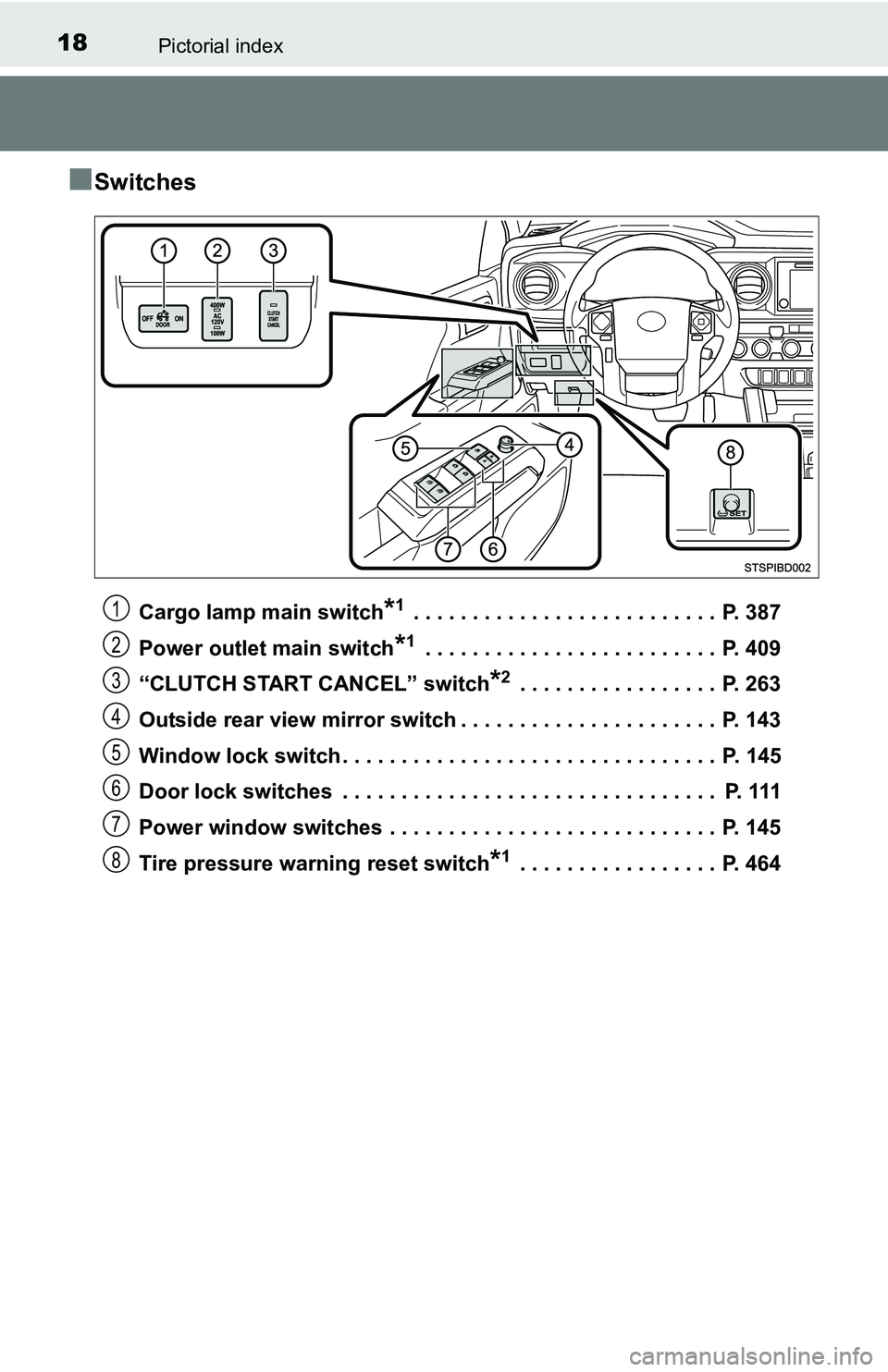
■Switches
Cargo lamp main switch*1 . . . . . . . . . . . . . . . . . . . . . . . . . . P. 387
Power outlet main switch
*1 . . . . . . . . . . . . . . . . . . . . . . . . . P. 409
“CLUTCH START CANCEL” switch
*2 . . . . . . . . . . . . . . . . . P. 263
Outside rear view mirror switch . . . . . . . . . . . . . . . . . . . . . . P. 143
Window lock switch . . . . . . . . . . . . . . . . . . . . . . . . . . . . . . . . P. 145
Door lock switches . . . . . . . . . . . . . . . . . . . . . . . . . . . . . . . . P. 111
Power window switches . . . . . . . . . . . . . . . . . . . . . . . . . . . . P. 145
Tire pressure warning reset switch
*1 . . . . . . . . . . . . . . . . . P. 464
1
2
3
4
5
6
7
8
Page 95 of 640
952. Instrument cluster
2
Instrument cluster
●Trip distance*1/Distance*1, 2
Displays the engine was started and the distance since the function
was reset, respectively
●Digital speedometer
*1
●Display off*1
A blank screen is displayed
*1: Can be registered to Drive information 1 through 3.
*2: Resetting procedures:
• Select a function to be reset using the meter control switch and then
press and hold the center button to reset.
• If there is more than one function that can be reset, check boxes will be
displayed next to the functions.
●Clinometer (if equipped)
Displays the longitudinal and lateral inclination of the vehicle.
●Intuitive parking assist (if equipped)
P. 2 2 0
●Multi-terrain select (if equipped)
P. 2 5 5
●Crawl control (if equipped)
P. 2 5 9
●Tire inflation pressure (if equipped)
P. 4 6 3
■Changing the settings
Select using the meter control switch.
Select an item and then set it with the center button.
Vehicle information
Settings display
1
2
Page 464 of 640
4647-3. Do-it-yourself maintenance
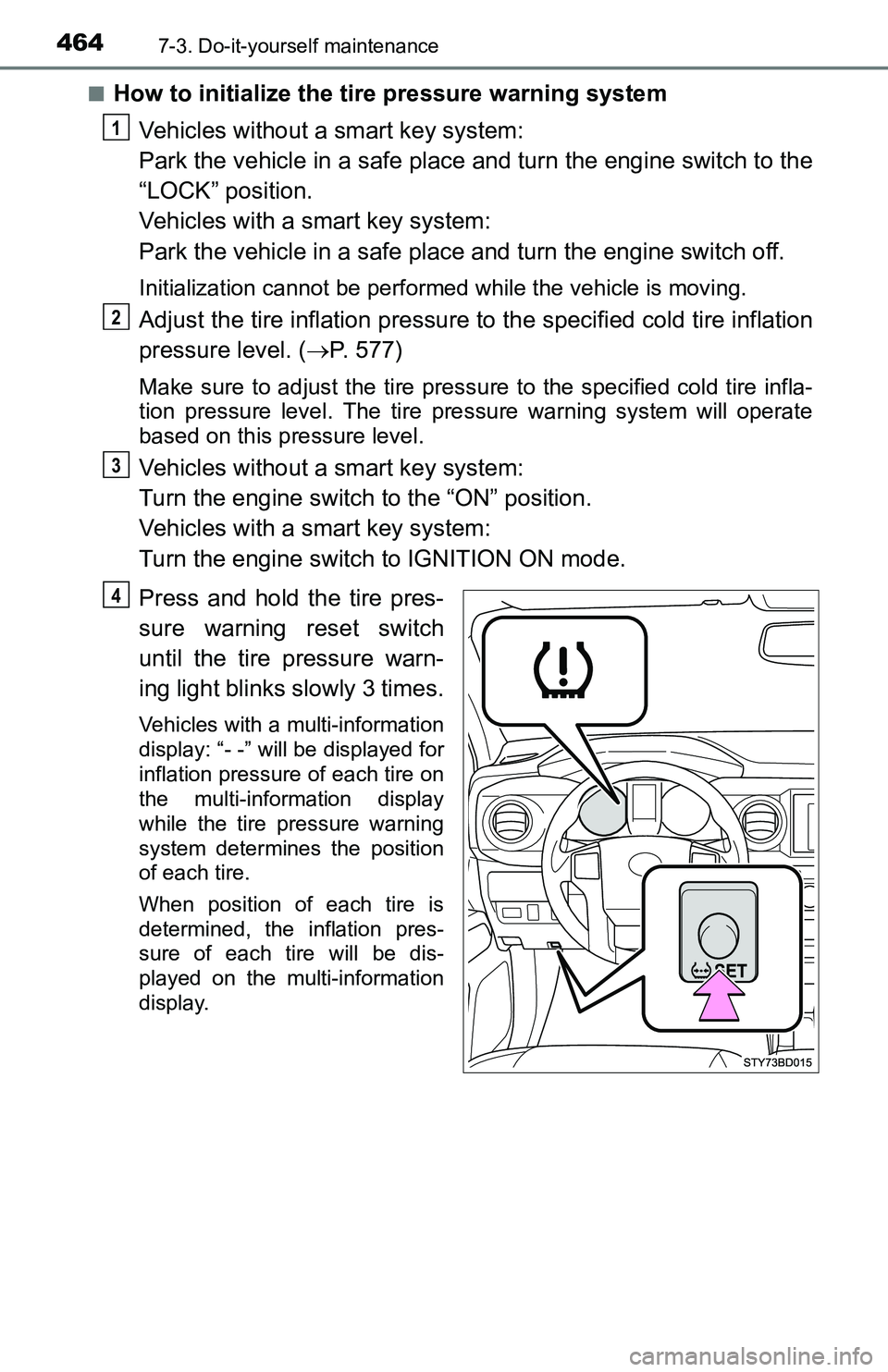
■How to initialize the tire pressure warning system
Vehicles without a smart key system:
Park the vehicle in a safe place and turn the engine switch to the
“LOCK” position.
Vehicles with a smart key system:
Park the vehicle in a safe place and turn the engine switch off.
Initialization cannot be performed while the vehicle is moving.
Adjust the tire inflation pressure to the specified cold tire inflation
pressure level. (P. 577)
Make sure to adjust the tire pressure to the specified cold tire infla-
tion pressure level. The tire pressure warning system will operate
based on this pressure level.
Vehicles without a smart key system:
Turn the engine switch to the “ON” position.
Vehicles with a smart key system:
Turn the engine switch to IGNITION ON mode.
Press and hold the tire pres-
sure warning reset switch
until the tire pressure warn-
ing light blinks slowly 3 times.
Vehicles with a multi-information
display: “- -” will be displayed for
inflation pressure of each tire on
the multi-information display
while the tire pressure warning
system determines the position
of each tire.
When position of each tire is
determined, the inflation pres-
sure of each tire will be dis-
played on the multi-information
display.
1
2
3
4
Page 469 of 640
4697-3. Do-it-yourself maintenance
7
Maintenance and care
■The initialization operation (vehicles with the tire pressure warning
system)
●Make sure to carry out initialization after adjusting the tire inflation pres-
sure.
Also, make sure the tires are cold before carrying out initialization or tire
inflation pressure adjustment.
●If you have accidentally turned the engine switch to the “LOCK” position
(vehicles without a smart key system) or off (vehicles with a smart key
system) during initialization, it is not necessary to press the reset switch
again as initialization will restart automatically when the engine switch
has been turned to the “ON” position (vehicles without a smart key sys-
tem) or IGNITION ON mode (vehicles with a smart key system) for the
next time.
●If you accidentally press the reset switch when initialization is not neces-
sary, adjust the tire inflation pressure to the specified level when the
tires are cold, and conduct initialization again.
■Warning performance of the tire pressure warning system (vehicles
with a multi-information display)
The warning of the tire pressure warning system will change in accor-
dance with the conditions under which it was initialized. For this reason,
the system may give a warning even if the tire pressure does not reach a
low enough level, or if the pressure is higher than the pressure that was
adjusted to when the system was initialized.
■When initialization of the tire pressure warning system has failed (if
equipped)
Initialization may take longer to complete if the vehicle is driven on an
unpaved road. When performing initialization, drive on a paved road if
possible. Depending on the driving environment and condition of the tires,
initialization will be completed in approximately 10 minutes. If initialization
is not complete after driving approximately 10 minutes, continue driving
for a while.
If the inflation pressure of each tire is not displayed after driving for
approximately 1 hour, perform the following procedure.
●Park the vehicle in a safe place for approximately 20 minutes. Then
drive straight (with occasional left and right turns) at approximately
25mph (40 km/h) or more for approximately 10 to 20 minutes.
However, in the following situations, the tire inflation pressure will not be
recorded and the system will not operate properly. Perform initialization
again.
●When operating the tire pressure warning reset switch, the tire pressure
warning light does not blink 3 times.
●After performing initialization, the tire pressure warning light blinks for 1
minute then stays on while driving.
If the inflation pressure of each tire is still not displayed, have the vehicle
inspected by your Toyota dealer.
Page 470 of 640
4707-3. Do-it-yourself maintenance
■Tire pressure warning system certification (if equipped)
For vehicles sold in U.S.A.
FCC ID: HYQ23AAK
FCC ID: PAXPMVC015
NOTE:
This device complies with part 15 of the FCC Rules. Operation is subject
to the following two conditions: (1) This device may not cause harmful
interference, and (2) this device must accept any interference received,
including interference that may cause undesired operation.
FCC WARNING:
Changes or modifications not expressly approved by the party
responsible for compliance could void the user’s authority to operate the
equipment.
For vehicles sold in Canada
Model: PMV-C015
NOTE:
This device complies with Industry Canada licence-exempt RSS
standard(s). Operation is subject to the following two conditions: (1) this
device may not cause interference, and (2) this device must accept any
interference, including interference that may cause undesired operation
of the device.
WARNING
■When inspecting or replacing tires
Observe the following precautions to prevent accidents.
Failure to do so may cause damage to parts of the drive train as well as
dangerous handling characteristics, which may lead to an accident
resulting in death or serious injury.
●Do not mix tires of different makes, models or tread patterns.
Also, do not mix tires of remarkably different treadwear.
●Do not use tire sizes other than those recommended by Toyota.
●Do not mix differently constructed tires (radial, bias-belted or bias-ply
tires).
●Do not mix summer, all season and snow tires.
●Do not use tires that have been used on another vehicle.
Do not use tires if you do not know how they were used previously.
■When initializing the tire pressure warning system (if equipped)
Do not operate the tire pressure warning reset switch without first
adjusting the tire inflation pressure to the specified level. Otherwise, the
tire pressure warning light may not come on even if the tire inflation
pressure is low, or it may come on when the tire inflation pressure is
actually normal.
Page 516 of 640
5168-2. Steps to take in an emergency
■If the malfunction indicator lamp comes on while driving
First check the following:
●Is the fuel tank empty?
If it is, fill the fuel tank immediately.
●Is the fuel tank cap loose?
If it is, tighten it securely.
The light will go off after several driving trips.
If the light does not go off even after several trips, contact your Toyota dealer
as soon as possible.
■
When the tire pressure warning light comes on (if equipped)
Check the tire inflation pressure and adjust to the appropriate level. Push-
ing the tire pressure warning reset switch will not turn off the tire pressure
warning light.
■The tire pressure warning light may come on due to natural causes
(if equipped)
The tire pressure warning light may come on due to natural causes such
as natural air leaks and tire inflation pressure changes caused by temper-
ature. In this case, adjusting the tire inflation pressure will turn off the
warning light (after several minutes).
■When a tire is replaced with a spare tire (vehicles with the tire pres-
sure warning system)
The temporary spare tire is not equipped with a tire pressure warning
valve and transmitter. If a tire goes flat, the tire pressure warning light will
not turn off even though the flat tire has been replaced with the temporary
spare tire. Replace the temporary spare tire with the repaired tire and
adjust the tire inflation pressure. The tire pressure warning light will go off
after several minutes.
■Conditions that the tire pressure warning system may not function
properly (if equipped)
P. 4 6 8
■If the tire pressure warning light frequently comes on after blinking
for 1 minute (if equipped)
If the tire pressure warning light frequently comes on after blinking for 1
minute when the engine switch is turned to “ON” position (vehicles with-
out a smart key system) or IGNITION ON mode (vehicles with a smart
key system), have it checked by your Toyota dealer.
■Warning buzzer
In some cases, the buzzer may not be heard because of noisy place or an
audio sound.
Page 548 of 640
5488-2. Steps to take in an emergency
■The temporary spare tire
●The temporary spare tire is identified by the label “TEMPORARY USE
ONLY” on the disc wheel.
Use the temporary spare tire temporarily, and only in an emergency.
●Make sure to check the tire inflation pressure of the temporary spare
tire. (P. 577)
■After completing the tire change (vehicles with the tire pressure
warning system)
The tire pressure warning system must be reset. (P. 464)
■When using the temporary spare tire (vehicles with the tire pressure
warning system)
As the temporary spare tire is not equipped with the tire pressure warning
valve and transmitter, low inflation pressure of the spare tire will not be
indicated by the tire pressure warning system. Also, if you replace the
temporary spare tire after the tire pressure warning light comes on, the
light remains on.
■If you have a flat rear tire on a road covered with snow or ice
Install the temporary spare tire on one of the front wheels of the vehicle.
Perform the following steps and fit tire chains to the rear tires:
Replace a front tire with the temporary spare tire.
Replace the flat rear tire with the tire removed from the front of the
vehicle.
Fit tire chains to the rear tires.
1
2
3
Page 635 of 640
635Alphabetical index
Headlight switch.................... 203
Ignition switch ............... 187, 190
Intuitive parking assist .......... 220
Light switches ....................... 203
Moon roof switches ............... 149
Multi-terrain Select
switches.............................. 255
Outside rear view mirror
defoggers switch ........ 372, 379
Outside rear view mirror
switches.............................. 143
Power door lock switch ......... 111
Power mode switch............... 196
Power outlet main switch ...... 409
Power window switches ........ 145
Rear differential lock
switch ................................. 250
Seat heater switches ............ 383
Talk switch
*.......................... 363
Telephone switches
*............ 342
Tire pressure warning
reset switch ........................ 464
Turn signal lights................... 201
VSC off switch ...... 248, 265, 266
Window lock switch............... 145
Windshield wipers
and washer switch .............. 208
Wireless charger switch ........ 414Tachometer ................................ 88
Tail lights.................................. 203
Light switch ........................... 203
Replacing light bulbs ............ 495
Wattage ................................ 578
Tailgate
Removing the tailgate ........... 117
Tailgate ................................. 116
Talk switch
*............................. 363
Telephone switches
*.............. 342
Theft deterrent system
Alarm ...................................... 78
Engine immobilizer system ..... 69
Tire inflation pressure............. 472
Maintenance data ................. 577
Warning light......................... 513
Warning message......... 521, 523
Tire information ....................... 582
Glossary ............................... 587
Size....................................... 583
Tire identification number ..... 583
Uniform Tire Quality
Grading .............................. 585
Tire pressure warning
system.................................... 463
Initializing .............................. 464
Installing tire pressure
warning valves and
transmitters ........................ 463
Registering ID codes ............ 465
Tire pressure warning reset
switch ................................. 464
Warning light......................... 513
Warning message......... 521, 523
T
*: For vehicles with Entune Audio Plus or Entune Premium Audio, refer to
the “NAVIGATION AND MULTIMEDIA SYSTEM OWNER’S MANUAL”