engine oil TOYOTA TACOMA 2017 Owners Manual (in English)
[x] Cancel search | Manufacturer: TOYOTA, Model Year: 2017, Model line: TACOMA, Model: TOYOTA TACOMA 2017Pages: 640, PDF Size: 11.07 MB
Page 6 of 640
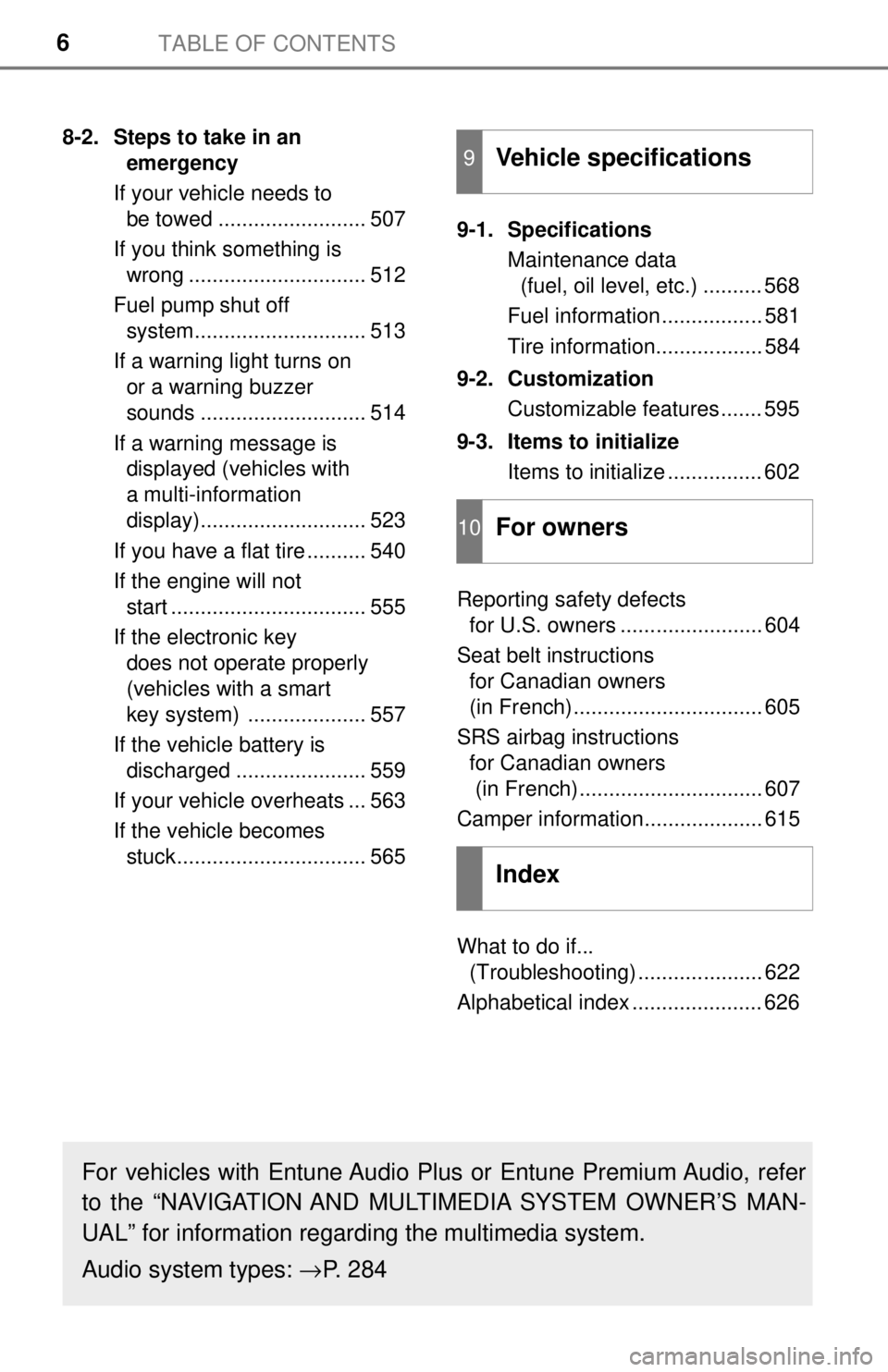
TABLE OF CONTENTS6
8-2. Steps to take in an emergency
If your vehicle needs to be towed ......................... 507
If you think something is wrong .............................. 512
Fuel pump shut off system............................. 513
If a warning light turns on or a warning buzzer
sounds ............................ 514
If a warning message is displayed (vehicles with
a multi-information
display)............................ 523
If you have a flat tire .......... 540
If the engine will not start ................................. 555
If the electronic key does not operate properly
(vehicles with a smart
key system) .................... 557
If the vehicle battery is discharged ...................... 559
If your vehicle overheats ... 563
If the vehicle becomes stuck................................ 565 9-1. Specifications
Maintenance data (fuel, oil level, etc.) .......... 568
Fuel information ................. 581
Tire information.................. 584
9-2. Customization Customizable features ....... 595
9-3. Items to initialize Items to initialize ................ 602
Reporting safety defects for U.S. owners ........................ 604
Seat belt instructions for Canadian owners
(in French)................................ 605
SRS airbag instructions for Canadian owners
(in French)............................... 607
Camper information.................... 615
What to do if... (Troubleshooting) ..................... 622
Alphabetical index ...................... 6269Vehicle specifications
10For owners
Index
For vehicles with Entune Audio Plus or Entune Premium Audio, refer
to the “NAVIGATION AND MULTIMEDIA SYSTEM OWNER’S MAN-
UAL” for information regarding the multimedia system.
Audio system types: →P. 284
Page 15 of 640
15Pictorial index
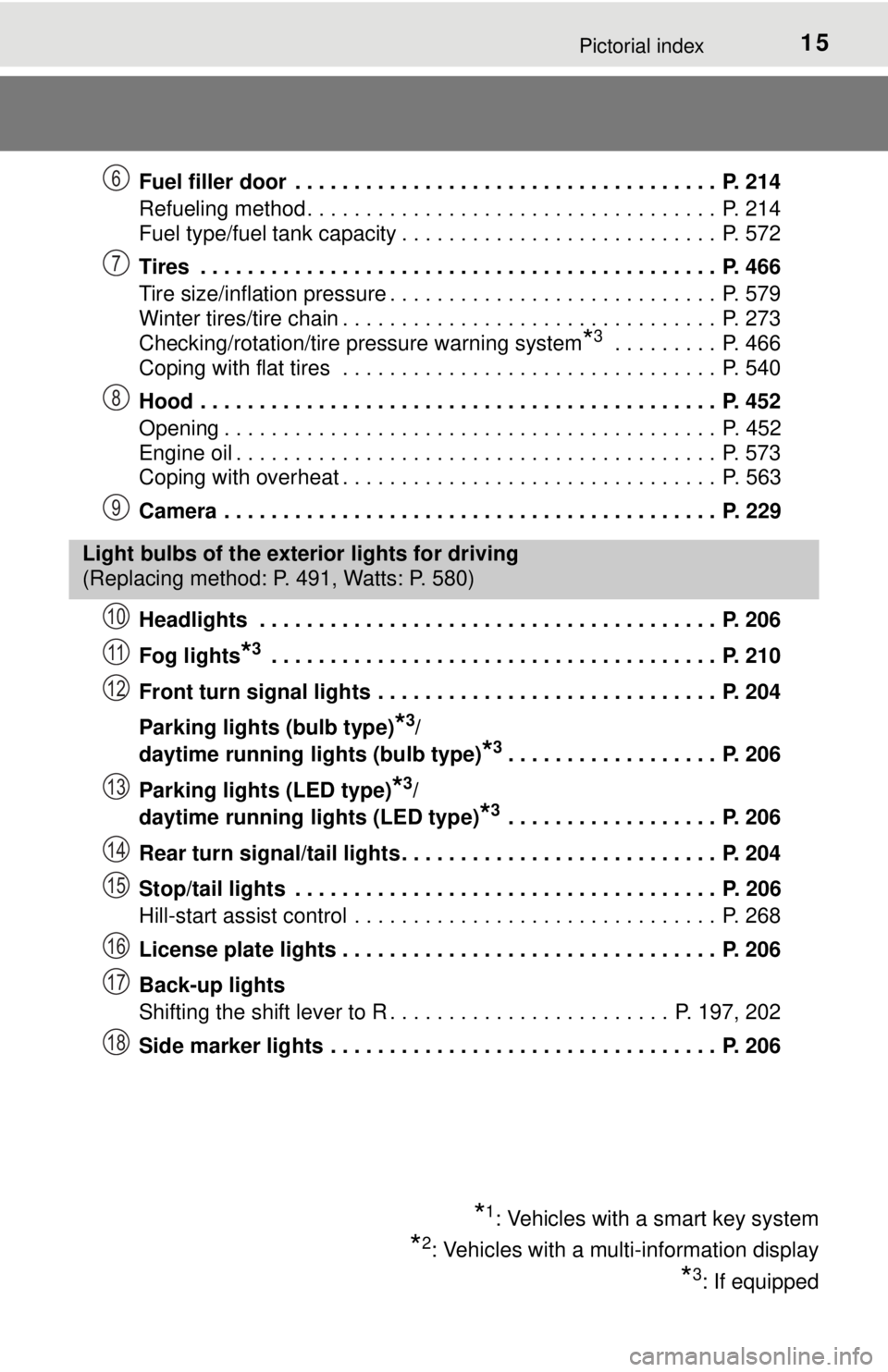
Fuel filler door . . . . . . . . . . . . . . . . . . . . . . . . . . . . . . . . . . . . P. 214
Refueling method . . . . . . . . . . . . . . . . . . . . . . . . . . . . . . . . . . . P. 214
Fuel type/fuel tank capacity . . . . . . . . . . . . . . . . . . . . . . . . . . . P. 572
Tires . . . . . . . . . . . . . . . . . . . . . . . . . . . . . . . . . . . . . . . . . . . . P. 466
Tire size/inflation pressure . . . . . . . . . . . . . . . . . . . . . . . . . . . . P. 579
Winter tires/tire chain . . . . . . . . . . . . . . . . . . . . . . . . . . . . . . . . P. 273
Checking/rotation/tire pressure warning system
*3 . . . . . . . . . P. 466
Coping with flat tires . . . . . . . . . . . . . . . . . . . . . . . . . . . . . . . . P. 540
Hood . . . . . . . . . . . . . . . . . . . . . . . . . . . . . . . . . . . . . . . . . . . . P. 452
Opening . . . . . . . . . . . . . . . . . . . . . . . . . . . . . . . . . . . . . . . . . . P. 452
Engine oil . . . . . . . . . . . . . . . . . . . . . . . . . . . . . . . . . . . . . . . . . P. 573
Coping with overheat . . . . . . . . . . . . . . . . . . . . . . . . . . . . . . . . P. 563
Camera . . . . . . . . . . . . . . . . . . . . . . . . . . . . . . . . . . . . . . . . . . P. 229
Headlights . . . . . . . . . . . . . . . . . . . . . . . . . . . . . . . . . . . . . . . P. 206
Fog lights
*3 . . . . . . . . . . . . . . . . . . . . . . . . . . . . . . . . . . . . . . P. 210
Front turn signal lights . . . . . . . . . . . . . . . . . . . . . . . . . . . . . P. 204
Parking lights (bulb type)
*3/
daytime running lights (bulb type)
*3. . . . . . . . . . . . . . . . . . P. 206
Parking lights (LED type)
*3/
daytime running lights (LED type)
*3 . . . . . . . . . . . . . . . . . . P. 206
Rear turn signal/tail lights . . . . . . . . . . . . . . . . . . . . . . . . . . . P. 204
Stop/tail lights . . . . . . . . . . . . . . . . . . . . . . . . . . . . . . . . . . . . P. 206
Hill-start assist control . . . . . . . . . . . . . . . . . . . . . . . . . . . . . . . P. 268
License plate lights . . . . . . . . . . . . . . . . . . . . . . . . . . . . . . . . P. 206
Back-up lights
Shifting the shift lever to R . . . . . . . . . . . . . . . . . . . . . . . . P. 197, 202
Side marker lights . . . . . . . . . . . . . . . . . . . . . . . . . . . . . . . . . P. 206
6
7
8
9
Light bulbs of the exterior lights for driving
(Replacing method: P. 491, Watts: P. 580)
*1: Vehicles with a smart key system
*2: Vehicles with a multi-information display
*3: If equipped
10
11
12
13
14
15
16
17
18
Page 83 of 640
832. Instrument cluster
2
Instrument cluster
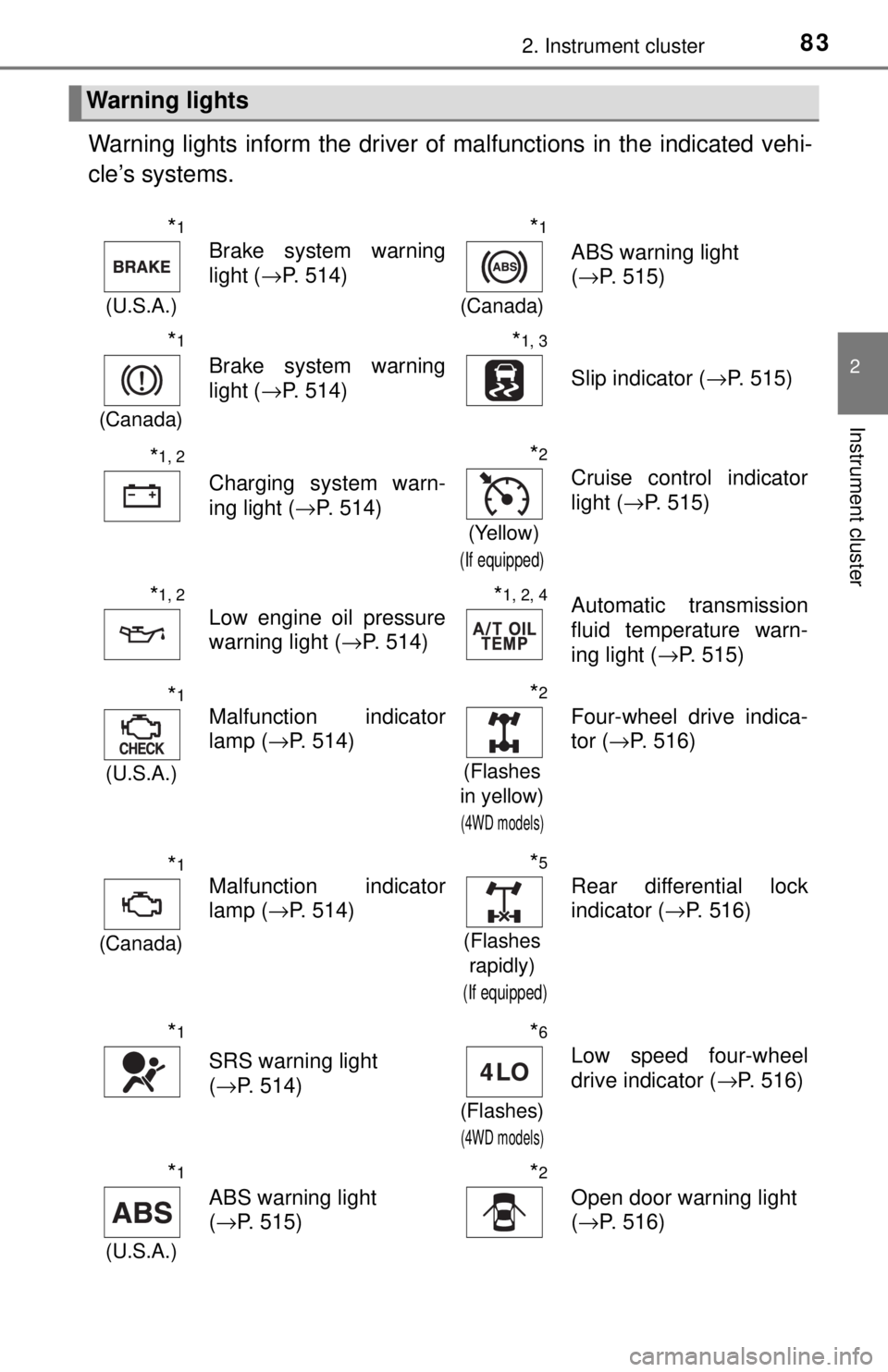
Warning lights inform the driver of malfunctions in the indicated vehi-
cle’s systems.
Warning lights
*1
(U.S.A.)
Brake system warning
light ( →P. 514)
*1
(Canada)
ABS warning light
(→P. 515)
*1
(Canada)
Brake system warning
light ( →P. 514)
*1, 3
Slip indicator ( →P. 515)
*1, 2
Charging system warn-
ing light (→P. 514)
*2
(Yellow)
(If equipped)
Cruise control indicator
light (→P. 515)
*1, 2
Low engine oil pressure
warning light ( →P. 514)*1, 2, 4Automatic transmission
fluid temperature warn-
ing light ( →P. 515)
*1
(U.S.A.)
Malfunction indicator
lamp (→P. 514)
*2
(Flashes
in yellow)
(4WD models)
Four-wheel drive indica-
tor ( →P. 516)
*1
(Canada)
Malfunction indicator
lamp ( →P. 514)
*5
(Flashes
rapidly)
(If equipped)
Rear differential lock
indicator ( →P. 516)
*1
SRS warning light
(→P. 514)
*6
(Flashes)
(4WD models)
Low speed four-wheel
drive indicator ( →P. 516)
*1
(U.S.A.)
ABS warning light
(→P. 515)
*2
Open door warning light
(→P. 516)
Page 84 of 640
842. Instrument cluster
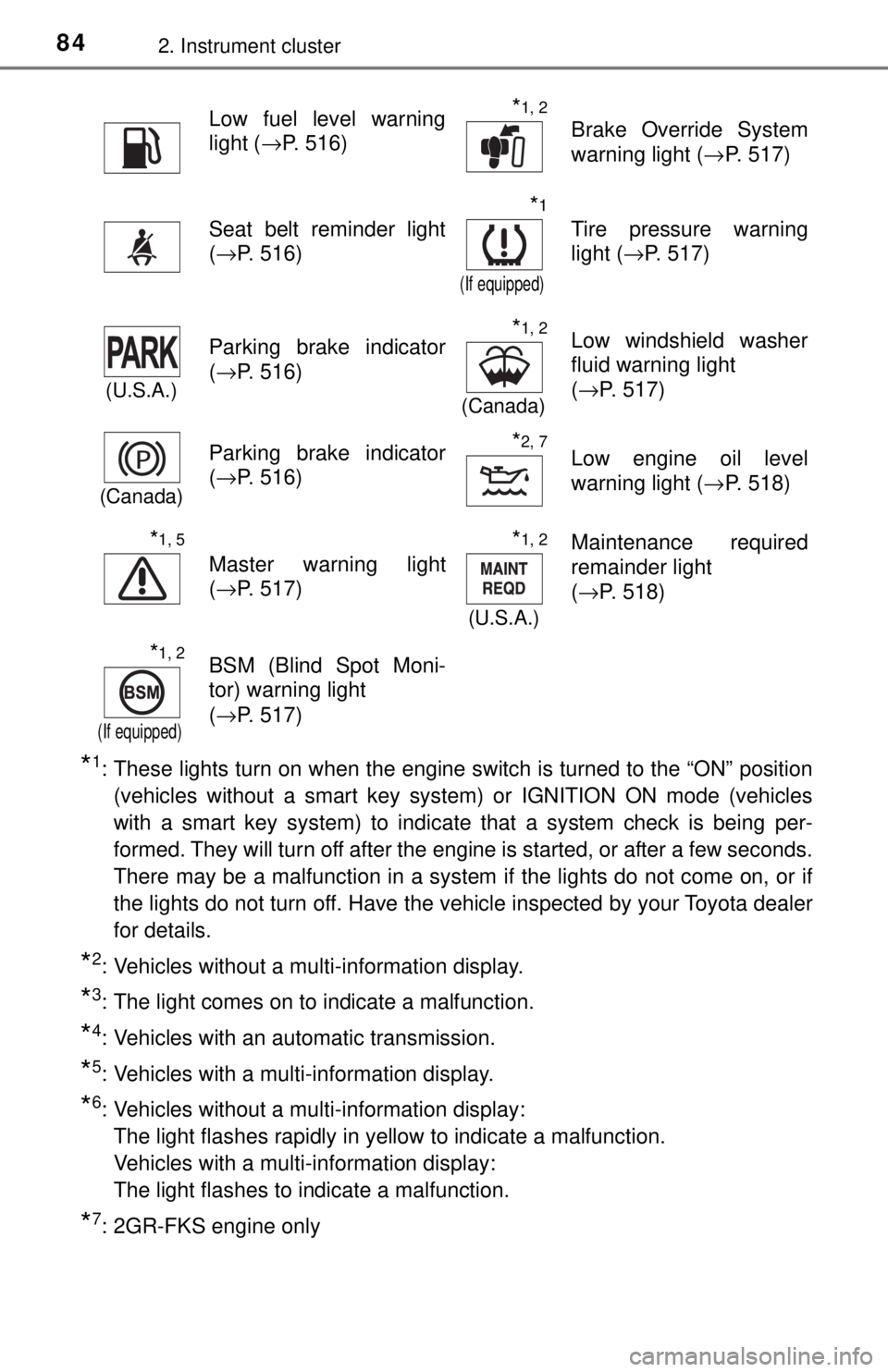
*1: These lights turn on when the engine switch is turned to the “ON” position(vehicles without a smart key system) or IGNITION ON mode (vehicles
with a smart key system) to indicate that a system check is being per-
formed. They will turn off after the engine is started, or after a few seconds.
There may be a malfunction in a system if the lights do not come on, or if
the lights do not turn off. Have the vehicle inspected by your Toyota dealer
for details.
*2: Vehicles without a multi-information display.
*3: The light comes on to indicate a malfunction.
*4: Vehicles with an automatic transmission.
*5: Vehicles with a multi-information display.
*6: Vehicles without a multi-information display:
The light flashes rapidly in yellow to indicate a malfunction.
Vehicles with a multi-information display:
The light flashes to indicate a malfunction.
*7: 2GR-FKS engine only
Low fuel level warning
light ( →P. 516)*1, 2
Brake Override System
warning light ( →P. 517)
Seat belt reminder light
(→P. 516)
*1
(If equipped)
Tire pressure warning
light ( →P. 517)
(U.S.A.)
Parking brake indicator
(→P. 516)*1, 2
(Canada)
Low windshield washer
fluid warning light
(→P. 517)
(Canada)
Parking brake indicator
(→P. 516)*2, 7Low engine oil level
warning light ( →P. 518)
*1, 5
Master warning light
(→P. 517)
*1, 2
(U.S.A.)
Maintenance required
remainder light
(→P. 518)
*1, 2
(If equipped)
BSM (Blind Spot Moni-
tor) warning light
(→P. 517)
Page 124 of 640

1243-2. Opening, closing and locking the doors
■Conditions affecting operation
The smart key system uses weak radio waves. In the following situations, the
communication between the electronic key and the vehicle may be affected,
preventing the smart key system, wireless remote control and engine immobi-
lizer system from operating properly. (Ways of coping: →P. 557)
● When the electronic key battery is depleted
● Near a TV tower, electric power plant, gas station, radio station, large dis-
play, airport or other facility that generates strong radio waves or electrical
noise
● When carrying a portable radio, cellular phone, cordless phone or other
wireless communication device
● When the electronic key is in contact with, or is covered by the following
metallic objects
• Cards to which aluminum foil is attached
• Cigarette boxes that have aluminum foil inside
• Metallic wallets or bags
• Coins
• Hand warmers made of metal
• Media such as CDs and DVDs
● When multiple electronic keys are in the vicinity
● When other wireless keys (that emit radio waves) are being used nearby
● When carrying the electronic key together with the following devices that
emit radio waves
• Another vehicle’s electronic key or a wireless key that emits radio waves
• Personal computers or personal digital assistants (PDAs)
• Digital audio players
• Portable game systems
● If window tint with a metallic content or metallic objects are attached to the
back window
● When the electronic key is placed near a battery charger or electronic
devices
Page 164 of 640

1644-1. Before driving
NOTICE
■If you get a flat tire while driving
A flat or damaged tire may cause the following situations. Hold the steering
wheel firmly and gradually depress the brake pedal to slow down the vehi-
cle.
● It may be difficult to control your vehicle.
● The vehicle will make abnormal sounds or vibrations.
● The vehicle will lean abnormally.
Information on what to do in case of a flat tire ( →P. 540)
■ When encounterin g flooded roads
Do not drive on a road that has flooded after heavy rain, etc. Doing so may
cause the following serious damage to the vehicle:
● Engine stalling
● Short in electrical components
● Engine damage caused by water immersion
In the event that you drive on a flooded road and the vehicle is flooded, be
sure to have your Toyota dealer check the following:
● Brake function
● Changes in quantity and quality of oil and fluid used for the engine, trans-
mission, transfer (4WD models) differentials, etc.
● Lubricant condition for the propeller shaft, bearings and suspension joints
(where possible), and the function of all joints, bearings, etc.
Page 273 of 640
2734-6. Driving tips
4
Driving
Winter driving tips
●Use fluids that are appropriate to the prevailing outside tempera-
tures. • Engine oil
• Engine coolant
• Washer fluid
● Have a service technician ins pect the condition of the battery.
● Have the vehicle fitted with four snow tires or purchase a set of tire
chains for the rear tires.
Ensure that all tires are the same size and brand, and that chains match
the size of the tires.
Perform the following accordin g to the driving conditions:
● Do not try to forcibly open a window or move a wiper that is frozen.
Pour warm water over the frozen area to melt the ice. Wipe away
the water immediately to prevent it from freezing.
● To ensure proper operation of the climate control system fan,
remove any snow that has accumulated on the air inlet vents in
front of the windshield.
● Check for and remove any excess ice or snow that may have accu-
mulated on the exterior lights, vehicle’s roof, chassis, around the
tires or on the brakes.
● Remove any snow or mud from the bottom of your shoes before
getting in the vehicle.
Accelerate the vehicle slowly, keep a safe distance between you and
the vehicle ahead, and drive at a reduced speed suitable to road con-
ditions.
Carry out the necessary preparations and inspections before
driving the vehicle in winter. Al ways drive the vehicle in a man-
ner appropriate to the prevailing weather conditions.
Preparation for winter
Before driving the vehicle
When driving the vehicle
Page 280 of 640

2804-6. Driving tips
NOTICE
■To prevent the water damage
Take all necessary safety measures to ensure that water damage to the
engine or other components does not occur.
● Water entering the engine air intake will cause severe engine damage.
● Water entering the automatic transmission will cause deterioration in shift
quality, locking up of your transmission accompanied by vibration, and ulti-
mately damage.
● Water can wash the grease from wheel bearings, causing rusting and pre-
mature failure, and may also enter the differentials, transmission and
transfer case, reducing the gear oil’s lubricating qualities.
■ When you drive through water
If driving through water, such as when crossing shallow streams, first check
the depth of the water and the bottom of the river bed for firmness. Drive
slowly and avoid deep water.
■ Inspection after off-road driving
● Sand and mud that has accumulated in brake drums and around brake
discs may affect braking efficiency and may damage brake system compo-
nents.
● Always perform a maintenance inspection after each day of off-road driv-
ing that has taken you through rough terrain, sand, mud, or water. For
scheduled maintenance information, refer to the “Scheduled Maintenance
Guide” or “Owner’s Manual Supplement”.
Page 422 of 640

4226-4. Other interior features
NOTICE
■Conditions in which the wireless charger may not operate correctly
In the following situations, the wireless charger may not operate correctly:
● When a portable device is fully charged
● When there is a foreign object between the charging area and portable
device
● When a portable device becomes hot while charging
● When a portable device is placed on the wireless area with its charging
surface facing up
● When a portable device is not centered on the charging area
● When the vehicle is near a TV tower, electric power plant, gas station,
radio station, large display, airport or other facility that generates strong
radio waves or electrical noise
● When the portable device is in contact with, or is covered by any of the fol-
lowing metallic objects
• Cards to which aluminum foil is attached
• Cigarette boxes that have aluminum foil inside
• Metallic wallets or bags
• Coins
• Metal hand warmers
• Media such as CDs and DVDs
● When wireless keys (that emit radio waves) other than those of your vehi-
cle are being used nearby.
If in situations other than above the wireless charger does not operate prop-
erly or the operation indicator light is blinking, the wireless charger may be
malfunctioning. Contact your Toyota dealer.
■ To prevent failure or damage to data
● Do not bring magnetic cards, such as a credit card, or magnetic recording
media, close to the wireless charger. Otherwise, data may be erased due
to the influence of magnetism.
Additionally, do not bring precision instruments such as wrist watches,
close to the wireless charger, as such objects may malfunction.
● Do not leave portable devices in the cabin. The temperature inside the
cabin may become high when parked in the sun, and cause damage to the
device.
■ To prevent battery discharge
Do not use the wireless charger for a long period of time with the engine is
stopped.
Page 439 of 640
4397-1. Maintenance and care
7
Maintenance and care
WARNING
■When washing the vehicle
Do not apply water to the inside of the engine compartment. Doing so may
cause the electrical components, etc., to catch fire.
■ Precautions regarding the exhaust pipe
Exhaust gases cause the exhaust pipe to become quite hot.
When washing the vehicle, be careful not to touch the pipe until it has
cooled sufficiently, as touching hot exhaust pipe can cause burns.
NOTICE
■To prevent paint deterioration and corrosion on the body and compo-
nents (aluminum wheels, etc.)
● Wash the vehicle immediately in the following cases:
• After driving near the sea coast
• After driving on salted roads
• If coal tar or tree sap is present on the paint surface
• If dead insects, insect droppings or bird droppings are present on the
paint surface
• After driving in an area contaminated with soot, oily smoke, mine dust,
iron powder or chemical substances
• If the vehicle becomes heavily soiled with dust or mud
• If liquids such as benzene and gasoline are spilled on the paint surface
● If the paint is chipped or scratched, have it repaired immediately.
● To prevent the wheels from corroding, remove any dirt and store in a place
with low humidity when storing the wheels.
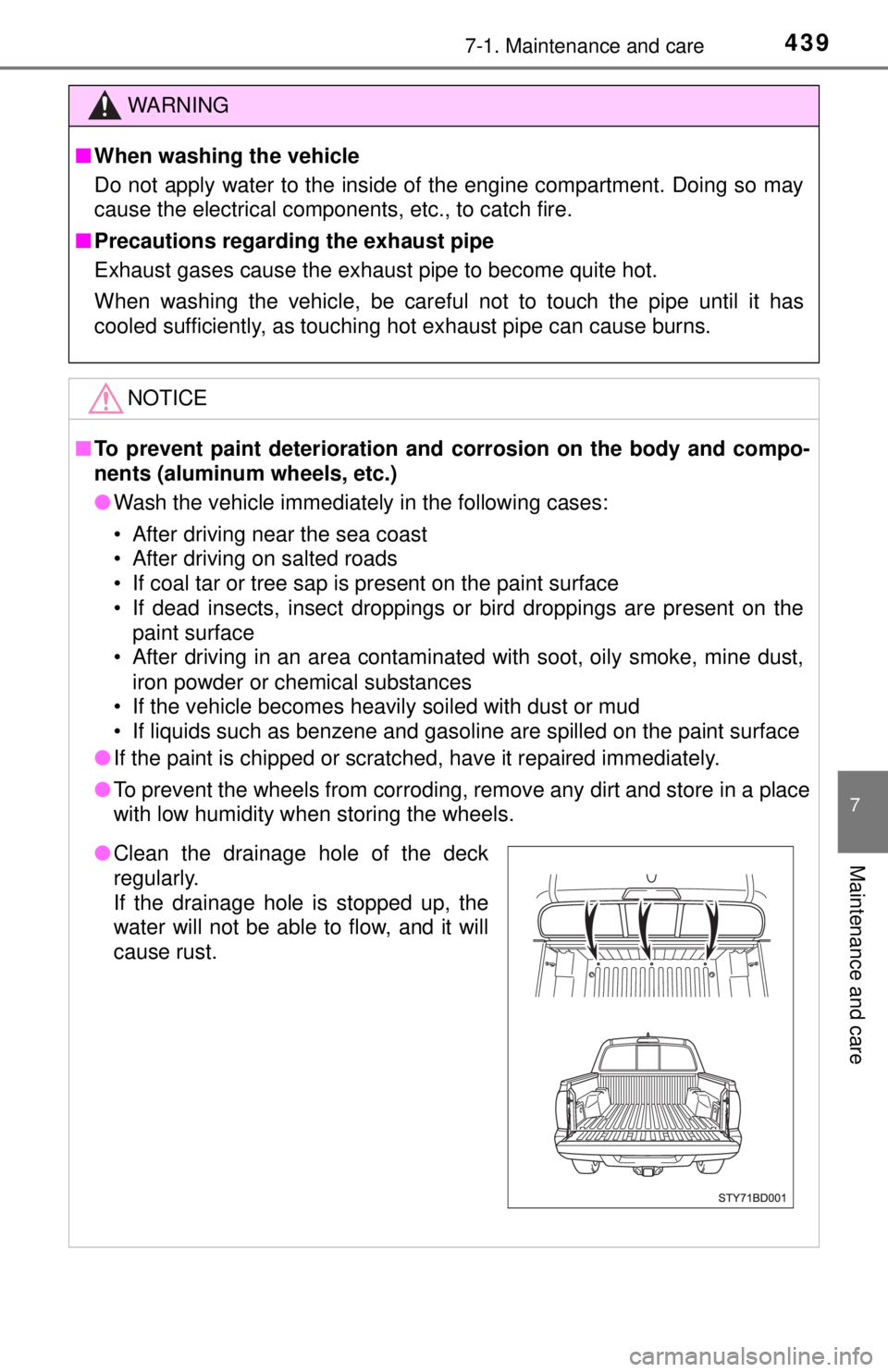
●Clean the drainage hole of the deck
regularly.
If the drainage hole is stopped up, the
water will not be able to flow, and it will
cause rust.